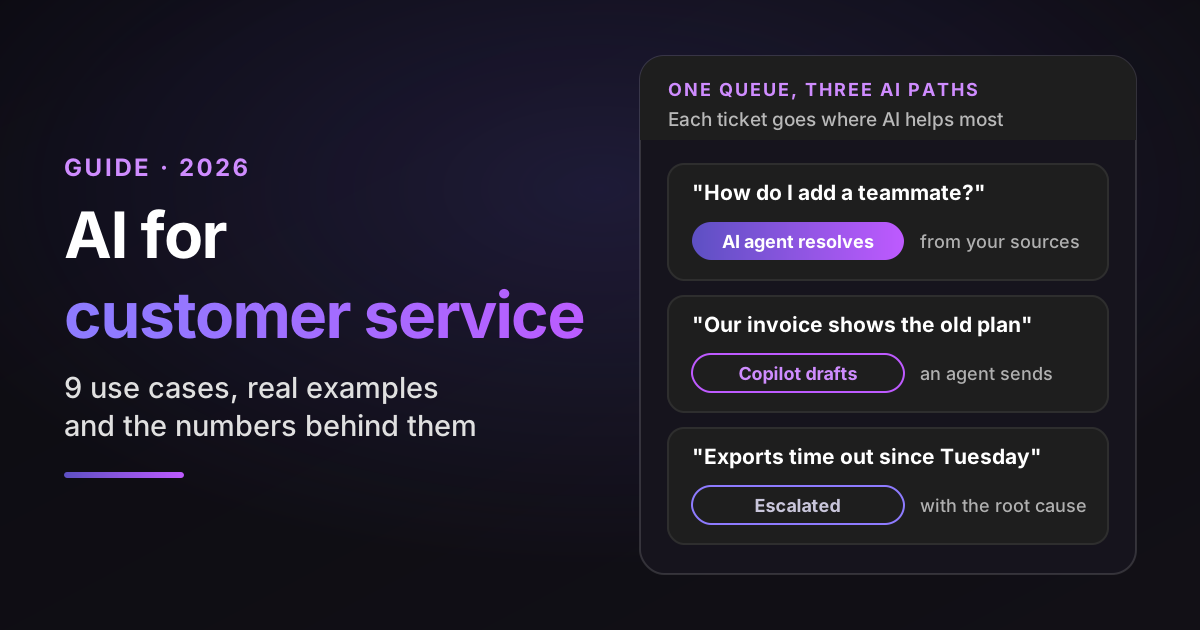
If your team resolves tickets by digging through past fixes, account data and engineering tools, start with Pluno. In a Pluno customer case study, Smartness reported cutting first response time from hours to 22 minutes after switching from Fin by Intercom.
Request a free 50-ticket simulation to see what that looks like on your queue. We compare Pluno's draft replies and handoff decisions with the replies your team actually sent, offline, with no replies sent to customers.
The short answer: AI for customer service works when every task has an owner and a clear point where the AI hands off to a person. Here's the split most support teams start from:
Who owns each AI task, and when the AI hands off
| Task | Who owns the outcome | When AI hands off |
|---|---|---|
| Answer how-to and policy questions | AI agent, reviewed by a support lead | Sources are missing or disagree, or the customer asks for a person |
| Draft replies and summaries | The human agent, who edits and sends | Always: a person sends the reply |
| Tag, route and fill ticket fields | Support operations | Low confidence, or a case the rules don't cover |
| Investigate technical issues | Tier 2 or a support engineer | Always: a person confirms the cause |
| Escalate bugs to engineering | Support, then engineering | Once a bug is confirmed |
| Score conversations for quality | Quality assurance (QA) lead | Before a score affects an agent's review |
Say your queue holds 4,000 tickets per month. A third are how-to questions, a quarter are about one customer's account, and the rest are bugs, integrations and setup problems that take real digging.
Where should AI go first? This guide judges nine use cases by the same four yardsticks:
- Who it serves: your customers directly, or your team behind the scenes.
- Risk when it's wrong: what a customer experiences if the AI makes a mistake.
- What it needs: the data, access and rules it can't work without.
- How you measure it: the number that tells you it's working.
TL;DR
- Three jobs: AI agents resolve tickets, copilots assist the agents who resolve the rest, and operations AI tags, routes, escalates and scores conversations.
- Where to start: pilot the lower-risk uses (tagging, summaries, QA, escalation briefs) and reply drafts, then let an AI agent answer customers on topics where it scores well on a held-out sample of your tickets.
- The evidence: at one software company, an AI assistant for 5,172 support agents raised issues resolved per hour by 15% on average and 30% for less experienced and lower-skilled agents.
- The catch: in Gartner's July to August 2026 survey of 275 service and support leaders, 4% said their organization had achieved the ROI it expected from AI. In a separate Gartner survey, 87% of customers said companies using generative AI for service must offer a way to reach a person.
- Bottom-line advice: sort recent tickets by type, start where the biggest pile meets the lowest risk, test on held-out tickets before going live, and report verified resolutions (solved, not reopened, no repeat contact), not billable ones.
- Our pick for technical B2B queues: Pluno, which learns from your resolved tickets and connected tools inside the help desk you already run.
How I sourced this: I'm Syed Ali, Sales & Marketing Manager at Pluno, and Pluno makes one of the products in this guide. Each source is labeled by type:
- Official documentation and pricing pages for what a product does and costs. Vendor pricing was checked on November 10, 2026.
- Independent research from Gartner, McKinsey, Qualtrics and a peer-reviewed study.
- Vendor research and case studies, including Pluno's own customer stories.
- Illustrative examples, such as sample tickets and calculator defaults, which aren't measurements.
AI for customer service: the three jobs it can take off your team
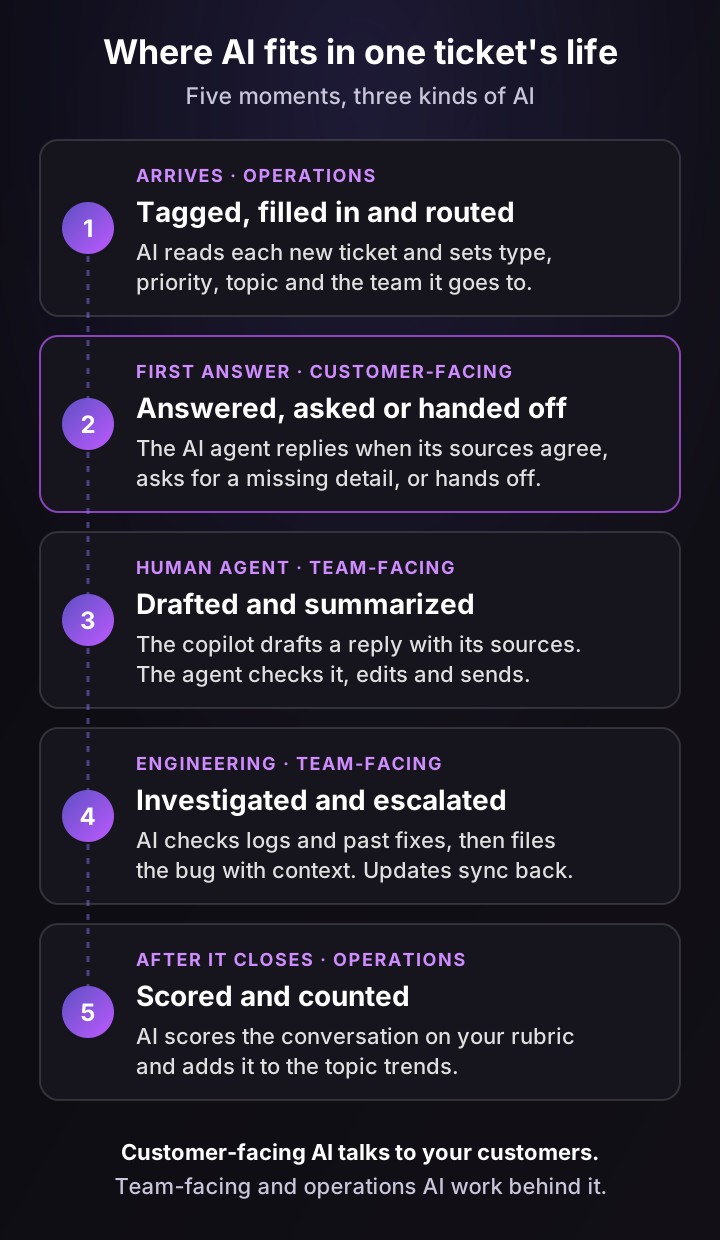
AI for customer service does three jobs, and your first decision is which one your queue needs most: resolving tickets, assisting the people who resolve them, or running the operations around each ticket.
- Autonomous resolution (customer-facing): an AI agent answers on email, chat, web forms or messaging, and sometimes inside your own product. It resolves what its sources support and hands off the rest. It fits best when many tickets have a complete, current answer.
- Agent assist (team-facing): an AI copilot drafts replies, summarizes long threads and investigates technical issues for your human agents. It fits tickets that need judgment or account context a customer-facing answer can't safely give.
- Operations: tagging, field filling, routing, escalation briefs, quality reviews and topic trends. No customer sees the output first, which makes it a safe place to learn how the AI behaves on your tickets.
Most teams end up using all three. Your ticket mix sets the order, and the rollout section shows how to sort it.
How is customer service AI different from the chatbots you remember?
The chatbots many teams tried before 2023 followed decision trees. Someone wrote every path, and anything off-script ended in "Sorry, I didn't get that."
Today's customer service AI reads the question in plain language and looks up the answer in your sources. Then it writes a reply for that specific customer.
The better ones also decide. They answer when the sources support an answer, ask for a missing detail when they don't, and hand off when the question needs a person. My chatbot guide covers the older model, and AI agents explained covers what changed.
Voice, languages and sentiment: what changes by channel
The same AI behaves differently depending on where the conversation happens, and each channel adds its own buying question:
- Live voice vs call summaries: a voice agent answers the phone in real time, so it needs speech recognition, low latency and a fast transfer to a person. Post-call AI transcribes the recording and writes a summary into the ticket, with no live risk.
- Languages: AI can answer in the customer's language. Check that your QA can score conversations in every language you serve, not only English.
- Sentiment: AI can spot frustration in a message and route the ticket to a person sooner. Decide which signals trigger a handoff instead of letting the AI keep trying.
- Proactive messages: some teams let AI write to customers first, for example during an incident or a shipping delay. Ask whether proactive messages follow the same rules and handoff path as replies.
Three ways to add AI to your customer service
You can get customer service AI in three ways, and the choice shapes everything after it:
- Switch to a help desk with AI built in. You get one vendor, but you migrate tickets, macros, reports and habits.
- Turn on your help desk's native AI. It's the fastest to try, and it's usually strongest on help center answers inside that one help desk.
- Add an AI layer inside the help desk you already run. Your tickets, views and reporting stay where they are, and the AI can read sources beyond the help center, such as past tickets and engineering tools.
Here's a shortlist by queue type:
- Technical, account-specific B2B queues: Pluno. It runs inside Zendesk, Intercom, Salesforce Service Cloud, HubSpot, Jira Service Management and Freshdesk, learns from your resolved tickets and connected tools, drafts replies for review and files engineering escalations with context.
- Mostly simple FAQs, with everything kept at your help desk vendor: its native AI agent, such as Zendesk AI agents, Fin by Intercom or Freddy in Freshdesk. Pluno answers these questions too, next to the complex ones.
- A live phone agent: a voice AI vendor. Pluno works with calls through transcripts and summaries, not as a live voice agent.
My comparison of AI customer service software covers the wider vendor field.
How AI in customer service works, from ticket to answer
AI in customer service works in five steps: it reads the ticket, gathers what your team already knows, decides what to do, acts, and gets checked. The decision step matters most, because it separates an AI that resolves tickets from one that only replies to them.
- Read. The AI works out what the customer wants, which product or plan it concerns and how urgent it is.
- Gather. It searches your knowledge for the answer: help center articles, past tickets your team solved and internal docs. Retrieval-augmented generation is the name for supplying that retrieved knowledge to the model, and my generative AI guide explains it. Live data, such as the customer's plan or order, comes from a separate tool call to an API.
- Decide. It picks one of three moves: answer, ask a clarifying question, or hand off to a person with a summary.
- Act. It sends the reply, fills in ticket fields, calls an API or files an escalation.
- Check. Someone, or something, reviews the outcome: did the customer come back, was the answer right, did the handoff carry enough context?
Here's an illustrative ticket. A customer writes, "SSO stopped working for our team after we switched identity providers." The AI finds three past tickets where the cause was an outdated certificate on the customer's side.
Before it says so, it checks a current signal: the error message the customer sees, or the certificate on their new provider. If the ticket doesn't include it, the AI asks for it, and only then replies with the fix and the setting to change.
If the past tickets disagreed, or the customer's setup didn't match, the right move would be a handoff, not a guess. That's why "how many tickets did it answer?" is the wrong first question. Ask how often it chose the right move.
9 AI customer service use cases, ranked by risk
There are nine places where AI pays off in a support team, ranked below from lowest to highest risk. Risk means one thing here: what a customer experiences when the AI gets it wrong. Start near the top and move down as your AI proves accurate on your tickets.
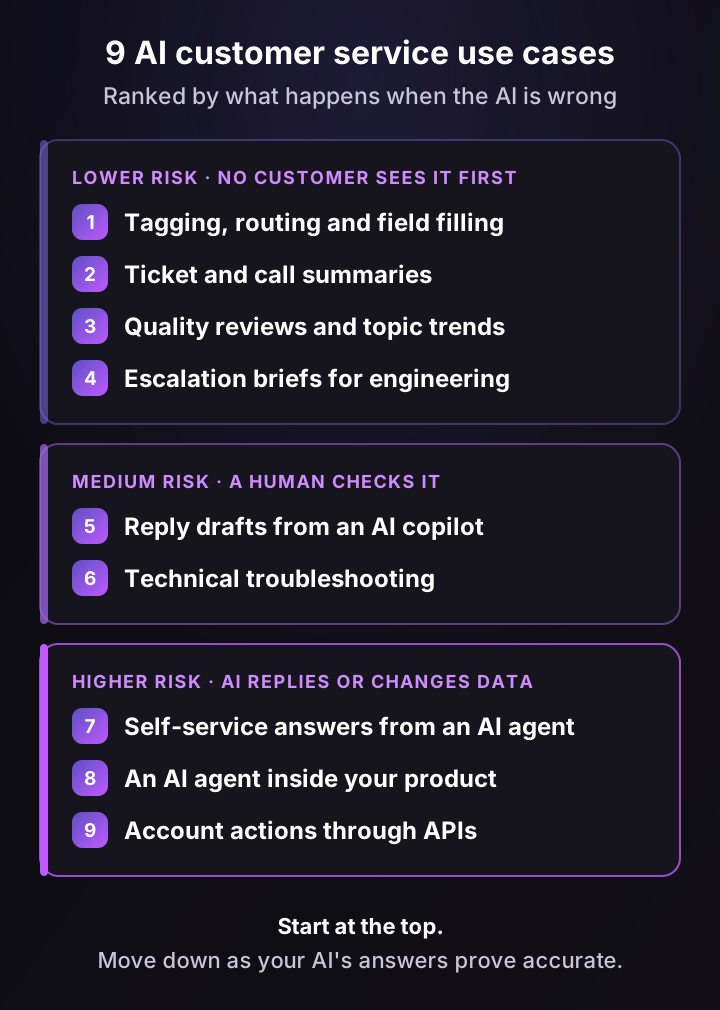
The 9 use cases at a glance
| Use case | Who it serves | Risk when it's wrong | How you measure it |
|---|---|---|---|
| 1. Tagging, routing, field filling | Team leads, operations | Low to medium | Share of values agents change, misroutes |
| 2. Ticket and call summaries | Human agents | Low | Handle time on transferred tickets |
| 3. Quality reviews, topic trends | QA, managers, product | Low | Coverage, agreement with a human |
| 4. Escalation briefs | Agents, engineers | Low | Escalation turnaround |
| 5. Reply drafts (AI copilot) | Human agents | Medium | Handle time, edit rate, QA accuracy |
| 6. Technical troubleshooting | Tier 2, support engineers | Medium | Escalation rate, time to diagnosis |
| 7. Self-service answers (AI agent) | Customers | Higher | Verified resolutions, reopens, customer satisfaction (CSAT) |
| 8. AI agent in your product | Product users | Higher | Tickets on covered topics |
| 9. Account actions through APIs | Customers | Highest | Errors and reversals |
1. Ticket tagging, routing and field filling
AI reads each new ticket and fills in the fields your agents used to set by hand: type, priority, product area, contact reason and the team it should go to. It's the least glamorous use of AI in customer service and often the fastest win, because routing rules and reports depend on those fields.
- Who it serves: team leads and support operations.
- Risk when it's wrong: low to medium. No customer reads a tag, but a wrong priority or route can delay an urgent ticket, so run it in shadow mode first.
- What it needs: your field list, a one-line definition per tag and a few hundred correctly tagged past tickets.
- How you measure it: the share of AI-set values your agents change, and misrouted tickets per week.
Write the tag definitions first. If two of your agents disagree on what counts as a "billing issue," the AI will disagree with both of them. The Zendesk auto-tagging guide walks through the setup.
2. Ticket and call summaries
A summary turns a 14-message thread or a 20-minute call into five lines: what the customer wants, what's been tried and what happens next. Summaries pay off most on tickets that change hands, such as a shift change, a Tier 2 transfer or an escalation.
- Who it serves: human agents and team leads.
- Risk when it's wrong: low. A weak summary costs a minute, and the full thread is still there.
- What it needs: the ticket thread, or the call recording or transcript.
- How you measure it: handle time on transferred tickets, and how often agents still read the whole thread.
3. Quality reviews and topic trends
Most QA programs review a small sample of conversations by hand. AI can score eligible conversations against your rubric and group tickets into topics, so a spike in "SSO login fails" shows up on Tuesday, not in next month's review.
- Who it serves: QA leads, support managers and product teams.
- Risk when it's wrong: low, as long as scores feed coaching and a human checks before anything affects an agent's review.
- What it needs: a written rubric with examples of a pass and a fail for each criterion.
- How you measure it: the share of conversations reviewed, and how often AI scores match a human calibrator.
My Zendesk QA guide compares the ways to set this up.
4. Escalation briefs for engineering
When a ticket turns out to be a bug, AI writes the report engineering needs: a summary, steps to reproduce, affected accounts and what support already tried. Good tools also bring engineering's updates back to the ticket, so agents stop chasing threads in Slack.
- Who it serves: support agents and the engineers who receive escalations.
- Risk when it's wrong: low. An engineer reads the brief before acting on it.
- What it needs: escalation templates and a connection to the tools engineering works in, such as Slack, Jira or Linear.
- How you measure it: escalation turnaround, and how often engineering replies "can you send more info?"
5. Reply drafts from an AI copilot
An AI copilot drafts a reply in the help desk sidebar, with the sources it used. The agent checks it, edits it and sends it. For complex queues this is often where customer service AI starts, because a person stays between the AI and the customer.
- Who it serves: human agents.
- Risk when it's wrong: medium. A wrong draft that an agent sends without reading becomes a wrong answer.
- What it needs: your help center, past tickets and internal docs. The more of your team's solved tickets it can read, the better its drafts on unusual tickets.
- How you measure it: handle time, how much agents edit the drafts, and accuracy in QA reviews.
The best-documented productivity gains from AI in customer service come from this kind of assistant, and the benefits section has the numbers.
6. Technical troubleshooting
For software companies, the hardest tickets aren't how-to questions. They're "it worked yesterday." AI can now check logs, error tracking, recent deploys and past fixes, then hand the agent a likely root cause with the evidence behind it.
- Who it serves: Tier 2 agents and support engineers.
- Risk when it's wrong: medium. A person reads the findings first, but a confident wrong diagnosis can send them down the wrong path.
- What it needs: scoped, read-only access to logs, error tracking and, where allowed, code or the database.
- How you measure it: the share of tickets escalated to engineering, and time to diagnosis.
The technical support troubleshooting guide shows the process this speeds up.
7. Self-service answers from an AI agent
This is the use case most people mean by AI customer service: an AI agent that answers on email, chat, web forms or messaging and resolves the ticket without a person. The good ones choose between the three moves from the last section instead of always replying.
- Who it serves: your customers.
- Risk when it's wrong: higher. The customer reads the answer directly, and some will act on it.
- What it needs: accurate help center content and past tickets, a list of topics it must always hand off (refund exceptions, legal, security) and a visible way to reach a person.
- How you measure it: verified resolution rate, reopens and repeat contacts, and CSAT on AI-resolved tickets.
Start with the topics where your help center answer is complete and current. My guide to autonomous customer service goes deeper on how far fully autonomous resolution goes today.
8. An AI agent inside your product
An in-product AI agent sits inside your app, reads the user's current setup and can change a setting or finish a setup step once the user says yes. For SaaS companies, it catches "how do I..." questions while the user is still on the screen, before they become tickets.
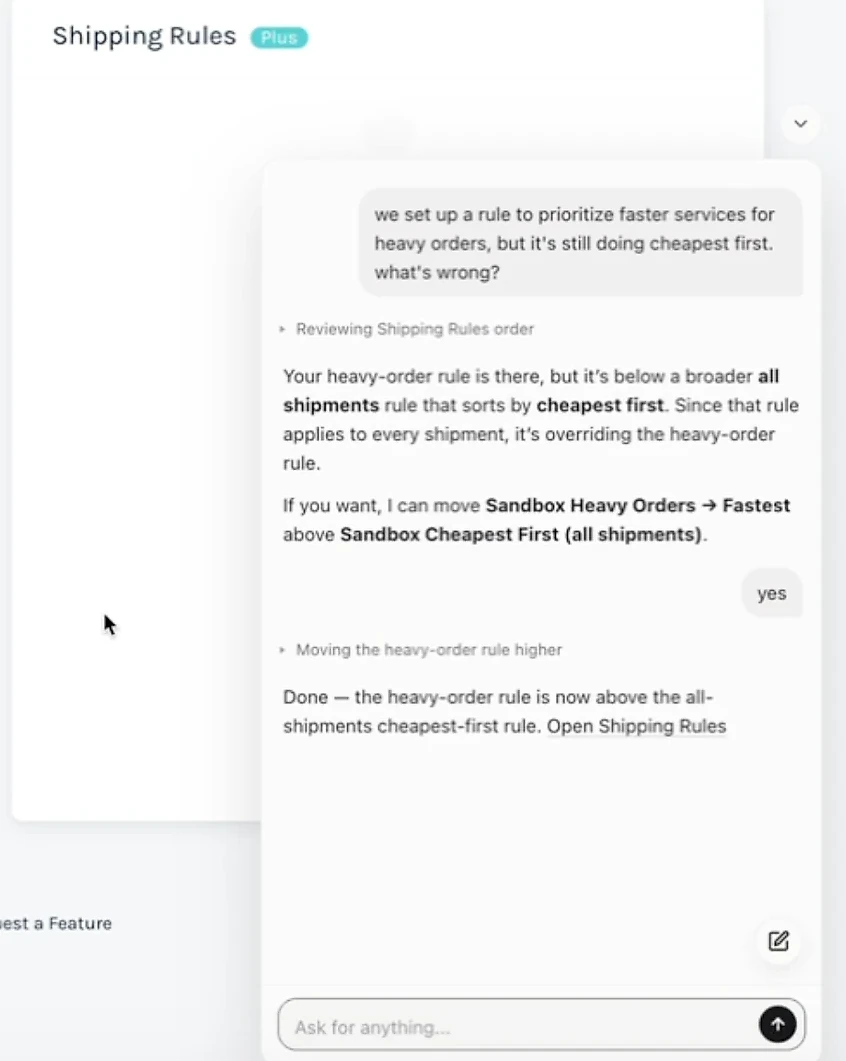
A demo we recorded in a sandbox account of a shipping platform, not a customer deployment. The agent reads the account's shipping rules, proposes moving one, and moves it only after the user replies "yes."
- Who it serves: the people who use your product.
- Risk when it's wrong: higher. It acts inside the product, so every change needs the user's confirmation.
- What it needs: product context, your docs and rules for which actions it may take.
- How you measure it: tickets on the covered topics, tasks completed and handoffs to support.
The in-app support AI guide compares this with a docs chatbot.
9. Account actions through APIs
At the top of the risk ladder is AI that changes data: refunds, plan changes, address updates, license resets. It turns "I've passed this to billing" into a solved ticket, but every action needs limits.
- Who it serves: your customers.
- Risk when it's wrong: the highest. Mistakes cost money and trust.
- What it needs: APIs, scoped permissions, limits such as a maximum refund amount, and an audit log.
- How you measure it: resolution rate on action tickets, plus the error and reversal rate.
Start read-only. An AI that can look up a plan or an order status solves many tickets before it ever writes anything.
Examples of AI in customer service: what real companies report
Companies using AI for customer service range from B2B software teams that added AI to the help desk they already ran, to Klarna, which now handles most of its service chats with an AI assistant. The table gives the comparable facts, and the cases below it teach the most about technical tickets.
The first five companies are Pluno customers, and each result links to its case study. Each line names the measure, because deflection, handling, research time and rollout speed are different numbers.
Reported results by company and measure
| Company | Reported result | Source |
|---|---|---|
| Smartness (lodging technology) | First response time: hours to 22 minutes. Real ticket deflection: 40%+, after switching from Fin by Intercom | Pluno case study |
| Innovorder (restaurant software) | Deflection: 67% across chat and WhatsApp in the reported January 10 to February 10 window. CSAT: up 15 points | Pluno case study |
| Velotric (e-bikes) | Handling: 58% of routed tickets handled by the AI agent. Research time: about 20 minutes to under 5 | Pluno case study |
| Kojo (construction procurement) | Deflection: 30% to 50% for a five-person team. Engineering: same-day Jira escalations | Pluno case study |
| Lightspeed (retail and hospitality commerce) | Escalations: two-thirds of Slack escalations created with Pluno. Rollout: after a two-month live pilot, about 100 agents live in 2 to 3 weeks | Pluno case study |
| Klarna (payments) | Share of service chats handled by its AI assistant: two-thirds in month one (2024), 80% in 2025 | Press release, annual filing |
Technical tickets: Innovorder
Innovorder sells restaurant software across more than 20 product modules, so a large share of its tickets need product-specific troubleshooting. Its team found that the fixes already lived in past tickets, emails and calls, not in written documentation.
Because Pluno learns from those past tickets, the team didn't have to write the documentation first. In the reported January 10 to February 10 window, AI resolved 67% of its chat and WhatsApp tickets, and new hires work independently in 1 to 3 weeks instead of 6 to 8 (case study).
Engineering handoff: Kojo
Kojo's five-person support team handles more than 1,000 tickets per month, and some of them are bugs that need engineering. Its escalations now reach Jira straight from Zendesk the same day, with the details filled in.
Updates from the linked Jira issue flow back into the Zendesk ticket, so agents don't chase engineering for status. Deflection AI handles 30% to 50% of the queue alongside it (case study).
What Klarna's numbers show
In May 2025, more than a year after its AI assistant took over two-thirds of service chats in its first month, Klarna's CEO told Bloomberg that the AI was cheaper but gave lower-quality service, and Klarna started hiring human agents so customers could always reach a person.
The AI stayed. Klarna's annual filing for 2025 says its assistant has had 31 million conversations since launch and handled 80% of customer service chats in 2025. The takeaway: Klarna expanded access to human support while continuing to handle a large share of chats with AI, so track resolution quality and access to a person alongside speed.
Benefits of AI in customer service: what the evidence shows
The benefits of AI in customer service are faster first replies, more productive agents, more capacity, consistent answers that show their sources, better CX scores where AI is built in deeply, and fuller data on your tickets. Here's the evidence behind each, with the source type labeled.
1. Faster first replies on the channels you enable
An AI agent can answer within seconds on the channels you turn it on for, including nights and weekends. Customers now expect it: in Zendesk's CX Trends 2026 survey of 6,182 consumers, 74% said that, due to AI, they now expect customer service to be available 24/7 (vendor research).
2. More productive agents, especially newer ones
This is the best-documented benefit, and it comes from agent assist, not autonomous resolution. A study published in the Quarterly Journal of Economics followed 5,172 support agents at one Fortune 500 business software company as they got an AI assistant that suggested replies in real time (open copy).
Issues resolved per agent-hour rose 15% on average and 30% for less experienced and lower-skilled agents. The researchers found evidence that the assistant passed the know-how of top agents to newer ones, helping them climb the learning curve faster.
3. More capacity without hiring at the same pace
Every ticket AI resolves is one your team doesn't touch. In Salesforce's 2025 State of Service survey of 6,500 service professionals, service teams estimated that AI handled 30% of cases and projected 50% by 2027 (vendor research).
Salesforce also estimates that reps using AI spend 20% less time on routine cases, which it puts at about four hours a week.
4. Consistent answers that show their sources
A human team gives slightly different answers to the same question, depending on who picks it up. AI can apply the same approved policy consistently, as long as its sources are current and apply to that customer, and it can cite the article or past ticket behind each answer.
Customers want that transparency. In the same Zendesk research, 95% of consumers said they want to know why AI makes the decisions it does, while only 37% of CX organizations currently explain the rationale behind a decision.
5. Better CX scores where AI is built in deeply
McKinsey's State of Customer Care survey of 440 care leaders grouped teams by AI maturity. Among the highest-maturity group, 40% reported significantly improved customer experience scores in the past 12 months, compared with 12% of the lowest-maturity group.
That's a survey association, not proof that AI caused the gain, but it points to depth of use rather than simply owning a tool.
6. Fuller data on your tickets
When AI tags eligible tickets and scores eligible conversations, your reports stop depending on whether a busy agent picked the right dropdown. You see contact reasons, product areas and quality trends across the channels you cover, not a hand-picked sample.
What AI doesn't fix
AI can't fix a confusing product, a bad policy or an outdated help center. It repeats them faster.
Qualtrics found that nearly one in five consumers who used AI for customer service got no benefit from it, a failure rate almost four times higher than for AI use in general. To judge whether AI will pay off in your queue, start with what it costs and what you'd count as a success.
How much does AI for customer service cost? Prices and a calculator
AI for customer service is priced by billable resolution or outcome, by conversation or session, by agent seat, or through prepaid credits, often on top of a platform or help desk plan. Here's the summary, with Pluno first:
AI agent pricing by vendor, checked November 10, 2026
| Vendor | Billing unit | List price |
|---|---|---|
| Pluno Deflection AI | Billable resolution | 0.90€ each, plus a platform fee by ticket volume from 249€ a month |
| Fin by Intercom | Outcome, one per conversation | $0.99 per outcome, $9.99 per sales qualification |
| Zendesk AI agents | Automated resolution, drawn from an account allowance | Allowance of $2 to $10 per agent seat a month by plan. Overage rate not published |
| Salesforce Agentforce | Conversation, or Flex Credits per action | $2 per conversation, or $500 per 100,000 credits |
| Freshdesk Freddy AI Agent | Session | $49 per 100 sessions, after 500 free sessions once |
Pricing checked on November 10, 2026, on each vendor's pricing page and help center. Prices are in USD unless marked in euros.
What each vendor counts as billable
The details below use the same fields for every vendor, because the billable unit matters as much as the price.
- Billable unit: a billable resolution, meaning a ticket Deflection AI fully resolved without a human getting involved. Pluno bills only for tickets it fully resolves.
- How to audit it: every billed ticket carries Pluno's resolved tag (
pluno-resolved, orpluno-resolved-chatfor chat) in your help desk, and you can export the full list for any billing period. - Platform fee: by monthly ticket volume, from 249€ a month (210€ billed annually) for up to 500 tickets, and 1,499€ a month for up to 5,000.
- Currency: EUR, with USD billing available on annual plans.
- Billable unit: an outcome, charged at most once per conversation (billing definitions).
- What counts: a confirmed resolution, an assumed resolution (the customer leaves without asking for more help), a successful Procedure configured to end in a handoff, a disqualification or a self-serve routing, at $0.99 each. A sales qualification is $9.99.
- What doesn't count: an ordinary escalation, such as a customer asking for a person.
- Minimum: 50 outcomes a month when Fin runs on another help desk. Currency: USD.
- Billable unit: an automated resolution. Since May 18, 2026, each one falls into a tier, and only verified resolutions, which an AI check confirms resolved the request, draw down your allowance.
- What doesn't count: assisted escalations, and contained conversations that fail verification.
- Allowance: an account-level pool worth $2 to $10 per agent seat a month depending on plan, up to $5,000 a year, with no carry-over. Overage is billed pay-as-you-go, and the help center doesn't publish the rate.
- Legacy model: accounts still on the earlier platform get a set number of automated resolutions per agent a month. Zendesk's pricing page still lists 5 or 10 per agent, then $1.50 committed or $2.00 pay-as-you-go, so ask which model your account is on.
- Billable unit: a conversation, aimed at external customer-facing agents, or Flex Credits consumed per action.
- Prices: $2 per conversation, or $500 per 100,000 Flex Credits. A standard action uses 20 credits (about $0.10) and a voice action 30 (about $0.15), per the rate card.
- Rule: an org uses one model or the other, not both, so check Salesforce's usage terms for the option you model. Currency: USD.
- Billable unit: a session. An email session is a 72-hour window from the customer's first email. In Freshdesk Omni, where the chat AI agent runs, a chat session covers 24 hours from its start.
- Price: $49 per 100 sessions.
- Allowance: 500 free sessions once per account, for new customers on the Growth, Pro or Enterprise plans. Currency: USD.
A unit that counts handoffs, assumed resolutions or conversations can charge you for tickets your team still had to answer. Ask every vendor for the list of billed tickets and check a sample against your verified resolutions.
The cost of each resolution may also climb. Gartner predicts that by 2030, the cost per resolution for generative AI will exceed $3, more than many B2C offshore human agents.
Run your own numbers
The calculator separates verified resolutions, which save agent time, from billable outcomes, which drive the bill. Put in your volume and prices, or use Pluno's list prices in EUR, including the platform fee for your volume tier.
AI for customer service calculator: what is the net capacity value?
Verified resolutions are tickets the AI really solved: no human reply, no reopen and no repeat contact on the same issue. They set the agent time you avoid and the queue your team still handles. Billable outcomes are what the vendor charges for, which can include handoffs, unconfirmed answers or conversations. Take them from the vendor's billed-ticket list. The platform fee is any fixed monthly charge. With the Pluno preset it follows Pluno's listed volume tier (monthly billing), which also covers tagging, escalation and summary tools this calculator doesn't value. Freed time is capacity, not a cash saving, unless it avoids hiring, overtime or outsourcing. Setup, knowledge upkeep, review time and the cost of wrong answers are left out. Your own numbers, not benchmarks.
AI agent, after usage charges
$8,200
1,200 verified resolutions worth $9,600, minus $1,400 for 1,400 billable outcomes
AI copilot, after seats
$5,100
2,800 human-handled tickets worth $5,600, minus $500 for seats
Gross agent hours freed
380 h
Per month, before any charges
Net estimated capacity value
$13,300
Per month, after usage, seats and a $0 platform fee
At these numbers, the AI agent adds more capacity value. You pay for 200 billable outcomes a month that your team still has to handle, so ask for the billed-ticket list and check a sample.
With the defaults (4,000 tickets per month, 30% verified resolutions, 35% billable outcomes, 12 minutes per ticket), the AI agent adds more capacity value. Drop verified resolutions to 20%, as you might in a deeply technical queue, and the copilot pulls ahead. That's why complex queues rarely run on an AI agent alone.
The costs that aren't on the price page
Compare vendor charges and operating costs separately. Which is larger depends on your ticket volume, how much of the queue the AI covers and the work needed to keep quality up.
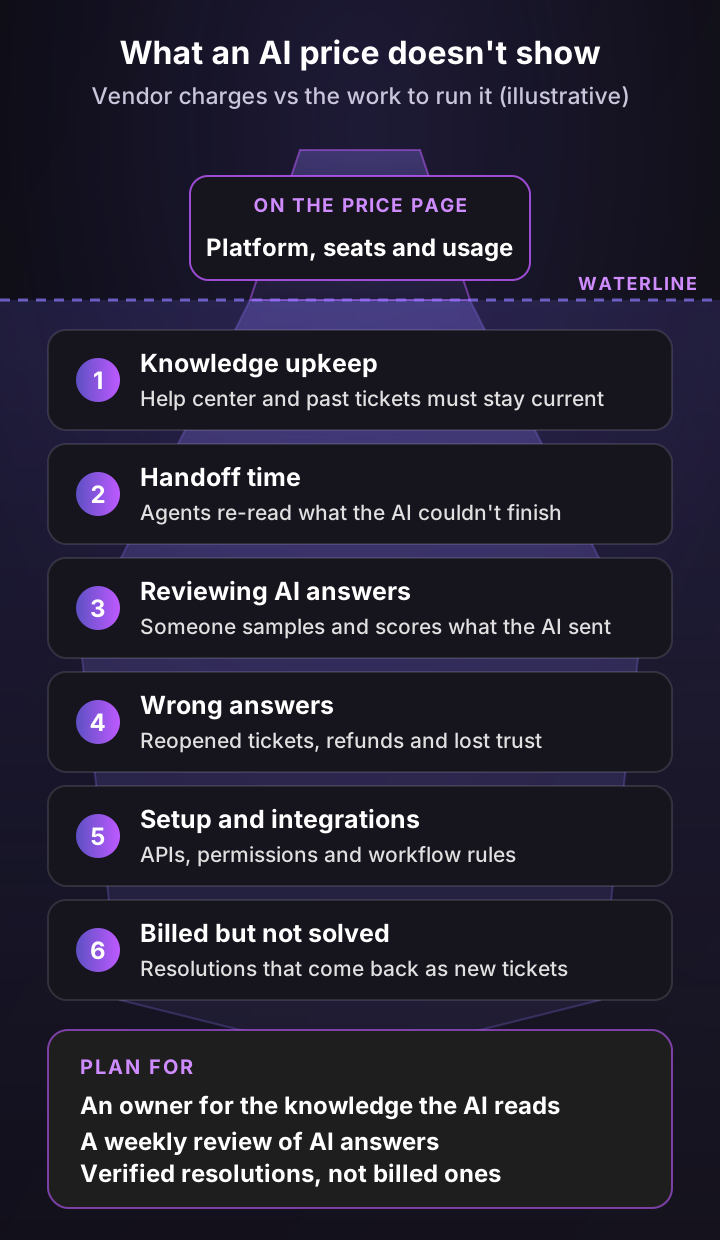
Budget an owner for the knowledge the AI reads and a weekly review of its answers before you sign. Both decide whether the resolution rate on your dashboard holds up.
6 ways AI for customer service goes wrong, and how to prevent them
AI for customer service usually goes wrong in six predictable ways, and each one has a design fix. The first two have made headlines, and the other four are quieter and more common.
1. It makes up a policy
In April 2025, the AI support bot of the coding tool Cursor told users that being logged out when they switched machines was intended behavior under a new policy. There was no such policy, and the co-founder had to say so in public.
A year earlier, a Canadian tribunal held Air Canada liable for what its chatbot told a customer about bereavement fares. Air Canada had argued it wasn't responsible for the chatbot's information, which the tribunal said amounted to suggesting the chatbot was "a separate legal entity" and called a remarkable submission.
The fix: let the AI answer only from your sources, and make it hand off when they're missing or contradict each other. Label AI replies as AI, and test policy questions before go-live.
2. Customers can't reach a person
In Gartner's survey of 3,566 customers, 87% said companies using generative AI for service must give them a way to reach a human agent. An AI that loops on the same answer turns a small question into a lost customer.
The fix: hand off the first time a customer asks for a person, and after two failed answers on the same question. Tell them who's taking over and roughly when.
3. The knowledge goes stale
Your product changes every sprint, and the help center lags behind. An AI agent that reads last quarter's articles gives last quarter's answers, confidently.
The fix: give one person ownership of the sources the AI reads. Use a tool that also learns from recently resolved tickets, which reflect what your team tells customers today.
4. Deflection gets counted as resolution
A customer who gives up and closes the chat looks like a deflection. Gartner found that only 14% of customer service issues are fully resolved in self-service, and only 36% even for issues customers called very simple, so "no reply" proves very little.
The fix: count a ticket as a verified resolution only if it isn't reopened and no same-issue contact arrives within your observation window, and confirm a sample in QA. The measurement section defines each number.
5. AI handles a judgment call
Refund exceptions, a security question, an angry admin at your biggest account: these need a person, even when the AI could produce a plausible reply.
The fix: write always-hand-off rules by topic, customer and sentiment before launch (step 3 of the rollout below), and review them monthly.
6. Data access outruns security review
AI needs your tickets and often live account data, so security teams get involved early. In Salesforce's research, 51% of service leaders said security concerns had delayed or limited their AI initiatives.
The fix: ask every vendor where data is processed, whether your data trains their models, which systems it can write to, and what it logs. Start with read-only access and scope it per system.
How to use AI in customer service: a 6-step rollout
To use AI in customer service well, start with your own tickets, not a vendor's feature list. The sample sizes below are suggested starting points, so scale them to your volume.
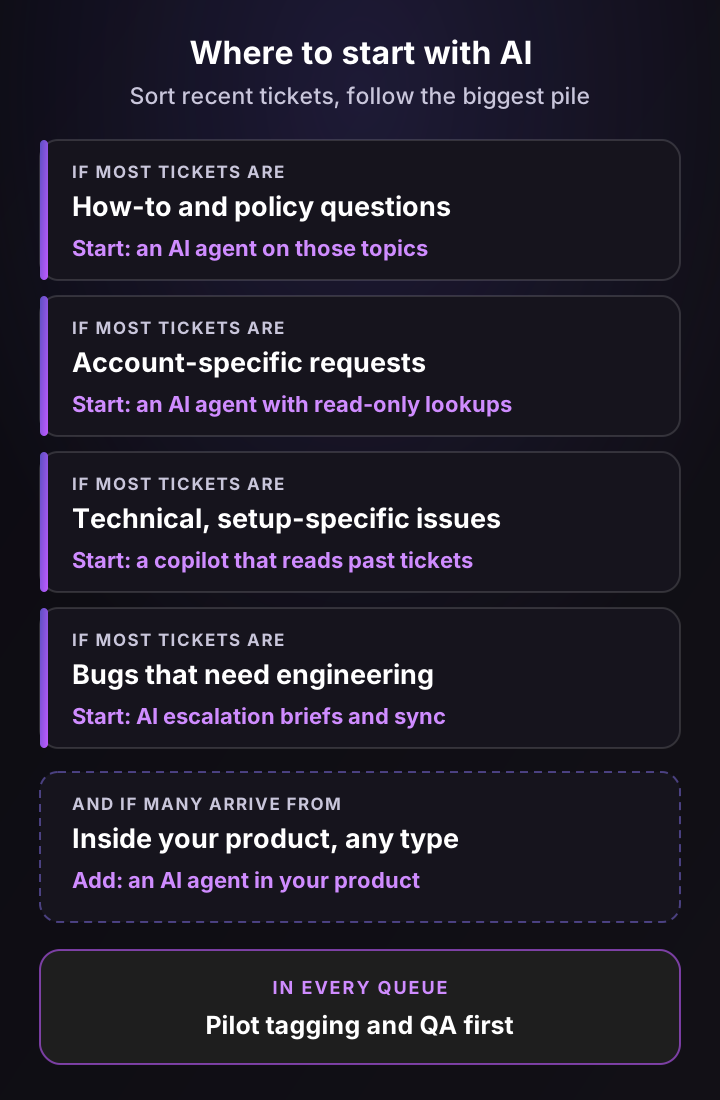
Step 1: Sort a sample of recent tickets by type
Export a sample of recent solved tickets (500 is a practical start) and sort them by what it took to solve them, not by the tag they carry. Four types cover most B2B queues:
- How-to and policy: the answer is already in your help center.
- Account-specific: the answer depends on this customer's plan, order, permissions or billing.
- Technical and setup-specific: someone had to investigate, test or read logs.
- Bugs: the fix needed engineering.
Then flag the channel: did the ticket come from inside your product? A ticket can be technical and in-product at once, which tells you where an in-product AI agent would catch it. An afternoon with a spreadsheet does the sort, or let AI tagging do a first pass and correct a sample.
The biggest pile tells you where to start, and its share tells you how much of the queue an AI agent alone could cover.
Step 2: Fix what the AI will read
Find the 20 help center articles behind your biggest pile and check each one against what agents actually tell customers. Mark outdated articles, merge duplicates and write down the fixes that only live in agents' heads.
Past tickets are the source most teams forget. They hold the workarounds and edge cases nobody turned into an article, so pick a tool that can learn from them, and exclude tickets where the answer was wrong.
Step 3: Write the rules before go-live
Decide in writing what the AI must never answer on its own, and who it hands those tickets to. Typical rules:
- Always hand off: refund exceptions, legal or security questions, cancellations and anything from your largest accounts.
- Hand off on sentiment: a customer who is angry or has written in three times about the same issue.
- Ask first: when the customer's plan, product version or account isn't clear from the ticket.
- Tone and handoff message: how it greets and signs off, and how it tells the customer a person is taking over and roughly when.
Step 4: Test on held-out tickets before customers see anything
Set aside a stratified sample of recent tickets (50 to 200 is a practical start) that covers each ticket type in proportion and that nobody uses for tuning. Score each AI answer on four questions:
- Accuracy: was the answer right?
- Safe action: did it stay within what it's allowed to do?
- Handoff completeness: on a handoff, did the agent get enough context to continue without re-asking?
- Resolution: would the answer have solved the issue?
Fix the gaps on a separate set of tickets, then score the held-out sample once more. Tuning on the same tickets you score rewards the AI for memorizing the test.
Step 5: Go live narrow, then widen
Turn the AI agent on for one channel and two or three topics that scored well. Read every AI reply in the first week, then switch to a daily sample.
Run tagging in shadow mode first: the AI suggests values, agents keep setting them, and you compare. Turn on auto-routing queue by queue once priority and routing match on a sample, and keep a reviewer on escalation briefs, drafts and QA scores until they agree with your team's judgment.
Step 6: Expand with a launch card
Write a one-page launch card for each topic or action before it goes live:
- Owner: who reviews the AI's work and who can switch it off.
- Held-out sample: stratified by ticket type and scored before launch.
- Minimum volume: enough live tickets in the window to judge, for example 100 per topic.
- Thresholds: agreed minimums for verified resolutions and correctness in QA samples, and a maximum for reopens and repeat contacts.
- Zero tolerance: no unauthorized writes, such as a refund outside your limits.
- Rollback trigger: what pauses the topic, for example two weeks below threshold or any unauthorized write.
Expand only when a topic clears its thresholds, not when its numbers simply hold steady. Add account actions read-only first, then write actions one at a time with limits.
How to measure AI customer service: 6 numbers to report
Measure AI customer service with six numbers, reported separately for AI-resolved tickets, AI-to-human handoffs and tickets your team handled from the start. A blended number can look healthy while handoffs quietly fail.
Keep four terms apart. A billable resolution is what a vendor charges for, a verified resolution is a ticket the AI truly solved, a deflection is a ticket that never reached a person, solved or not, and a handoff is the AI passing a ticket to a person.
Six numbers to report, and how to calculate them
| Number | How to calculate it | Warning sign |
|---|---|---|
| Verified resolution rate | Tickets the AI solved with no human reply, no reopen and no same-issue contact in a fully observed window, confirmed correct in a QA sample ÷ all eligible AI-touched tickets whose window has passed | Billable resolutions far above verified ones |
| Reopen and repeat-contact rate | Tickets first marked solved by AI that were reopened or followed by a same-issue contact in the window ÷ all tickets first marked solved by AI | Rising week over week |
| CSAT by cohort | Satisfied ratings ÷ all ratings, for AI-resolved, handoff and human-only tickets | Handoff CSAT well below the others |
| Handoff wait time | Minutes from the handoff to a person's first reply | Customers waiting longer after AI than without it |
| Handle time after handoff | Agent working time on the ticket after the handoff | Agents re-asking what the customer already said |
| Cost per verified resolution | (Usage charges + allocated platform and seat fees + review minutes × loaded cost per minute) ÷ verified resolutions | Higher than a human-handled ticket |
Two notes from the field. Seven days is a common observation window for B2B, but pick one that matches how long your customers take to test a fix, and count only tickets whose window has fully passed. And read 20 AI-resolved tickets every week, because a rate can't tell you whether the answers were right.
The CSAT guide shows how to build the three cohorts, and the customer service metrics guide covers first response time, resolution time and the other standard definitions.
Will AI replace customer service agents?
No, AI isn't replacing customer service agents across the board, but it is changing what they spend their day on. Most companies use it to absorb growth and take the repetitive tickets, while people handle the complex, emotional and high-stakes ones.
In a Gartner survey of 275 service and support leaders from July and August 2026, 21% said their organization had cut human agent headcount because of AI. Already, 7% had rehired after earlier cuts, and 71% said they were shifting human agents into different roles within service and support.
Gartner also predicts that by 2027, half of the organizations that planned big cuts to their service workforce will abandon those plans. There are counterexamples at very large scale: Salesforce's CEO said he reduced its support headcount from 9,000 to about 5,000, and the company said it no longer needed to backfill support engineer roles and had redeployed hundreds of employees.
The roles that grow sit around the AI: owning the knowledge it reads, reviewing its answers, writing its rules and handling the harder tickets it hands over. Gartner found that more than half of leaders had hired specialized staff to support AI initiatives.
Joseph D'Apuzzo, Customer Support Manager at Smartness, put it this way: "Support starts with real talent. So if you think about using AI to replace talent, you're doing it wrong."
What Pluno customers say about AI for customer service
These quotes come from the recorded interviews behind Pluno's customer stories. They cover the two workflows this guide keeps returning to: answering from past tickets, and handing bugs to engineering with the context attached.
“I compared Pluno with Fin by Intercom, and Pluno was miles ahead!”
Customer-reported outcome: First response time down from hours to 22 minutes, with 40%+ real ticket deflection.
“What really sets Pluno apart is that integration between Zendesk and Jira and Pluno… Having updates on your tickets automatically in Zendesk from the linked Jira tickets is a game changer.”
Customer-reported outcome: Same-day Jira escalations and 30% to 50% ticket deflection for a five-person team.
“In one single click, we were able to escalate and get help from someone else. This back and forth between our communication tools and where you can get help was clearly the game changer for us.”
Customer-reported outcome: Two-thirds of Slack escalations are now created with Pluno.
“99% of the time we are giving the solution on the tickets, with the emails or the phone. So Pluno can find this on past tickets to give to new tickets. So we don't have to write the documentation like before.”
Customer-reported outcome: Two-thirds of chat and WhatsApp tickets resolved by AI in the reported window.
Check these workflows in your own evaluation
Whichever vendor you test, run the same five checks:
- Hard tickets: have it answer 10 of your hardest resolved tickets, and ask to see the sources it used for each.
- Conflicting sources: give it a question where your help center and past tickets disagree, and see whether it asks, hands off or guesses.
- Escalation round trip: file a test escalation and confirm that engineering's reply comes back to the ticket.
- Billing: compare its billable resolutions with your verified resolutions on a sample.
- Where it runs: confirm it works in your help desk, on your channels and in the tools engineering uses.
How Pluno brings AI for customer service into your help desk
Pluno is the AI agent for complex support. You add it to the help desk you already use, whether that's Zendesk, Intercom, Salesforce Service Cloud, HubSpot, Jira Service Management or Freshdesk, and it brings AI into each part of the support workflow from there. Each module runs where that work happens:
- In the help desk: Deflection AI answers tickets on email, web forms, chat and messaging channels, and AI Copilot, ticket summaries, AI Tagging & Field Filling and Quality Assurance work in the ticket and the sidebar. See the integrations docs.
- In engineering's tools: Escalation Copilot files escalations in Slack, Jira, Linear, Microsoft Teams or incident.io and syncs updates back, and the Troubleshooting Agent runs from the help desk sidebar, Slack or the Pluno dashboard.
- In your product: the Product Agent is a chat widget you embed in your own app.
Here's how the nine use cases map to Pluno:
The nine use cases mapped to Pluno
| Use case | Pluno module | Where it runs |
|---|---|---|
| 1. Tagging, routing, field filling | AI Tagging & Field Filling | Help desk |
| 2. Ticket and call summaries | Ticket summaries in AI Copilot, call summaries | Help desk |
| 3. Quality reviews, topic trends | Quality Assurance, ticket trends and topic insights | Help desk, Pluno dashboard |
| 4. Escalation briefs | Escalation Copilot | Help desk, Slack, Jira, Linear, Microsoft Teams, incident.io |
| 5. Reply drafts | AI Copilot | Help desk sidebar |
| 6. Technical troubleshooting | Troubleshooting Agent | Help desk sidebar, Slack, Pluno dashboard |
| 7. Self-service answers | Deflection AI | Customer channels in the help desk |
| 8. AI agent in your product | Product Agent | Your app |
| 9. Account actions | Deflection AI with configured API actions, plus Shopify | Customer channels in the help desk |
For account actions, Deflection AI can call your own APIs once they're configured. In Shopify it can look up orders, refund, cancel or edit them, and update a shipping address, all under your AI Workflow rules. For example, a rule can allow address changes on unfulfilled orders when the request comes from the email on the order, and anything outside the rules goes to your team with the order and conversation summarized.
What makes it different on complex tickets
- It learns from your past tickets. Pluno treats your team's resolved tickets as primary evidence, alongside the help center, docs and connected tools. It reconstructs the troubleshooting steps and edge-case fixes your agents actually used, favoring the latest successful ones.
- It decides before it replies. Deflection AI answers when its sources agree, asks the customer for a missing detail, and escalates with a research summary when information is missing or contradictory, or a business decision is needed. See how deflection works.
- It finds the root cause. The Troubleshooting Agent investigates code, logs, error tracking and session recordings, and returns a likely root cause and a recommended fix.
- It follows your rules. AI Workflows set what always escalates, which customers always get a person, and tone and brand, with no limit on the number of rules.
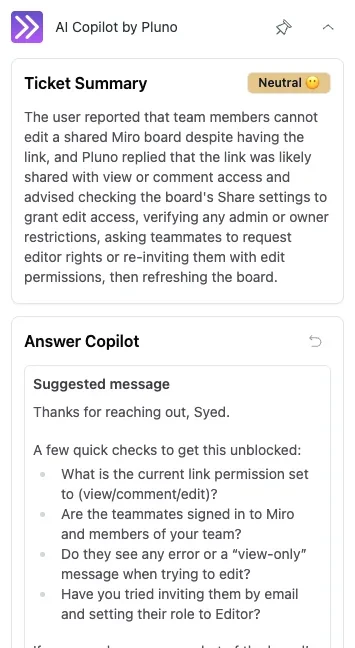
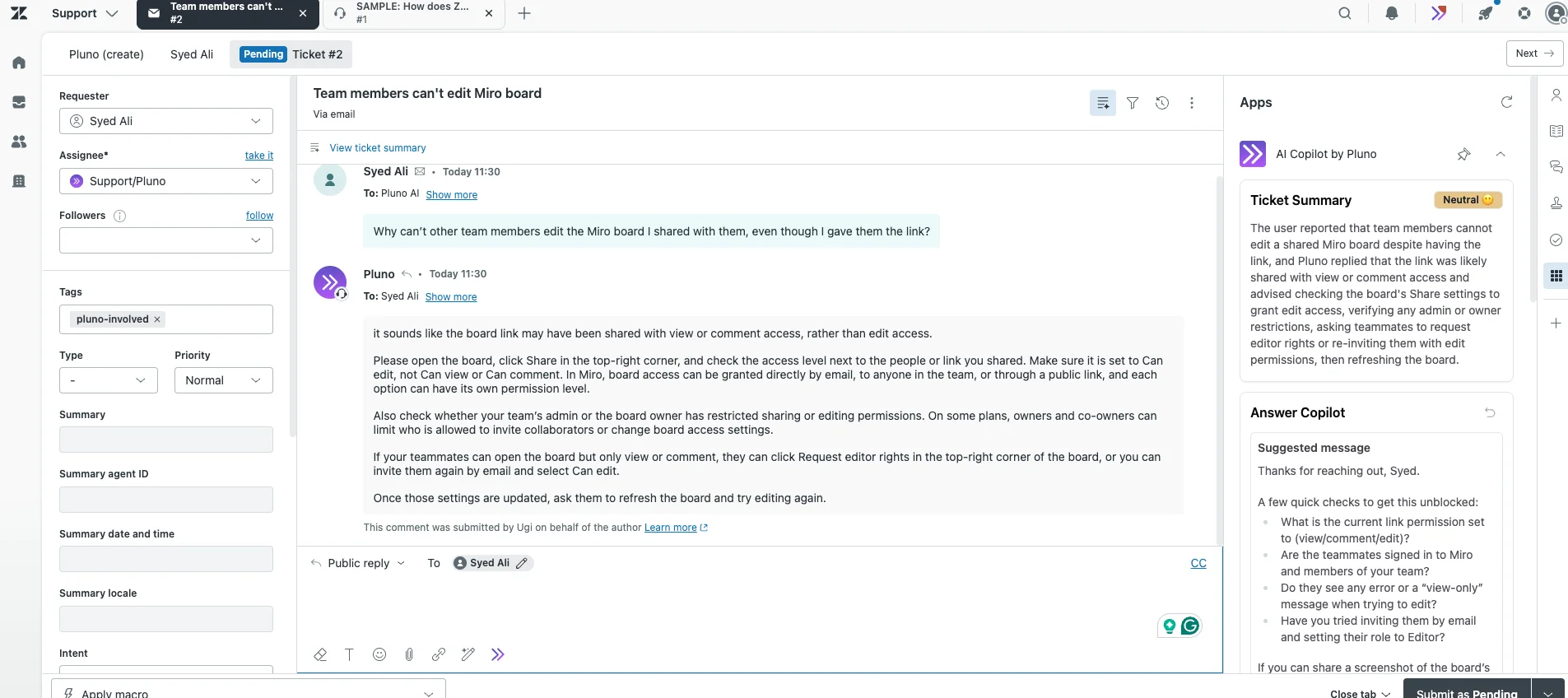
Demo ticket in a Zendesk sandbox. Top: the Ticket Summary with the customer's sentiment. Bottom: the Answer Copilot's suggested reply. Full screenshot with the ticket thread.
Pluno vs Forethought AI agents by Zendesk
Forethought, now part of Zendesk and sold as Forethought AI agents by Zendesk, covers several of the same jobs. Here's how the two compare on five criteria, from each company's public pages. Where Forethought documents no equivalent, the table says to verify it in a demo.
Pluno vs Forethought AI agents by Zendesk on five criteria
| Criterion | Pluno | Forethought AI agents by Zendesk |
|---|---|---|
| Past tickets | Learns from your resolved tickets, alongside the help center and connected tools | Learns from historical tickets. Forethought's FAQ says it performs effectively with 20,000+ historical tickets and needs at least 2,000 email or chat tickets a month |
| Technical investigation | Troubleshooting Agent investigates code, logs, error tracking and session recordings | No native code or log investigation documented. Verify in demo |
| Agent assistance | AI Copilot drafts replies with sources in the help desk sidebar | Assist suggests replies and summaries, running as a Chrome extension |
| Engineering escalation | Escalation Copilot files to Slack, Jira, Linear, Microsoft Teams or incident.io and syncs updates back | Not documented as a feature. Verify in demo |
| Pricing | Published: platform fee from 249€ a month for up to 500 tickets, 0.90€ per billable resolution, AI Copilot 49€ per seat | Quote-based: a platform access fee plus an outcome-based fee (pricing) |
My Forethought review covers it in depth.
How to judge the 50-ticket simulation
The simulation replays your recent tickets and shows, side by side, how Pluno would have answered each one next to the reply your team sent. Score it with the same four questions as the rollout test: accuracy, safe action, handoff completeness and whether the answer would have solved the issue.
To compare Pluno with the tool you use today, run both on the same held-out tickets, limit each to the knowledge that existed when each ticket arrived, and write down the sample and scoring method before you look at the results. Requesting it only takes a short form with your name, work email and website, and the Pluno team follows up to set it up.
Security and pricing
Pluno has a SOC 2 Type 2 report, with the latest audit completed in February 2026 (see the trust center), and a data processing agreement. We don't train any models on customer data, and the docs explain how Pluno processes and protects your ticket data.
Pricing, as listed on the Pluno pricing page on November 10, 2026: a monthly platform fee by ticket volume, from 249€ a month (210€ a month billed annually) for up to 500 tickets. It covers AI Tagging & Field Filling, Escalation Copilot, ticket trends and topic insights, and ticket and call summaries.
Deflection AI costs 0.90€ per billable resolution, as described in the pricing section above. AI Copilot is 49€ per seat a month, Quality Assurance 35€ per agent a month, and the Troubleshooting Agent runs on credits from 99€ a month, with 4,080 free credits for new workspaces and a 14-day free trial.
The bottom line
AI for customer service works best when you treat it as nine jobs, not one product. Pilot the low-risk ones that most tickets benefit from, such as tagging, summaries, QA and escalation briefs, and give your agents a copilot. Then let an AI agent answer customers on the topics where it clears your thresholds on held-out tickets, with a visible way to reach a person.
Judge every step by verified resolutions, reopens and CSAT per cohort, not by the count on a vendor's invoice. Klarna shows the pattern: it kept most chats with AI and still expanded access to people.
Three companion guides go deeper on one part each: AI customer service software for building a vendor shortlist, customer support automation for designing the workflows around the AI, and autonomous customer service for how far fully autonomous resolution goes today.
If your queue is full of technical, account-specific tickets, evaluate Pluno on your own history. Request a free 50-ticket simulation, and score it with the four questions above. We compare Pluno's draft replies and handoff decisions with the replies your team actually sent, offline, with no replies sent to customers.
Prefer a walkthrough first? Book a demo instead.
FAQ
What is AI for customer service?
AI for customer service is the use of AI to answer customers, help human agents and handle the admin around support tickets. It covers AI agents that resolve tickets on their own, copilots that draft replies and summaries for agents, and AI that tags, routes, escalates and reviews conversations.
How is AI used in customer service?
The most common uses are answering routine questions on chat, email and messaging, drafting replies for human agents, summarizing long tickets and calls, tagging and routing new tickets, writing escalation reports for engineering and scoring conversation quality. Newer uses include AI agents inside a company's own product and AI that takes account actions, such as plan changes or refunds, through APIs.
How can AI help customer service teams?
AI helps by taking repetitive tickets off the queue, so agents spend their time on complex ones, and by doing the research on the tickets that remain. In a published study at one software company, an AI assistant that suggested replies to 5,172 support agents raised issues resolved per hour by 15% on average and 30% for less experienced agents.
What is the best AI for customer service?
For B2B software teams handling technical and account-specific tickets in an existing help desk, we recommend Pluno. It uses resolved tickets and connected sources to investigate issues, drafts replies when an agent should review them, and sends engineering escalations with context. For a broader shortlist, see my comparison of AI customer service software.
Can I use ChatGPT for customer service?
A standard ChatGPT conversation can help you draft replies. With an approved app or a custom integration, ChatGPT can access connected sources and take supported actions, but a production support deployment still needs channel routing, permissions, QA and a human handoff. Pluno provides those workflows inside supported help desks, and my build vs buy guide compares building your own.
Can I use AI for customer service without changing my help desk?
Yes, if the AI runs inside your help desk as an app or integration. Check four things: that it supports your help desk and channels, which ticket data and tools it can read, what it can write (replies, internal notes, fields, tags), and how it hands off to your team. Pluno works this way in Zendesk, Intercom, Salesforce Service Cloud, HubSpot, Jira Service Management and Freshdesk, and the integrations docs cover setup.
Will AI replace customer service jobs?
AI is changing customer service jobs more than replacing them. In Gartner's mid-2026 survey of 275 service and support leaders, 21% said their organization had cut human agent headcount because of AI, while 71% said they were shifting agents into different roles within service and support. The work that grows includes knowledge ownership, AI review and complex tickets.
How much does AI customer service cost?
Pluno charges 0.90€ per billable resolution plus a platform fee by ticket volume from 249€ a month, with AI Copilot at 49€ per seat. In November 2026, Fin by Intercom listed $0.99 per outcome and Salesforce Agentforce $2 per conversation, while Zendesk drew verified resolutions from an account allowance and still listed $1.50 to $2.00 per automated resolution for its earlier model. Add the time to keep knowledge current and review AI answers, which doesn't appear on any price page.
What companies use AI for customer service?
Klarna is the best-known example: its AI assistant handled 80% of its customer service chats in 2025, and the company also expanded access to human agents. Salesforce uses AI agents in its own support team, Air Canada and Cursor are well-known cautionary cases, and B2B software teams such as Innovorder, Smartness and Kojo run AI inside their existing help desks.
Is AI customer service safe for customer data?
It can be, if you check the vendor the way you'd check any system that reads customer data. Ask where data is processed, whether your data trains the vendor's models, which systems the AI can write to, and what it logs. Start with read-only access, and ask for a SOC 2 report and a data processing agreement.
How does AI handle complex customer service issues?
Good AI handles complex issues by researching them, not by guessing. It searches past tickets, docs and connected tools such as logs or error tracking, then either answers with the evidence or hands the ticket to a person with a summary of what it found. On bugs, it can file the escalation for engineering with steps to reproduce.
What is the future of AI in customer service?
Gartner predicts that by 2029, agentic AI will resolve 80% of common customer service issues without human help. Expect more AI agents that take actions in accounts and products, more pricing tied to outcomes, and more pressure to offer an easy path to a person, which 87% of customers in a separate Gartner survey called essential.