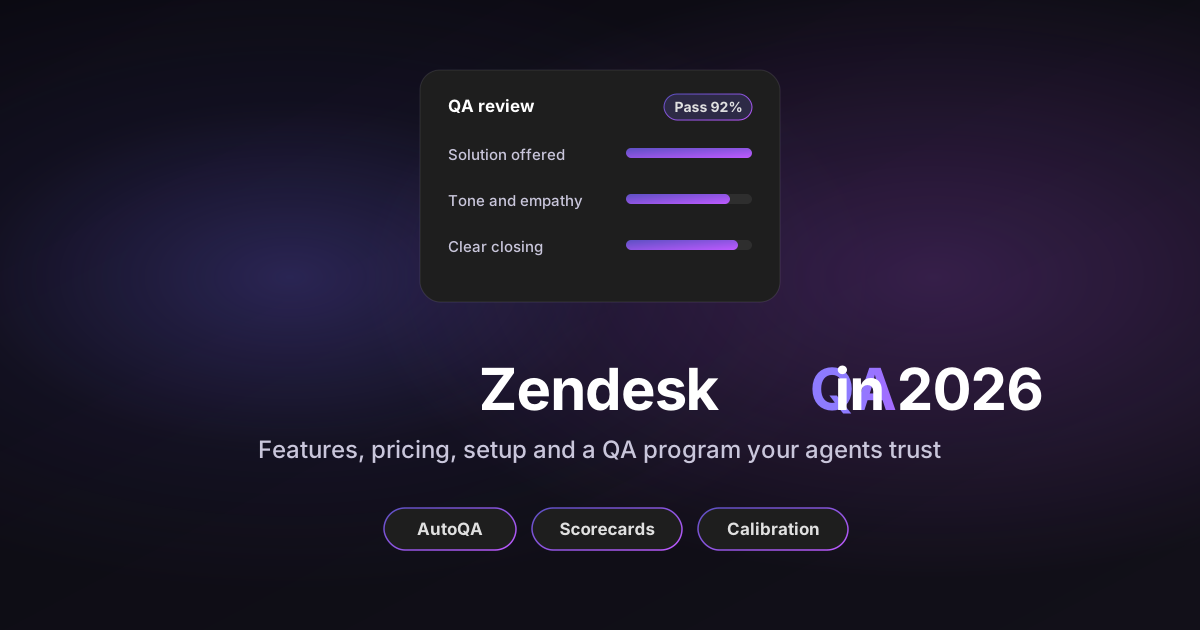
Zendesk QA is Zendesk's quality assurance add-on for scoring support conversations. It started life as Klaus, which Zendesk bought in early 2024. Its AutoQA feature scores your tickets automatically on categories such as tone, empathy and whether a solution was offered, so you no longer depend on a manual sample.
This guide covers what it does, what it costs, how to set it up, and how to turn it into a quality assurance program your agents actually trust. I read Zendesk's product pages, pricing page and help center articles for every fact below, and each one links to its source.
Prices checked: October 20, 2026, on Zendesk's US pricing page.
Disclosure: I work at Pluno, which sells an AI layer for help desks that includes its own Quality Assurance module.
To keep comparisons fair, I describe every QA option in this post with the same five yardsticks:
- Coverage: how many conversations get scored.
- What it checks: style and process only, or also whether the answer was correct.
- Speed: how soon a score shows up after a ticket is solved.
- Where results show: inside the ticket, in a separate app, or both.
- Price: what you pay per agent, and what else you must buy.
TL;DR: Is Zendesk QA worth it?
- What it is: Zendesk's QA add-on, formerly Klaus. AutoQA scores solved tickets on 8 default categories, and Spotlight flags risky conversations for a human to review.
- Price: Zendesk doesn't list a stand-alone price for QA on its US pricing page. The Workforce Engagement bundle (QA plus workforce management) is $50 per agent a month on annual billing, and you buy add-ons for every agent in the account.
- Setup: about 8 steps, from giving people access to building a scorecard and assignments. Tickets sync every four to six hours, so scores are not instant.
- Best for: larger Zendesk teams that want manual reviews, calibration, disputes and coaching in one tool, plus workforce management in the bundle.
- Bottom line: if you mainly want every ticket scored against your own criteria, with reasoning inside the ticket within seconds, an AI QA layer such as Pluno Quality Assurance does that at 35€ per agent a month. Price both on what you'd actually use.
What is Zendesk QA and what does it do for your team?
Zendesk QA scores your support conversations so you can see quality across the whole queue, not just a 2% sample. It replaces spreadsheet reviews with scorecards, automatic scoring and coaching tools, all connected to your Zendesk tickets.
The product began as Klaus, an independent QA platform. Zendesk announced the deal on January 8, 2024 and completed it on February 12, 2024, folding Klaus into its workforce engagement management (WEM) products next to Tymeshift.
Klaus then became Zendesk QA, a native add-on you open from the Zendesk product tray. A few help articles still say "Zendesk QA (Klaus)".
In practice, it does four jobs for a support team:
- Scores conversations automatically with AutoQA, across email, messaging and calls.
- Flags the conversations worth a human look with Spotlight, such as churn risk or an escalation request.
- Runs manual reviews with scorecards, assignments, calibration sessions and disputes.
- Turns scores into coaching with sessions, quizzes and dashboards.
It also reviews Zendesk AI agents. According to Zendesk's QA page, AI Agent QA is part of the add-on at no extra charge. If you're new to the help desk itself, my guide on how to use Zendesk for customer service covers the basics first.
Core features: AutoQA, scorecards and Spotlight
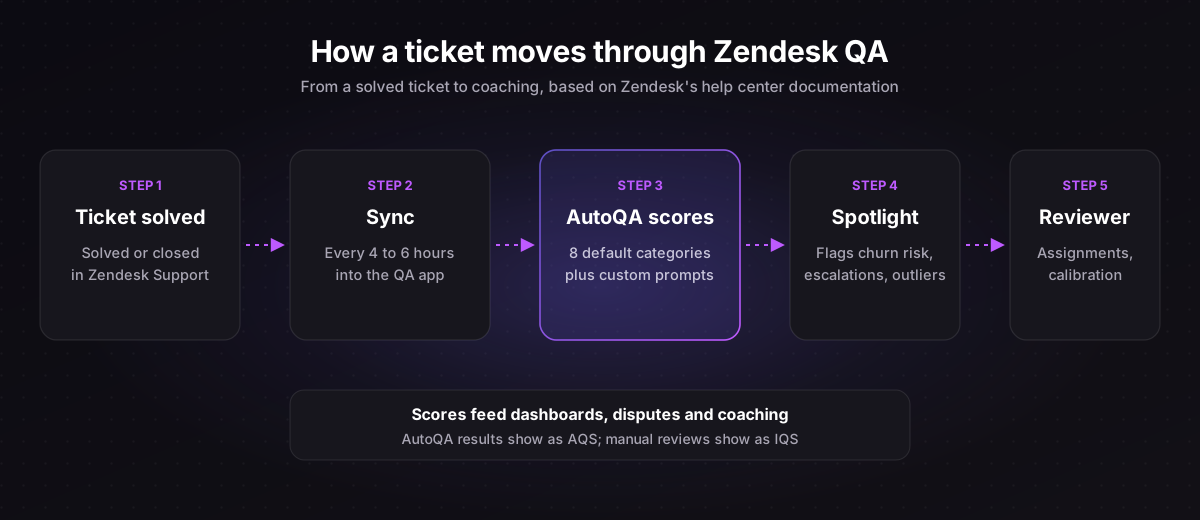
The product has three core pieces: AutoQA scores tickets, scorecards define what "good" looks like, and Spotlight picks which tickets a person should review. Everything else, from calibration to quizzes, builds on those three.
AutoQA: automatic scoring on 8 categories
AutoQA scores solved and closed tickets on eight default autoscoring categories: Greeting, Empathy, Spelling and grammar, Closing, Solution offered, Tone, Readability and Comprehension. Five of them also score calls: Greeting, Closing, Empathy, Comprehension and Solution offered.
You can add your own categories as well. Zendesk supports AI prompt-based, exact text-match and manual categories, so you can write a check like "Did the agent link the right help center article?" in plain language.
AutoQA results feed the auto quality score (AQS). Manual reviews feed a separate internal quality score (IQS), and Zendesk reports the two apart.
QA scorecards: rating scales, weights and critical categories
A scorecard is the list of categories a review uses. Zendesk's scorecards offer binary, 3-point, 4-point and 5-point rating scales, with optional N/A.
Each category gets a weight from 0 to 100, and the default is 10. You can mark a category as critical, so a score under 50% on it fails the whole review. Conditional scorecards switch on by channel, tag, source type or CSAT, so a phone call and an email don't need the same checklist.
Spotlight and AI insights: which tickets to review
Spotlight flags tickets, while rating categories grade agents. The system spotlights include Outliers, Churn risk, Escalation request, Follow up, Extra mile, Sentiment, SLA, Bot repetition and, for voice, Dead air.
AI insights let you write your own spotlight or score in natural language. Zendesk caps these at 10 active prompt-based categories and spotlights per account, plus 20 exact text-match ones.
Calibration, disputes and coaching
These features make reviews fair and useful:
- Assignments give each reviewer a recurring set of tickets: daily, weekly, every two weeks or monthly.
- Calibration sessions let several reviewers score the same ticket to compare results. Calibration scores don't change IQS.
- Disputes let an agent challenge a review, which a reviewer can accept, partially accept or reject.
- Coaching sessions and quizzes turn findings into training. Quizzes are multiple choice and can't be edited after you publish them.
| Feature | What it does | Who uses it |
|---|---|---|
| AutoQA | Scores every eligible solved ticket on 8 default categories | QA leads, team leads |
| Custom categories | Adds prompt-based, text-match or manual checks | QA leads |
| Scorecards | Sets scales, weights and critical categories | QA leads |
| Spotlight | Flags risky tickets for human review | Reviewers |
| Assignments | Sends reviewers a recurring set of tickets | Reviewers |
| Calibration | Compares how reviewers score the same ticket | QA leads |
| Disputes | Lets agents challenge a review | Agents, reviewers |
| Coaching and quizzes | Turns findings into training | Team leads |
| AI Agent QA | Reviews Zendesk AI agent conversations | QA leads |
Zendesk QA pricing in 2026
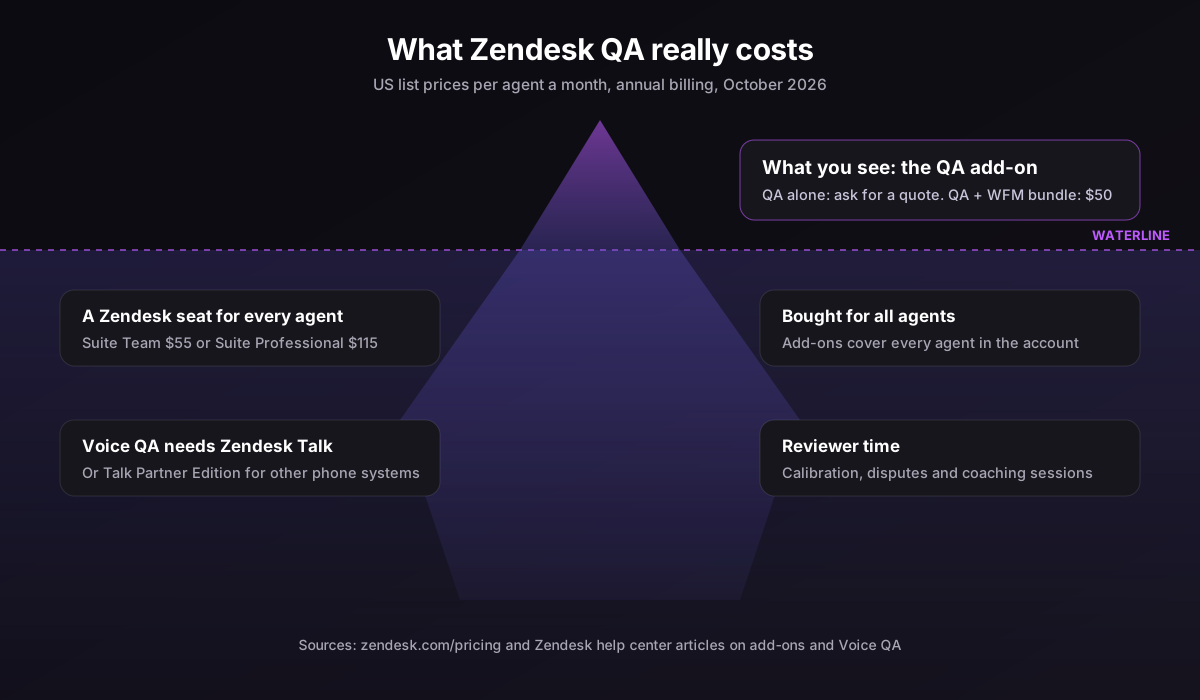
QA is a paid add-on, and Zendesk's US pricing page doesn't show a price for QA on its own. The published option is the Workforce Engagement bundle, which pairs QA with Zendesk WFM for $50 per agent a month on annual billing.
Here is what Zendesk publishes about Zendesk QA pricing, as of October 20, 2026:
| Item | Price or rule | Source |
|---|---|---|
| Workforce Engagement bundle (QA + WFM) | $50 per agent a month, paid yearly ($65 paid monthly) | Zendesk pricing |
| QA on its own | No price listed on the US pricing page; contact Zendesk | Zendesk pricing |
| Which plans can add it | Any Support or Suite plan | QA product page |
| How many seats | Add-ons are bought for all agents in the account | Add-on help article |
| AI Agent QA | Included in the add-on at no extra charge | QA product page |
| Trial | No self-serve trial; contact Zendesk to start one | QA product page |
The "all agents" rule matters most. You can't buy QA only for the 10 agents you plan to review if your account has 40 agents.
Remember that QA sits on top of your Zendesk plan. Suite Team is $55 and Suite Professional is $115 per agent a month on annual billing, according to Zendesk's pricing page.
A worked example: 25 agents on Suite Professional
Say you run 25 agents on Suite Professional and buy the Workforce Engagement bundle on annual billing:
- Suite Professional seats: 25 × $115 = $2,875 a month.
- Workforce Engagement bundle: 25 × $50 = $1,250 a month.
- Total: $4,125 a month, so quality and workforce tools add about 43% to your seat bill.
If you only need QA, ask Zendesk for a QA-only quote and compare it with the bundle. Use the calculator below to run your own team size.
Zendesk QA cost estimator
US list prices, October 2026: Zendesk plan prices per agent and the Workforce Engagement bundle (Zendesk QA plus Zendesk WFM) at $50 a month on annual billing or $65 monthly, bought for every agent in the account. Zendesk doesn't publish a QA-only price, so ask for a quote. Excludes Suite Enterprise, Zendesk Talk for voice QA, other add-ons and taxes. Pluno's price is in euros.
Suite Professional seats
$2,875
Per month, before add-ons
Workforce Engagement bundle
$1,250
Zendesk QA + WFM, every agent
Seats + bundle
$4,125
Your monthly Zendesk bill
The bundle adds 43% to your seat bill. For comparison, Pluno Quality Assurance for the same 25 agents is 875€ a month (35€ per evaluated agent), as an add-on to a Pluno plan from 249€ a month. Treat both as a floor, not a quote.
How to set up Zendesk QA in 8 steps
You set it up in eight steps: open it, check the help desk connection, give people access, create workspaces, turn on AutoQA, build a scorecard, create assignments, and connect voice if you need it. The steps below follow Zendesk's Getting started admin guide.
- Open the QA app. Click the Zendesk products icon in the top bar and choose Quality assurance. At first, only the account owner has access, as an Admin.
- Check the help desk connection. Go to your profile icon, then Settings, then Account: Connections, and choose Edit connection. Here you set data retention, masking and sync filters, such as syncing only certain groups or tags.
- Give people access. In Admin Center, go to People, Team, Team members. Open a person, tick Quality assurance Access under Roles and access, pick a role and save. The roles are Admin, Agent, Reviewer, Workspace lead, Workspace manager and Connected user.
- Create workspaces. Open Users, bots, and workspaces and select the plus sign next to Workspaces. Use one workspace per team, region or BPO so scores stay comparable.
- Turn on AutoQA. In Settings, Account: General, switch on Automated agent scoring and LLM-based AutoQA. Zendesk explains both options in its AutoQA settings article.
- Build a scorecard. Go to Settings, Account: Scorecards, then Create, Scorecard. Name it, choose the workspaces, add categories with their scale and weight, and publish.
- Create assignments. In your workspace, open Assignments and select Create assignment. Set the cycle, reviewers, reviewees, conditions and a goal.
- Add voice (optional). In Admin Center, go to Channels, Talk and email, Talk, Settings. Switch on "Transcribe and summarize call recordings for Zendesk QA" and pick the lines. Voice QA works with Zendesk Talk or Talk Partner Edition.
It can also connect to Front and Gorgias, and it has a Chrome extension for reviewing in other browser tools. My best Zendesk add-ons guide lists other apps worth adding next to it.
How to run a Zendesk quality assurance program
A tool doesn't make a QA program. You need clear criteria, a review rhythm, calibration and a short list of metrics your agents understand. Here's how I'd run Zendesk quality assurance in the first 90 days.
Start with a short QA scorecard
Keep your first scorecard to five or six criteria you can actually observe. "The agent restated the problem" is easier to score fairly than "The agent was empathetic".
| Criterion | Scale | Weight | Critical? |
|---|---|---|---|
| Understood the problem | 4-point | 20 | No |
| Solution offered and correct | Binary | 30 | Yes |
| Followed the right process (refunds, security checks) | Binary | 20 | Yes |
| Tone and empathy | 4-point | 15 | No |
| Clear closing and next steps | Binary | 15 | No |
Mark only the criteria that would hurt a customer as critical. If everything is critical, every small slip fails a review and agents stop trusting the score.
Roll it out in four phases
- Weeks 1 to 2: set up AutoQA on the default categories and read the results without sharing scores. Fix any category that scores in an obviously wrong way.
- Weeks 3 to 4: publish your scorecard and run two calibration sessions. Reviewers score the same five tickets, then talk through every disagreement.
- Weeks 5 to 8: start weekly assignments, focused on Spotlight flags and low AutoQA scores. Share scores with agents and open disputes.
- Weeks 9 to 12: add coaching sessions for the lowest criteria, and review whether each criterion still earns its place.
Track a few metrics that matter
- Internal quality score (IQS): your manual review average. Watch the trend, not single reviews.
- Pass rate: the share of reviews with no failed critical category.
- Dispute rate: a high rate usually means unclear criteria, not bad agents.
- Calibration gap: how far reviewers' scores differ on the same ticket. Shrink it before you tie scores to performance reviews.
- CSAT next to IQS: if quality rises and CSAT doesn't, your criteria may measure the wrong things.
Quality scores are most useful when they lead to fixes. A low "solution correct" score often points to a missing or outdated help center article, not a weak agent. My guide to Zendesk automation covers how to route those findings into your workflows.
Limits to know before you buy
It's a capable tool, but a few documented limits shape how you'll use it. Check these before you commit.
- Scores aren't instant. Zendesk tickets sync every four to six hours, so agents see feedback hours after a ticket closes.
- Not every ticket qualifies for AutoQA. A ticket needs at least one customer and one agent message of at least 10 words each. AutoQA skips tickets imported before the scorecard was published, and conversations over 20,000 characters or 150 messages.
- Calls with several agents: on Talk calls, only the first agent is scored.
- AI checks are capped: 10 active prompt-based categories and spotlights per account.
- Language support varies. Readability works only in English and Spanish, and Spelling and grammar covers about nine languages.
- Access starts closed: only the account owner can open it until you grant roles.
- It checks style better than facts. The default categories judge how an agent wrote, and "Solution offered" asks whether a solution was given. Checking that the answer was actually correct takes custom prompts within your 10-prompt limit.
What people actually say about Zendesk QA
Reviews, most of them written when the product was still Klaus, praise the reporting and automation and push back on price and setup effort:
“I love how Klaus is keeping up with the newest technologies and using AI to automate processes while highlighting critical cases for manual review. That's what we want - less manual work and more use of the latest tech.”
“I like the UI and I particularly like the reporting it allows. It goes quite deep.”
“There is a bit of learning curve in the beginning, especially when setting up the scorecards and deciding which criteria are actually important for your team.”
“Klaus used to be fun but after Zendesk acquired it, the changes were not so good. The scorecard was very limiting as well.”
“Can't say anything bad besides the price tag. It's quite heavy for a small team who could handle to QA without the tool”
The pattern is consistent: teams like what AutoQA saves them, but small teams question the cost, and scorecard setup takes real thought.
Zendesk QA vs Pluno Quality Assurance
If your main goal is to score every ticket against your own criteria, Pluno Quality Assurance covers that job and goes further on accuracy and speed. Pluno is an AI layer you add directly inside your existing help desk, and Quality Assurance is one of its modules, next to the AI agent, AI Copilot and Escalation Copilot.
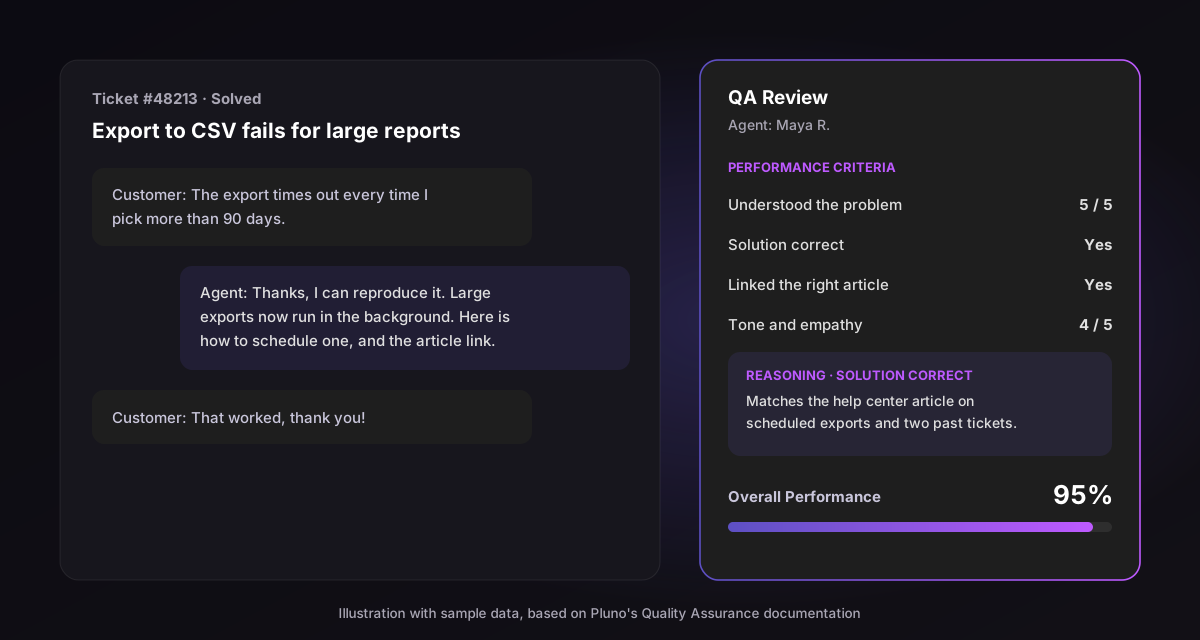
Here's how it works. When a ticket is solved, Pluno scores each human agent who worked on it against your criteria, usually within 10 to 30 seconds. Every score comes with a written reason and a confidence score.
What Pluno Quality Assurance adds for Zendesk teams:
- Correctness, not just style: switch on knowledge base access for a criterion, and Pluno checks the agent's answer against your help center, docs and past tickets before it scores.
- Feedback in the ticket: a QA Review card appears in the help desk sidebar for each agent, with the score per criterion and the reasoning.
- Every channel: email, messaging and calls. Pluno reads the whole conversation, including internal notes, calls and call summaries.
- Your own criteria: unlimited custom criteria on a 1 to 5 scale or yes and no, plus time to first response and time to resolution taken from Zendesk.
- Reporting: agent performance, criteria trends and a ticket list you can filter to "Needs Review" and export.
For scale, BLUETTI has run more than 160,000 QA evaluations with Pluno, scoring conversations against up to 45 criteria.
| Yardstick | Zendesk QA | Pluno Quality Assurance |
|---|---|---|
| Coverage | AutoQA on every eligible solved ticket | Every solved ticket, each human agent scored separately |
| What it checks | 8 default categories plus up to 10 AI prompts | Unlimited custom criteria, with optional answer checks against your knowledge |
| Speed | Ticket sync every 4 to 6 hours | About 10 to 30 seconds after a ticket is solved |
| Where results show | The QA app and its dashboards | Help desk sidebar and Pluno reporting |
| Price | WEM bundle $50 per agent a month (annual); QA alone quoted | 35€ per agent a month, as an add-on to a Pluno plan |
What Pluno Quality Assurance costs, from Pluno pricing:
- Quality Assurance: 35€ per evaluated agent a month. Every agent is evaluated by default, and you can ask Pluno to limit it to certain people, roles or groups.
- Platform fee: from 249€ a month for up to 500 tickets, which also includes the AI agent, AI Tagging, Escalation Copilot, topic trends and call summaries.
Zendesk's add-on still makes sense if you need calibration sessions, disputes and quizzes in one place, or workforce management in the same bundle. If you want every ticket scored for correctness within seconds, and an AI layer that also resolves and escalates tickets, Pluno covers the QA job and more. You can compare the wider options in my guide to the best AI agents for Zendesk.
The bottom line
Zendesk QA gives Zendesk teams AutoQA on eight categories, Spotlight flags, scorecards, calibration, disputes and coaching in one add-on. The trade-offs are a price you have to request unless you take the $50 Workforce Engagement bundle, add-ons bought for every agent, and scores that arrive hours after a ticket closes.
Start with a five-criterion scorecard, calibrate before you share scores, and track IQS, pass rate and dispute rate. If you mainly need every ticket scored for correctness inside the ticket, try Pluno Quality Assurance on your own Zendesk tickets.
FAQ
What does Zendesk QA do?
It scores support conversations for quality. AutoQA grades solved tickets on categories like tone, empathy and whether a solution was offered, Spotlight flags risky conversations, and reviewers run manual reviews, calibration and coaching in the same tool.
How much does Zendesk QA cost?
Zendesk doesn't list a stand-alone QA price on its US pricing page, so you request a quote. The Workforce Engagement bundle, which includes QA and Zendesk WFM, costs $50 per agent a month on annual billing or $65 monthly. You buy it for every agent in your account.
What happened to Klaus?
Yes. Zendesk completed its acquisition of Klaus in February 2024 and rebuilt it as the Zendesk QA add-on. Some help center articles still use the name "Zendesk QA (Klaus)".
Is AI Agent QA included in the add-on?
Yes. Zendesk says AI Agent QA is included in the add-on at no extra charge. It detects Zendesk AI agents on messaging and voice automatically, and you can mark other bots by hand.
Is there a free trial?
Not on your own. Zendesk's standard trial includes Copilot by default, but you contact Zendesk to try QA or other add-ons.
Do I need coding skills to use AutoQA?
No. AutoQA works out of the box on the default categories, and you write custom checks as plain-language prompts. You'll still need time to design a scorecard and calibrate reviewers.
What is the difference between QA and WEM in Zendesk?
QA is the quality assurance product. WEM (workforce engagement management) is a bundle of QA and Zendesk WFM for scheduling and forecasting, sold at a discount compared with buying both separately.
What is a good QA score?
There's no universal number. Set your target after calibration, then track the trend in your internal quality score and pass rate. A stable pass rate with a falling dispute rate is a better sign than one high score.
What are the best Zendesk QA alternatives?
Dedicated QA platforms and AI layers both score Zendesk tickets. Pluno Quality Assurance scores every solved ticket against your own criteria within seconds, checks answers against your knowledge, and shows the result in the help desk sidebar.