It is 4:47pm on a Friday. A customer tags your support engineer in Zendesk: checkout is failing for their EU team. The agent runs through the basics and cannot reproduce it. They ping #engineering in Slack. An engineer asks for repro steps and the request ID. Support asks the customer. The customer is offline until Monday. Tuesday morning the engineer is mid-PR review and has to rebuild context from scratch. A Jira ticket gets created. Two more customers report the same bug. By the time the fix ships, three engineers have been pulled out of deep work and CSAT has slipped on four tickets. This is the escalation loop, and it is one of the most expensive failure modes in B2B SaaS support. This guide breaks down what causes the loop, how good technical support troubleshooting prevents most of it, and how an AI troubleshooting agent closes the gap on the rest.
Short answer: The engineering escalation loop happens because support cannot reach the code, logs, database, and error tracking that hold the underlying cause, so it has to bounce context between people. The fix is to automate the investigation layer with an AI troubleshooting agent that diagnoses tickets before they hit a human queue, then either resolves them with the customer or escalates with a complete brief.
The hidden cost of engineering escalations
Every B2B SaaS support team has a top-of-funnel metric (ticket volume) and a CSAT metric. Many teams still do not track the metric that actually moves the business: the share of engineering time consumed by customer escalations. That hidden cost is where the escalation loop lives.
Three patterns make it worse than it looks on the dashboard.
The four-tool shuffle
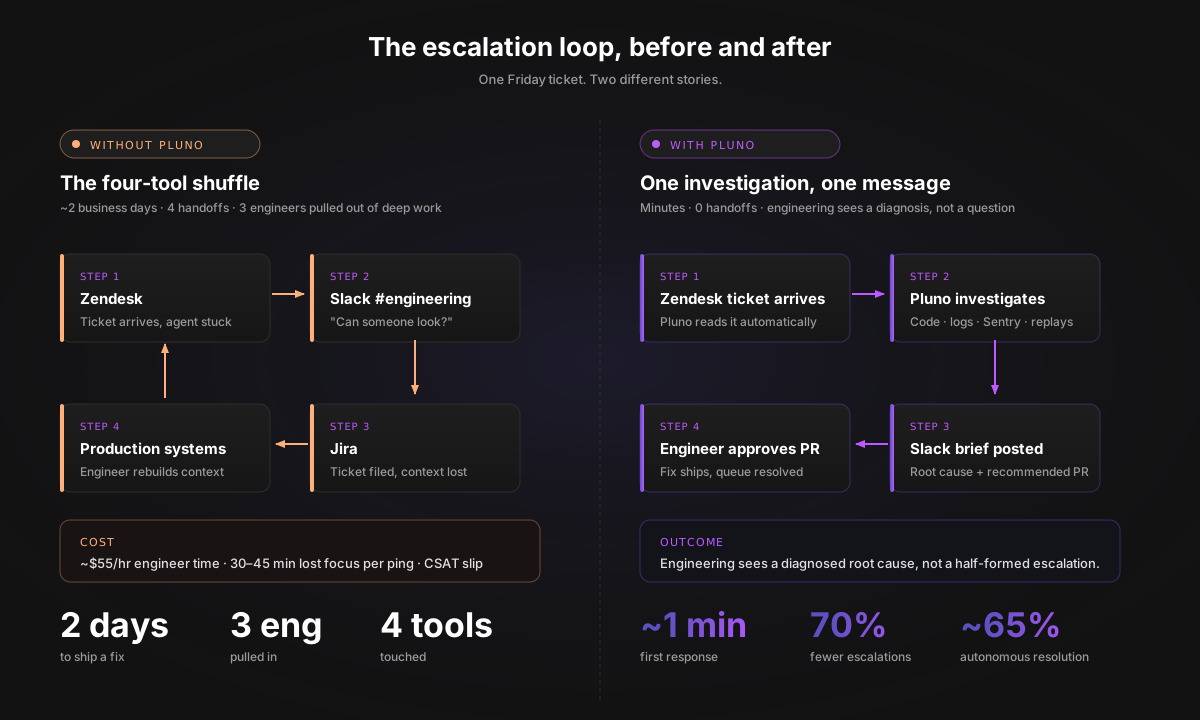
A single complex ticket usually touches four systems before it gets resolved: the support tool (Zendesk or Intercom), the issue tracker (Jira), the team chat (Slack), and somewhere in production (Sentry, the database, logs, or the codebase itself). Each handoff between systems can lose context. The customer's exact words become a Jira summary. The Sentry stack trace lives on a different tab from the Zendesk thread. The Slack reply with the fix often does not make it back into the ticket. Reconciling those four tools by hand is the actual work of an engineering escalation, and it is the work that grows with ticket volume.
What one engineering escalation actually costs
A US T2 technical support engineer is roughly $100,000 to $128,000 fully loaded per year. Even at the low end, every hour of engineering investigation on a customer ticket is around $55 of direct cost, not counting the displaced work. A 15-minute "quick question" in Slack can easily turn into 30 to 45 minutes of lost focus once you count context-switching. As an illustrative example, a team handling 30 engineering escalations a week with that profile loses the rough equivalent of one engineer's working hours on customer tickets instead of shipping product. Run the math against your own escalation volume to see the order of magnitude.
The customer does not see the loop, but they feel it
From the customer's side, the loop looks like silence followed by another clarifying question. They do not see the four-tool shuffle. They see "we're escalating to engineering" and then nothing for two days. The CSAT hit lands on the support agent, but the cost is borne by engineering throughput and customer satisfaction at the same time. Great troubleshooting skills can significantly reduce customer churn risk because resolving complex issues quickly helps regain customer trust.
The rest of this guide is about closing that loop. The troubleshooting process below catches most issues before they ever leave support. Pluno's Troubleshooting Agent handles the cases where the underlying cause is in code, logs, or production data the support team cannot see, the layer where most teams want to reduce engineering escalations without dropping CSAT.
Why traditional troubleshooting cannot close the gap
Most teams have already tried something. None of the common alternative solutions close the loop on the tickets that actually need engineering investigation.
Hire more support agents. Adds personalized service but does not change what the agents can see. A new tier-2 hire still cannot read your Sentry events or query your database, so complex tickets still escalate. Cost of hiring, training, and retention grows faster than ticket volume.
KB-first AI agents. Fast on FAQ-style questions because they are trained on help-center content. Help centers capture only a slice of real support knowledge, so KB-first agents hallucinate or escalate the moment a ticket involves anything that is not in the docs. The escalation rate to engineering does not move. We compare the category in detail in Best AI Agents for Zendesk in 2026.
Flow-based bots. Handle preconfigured paths but require constant maintenance. Edge cases break them, every new product release means rebuilding flows, and they cannot investigate anything the configurator did not anticipate.
AI copilots. Draft messages for human agents and improve consistency. Useful for tone, useless for diagnosis. The human still has to do the investigation, and complex tickets still escalate.
The shared failure mode is that none of these tools investigate the actual product. They suggest, summarize, or route. They do not open Sentry, query the database, read the codebase, or watch a session recording, which is exactly what the engineer on the other side of the escalation has to do.
The troubleshooting process that prevents escalations
The escalation loop is easier to break when the troubleshooting process is consistent before tickets even get near engineering. The same six-step loop applies whether the ticket is a network connection drop, a login credentials problem, or a checkout regression. Teaching this loop is also the fastest way to grow troubleshooting skills and problem solving skills across a support team, which is what separates teams that scale gracefully from teams that drown in IT issues every quarter.
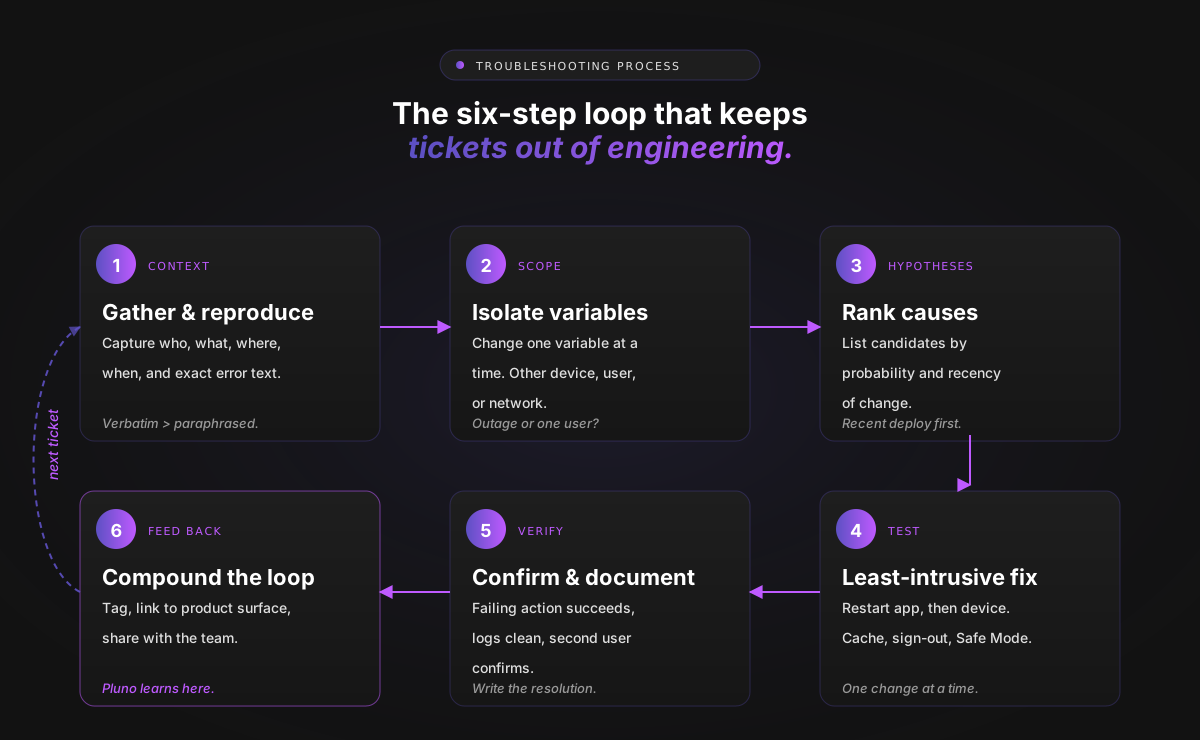
Step 1: Gather context and reproduce
Effective troubleshooting requires asking the right questions, gathering information, and reproducing the issue before attempting a fix, an approach Help Scout calls out in the art of troubleshooting. Capture five things for every ticket: who is affected, what is happening (with exact error messages), where (device, browser, environment), when (first occurrence and pattern), and conditions (operating system version, app version, what the user already tried). Ask the user to run the same task that failed and capture screenshots; verbatim error text beats retyped descriptions every time.
Step 2: Define scope and isolate variables
Simplify the problem and change one variable at a time. Quick checks: same user on a different device, same device with a different user, same app on a different network, different app hitting the same backend. Many common technical glitches resolve by clearing temporary files, closing stuck background processes, or deleting unnecessary files when disk space is tight. Run those before assuming a major outage.
Step 3: Form ranked hypotheses
List likely causes and rank by probability and recency of change.
| Symptom | High likelihood causes | Less likely |
|---|---|---|
| Slow computer | Background processes, low disk space, malicious software, outdated software | Outdated hardware, CPU throttling |
| Login rejected | Wrong username format, caps lock, MFA drift, failed login attempts locking the account | DNS resolution, certificate revocation |
| Internet connection drops | Router or modem, Wi-Fi channel congestion, outdated firmware in router settings | ISP outage, fiber damage |
| API errors after deploy | Recent code change, schema drift, expired secrets, missing config | Provider outage, dependency upgrade |
When you suspect conflicting software, use Safe Mode to narrow the cause, as Microsoft documents in Windows startup settings.
Step 4: Test the least-intrusive fix first
Effective troubleshooting follows a least-intrusive path. Restart the app before restarting the device. Log out and back in. Clear cache. Run a full system scan with antivirus software if performance is degraded. Test in Safe Mode to rule out conflicting third-party applications. Change one thing at a time so you know which change resolved the issue.
Step 5: Verify, document, and close
"Verified" means the failing action now succeeds, logs are clean for a defined window, adjacent system functionality still works, and for issues affecting multiple users at least two confirm normal operation. Documenting the troubleshooting process and solutions, in the spirit of Global Tech Solutions' 5-step framework, is what turns one resolution into reusable knowledge. The same documentation discipline is what turns an ad-hoc IT helpdesk into a team with measurable troubleshooting skills.
Step 6: Feed the resolution back
The step most teams skip. Every closed ticket should be tagged and linked to the customer, the product surface, and the code path. Without this loop, you re-diagnose the same problems and solutions every time. With it, the resolution process compounds: the second customer who hits the bug gets the answer in seconds, the third triggers a fix in product, and the fourth never sees the issue at all. This is also where AI starts to matter: Pluno learns from resolved tickets and connected tools so recurring support issues become reusable diagnostic context, instead of disappearing into Zendesk archives. The same principle drives smarter ticket routing — we cover the mechanics in Zendesk Auto-Tagging: A Complete Guide.
Common technical issues that should never reach engineering
A large share of tickets that get escalated to engineering should never leave support. These are the recurring problems and solutions a strong IT helpdesk closes on its own. The pattern is almost always the same: the support agent has the troubleshooting skills to handle the case, but lacks access to the right data or the right diagnostic flow. The categories below cover the IT issues that account for most ticket volume in a typical B2B SaaS environment.
Login credentials, account access, and password resets
Users may forget their login passwords, hindering their access to accounts and systems. Accounts also become locked after exceeding login attempts, often due to genuine forgetfulness, which is a standard security measure aimed at ensuring secure access. Resetting passwords helps regain access quickly. Most resolve when an agent checks caps lock, verifies username format, walks the user through a self-service password reset, and confirms MFA time sync. Enable two factor authentication on every account that supports it to reduce the risk of unauthorized access attempts trying to block access to real users. When a user cannot reach shared network resources after a reset, check that account permissions were not also rolled back. CISA's phishing guidance for businesses is the baseline for prevention; awareness training reduces the risk of phishing scams and social engineering attacks that compromise secure access.
Internet connection and network resources
Dropped Wi-Fi signals or unreliable internet connections cause slow internet access, dropped video calls, and persistent network connectivity problems. Quick checks: confirm Wi-Fi shows a stable connection, test another device, restart the router or modem to clear temporary network glitches, try a mobile hotspot, run a speed test. If users lose network immediately after a reboot, check firewall settings and router settings for outdated firmware. Outdated firmware on routers can cause connectivity issues due to compatibility problems or security vulnerabilities. Changing to a less congested Wi-Fi channel can improve signal quality. For office issues, a wired ethernet connection is the fastest workaround during a Wi-Fi outage and the cleanest way to confirm a stable internet connection. Moving or extending Wi-Fi coverage ensures devices receive a strong, stable connection.
Slow performance, disk space, and system resources
Slow performance is one of the most common IT issues an IT helpdesk handles. The drivers range from too many startup apps consuming system resources to genuine malware infections. Restart properly, close background processes, free up disk space via Microsoft's drive cleanup guidance, delete unnecessary files, and move large files to external storage or cloud storage. Slow system performance often resolves with a Disk Cleanup pass that removes temporary files plus a full scan with antivirus software. Regularly scan endpoints and pair scans with anti malware scans on a defined schedule. Outdated hardware is less common than people think; most overall system performance improvements come from the short list above, not new equipment.
Outdated software, updates, and compatibility problems
Outdated software is rarely the loudest issue on the queue. It is usually the most expensive when it goes wrong. Software installation issues can arise from compatibility problems or insufficient permissions; users frequently encounter errors that point to missing dependencies or corrupted program files. Microsoft documents both the compatibility workflow and the install/uninstall troubleshooter. Keep operating system, browsers, VPN client, antivirus software, and line-of-business apps up to date so security patches actually land. Regular updates close known security gaps that attackers can exploit; CISA's #StopRansomware program is a useful baseline for prevention and response.
Hardware peripherals and physical connections
Hardware peripherals can be a major inconvenience: printers, USB devices, external monitors, scanners. Printer malfunctions usually resolve by checking the proper connection, confirming the device is set as the default, and updating printer drivers, the same approach Microsoft recommends in Fix printer connection and printing problems. A computer that fails to power on requires checking that the hardware components are properly connected and seated, or escalating for further investigation. Microsoft also documents external monitor troubleshooting for connection and driver checks.
Data loss, file history, and recovery
Accidentally deleting important files is a frequent source of human error. Check file history first to recover files and avoid escalating to IT professionals; if that fails, restore data from backup. Microsoft File History keeps copies of files on a separate drive so previous versions can be restored. Recovery tools can also scan storage devices for remnants of corrupted files and recover data, which is crucial for data integrity. Most of these incidents are not system failures.
For B2B SaaS, the equivalents are CSV delimiter issues, OAuth token expirations, browser SSO loops, and webhook misconfigurations. They look complex, they get escalated, and they almost always have a customer-side fix that an investigation can surface in minutes.
What an AI troubleshooting agent does differently
Once the routine issues are filtered out, what remains is the expensive layer: tickets that require product context, production evidence, and engineering judgment. That is where traditional troubleshooting stops and an AI troubleshooting agent becomes useful.
A KB-first AI agent answers from documentation. An AI troubleshooting agent investigates the product.
Five capabilities separate the categories:
-
Investigates across systems. Reads codebase, database, logs, error tracking like Sentry, session recordings, and past tickets, not just help center articles.
-
Learns from past tickets. Picks up troubleshooting steps, diagnostic flows, and edge case resolutions from how the team actually solves issues, so it can fix bugs in workflow without manual reconfiguration.
-
Escalates safely. When confidence is low or human action is required, the agent escalates with a complete summary, the evidence it collected, and a recommended next step instead of bouncing the ticket back.
-
Works inside the team's existing tools. Slack, Zendesk, Jira, an internal dashboard, or via API. Channel-switching kills adoption.
-
Connects support and engineering workflows. Two-way context sync so support never misses follow-ups and engineers never re-investigate context that already exists.
The third and fifth capabilities are what actually break the escalation loop and make support ticket investigation a system the support team can operate without paging engineering.
How Pluno's troubleshooting agent works
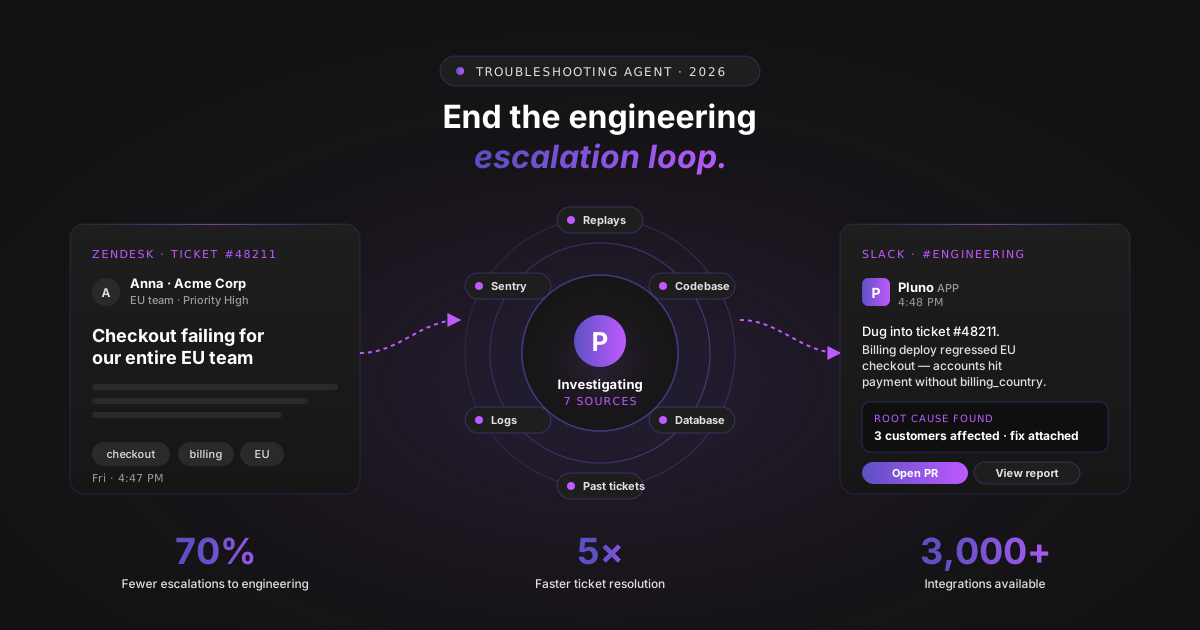
Pluno's Troubleshooting Agent brings this investigation layer to B2B SaaS support teams running complex products. According to Pluno's product page, the agent investigates the customer's account, the codebase, the database, Sentry issues, session recordings, and logs the moment a ticket arrives. Then it either resolves the issue with the customer or escalates with a complete brief.
Pluno reports 3,000+ available integrations across error tracking, observability, code hosting, databases, and messaging, with output surfaces in Slack, the support tool, an internal dashboard, or via API. Confirm which integrations match your stack and what depth of access each one provides during evaluation. Support engineers, escalation teams, solutions engineers, product engineers, and on-call responders all see the work happen in their existing tools.
The promise is direct: cut the time engineering spends on customer troubleshooting, resolve more support tickets without engineering involvement, and find issues before they are widely reported.
The following are representative workflows from Pluno's launch positioning and product page.
Scenario 1: Engineering gets a diagnosis, not a question
A Zendesk ticket comes in about a failing checkout flow. Pluno's troubleshooting agent investigates the codebase, the production database, Sentry, session recordings, and logs. It posts the following message into the customer's #engineering Slack channel:
Hey, a new Zendesk ticket came in about checkout failing, and I dug into it. This looks like a real issue, not a one-off. The latest billing deploy seems to have introduced a regression where some EU accounts hit the payment flow without a billing_country value. I attached a full report with the details and the fix I'd recommend. Want me to create a PR for it?
Compare this to the same ticket without Pluno. Support pings engineering for "checkout broken." Engineering asks for the customer's account ID, the request ID, and a screen recording. Support asks the customer. Two business days later, the engineer rebuilds context from scratch, opens Sentry, finds the regression, and ships a fix. Pluno collapses that loop into one Slack message with a recommended PR.
Scenario 2: The customer-side fix that never escalates
A different ticket comes in about a broken CSV export with confusing error messages. Pluno investigates, then sends an internal note in the Zendesk ticket:
Troubleshooting complete: customer-side fix available, no engineering escalation needed. Underlying cause: the customer's CSV export contains a field with unescaped commas (deal_source), which Excel auto-splits on open. This is not a product bug. Exports are completing successfully on our side (logs for request IDs exp_8821, exp_8834, exp_8851 all returned 200 OK). Checked: Sentry (clean), export logs (clean), session recording from 2027-04-19 14:22 UTC (confirms the misinterpretation), account config (healthy). Fix for the customer: change the export delimiter to semicolon or tab, or use Excel's Data > From Text/CSV flow instead of double-clicking.
The support agent reviews the note, sends the fix to the customer, and closes the ticket. Engineering is never paged. Without the agent, this ticket would have spent two days in #engineering while an engineer pulled logs and confirmed it was not a product issue.
Scenario 3: The incident detected before it spreads
Two unrelated tickets arrive within ten minutes. Pluno reads both, correlates them with a recent deploy and a spike in Sentry events, and posts an alert to the on-call channel before a third customer files a ticket. The team treats it as an incident rather than three separate tier-1 cases. The fix ships before the issue trends in the queue.
Scenario 4: The on-call engineer wakes up to a diagnosis, not a page
It is 2:14am Saturday. A high-value customer files a ticket about API errors. Without Pluno, the on-call engineer gets paged, opens their laptop, and starts investigating from scratch. With Pluno, the on-call engineer wakes up to a Slack message from the agent: "Investigated. Three customers hitting a rate-limit bug introduced in the 14:32 deploy. Suggested fix attached. Recommend rollback rather than forward-fix given the time of day." The engineer approves the rollback in a single message and goes back to sleep.
The thread across all four scenarios is the same: support engineers, escalation teams, on-call responders, and product engineers all see fully investigated tickets instead of half-formed escalations.
What this looks like for your engineering team
If you are a VP Engineering or CTO, the troubleshooting agent shows up in three measurable places.
Reclaimed deep-work hours. Every escalation that does not happen is focus time an engineer gets back, often 30 to 45 minutes once context-switching is counted. Model this against your own escalation volume to estimate the throughput you would gain back without hiring.
Cleaner on-call. Pages turn from "something is wrong, figure it out" into "here is what is wrong and what I recommend." On-call quality of life can be an important retention factor for senior engineers.
Fewer context-switches per sprint. Pluno reports that customers see meaningful drops in interruptions because most tickets either close with a customer-side fix or arrive at engineering with a diagnosed root cause and a recommended fix.
If you are a Head of Support Engineering or Technical Support, the same agent shows up differently:
Higher tier-1 resolution. Tickets your team would have bounced to engineering now close with the agent's diagnostic note, because the missing piece was access to logs and code, not skill.
Faster ramp for new hires. Junior agents learn the diagnostic flow by watching the agent investigate in their tickets. Pluno reports onboarding reductions in the 40 to 71 percent range for customers including Kojo and Innovorder; ask for customer proof during evaluation.
Better CSAT and customer satisfaction on complex tickets. Pluno reports customer deployments where first response time drops from over an hour to under a minute, because the agent starts investigating the moment the ticket arrives. Ask for customer proof during evaluation to confirm what is realistic for your stack.
Setup and implementation
According to Pluno, most teams are live within a day, and the agent begins suggesting troubleshooting steps as soon as it has read your historical tickets.
A typical rollout:
-
Connect Zendesk (or your support tool). Pluno learns from your historical tickets to understand recurring support issues, troubleshooting flows, and team-specific language.
-
Add internal sources. Slack, Jira, your help center, internal docs, error tracking like Sentry, observability tooling, code hosting, and any APIs the agent should query. Pluno's Troubleshooting Agent page lists 3,000+ supported integrations.
-
Set escalation policies. Define confidence thresholds, which Slack or Jira channels the agent can post to, and which actions require human approval. Code or data changes always require human approval, which is part of ensuring secure access to production systems.
-
Pilot on a narrow ticket category. Login problems, integration errors, export issues, or one specific product surface. Run the agent on those tickets first.
-
Measure and expand. Track engineering escalations, time to first response, autonomous resolution rate, and CSAT. Roll out to additional categories once you see the numbers move.
Per Pluno's public materials, the platform is SOC 2 Type 2 certified and GDPR compliant, data processing happens in Europe, models are hosted via Microsoft Azure, and customer data is not used to train external models. Confirm specifics with Pluno's security team or trust page during procurement to ensure your security posture stays up to date.
Outcomes and how to measure them
The metrics that matter most for the engineering escalation loop, in priority order.
| Metric | Why it matters | What Pluno customers report |
|---|---|---|
| Engineering escalation rate | Direct measure of the loop closing | Significant reductions across deployments |
| Engineering hours per customer ticket | Captures deep-work disruption, not just count | Investigation context arrives pre-built |
| Autonomous resolution rate | Tickets closed without a human touching them | ~65% average across 200+ Pluno teams |
| Time to first response | Customer-visible speed | Drops from over an hour to under a minute (Pluno-reported) |
| New-hire ramp time | Knowledge transfer through the agent | 40 to 71% reduction (Kojo, Innovorder, Pluno-reported) |
| CSAT on complex tickets | Confirms speed is not at the cost of customer satisfaction | Held or improved post-deployment |
Use Freshworks' benchmark report as a baseline for first-contact resolution, then compare pre- and post-Pluno performance against your own ticket data. Do not rely on vendor headline numbers; pilot first, measure against your baseline, and expand.
Stop paying engineers to investigate customer tickets
The escalation loop is not a process problem. It is a tooling problem. Support cannot reach the systems where the underlying cause lives, so the only way to resolve complex tickets today is to interrupt an engineer.
An AI troubleshooting agent closes that loop by doing the investigation before a human picks up the ticket. Support resolves more on its own. Engineering only sees tickets that arrive with a root cause and a recommended fix. On-call gets quieter. CSAT and customer satisfaction both go up.
FAQ
What is technical support troubleshooting?
It is the structured process of identifying, diagnosing, and resolving technical issues, especially the product-level issues that span support and engineering. A strong process runs through six steps: gather context, define scope, form ranked hypotheses, test the least-intrusive fix first, verify, and document.
What are the most common IT issues a support team should resolve before escalating?
Login credentials and password resets, internet connection and network resources problems, slow performance from full disk space or background processes consuming system resources, outdated software and compatibility problems, error messages with a clear diagnostic path, and hardware peripherals with simple proper connection checks. Most of these IT issues have well-known problems and solutions; the harder cases need product context that only an investigation across logs, code, and database can provide.
How do you build troubleshooting skills on a support team?
Train agents on a consistent resolution process: the six-step loop covered above. Use real tickets from the last 90 days as training cases. Pair junior agents with senior ones on complex tickets so problem solving skills transfer through observation rather than slide decks. Track first-contact resolution, escalation rate, and resolution time per agent to spot where the skills gap actually lives.
Why is customer escalation to engineering so expensive?
Every escalation forces context to bounce between four tools (the support tool, Jira, Slack, and production systems), and every handoff loses information. A 15-minute "quick question" can turn into 30 to 45 minutes of lost engineering focus once context-switching is counted. Multiply that by 30 escalations a week and you have a full FTE of engineering time spent on customer tickets.
What is the difference between a KB-first AI agent and an AI troubleshooting agent?
A KB-first agent answers from help center content. An AI troubleshooting agent investigates across past tickets, logs, error trackers, session recordings, and the codebase to find the underlying cause. The first handles simple FAQs; the second handles complex troubleshooting and is the category that actually reduces engineering escalations.
Can an AI agent work with Zendesk, Slack, and Jira?
Yes. According to Pluno's Troubleshooting Agent page, the agent runs inside Zendesk, posts to Slack channels, creates Jira tickets with full context, and syncs updates back automatically. The goal is to meet engineering and support in the tools they already use.
Is it safe to let an AI agent investigate production data?
Look for SOC 2 Type 2 certification, GDPR compliance, EU data processing, and a policy that customer data is not used to train external models. Pluno's public materials describe all four; confirm with the vendor's security team during procurement. Also require human approval for any action that modifies customer data or ships code.
How do you measure whether the troubleshooting agent is working?
Track engineering escalation rate, engineering hours per customer ticket, autonomous resolution rate, time to first response, and CSAT on complex tickets. The first two are the metrics that matter most for engineering leaders; the last three are the ones support leaders watch.
How long does setup take?
Pluno reports that most teams are live within a day, since the agent learns from historical tickets the moment it connects to the support tool rather than waiting for manual flow configuration.
Does the agent replace support agents or engineers?
No. The agent handles the investigation layer that neither role enjoys: pulling logs, correlating Sentry events, reading session recordings, and matching against past tickets. Support agents and engineers still handle judgment, communication, and the actual fix. Pluno reports that customers redeploy reclaimed time toward higher-value work, not headcount reduction.