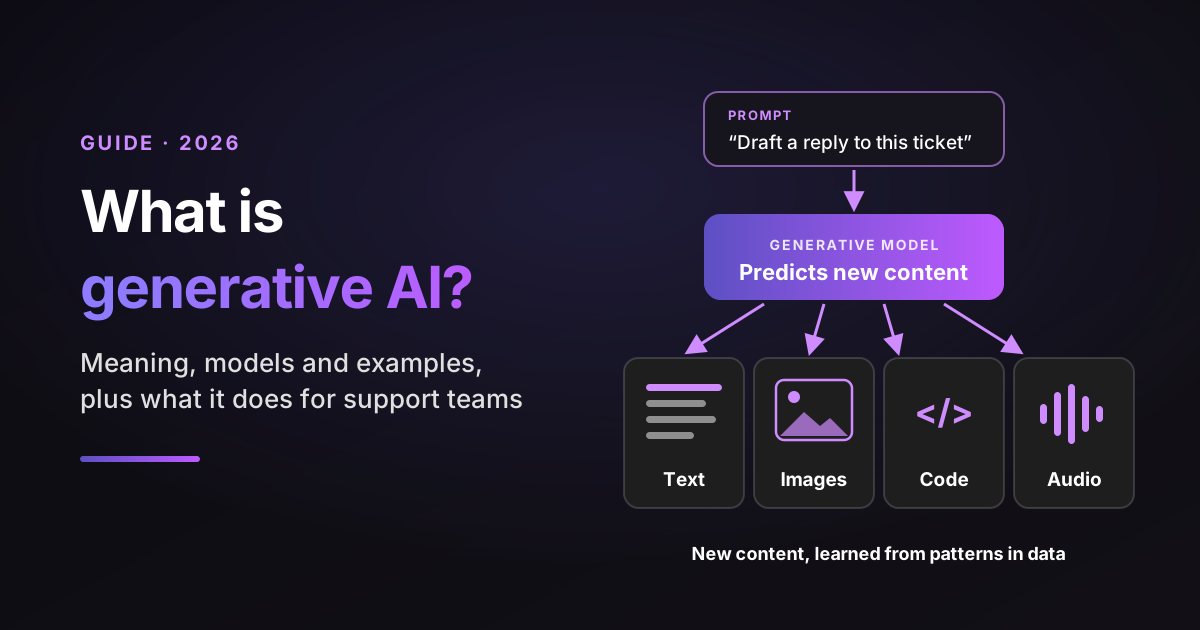
Generative AI is artificial intelligence that creates new content, such as text, images, code, audio or video, by learning patterns from huge amounts of existing data and predicting what should come next. Ask it to draft a reply to an angry customer and it writes one in seconds, in words nobody wrote before.
If you run a support team, you already meet this technology every day. It drafts replies in your help desk, summarizes long threads and powers the chatbot your customers either love or complain about.
The hard part isn't knowing that it exists. It's knowing what it can be trusted with.
This guide explains the meaning in plain words, how the technology works, the main generative AI models and real examples, then gets specific about support: where it saves time, where it fails and what it costs. When I compare models, tools and support jobs in this post, I use the same four yardsticks every time:
- Output: what it creates.
- Grounding: what it draws on, its training data alone or your own sources too.
- Failure mode: how it typically goes wrong.
- Human check: where a person should review the output before it matters.
Sources: every statistic links to its original source, with the date it was published or measured. Analyst forecasts are labeled as forecasts. Model names and prices were checked on each vendor's own pages on October 30, 2026, and they change often.
Disclosure: I work at Pluno, which sells an AI layer for help desks that resolves tickets, drafts replies for agents and escalates to engineering.
TL;DR
- What is generative AI? AI that creates new text, images, code, audio or video by predicting what should come next, based on patterns it learned from data.
- How it differs from other AI: predictive AI sorts and forecasts. Generative AI produces something new. Agentic AI uses generative AI inside a loop that also takes actions.
- The main generative AI models: large language models (LLMs) for text and code, diffusion models for images and video, plus GANs, VAEs and multimodal models.
- The proof for support teams: in a study of 5,172 support agents, a generative AI assistant raised issues resolved per hour by 15% on average, with the biggest gains for less experienced agents.
- The main risk: confident wrong answers. Ground every answer in your own help center and resolved tickets, and keep a human check where mistakes are costly.
- My recommendation for B2B support teams: start with drafts and summaries that a person reviews, then let AI answer customers once quality is proven. For technical, account-specific tickets, shortlist Pluno: Velotric cut agent time on a copilot-assisted ticket from about 20 minutes to under 5.
Generative AI meaning: what it is and what it does for your team
In plain terms, it's AI that makes things. You give it a prompt, a request in plain language, and it returns new content that fits the request: an email, a summary, a picture, a few lines of code.
The big definitions agree on the core idea. IBM calls it AI "that can create original content", and AWS describes a type of AI "that can create new content and ideas". The US government's NIST Generative AI Profile (July 2024) uses a stricter wording: models that learn the structure of their input data to generate "derived synthetic content".
That last phrase is the useful one for you. The model doesn't look answers up in a database. It produces new output that resembles what it learned, which is why it can write fluently about your refund policy and still get the refund window wrong.
For a support team, the payoff shows up in three places:
- Writing: first drafts of replies, macros and help center articles.
- Reading: summaries of long threads, call transcripts and escalations.
- Sorting: tags, priority and fields filled from what the customer actually wrote.
Adoption is already mainstream. The Stanford AI Index 2026 reports, using McKinsey survey data, that 79% of respondents said their organizations regularly used generative AI in at least one business function in 2025, up from 71% in 2024. The same report finds generative AI reached 53% adoption in three years, faster than the personal computer or the internet.
Generative AI vs traditional AI
Traditional AI, often called predictive or analytical AI, sorts and forecasts. It answers questions like "is this email spam?" or "which customers are likely to churn?" with a label or a score.
Generative AI answers a different kind of request: "write the reply" or "summarize this call". The output is new content, not a label.
In practice, the two often work side by side. A help desk might use a predictive model to route a ticket and a generative model to draft the answer.
Generative AI vs agentic AI
A generative model creates content when you ask. Agentic AI uses that ability inside a loop: it decides the next step, calls tools such as an order lookup and checks the result before it finishes.
So every AI agent relies on a generative model, but most generative tools are not agents. I cover the agent side in depth in my guide to agentic AI.
| Kind of AI | Output | Grounding | Failure mode | Human check |
|---|---|---|---|---|
| Predictive AI | A label, score or forecast | Your historical data | Wrong category or score | Spot checks on the labels |
| Generative AI | New text, images, code or audio | Training data, plus sources you add | Fluent but wrong content | Review before it reaches a customer |
| Agentic AI | Completed tasks, plus content | Your data and connected tools | Wrong action taken | Approval for risky actions |
How does generative AI work?
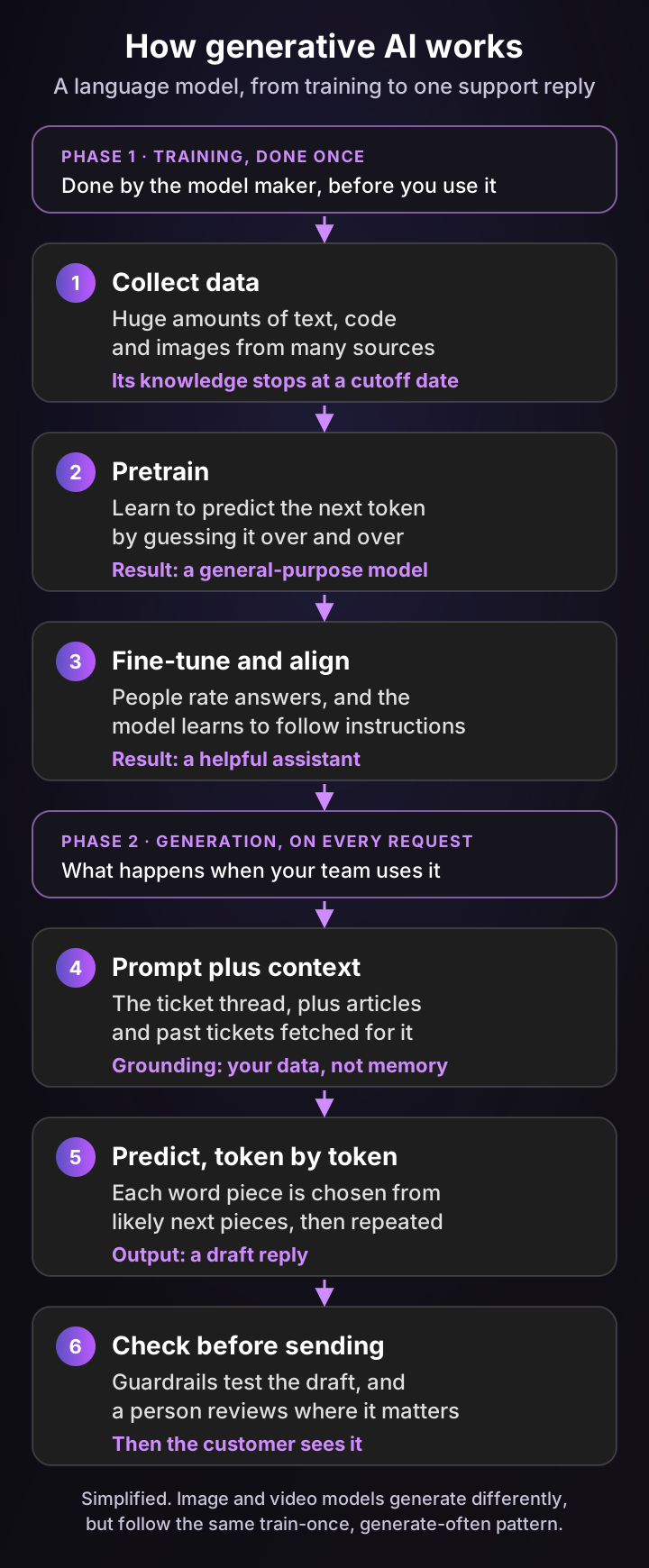
It works in two phases. First, a model learns patterns from a huge amount of data during training. Then, every time you send a prompt, it uses those patterns to generate new output, one small piece at a time.
Training: learning patterns from data
A large language model starts by reading a vast amount of text and code. During pretraining it plays one game billions of times: guess the next token, a word or part of a word, then adjust when the guess is wrong. OpenAI's GPT-3 paper (May 2020) described exactly this kind of "autoregressive language model", with 175 billion parameters.
Pretraining produces a model that can continue any text but isn't yet a good assistant. Fine-tuning fixes that. People rate and correct its answers, and the model learns to follow instructions, refuse harmful requests and stay on topic.
One consequence matters for support. The model's built-in knowledge stops at a training cutoff and rarely covers your product in detail, so on its own it knows nothing about your latest release or last week's pricing change.
Generation: predicting one token at a time
When you send a prompt, the model breaks it into tokens, then predicts the most likely next token, adds it and repeats. A 150-word reply is a few hundred of these predictions in a row.
Each choice is a probability, not a lookup. That's why the same prompt can give slightly different answers, and why a wrong answer can sound just as confident as a right one.
Grounding: why your own data matters most
Grounding means giving the model trusted information to work from at the moment it answers. The most common method is retrieval-augmented generation (RAG): the system first searches your sources for relevant passages, then passes them to the model with the question.
Here's an illustrative example. A customer asks, "Can I export my invoices as CSV?" Without grounding, the model guesses from what similar products do. With grounding, it reads your help center article and a resolved ticket from last month, and answers from those, with links.
In support, grounding is the difference between a demo and a tool you can trust. Resolved tickets matter as much as articles, because they record how your team actually fixed problems, including the edge cases nobody documented.
A short history of generative AI, from GANs to ChatGPT
The technology is older than ChatGPT. The key building blocks arrived between 2013 and 2020, and ChatGPT made them usable by anyone in November 2022.
| Date | Milestone | Why it mattered |
|---|---|---|
| December 2013 | Variational autoencoders (VAEs) | A practical way to learn a compact code for data and sample new variations |
| June 2014 | Generative adversarial networks (GANs) | Two networks compete, which produced the first strikingly realistic images |
| June 2017 | The transformer, "Attention Is All You Need" | The architecture behind today's large language models |
| May 2020 | GPT-3 | Showed that one very large model could handle many tasks from a prompt |
| June 2020 | Denoising diffusion models | The approach behind most modern image and video generators |
| November 30, 2022 | ChatGPT launches | A chat interface put generative AI in front of the public |
| August 1, 2024 | EU AI Act enters into force | The first broad law with rules for general-purpose AI models |
| September 2026 | Claude Fable 5.1, then Claude Opus 5.5 and Gemini 4 Argon | A new round of flagship models, alongside OpenAI's GPT-6 family |
The pace hasn't slowed. On the Stanford AI Index 2025, the cost of running a model at GPT-3.5's level dropped more than 280-fold between November 2022 and October 2024.
Generative AI models: the 5 families and what each creates
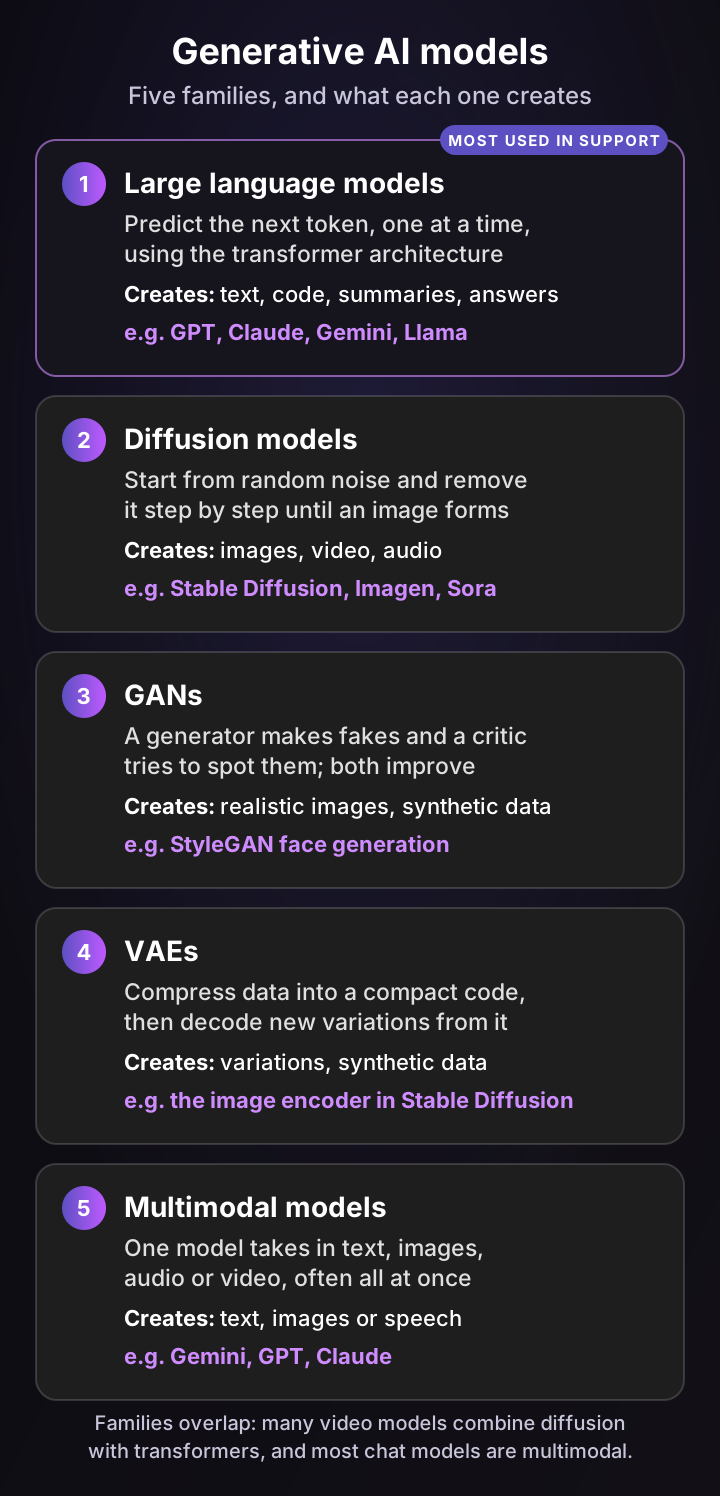
Generative AI models fall into five broad families. Large language models handle text and code, and they power almost every support tool. Diffusion models create images and video, and GANs, VAEs and multimodal models fill in the rest.
1. Large language models (LLMs)
An LLM predicts the next token using the transformer architecture. IBM explains that transformers use attention to focus on "what's most important about data within a sequence", which lets them keep track of a long conversation.
LLMs write replies, summaries, code and structured data. They're also the family most likely to be inside your help desk, whether as a reply drafter, a summarizer or a customer-facing AI agent.
2. Diffusion models
A diffusion model learns by adding noise to images until they're unrecognizable, then learning to reverse the process. To generate, it starts from pure noise and removes it step by step until an image matches the prompt.
Most image generators work this way, and video models extend the idea across frames. The Denoising Diffusion Probabilistic Models paper from June 2020 is the usual starting point.
3. Generative adversarial networks (GANs)
A GAN pairs two networks. A generator creates fakes, and a discriminator tries to tell them from real data, so each pushes the other to improve, as Goodfellow and co-authors described in 2014.
GANs produced the first photo-realistic synthetic faces. Today they're more common in niche jobs, such as creating synthetic training data, than in mainstream tools.
4. Variational autoencoders (VAEs)
A VAE compresses data into a compact code, then decodes new variations from it. IBM puts it simply: VAEs can "decode multiple new variations of the content".
You rarely use a VAE on its own. They often work inside larger systems, such as the image encoder in Stable Diffusion, or in anomaly detection.
5. Multimodal models
A multimodal model takes in more than one kind of data, such as text, screenshots and audio, and can answer across them. Most flagship assistants now work this way.
For support, multimodal matters more than it sounds. Customers send screenshots of error messages, and a model that reads the image can answer the question the customer didn't type.
| Model family | Output | Grounding | Failure mode | Human check |
|---|---|---|---|---|
| Large language models | Text, code, summaries | Training data, plus your retrieved sources | Confident wrong facts | Review customer-facing answers |
| Diffusion models | Images, video, audio | Training images, plus any reference you give | Garbled text, odd details | Review before publishing |
| GANs | Realistic images, synthetic data | Training data only | Narrow range of outputs | Check the data looks real enough |
| VAEs | Variations, compact codes | Training data only | Blurry or generic output | Usually built into other tools |
| Multimodal models | Text, images or speech | Mixed inputs, plus your sources | Misreading an image or chart | Spot-check the hard cases |
Today's leading generative AI models
As of October 2026, these are the flagship models on each vendor's own model pages:
- Text and code: OpenAI's GPT-6 family, Anthropic's Claude Fable 5.1 and Claude Opus 5.5, Google's Gemini 4 Argon, Meta's Muse and Llama 4 models and Mistral Large 4, which Mistral releases as an open-weight model.
- Images: Midjourney V8.2, OpenAI's image models and Stable Diffusion 3.5.
- Video: Google's Veo 3.1. OpenAI shut down the Sora 2 models in its API on September 24, 2026, a reminder that tools in this field come and go.
- Speech: ElevenLabs' Eleven v4 text-to-speech model.
8 generative AI examples you can try today
The clearest generative AI examples share a pattern: a person asks in plain language and gets a usable first draft. Here are eight, with the same four yardsticks applied to each.
1. Writing and chat assistants
ChatGPT, Claude and Gemini write emails, explain concepts and rewrite text in another tone. They're the most familiar face of generative AI.
- Output: text. Grounding: training data, plus files or web results you add. Failure mode: made-up facts. Human check: you read before you use it.
2. Coding assistants
GitHub Copilot and Claude Code suggest and write code inside a developer's editor or terminal. Support engineers use them to write scripts, queries and small fixes.
- Output: code. Grounding: your codebase. Failure mode: subtle bugs. Human check: code review and tests.
3. Image generation
Midjourney, Stable Diffusion and OpenAI's image models turn a text prompt into a picture or edit an existing one. Marketing teams use them for concepts and illustrations.
- Output: images. Grounding: training images, plus any reference image. Failure mode: odd details and garbled text. Human check: review before publishing, including usage rights.
4. Video generation
Veo creates short video clips with sound from a text prompt or an image. Teams use it for product explainers and ad concepts.
- Output: video. Grounding: training data, plus a reference image. Failure mode: physics and continuity errors. Human check: frame-by-frame review.
5. Voice and speech
ElevenLabs turns text into natural-sounding speech in many languages. In support, the same technology reads out answers in voice channels.
- Output: audio. Grounding: a voice sample and your script. Failure mode: wrong emphasis, or misuse of cloned voices. Human check: consent for any cloned voice, plus listening tests.
6. Summaries of tickets, calls and meetings
Summaries are the quiet workhorse of the whole field. A model reads a 20-message ticket or a 30-minute call and returns the issue, what was tried and what's next.
- Output: a short summary. Grounding: the thread or transcript itself. Failure mode: dropping the one detail that mattered. Human check: the agent skims it against the thread on hard tickets.
7. Research with cited answers
Research tools such as Gemini Deep Research search many sources and write a report with citations. They save hours on competitor scans and policy questions.
- Output: a cited report. Grounding: web pages it retrieves. Failure mode: citing a source that doesn't say what the report claims. Human check: open the key citations.
8. Answering customer support tickets
AI agents and copilots in your help desk read a ticket, retrieve your help center articles and past resolutions, and write a reply. A copilot hands the draft to a human agent, while an AI agent can send it directly within rules you set.
- Output: a reply. Grounding: your help center, resolved tickets and account data. Failure mode: a plausible answer built on an outdated article. Human check: the agent edits drafts, and guardrails decide when AI answers alone.
| Example | Output | Grounding | Failure mode | Human check |
|---|---|---|---|---|
| Writing assistants | Text | Training data, plus what you add | Made-up facts | You read before using |
| Coding assistants | Code | Your codebase | Subtle bugs | Code review and tests |
| Image generation | Images | Training images, plus a reference | Odd details | Review before publishing |
| Video generation | Video | Training data, plus a reference | Continuity errors | Frame-by-frame review |
| Voice and speech | Audio | Voice sample and script | Misused voices | Consent and listening tests |
| Summaries | Short summary | The thread or transcript | Missing key detail | Skim on hard tickets |
| Research | Cited report | Retrieved web pages | Wrong citations | Open key sources |
| Support replies | Customer reply | Help center, past tickets, account data | Outdated answer | Draft review or guardrails |
Generative AI in customer service: where it helps your team most
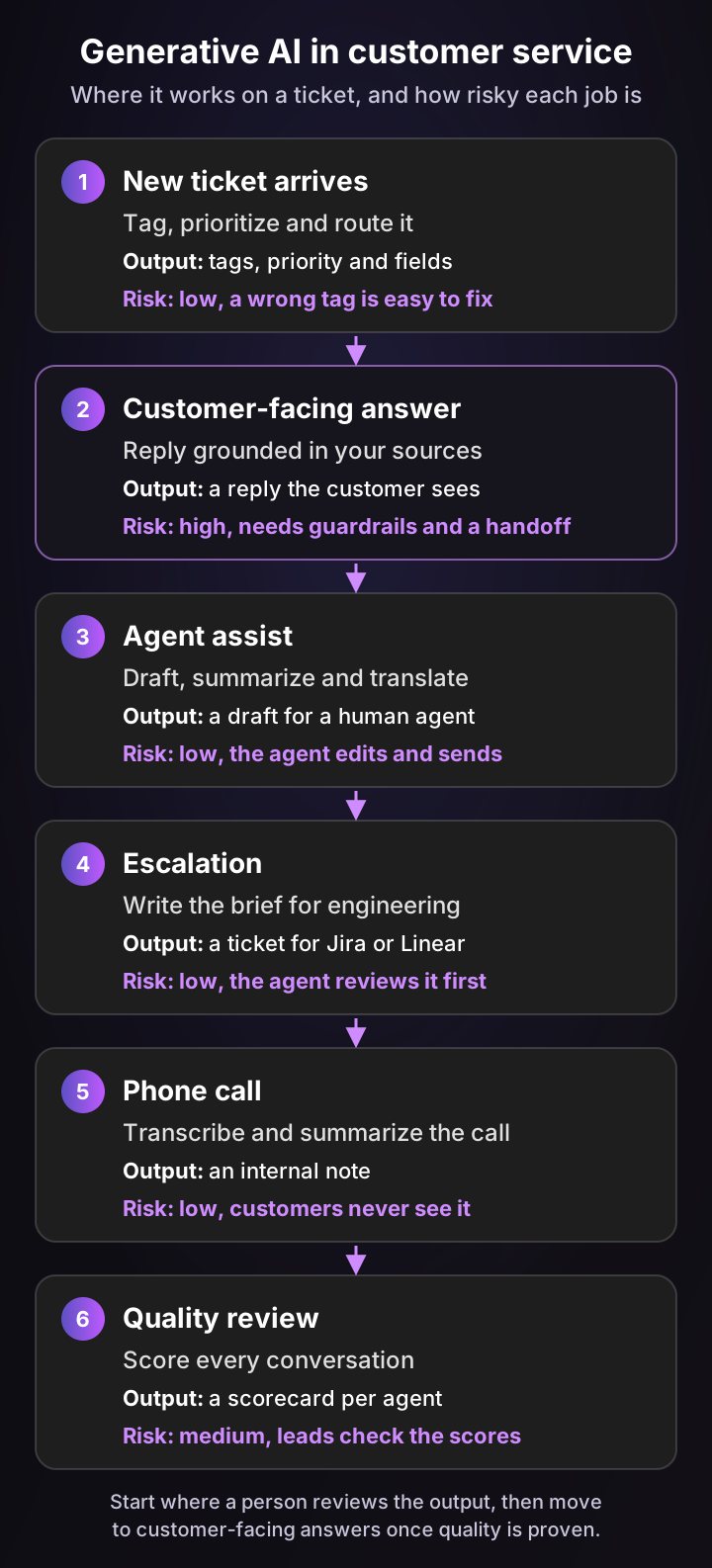
Generative AI in customer service does six jobs: it tags tickets, answers customers, drafts replies for agents, writes escalation briefs, summarizes calls and scores quality. The jobs where a person reviews the output are the safest place to start.
What the research says about productivity
The strongest evidence comes from a study of real support work. Erik Brynjolfsson, Danielle Li and Lindsey Raymond tracked 5,172 customer support agents who got a generative AI assistant that suggested replies. In the published version in the Quarterly Journal of Economics (May 2025), issues resolved per hour rose 15% on average.
The gains were uneven, and that's the useful part. Less skilled and less experienced agents improved the most, with gains of around 30%, while the most experienced agents saw little change. In other words, the assistant spread the know-how of top agents to everyone else.
McKinsey's 2023 analysis estimated generative AI could add $2.6 trillion to $4.4 trillion a year across 63 use cases. For customer care specifically, it put the productivity value at 30 to 45% of current function costs. That's a forecast, not a measured result, but it explains why support was one of the first functions to adopt.
The six jobs, from safest to riskiest
| Support job | Output | Grounding | Failure mode | Human check |
|---|---|---|---|---|
| Call summaries | Internal note | The call transcript | Missing a key promise | None needed for most calls |
| Ticket tagging and fields | Tags, priority, fields | The ticket and customer data | Wrong tag or route | Spot checks; easy to fix |
| Escalation briefs | Jira or Linear ticket | Thread, troubleshooting history | Missing reproduction steps | Agent reviews before filing |
| Agent reply drafts | Draft reply | Help center, past tickets, account data | Outdated or wrong answer | Agent edits and sends |
| Quality scoring | Scorecard per agent | Your QA rubric and knowledge base | Unfair or inconsistent scores | Leads calibrate regularly |
| Customer-facing answers | Sent reply | Help center, past tickets, account data | Confident wrong answer | Guardrails and handoff rules |
The order isn't a ranking of value. Customer-facing answers often save the most time, which is exactly why they deserve the most care.
What customers expect when AI answers
Customers accept AI answers, as long as they can still reach a person. In a Gartner survey of 3,566 customers published in August 2026, 87% said companies using generative AI for customer service must offer access to a human agent.
Service teams are moving fast anyway. In Salesforce's State of Service report from November 2025, service teams estimated AI handles 30% of their cases today and projected 50% by 2027. For the full picture of AI that answers customers, see my guide to conversational AI for customer service.
The risks of generative AI and how to manage them
The biggest risk is a confident wrong answer, and you manage it the same way you manage a new hire: give it the right sources, limit what it can do alone and check its work. The other risks, from privacy to copyright, are mostly about which tools you choose.
Hallucinations: confident wrong answers
A hallucination is output that sounds right but isn't supported by any source. NIST calls it confabulation: "The production of confidently stated but erroneous or false content".
Even the best models still do it. On Vectara's hallucination leaderboard, updated October 22, 2026, current flagship models from OpenAI, Anthropic and Google added unsupported claims to between 6.5% and 12.1% of document summaries. That test measures one narrow task, summarizing a given document, so treat it as a signal rather than a rate for your tickets.
Wrong answers have real costs. In Moffatt v. Air Canada (February 14, 2024), the airline's website chatbot gave a customer wrong information about bereavement fares. Air Canada argued, in the tribunal's words, that the chatbot was "a separate legal entity that is responsible for its own actions".
It lost. The tribunal ordered it to pay $650.88 in damages, plus interest and fees, because the company is responsible for everything on its website.
Data privacy and security
Anything you send to a model may be stored or processed by its provider. Before you connect customer data, check where it's processed, whether the vendor trains models on it and who can access it.
Prompt injection is the security risk unique to this technology. A customer message or a retrieved document can contain hidden instructions, and OWASP ranks prompt injection first among risks for LLM applications.
Copyright and ownership
Who owns generated content, and whether training on copyrighted works is allowed, is still being settled in courts and by regulators. The US Copyright Office has published a multi-part report on AI, covering copyrightability in January 2025 and training in a pre-publication version in May 2025.
For support content, the practical risk is lower. Your replies and articles are built from your own knowledge, but check your vendor's terms on who owns the output.
Regulation: the EU AI Act
The EU AI Act entered into force on August 1, 2024. Obligations for general-purpose AI models applied from August 2, 2025, and most of the Act, including its transparency rules, applied from August 2, 2026.
For support teams, Article 50 is the one to know. It requires that people are informed when they're interacting with an AI system, and that AI-generated content is marked in a machine-readable format.
Environmental cost
Running these models uses real energy. The Stanford AI Index 2026 reports AI data center power capacity of 29.6 GW, comparable to New York state at peak demand. Per-query energy ranged from roughly 5 to 23 watt-hours across the models it compared, for prompts of about 1,000 tokens in and out.
| Risk | What it looks like in support | How to manage it |
|---|---|---|
| Hallucinations | A refund window that doesn't exist | Ground answers in your sources and hand off when they disagree |
| Data privacy | Customer data used to train a public model | Check processing region, training policy and access controls |
| Prompt injection | A message telling the AI to ignore its rules | Enforce permissions outside the model and limit tools |
| Copyright | Unclear ownership of generated content | Read the vendor's output terms |
| Regulation | Customers not told they're talking to AI | Label AI answers and keep a route to a human |
| Environmental cost | Heavy models used for simple jobs | Use smaller models where they do the job |
What does generative AI cost?
You pay for it in one of two ways. Model APIs charge per million tokens of input and output, which often works out to cents per ticket. Finished products charge per seat, per resolution or per conversation, on top of a platform fee.
Model API prices, per million tokens
Here's what the main providers list on their own pricing pages, checked October 30, 2026, in USD at standard rates:
| Model | Provider | Input | Output |
|---|---|---|---|
| GPT-6 Astra | OpenAI | $10.00 | $50.00 |
| GPT-6.1 Sol | OpenAI | $2.00 | $10.00 |
| GPT-6 Luna | OpenAI | $0.10 | $0.50 |
| Claude Fable 5.1 | Anthropic | $10.00 | $50.00 |
| Claude Opus 5.5 | Anthropic | $4.00 | $20.00 |
| Claude Sonnet 5.5 | Anthropic | $2.00 | $10.00 |
| Claude Haiku 5.5 | Anthropic | $0.10 | $0.50 |
| Gemini 4 Argon | $2.00 | $10.00 | |
| Gemini 3.8 Flash | $0.75 | $3.75 |
Some rates depend on prompt length or date. OpenAI's prices are for prompts up to 272K tokens, and Claude Haiku 5.5 costs more above 100K. Google's Gemini 4 Argon rate rises to $4 / $20 from December 1, 2026, and Gemini 3.8 Flash to $1.50 / $7.50 from January 1, 2027.
Finished products: seats, resolutions and platform fees
Most support teams don't call a model API directly. They buy a product that handles retrieval, integrations and guardrails, and pay per seat for agent tools or per resolution for AI agents.
Pluno, for example, charges a base fee that scales with your monthly ticket volume, starting at 249€ a month for up to 500 tickets, or 210€ a month billed annually. AI Copilot is 49€ per seat a month, and Deflection AI is 0.90€ per resolved ticket, with escalations not billed. Full prices are on the pricing page, and my guide to agentic AI costs compares billing models across vendors.
Unit costs aren't guaranteed to keep falling. In January 2026, Gartner predicted that generative AI cost per resolution will exceed $3 by 2030, more than many offshore human agents.
The costs below the waterline
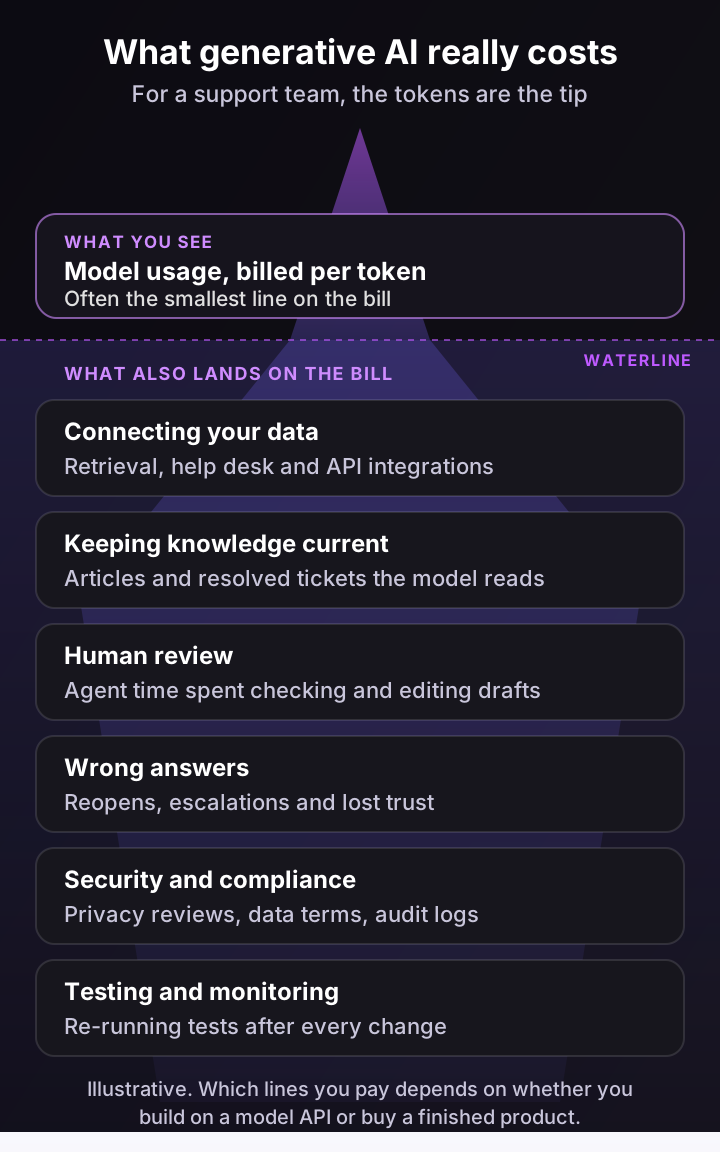
The token bill is usually the smallest part. The rest of the cost sits in the work around the model: connecting your data, keeping knowledge current and reviewing what it writes.
Run your own numbers
The calculator below estimates the raw model bill if you call an API yourself, next to the value of the agent time it saves. It starts at Claude Sonnet 5.5's list prices of $2 and $10 per million tokens, with 8,000 input tokens per call for the thread plus retrieved sources.
Generative AI cost calculator: what do the tokens cost per ticket?
Estimates the raw model bill when you call a model API yourself: every draft or answer sends the ticket thread and retrieved articles as input tokens and gets the reply back as output tokens. Set the prices per million tokens from the model's own pricing page. It leaves out everything else on the bill: retrieval, integrations, hosting, review time, errors and any product fees. Bought products usually charge per seat or per resolution instead. Your own numbers, not benchmarks.
Model cost a month
$189
$144 input + $45 output, 9,000 generations
Model cost per ticket
$0.063
Tokens only, nothing else on the bill
Value of agent time saved
$3,500
100 agent hours a month
At these settings, the tokens cost 5% of the agent time they save. The model bill is rarely what decides the business case. What decides it is whether the drafts are good enough to save those minutes.
At the default settings, 3,000 tickets with three generations each cost about $189 a month in tokens, around 6 cents a ticket. The two minutes of agent time saved per ticket are worth about $3,500. That's why the business case rarely depends on the model price, and almost always depends on whether the drafts are good enough to use.
How to start using generative AI in your support team in 6 steps
The safest way to start is inside your team, not in front of customers. Begin with drafts and summaries that a person reviews, measure the time saved, then widen the scope. Here's the sequence I'd follow.
- Pick one internal job first. Ticket summaries or reply drafts for your highest-volume category are good starting points. A person sees every output, so mistakes cost minutes, not customers.
- Fix your sources. Check that the answers live somewhere the AI can read: help center articles, resolved tickets and internal docs. If your best agents answer from memory, write it down before launch.
- Measure a baseline. Record handle time, first response time and reopen rate for that category before you switch anything on. My guide to customer service metrics covers how to track each one.
- Test on past tickets. Run the AI on a set of recent tickets, using only what was known when each arrived, and score the answers for accuracy, tone and whether they'd have solved the problem.
- Set guardrails before customers see anything. Decide which topics the AI may answer alone, which it must hand off and what a handoff includes. Label AI answers and keep a clear route to a human.
- Review weekly, then widen. Read a sample of outputs every week, track how much agents edit the drafts and fix the sources behind repeat mistakes. Move to customer-facing answers once a category's drafts rarely need changes.
Most teams also need a data review before step one. Ask every vendor where data is processed, whether it trains models on your data and how long it keeps prompts.
What support teams say about generative AI
Here's what practitioners say in their own words, including one Pluno customer. Each card is one person's experience, not a benchmark.
“If a customer sends a huge, novel-length email or a ticket gets transferred to me with 20 back and forth messages, the AI creates a quick bulleted summary. It saves me so much time because I don’t have to read the whole thread to know the problem.”
“Instead of customers waiting anywhere from 2 to 5 business days for a reply, they’re getting an instant response from Finn. ... That’s 1,271 tickets that our two-person customer support team no longer has to handle.”
“Pluno helped us turn repetitive questions into scalable AI-assisted support while allowing us to focus our time and expertise where human involvement matters most.”
“Fin sometimes gives incorrect answers, so we still need to review its responses to make sure customers receive accurate information.”
“As far as the fin chatbot, I don't like how much it hallucinates and gives people incorrect answers.”
Three lessons stand out:
- Summaries pay off on the first day. Reading a 20-message thread is pure overhead, and a summary removes it without any risk to the customer.
- Instant answers change the math for small teams. One two-person team describes 1,271 tickets it no longer has to handle, and replies that went from days to seconds.
- Hallucinations are still the main complaint. Two reviewers say the AI gives incorrect answers often enough that responses still need review. That's an argument for grounding answers in your own resolved tickets and handing off when sources disagree.
How Pluno uses generative AI inside your help desk
Pluno is an AI layer for help desks: it runs inside Zendesk, Intercom, Salesforce Service Cloud, HubSpot, Jira Service Management and Freshdesk, so you keep your tickets, macros and reporting. It adds AI across your support workflows, from the first reply to the engineering escalation.
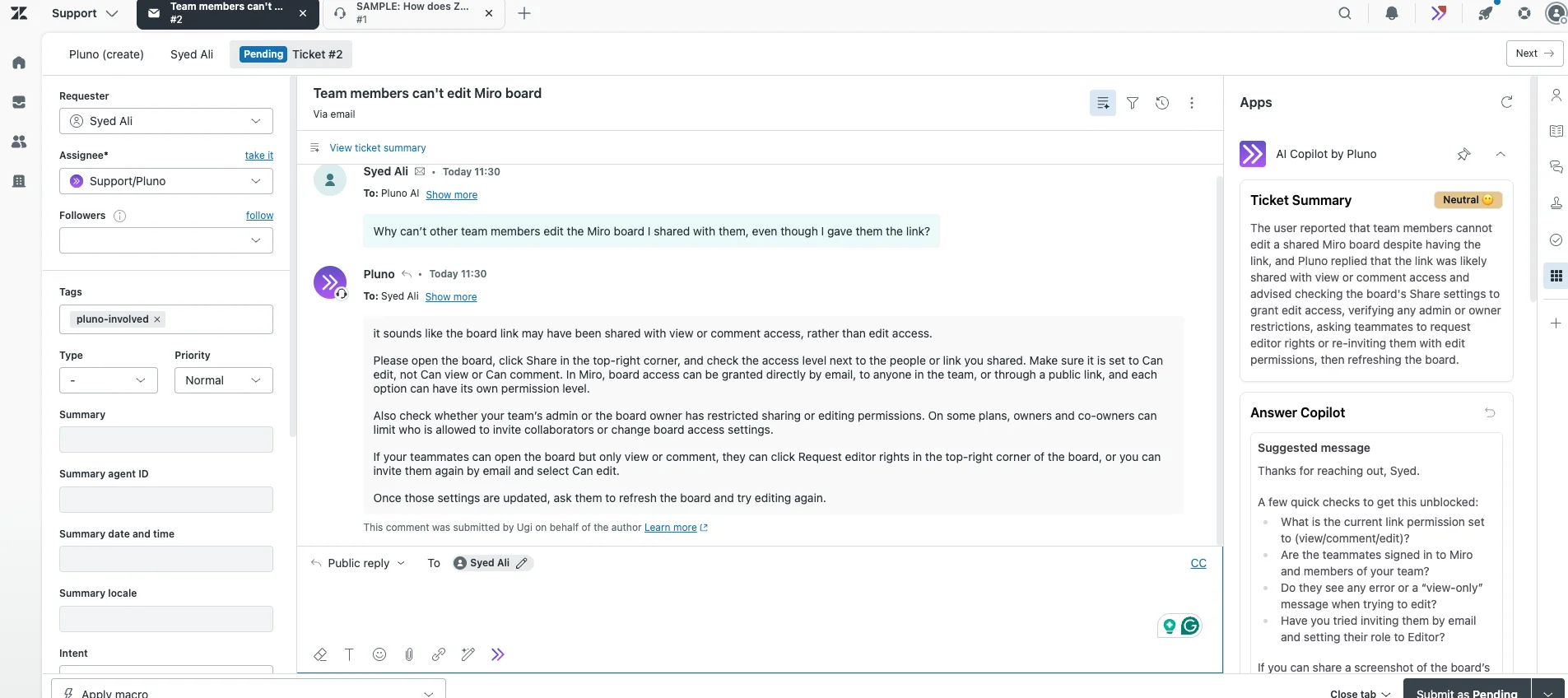
Demo ticket in a Zendesk sandbox. AI Copilot summarizes the thread and drafts a reply in the sidebar before the agent opens the ticket.
Generative AI grounded in how your team actually resolves tickets
- Drafts for every message. AI Copilot pre-generates a suggested reply in the help desk sidebar for every incoming customer message, with cited sources and troubleshooting steps. Agents refine it through a chat interface, and it regenerates on each new message.
- Answers learned from your resolved tickets. Pluno reconstructs the troubleshooting steps your agents actually used from past tickets, favoring the latest successful resolutions, alongside your help center, docs and connected tools.
- Answers only when the sources agree. Deflection AI replies to customers only when its sources agree and your AI Workflows allow it. Otherwise it escalates with a research summary, ticket references and next steps.
- Summaries and fields without typing. AI Tagging & Field Filling sets tags, priority and custom fields with a justification for each value, and Call Insights & Summary turns call recordings into structured internal notes.
- Briefs and quality reviews. Escalation Copilot writes the escalation brief for Slack, Jira, Linear, Microsoft Teams or incident.io, and Quality Assurance scores every conversation against your own rubric.
Built for customer data
Pluno's language models are hosted via Microsoft Azure, model providers never access customer data and no models are trained on it. Data is processed in the EU or EEA, and Pluno has been SOC 2 Type 2 certified since March 2025.
What teams report
- Velotric: agent time on a copilot-assisted ticket fell from about 20 minutes to under 5, and the AI agent handles 58% of routed tickets (full story).
- Waste Vision: agents save 2 to 5 minutes on every ticket they touch, and Deflection AI resolves 10 to 20% of incoming tickets (full story).
- Innovorder: Pluno resolves 67% of chat tickets, with replies in under a minute (full story).
The bottom line
Generative AI creates new content by predicting what should come next, based on patterns it learned from data. For support teams, its value comes from writing, reading and sorting work your agents do hundreds of times a day, and its main risk is a fluent answer that's wrong.
The teams that get the most from it start where a person reviews the output, ground every answer in their own help center and resolved tickets, then let AI answer customers category by category. If you run B2B support with technical, account-specific tickets, Pluno is the option I'd test first: it drafts and answers from how your team actually resolved past tickets, inside the help desk you already use.
FAQ
What is generative AI in simple terms?
It's AI that makes new things, such as text, pictures, code or audio, when you ask it in plain language. It learned patterns from huge amounts of examples and uses them to predict what a good answer looks like.
What is generative AI designed to do?
It's designed to produce new content that fits a request: drafting, summarizing, translating, writing code or creating images. It's not designed to look up guaranteed facts, which is why important answers need grounding in trusted sources.
What is the difference between AI and generative AI?
Generative AI is one type of AI. Traditional AI mostly classifies and predicts, such as flagging spam or forecasting churn, while the generative kind creates new content, such as a reply or a summary.
Is ChatGPT generative AI?
Yes. ChatGPT is a chat app built on OpenAI's large language models, which generate text, code and images in response to prompts. OpenAI launched ChatGPT on November 30, 2022.
Is generative AI the same as an LLM?
No. A large language model (LLM) is one kind of generative AI model, the kind that works with text and code. The category also includes diffusion models for images and video, GANs, VAEs and speech models.
What are generative AI models?
They're trained systems that create new data similar to what they learned from. The main families are large language models, diffusion models, generative adversarial networks (GANs), variational autoencoders (VAEs) and multimodal models.
What are some generative AI examples?
Common generative AI examples include writing assistants such as ChatGPT, Claude and Gemini, coding assistants such as GitHub Copilot, image generators such as Midjourney, video generators such as Veo, text-to-speech from ElevenLabs, and support tools that draft or send replies to tickets.
How is generative AI used in customer service?
In customer service, it drafts replies for agents, answers customers directly from your help center and past tickets, summarizes threads and calls, fills ticket fields, writes escalation briefs and scores conversations for quality.
What are the limitations of generative AI?
It can state wrong information confidently, its built-in knowledge stops at a training cutoff and it can't verify facts on its own. It also raises privacy, copyright and security questions, so it works best with trusted sources and human review.
Is generative AI bad for the environment?
It uses significant energy. The Stanford AI Index 2026 reports AI data center capacity of 29.6 GW, and per-query energy varies several-fold between models, so using a smaller model for simple jobs reduces the footprint.
When was generative AI created?
Early generative models go back decades, but the modern field took shape between 2013 and 2020 with VAEs, GANs, the transformer and diffusion models. It went mainstream when ChatGPT launched in November 2022.