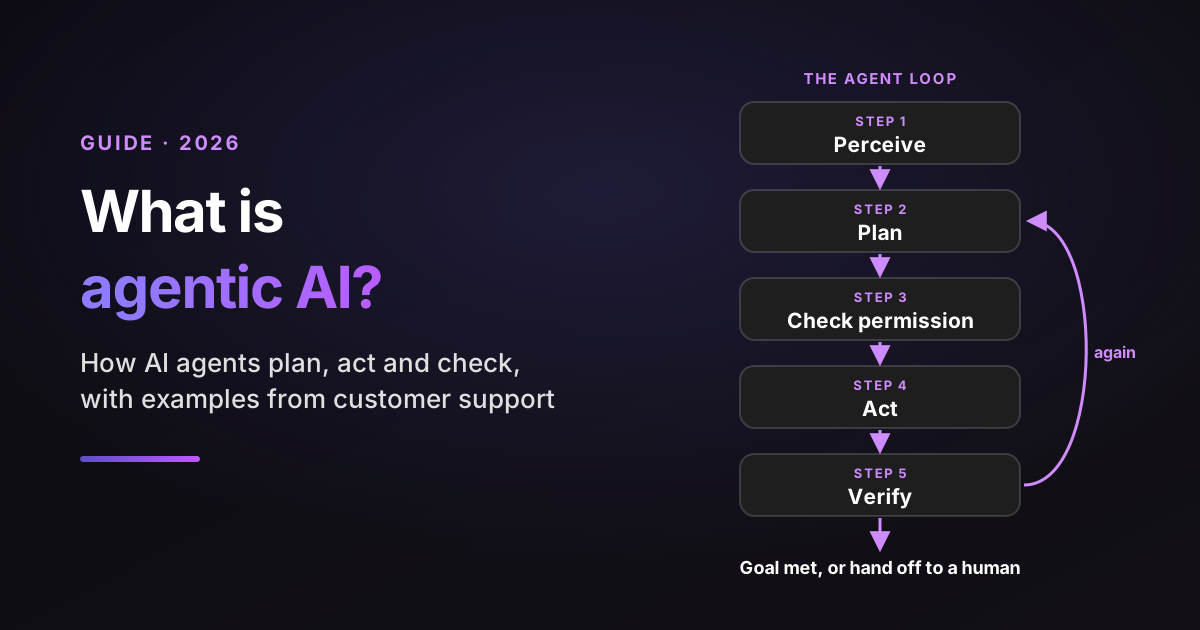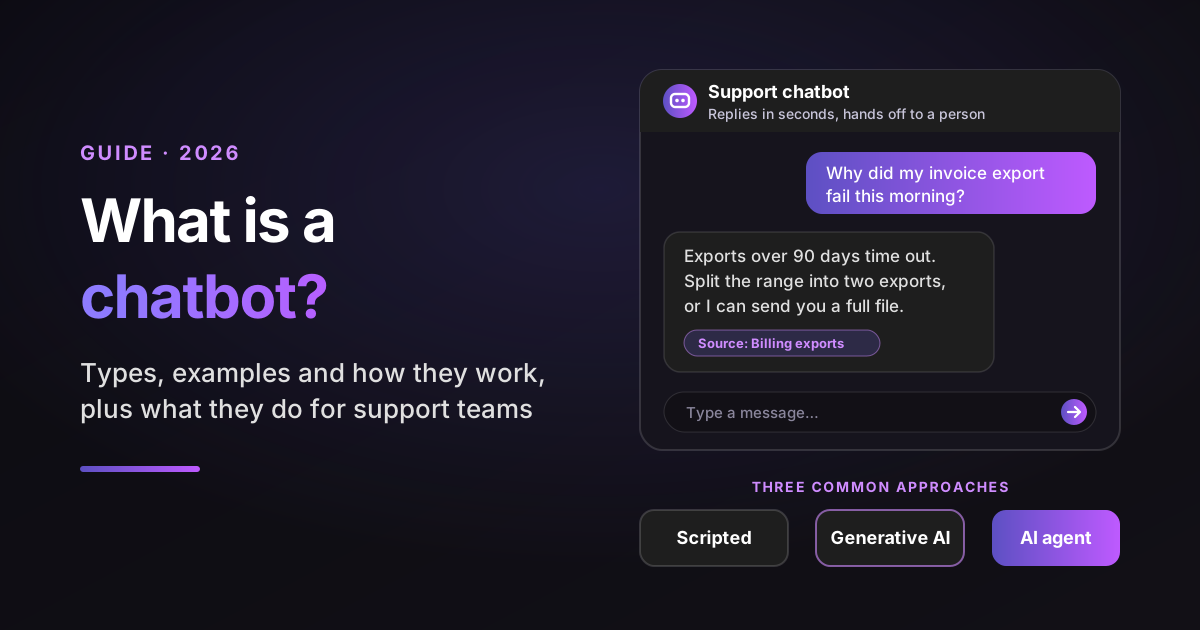
Every support vendor now sells "AI agents", and they rarely mean the same thing. For one vendor it's a chatbot with a new name. For another it's software that reads a ticket, checks the account, fixes the setting and confirms the fix worked.
This guide gives you a definition of AI agents you can defend in a budget meeting. It covers the seven types and where each one fits in support, 12 real AI agents you can try, and a plain look at building one versus buying one. If you want the agent loop step by step, my guide to agentic AI covers it.
To compare them fairly, I judge every type, example and product in this post on the same four yardsticks:
- Decides: how it picks its next action, from fixed rules to its own plan.
- Reach: which data and tools it can use, and whether it can change things or only read them.
- Learns: whether it gets better from results without someone reprogramming it.
- Sign-off: where a person approves before something reaches a customer or changes.
Sources: every statistic links to its original source, with the date it was published or measured. Analyst forecasts are labeled as forecasts, and vendor surveys are labeled as vendor research. Prices come from each vendor's own pricing page, checked on November 4, 2026. Support tickets used as examples are illustrative composites, not single customers.
Disclosure: I work at Pluno, which sells AI that runs inside your help desk to resolve tickets, assist human agents and escalate to engineering.
TL;DR
- What is an AI agent? Software that perceives its environment, decides its next step toward a goal and acts through tools with some autonomy. Today's versions use a large language model (LLM) to read messy input and choose those steps.
- The 7 types of AI agents: simple reflex, model-based reflex, goal-based, utility-based, learning, hierarchical and multi-agent systems. Most products you can buy today are goal-based agents that learn from data.
- Start with one agent: in Google Research's tests of 180 agent setups, every multi-agent variant made step-by-step planning tasks 39 to 70% worse. A single AI agent with good tools is the right first step for most support teams.
- Build or buy: in MIT's 2025 study of AI deployments, bought tools succeeded about three times as often as internal builds. Unless agents are your product, buy.
- My recommendation for B2B SaaS support teams: shortlist Pluno. It runs several AI agents inside your existing help desk, each scoped to one job, from resolving tickets to investigating bugs. Innovorder reports Pluno resolves 67% of its chat tickets.
- Bottom-line advice: judge any AI agent on what it can reach and where a person signs off, then test it on your own past tickets before it meets a customer.
What is an AI agent, and what can AI agents do for your support team?
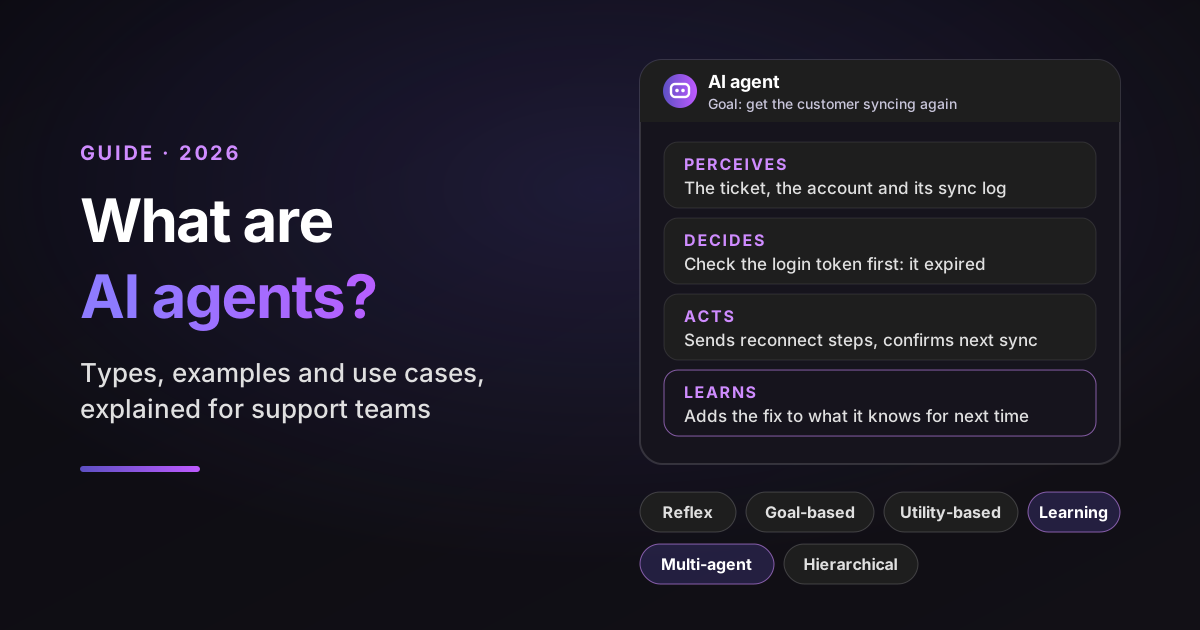
An AI agent is software that perceives its environment, decides what to do next to reach a goal, and acts through tools with some autonomy. In a support team, that means an AI agent can read a ticket, look up the account, take an allowed action and reply, rather than only suggesting text for a person to send.
The big definitions agree on the core. IBM describes a system that performs tasks on its own by designing workflows with the tools it has. AWS puts the split clearly: humans set the goals, and the agent chooses the actions that reach them.
Google Cloud adds reasoning, planning and memory to the list, and stresses that they can learn and adapt. So an AI agent isn't defined by the model inside it. It's defined by what it notices, what it decides and what it's allowed to change.
Here's the payoff in a support queue. A customer writes: "My teammate shared a dashboard, but I can't open it." A chatbot links the sharing article. An AI agent checks both accounts, sees the customer is on a viewer seat without access to that workspace, explains it, and offers the admin a one-click fix.
The textbook definition, and why it still matters
The classic definition comes from Stuart Russell and Peter Norvig's textbook Artificial Intelligence: A Modern Approach, first published in 1995. In their words, roughly: an agent is anything that perceives its environment through sensors and acts on that environment through actuators.
By that definition, a thermostat is an agent. It senses the room temperature and switches the heating. That sounds too broad, but it's useful, because it forces the right question: what can this thing sense, and what can it change?
What large language models added is a general way to read unstructured input, such as an angry email, and choose among many tools. The definition stayed the same. The range of environments an agent can handle got much wider.
Four traits that separate an AI agent from ordinary software
In 1995, Michael Wooldridge and Nicholas Jennings set out a "weak notion of agency" in their paper Intelligent Agents: Theory and Practice. Their four traits still make a clean checklist for support software:
- Autonomy. It acts without a person directing each step. In support: it works the ticket without an agent clicking through each lookup.
- Reactivity. It notices changes and responds in time. In support: when the customer replies with an error code, it changes its plan.
- Pro-activeness. It takes the initiative toward a goal, not only in response to input. In support: it confirms the next sync succeeded before closing the ticket.
- Social ability. It communicates with people and other agents. In support: it asks the customer a clarifying question, or hands off to a human agent with notes.
My quick test for products: remove the model and see what's left. If the product would do the same thing with a decision tree, it's a workflow with an AI label.
How widely are AI agents used in 2026?
AI agents have moved from demos to production, though most companies are still early. Surveys disagree on the exact numbers because they ask different people different questions, so read each one with its sample in mind.
| Source | Who they asked | What they found |
|---|---|---|
| LangChain, published June 2026 | 1,340 people, mostly developers in LangChain's audience, surveyed late 2025 | 57.3% have AI agents in production; customer service is the most common use case (26.5%) |
| KPMG AI Pulse, September 2026 | 314 US leaders at companies with $1B+ revenue | 62% are building, deploying or developing agents; multi-agent work rose from 6% to 25% |
| Deloitte, August 2026 | 501 US leaders already at least piloting | 42% have tested or deployed agents; only 15% have scaled multi-agent adoption |
| Salesforce State of Service, May 2026 (vendor research) | 3,075 service professionals | Service teams using agentic AI rose from 39% to 66% in a year |
| Capgemini, July 2025 | 1,500 executives at $1B+ companies | Trust in fully autonomous agents fell from 43% to 27% in a year |
The forecast side is steeper. In August 2025, Gartner predicted that 40% of enterprise apps will include task-specific AI agents by the end of 2026, up from less than 5% in 2025.
Put together, the data says two things. Agents are now normal in support, and trust in letting them run without checks is falling, not rising. That's why the sign-off yardstick matters as much as the tools.
What's inside an AI agent: the 5 parts
Every AI agent has five parts: a model that reasons, instructions that set its job, tools that let it act, memory that carries context, and guardrails that limit what it may do on its own. The code that runs these parts in a loop is often called the agent's harness.
- Model. The LLM that reads the situation and picks the next step. A bigger model isn't always better: a smaller, faster one often wins on simple, high-volume tickets.
- Instructions. The job description: your policies, tone, what to escalate and when to stop. In support, these are your refund rules and escalation paths, written down.
- Tools. Functions it can call, such as "search past tickets", "look up subscription" or "issue credit". A tool that only reads is far safer than one that writes.
- Memory. Short-term memory holds this conversation and what the agent has already tried. Long-term memory holds your help center, past resolutions and account history.
- Guardrails. Limits enforced outside the model, such as refund caps, blocked topics and approval steps. A prompt that says "never refund over $50" is a request; a cap in the billing tool is a guardrail.
Microsoft framed the same idea simply when it introduced its agents in 2024: an agent needs memory, entitlements and tools. Entitlements are the part most teams skip, and they decide what can go wrong.
For a support leader, the practical point is this: you control four of the five parts. You rarely choose the model, but you write the instructions, pick the tools, feed the memory and set the guardrails. For how these parts run as a loop on a real ticket, see how agentic AI works.
Types of AI agents: 7 kinds, from simple reflex to multi-agent systems
The classic types of AI agents are simple reflex, model-based reflex, goal-based, utility-based and learning agents, from Russell and Norvig's textbook. Vendors such as AWS add two more for systems of agents: hierarchical agents and multi-agent systems.
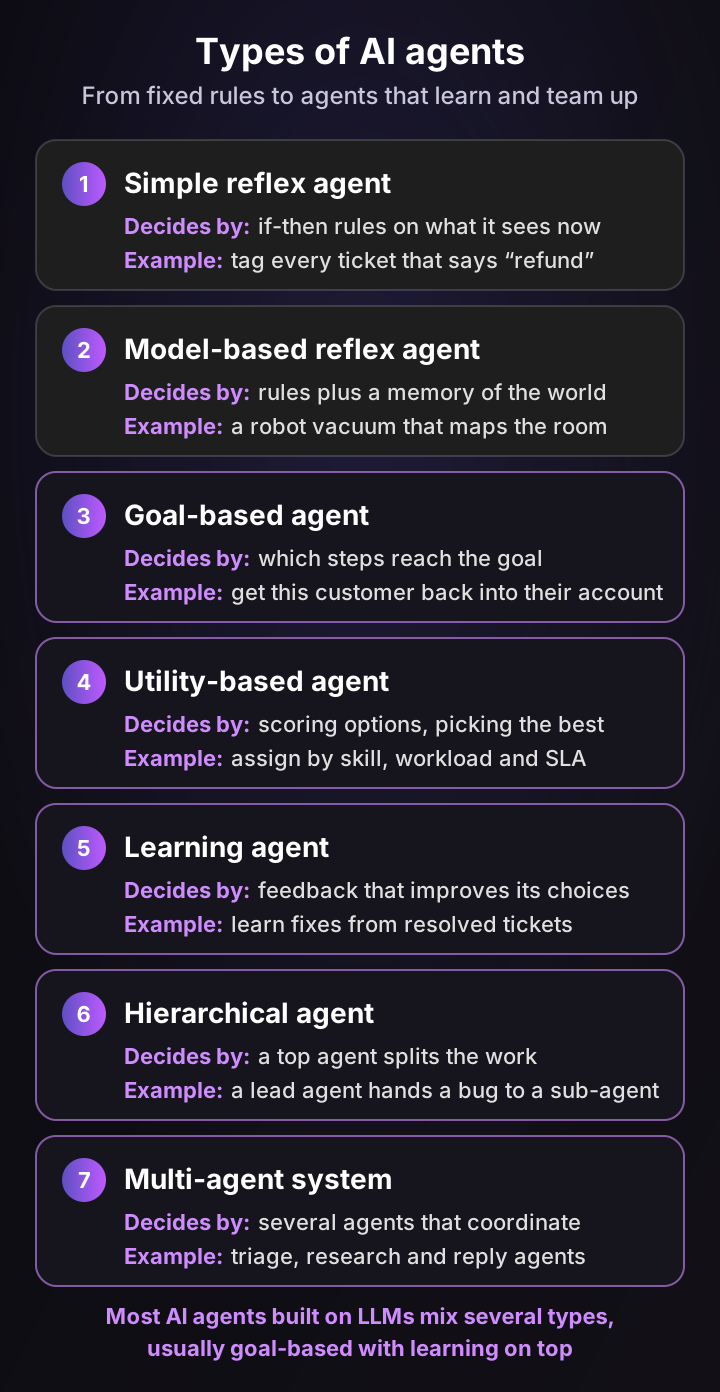
The types aren't a ranking of quality. Each one decides in a different way, and a simple type is often the right tool for a simple job.
1. Simple reflex agents
A simple reflex agent follows if-then rules based only on what it sees right now, with no memory. A basic thermostat that turns the heat on below 19°C is the textbook case.
In support, a help desk trigger that tags every ticket containing "refund" is a simple reflex agent. It's fast and predictable. Salesforce gives the catch: its example of a password-reset agent that reacts to the exact phrase "locked out" fails as soon as the customer words it differently.
- Decides: fixed rules. Reach: what's in the current message. Learns: no. Sign-off: whoever wrote the rules.
2. Model-based reflex agents
A model-based reflex agent keeps an internal picture of the world, so it can act on things it can't see in the moment. IBM describes it as combining current perception with memory to keep that internal model.
A robot vacuum is the everyday example. A Roomba maps your home and remembers the layout, then reacts to obstacles its camera spots while it cleans. In support, routing that knows a customer already has an open ticket, and adds the new email to it instead of opening a duplicate, works this way.
- Decides: rules plus its model of the world. Reach: current input and stored state. Learns: no. Sign-off: the rules you set.
3. Goal-based agents
A goal-based agent chooses actions by asking which ones get it closer to a goal. It can plan several steps ahead, rather than reacting one message at a time.
In support, the goal might be "get this customer back into their account". The agent decides it should check the identity provider first, then the user's status, then whether a password reset is pending. Most AI support products work this way, with an LLM doing the planning.
- Decides: which steps reach the goal. Reach: the tools you connect. Learns: not by itself. Sign-off: at whatever gates you set.
4. Utility-based agents
A utility-based agent goes one step further: when several paths reach the goal, it scores them and picks the best trade-off. IBM puts it as reaching the goal while maximizing utility or reward.
Self-driving cars are the classic case. The Waymo Driver predicts what other road users will do and plans its speed and path, among many safe options. In support, assigning a ticket by weighing agent skill, current workload and time left on the service level agreement (SLA) is a utility problem.
- Decides: scores options and picks the best. Reach: the signals it can measure. Learns: sometimes. Sign-off: you define what "best" means.
5. Learning agents
A learning agent improves its choices from feedback, so its behavior changes over time without someone rewriting it. Any of the first four types can also learn.
The Google Nest Learning Thermostat learns from the temperature changes you make and adjusts your schedule. It's also a neat example of sign-off as a dial: you can let it change the schedule automatically, have it suggest changes for you to accept, or switch learning off.
In support, an AI agent that learns which troubleshooting steps fixed similar tickets last month, and favors the newest fixes, is a learning agent. This is where an agent gets better the longer you run it, as long as the feedback it learns from is right.
- Decides: from rules or goals, refined by feedback. Reach: results of past actions. Learns: yes. Sign-off: often on what it learns, as well as what it does.
6. Hierarchical agents
A hierarchical setup arranges agents in tiers. AWS describes higher-level agents breaking complex tasks into smaller ones and assigning them to lower-level agents.
In support: a lead agent receives "our sync broke after the update" and assigns sub-tasks. One sub-agent checks recent releases, another reads the account's logs, and the lead combines the results into one answer.
- Decides: the top agent plans; lower agents execute. Reach: split across agents. Learns: depends on each agent. Sign-off: usually at the top.
7. Multi-agent systems
A multi-agent system is several agents that interact to solve a problem or reach shared goals. Unlike a strict hierarchy, they can pass work sideways or work in parallel.
In support, that might be a triage agent, a billing agent and a technical agent, each with its own tools and rules, handing tickets to each other. Whether that's worth the extra complexity is the next section's question.
- Decides: each agent for its own part, plus a handoff rule. Reach: each agent's own tools. Learns: depends on each agent. Sign-off: at each handoff or at the end.
| Type | Decides | Reach | Learns | Sign-off | Support example |
|---|---|---|---|---|---|
| Simple reflex | Fixed if-then rules | Current message only | No | Whoever wrote the rules | Tag tickets that mention "refund" |
| Model-based reflex | Rules plus stored state | Message and memory | No | The rules | Merge a new email into an open ticket |
| Goal-based | Steps toward a goal | Connected tools | Not by itself | Approval gates you set | Get a locked-out user back in |
| Utility-based | Scores options, picks the best | Measurable signals | Sometimes | You define "best" | Assign by skill, load and SLA |
| Learning | Refined by feedback | Results of past actions | Yes | What it learns and does | Learn fixes from resolved tickets |
| Hierarchical | Top agent splits work | Split across tiers | Per agent | Usually at the top | Lead agent assigns log checks |
| Multi-agent system | Each agent plus handoffs | Each agent's tools | Per agent | At each handoff | Triage, billing and technical agents |
So where do today's LLM-based agents sit? Most are goal-based agents with learning on top, and a few add utility scoring for choices like routing. The label matters less than the four yardsticks: two products with the same "type" can differ completely in what they reach and who signs off.
Types of AI agents by the job they do
Vendors also sort them by where they work. Google Cloud splits them into surface agents that interact with people, such as customer service agents, and background agents that run processes without a conversation. In practice, you'll meet these seven jobs:
- Customer-facing agents answer and resolve customer questions on chat, email or voice.
- Employee-facing agents draft, research and fill in work for a person who stays in charge, such as a reply suggestion in the help desk sidebar.
- Coding agents read a codebase, change it and open a pull request for review.
- Browser and computer-use agents operate websites and desktop apps the way a person would.
- Research agents run many searches and write a cited summary.
- Voice agents handle phone calls end to end.
- In-product agents live inside software and act on the user's own account.
Single agent or multi-agent system? How to choose
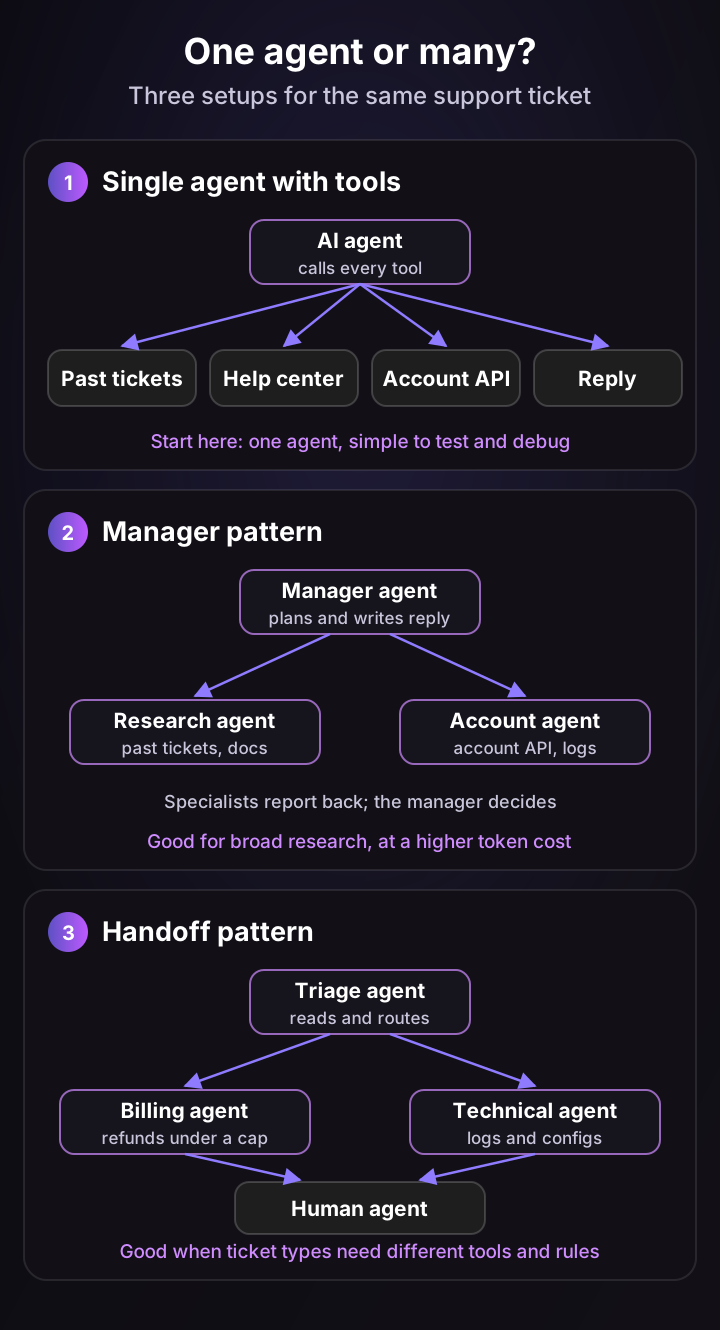
Start with a single AI agent and good tools. Move to a multi-agent system only when the work splits into parallel pieces that don't need to share the same context, because coordination costs tokens and adds new ways to fail.
The best evidence cuts both ways:
- Multi-agent can win big on research. Anthropic reported that its multi-agent research system beat a single agent by 90.2% on its internal research evaluation (June 2025). It also found agents use about 4 times the tokens of a chat, and multi-agent systems about 15 times.
- Multi-agent can lose big on step-by-step work. In Google Research's controlled tests of 180 agent setups (January 2026), a coordinated team gained 80.9% on a financial reasoning task that split into parallel parts. On a sequential planning task, every multi-agent variant made results 39 to 70% worse.
- Errors compound when agents work alone. The same Google study found independent agents amplified errors 17.2 times, compared with 4.4 times when a central agent coordinated them.
Cognition, which makes the coding agent Devin, argued the practical side in a post titled Don't Build Multi-Agents (June 2025). Its point: when agents can't see each other's full context, they make conflicting decisions.
Now map that to support. Most tickets are sequential: read the message, check the account, find the cause, fix it, confirm. That's a single-agent job.
The research step is different, because searching past tickets, docs and logs at once splits well. A single agent that runs parallel searches gets most of the benefit without the handoff risk.
| Setup | Use it when | Watch out for |
|---|---|---|
| Single AI agent with tools | Most support tickets: one goal, steps in order | Too many tools in one agent can confuse its choices |
| Manager with specialist agents | Broad research that splits into independent parts | Higher token cost, and the manager can lose detail |
| Handoffs between agents | Ticket types that need very different tools or rules | Context lost at each handoff, and loops between agents |
AI agents vs AI assistants, bots and automation workflows
The difference is who decides the next step. A bot follows pre-written rules, an automation workflow runs fixed steps, an AI assistant waits for a person to direct it, and an AI agent chooses its own next step toward a goal.
Google Cloud ranks them the same way: agents have the most autonomy, AI assistants need a person's input and direction, and bots are the least autonomous. One product often contains all of them, so judge the configuration, not the label.
| Bot (scripted chatbot) | Automation workflow (including RPA) | AI assistant (copilot) | AI agent | |
|---|---|---|---|---|
| Decides | Your script | Fixed steps in code; a model may fill in gaps | The person using it | Its own next step, within your rules |
| Reach | The flows you built | The systems each step touches | What the person asks it to look at | The tools and data you connect |
| Learns | No | No | Sometimes, from feedback | Often, from results and data |
| Sign-off | None needed: it can't go off script | Built into the flow | The person approves every output | Rules set in advance, plus handoff |
| Support example | A menu that links help articles | Robotic process automation (RPA) that copies order data between systems | Reply drafts in the help desk sidebar | Resolving a configuration problem end to end |
Fixed workflows are underrated. For a password reset with three predictable steps, a workflow is cheaper and easier to audit than an AI agent.
Save the agent for tickets where the next step depends on what the last one found. For the chatbot side of this comparison, see my guide to chatbots.
12 AI agent examples, grouped by the job they do
The AI agents you can use today fall into five jobs: customer support, coding, browsing and personal tasks, workplace platforms, and specialist industries. Here are 12 real ones, described from their own official pages, with the four yardsticks applied to each. I've left out the support agents I compared in my AI agents for customer support review.
Customer support agents
1. HubSpot Customer Agent. HubSpot's AI agent answers conversations on chat, email, forms, voice, WhatsApp and Facebook Messenger. It takes actions in the HubSpot CRM and connected tools such as Shopify, and hands off to your team with context. It counts a conversation as resolved if no human takes over within 72 hours.
- Decides: its own replies and CRM actions. Reach: HubSpot CRM and connected tools. Learns: not stated. Sign-off: handoff to your team. Price: $0.50 per resolution for messaging, on HubSpot Professional or Enterprise.
2. Freshworks Freddy AI Agent. Freddy AI Agent is a no-code support agent for email, web chat, WhatsApp and social channels. It runs workflows such as order tracking, refunds and plan changes through tools like Shopify, Stripe and FedEx.
- Decides: within the workflows you configure. Reach: connected commerce and payment tools. Learns: not stated. Sign-off: transfers to a person with full context. Price: the first 500 sessions are included once, then $49 per 100 sessions.
3. Gorgias AI Agent. Gorgias built its AI agent for online stores. It can change Shopify orders: cancel and restock, edit the shipping address, replace items or reship.
- Decides: answers and order actions. Reach: Shopify orders. Learns: not stated. Sign-off: it asks the shopper to confirm a new address, and hands off when a replacement raises the order total. Price: $0.90 per automated interaction on an annual contract, $1.00 monthly.
Coding agents
4. Devin by Cognition. Cognition launched Devin in March 2024 as an autonomous software engineer. It takes a task from Slack, Jira, Linear or GitHub, works in its own cloud sandbox and returns a pull request.
- Decides: its own plan for the change. Reach: code, a shell, a browser and connected work tools. Learns: not stated. Sign-off: code review on the pull request. Price: free tier, then $20 a month for Pro, $200 for Max, and team plans from $80 a month plus seats.
5. OpenAI Codex. Codex is OpenAI's coding agent. It reads a codebase, builds features, fixes issues and reviews code, from the ChatGPT apps, a command-line tool, an IDE extension or the cloud.
- Decides: its own steps toward the task. Reach: files and a terminal in a sandbox, with network access off by default. Learns: not stated. Sign-off: it asks for approval to edit files outside the workspace or run commands that need network access. Price: included in ChatGPT plans, from the free tier.
Browsing and personal agents
6. Perplexity Comet. Comet is a browser with a built-in assistant that researches, drafts email, shops and completes web tasks. Perplexity made it free for everyone in October 2025.
- Decides: steps on the web for you. Reach: websites you're logged into. Learns: not stated. Sign-off: a pause button; no approval steps are described. Price: the browser is free.
7. Amazon Alexa+. Alexa+ is Amazon's generative AI voice assistant. Beyond the smart home, it books and orders through partner services such as OpenTable, Uber Eats, Thumbtack and Ticketmaster.
- Decides: which service and steps to use. Reach: smart home devices and partner services. Learns: not stated. Sign-off: none described for bookings. Price: free with Prime, or $19.99 a month without.
8. Tasks in Gemini. You give Gemini a goal or a recurring schedule, and it works in the background across Gmail, Calendar, Google Docs and a browser. It can run up to 15 tasks at a time.
- Decides: its own steps across Google apps. Reach: Gmail, Calendar, Workspace files and the web. Learns: not stated. Sign-off: Google says Gemini asks for your confirmation before certain actions, and before every web-browsing task. Price: requires a Google AI Pro or Ultra plan; not available in the EEA, the UK or Switzerland.
Workplace agent platforms
9. Microsoft Copilot Studio. Copilot Studio is a no-code platform for building custom agents and workflows across Microsoft 365 and business systems. It has more than 1,500 prebuilt connectors and supports MCP servers.
- Decides: whatever you design. Reach: Microsoft 365 and connected systems. Learns: not stated. Sign-off: your design, plus approval gates between test and production. Price: $200 per pack of 25,000 Copilot Credits a month, or pay as you go.
10. Gemini Enterprise. Google's workplace platform, which replaced Agentspace in October 2025, gives employees one place to chat with agents, search company data and run prebuilt or custom agents. It connects to Google Workspace, Microsoft 365, Salesforce and SAP, among others.
- Decides: per agent. Reach: company data across connected systems. Learns: not stated. Sign-off: central governance to see and audit agents. Price: by edition.
11. Zapier Agents. Zapier Agents let you build AI teammates in plain language that run tasks across more than 9,000 apps, plus the web.
- Decides: steps across your apps. Reach: any app connected to Zapier. Learns: not stated. Sign-off: it asks before continuing once it hits its activity limit per run. Price: a free plan with 400 activities a month.
Specialist industry agents
12. Harvey. Harvey is an AI platform for law firms and in-house legal teams, with agents that run legal work end to end. It connects to document systems such as iManage, NetDocuments and SharePoint.
- Decides: steps in legal tasks. Reach: legal document systems and email. Learns: not stated. Sign-off: admins choose which tools need a person's confirmation before they run. Price: not listed.
| AI agent | Job | Decides | Reach | Sign-off | Price (checked Nov 4, 2026) |
|---|---|---|---|---|---|
| HubSpot Customer Agent | Support | Replies and CRM actions | HubSpot CRM, connected tools | Handoff to team | $0.50 per resolution |
| Freddy AI Agent | Support | Configured workflows | Commerce and payment tools | Transfer with context | $49 per 100 sessions after 500 |
| Gorgias AI Agent | E-commerce support | Answers and order changes | Shopify orders | Shopper confirms some changes | $0.90 per interaction (annual) |
| Devin | Coding | Its own plan | Code, shell, browser | Pull request review | Free, then from $20 a month |
| OpenAI Codex | Coding | Its own steps | Sandboxed files and terminal | Approval outside the sandbox | Included in ChatGPT plans |
| Perplexity Comet | Browsing | Web steps | Logged-in websites | Pause button | Free browser |
| Amazon Alexa+ | Personal | Service and steps | Smart home, partner services | None described | Free with Prime |
| Tasks in Gemini | Personal work | Steps across Google apps | Gmail, Calendar, web | Confirmation before some actions | Google AI Pro or Ultra |
| Copilot Studio | Workplace builder | Your design | Microsoft 365, 1,500+ connectors | Your design | $200 per 25,000 credits |
| Gemini Enterprise | Workplace platform | Per agent | Company systems | Central audit | By edition |
| Zapier Agents | No-code builder | Steps across apps | 9,000+ apps | Asks at activity limit | Free plan available |
| Harvey | Legal | Legal task steps | Legal document systems | Admin-chosen confirmations | Not listed |
Read down the "Learns" yardstick and a pattern stands out: almost no vendor says how its agent learns from results. Ask that question in every demo. An agent that can't learn from your resolved work will make the same mistake next month.
AI agent use cases by team
AI agents pay off where work is high-volume, follows rules you can write down and spans several systems. Customer support is the most common use case in LangChain's survey, and it's where most teams start.
AI agents in customer support
In a B2B SaaS support team, these are the jobs they handle well today:
- Triage: reading each new ticket, setting priority, type and fields, and routing it.
- Resolving documented questions: answering how-to tickets from your help center and past tickets.
- Account lookups: checking plan, usage, invoice or sync status through your APIs.
- Account-specific fixes: finding the setting behind "it stopped working" and fixing it, with approval for anything risky.
- Technical investigation: checking logs, error tracking and recent releases to find the cause of a bug.
- Escalation briefs: writing the engineering ticket with reproduction steps and customer impact.
- Quality review: scoring every conversation, human or AI, against your rubric.
- In-product help: fixing a user's configuration from inside your app.
Which tickets an AI agent should resolve alone, and which it should only investigate, depends on the risk of the action. I sort a typical queue ticket type by ticket type in my agentic AI guide.
AI agents in other teams
| Team | Typical AI agent job | Example | Where a person signs off |
|---|---|---|---|
| IT service desk | Password resets, access requests, device issues | Agents built in Copilot Studio | Access and security approvals |
| Engineering | Code changes, bug fixes, code review | Devin, OpenAI Codex | Pull request review |
| HR and finance | Payroll checks, expenses, procurement, audits | Workday agents | Exceptions flagged for review |
| Legal | Drafting, review, research across documents | Harvey | Tools that need confirmation |
| Healthcare | Drafting clinical notes from the visit conversation | Abridge | Clinician reviews every draft |
| Operations | Moving data between apps, recurring reports | Zapier Agents, n8n | Activity limits and approval steps |
The pattern across teams is the same one support teams find: the agent does the legwork, and a person signs off where a mistake costs money, trust or safety.
A short history of AI agents
AI agents are older than the current hype. The idea moved from research labs to email filters to LLM-powered agents over three decades.
- 1994: Pattie Maes at MIT describes interface agents that sort email, schedule meetings and filter news for their users.
- 1995: Wooldridge and Jennings publish their four traits of agency, and Russell and Norvig's textbook puts agents at the center of AI.
- March to April 2023: open-source projects such as AutoGPT and BabyAGI wrap GPT-4 in a loop that sets and works through its own task list, and the term "AI agent" goes mainstream.
- October 2024: Anthropic releases computer use in public beta, letting Claude operate a computer through screenshots, mouse and keyboard.
- January 2025: OpenAI previews Operator, a browser-using agent, later folded into ChatGPT.
- March 2025: OpenAI releases its Agents SDK, and agent frameworks from Google, Microsoft and others follow within the year.
- 2026: in KPMG's September survey, 62% of large US companies are building, deploying or developing agents, and support is the most common use case in LangChain's.
The arc carries a lesson. The 2023 projects aimed at open-ended autonomy. What works in production today is narrower: a clear job, a defined set of tools and a person signing off where it counts.
Build or buy an AI agent? What each one really takes
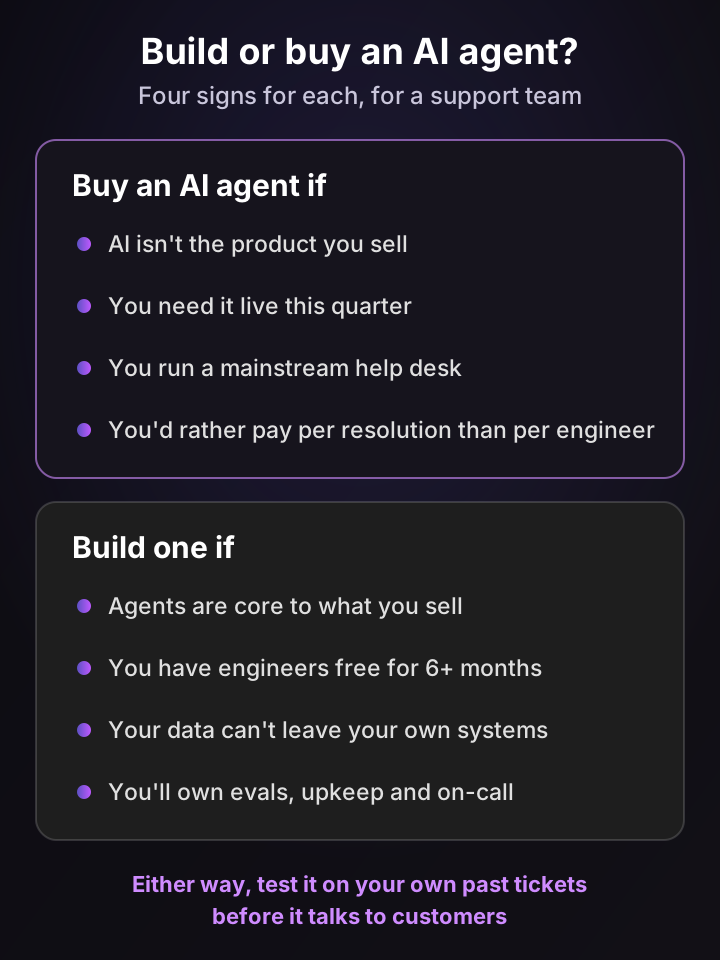
For most support teams, buying is faster and cheaper. Build one only when agents are core to what you sell, you have engineers free for months, or your data can't leave your own systems.
The best broad evidence comes from MIT's 2025 study of AI in business, based on interviews, a survey and 300 public deployments. As reported by Fortune, tools bought from specialist vendors succeeded about 67% of the time, and internal builds about one-third as often.
Lightspeed, the commerce platform, went through this choice for its support team. It considered building an internal tool, but decided the real cost was maintaining and improving it month after month, and chose Pluno instead. About 100 agents were working with it within two to three weeks of the pilot.
The frameworks teams build AI agents with
If you do build, you won't start from scratch. These are the main frameworks as of November 2026:
| Framework | From | Languages | License | Good for |
|---|---|---|---|---|
| OpenAI Agents SDK | OpenAI | Python, TypeScript | MIT | Agents with handoffs, guardrails and tracing |
| Claude Agent SDK | Anthropic | Python, TypeScript | MIT repo, Anthropic commercial terms | The agent loop and tools behind Claude Code |
| Agent Development Kit (ADK) | Python, TypeScript, Go, Java, Kotlin | Apache 2.0 | Code-first agents that work with many models | |
| LangGraph | LangChain | Python, JavaScript | MIT | Stateful, step-by-step agent graphs |
| CrewAI | CrewAI | Python | MIT | Teams of role-based agents |
| Microsoft Agent Framework | Microsoft | .NET, Python | MIT | The successor to AutoGen and Semantic Kernel |
| Amazon Bedrock AgentCore | AWS | Any framework | Managed service | Running and governing agents built with any framework |
| n8n | n8n | Visual builder | Fair-code, self-hostable | Mixing AI agent steps with fixed workflow steps |
What building an AI agent for support involves
A framework gives you the loop. The work that decides whether your agent is any good sits around it:
- Scope one job. "Resolve billing questions under $100" beats "handle support". Pull 90 days of tickets and pick one high-volume type.
- Build the tools and permissions. Every lookup and action needs an API, an authentication model and a read-or-write decision. This is usually the biggest piece of engineering.
- Write the instructions. Turn your policies, tone and escalation rules into instructions, and keep them in version control.
- Build an evaluation set. Collect a few hundred past tickets with known good outcomes, and rerun them after every change to the model, tools or instructions.
- Add guardrails and a handoff. Cap risky actions in code, log every tool call, and design what the human agent receives when the agent stops.
- Run it like a product. Someone has to own model updates, help desk changes, new ticket types, outages and the on-call rotation.
Running costs are rising, not falling. Gartner predicted in January 2026 that by 2030, the cost per resolution for generative AI in customer service will exceed $3, partly because complex use cases use more tokens. That's a forecast, but it's a reason to model model costs per conversation honestly.
Run your own numbers
Enter your volume, salaries and quotes below. The defaults are my assumptions for a small in-house team: for scale, the US median wage for software developers was $135,980 in May 2025, before benefits and overhead.
Build or buy an AI agent? Two-year cost calculator
Compares 24 months of cost. Build: engineers during the build, engineers who maintain it after launch, and model and hosting cost on every conversation once it's live. Buy: the vendor's monthly platform fee plus its price per resolution, live from month one. Enter one currency; the calculator does not convert. The engineering defaults are my assumptions for a small team, not benchmarks, and the build side leaves out evals tooling, security reviews, on-call time and the resolutions you miss while it's being built. The buy side leaves out seats and add-ons. Use your own quotes and salaries.
Build, 24 months
$457,200
$180,000 build + $270,000 upkeep + $7,200 model
Buy, 24 months
$55,200
$2,300 a month for 2,000 resolutions
Difference
$402,000
Buying costs less over two years
Building only pays off above about 43,412 conversations a month, and that assumes your agent reaches the same resolution rate as a product built for the job. It also goes live 6 months later.
At the defaults, building only catches up at tens of thousands of conversations a month, and that assumes your agent resolves as many tickets as a product built for the job. For most support teams, the money is better spent on clean knowledge and good tools for whichever agent you buy.
How to evaluate AI agents before they talk to customers
Test reliability, not a demo. Run the same tasks several times on your own tickets, check every action it took, and score what it hands off, not only what it resolves.
Benchmarks show why one good run proves little. Sierra's τ-bench, a test of agents in simulated customer service conversations, introduced a metric called pass^k: the chance an agent succeeds on the same task every time across k tries. In the 2024 paper, a leading model solved under half the tasks, and its pass^8 score in the retail domain fell below 25%.
The follow-up, τ²-bench (June 2025), let the simulated customer use tools too, as in real troubleshooting where the customer has to click something. Performance dropped significantly when agents had to guide a user rather than act alone.
For support, that translates into a short scorecard. Ask every vendor, and test every answer on your own tickets:
- Which tools can it call, and which ones can change data? Ask for the list, not the category.
- What does it learn from? Help center only, or also your resolved tickets and their outcomes?
- Where does a person sign off? Before replies, before account changes, or only on handoff?
- What counts as resolved, and is that what you're billed for? Silence after a reply isn't always a fix.
- What does the human agent get on handoff? A summary, what was checked and the suggested next step, or a raw transcript?
- Can you switch off one action without switching off the whole agent?
- Can you see every step it took on a ticket? You'll need that log the first time something goes wrong.
- How does it behave on the same ticket twice? Run a sample several times and compare answers.
For how to replay past tickets fairly, without letting the agent see the answer, see step 4 of my rollout guide.
What people who build and run AI agents say
Here's what builders and support teams say in their own words, including two Pluno customers. Each card is one person's experience, not a benchmark.
“I use this approach for a ticket based customer support agent. There are a bunch of boolean checks that the LLM must pass before its response is allowed through... People are much happier with it than I could have imagined, though it's definitely not cheap (but the cost difference is very OK for the tradeoff).”
“I think that anyone who actually implements AI in an enterprise context has come to the same conclusion. Using the Anthropic vernacular, AI "workflows" are the solution 90% of the time and AI "agents" maybe 10%.”
“Creating single agent systems is already quite tricky. The best practices and LLMOps workflows are far from mature. Jumping to multi-agent systems is very early imo. My suggestion to any builder in this space is to start simple, very simple, and then add complexity, instead of building a house of cards.”
“Pluno helped us turn repetitive questions into scalable AI-assisted support while allowing us to focus our time and expertise where human involvement matters most.”
Customer-reported outcome: 58% of routed tickets handled by the AI agent
“Pluno is the tool beside you every day, every time, to guide you when you need help.”
Customer-reported outcome: About 100 agents live in two to three weeks
Three lessons repeat across these accounts:
- Checks beat cleverness. The support team that is happy with its agent runs a set of pass-or-fail checks before any reply goes out, and accepts the extra cost.
- Most of the value is in scoped work. Two builders argue for fixed workflows and single agents first, and multi-agent setups only when the job demands it.
- The human side still matters. Velotric's team uses AI for repetitive questions so people spend their time on the cases that need them, and Lightspeed's agents use Pluno as an everyday guide rather than a replacement.
How Pluno puts AI agents to work inside your help desk
Pluno is an AI layer for help desks. It runs inside Zendesk, Intercom, Salesforce Service Cloud, HubSpot, Jira Service Management and Freshdesk, so you keep your tickets, macros and reporting, and it adds AI across your support workflows instead of one bot at the front door.
In the terms of this guide, Pluno is a set of AI agents, each scoped to one job, with its own reach and its own sign-off. Here they are on the same four yardsticks:
| Pluno module | Job | Decides | Reach | Learns | Sign-off |
|---|---|---|---|---|---|
| Deflection AI | Resolve tickets end to end | Researches until its sources agree, or hands off | Past tickets, help center, docs, Slack threads, your APIs and MCP servers | From your resolved tickets, favoring the latest successful fixes | AI Workflows set what it may do alone; escalations carry a research summary |
| AI Copilot | Draft the reply for a human agent | Researches each new customer message | The same sources, in the help desk sidebar | From your resolved tickets | The human agent sends |
| Troubleshooting Agent | Find the root cause of technical tickets | Investigates across systems | Code, logs, error tracking, session recordings, databases | Each investigation starts from live evidence | Approval before it opens a pull request, by default |
| Escalation Copilot | Hand a ticket to engineering | Writes the brief from your template | The ticket and its history | Not applicable | The human agent files it |
| AI Tagging | Triage | Sets priority, type, tags and fields | The last 12 messages, ticket metadata and customer fields | Not applicable | Never overwrites values a human agent set, and records a justification for each value |
| Quality Assurance | Review every conversation | Scores each one against your rubric | Resolved tickets and your knowledge base | Not applicable | Your team reviews the scorecards |
| Product Agent | Fix the user's setup inside your product | Checks the user's configuration first | The user's account in your app | From docs and past tickets | The user confirms each change |
Resolving tickets from how your team actually fixed them
Most AI support tools answer from the help center. Deflection AI also learns from your resolved tickets, so it picks up the troubleshooting steps and edge-case fixes your human agents actually used, with the newest successful resolutions first.
For each ticket, it runs several rounds of parallel searches across past tickets, the help center, docs, Slack threads and connected APIs, and replies only when its sources agree. That's the single-agent-with-parallel-research setup from earlier: the research splits, the decision doesn't.
When the evidence is thin, it escalates with a research summary, ticket references and next steps instead of guessing. You pay 0.90€ per fully resolved ticket, escalations aren't billed, and every AI-resolved ticket is tagged in your help desk so you can audit the count.
AI agents for the tickets that need your team
The hard tickets are where your team spends its hours, so Pluno keeps helping after the handoff. AI Copilot drafts a sourced reply for the human agent, and Escalation Copilot files a Jira, Linear, Slack, Microsoft Teams or incident.io escalation with the brief already written, then syncs updates back to the ticket.
For technical tickets, the Troubleshooting Agent investigates across your code, logs and error tracking, and returns the likely cause and a recommended fix in the help desk sidebar or Slack.
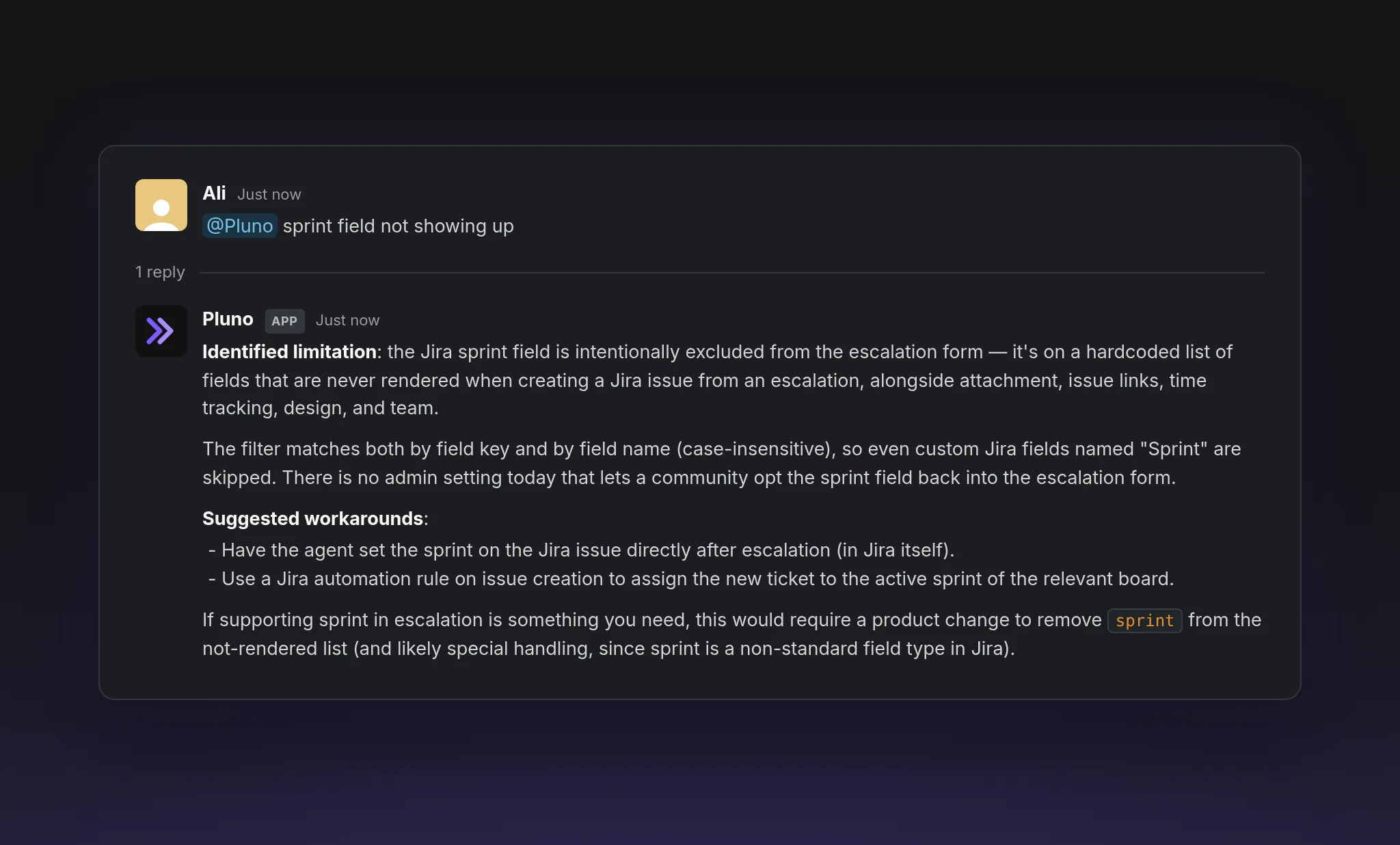
The Troubleshooting Agent in Slack, answering a question about Pluno's own escalation form by reading the code behind it.
Inside your own product, the Product Agent reads each user's configuration before it answers, and makes changes once the user says yes.
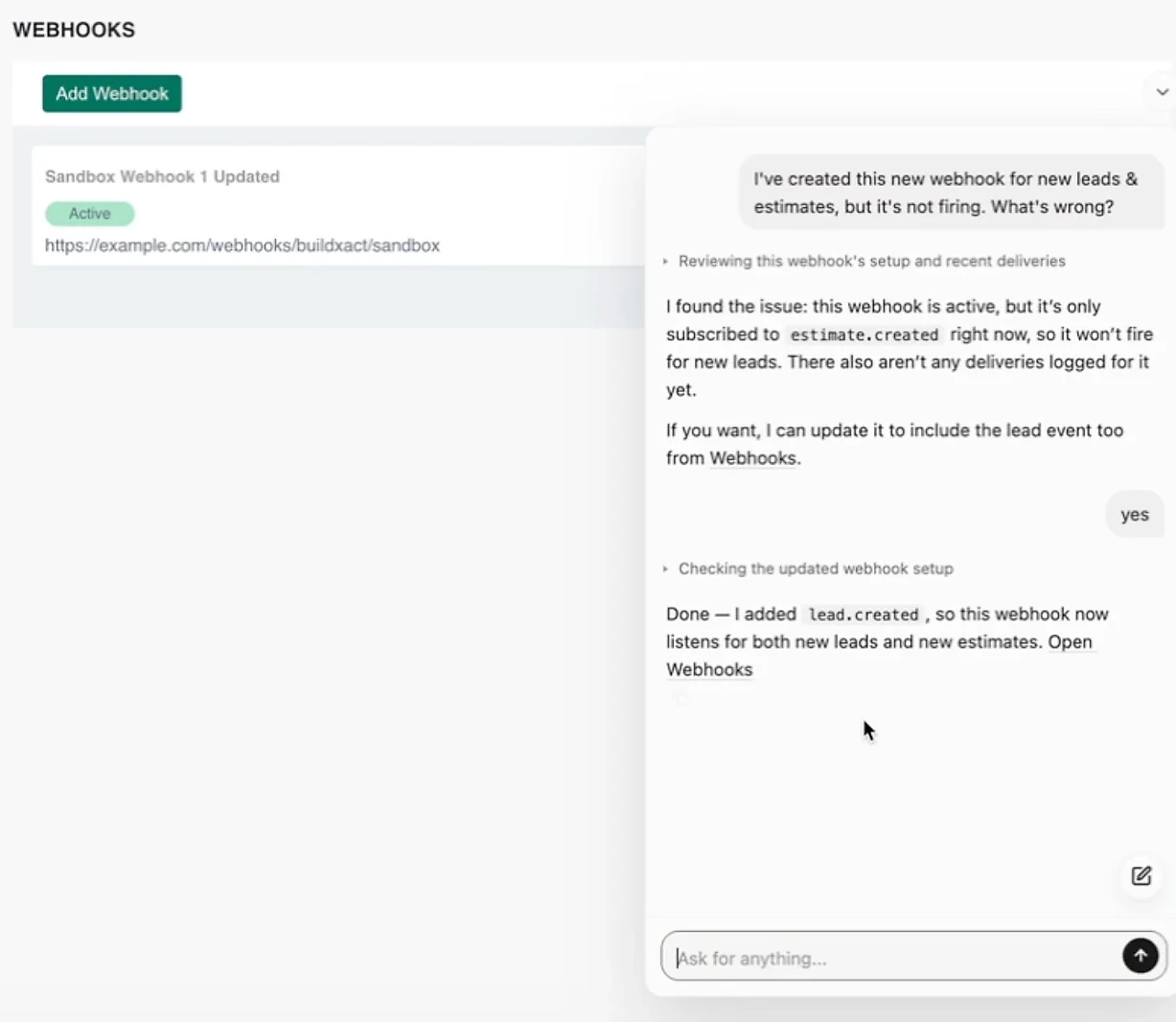
Demo recorded in a sandbox account with sample data. The Product Agent checks the webhook's setup and deliveries, asks before changing it, then verifies the change.
What teams report
- Innovorder, whose tickets span restaurant software and hardware, reports that Pluno resolves 67% of its chat tickets.
- Velotric reports that its AI agent handles 58% of routed tickets, and that human agent time on a Copilot-assisted ticket fell from about 20 minutes to under 5 (full story).
- Lightspeed had about 100 agents working with Pluno in two to three weeks, and now creates two-thirds of its Slack escalations with it (full story).
Pricing starts with a base fee that scales with ticket volume, from 249€ a month for up to 500 tickets (210€ billed annually). Deflection AI is 0.90€ per resolved ticket and AI Copilot is 49€ per seat a month; the full list is on the pricing page.
The bottom line
AI agents are software that perceive, decide and act toward a goal, and the useful question is never "is it an agent?" but "what can it reach, and who signs off?" The seven types tell you how an AI agent decides. The four yardsticks tell you whether you can trust it with your customers.
For a B2B SaaS support team, the path that works is narrow: one AI agent, one ticket type, read access before write access, and a test on your own past tickets. Buy rather than build unless agents are your product.
If your tickets are technical and account-specific, Pluno is the option I'd test first. It runs AI agents inside the help desk you already use, learns from how your team resolved past tickets, and hands engineering a complete escalation when the fix needs code.
FAQ
What is an AI agent in simple terms?
An AI agent is software you give a goal instead of step-by-step instructions. It looks at the situation, picks what to do next, uses tools such as searches or account lookups to do it, and checks whether the goal is met.
What is AI agent software used for?
AI agent software handles work that needs several steps across different systems. Common uses are resolving support tickets, writing and fixing code, researching topics, booking and ordering through websites, and handling IT requests such as password resets.
What are the types of AI agents?
The five classic types of AI agents are simple reflex, model-based reflex, goal-based, utility-based and learning agents. Many sources add two types for groups of agents: hierarchical agents and multi-agent systems, for seven in total.
Is ChatGPT an AI agent?
ChatGPT is a chatbot built on a large language model, and in a plain conversation it isn't acting as an AI agent. When it chooses and runs tools, such as web search or code, to finish a multi-step task, it works as one. OpenAI's coding agent, Codex, is included in ChatGPT plans.
What is the difference between an AI agent and a chatbot?
A chatbot holds a conversation, usually following a script or answering from documents. An AI agent works toward a goal and can take actions, such as checking an account or changing a setting. Many modern support chatbots include an AI agent behind the chat window.
Are AI agents and agentic AI the same thing?
They're closely related. An AI agent is one system that works toward a goal; agentic AI is the broader approach of building AI that acts on its own, which can use one AI agent or several. My agentic AI guide covers the approach in depth.
What is the difference between an AI agent and an LLM?
A large language model (LLM) is the reasoning engine: it reads text and writes text. An AI agent wraps an LLM with instructions, tools, memory and guardrails, so it can act in other systems rather than only reply.
How do I build an AI agent?
Pick one narrow job, connect the tools it needs with the right permissions, write its instructions, and build a set of past cases to test it on. Frameworks such as the OpenAI Agents SDK, Claude Agent SDK, Google ADK and LangGraph handle the agent loop for you.
How much do AI agents cost?
Support AI agents are usually priced per resolution or per conversation, often with a platform fee. HubSpot Customer Agent costs $0.50 per resolution and Gorgias AI Agent $0.90 per automated interaction on an annual contract. Pluno's Deflection AI is 0.90€ per resolved ticket on top of a volume-based base fee.
Are AI agents safe to use with customers?
They can be, when you limit what they may do alone. Give read access before write access, enforce caps and approvals outside the model, log every action, and make sure it hands off with context whenever its evidence is thin.
Can AI agents learn?
Some can. Learning agents improve from feedback, such as which fixes resolved similar tickets. Many products don't learn from results at all and only change when someone edits their instructions or knowledge, so ask each vendor how theirs learns.
Will AI agents replace human support agents?
Not for most teams. AI agents take over tickets they can verify and resolve, while people handle judgment calls, upset customers and product defects. In a 2026 Gartner prediction, half of companies that cut customer service staff because of AI will rehire by 2027.
What is an AI agent harness?
The harness is the code around the model that makes it an AI agent. It runs the loop, passes tool results back to the model, stores memory and enforces limits such as timeouts, caps and approval steps.