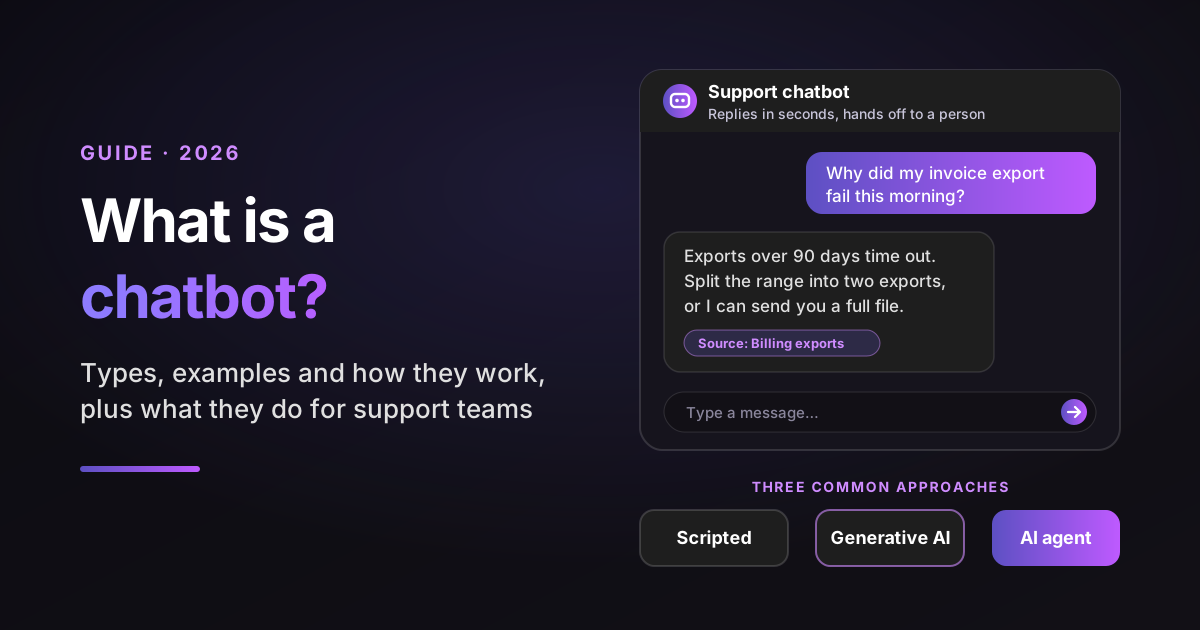
You've used one, even if you never called it that. ChatGPT is a chatbot, so is the help widget in the corner of most software apps, and so is the bank assistant that tells you why a payment bounced.
For a support team, the question isn't whether to have a chatbot. It's which kind, trusted with what, and what happens when it doesn't know the answer.
Working on AI support at Pluno, I've watched chatbots both clear queues and quietly drive customers away. This guide explains how chatbots work, the main types and real examples, then gets specific about support: what they cost, where they fail and how to launch one that customers don't hate. To compare chatbot types and tools fairly, I use the same four yardsticks throughout:
- Understanding: what the chatbot can make sense of, from button clicks to free text.
- Answer source: where its answers come from, such as scripts, your help center or your past tickets.
- Actions: what it can do beyond replying, such as changing a setting or issuing a refund.
- Failure mode: how it typically goes wrong, and what happens to the customer next.
Sources: every statistic links to its original source, with the date it was published or measured. Forecasts are labeled as forecasts. Vendor prices were checked on each vendor's own pricing page on November 2, 2026, and they change often.
Disclosure: I work at Pluno, which sells an AI layer for help desks that resolves tickets and chats, drafts replies for agents and escalates to engineering.
TL;DR
- What is a chatbot? Software that holds a conversation with people in text or voice. Scripted chatbots follow menus and rules, while AI chatbots use machine learning to understand messages. Most new ones are generative AI chatbots, which handle varied natural language phrasing and write their own replies.
- The five common types: menu-based, rule-based, intent-based (NLP), generative AI chatbots and AI agents. They overlap, and many chatbots mix them.
- Chatbot vs AI agent: a chatbot provides a conversational interface. An AI agent can pursue goals through decisions and tool use, such as checking an account or changing a setting, sometimes through that interface.
- The number that matters most: in a Gartner survey of 3,566 customers (published September 2026), only 27% said they would try a chatbot again after a negative experience. A bad bot doesn't just fail once; it trains customers to skip it.
- What it costs: support chatbot pricing includes conversation tiers, charges per outcome or resolution, and custom contracts. Platform and seat charges may apply on top.
- My recommendation: Pluno is our recommended starting point for B2B support teams that need historical ticket knowledge, technical investigation and engineering escalation in their existing help desk. Innovorder's Pluno AI resolves 67% of chat tickets, with replies in under a minute.
What is a chatbot, and what can it do for your support team?
A chatbot is a computer program that talks with people. IBM defines it as "a software application that communicates with people through text or voice", and Merriam-Webster calls it a bot "designed to converse with human beings".
The word is short for "chatterbot". Merriam-Webster dates the first known use of "chatbot" to 1994, the same year Michael Mauldin put "ChatterBots" in the title of a paper for the AAAI conference.
For a support team, a chatbot earns its keep in three ways:
- Instant answers: it replies in seconds, at 3 a.m. or on a public holiday, to the questions your team answers fifty times a week.
- Triage: it collects the order number, the account email and the error message before a person ever sees the conversation.
- Capacity: every chat it fully resolves is one your agents don't touch, which frees them for the hard, account-specific problems.
Customers already expect the first one. In Zendesk's CX Trends 2026 report, 74% of consumers say that because of AI, they now expect customer service to be available 24/7.
What is an AI chatbot?
An AI chatbot is a chatbot that uses artificial intelligence to understand messages. Older AI chatbots use machine learning to sort messages into intents, while most new ones are generative AI chatbots, built on a large language model (LLM) that also writes the reply. IBM describes AI chatbots as using "AI models to interpret natural language, maintain context and generate responses".
That changes the experience in two ways. Customers can ask questions naturally without choosing a predefined intent or menu option, and a generative AI chatbot can answer questions nobody scripted in advance.
It also changes the risk. A scripted chatbot can only say what someone wrote for it, while a generative AI chatbot can say something nobody wrote, including something wrong. My guide to generative AI explains why that happens and how grounding reduces it.
Chatbots are mainstream now
About half of US adults now use AI chatbots, according to Pew Research Center (survey of 5,119 adults, February 2026), and 44% report using ChatGPT, up from 34% a year earlier. At its DevDay 2026 in September, OpenAI reported a collective audience of 1.2 billion weekly users across its products.
That familiarity cuts both ways for you. Customers arrive used to a chatbot that understands them, so a menu bot that only offers four buttons feels older than it did three years ago.
How do chatbots work?
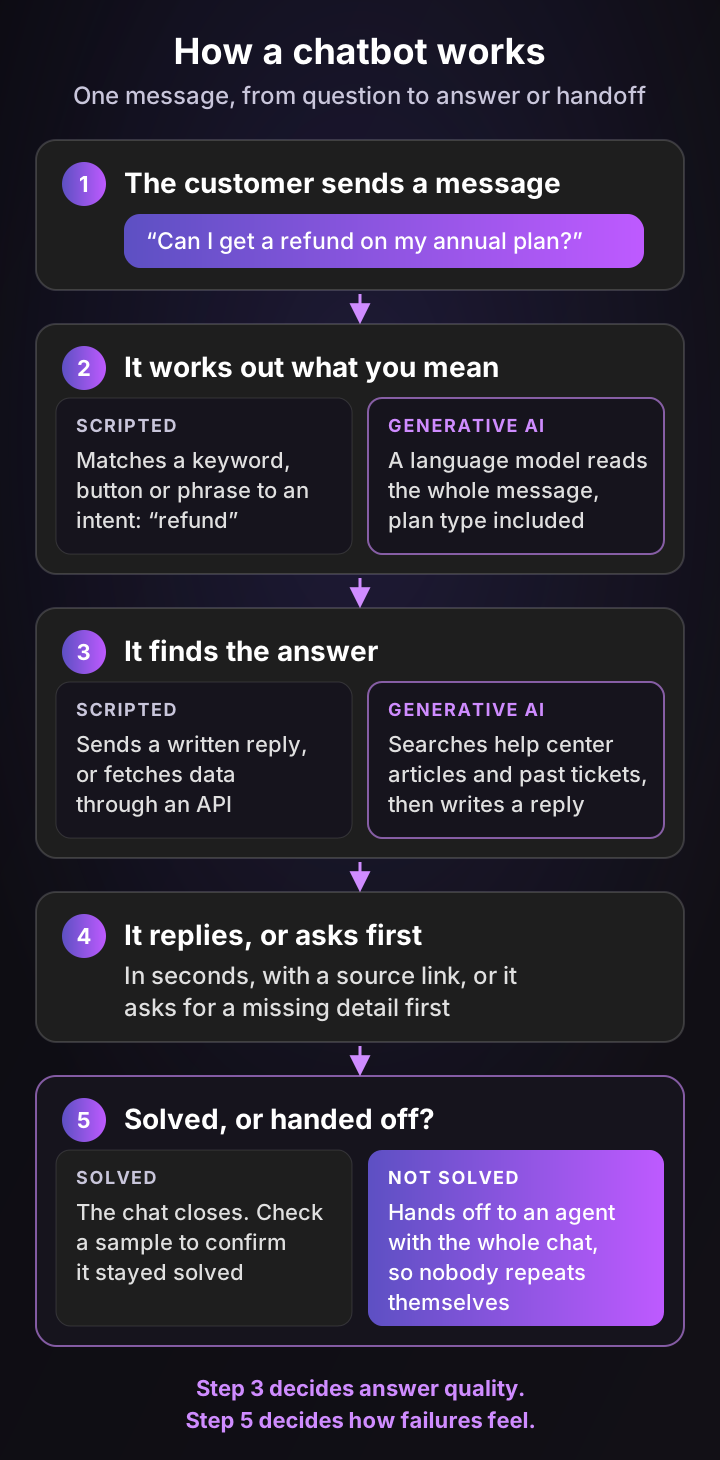
Every chatbot runs a similar loop: it receives a message, works out what the person wants, finds an answer and replies. Along the way it may ask a clarifying question or look further, and in the end it resolves the conversation or hands it to a person. What separates a scripted chatbot from a generative AI chatbot is how it does the second and third steps.
Steps 1 and 2: understanding the message
An intent-based chatbot sorts each message into an intent, a label for what the person wants. Google's Dialogflow documentation describes an intent as something that "categorizes an end-user's intention for one conversation turn", learned from example phrases a team writes in advance.
If a customer writes "refund pls, charged twice", an intent-based chatbot might match it to "refund_request". If they write "why is my bill different this month?", it may match nothing, or the wrong thing.
An LLM chatbot can interpret a request without a predefined intent list, although many implementations still classify requests to route them or apply business rules. Its language model reads the whole message, including details like "annual plan" or "since this morning", and carries the context from earlier in the conversation.
Step 3: finding the answer
This is the step that decides answer quality. A scripted chatbot sends the reply someone wrote for that intent, or fetches data through an API, such as an order's status. Its answers are only as current as its scripts and integrations.
A generative AI chatbot usually searches your sources first, then writes a reply from what it finds. The method is called retrieval-augmented generation (RAG), introduced in a 2020 paper by Lewis and co-authors. AWS explains it as pointing the model at a knowledge base outside its training data before it answers.
Here's an illustrative example. A customer asks, "Can I get a refund on my annual plan?" A grounded chatbot finds your refund article and two resolved tickets where agents explained prorated refunds, then answers from those, with a link to the article.
Steps 4 and 5: replying, then resolving or handing off
The chatbot replies in seconds, or first asks for a missing detail, such as the order number, or searches again. Then the conversation ends in one of two ways: the customer's problem is solved and the chat closes, or the chatbot hands off to a person.
The handoff is where most chatbots lose customers. A good one passes the whole conversation, what the chatbot already found and the details the customer gave, so the agent starts where the bot stopped. A bad one dumps the customer in a queue with nothing, and they repeat everything.
"Solved" is also harder to measure than it looks, because a customer who gave up and a customer who got an answer both stop replying. Step 7 of the launch plan below covers how to tell them apart.
Types of chatbots: 5 common approaches, from button menus to AI agents
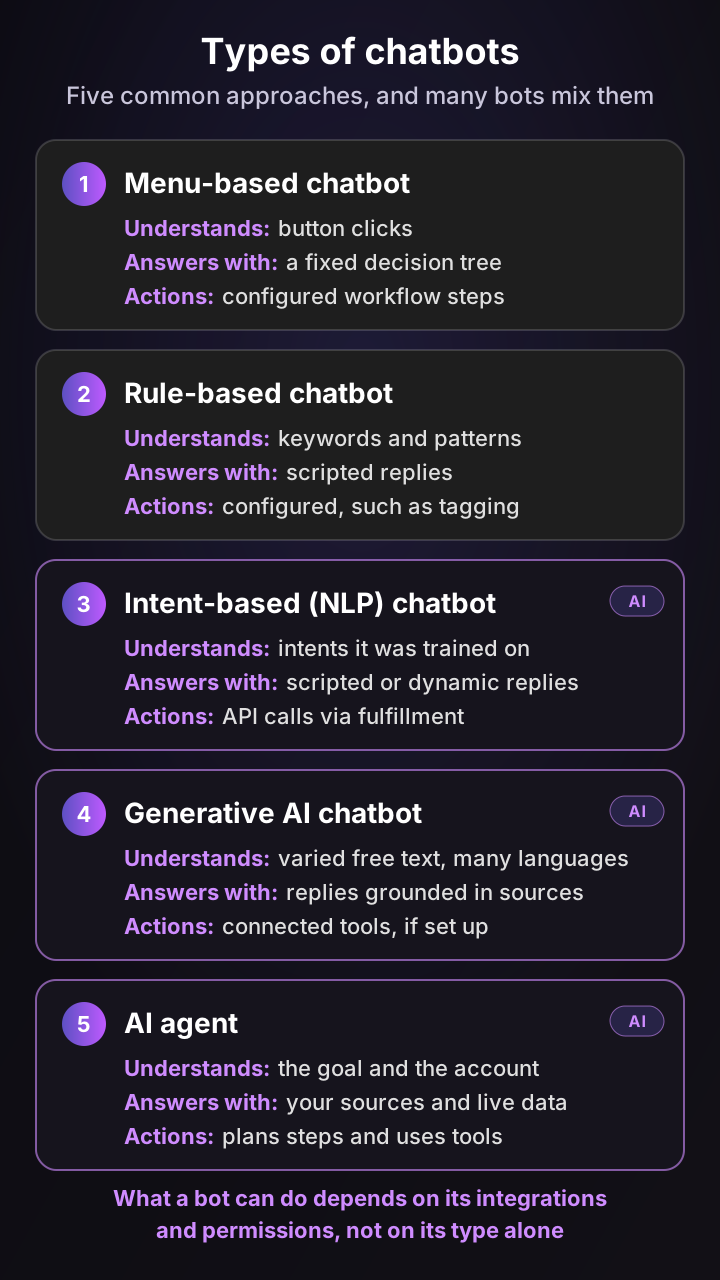
There are five common types of chatbots: menu-based, rule-based, intent-based, generative AI chatbots and AI agents. They aren't a strict ladder. Many chatbots mix them, and what any of them can do depends on its integrations and permissions as much as its type.
1. Menu-based chatbots
A menu-based chatbot offers buttons instead of a text box: "Track my order", "Billing", "Talk to us". Each click leads to the next set of buttons in a fixed decision tree, and a button can also trigger a configured action, such as creating a ticket.
They're predictable and cheap to build. They also frustrate anyone whose question isn't on the menu, which in B2B support is a large share of questions.
2. Rule-based chatbots
A rule-based chatbot reads free text but looks for keywords or patterns. If the message contains "password" and "reset", it sends the password reset article, and rules can also tag or route the chat.
Rule-based bots work for a handful of high-volume, stable questions. They break on phrasing they weren't built for, and every new product change means editing rules by hand.
3. Intent-based (NLP) chatbots
An intent-based chatbot uses natural language processing (NLP) to classify messages into intents it was trained on, as in the Dialogflow example above. It copes with varied phrasing far better than keyword rules, and it's an AI chatbot in the broad sense.
Each intent can return a scripted reply, or call your systems through what Dialogflow calls fulfillment to look up data or act, such as checking an order. The limit is the intent list: someone has to write example phrases for each intent, and anything outside the list falls through to a fallback message.
4. Generative AI chatbots
A generative AI chatbot uses a large language model to handle varied natural language phrasing and write a new reply each time, usually grounded in your help center, docs and past tickets. It handles questions nobody scripted, in many languages, and with connected tools it can also look things up.
Its weak spot is confident wrong answers. If its sources are outdated or missing, it can still produce a fluent reply, which is why grounding and a clear "I'm not sure" path matter so much.
5. AI agents
An AI agent pursues a goal: it decides which steps to take and uses tools to take them. In support, it checks the customer's account, order or configuration, then does something about it, such as changing a setting, starting a return or filing a bug report.
Many agents work through a chat window, but the chat is only the interface. Agents need the tightest guardrails of any type, and my guide to agentic AI covers how they plan, act and check their work.
Hybrid and voice chatbots
Many real chatbots are hybrids. A common setup shows a few buttons for the top requests, then switches to a generative AI chatbot when the customer types something else.
Voice assistants such as Siri and Alexa are chatbots too, with speech in and out. The type question still applies: a voice bot can be menu-based ("press 1 for billing") or fully generative.
| Chatbot type | Understanding | Answer source | Actions | Failure mode |
|---|---|---|---|---|
| Menu-based | Button clicks | A fixed decision tree | Configured workflow actions | Customer's question isn't on the menu |
| Rule-based | Keywords and patterns | Scripted replies | Configured actions, such as tagging or routing | Misses unusual phrasing |
| Intent-based (NLP) | Intents it was trained on | Scripted or dynamically generated responses through fulfillment | API calls set up per intent | Falls back on anything new |
| Generative AI chatbot | Varied free text, in many languages | Help center, docs, past tickets | Through connected tools, if set up | Confident wrong answer |
| AI agent | The goal, plus account data | Your sources plus live systems | Plans steps and uses tools, such as changing settings | Wrong action, without guardrails |
Chatbot vs AI agent, live chat and virtual assistant
These terms overlap, and vendors use them loosely. Here's how I separate them, using the same yardsticks:
- Chatbot vs AI agent: a chatbot provides a conversational interface. An AI agent can pursue goals through decisions and tool use, sometimes through that interface. So a chatbot can be the front end of an agent, and an agent can run with no chat window at all.
- Chatbot vs live chat: live chat is a channel where a human agent replies in real time. A chatbot is software replying in that same chat window, often before a human joins.
- Chatbot vs virtual assistant: "virtual assistant" usually means a general helper such as Siri, Alexa or Copilot that works across many tasks for one person. A support chatbot works for one company and its customers.
- Chatbot vs conversational AI: conversational AI is the technology behind modern chatbots and voice bots. My guide to conversational AI for customer service goes deeper.
The difference is easiest to see side by side. In the demo below, two configurations get the same question about a scheduled import that didn't run: a support chatbot that answers from the help center only, and Pluno's Product Agent with access to the user's account.
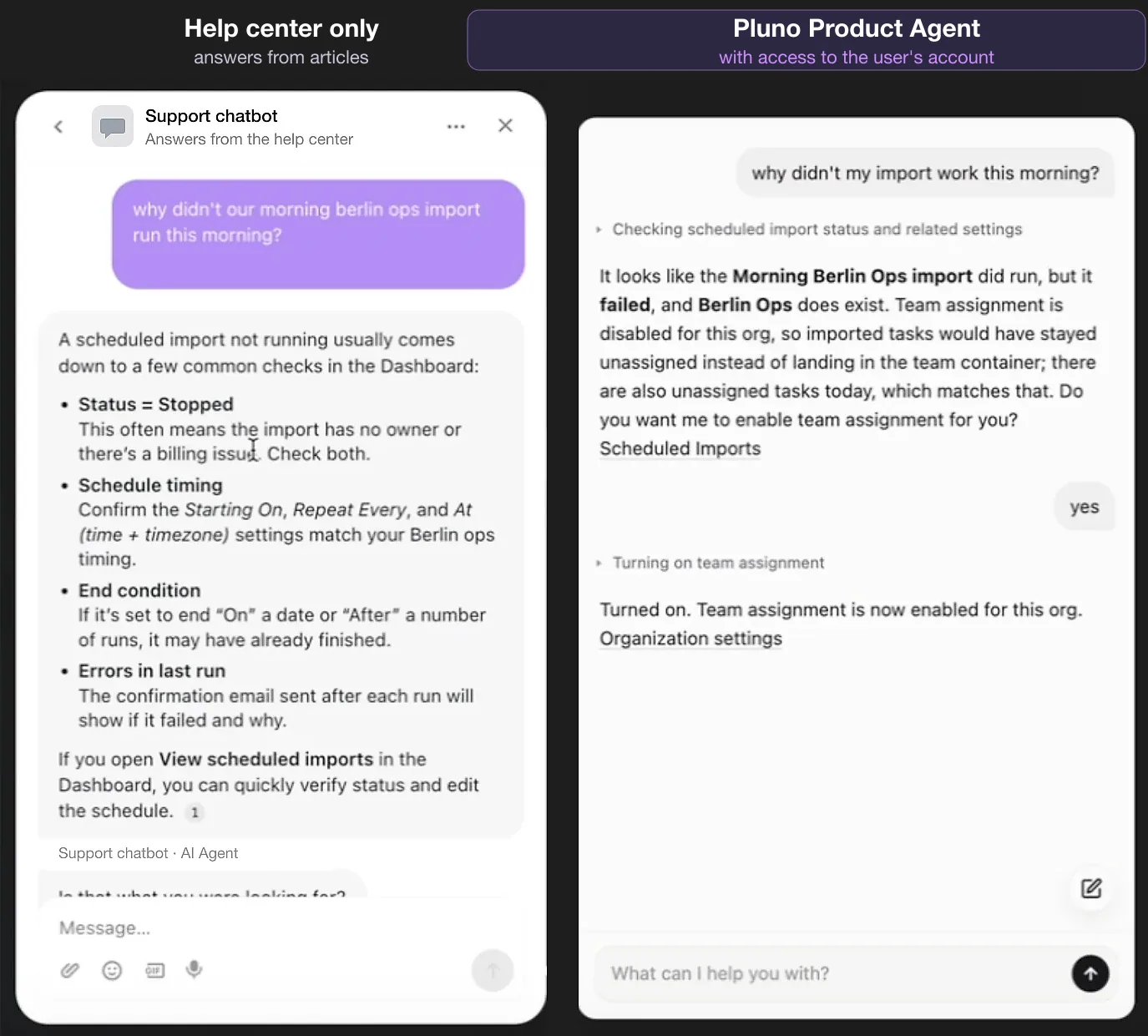
Two demo workspaces we recorded in sandbox accounts. They compare these two configurations, not every chatbot and every agent.
The help center answer isn't wrong. It's generic: four things the customer could check. The agent checks the account itself, identifies a configuration issue and applies the approved change, so the customer doesn't work through the checklist alone.
10 chatbot examples, from ChatGPT to your help desk
The clearest chatbot examples fall into three groups: general assistants anyone can use, voice assistants, and chatbots that companies run for their own customers. Here are ten, with what each shows about the technology. The table at the end compares them on the four yardsticks.
General-purpose AI chatbots
- ChatGPT is OpenAI's generative AI chatbot, launched on November 30, 2022. It writes, explains, summarizes and codes, and it's the reason most people now expect a chatbot to understand free text.
- Claude is Anthropic's AI chatbot, positioned as "the AI assistant for work", with a focus on long documents, writing and code.
- Gemini is Google's AI assistant, built into Google's apps and Android phones.
- Microsoft Copilot is Microsoft's AI assistant for work and life, built into Windows and Microsoft 365.
- Meta AI sits inside WhatsApp, Instagram and Messenger. Meta says more than 1 billion people use it every month.
Voice assistants
- Siri arrived with the iPhone 4S in October 2011. Apple began rolling out a new Siri AI, in beta and in English, in September 2026.
- Alexa+ is Amazon's generative AI version of Alexa. It costs $19.99 a month, or is free for Prime members.
Chatbots companies run for their customers
- Erica is Bank of America's virtual financial assistant. Since its 2018 launch, client interactions have passed 3.2 billion, and in 2025 alone, 20.6 million users interacted with it nearly 700 million times, according to the bank's March 2026 release.
- Klarna's AI assistant handled 2.3 million conversations in its first month in 2024, two-thirds of Klarna's service chats, and cut resolution time from 11 minutes to under 2. In May 2025, Klarna began recruiting human agents again, with its CEO quoted as saying that investing in the quality of human support was the way forward. Volume handled isn't the same as quality.
- Pluno is an AI layer that runs inside a company's help desk, such as Zendesk, Intercom or Salesforce Service Cloud. It answers customers from the company's resolved tickets and help center, and its Product Agent acts for users inside the company's own product. At Innovorder, it resolves 67% of chat tickets.
Other help desk AI agents include Fin by Intercom, Zendesk AI agents, Forethought AI agents by Zendesk, Ada, Tidio's Lyro and Salesforce Agentforce. I compare the tools in my roundup of the best AI chatbots for customer service.
| Example | Understanding | Answer source | Actions | Failure mode |
|---|---|---|---|---|
| ChatGPT, Claude, Gemini, Copilot | Free text, files, images | Training data, plus web search and what you add | Some, with connected apps | Made-up facts |
| Meta AI | Free text in messaging apps | Training data, plus web search | Few | Made-up facts |
| Siri, Alexa+ | Speech | Device data and connected services | Controls apps and smart devices | Mishears or misreads the request |
| Erica | Banking questions in text or speech | The customer's own accounts | Everyday banking tasks | Needs a human for complex cases |
| Klarna's assistant | Free text, many languages | Klarna's policies and account data | Refunds, returns, payment changes | Quality gaps at high volume |
| Pluno | Free text in 50+ languages | Resolved tickets, help center, docs and connected tools | Product Agent acts in your product; bugs go to engineering with research | Escalates when sources disagree, instead of guessing |
| Other help desk AI agents | Free text, many languages | Help center, past tickets, account data | Varies by vendor and setup | Wrong answer, or a poor handoff |
A short history of chatbots, from ELIZA to ChatGPT
Chatbots are older than the internet. The first one, ELIZA, ran at MIT in the mid-1960s, and the idea behind it goes back to a 1950 question from Alan Turing.
| Date | Milestone | Why it mattered |
|---|---|---|
| October 1950 | Alan Turing, "Computing Machinery and Intelligence" | Asked "Can machines think?" and proposed judging it by conversation |
| January 1966 | ELIZA, by Joseph Weizenbaum | The first famous chatbot: it played a therapist by reflecting the user's words back |
| 1995 | A.L.I.C.E., by Richard Wallace | A pattern-matching chatbot that later won the Loebner Prize, a Turing-test contest, in 2000 and 2001 |
| 2001 | SmarterChild | A chatbot on AOL Instant Messenger that reached over 17 million users |
| October 2011 | Siri launches on the iPhone 4S | Put a voice assistant in millions of pockets |
| April 2016 | Bots on Facebook Messenger | Opened a major messaging app to business chatbots |
| November 30, 2022 | ChatGPT launches | Made generative AI chatbots a mass-market product |
| September 2026 | Siri AI begins rolling out | Generative AI reaches the voice assistant on the iPhone |
ELIZA only reflected words back, yet it felt like a conversation. That gap between sounding right and being right is still the central problem with chatbots, and it's what the rest of this guide is about.
Chatbots in customer service: what they handle and where they fail
Chatbots in customer service handle routine, well-documented questions very well. Chatbots without authenticated access to live customer data struggle with account-specific problems, and every chatbot struggles with policy edge cases and anything its sources don't cover. The difference between a good and a bad support chatbot is mostly what it does at that edge.
Where chatbots do well
The best fit is high-volume questions with one correct, documented answer: how-to steps, plan limits, order status, password resets and opening hours. Here a chatbot answers in seconds, and nobody waits in a queue.
The expectation is that AI does more every year. In Salesforce's State of Service report (6,500 service professionals, 2025), teams expected AI to resolve 50% of service cases by 2027, up from 30% in 2025. Gartner goes further in a March 2025 forecast: by 2029, agentic AI will resolve 80% of common customer service issues without a human.
Where chatbots fail
Three failure patterns cause most of the damage:
- The confident wrong answer. The chatbot invents a policy or misstates one, and the customer acts on it.
- The loop. The chatbot can't solve the problem and won't let the customer reach a person, so they rephrase the same question again and again.
- The silent failure. The chat ends, it counts as "deflected", but the customer simply gave up or called instead. Your dashboard looks better while the customer's experience gets worse.
Customers remember these. In Gartner's survey of 3,566 customers (published September 2026), only 27% said they would try a chatbot again after a negative experience. And while 49% said they would have been willing to use a chatbot, only 7% actually used one in their most recent service interaction.
Gartner's research also points to the most important design rule. In its August 2026 release, 87% of customers said companies using generative AI for service must offer a way to reach a human agent.
Real chatbot failures, and what they cost
Every one of these is public, and each one maps to a failure mode above:
| Case | What the chatbot did | What it cost | The lesson |
|---|---|---|---|
| Moffatt v. Air Canada (February 2024) | Gave wrong information about bereavement fares | Ordered to pay C$812.02 in damages, interest and tribunal fees; the tribunal rejected its attempt to disclaim responsibility for the chatbot | You're responsible for what your chatbot says |
| DPD (January 2024) | Swore at a customer and called DPD "the worst delivery firm in the world" after a system update | Viral embarrassment; DPD disabled the AI element | Test after every change, not only at launch |
| NYC MyCity (March 2024) | Told business owners they could take a cut of workers' tips | Public criticism of a government service | Ground answers in sources, especially on legal and policy questions |
| Cursor (April 2025) | A support bot invented a login policy that didn't exist | A co-founder had to correct it publicly | Label AI replies and keep humans on policy questions |
Courts outside North America are reaching the same conclusion. In May 2026, the Higher Regional Court of Hamm in Germany held a company liable after its chatbot invented specialist titles for its doctors, finding the chatbot was not a separate "third party". In its May 12, 2026 announcement concerning case 4 UKl 3/25, the court said it had permitted an appeal, but Verbraucherzentrale NRW, the consumer group that brought the case, reported on June 1, 2026 that the ruling is final.
What does a chatbot cost?
A chatbot costs anything from nothing to several dollars per conversation. Consumer AI chatbots are free or about $20 a month per person. Support chatbot pricing includes conversation tiers, charges per outcome or resolution, and custom contracts, and platform and seat charges may apply on top.
Help desk chatbot prices, checked November 2, 2026
These vendors charge for different events, in two currencies, so the list prices aren't directly comparable unit prices. To compare vendors, price the same workload in one currency.
| Product | Billable event | List price | Billing terms and extra costs |
|---|---|---|---|
| Pluno, our pick for complex B2B support | A resolved ticket: no human involved, and no customer reply for 72 hours after Pluno's last answer | €0.90 per resolution | Plus a base fee set by your total monthly ticket volume, from €249 a month for up to 500 tickets (€210 a month, billed annually). Escalations are never billed |
| Fin by Intercom | An outcome: a resolution, or a completed Procedure, which can include a handoff | $0.99 per outcome | Charged once per conversation; minimum monthly commitment when used with another help desk |
| Zendesk AI agents | An automated resolution | $1.50 committed, $2.00 pay-as-you-go | 5 to 10 automated resolutions per agent a month included, depending on plan, on top of Zendesk seats |
| Tidio Lyro | A Lyro conversation, in monthly tiers | From $32.50 a month, billed annually, for 50 Lyro conversations | Billed monthly, the same tier costs more; 50 free Lyro conversations, once per account lifetime |
| Salesforce Agentforce | A conversation, or an action paid with Flex Credits | $2 per conversation, or $0.10 per standard action at the listed credit rate | Voice actions and other consumption are charged differently, and one conversation can use several actions; prices "subject to change" |
| Ada | Custom | Quote only | No public price |
An "outcome" isn't always a customer helped with no human. At Fin, a completed Procedure that ends in a handoff can count as a billable outcome, while Pluno never bills an escalation.
For consumer chatbots, Claude Pro is $20 a month billed monthly, and ChatGPT has a free plan plus paid tiers. For a deeper look at one vendor's billing, see my breakdowns of Zendesk AI pricing and Agentforce pricing.
What a chatbot price leaves out
The per-resolution price is the visible part of the bill. The rest sits in the work around the chatbot:
- Setup and knowledge upkeep: writing and updating the help center articles it answers from.
- Review time: someone reading a sample of conversations every week.
- Handoff cost: extra agent minutes when a customer arrives from a failed bot chat and has to explain everything again.
- Wrong answers: refunds, credits or churn when the chatbot gets a policy wrong.
The handoff cost is the one I see teams forget most. If a failed chat adds two minutes to every handed-off conversation, a chatbot that resolves 40% of chats still makes the other 60% slower.
Run your own numbers
The calculator below estimates what a support chatbot is worth once handoffs count. It starts with illustrative defaults: 3,000 chats a month, a 40% resolution rate, $1 per billable resolution, eight agent minutes per chat at $35 an hour and two extra minutes per handoff.
Chatbot calculator: what is it worth once handoffs count?
Values the agent time a chatbot frees on the chats it resolves, minus what it costs: the chatbot bill (a price per billable resolution plus any fixed monthly fee) and the extra agent time on chats it hands off. Use your vendor's billable resolution count, then check a sample of those chats, because a billable resolution isn't always a solved problem. Enter the extra handling time after a handoff that you measured. Complete context can reduce it, but it rarely reaches zero, so treat 0 as an optimistic case. Freed time is capacity, not a cash saving, unless it avoids hiring, overtime or outsourcing. Setup, knowledge upkeep and the cost of wrong answers are left out. Your own numbers, not benchmarks.
Agent time freed
$5,600
1,200 resolved chats at $4.67 each
Chatbot bill + handoff cost
$3,300
$1,200 bill + $2,100 on 1,800 handoffs
Monthly capacity value after chatbot costs
$2,300
Agent time freed, minus bill and handoff time
The chatbot breaks even at a 25% resolution rate. Handoffs cost $2,100of agent time a month here. A handoff with the full conversation and the chatbot's research can lower that line.
With those defaults, the chatbot frees about $5,600 of agent time, costs $1,200 in resolutions and adds about $2,100 of handoff time, for an estimated capacity value of about $2,300 a month. That's capacity, not cash: it becomes a saving only when it avoids hiring, overtime or outsourcing. Enter the extra handling time after a handoff that you actually measure, because complete context can reduce that overhead but doesn't make it zero.
To model Pluno, enter €0.90 per resolution and the base fee for your total monthly ticket volume as the fixed fee, converted to dollars. Between 1,000 and 3,000 tickets a month, that's €999 a month, or €850 a month billed annually. The base fee also covers other modules, such as Escalation Copilot, so putting all of it on the chatbot overstates its cost.
How to launch a support chatbot customers don't hate, in 7 steps
The safest way to launch a support chatbot is to start narrow, ground it in your own answers and make the exit to a human easy. Here's the sequence I'd follow.
- Pick the questions first, not the tool. Pull your last 1,000 tickets and group them by topic. The chatbot's first scope is the high-volume topics with one documented answer.
- Fix your sources. Check that each of those answers lives somewhere the chatbot can read, ideally your help center plus resolved tickets. If your best agents answer from memory, write it down before launch.
- Choose the type to match the questions. Menu or rule-based bots suit a handful of stable flows. For free-text B2B questions, use a generative AI chatbot grounded in your sources, and for account-specific problems, an AI agent with access to the account.
- Test on past conversations. Run the chatbot on recent tickets, using only what was known when each arrived, and score every answer for accuracy and for whether it should have handed off.
- Design the handoff before the answers. Decide which topics always go to a person, show a "talk to a person" option from the start and pass the whole conversation to the agent.
- Label it and launch in one channel. Say clearly that it's an AI, as Article 50 of the EU AI Act requires in its scope and as California's AB 1609 will from January 1, 2027. Start with your web widget before email or WhatsApp.
- Measure resolutions, not deflections. Separate three numbers: billable resolutions (what your vendor charges for), resolutions the customer confirmed and resolutions that pass an audit of sampled conversations. Billing rules often rest on inactivity. Pluno, for example, counts a billable resolution after 72 hours without another customer response, provided no human intervened, so validate outcomes separately with sampled conversations, repeat contacts within 48 hours and CSAT. My guide to customer service metrics covers how to track each one.
Chatbot rules you need to know in 2026
The main legal rule for chatbots is disclosure: in a growing number of places, customers must be told when they're talking to a bot. Some new laws also require a route to a human. This is general information, not legal advice, so check the details with your counsel.
- EU AI Act, Article 50: providers must design AI systems that interact directly with people so that those people are informed they're interacting with an AI, unless that's obvious to a reasonably well-informed person from the context. The information is due at the latest at the first interaction. Article 50 applies from August 2, 2026, according to the European Commission.
- California's BOT Act: Business and Professions Code section 17941 makes it unlawful to use a bot to mislead people about its artificial identity to sell goods or influence a vote. Disclosing that it's a bot is the safe harbor.
- California AB 1609: signed on September 28, 2026, it takes effect on January 1, 2027, according to Holland & Knight. From then, large companies must disclose when a customer service representative is a chatbot. When a customer asks for a human during regular business hours, they must make a good-faith effort to connect them within 15 minutes or let them schedule an appointment. Latham & Watkins reports it applies to businesses with gross annual revenue over $500 million.
- Companion chatbot laws: California's SB 243, in force since January 1, 2026, and similar 2026 laws in other states target companion chatbots, not support bots. Utah's AI disclosure law applies more broadly, as Davis Polk summarizes.
The practical takeaway is the same everywhere. Label your chatbot as AI, keep a clear route to a person and don't let it make promises your team wouldn't.
What support teams and customers say about chatbots
Here's what support teams and customers say in their own words, starting with two Pluno customers. Each card is one person's experience, not a benchmark, and the Pluno results are what the customers reported in their stories.
“My CEO tested it once, asked one question, and immediately saw that the AI was impressive. That was it.”
Customer-reported outcome: Pluno resolves 67% of chat tickets, with replies in under a minute and CSAT up 15 points.
“The numbers of resolved tickets were high, but when you looked at the quality, it wasn't great. You could feel frustration building up in our customer base.”
Customer-reported outcome: After testing Pluno on 50 real tickets, Smartness switched: 40%+ real ticket deflection and first response time down from hours to 22 minutes.
“Customers are able to ask more complicated questions and get real answers instead of being forced to escalate to a human.”
“We’ve improved our resolution/deflection rate from around 54% to 60%. ... it’s difficult to know whether these are true resolutions or cases where the customer simply gave up, or jumped to another channel, calling us instead.”
“On handoff, what hurt us was not the bot failing but failing silently. Low-confidence answers went out looking as confident as good ones. Once it said it was unsure and offered the handoff in the same message, complaints dropped...”
“It’s been over a week of just being stuck in the chatbot. At this point, I want to just close my store as this experience is bad and I am trying to run a business.”
Three lessons stand out:
- Volume isn't quality. Smartness saw high resolved-ticket numbers from its previous AI agent while customers grew frustrated. A Zendesk user describes the upside when it works: customers get real answers to complicated questions.
- "Deflected" can hide customers who gave up. One team lead on the Intercom Community can't tell true resolutions from customers who left or called instead. Another found that admitting uncertainty and offering a handoff in the same message cut complaints.
- A bot with no exit costs you customers. A Shopify merchant stuck in a support chatbot for over a week said they wanted to close their store. This illustrates the frustration that Gartner's survey describes.
How Pluno goes beyond a chatbot inside your help desk
Pluno is an AI layer for help desks: it works with Zendesk, Intercom, Salesforce Service Cloud, HubSpot, Jira Service Management and Freshdesk, so you keep your tickets, macros and reporting. It adds AI across your support workflows, from the first reply in chat to the engineering escalation, so the customer-facing part works like an AI agent, not a scripted chatbot.
Setup differs by help desk. In Zendesk, Pluno runs as a native app in the ticket sidebar, while Intercom agents use AI Copilot and Escalation Copilot through the Pluno Chrome extension. The integration docs list what each help desk supports, and the Pluno team connects your help desk with you during onboarding.
On the four yardsticks, here's what that means:
- Understanding: free-text messages in 50+ languages, across email, web forms and messaging channels, including your web widget and WhatsApp.
- Answer source: your resolved tickets, help center, docs, Slack threads and connected tools. Pluno reconstructs the troubleshooting steps your agents actually used, favoring the latest successful resolutions, and runs several rounds of searches before it answers.
- Actions: inside your product, the Product Agent checks each user's own setup and can change settings, finish setup steps or run exports for them, as in the side-by-side demo above.
- Failure mode: when its sources disagree, or a refund or another business decision is needed, it hands off instead of guessing, with a research summary, ticket references and next steps for the agent.
Which Pluno module does what, and how it's billed
Each module runs in a different place and is priced on its own terms:
| Module | Where it runs | What it does | How it's billed |
|---|---|---|---|
| Deflection AI | Your messaging channels, email and web forms | Answers customers, asks for missing details and hands off with its research | €0.90 per resolution, plus the base fee |
| AI Copilot | The agent sidebar in your help desk | Drafts replies and ticket summaries for your agents | €49 per seat a month, plus the base fee |
| Escalation Copilot | The ticket sidebar, sending to Slack, Jira, Linear, Microsoft Teams or incident.io | Writes the escalation brief and syncs updates back to the ticket | Included in the base fee |
| Troubleshooting Agent | The help desk sidebar, Slack or the Pluno dashboard | Investigates code, logs, session recordings, databases and error tracking to find the root cause | Credit plans from €99 a month, about 50 investigations |
| Product Agent | Embedded in your own product | Checks each user's setup and runs supported tasks for them | Talk to us |
Answers in chat that come from how your team resolves tickets
Deflection AI picks up new conversations in your messaging channels and tickets from email and web forms. It searches past tickets, your help center, docs and connected APIs in parallel, and it replies only when its sources agree and your AI Workflows allow it. When your sources show your team always needs a detail the customer left out, it asks for it first.
Everything else goes to your team with the work already done. The agent sees what the customer asked, what Pluno found and what it suggests next, so they still read and continue the case, but they don't start from zero.
Help for the agent after the handoff
A chatbot's job usually ends at the handoff. Pluno's doesn't. AI Copilot drafts a reply for every incoming message in the help desk sidebar, with references and troubleshooting steps, and Escalation Copilot writes the brief for Slack, Jira, Linear, Microsoft Teams or incident.io when a chat turns out to be a bug.
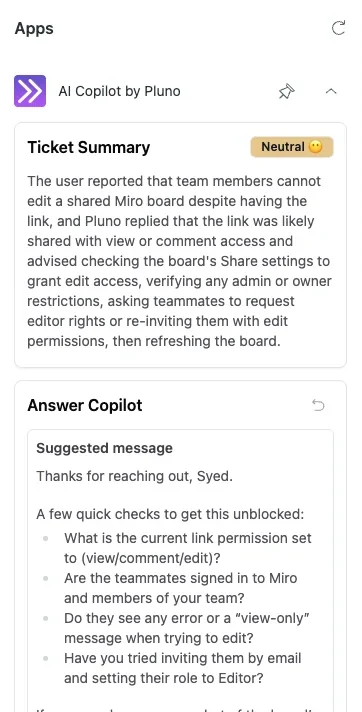
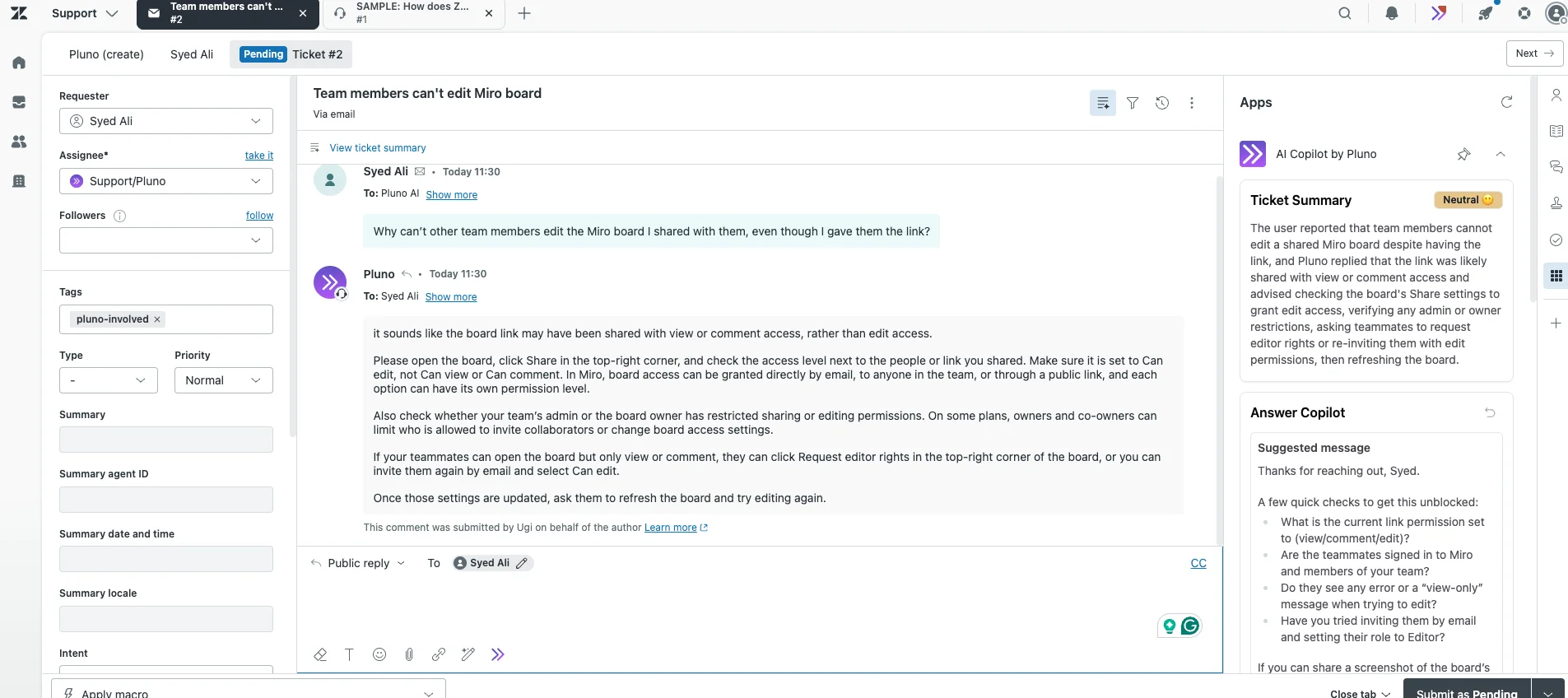
Demo ticket in a Zendesk sandbox: AI Copilot's ticket summary and suggested reply in the help desk sidebar (full screenshot).
When a chat turns out to be a technical problem
Say a customer's nightly data sync keeps failing. The support agent starts an investigation from the ticket sidebar, and the Troubleshooting Agent checks the systems you connected to it, such as your codebase, logs, error tracking and databases. Its summary and recommended fix appear where the investigation started.
If the cause is a genuine bug, the agent escalates it to engineering with Escalation Copilot, so the ticket reaches Jira or Linear with the context already written up. Setting it up means connecting the systems you want the Troubleshooting Agent to read, through its integrations.
What teams report
- Innovorder: Pluno resolves 67% of chat tickets, with replies in under a minute and CSAT up 15 points (full story).
- Kojo: ticket deflection went from 0% to 50%, with same-day Jira escalations (full story).
- Smartness: 40%+ real ticket deflection after switching from Fin by Intercom, and first response time down from hours to 22 minutes (full story).
Smartness made that switch after the same test we offer every team. Its support manager handed over 50 real tickets, expecting Pluno to lose to the AI agent they already ran, then compared Pluno's answers side by side and switched.
Pluno or Forethought?
The other help desk AI agent that learns from past tickets is Forethought, now sold as Forethought AI agents by Zendesk and available on help desks other than Zendesk too. Here's how the two compare for a B2B support team:
| What to check | Pluno | Forethought AI agents by Zendesk |
|---|---|---|
| Historical ticket knowledge | Answers from your resolved tickets, with plans from 500 tickets a month | Trains on past tickets, and Forethought says it works best with 20,000+ past tickets |
| Live account investigation | Product Agent in your product; Troubleshooting Agent across code, logs and databases | Its Browser Agent can work in internal tools that have no API |
| Engineering escalation | Escalation Copilot to Slack, Jira, Linear, Microsoft Teams or incident.io, with two-way sync | Routing through its Triage add-on |
| Agent assistance | AI Copilot drafts in the help desk sidebar | Reply drafts through its Assist add-on |
| Total cost | Published prices and a 14-day free trial | Quote only |
My Forethought AI review compares the two in depth.
Pricing is outcome-based for the customer-facing part: Deflection AI is €0.90 per resolved ticket, and escalations aren't billed. The base fee scales with your total monthly ticket volume, not only the tickets Pluno handles: from €249 a month for up to 500 tickets (€210 a month, billed annually), or €999 a month between 1,000 and 3,000 tickets (€850 a month, billed annually). AI Copilot is €49 per seat a month, and full prices are on the pricing page.
The bottom line
A chatbot is software that holds a conversation with people, and its type and integrations decide what it understands, where its answers come from and what it can do. Menu and rule-based bots suit a few stable flows, generative AI chatbots handle free-text questions, and AI agents with account access can fix account-specific problems.
For a support team, the winning chatbot isn't the one with the highest deflection number. It's the one that answers from your own resolved tickets, says when it isn't sure and hands off with the whole conversation, because only 27% of surveyed customers said they would try a chatbot again after a negative experience.
Pluno is our recommended starting point for B2B support teams that need historical ticket knowledge, technical investigation and engineering escalation in their existing help desk. Innovorder's Pluno AI resolves 67% of chat tickets, and Smartness switched to Pluno after testing it on 50 real tickets.
FAQ
What is a chatbot in simple terms?
A chatbot is a computer program you can chat with. You type or say a question, and it answers in plain language, from a script, with data it looks up or, for a generative AI chatbot, with a reply it writes itself.
What is a chatbot used for?
Chatbots are used for customer service, sales questions, booking and ordering, internal IT and HR help, and as general AI assistants for writing and research. In support, they answer common questions, collect details and hand harder cases to a person.
What is an AI chatbot, and how does it work?
An AI chatbot uses artificial intelligence to understand messages. Older ones classify messages into intents with machine learning, while most new ones are generative AI chatbots that use a large language model to read free text and write their own replies. In support, a generative AI chatbot usually searches your help center and past tickets first, then answers from what it finds and hands off when it can't.
What is the difference between a chatbot and ChatGPT?
Chatbot is the general category; ChatGPT is one product within it. ChatGPT is OpenAI's generative AI chatbot, launched on November 30, 2022, and with tools such as web search and connected apps, it also does some of what AI agents do.
Are all chatbots AI?
No. Menu-based and rule-based chatbots follow fixed menus and keyword rules, with no AI. Intent-based chatbots use machine learning to classify messages, which makes them AI chatbots in the broad sense, and generative AI chatbots use large language models to understand messages and write replies.
What is the difference between a chatbot and an AI agent?
A chatbot provides a conversational interface. An AI agent can pursue goals through decisions and tool use, such as checking an account, changing a setting or filing a bug, sometimes through that interface. Chatbots can run configured actions too, and not every agent has a chat window.
What was the first chatbot?
ELIZA, written by Joseph Weizenbaum at MIT and published in January 1966. It imitated a therapist by turning the user's statements back into questions.
Why are some chatbots so frustrating?
Most frustration comes from three things: scripted bots that don't understand the question, generative AI chatbots that answer confidently but wrongly, and bots that won't let you reach a person. A grounded answer source and an easy handoff fix most of it.
What are the limitations of chatbots?
Generative chatbots combine patterns learned during training with any supplied or retrieved information. Without reliable grounding, they can produce unsupported answers. Chatbots without authenticated access to live customer data also struggle with account-specific problems.
Can a support chatbot safely use past tickets?
Yes, with the right controls. Pluno, for example, anonymizes past tickets before they become knowledge, replacing names, email addresses and signatures with placeholders, and never uses internal notes as ticket knowledge.
You can also exclude ticket groups and scrub sensitive values with your own rules, as its data privacy docs and DPA describe. Whatever the vendor, check that every source you connect is one you're comfortable with the chatbot drawing on in front of customers.
Do I have to tell customers they're talking to a chatbot?
In many places, yes. In the EU, Article 50 of the AI Act has applied since August 2, 2026: providers must make sure people are told they're interacting with an AI by the first interaction, unless that's obvious from the context.
California's AB 1609 adds disclosure and a route to a human for large companies from January 1, 2027. Labeling your chatbot is good practice everywhere.
Are chatbots free?
Some are. ChatGPT, Claude and Gemini have free plans, and many help desks include a basic chatbot. Support chatbot pricing includes conversation tiers, charges per outcome or resolution, and custom contracts, and platform and seat charges may apply.