When a customer gets stuck inside a software product, the usual support journey takes them away from the task they were trying to complete.
They search a help center. They open a chatbot that repeats the help center. If neither works, they create a ticket, describe their setup, attach screenshots, and wait for someone to investigate.
Putting that journey inside a widget makes it more convenient, but it does not necessarily make it more useful. The support experience still knows very little about the customer, their configuration, or what is happening on the screen in front of them.
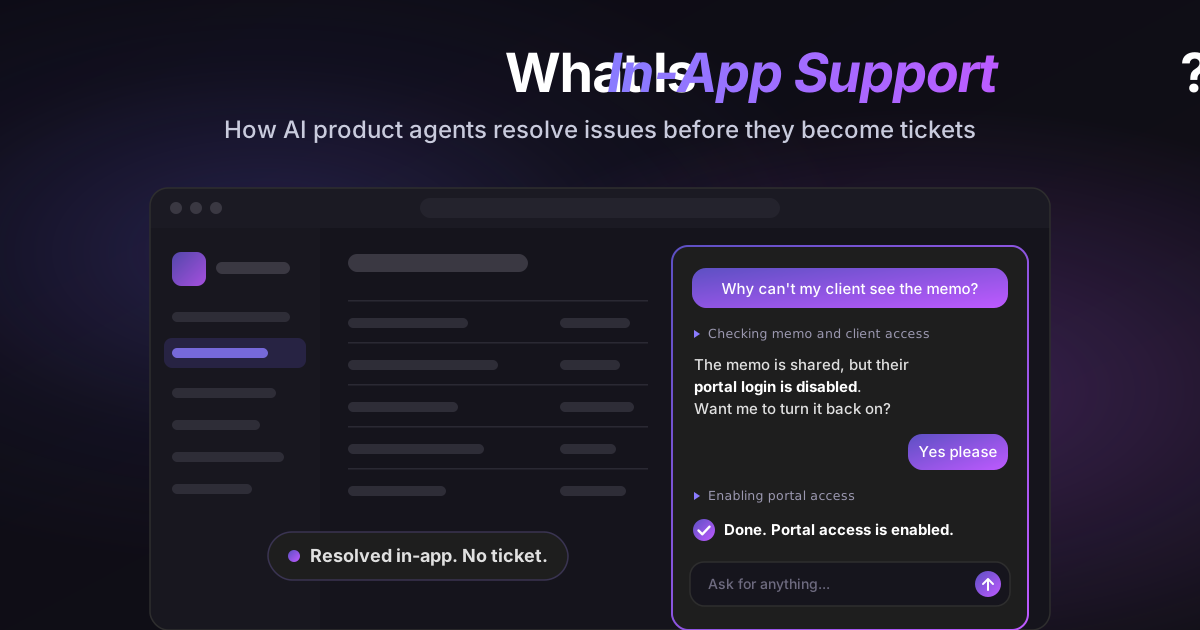
That is beginning to change. A new type of AI product agent can provide in-app support that understands the user's situation and, with the right permissions, takes action inside the product to resolve it.
TL;DR
-
In-app support is help delivered inside the product, so users get unstuck without leaving their workflow. Where it happens matters less than whether it can actually solve the problem.
-
Most in-app help can't see the account. Tooltips, documentation chatbots and live chat all start without the user's plan, role, settings or integrations, so account-specific questions still turn into tickets.
-
An AI product agent checks that context first, then acts. With the user's permission it can change a setting, fix a configuration, finish a setup step or run an export, and it asks for confirmation before high-impact changes.
-
When it can't resolve something, it escalates with the full picture: the conversation, account context, configuration and steps already tried.
-
Measure resolution, not containment. Track whether the user finished the task and didn't open a related ticket afterward, not just how many chats closed.
What is in-app support?
In-app support, also called in-product customer support, is help delivered directly inside a software product, so users can get answers and resolve problems without leaving their workflow. It can include tooltips, guided tours, searchable help content, chat, live support, or an embedded AI assistant.
The defining characteristic is where the support happens: inside the application rather than on a separate help site, in an email thread, or through another channel.
But location is only the first layer. Good in-app support should also reduce the effort required to solve the problem. If a user still has to search generic documentation, explain their account setup, and carry out every step manually, the support may be in the app without being meaningfully connected to the product.
The next step is context-aware in-app support: help that can understand the user's current account, permissions, configuration, and task before responding.
Why traditional in-app help still creates avoidable tickets
Most in-app help falls into one of three categories.
1. Static guidance
Tooltips, checklists, walkthroughs, and help panels are useful when every user follows roughly the same path. They explain where a feature lives or walk a new customer through a standard setup.
They are less effective when the correct answer depends on the customer's plan, role, integration, data, or previous configuration. A generic walkthrough cannot easily explain why one account behaves differently from another.
2. Documentation-based chatbots
A documentation chatbot makes a help center conversational. Instead of searching through articles, the user asks a question and receives a summarized answer. (We compare the main options in our roundup of AI chatbots for customer service.)
That is faster than manual search, but the answer is usually based on what the documentation says should happen. The chatbot may not know what is actually happening in this account.
For example, the documented answer might say that a reporting feature is available to administrators. It cannot necessarily see that the person asking is a viewer, that their workspace is on a different plan, or that a required setting is disabled.
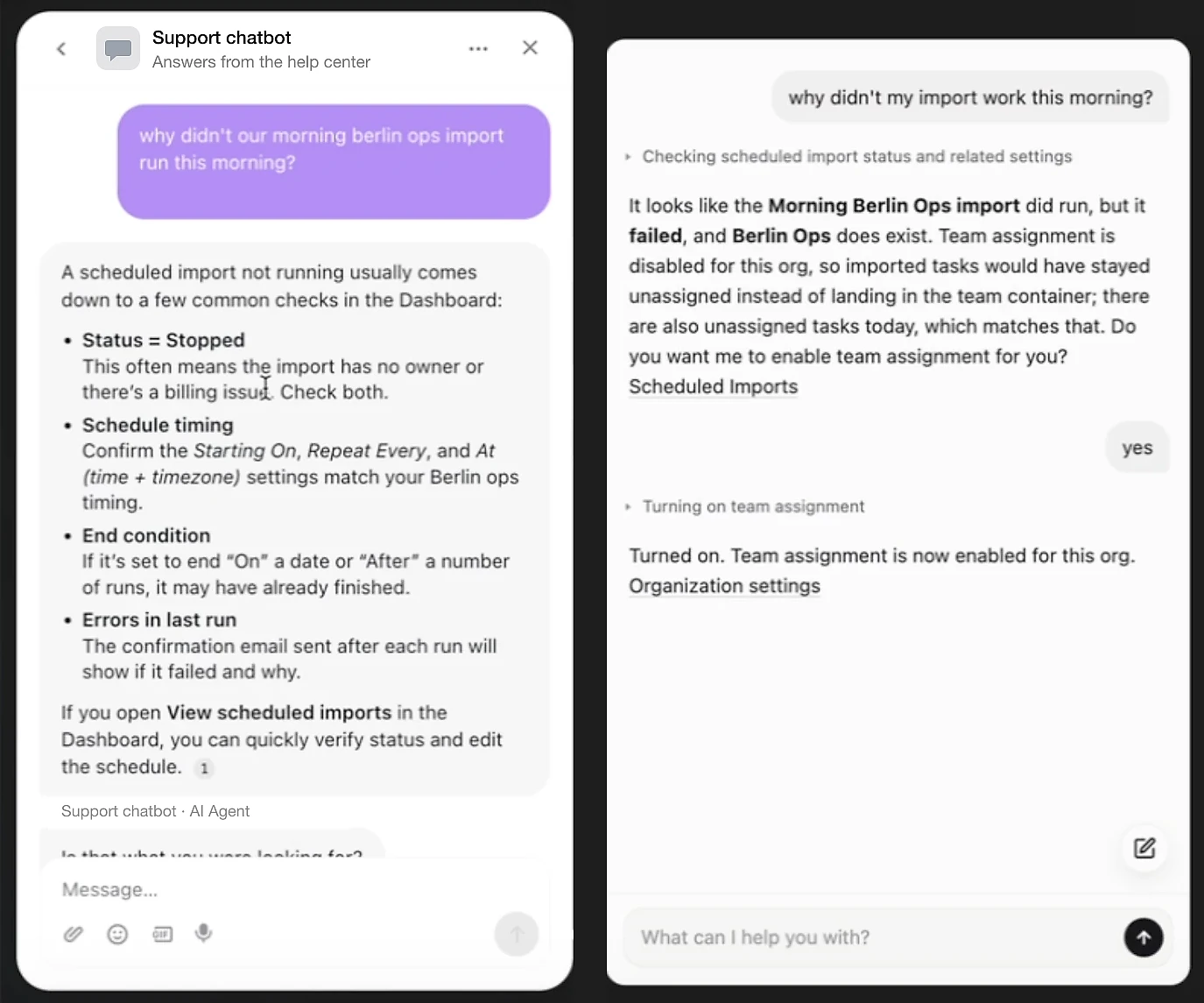
The screenshot below, a demo recorded in a sandbox account, shows the gap. Both assistants get the same question about a scheduled import that didn't work. The documentation chatbot on the left lists four common causes for the user to check. The product agent on the right checks the account, finds that the import ran but failed because team assignment is disabled, and turns it on when the user says yes.
3. Live chat
Live chat gives the customer access to a person, but it moves the diagnostic work to the support team. An agent still has to identify the account, check permissions, inspect the configuration, ask follow-up questions, and guide the customer through the fix.
Live chat is valuable for cases that need judgment or empathy. It is an expensive way to answer the same setup, permissions, configuration, and export questions repeatedly.
The common limitation is not the interface. It is the absence of product context and the inability to complete the task.
What is an AI product agent?
An AI product agent is an embedded AI support agent that understands a user's product context and can help complete tasks inside the software. You may also see it called an in-product AI assistant or an AI product support agent. It combines conversational assistance with account-aware guidance and controlled actions.
Instead of answering only from documentation, an AI product agent can consider information such as:
- The page or workflow the user is currently viewing
- Their role and permissions
- Their plan and enabled features
- Relevant account settings and integrations
- The state of the task they are trying to complete
- Actions that have already been attempted
With appropriate authorization, it can then do more than describe the next step. It can change a setting, complete part of a setup, run an export, correct a configuration issue, or monitor a process for completion.
This changes the goal of in-app customer support. The goal is no longer simply to answer the question. It is to get the user unstuck.
In-app support vs chatbots, live chat, and AI product agents
| Support experience | Uses general knowledge | Understands the user's configuration | Can complete product actions | Available 24/7 | Escalates with diagnostic context |
|---|---|---|---|---|---|
| Help center | Yes | No | No | Yes | No |
| Documentation chatbot | Yes | Usually no | Usually no | Yes | Sometimes includes the conversation |
| Live chat | Yes | After an agent investigates | Through manual agent work | Depends on staffing | Depends on the agent's notes |
| AI product agent | Yes | Yes | Yes, within approved permissions | Yes | Yes |
These approaches do not have to replace one another. A help center remains useful for learning. Live support remains important for sensitive or ambiguous situations. An AI product agent fills the space between generic information and a human investigation: cases that can be resolved immediately once the product understands the user's context.
How an AI product agent works
A context-aware support interaction typically follows four steps.
1. The user asks for help inside the product
The user opens an embedded assistant while setting up an integration, configuring a workspace, running a report, or completing another task. They explain the outcome they want in their own words.
Because the conversation begins inside the product, the user does not have to switch to a help center or start an email thread.
2. The agent checks the relevant context
Before answering, the product agent examines the information needed for that request. That might include the current screen, account plan, user role, field mapping, feature settings, or status of an ongoing process.
The scope matters. The agent should inspect only the context required for the task and operate under the permissions assigned to the user and the product.
This is the difference between saying, "Reports are available to editors," and saying, "This user is currently a viewer, but the Reports feature requires the editor role on your plan."
3. It guides the user or takes an approved action
Some requests need only a precise explanation. Others can be completed directly.
An AI product agent might:
- Turn on an approved setting
- Correct an incomplete field mapping
- Help connect an integration
- Complete a setup step
- Apply filters and run an export
- Fix a supported configuration problem
- Watch a verification step and notify the user when it succeeds
High-impact or irreversible actions should require confirmation. The product should also keep a record of what the agent inspected and changed.
4. It escalates when the issue needs a person
Not every problem should be automated. A suspected bug, an ambiguous request, or an action outside the agent's permissions should move to the support team.
The escalation should include the conversation, relevant account context, configuration, actions already attempted, and the reason the issue could not be resolved. The customer should not have to repeat the story from the beginning.
That is a better handoff than a chatbot that reaches the end of a script and asks the user to create a ticket with no context attached. If your help desk already uses AI to sort incoming tickets, see how AI ticketing systems triage and route what the agent hands over.
Examples of context-aware in-app support
The difference becomes clearer in real product situations. The examples below are demos we recorded in sandbox accounts of different SaaS products, to show how a product agent handles each type of request.
An access question
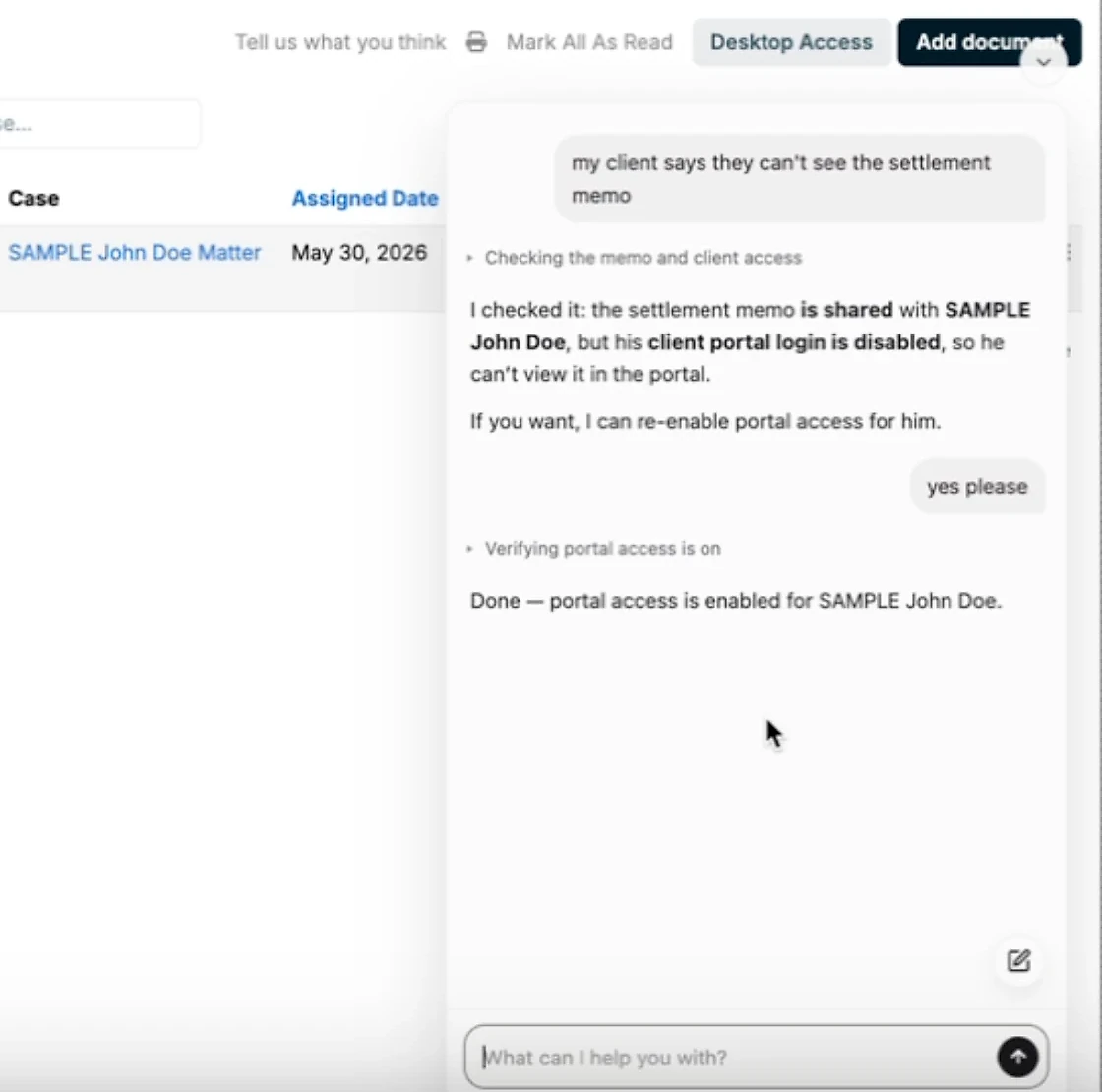
User: "My client says they can't see the settlement memo."
A generic assistant explains how document sharing works. A context-aware product agent checks the memo and the client's account, finds that the memo is shared but the client's portal login is disabled, and offers to re-enable portal access. One "yes please" later, the client can see the document.
A failed integration
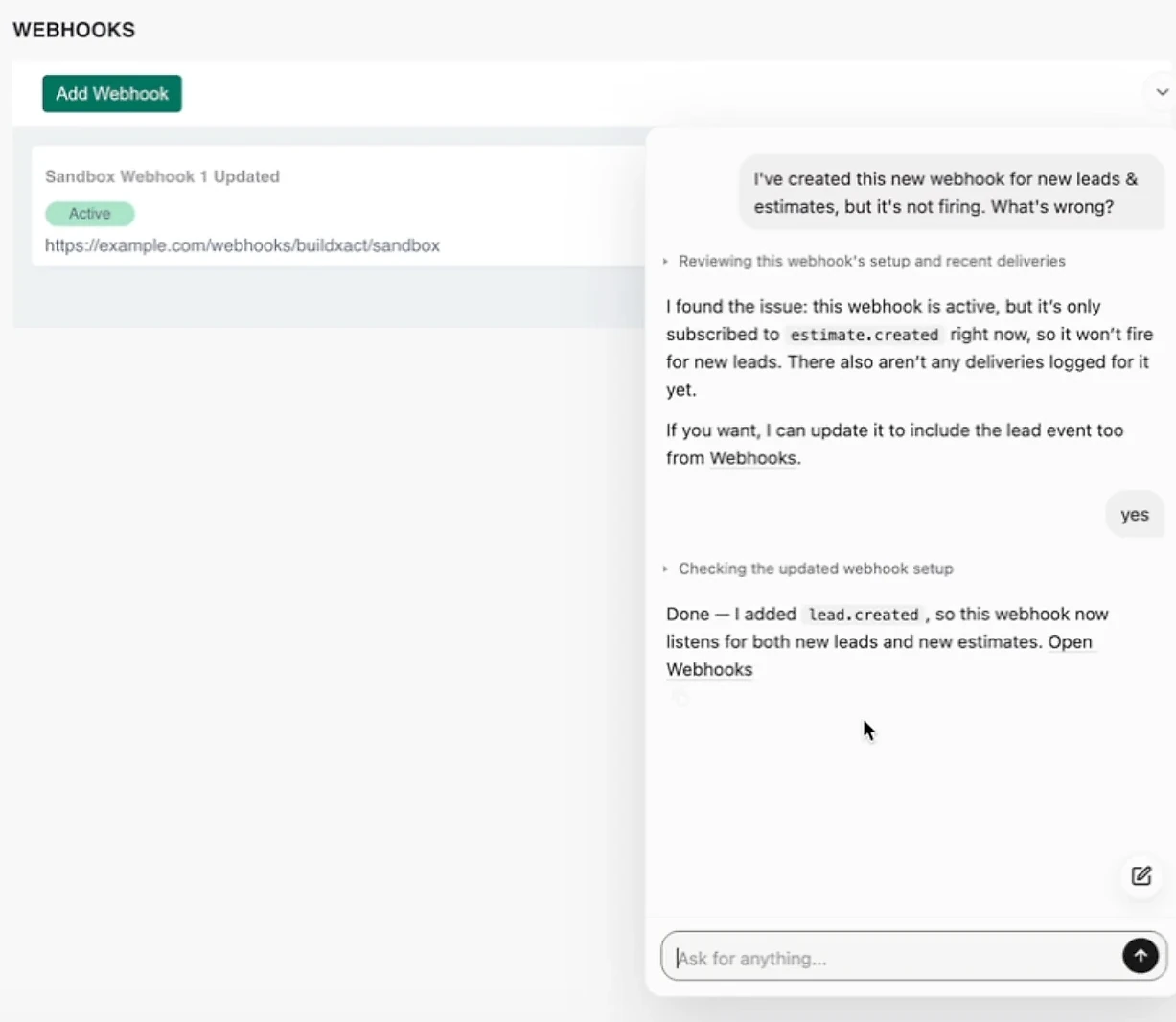
User: "I've created this new webhook for new leads and estimates, but it's not firing. What's wrong?"
A help article lists ten possible causes. A product agent reviews this webhook's setup and recent deliveries, sees that it is only subscribed to the estimate event, and, with confirmation, adds the lead event so the webhook fires for both.
A data export
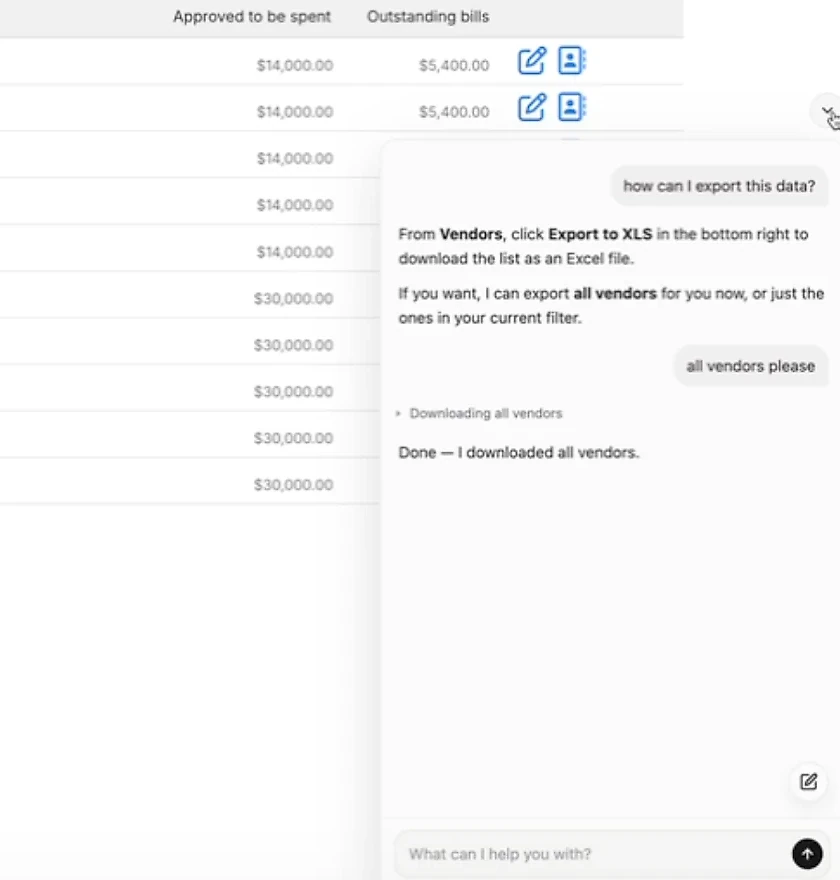
User: "How can I export this data?"
A traditional chatbot explains which button to click. A product agent explains that too, then offers to run the export itself, for all vendors or just the current filter, and downloads the file.
A configuration problem
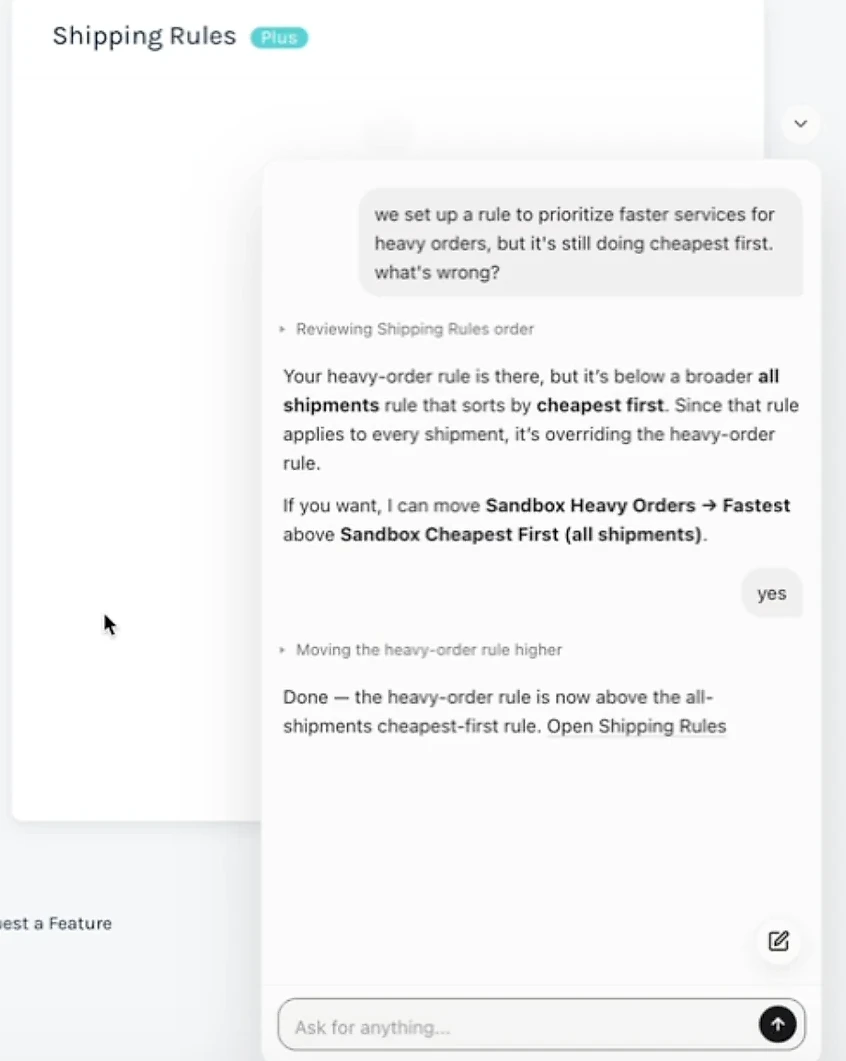
User: "We set up a rule to prioritize faster services for heavy orders, but it's still doing cheapest first. What's wrong?"
The rule exists, so documentation can't explain the problem. The product agent reviews the order of the account's shipping rules, sees that a broader "all shipments, cheapest first" rule sits above the heavy-order rule and overrides it, and moves the heavy-order rule higher once the user agrees.
These are not just shorter conversations. They remove work from both the customer and the support team.
How to reduce support tickets with an AI product agent
Many support queues contain questions that are individually simple but collectively expensive:
- How do I enable this feature?
- Why can one teammate access this page while another cannot?
- Which value belongs in this configuration field?
- Has my integration finished syncing?
- Can you export this data for me?
- Why is this setup step still incomplete?
These questions become tickets because the answer depends on the customer's account or because the customer needs someone to perform an action. Documentation alone cannot close that gap.
This is where the industry expects most of the change. Gartner predicts that agentic AI will autonomously resolve 80% of common customer service issues without human intervention by 2029, leading to a 30% reduction in operational costs (Gartner, 5 March 2025). Resolving an issue autonomously, rather than answering a question about it, requires exactly the two things a documentation chatbot lacks: account context and the ability to act.
AI customer self-service that finishes the task
AI customer self-service can resolve more of these issues before a ticket exists. The user asks for help at the moment of friction, the product agent checks the relevant context, and the task is completed in the same workflow.
This is what separates product support automation from deflection. The result is more useful than ticket deflection for its own sake. A question has not merely been kept out of the support queue; the underlying problem has been resolved.
Support agents can then spend more time on bugs, complex technical investigations, sensitive account issues, and situations that require human judgment. For the wider picture of what to automate first across the whole queue, see our customer support automation guide, and for how far fully autonomous customer service can go today.
AI customer onboarding: how in-app support improves activation
Product onboarding rarely fails because the customer cannot find the first checklist. It fails when the customer encounters an account-specific obstacle before reaching value.
The required field has a different name in their CRM. A teammate lacks the necessary permissions. A DNS record has not propagated. An integration is connected but configured incorrectly. The user does not know which settings apply to their workflow.
Static onboarding treats these situations as exceptions. A product agent can support them as they happen.
For SaaS companies, that creates several opportunities:
- Faster time to value: Users can complete setup without waiting for a support response.
- More personalized onboarding: Guidance can reflect the customer's plan, role, and configuration.
- Fewer abandoned workflows: Help appears where the user becomes stuck, not after they leave the product.
- Scalable assistance: Every customer can access immediate support, including outside staffed support hours.
- Better feedback: Repeated questions reveal confusing interfaces, missing defaults, and weak onboarding steps.
An AI product agent should not be used to hide a confusing product. Its conversation data should help the product team identify and remove recurring friction. The best support interaction is still the one the customer never needs because the product is clear.
When an AI product agent is a good fit
This model is particularly useful for B2B SaaS products where:
- Accounts have different plans, permissions, integrations, or configurations
- Customers repeatedly ask how-to and setup questions
- Support answers depend on the current state of the customer's workspace
- The product includes many modules or configuration options
- Users need help completing operational tasks, not just finding information
- Slow setup directly affects activation or retention
- Support teams spend significant time reconstructing account context
It may be less useful when the product is simple, the support questions are mostly unrelated to product usage, or the organization cannot safely expose the context and actions the agent would need.
The product agent should earn its place by resolving a well-defined set of customer problems, not by adding another chat bubble.
What to consider before adding an AI product agent
Start with the requests that create the most friction
Review support conversations and identify recurring requests that require account context or a predictable product action. Setup, permissions, configuration, integrations, and exports are often good starting points.
Do not begin by asking the agent to handle every possible issue. A smaller set of high-value, measurable workflows provides a safer path to production.
Define permissions and confirmation rules
The product agent should never have broader access than the situation requires. Decide which information it can inspect, which actions it can suggest, which actions need explicit confirmation, and which actions must always remain human-controlled.
Where possible, inherit the user's existing permissions. If a user cannot change a billing setting manually, an assistant acting on their behalf should not be able to change it either.
Design the human handoff before automation
Define what low confidence, missing context, suspected bugs, and unsupported actions look like. Then decide where those cases go and what diagnostic information should travel with them.
A successful escalation is part of the product experience, not evidence that the agent failed.
Measure resolution, not conversation containment
A closed chat is not necessarily a solved problem. Useful measures include:
- Whether the user completed the intended task
- Whether the same user opened a related ticket afterward
- Which requests were resolved through guidance versus action
- Escalation rate and escalation quality
- Customer feedback after the interaction
- Changes in setup completion and activation
- Repeated failure points that indicate a product problem
These measures discourage superficial deflection and keep the system focused on customer outcomes.
Build in governance from the beginning
Context-aware assistance needs clear data boundaries, access controls, action logs, retention rules, and a way for teams to review conversations. Customers should know when they are interacting with AI and when an action will change their account.
How Pluno brings AI product support inside your SaaS product
Pluno Product Agent is an embedded AI support agent designed to provide personalized help inside a software product.
It checks the user's current product context and configuration before responding. It can guide the user or complete supported tasks such as changing settings, finishing setup, running exports, and fixing configuration issues. When an issue appears to be a genuine bug or requires human judgment, it escalates the case with the conversation, account context, configuration, and steps already attempted.
Pluno is added through an embedded widget. It works with existing documentation, past support tickets, and product context, so teams do not have to train a separate workflow for every question or build and maintain a new API solely for the agent.
For security and governance, data is processed in Europe, LLMs are hosted through Microsoft Azure, customer data is not used to train models, and the platform is SOC 2 Type II certified and GDPR compliant. Reports and the current list of subprocessors are in the Pluno Trust Center.
The aim is not to replace the support team. It is to resolve suitable questions and tasks inside the product while giving human agents better context for the cases that genuinely need them.
Frequently asked questions
What is in-app customer support?
In-app customer support is assistance delivered inside a software application. It lets users access guidance, chat, self-service resources, or an embedded AI assistant without leaving the product. More advanced in-app support can use account context and complete approved actions for the user.
What is an AI product agent?
An AI product agent is an assistant embedded in a software product that understands product knowledge and the user's current account context. It can answer questions, guide workflows, take permitted actions, and escalate unresolved issues with relevant diagnostic information.
How is an AI product agent different from a chatbot?
A typical support chatbot retrieves general answers from documentation. An AI product agent can also inspect the user's current configuration and act inside the product. That allows it to solve account-specific problems rather than only explain generic steps.
What is context-aware customer support?
Context-aware customer support uses information about the customer's account, permissions, configuration, current workflow, and previous actions to provide a relevant answer. It reduces the need for the customer to explain details the product can already see.
Can an AI agent change settings or run exports for users?
Yes, if the product grants the necessary access and the action is within the user's permissions. Sensitive or irreversible actions should require confirmation, and every action should be logged.
How do you reduce support tickets with in-app support?
It resolves common questions at the moment they occur. When the support experience can inspect the customer's setup and complete a task, many how-to, setup, permissions, configuration, and export issues can be solved before the user creates a ticket.
What does AI customer onboarding look like with a product agent?
The product agent provides guidance based on the customer's actual setup, explains account-specific blockers, helps complete configuration steps, and remains available throughout onboarding. This can reduce the time users spend waiting for assistance.
What happens when the product agent cannot resolve an issue?
It should hand the case to a human with the conversation, relevant account context, configuration, actions already taken, and the reason for escalation. The customer should not need to repeat the same information.
Does an AI product agent replace the support team?
No. It handles suitable questions and repeatable tasks. Human support remains essential for bugs, complex investigations, sensitive cases, exceptions, and decisions that require judgment.
Move support closer to the problem
In-app support began by moving help content closer to the user. AI product agents move resolution closer to the user.
The important shift is from generic instructions to context-aware assistance: understanding the customer's setup, helping complete the task, and escalating intelligently when human expertise is required.
For SaaS companies, that creates a better support model. Customers receive help without abandoning their workflow. Support teams spend less time reconstructing context. Product teams gain a clearer view of where users get stuck.
See how Pluno Product Agent provides context-aware support directly inside your product.