Customer service metrics are the numbers that tell you whether customers get help quickly, whether that help solves their problem, and what it costs you to provide. Most teams track too many of them and trust too few.
You've probably felt this in a quarterly review. First response time looks great, CSAT is green, and someone asks why three of your largest accounts complained about support before their renewal. The dashboard had the data, but no single number connected it.
This guide gives you 15 customer service metrics for a SaaS support team, grouped by the question each one answers. For every metric I use the same five yardsticks, so you can compare them fairly:
- What it answers: the question the metric settles.
- Formula: how to calculate it from help desk data.
- Benchmark: a published figure, with its source and who it covers.
- How it misleads: the way the number gets gamed or misread.
- Pair it with: the second metric that catches that failure.
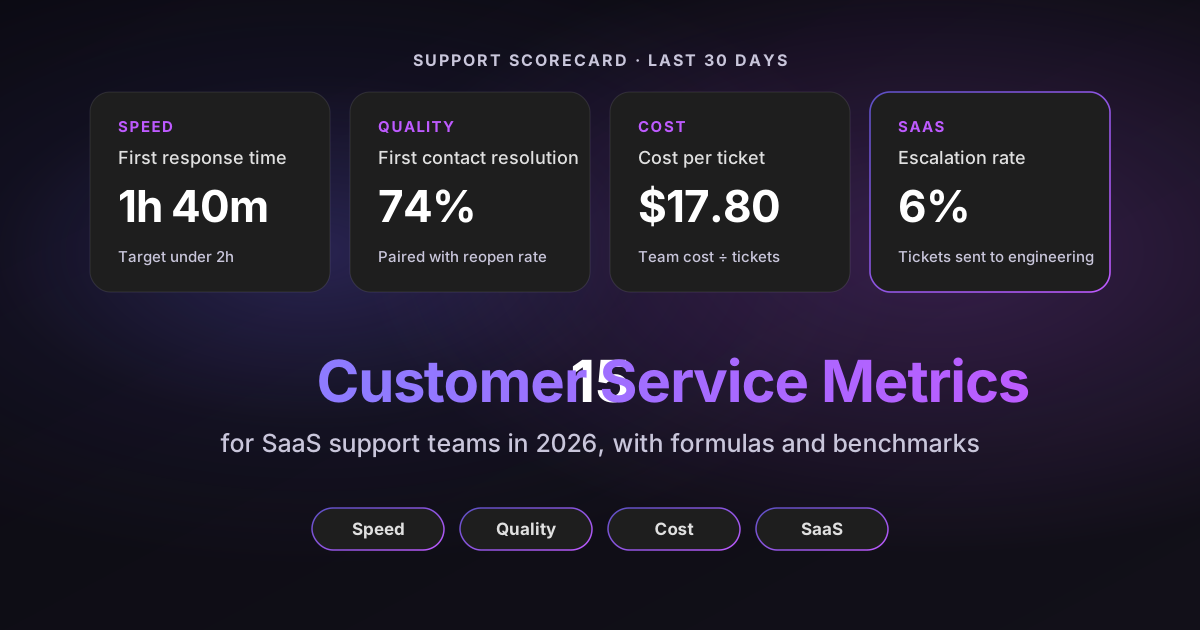
Sources: every benchmark links to the original report or vendor documentation, checked on October 23, 2026. Many published benchmarks come from call centers or internal IT service desks rather than SaaS support, and I label each one with the population it covers. The scorecard graphics use sample data.
Disclosure: I work at Pluno, which sells an AI layer for help desks that resolves tickets, assists agents and scores conversations.
TL;DR
- The core scorecard: report one metric for each of four questions: first response time (speed), first contact resolution (quality), cost per ticket (cost) and contact rate (what support tells the business). Add the other 11 as diagnostics.
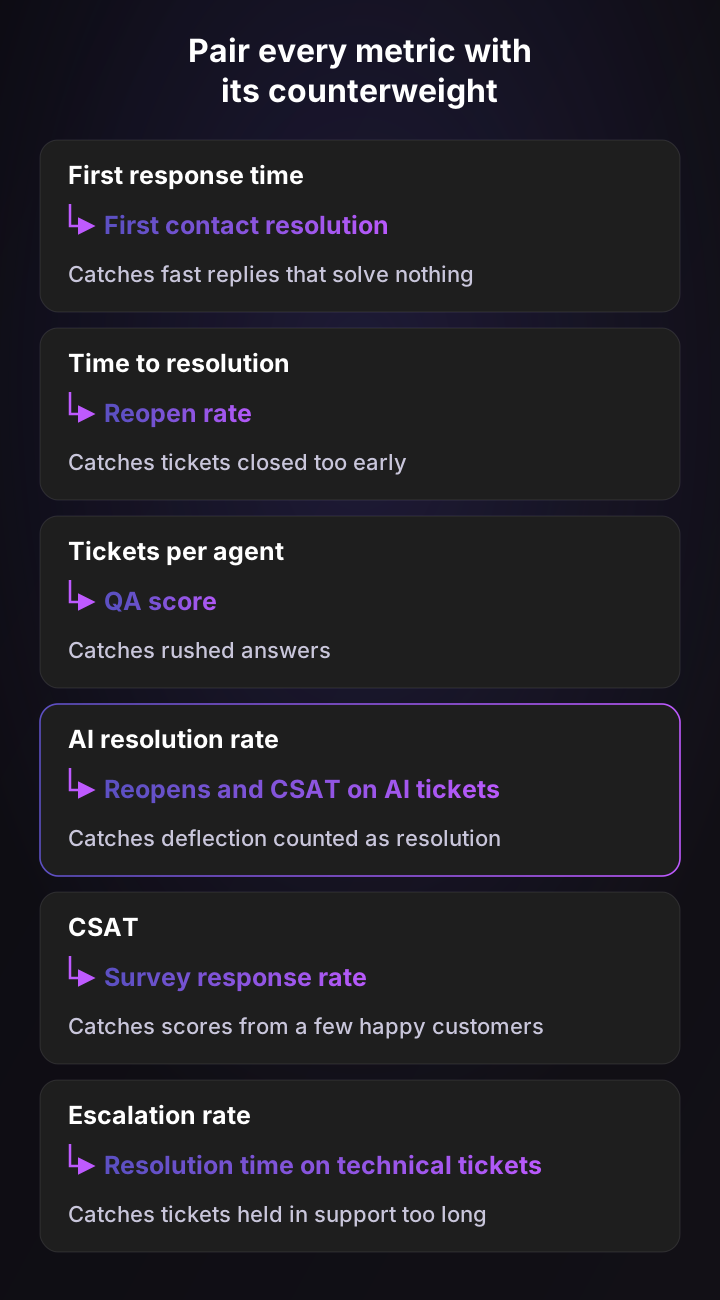
- Pair every headline number: fast replies are only good if they resolve, so first response time travels with first contact resolution, and AI resolution rate travels with reopens and CSAT on AI tickets.
- Key benchmark: call centers average 69% first contact resolution, and technical support calls only 60%, according to SQM Group's 2024 data. Technical SaaS queues should expect to sit nearer the lower figure.
- Split AI from human: blended first response time and cost per ticket hide what your agents are doing. Report AI-resolved and human-handled tickets separately from the first day.
- The SaaS-specific metric most teams miss: contact rate, tickets per 100 active accounts a month, which ties support volume to product quality and sends the fix upstream.
How the right customer service metrics help a SaaS support team
The right customer service metrics let you spot a problem before a customer escalates it, and defend your headcount with numbers your CFO trusts. The wrong ones reward agents for closing tickets instead of solving them.
A metric is any number you track. A customer service KPI is a metric you've set a target for and report upward, so every KPI is a metric but not the other way round. Most teams need about four support KPIs, and I use "metric" for everything else.
SaaS support needs a different mix than a retail or call-center team. Your tickets are more technical, many need engineering, and each customer pays you every month, so a bad support experience shows up in renewals rather than in a single lost sale. Freshdesk's benchmark report found Software & IT teams had the longest average resolution time of any industry, 51.0 hours against a 39.7-hour average, on 2021 ticket data.
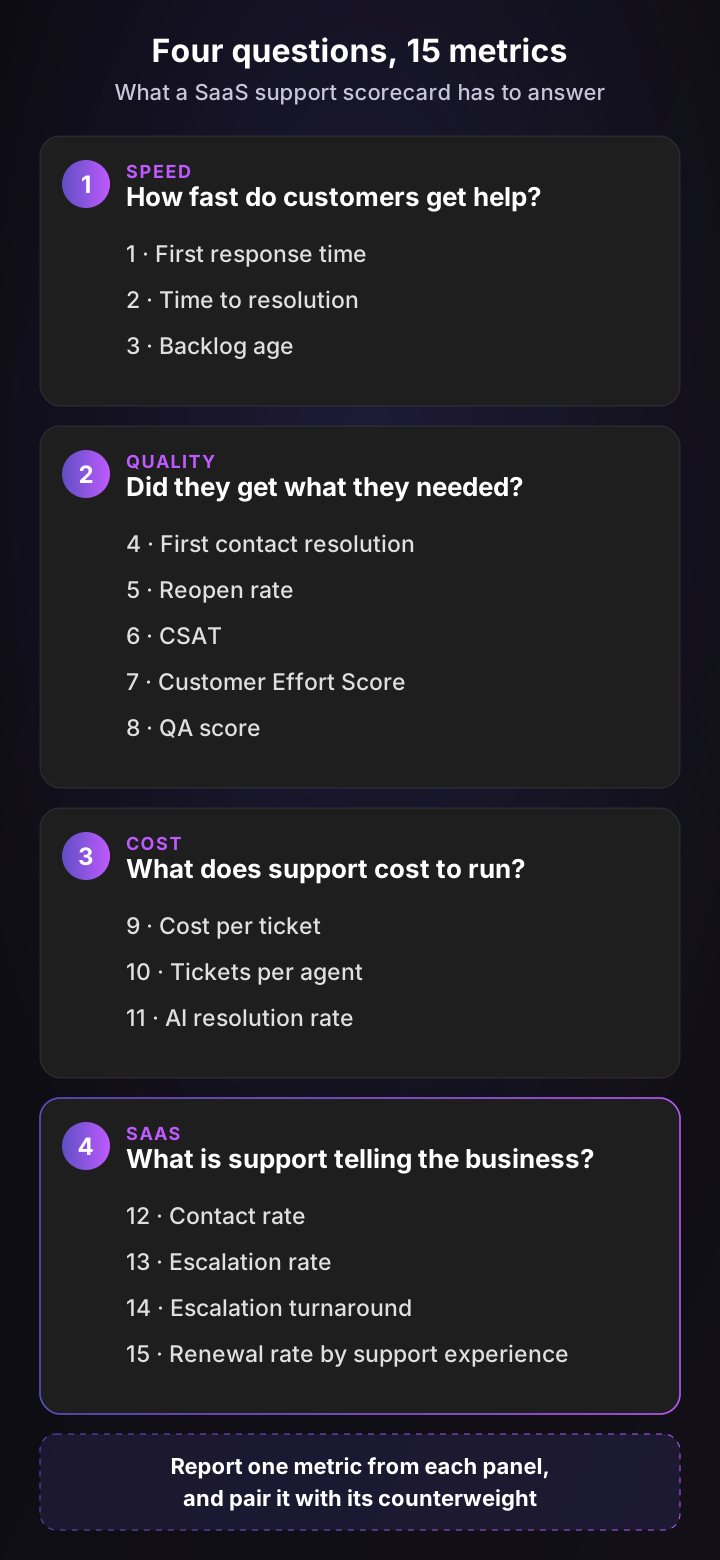
The four questions keep your scorecard honest. If a number doesn't help answer one of them, it's a diagnostic you check when something moves, not a metric you report.
Speed metrics: how fast do customers get help?
Speed metrics measure the customer's wait: for a first reply, for a fix, and for the oldest tickets still in your queue. They're the easiest customer service metrics to improve and the easiest to fake.
1. First response time
First response time measures how long a customer waits for the first human reply. It sets the customer's first impression of whether anyone is listening.
- Formula: time from ticket creation to the first public agent reply. Zendesk defines it the same way.
- Benchmark: Software & IT teams averaged 6.6 hours on tickets in Freshdesk's report (2021 data, 40,060 customers). On live chat, agents averaged a 35-second first reply in the LiveChat Customer Service Report, with data last updated in 2024.
- How it misleads: an automatic acknowledgement can satisfy the clock. Zendesk notes that reply-time SLA targets are fulfilled by an autoreply trigger that posts a public comment.
- Pair it with: first contact resolution.
Report the median, not the average, and use business hours if your team isn't staffed around the clock. One ticket that waited over a long weekend can double an average while telling you nothing about Tuesday.
2. Time to resolution
Time to resolution measures how long a customer waits until the problem is actually solved. It's closer to what customers care about than first response time.
- Formula: time from ticket creation to its most recent resolution. Zendesk calls this full resolution time and tracks first resolution time separately.
- Benchmark: 51.0 hours for Software & IT in Freshdesk's report. In Freshworks' 2025 benchmark, tickets took 36 hours at companies without AI assistance and 32 minutes at companies using AI extensively, on the vendor's own customer data.
- How it misleads: the clock keeps running while a ticket waits on the customer. Zendesk warns that focusing solely on resolution time isn't a good idea, because it includes stages when no agent is working on the ticket.
- Pair it with: reopen rate.
For technical SaaS queues, split this by ticket type. A password reset and a data-sync bug shouldn't share one target, and the blended number will always look like a staffing problem.
3. Backlog age
Backlog age measures how many open tickets are older than your resolution target. It shows the customers you're quietly failing while the averages look fine.
- Formula: open tickets older than your target ÷ all open tickets. Zendesk counts the ticket backlog as every ticket in a new, open, pending or on-hold state.
- Benchmark: I found no reliable public benchmark. Track your own trend week over week.
- How it misleads: a large backlog can be healthy. Zendesk points out that a big backlog isn't necessarily bad if the team's throughput is high. The age of the tickets is the warning sign, not the count.
- Pair it with: time to resolution, split by ticket type.
Quality metrics: did customers get what they needed?
Quality metrics measure whether the help worked: fixed the first time, stayed fixed, felt easy and met your own standard. In my experience this is the group leadership asks about least and customers notice most.
4. First contact resolution
First contact resolution measures the share of issues solved without the customer having to come back. It's one of the strongest predictors of satisfaction you can track.
- Formula: tickets resolved in one interaction ÷ all resolved tickets. Zendesk's ticket-data version is one-touch resolution. SQM measures it with a customer survey instead, because a resolved status doesn't prove the customer agrees.
- Benchmark: the cross-industry call-center average was 69% in SQM's 2024 data, and 60% for technical support calls. SQM calls 70% to 79% good and finds that every 1% gain in first contact resolution brings a 1% gain in customer satisfaction.
- How it misleads: pushing agents for first-touch closes can raise reopens. Zendesk notes that reopens may climb when agents concentrate on first-touch resolution and speed over quality.
- Pair it with: reopen rate.
5. Reopen rate
Reopen rate measures how often a "solved" ticket comes back. It corrects every speed metric above it.
- Formula: tickets reopened at least once ÷ tickets solved. Zendesk counts a reopen when a ticket moves from Solved back to Open.
- Benchmark: I found no primary benchmark I'd trust. Set your baseline over a full month.
- How it misleads: customers often open a new ticket instead of replying to the old one, so the reopen never registers. Zendesk also expects reopens to run higher on escalated tickets.
- Pair it with: repeat contacts, meaning the same requester writing about the same issue within 72 hours.
6. CSAT
CSAT (customer satisfaction score) measures how customers rate a specific support interaction. It's the customer service metric everyone reports and few teams read carefully.
- Formula: good ratings ÷ all ratings. Zendesk's satisfaction score divides good-rated tickets by satisfaction responses, and on a 1 to 5 scale counts 4 and 5 as good.
- Benchmark: 80% for Software & IT in Freshdesk's report, against a 79.4% average across industries.
- How it misleads: the customers who answer aren't a random sample. People tend to respond when they're delighted or furious, so a small response pool swings with a few tickets.
- Pair it with: survey response rate, and the reason behind each bad rating.
What about NPS? Net Promoter Score asks how likely a customer is to recommend you, then subtracts the share of detractors (0 to 6) from promoters (9 and 10), as Bain defines it. It measures the whole relationship, not a support interaction. Gartner does not recommend measuring NPS in customer service and support, so leave it to the company scorecard.
7. Customer Effort Score
Customer Effort Score (CES) measures how easy it was for the customer to get the issue handled. The research behind it, first published in Harvard Business Review, argues that reducing effort builds loyalty more reliably than trying to delight customers.
- Formula: the average agreement with "The company made it easy for me to handle my issue" on a 1 to 7 scale, the CES 2.0 statement from CEB, now part of Gartner, as Nicereply documents it.
- Benchmark: no cross-company benchmark is published for one scale. The evidence that matters is Gartner's finding that service interactions are nearly four times more likely to lead to disloyalty than loyalty, from research with over 125,000 B2B and B2C customers.
- How it misleads: low effort alone doesn't build loyalty. Gartner recommends tracking it alongside a value score, because value enhancement only happens after a low-effort interaction.
- Pair it with: repeat contacts. Effort usually shows up as customers writing in twice.
8. QA score
QA score measures how well agents meet your own standard: accuracy, tone, process and policy. It's the one quality metric you control end to end.
- Formula: the sum of ratings across your rubric ÷ the maximum possible score, averaged across reviewed conversations. Zendesk calls it the internal quality score.
- Benchmark: 88% in the 2023 Customer Service Quality Benchmark Report, as Zendesk's blog reports it. The same source says only about 2% of support interactions are manually reviewed.
- How it misleads: a 2% sample over-represents whatever tickets the reviewer happens to pick. The score also drifts when reviewers apply the rubric differently.
- Pair it with: CSAT. When the two disagree for weeks, either your rubric or your survey is measuring the wrong thing.
My Zendesk QA guide covers rubric design and how to review every conversation instead of a sample.
Cost metrics: what does support cost to run?
Cost metrics measure what each ticket costs you and how much your team can absorb. They're the numbers your CFO reads, so they need to be built on definitions you can defend.
9. Cost per ticket
Cost per ticket measures what you spend to handle one ticket, all in. It's the number that makes support legible in a budget meeting.
- Formula: total monthly support operating cost ÷ monthly tickets. HDI's cost per ticket definition counts salaries and benefits, technology, facilities, training and other operating expenses.
- Benchmark: $24.24 per email or web ticket on average (median $19.96), $23.26 per chat and $18.35 per phone call in MetricNet's 2023 benchmark summary. Those figures come from internal IT service desks, not SaaS support, so treat them as a rough reference.
- How it misleads: a low cost per ticket can mean service got worse. HDI makes this point: the savings may have come from weaker service levels or lower satisfaction.
- Pair it with: CSAT.
10. Tickets per agent
Tickets per agent measures how much work one agent handles in a month. It's the input for every headcount conversation.
- Formula: tickets solved in the period ÷ agents (in full-time equivalents). Average handle time, the time an agent spends working on one interaction, is the per-ticket view of the same workload.
- Benchmark: handle time averaged 13.70 minutes per email or web ticket in MetricNet's 2023 summary, again from IT service desks.
- How it misleads: quotas invite gaming, with agents closing easy tickets and leaving hard ones. SQM finds that less focus on handle time at the agent level can improve first contact resolution.
- Pair it with: QA score.
Use this metric for capacity planning at team level. Once it becomes an individual target, it rewards exactly the behavior you don't want.
11. AI resolution rate
AI resolution rate measures the share of tickets an AI agent resolves end to end, with no human involved. Vendors also call it automation rate or deflection rate, and they rarely mean the same thing.
- Formula: tickets the AI resolved ÷ all tickets. Watch the denominator: Intercom's Resolution Rate divides by conversations Fin was involved in, while its Automation Rate divides by all conversations.
- Benchmark: Intercom reports a 76% average resolution rate across Fin customers, and Freshworks reports an 83% average deflection rate for its AI agents. Both are vendor-reported. Across the market, service professionals estimate 30% of cases are handled by AI today, in Salesforce's survey of 6,500 of them.
- How it misleads: definitions change under you. In May 2026, Zendesk added contained resolutions to its AR% and told customers they may notice an increase, while billing still counts only verified ones.
- Pair it with: reopen rate and CSAT on AI-resolved tickets.
A customer who gives up on the bot isn't resolved, even if the dashboard counts it. My autonomous customer service guide explains the difference between deflection and resolution in more detail.
Customer support metrics for SaaS: what is support telling the business?
SaaS customer support metrics connect the queue to the product and the renewal. They're what turns support from a cost center into an early warning system for engineering, product and account management.
12. Contact rate
Contact rate measures how often customers need help, relative to how many customers you have. It's the most useful SaaS support metric most teams don't track.
- Formula: tickets in the month ÷ active accounts × 100, or per 1,000 active users for a product with many seats per account.
- Benchmark: none published that I could verify. It depends heavily on product complexity, so compare your own segments and months.
- How it misleads: volume rises with customer count, so raw ticket volume looks like a problem during healthy growth. Contact rate fixes that, but it can also fall because customers stopped bothering to ask.
- Pair it with: your top ticket drivers, meaning the topics behind the volume.
Segment it by plan, account age and product area. A contact rate that doubles in the 30 days after onboarding points at your setup flow, and one that spikes after a release points at the release.
13. Escalation rate
Escalation rate measures the share of tickets support can't resolve without engineering, product or another tier. In technical SaaS, it's where the slowest and most expensive tickets live.
- Formula: tickets escalated to engineering or another team ÷ all tickets. My technical troubleshooting guide covers the tickets that should never reach engineering.
- Benchmark: IT service desks resolved 78.9% of tickets at the first level in MetricNet's 2023 summary, so roughly a fifth moved on. I found no public benchmark for support-to-engineering escalation in SaaS.
- How it misleads: a low escalation rate can mean a capable team, or a team holding bugs it should have handed over days ago.
- Pair it with: time to resolution on technical tickets.
14. Escalation turnaround
Escalation turnaround measures how long an escalated ticket takes to come back to the customer with an answer. It's the stretch where B2B customers lose patience.
- Formula: time from escalation to the first engineering response, and separately, time from escalation to the next customer update.
- Benchmark: none published. Set a target with your engineering lead and review the misses together.
- How it misleads: engineering can respond fast while the customer hears nothing, because nobody copied the update back to the ticket. That's why I track the two clocks separately.
- Pair it with: CSAT on escalated tickets.
15. Renewal rate by support experience
Renewal rate by support experience compares how accounts renew depending on the support they received. It's the metric that connects your team to revenue.
- Formula: renewal rate of accounts with a poor support experience in the 90 days before renewal (a ticket over your resolution target, a bad rating, an open escalation) vs the renewal rate of all other accounts.
- Benchmark: 42% of teams say service directly shapes renewals and expansions in Freshworks' 2026 benchmark. Gartner finds that customers who get value from a service interaction are 86% more likely to repurchase or renew.
- How it misleads: large accounts open more tickets and renew more often, so the raw comparison can make support look harmful. Compare accounts of similar size and plan.
- Pair it with: contact rate for the same segment.
You'll need your CRM or customer success platform for this one. It's worth a quarterly analysis even if you never put it on a weekly dashboard.
All 15 customer service metrics at a glance
The table below summarizes each metric with its formula, a benchmark and its counterweight. Use it as a reference when you choose which customer service KPI examples belong on your own scorecard.
| # | Metric | Formula | Benchmark (source population) | Pair it with |
|---|---|---|---|---|
| 1 | First response time | Creation to first public agent reply | 6.6 h on tickets (Software & IT, 2021 data); 35 s on chat (2024) | First contact resolution |
| 2 | Time to resolution | Creation to latest resolution | 51.0 h (Software & IT, 2021 data) | Reopen rate |
| 3 | Backlog age | Open tickets over target ÷ open tickets | None published | Time to resolution by type |
| 4 | First contact resolution | Resolved in one interaction ÷ resolved | 69% overall, 60% technical (call centers, 2024) | Reopen rate |
| 5 | Reopen rate | Reopened ÷ solved | None published | Repeat contacts |
| 6 | CSAT | Good ratings ÷ all ratings | 80% (Software & IT, 2021 data) | Survey response rate |
| 7 | Customer Effort Score | Average agreement, 1 to 7 | None published | Repeat contacts |
| 8 | QA score | Rubric score ÷ maximum | 88% (2023 quality benchmark) | CSAT |
| 9 | Cost per ticket | Monthly cost ÷ monthly tickets | $24.24 per email ticket (IT service desks, 2023) | CSAT |
| 10 | Tickets per agent | Tickets solved ÷ agents | 13.7 min handle time per email (IT service desks, 2023) | QA score |
| 11 | AI resolution rate | AI-resolved ÷ all tickets | 76% (Intercom) and 83% (Freshworks), vendor-reported | Reopens and CSAT on AI tickets |
| 12 | Contact rate | Tickets ÷ active accounts × 100 | None published | Top ticket drivers |
| 13 | Escalation rate | Escalated ÷ all tickets | About 21% leave level 1 (IT service desks, 2023) | Resolution time on technical tickets |
| 14 | Escalation turnaround | Escalation to engineering reply, and to customer update | None published | CSAT on escalated tickets |
| 15 | Renewal rate by support experience | Renewal rate, poor vs normal support experience | 42% say service shapes renewals (2026) | Contact rate by segment |
Five of the 15 have no trustworthy public benchmark. That's normal for SaaS, where queues differ more than call centers do, and it's why your own trend matters more than anyone's average.
Run your own numbers: cost per ticket
Cost per ticket is the metric I'd calculate first, because most support leaders don't know theirs and it anchors every other conversation about headcount and AI. Set the sliders to your own team:
Cost per ticket calculator
Cost per ticket = monthly team cost ÷ monthly tickets. Use a fully loaded cost per agent (salary, benefits, taxes, software seats and management overhead). The AI scenario assumes the same headcount keeps handling today's tickets while AI resolutions absorb growth, so AI fees are counted only for tickets the AI resolves end to end. Your own numbers, not benchmarks.
Cost per ticket today
$20.00
$60,000 team cost a month
Tickets per agent
300
A month, today
Cost per ticket with AI
$14.30
4,286 tickets a month, same team
At 30% AI resolution, your 10 agents handle today's volume while AI resolves another 1,286 tickets for $1,286 a month. That's the workload of about 4.3 more agents without a new hire. Cost per ticket only falls if that capacity absorbs growth or backlog.
The AI scenario keeps your headcount fixed and lets AI resolutions absorb growth, because that's how most SaaS teams use it in the first year. If your volume is flat, the saving only appears when you hire less, so model it against your hiring plan rather than your current bill.
For a fuller model with your own resolution rates, try Pluno's ROI calculator.
How AI changes your customer service metrics
AI changes customer service metrics by mixing two very different populations into one number. An AI agent replies in seconds and resolves the simple tickets, so blended averages improve even if your human team gets slower.
Three habits keep the numbers honest:
- Split every metric by who resolved the ticket. Report first response time, time to resolution and CSAT separately for AI-resolved and human-handled tickets. The human numbers now describe a harder queue, and they'll look worse even when your agents are doing better.
- Re-baseline your human metrics. After AI takes the password resets, the average human ticket is more complex. Compare this quarter's human handle time with last quarter's only after you account for the change in mix.
- Fix the definitions in writing. Agree with your vendor what counts as a resolution, whether a later human reply removes it, and which conversations are in the denominator. Then report the same definition every month.
Customers notice when the AI fails. Gartner found that only 27% of customers would try a chatbot again after a negative experience, which is why reopens and CSAT on AI tickets belong next to the resolution rate. My guide to customer support automation covers how to measure a rollout ticket type by ticket type.
How to build a support scorecard in five steps
A good scorecard has four headline metrics, one per question, with their pairs and diagnostics underneath. Here's how I'd build one from scratch:
- Pick one headline metric per question. For most SaaS teams: first response time, first contact resolution, cost per ticket and contact rate. Swap in time to resolution if your customers care more about the fix than the first reply.
- Write the definition next to each number. Business hours or calendar hours, median or average, which channels and whether AI tickets are included. A metric without a written definition gets argued about instead of acted on.
- Take a baseline over four to six weeks. Don't set targets from published benchmarks. Use your own baseline, then set a target you can reach in a quarter.
- Segment before you report. Split by channel, ticket type, plan tier and AI vs human. Most "the metric got worse" conversations end once you see which segment moved.
- Match the cadence to the audience. Different readers need different numbers, as the table below shows.
| Audience | Cadence | What they should see |
|---|---|---|
| Agents and team leads | Daily and weekly | Backlog age, first response time, QA score, reopen rate |
| Head of support | Weekly and monthly | All four headline metrics with their pairs, split by segment |
| Leadership and the board | Monthly and quarterly | Cost per ticket, contact rate trend, AI resolution rate, renewal rate by support experience |
| Product and engineering | Monthly | Top ticket drivers, contact rate by product area, escalation rate and turnaround |
Accurate segments depend on accurate ticket fields. If agents skip the product-area field half the time, every metric you split by product area is guessing, which is why automatic ticket tagging tends to improve reporting before it improves routing.
What support teams say about customer service metrics
Support leaders keep coming back to the same complaint: teams chase the number that's easy to move instead of the outcome. These quotes come from Reddit and the Zendesk Community:
“Customers don’t want fast responses, they want fast resolutions.”
“First Call Resolution - this will be a key metric that drives CSAT and it is one that many companies now overlook. Everyone focused on First Response Time and now just sends an automated message...”
“If CSAT looks fine but people keep reopening the same issue, that’s a false positive. ... I’d keep CSAT as one signal, just not the scoreboard.”
“I only respond to surveys when I'm either totally unhappy with the service or when I'm pleasantly surprised ... So it will pretty much be either an one star or a five star review, and nothing in between.”
“We're trying to get more information on why users select a Bad CSAT, but currently, the majority does not pick a reason, nor do they add comments.”
“If 10 calls a day is good, but 15 calls a day is better, your techs are going to find a way to take those 15 calls, even if it means that people get worse service.”
The pattern across them is consistent. Speed metrics get gamed first, CSAT gets distrusted second, and the teams that sound confident track resolution and repeat contacts alongside both.
How Pluno moves your customer support metrics
Pluno is an AI layer that runs inside the help desk you already use, including Zendesk, Intercom, Salesforce Service Cloud, HubSpot, Jira Service Management and Freshdesk. Because it sits on top of your existing workflows, it adds AI to each part of the scorecard instead of replacing the tool you report from.
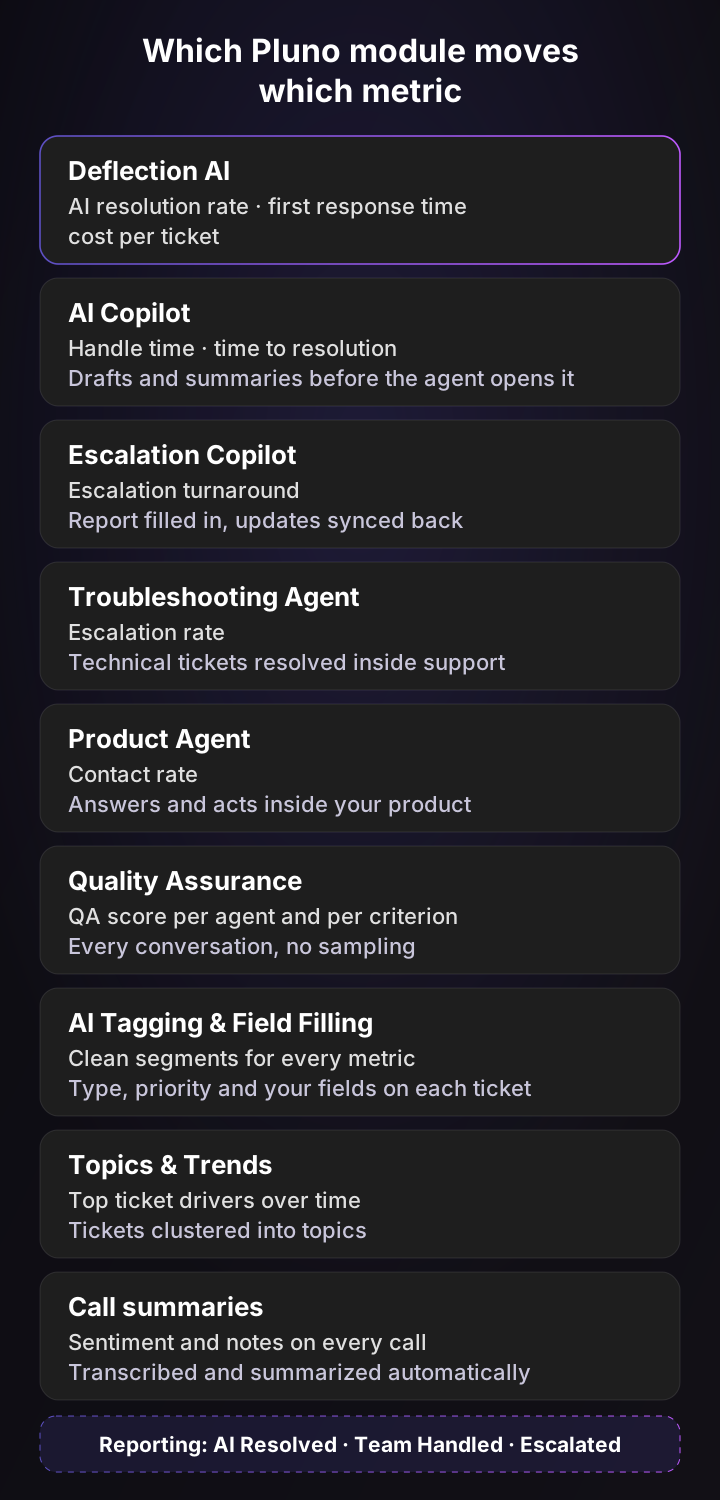
Speed. Deflection AI replies to customers in under a minute, around the clock, and resolves tickets end to end from your past tickets, help center and connected systems. AI Copilot drafts replies and summarizes the thread before an agent opens the ticket, which shortens handle time and time to resolution on the tickets your team keeps.
Quality. Quality Assurance scores every conversation per agent and per criterion against your own rubric, with written reasoning, so your QA score covers the whole queue instead of a 2% sample. Call summaries transcribe and summarize phone calls and detect customer sentiment on every one.
Cost. Deflection AI is billed only for tickets it fully resolves. Pluno's Reporting page counts a ticket as AI Resolved only when no human was involved, and moves it to Team Handled if an agent later replies publicly, so your AI resolution rate can't quietly inflate.
SaaS metrics.
- Escalation rate: the Troubleshooting Agent investigates technical tickets across code, logs and error tracking, so support can resolve more of them without handing them over.
- Escalation turnaround: Escalation Copilot creates the escalation with the report already filled in, sends it to where engineering and product teams work, such as Slack, Jira, Linear, Microsoft Teams or incident.io, and syncs updates back to the ticket.
- Contact rate: Product Agent answers and acts inside your own product, where customers get stuck, and Topics & Trends clusters your tickets into topics over time so you can see what's driving the volume.
- Clean segments: AI Tagging & Field Filling fills type, priority and your custom fields on each ticket, so every metric you split by product area or ticket type rests on complete data.
Pluno tags every ticket it touches (pluno-involved, pluno-resolved, pluno-routed-to-team), so you can split CSAT, reopens and resolution time by AI and human inside your own help desk reports.
Pluno customers see the change in the headline metrics:
- First response time: Smartness brought its first response time down to 22 minutes from hours.
- AI resolution rate: Innovorder's AI resolves 67% of chat tickets and replies in under a minute, down from up to an hour.
- Deflection: Kojo went to 50% ticket deflection from 0%.
- Handle time: Waste Vision saves 2 to 5 minutes on every ticket.
What Pluno costs, from Pluno pricing: a monthly platform fee tied to ticket volume, from 249€ a month for up to 500 tickets (210€ billed annually). AI Copilot is 49€ per seat a month, Deflection AI is 0.90€ per resolved ticket, Quality Assurance is 35€ per agent a month and the Troubleshooting Agent starts at 99€ a month.
The bottom line
The customer service metrics that matter for a SaaS team answer four questions: how fast, how well, at what cost, and what support is telling the business. Report one metric for each, pair it with the number that catches its failure, and split AI from human from the start.
If you only add one metric this quarter, make it contact rate by product area. It's the number most likely to get a fix built instead of another agent hired. To see how far AI moves your own numbers, run a free Pluno simulation on your past tickets and compare the results with your baseline.
FAQ
What are customer service metrics?
Customer service metrics are numbers that measure how fast customers get help, whether the help solves their problem, and what it costs to provide. Common examples are first response time, time to resolution, first contact resolution, CSAT and cost per ticket.
What are the 5 key performance indicators for customer service?
For most teams, the five customer service KPIs are first response time, time to resolution, first contact resolution, CSAT and cost per ticket. SaaS teams should add contact rate and escalation rate, because those connect support volume to product quality and engineering workload.
What are the most important customer support metrics for SaaS?
The most important customer support metrics for SaaS are first contact resolution, time to resolution, contact rate, escalation rate and renewal rate by support experience. They matter because SaaS tickets are technical, many need engineering, and a bad support experience shows up at renewal.
What is the difference between a customer service metric and a KPI?
A metric is any number you track, such as reopen rate. A KPI is a metric you've set a target for and report to leadership, such as "first response time under two business hours". Keep your KPIs to about four and treat the rest as diagnostics.
What is a good first response time?
It depends on the channel. Software & IT teams averaged 6.6 hours on tickets in Freshdesk's benchmark (2021 data), while live chat agents averaged 35 seconds in LiveChat's 2024 report. Set your target from your own baseline and report the median in business hours.
What is a good CSAT score?
Software & IT teams averaged 80% CSAT in Freshdesk's benchmark, against a 79.4% average across industries. Read it with your survey response rate, because a small pool of respondents tends to be the most delighted and the most frustrated customers.
What is a good first contact resolution rate?
SQM Group calls 70% to 79% good and 80% or more world class for call centers, with a 69% cross-industry average in its 2024 data. Technical support calls averaged 60%, which is a more realistic reference for technical SaaS queues.
What is the difference between CSAT and NPS?
CSAT measures satisfaction with one support interaction, while NPS measures how likely a customer is to recommend your company overall. Gartner doesn't recommend NPS for measuring customer service, so use CSAT and Customer Effort Score for support and leave NPS to the company scorecard.
What are help desk metrics?
Help desk metrics are the customer service metrics you can calculate directly from your help desk data: ticket volume, backlog, first response time, time to resolution, reopen rate, CSAT and tickets per agent. Metrics like contact rate and renewal rate need customer data from your CRM or billing system as well.
How do you measure AI in customer service?
Measure the AI resolution rate with a written definition of a resolution, then pair it with reopen rate and CSAT on AI-resolved tickets. Report first response time, time to resolution and CSAT separately for AI and human tickets so the blended numbers don't hide either.