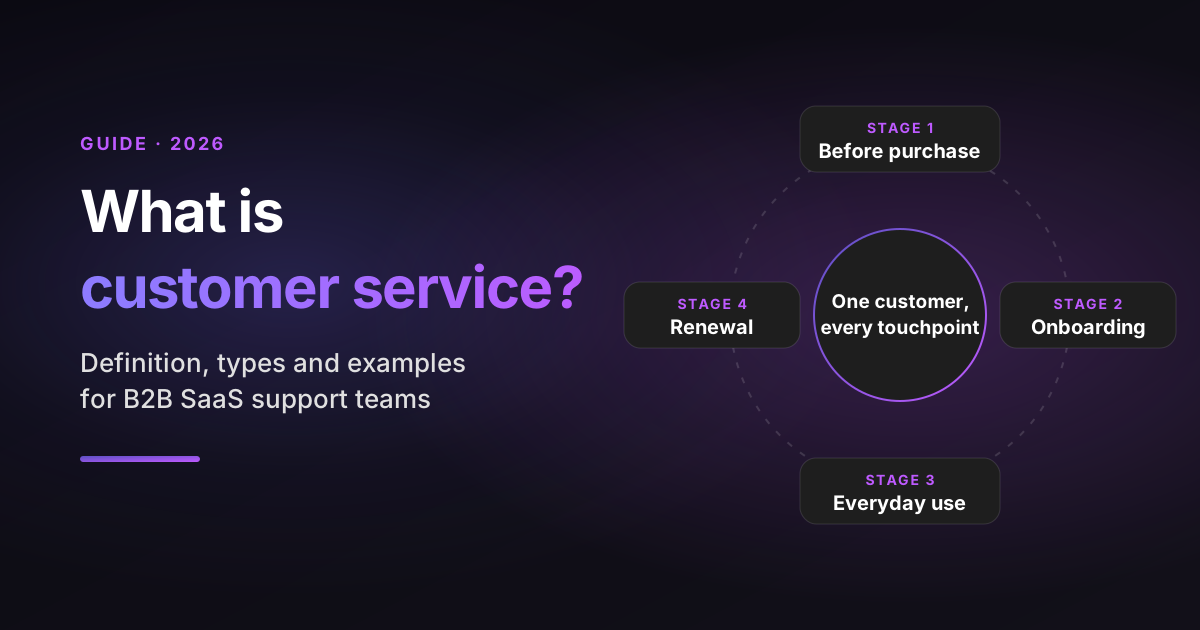
Customer service is the help a company gives people before, during and after they buy, so they can choose well, get value from the product and get problems fixed. In a B2B SaaS company, that covers the pre-sales question, the onboarding call, the 2 a.m. login ticket and the renewal check-in.
If you run a support team, you've likely had the definition argument already. Sales thinks customer service means answering tickets. Leadership thinks it means a CSAT number.
Your newest agent thinks it means being nice. Each view is partly right, and the gap between them is where customers fall through.
This guide gives you one working definition, then shows what it looks like in practice. When I compare the types of customer service, I use the same four yardsticks for every one:
- Best for: the kind of question the type handles well.
- Typical speed: how fast customers usually expect an answer there.
- Cost to serve: the relative cost of one contact, from lowest to highest.
- Where AI fits: what AI can take on in that type today.
Sources: statistics link to the original reports, checked on October 28, 2026. Many surveys mix consumer and business buyers, so I note the population where it matters. The examples labelled illustrative are composites built from common SaaS ticket patterns, not single customers.
Disclosure: I work at Pluno, which sells an AI layer for help desks that resolves tickets, assists agents and reviews conversation quality.
TL;DR
- The customer service definition I use: every interaction where a person or AI helps a customer, across the whole lifecycle. Customer support is the problem-fixing part of it, and customer experience is the bigger picture around it.
- Why it pays off: 85% of CX leaders in Zendesk's CX Trends 2026 say customers will drop a brand over an unresolved issue, even on the first contact. Resolution is what keeps customers, not a quick first reply.
- The 8 types: email and tickets, live chat, phone, self-service, in-app support, social and community, technical support and proactive service. Self-service and in-app support cost the least per contact. Phone costs the most.
- AI is a layer, not a ninth type: it now answers, drafts, tags, escalates and reviews across every channel. Gartner found that 91% of service leaders feel executive pressure to implement AI in 2026.
- Bottom-line advice: measure resolution, not just speed. Fix the top three reasons customers contact you, and route the rest to the fastest channel that can actually solve them.
What customer service means for your team and why it pays off
Customer service is every interaction where your company helps a customer reach their goal or fix a problem, by a person or by AI, from the first sales question to the renewal call. It includes reactive help, when the customer reaches out, and proactive help, when you reach out first.
The customer service meaning has widened over the years. It used to describe a phone line and a returns desk. In SaaS, the product is a service the customer pays for every month or year, so every interaction is a small vote on the renewal.
That's why it pays off in three concrete ways:
- Retention. Keeping customers is cheaper than finding new ones. Bain's Fred Reichheld found that in financial services, a 5% rise in retention produced more than a 25% rise in profit. That research is from 2001, but the logic holds for any subscription business.
- Growth. Service teams are now expected to grow accounts, not just protect them. In Salesforce's 2025 State of Service, service professionals projected that agentic AI would lift upsell revenue by 15%.
- Product insight. Tickets are the most honest feedback you get. A support team that tags tickets well can tell product which bug cost 140 tickets last month, which turns a vague complaint into a ranked roadmap item.
The flip side is just as real. In a Salesforce survey of 15,015 consumers in 18 countries, 43% said a poor customer service experience would stop them from buying from the same company again. Consumer data skews toward retail, but B2B buyers are consumers too, and they bring the same expectations to work.
My guide to customer service metrics shows how to track the numbers that connect support to renewals.
Customer service vs customer support vs customer experience
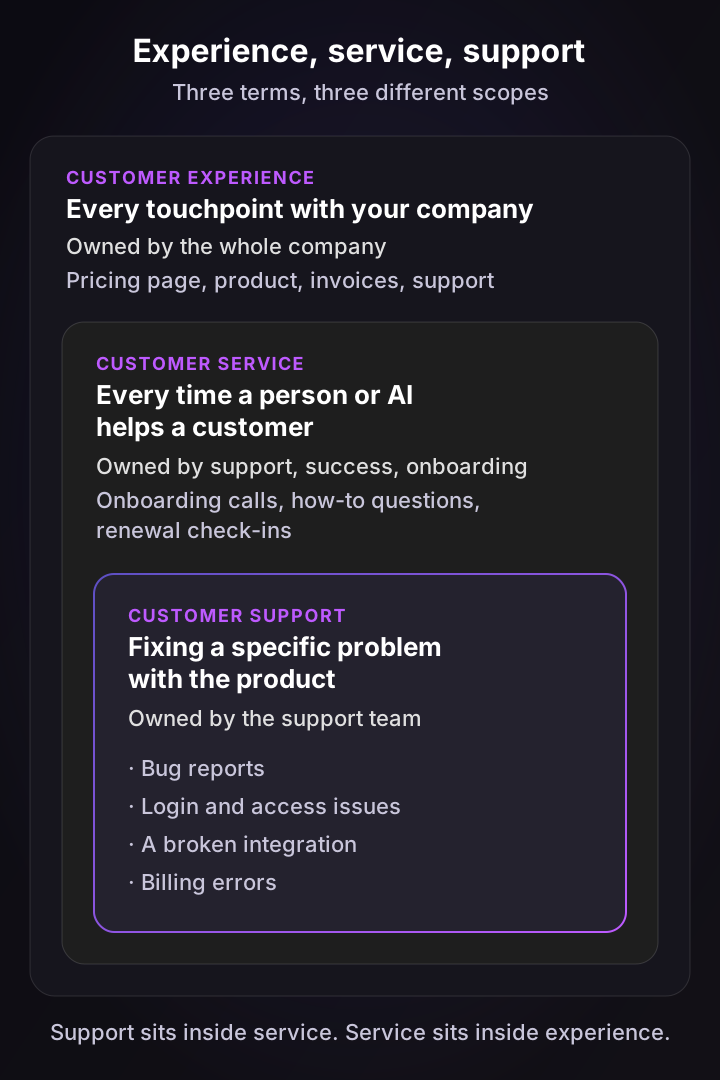
Customer service is the umbrella, customer support is the part that fixes problems, and customer experience is everything a customer sees and feels about your company. The three overlap, but they have different owners and different measures of success.
Here's how I separate them for a SaaS team:
- Customer experience (CX) covers every touchpoint: the pricing page, the product itself, invoices, outages and support. The whole company owns it.
- Customer service covers every moment where your team or AI helps a customer. Support, customer success and onboarding usually share it.
- Customer support is the problem-solving core: a bug, a login issue, a broken integration, a billing error. The support team owns it, and it's often technical.
A practical test: if the customer has a problem with the product, it's support. If they need guidance to get more from it, it's service. If it shapes how they feel about you without any conversation, such as a confusing invoice, it's experience.
| Customer support | Customer service | Customer experience | |
|---|---|---|---|
| Scope | Fixing a specific problem | Every helpful interaction | Every touchpoint |
| Usually owned by | Support team | Support, success, onboarding | The whole company |
| Starts when | A customer reports an issue | A customer needs help or guidance | A prospect first meets your brand |
| Typical measure | Time to resolution, first contact resolution | CSAT, Customer Effort Score | NPS, retention, churn |
| SaaS example | A webhook stops firing after an update | A new admin asks how to set up roles | A renewal invoice arrives with a surprise price |
For a deeper look at the support side, my guide to the SaaS help desk covers the tools and workflows a support team runs on.
The 8 types of customer service, compared
The main types of customer service are email and ticket support, live chat and messaging, phone, self-service, in-app support, social media and community, technical support and proactive service. Most SaaS teams run four or five of them, and the right mix depends on how urgent and how technical your customers' questions are.

Each type below uses the four yardsticks from the introduction.
1. Email and ticket support
Email and web-form tickets are the backbone of B2B SaaS support, because complex questions need screenshots, logs and a written trail.
- Best for: detailed issues that take more than one exchange, such as a data import that fails on row 4,000.
- Typical speed: hours, often within one business day.
- Cost to serve: medium.
- Where AI fits: AI agents can resolve routine tickets end to end, and copilots draft replies for the rest. My guide to AI ticketing systems compares the options.
2. Live chat and messaging
Chat and messaging serve customers who are working in your product right now and want to keep going.
- Best for: quick how-to questions and simple account requests.
- Typical speed: minutes. Customers often leave a chat that sits unanswered.
- Cost to serve: medium, since one agent can run a few chats at once.
- Where AI fits: AI can reply in seconds at any hour and hand over to a person with the context attached. See my guide to conversational AI for customer service.
3. Phone support
Phone is still the channel people pick when something is urgent, complicated or upsetting.
- Best for: outages, escalated accounts and emotional conversations where tone matters.
- Typical speed: right away, with a short hold at most.
- Cost to serve: highest, because one agent handles one call at a time.
- Where AI fits: AI can transcribe and summarize calls, detect sentiment and score quality, so agents skip the after-call notes.
4. Self-service help center
A help center lets customers solve problems without contacting anyone. It's popular but limited: Gartner found that 73% of customers use self-service at some point, yet only 14% of issues are fully resolved there.
- Best for: how-to questions with a known, stable answer.
- Typical speed: instant, if the article exists and is easy to find.
- Cost to serve: lowest per contact, though articles need upkeep.
- Where AI fits: AI can answer from your articles in plain language and flag questions that no article covers yet.
5. In-app support
In-app support puts help inside your product, next to the screen where the customer is stuck. It works best when the help can see the customer's own setup.
- Best for: questions about the user's account, settings or data, such as "why can't my client log in?"
- Typical speed: instant.
- Cost to serve: low.
- Where AI fits: an AI agent inside the product can check the user's configuration and fix it after they confirm. My guide to in-app support shows how this works.
6. Social media and community
Social channels and community forums put service in public, where other customers can read and join the answer. Many journeys start outside your own channels: Gartner found that 51% of customer service journeys now begin on third-party platforms such as Google, YouTube and ChatGPT.
- Best for: public questions, product feedback and peer-to-peer answers.
- Typical speed: same day on social, slower in forums.
- Cost to serve: medium. Moderation takes time, but community answers scale.
- Where AI fits: AI can triage mentions and suggest replies, though public answers usually still need a person's review.
7. Technical support
Technical support handles bugs, outages and integration errors, often with help from engineering. In B2B SaaS, this is where the hardest tickets and the angriest customers end up.
- Best for: problems that need logs, code or a product change to fix.
- Typical speed: hours to days, depending on severity and your service level agreement (SLA).
- Cost to serve: high, because it pulls in engineers.
- Where AI fits: AI can investigate logs and code to find the root cause and file a complete escalation. My guide for the technical support engineer covers the role.
8. Proactive customer service
Proactive service means contacting customers before they contact you: an outage notice, a warning that an API key expires next week, or a check-in when usage drops.
- Best for: problems you can see coming in your own data.
- Typical speed: before contact, which is the point.
- Cost to serve: low, since one message can prevent dozens of tickets.
- Where AI fits: AI can cluster tickets into trends, so you spot the problem while it's still small.
The table sums up the yardsticks for all eight types:
| Type | Best for | Typical speed | Cost to serve | Where AI fits |
|---|---|---|---|---|
| Email and tickets | Detailed, multi-step issues | Hours | Medium | Resolves routine tickets, drafts replies |
| Live chat and messaging | Quick questions during work | Minutes | Medium | Replies in seconds, hands over with context |
| Phone | Urgent or emotional issues | Right away | Highest | Summarizes and scores calls |
| Self-service help center | Known how-to answers | Instant | Lowest | Answers from articles, finds gaps |
| In-app support | Account-specific questions | Instant | Low | Checks setup and fixes it |
| Social and community | Public questions, feedback | Same day | Medium | Triages mentions, suggests replies |
| Technical support | Bugs, outages, integrations | Hours to days | High | Finds root cause, files escalations |
| Proactive service | Problems you can predict | Before contact | Low | Spots ticket trends early |
Notice what's missing: AI isn't a ninth type. In 2026 it works inside every channel, which is why I treat it as a layer across the table rather than a row in it.
What good customer service looks like: 6 principles
Good customer service solves the customer's problem on the first try, in the channel they chose, without making them repeat themselves. Speed matters, but only when the answer is right.
These six principles hold across every type:
- Resolve, don't just respond. A fast reply that doesn't fix anything starts a second ticket. Track resolution next to response time.
- Never make customers repeat themselves. Pass the full history along when a ticket moves from AI to a person, or from support to engineering.
- Be honest about timelines. "Engineering is on it, next update by Thursday" beats silence every time.
- Match the channel to the problem. Push how-to questions to self-service and move angry or complex cases to a person quickly.
- Write like a person. Use the customer's name, their words and their context. Skip the scripted apology.
- Close the loop. Tell the customer when the bug they reported ships, and tell product what caused the ticket.
The bar keeps rising. In Zendesk's CX Trends 2026, 88% of customers said they expect faster responses than a year ago, 74% said AI now makes them expect service around the clock, and 74% said repeating their story to different agents frustrates them. Principles 1 and 2 answer the last point directly.
Customer service examples from B2B SaaS teams
Customer service examples are easiest to understand as before-and-after stories. The first three below are illustrative composites. The last three are published results from Pluno customers.
Illustrative example 1: the login that wasn't a bug. A customer writes that none of their users can log in. A strong agent checks the account first, sees that SSO enforcement was turned on that morning, and replies with the exact setting to change. The ticket closes in one reply instead of an engineering escalation.
Illustrative example 2: the outage notice. An integration partner's API goes down at 9 a.m. The support lead posts a status update and sends an in-app banner to affected accounts before the queue fills up. Instead of 200 tickets, the team gets 30, and most are quick confirmations.
Illustrative example 3: the renewal save. A mid-market account files its fourth ticket about slow reports in a month. The agent tags the pattern and flags it to the account's customer success manager, who books a call before the renewal. Support saw the risk first because it reads the tickets.
Real result 1: faster first replies. Smartness, a lodging tech company, brought its first response time down to 22 minutes from hours.
Real result 2: AI resolutions on chat. Innovorder's AI resolves 67% of chat tickets and replies in under a minute, down from up to an hour.
Real result 3: escalations at scale. At Lightspeed, about 100 agents went live with Pluno in two to three weeks, and two thirds of Slack escalations are now created with it.
The customer service skills every agent needs
Customer service skills are the abilities that let an agent understand a problem, solve it and leave the customer feeling looked after. In B2B SaaS, they split into people skills and product skills, and you need both.
People skills:
- Active listening: reading the whole ticket and spotting the real question behind the stated one.
- Clear writing: short sentences, numbered steps and no jargon the customer didn't use first.
- Empathy: acknowledging the impact on the customer's business, not just their mood.
- Calm under pressure: handling an angry customer without getting defensive.
Product and process skills:
- Product knowledge: knowing the product well enough to reproduce an issue.
- Troubleshooting: narrowing a problem down step by step, from account to configuration to code.
- Tool fluency: using your help desk, internal docs and admin tools quickly.
- Writing a good escalation: steps to reproduce, expected versus actual result, affected accounts and urgency.
When I onboard a new agent, I pair them with a senior teammate on technical tickets for the first two weeks. Soft skills transfer from any job, while product skills only come from seeing real tickets. My technical support troubleshooting guide walks through a full diagnostic process.
How to measure customer service
You measure customer service with a small set of numbers that answer four questions: how fast customers get help, whether it solved their problem, what it costs and what support is telling the business.
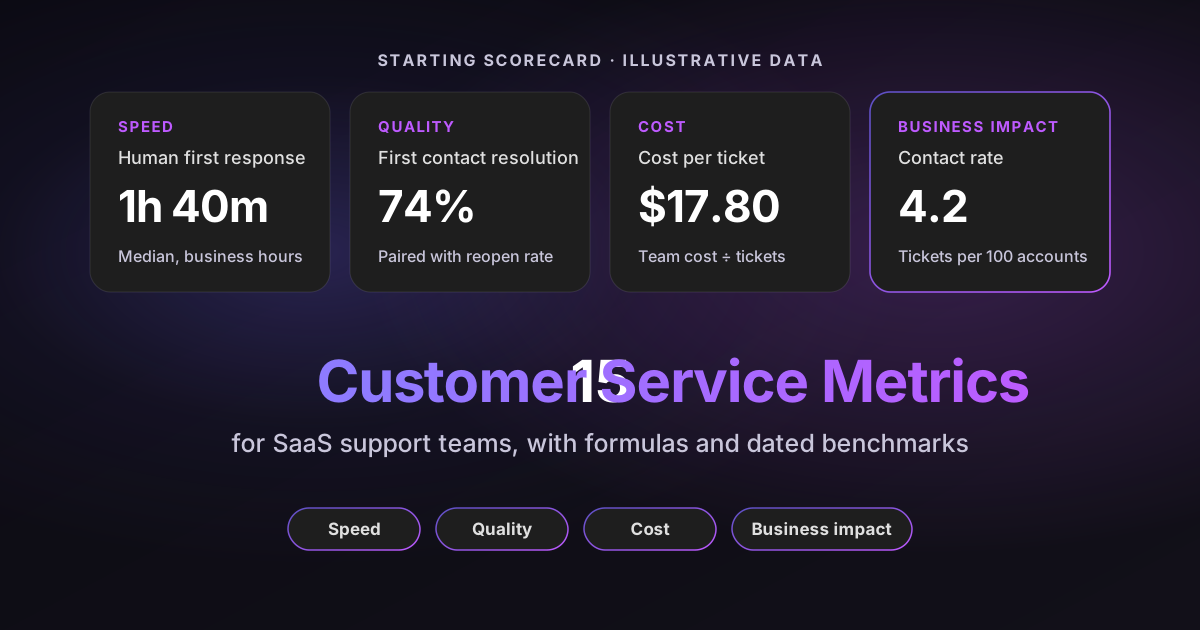
A starting scorecard for a SaaS team:
- Speed: first response time and time to resolution, in business hours.
- Quality: first contact resolution, reopen rate and customer satisfaction score (CSAT).
- Cost: cost per ticket and the share of tickets resolved by AI.
- Business impact: contact rate (tickets per 100 active accounts) and renewal rate by support experience.
Pair every speed number with a quality number, so nobody wins by replying fast and wrong. My full guide to customer service metrics gives formulas, benchmarks and the pitfalls for 15 of them.
What customer service costs: run your own numbers
Customer service costs are mostly people. For a ticket-based team, your monthly agent cost divided by your monthly ticket volume gives you cost per ticket, the number that anchors every staffing and AI conversation.
Set the sliders for your own team:
Cost per ticket calculator
Cost per ticket = monthly team cost ÷ monthly tickets. Use a fully loaded cost per agent (salary, benefits, taxes, software seats and management overhead). The AI scenario is a capacity model, not a spending cut: headcount, human productivity and ticket mix stay as they are, AI resolutions absorb extra demand, and the automation rate is the AI-resolved share of that expanded total. Add implementation, oversight and fixed AI fees as fixed monthly costs. Your own numbers, not benchmarks.
Cost per ticket today
$20.00
$60,000 team cost a month
Tickets per agent
300
A month, today
Modeled cost per ticket at expanded capacity
$14.30
4,286 tickets a month, same team
At a 30% automation rate on the expanded total, your 10 agents keep handling today's volume while AI resolves another 1,286 tickets for $1,286 a month. That's the workload of about 4.3 agents at today's productivity: capacity released, which becomes a cash saving only when you spend less.
The calculator models capacity, not an instant saving. When AI resolves a share of tickets, your team can absorb growth without hiring, or move time to onboarding and proactive work. It only becomes a cash saving if you actually spend less, so add any AI fees and setup time in the fixed-cost field.
Cost per contact also explains the channel mix. Moving a how-to question from phone to the help center can cut its cost to a fraction, but only if the article actually answers it. Pluno's ROI calculator models the full picture with your own resolution rates.
How AI is changing customer service in 2026
AI is changing customer service by taking over routine answers, helping agents on the rest and doing the admin around every ticket. Budgets show the shift: Gartner reported in August 2026 that AI spending by service leaders rose 38% while overall service budgets grew 2%. Service teams in Salesforce's research estimate that AI handles 30% of cases today and expect 50% by 2027.
In practice, AI now shows up in five places:
- Answering customers: AI agents resolve routine tickets end to end, from password resets to account changes.
- Helping agents: copilots draft replies and summarize long threads before an agent opens the ticket.
- Admin work: AI fills ticket fields, tags topics and routes tickets to the right team.
- Escalations: AI files complete bug reports for engineering and keeps the ticket updated.
- Quality: AI reviews every conversation against your rubric instead of a small sample.
Customers have mixed feelings about it. In a Gartner survey of 3,566 customers, 87% said companies using generative AI must offer a way to reach a human agent, while 50% said AI makes interactions easier. Gartner found that only 27% of customers would try a chatbot again after a negative experience, so the bar is accuracy, not just availability.
The lesson I take from that: deploy AI where it can resolve, not just reply, and give it an easy path to a person. My guides to autonomous customer service and AI customer service software go deeper on both.
How to improve customer service in 7 steps
You improve customer service by finding what drives your contacts, fixing the biggest causes and making every remaining contact faster to resolve. Here's the order I'd work in:
- Pull 90 days of tickets and tag them by reason. If your fields are half empty, fix tagging first. My guide to auto-tagging shows how.
- Rank the top 10 contact reasons by volume and by effort. A reason with 50 tickets and three escalations each can cost more than one with 300 quick replies.
- Remove the top three at the source. Send product the bug, rewrite the confusing screen, or add a proactive email before the known problem hits.
- Write or fix help center articles for the next tier. Check each article against real tickets, not just the product spec.
- Put AI on the repetitive tickets that remain. Start with one ticket type, measure resolutions and reopens, then widen.
- Give agents full context. Show account details, past tickets and similar resolved cases in the ticket view, so nobody hunts across five tools.
- Review quality every week. Score a broad set of conversations against a written rubric, and coach on the patterns, not single tickets.
Repeat the cycle every quarter. Contact reasons shift with every release, so the top three in January won't be the top three in June. For the automation side, see my guide to customer support automation.
What support teams say about customer service
These are selected comments from practitioners on Hacker News, posted between 2013 and 2025, not representative research. They keep coming back to the same idea: customers judge you on the fix and on being kept informed.
“Where I work we had a product which represented without any doubt the majority of our customer-service's tickets. Almost all of the tickets were related to deployment-issues. This got communicated back to engineering. We fixed deployment, and now it's hardly in the support-stats any more.”
“...most customers that come to you with a problem of a technical nature, and have the technical competence to understand the crux of the issue, will expect a technical and competent response. That's how you "stand out" in terms of support, because it's pathetically and amazingly rare.”
“I see customer support as the most important aspect of sales now for SaaS companies. It is likely to be the first, and one of the most common, touch points for any customer.”
“If you've ever worked in support you would know that even the most technical people can be highly inarticulate, have an inability to share even the most basic details... An AI bot answering those people with a lack of context and pretending to be a real support agent is an accident waiting to happen.”
The common thread: customers reward competence, and the best support teams send the cause of every repeated ticket back to engineering.
How Pluno helps you deliver better customer service
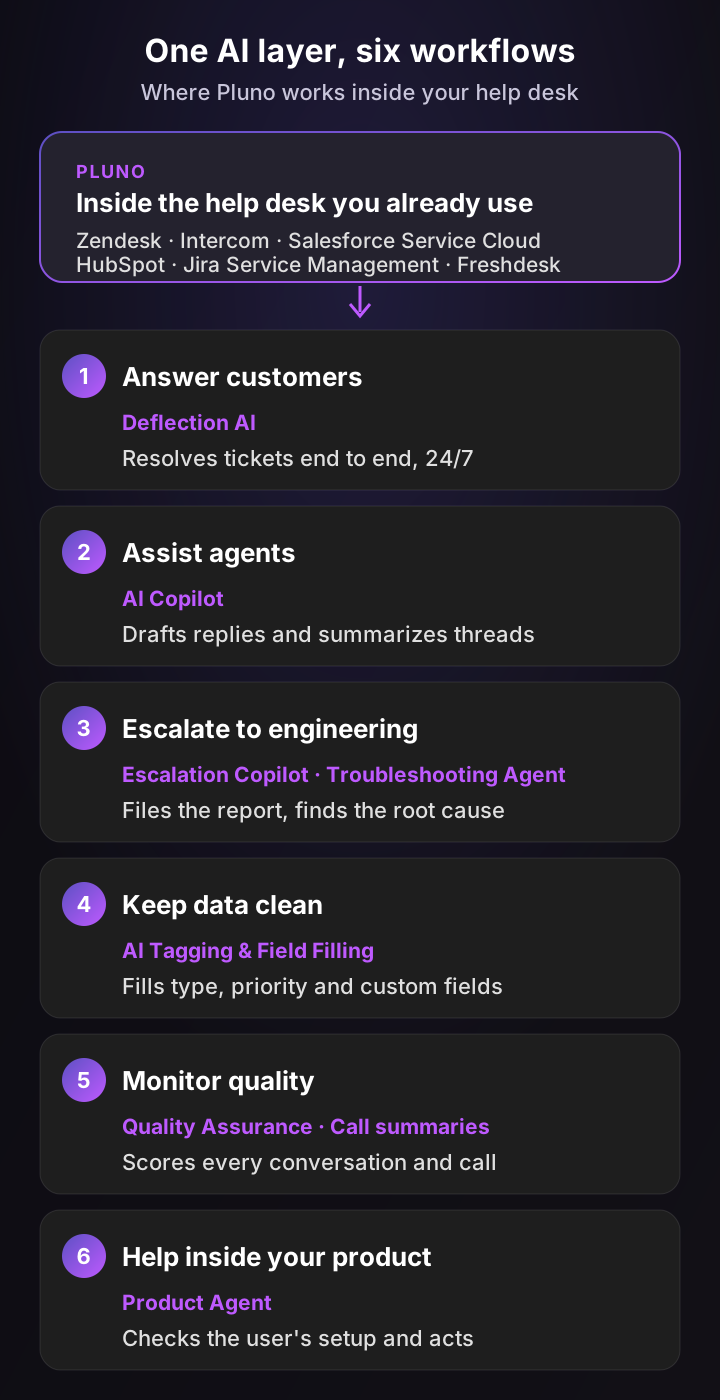
Pluno is an AI layer you add directly inside the help desk you already use: Zendesk, Intercom, Salesforce Service Cloud, HubSpot, Jira Service Management or Freshdesk. Because it sits inside your existing workflows, it brings AI to every part of customer service: answering customers, assisting agents, escalating to engineering, handling ticket admin and monitoring quality.
Here's how each module maps to the eight types above:
- Email, tickets and chat: Deflection AI resolves tickets end to end around the clock. It learns from your team's resolved tickets as well as your help center, docs and connected systems, and it escalates with a research summary when the evidence is thin instead of guessing.
- Agent assistance: AI Copilot drafts replies and summarizes the thread in the help desk sidebar, so agents start from a researched answer.
- Technical support: the Troubleshooting Agent investigates code, logs and error tracking to find the root cause. Escalation Copilot files the report where engineering and product teams work, such as Slack, Jira, Linear, Microsoft Teams or incident.io, and syncs updates back to the ticket.
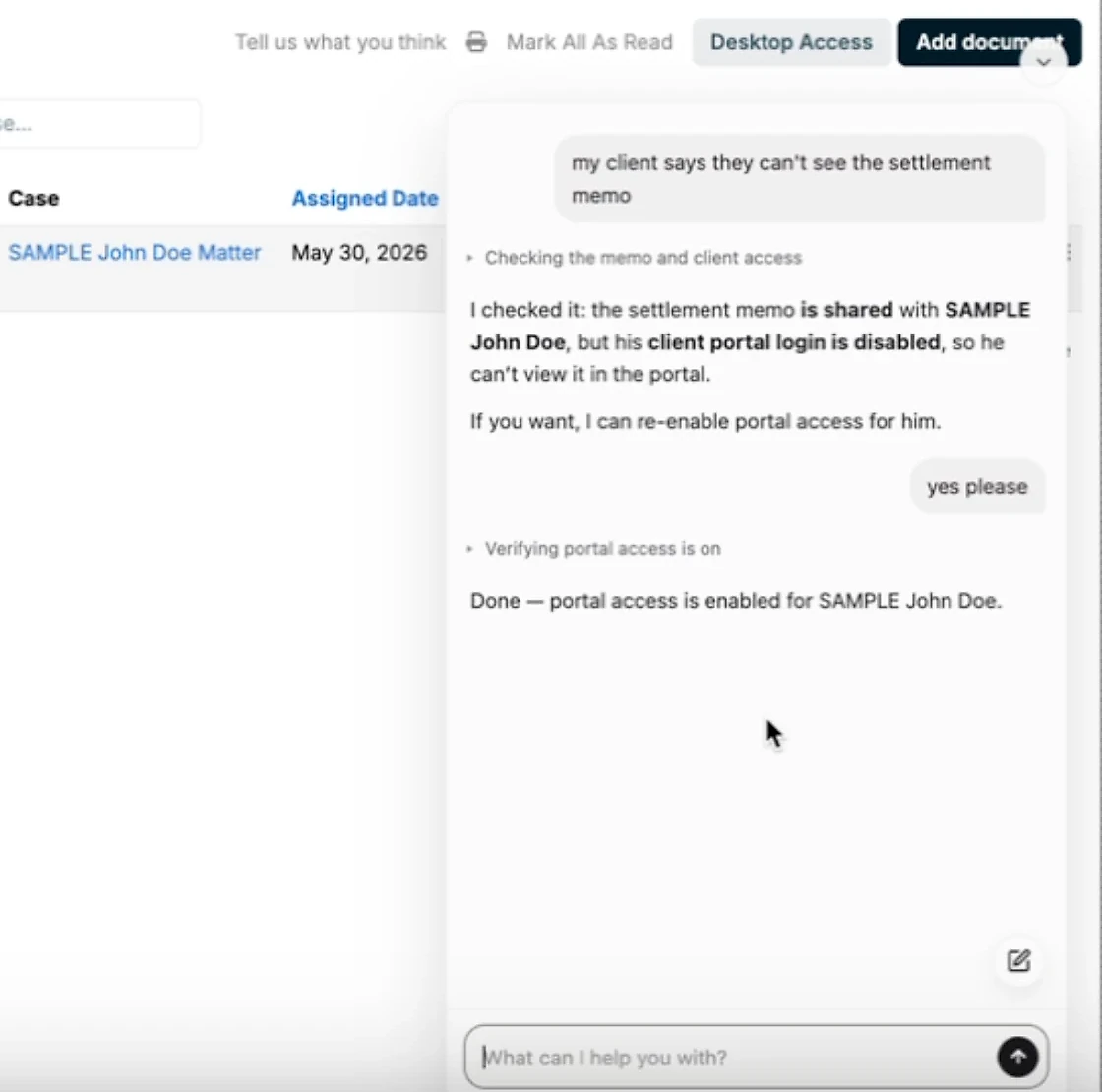
- In-app support: Product Agent lives inside your product, checks each user's setup and completes tasks for them.
- Phone: Call Insights & Summary transcribes and summarizes calls and detects customer sentiment.
- Quality and data: Quality Assurance scores every conversation against your rubric, and AI Tagging & Field Filling keeps ticket fields complete so your reports are accurate.
Here's the Product Agent in a sandbox demo account, fixing a client portal login after the user confirms:
Customers see it in their numbers. Kojo went to 50% ticket deflection from 0%, Velotric's AI agent handles 58% of routed tickets, and Waste Vision saves 2 to 5 minutes on every ticket.
What Pluno costs, from Pluno pricing: a monthly platform fee tied to ticket volume, from 249€ a month for up to 500 tickets (210€ billed annually). AI Copilot is 49€ per seat a month, Deflection AI is 0.90€ per resolved ticket, Quality Assurance is 35€ per agent a month and the Troubleshooting Agent starts at 99€ a month. There's a 14-day free trial with every module included.
The bottom line
Customer service is every interaction where your company helps a customer succeed, and in SaaS it decides renewals as much as the product does. Treat it as one system: pick the channels that fit your customers' problems, measure resolution as well as speed, and send the causes of tickets back to product.
If you do one thing this quarter, tag 90 days of tickets and remove the top three contact reasons. Then let AI handle the repetitive work that's left, so your team spends its time on the conversations that need a person. To see how much of your own queue Pluno would resolve, run a free simulation on your past tickets.
FAQ
What is customer service?
Customer service is the help a company gives customers before, during and after a purchase, by people or AI, so they can get value from the product and get problems solved. It includes answering questions, fixing issues, onboarding and proactive outreach.
What is the customer service definition in simple words?
In simple words, customer service means helping customers get what they need from your company. That can be answering a question, fixing a problem or warning them about an issue before it affects them.
What are the main types of customer service?
The main types are email and ticket support, live chat and messaging, phone, self-service help centers, in-app support, social media and community, technical support and proactive service. Most SaaS teams combine four or five of them.
Why is customer service important?
Customer service is important because it decides whether customers stay. In a Salesforce survey of 15,015 consumers, 43% said a poor customer service experience would stop them from buying from the same company again. In SaaS, where revenue renews every month or year, that makes service a growth lever, not just a cost.
What is good customer service?
Good customer service solves the customer's problem on the first try, in the channel they chose, without making them repeat themselves. It's honest about timelines, written like a person and followed up when the fix ships.
What is the difference between customer service and customer experience?
Customer service covers the interactions where your team or AI helps a customer. Customer experience covers every touchpoint, including the product, pricing, billing and marketing. Service is one part of the experience.
Is customer service the same as customer support?
Not quite. Customer support is the part of customer service that fixes specific problems, such as bugs or login issues. Customer service is broader and also includes onboarding, guidance and proactive outreach.
Is CRM the same as customer service?
No. A CRM is software that stores customer records and sales history, while customer service is the work of helping customers. Many teams connect their help desk to a CRM, so agents see the account's plan, owner and history in the ticket.
What software is used for customer service?
Most teams use a help desk such as Zendesk, Intercom, Salesforce Service Cloud, HubSpot Service Hub, Jira Service Management or Freshdesk, plus a help center and often AI tools on top. My roundup of AI help desk software compares the options.
What are the 7 steps of customer service?
There's no official list, but a practical 7-step flow is: greet the customer, understand the problem, confirm you understood it, solve it or set a clear timeline, check the fix worked, close the ticket and follow up if needed. The improvement plan above uses a different seven steps for the team level.
How do you handle difficult customers?
Stay calm, let the customer explain fully and acknowledge the business impact. Then state what you will do and by when, and keep that promise. If the issue is outside your control, escalate early and tell the customer who now owns it.
What does a customer service representative do?
A customer service representative answers customer questions, solves problems and records each interaction in the help desk. In SaaS, the role often includes troubleshooting product issues and escalating bugs to engineering with clear steps to reproduce.
How can AI improve customer service?
AI can resolve routine tickets end to end, draft replies for agents, fill ticket fields, file escalations and review every conversation for quality. It works best when it can only answer from your real sources and hands over to a person when it isn't sure.