HubSpot Breeze AI is HubSpot's family of built-in AI tools: Breeze Assistant, plus AI agents for marketing, sales, data and customer service, which HubSpot now groups under Agent Hub. For support teams, the piece that matters is Customer Agent, an AI agent that answers chat, email, form and WhatsApp conversations inside the HubSpot help desk. It costs $0.50 per resolved conversation, and that price applies to Customer Agent only, not to the rest of Breeze.
My verdict: Customer Agent is a good, low-cost default for HubSpot teams whose answers already live in their website and help center. For technical tickets, where the real fix usually sits in a resolved ticket or in your product's logs, Pluno is the stronger choice. It runs inside the same HubSpot help desk, answers from your past tickets, troubleshoots with your connected systems and never bills a ticket it escalates.
Test Pluno on your 50 most recent tickets
How I reviewed it: I worked from HubSpot's knowledge base, pricing page, product catalog and newsroom, HubSpot Community threads and G2, all checked on October 26, 2026. I didn't run Customer Agent on a live account, so treat its quality as unmeasured until you test it on your own tickets (the test is at the end).
I score Customer Agent and each alternative on the same six yardsticks:
- Help desk fit: where the AI agent runs, and which plan or seat it needs.
- Knowledge sources: the content it's allowed to answer from.
- Actions: the changes it can make in HubSpot and in your other tools.
- Handoff: what your team gets when the AI agent stops.
- Pricing: the billing unit, and what a month costs at real volume.
- Setup: who does the work, and how you test before customers see it.
Each yardstick, and each capability in the comparison table, gets one of three ratings:
- Strong: an official page documents it, it's on the plan you'd buy, and it works for technical B2B tickets without a workaround.
- Partial: it exists, but it's gated by plan or beta, limited in scope or needs a workaround.
- Not found: no official vendor page documents it as of October 26, 2026.
TL;DR: Is HubSpot Breeze AI worth it for your support team?
- For technical support, Pluno is the stronger pick. It answers from your resolved tickets, investigates with your code, logs and error tracking, and hands escalations to engineering with the research done. Escalations are never billed.
- The bottom-line number: Customer Agent costs $0.50 per resolved conversation, paid in HubSpot credits, and needs a Professional or Enterprise edition of a qualifying HubSpot product.
- Read the billing rule before you budget. Only handoffs the customer starts stop a conversation from counting as resolved, so a chat your workflow assigns to a rep can still be billed.
- Where Customer Agent wins: a low per-resolution price, many channels from one setup and no extra vendor when your answers are already written down.
What does HubSpot Breeze AI actually include?
HubSpot Breeze AI covers five areas: an assistant for everyone, plus AI agents for marketing, sales, data and customer service. Since 2026, HubSpot's pages call the agents Agent Hub ("formerly Breeze Agents"), and Agent Hub is included in every Starter, Professional and Enterprise edition. Most HubSpot AI agents then charge credits per task, at $0.01 per credit.
| Area | What it does | Plan | Price |
|---|---|---|---|
| Breeze Assistant | Answers questions from your CRM, drafts content and builds records, workflows and reports from plain-language requests | Every plan | Included |
| Marketing: Content Agent (beta) | Drafts blog posts, LinkedIn content and landing pages from one brief | Marketing Hub Pro or Enterprise | 1,000 credits ($10) per piece |
| Marketing: Nurture and Campaign agents (beta) | Personalizes nurture emails per contact and plans multi-channel campaigns | Not confirmed | Nurture: 10 credits per email |
| Marketing: AEO (beta) | Tracks how ChatGPT, Gemini and Perplexity mention your brand | Standalone or Marketing Hub Pro | $50/month, or included |
| Sales: Prospecting Agent | Researches accounts, finds contacts and drafts outreach | Starter and up | $1 per lead |
| Sales: Deal progression (beta) | Suggests next steps on deals and recommends CRM updates from calls and emails | Sales or Service Hub Pro | Credits for custom properties |
| Data: data enrichment | Fills contact and company fields and shortens forms | Starter and up | No credits |
| Data: Data Agent | Tracks buyer intent signals and answers custom questions about accounts | Starter and up | $0.10 per answer |
| Service: Customer Agent | Answers customers on chat, email, forms, WhatsApp, Messenger and beta voice | Pro or Enterprise | $0.50 per resolution |
Three notes on that table:
- Breeze Intelligence: HubSpot's old Breeze Intelligence help page now opens as "Get started with data enrichment", and enrichment no longer uses credits.
- Service extras: beyond Customer Agent, reps get reply recommendations (no credits, Service seat needed), the beta Knowledge Base Agent drafts articles at $2 each, and AI QA scores need Service Hub Enterprise.
- Getting started: a Super Admin manages AI under Settings > Account management > AI. Generative AI, CRM data and conversation data are on by default, while files data is off (HubSpot AI settings). Agents live under Agents > Agent Hub.
HubSpot Breeze AI use cases by team
Here's what that looks like day to day, based on what HubSpot documents for each tool:
- Marketing automation: a marketer gives the Content Agent one brief and gets a blog post, LinkedIn posts and a landing page draft, which it doesn't publish on its own. The Nurture Agent rewrites each email in a nurture workflow for the contact receiving it, and AEO shows which prompts in ChatGPT, Gemini or Perplexity mention your brand.
- Sales: the Prospecting Agent watches buying signals, scores accounts against your ideal customer profile and drafts outreach for a rep to review, or sends it in its fully autonomous mode. Deal progression suggests next steps from the emails, calls and meetings on a deal.
- SaaS support: Customer Agent answers "How do I export my invoices?" from your help center, sends a password reset link through a configured action and checks a customer's plan with a custom API call. Reps get reply recommendations, and the Knowledge Base Agent drafts articles from closed tickets.
- E-commerce support: Customer Agent can look up order status, with Shopify as HubSpot's own example, and answer shipping and return questions from your policy pages.
The SaaS example also shows where Breeze stops. "Why did my webhook stop firing after I rotated my API key?" needs your logs, your code and the fix an engineer found last spring, and that's the ticket type Pluno is built for.
The rest of this review is about the service side. If you're still choosing a help desk, my Zendesk vs HubSpot comparison covers Service Hub beyond its AI.
How HubSpot Customer Agent scores on 6 yardsticks
The HubSpot Customer Agent rates Strong on help desk fit and setup, and Partial on knowledge, actions, handoff and pricing. Each yardstick below links to the HubSpot page behind it.
Help desk fit: built in, on any qualifying Pro or Enterprise plan
Customer Agent lives inside HubSpot, so there's no new inbox and no extra vendor. You need a Professional or Enterprise edition of Marketing Hub, Sales Hub, Service Hub, Content Hub, Data Hub, Smart CRM or Revenue Hub, plus credits, an assigned seat and the "Customer agent editor" permission. If your company already has one of those, you don't need to upgrade Service Hub to switch it on.
It covers a wide set of channels: live chat, email, forms, WhatsApp and Facebook Messenger, plus inbound phone calls through the beta Customer Agent Voice. Every channel has to connect to the HubSpot inbox or help desk, so it won't answer tickets in another help desk.
Brands shape the setup. You can create one Customer Agent per HubSpot brand, each with its own sources and tone. Several products under one brand share one agent and one set of knowledge sources, and splitting them into separate brands can mean a brand add-on and a second configuration to maintain.
Rating: Strong, if you already pay for a qualifying Pro or Enterprise plan.
Knowledge sources: what you've written down, plus reviewed Q&A from recent tickets
Customer Agent answers from its content sources: your HubSpot knowledge base, website pages and blog, up to 5,000 crawled URLs per domain, uploaded files and short answers you write. Knowledge base articles re-sync when edited, and other sources weekly.
Historical support data goes through a step called "Generate knowledge". It analyzes tickets, inbox conversations or uploaded files and drafts FAQ-style Q&A pairs. The "All tickets" and "All inboxes" options cover the last 90 days, while a ticket segment or a single inbox has no stated limit.
You accept, skip or decline each pair, and accepted pairs become sources.
That's a useful way to fill gaps, but the agent never reads the tickets themselves, only the Q&A pairs someone approved. The fix for "SSO broke after we changed our domain" often sits in one ticket an engineer closed eight months ago, with steps too specific to survive as an FAQ. The content sources page also lists no connectors for tools such as Confluence or Notion.
Rating: Partial.
Actions: up to 20, through workflows and API calls
Customer Agent can take three kinds of action: enroll the visitor in a HubSpot workflow, update a CRM record, or send a GET or POST request to your own API. You can set up to 20, and each can require a matching or verified email first.
That covers lookups and simple changes, like order status or a password reset link. Customer Agent has no documented native codebase, log analysis, or multi-system troubleshooting capabilities. Access to such systems requires custom API development, and that's where technical tickets usually get solved.
Rating: Partial.
Handoff: live, async or none
When Customer Agent can't answer, the customer asks for a person, or you pause it, it hands off to your team. You choose live, async (a ticket for later) or no handoff, and route by inbox, team, user or workflow. Async handoff arrived in February 2026, after admins asked for it in HubSpot's community.
What HubSpot doesn't document is a research summary for the rep. Your team gets the conversation, but no list of the sources the agent checked or why it stopped. My guide to autonomous customer service explains why that note decides how fast a rep can pick up.
Rating: Partial.
Pricing: $0.50 per resolution, with a billing rule to check
Customer Agent charges 50 credits ($0.50) per resolved conversation. The price is low, but which conversations count is a policy you need to map against your own routing. I break it down in the pricing section below.
Rating: Partial, because workflow assignments can still be billed.
Setup: self-serve, with free testing
Setup is a few screens under Service > Customer Agent (HubSpot's setup guide). You can test as a specific contact, see the reasoning and cited sources behind each test answer, and batch-test with generated questions, all without using credits. After launch, a performance dashboard shows resolution, deflection and handoff rates and flags knowledge gaps.
Rating: Strong.
HubSpot Customer Agent scorecard
| Yardstick | What Customer Agent offers | Rating |
|---|---|---|
| Help desk fit | Built into HubSpot on any qualifying Pro or Enterprise plan, one agent per brand | Strong |
| Knowledge sources | Knowledge base, website, files and approved Q&A drafted from tickets or conversations | Partial |
| Actions | Up to 20: workflows, CRM updates and custom API calls; no native log or code analysis | Partial |
| Handoff | Live, async or none, without a documented research summary | Partial |
| Pricing | $0.50 per resolution; workflow assignments can still be billed | Partial |
| Setup | Self-serve, with free testing and cited sources | Strong |
HubSpot Breeze pricing: what Customer Agent really costs
HubSpot Breeze pricing depends on the tool, and for Customer Agent it's $0.50 per resolved conversation, billed as 50 credits. Voice costs $0.50 per minute. Before April 14, 2026, it was $1.00 per conversation, resolved or not.
You pay that on top of the plan that unlocks the agent. If you already have a qualifying Pro or Enterprise plan, credits are your only new cost. If you don't, the cheapest path for a support team is usually Service Hub Professional, listed on HubSpot's pricing page on October 26, 2026 as:
| Service Hub edition | Seat price | Credits included each month | Required onboarding | Customer Agent |
|---|---|---|---|---|
| Starter | From $7/seat/month ($20 list) | 500 | None | Not available |
| Professional | From $90/seat/month ($100 list) | 3,000 | $1,500 one-time | Available |
| Enterprise | From $150/seat/month | 5,000 | $3,500 one-time | Available |
On Service Hub, the included credits cover 60 resolutions a month on Professional and 100 on Enterprise. Data Hub and Customer Platform include more (5,000 on Professional and 10,000 on Enterprise), and if you own several hubs you get your highest allotment, not the sum (HubSpot product catalog).
How HubSpot credits work
Credits cost $0.01 each. You top up with capacity packs (1,000 credits for $10 a month, kept for the rest of your term, with an automatic upgrade if you go over) or pay-as-you-go in 10-credit steps.
Credits reset monthly, don't roll over and form one shared pool. Customer Agent competes with AI workflow actions, the Content Agent, voice minutes and every other credit-based tool, and when credits run out it stops taking new conversations.
What counts as a resolution
HubSpot counts a resolution when Customer Agent replies using a content source or an action, and no qualifying handoff follows within 72 hours of the customer's last message (HubSpot's definition). Only a handoff the customer starts qualifies. Manual assignment, including through workflows, doesn't.
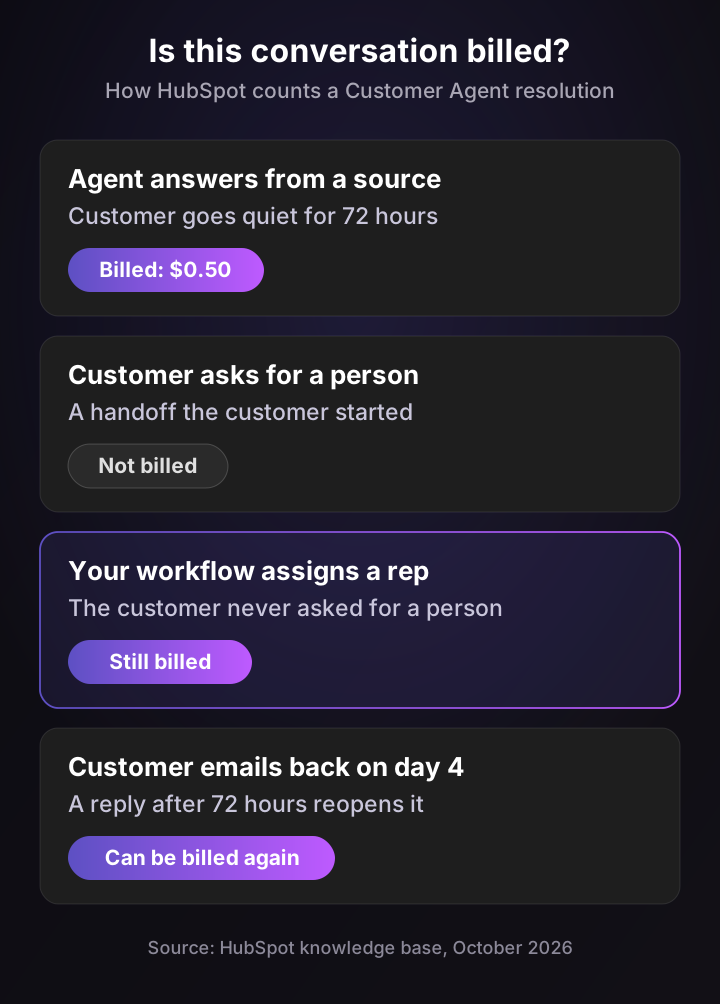
The diagram covers four cases. A customer who goes quiet is billed, and a customer who asks for a person isn't. A chat your workflow hands to a rep is still billed, and an email reply after 72 hours reopens the conversation so it can be billed again.
Before you switch the agent on, list every workflow that assigns conversations to reps. If your design relies on them, part of what you pay for will be conversations your team finished.
Costs that aren't in the $0.50
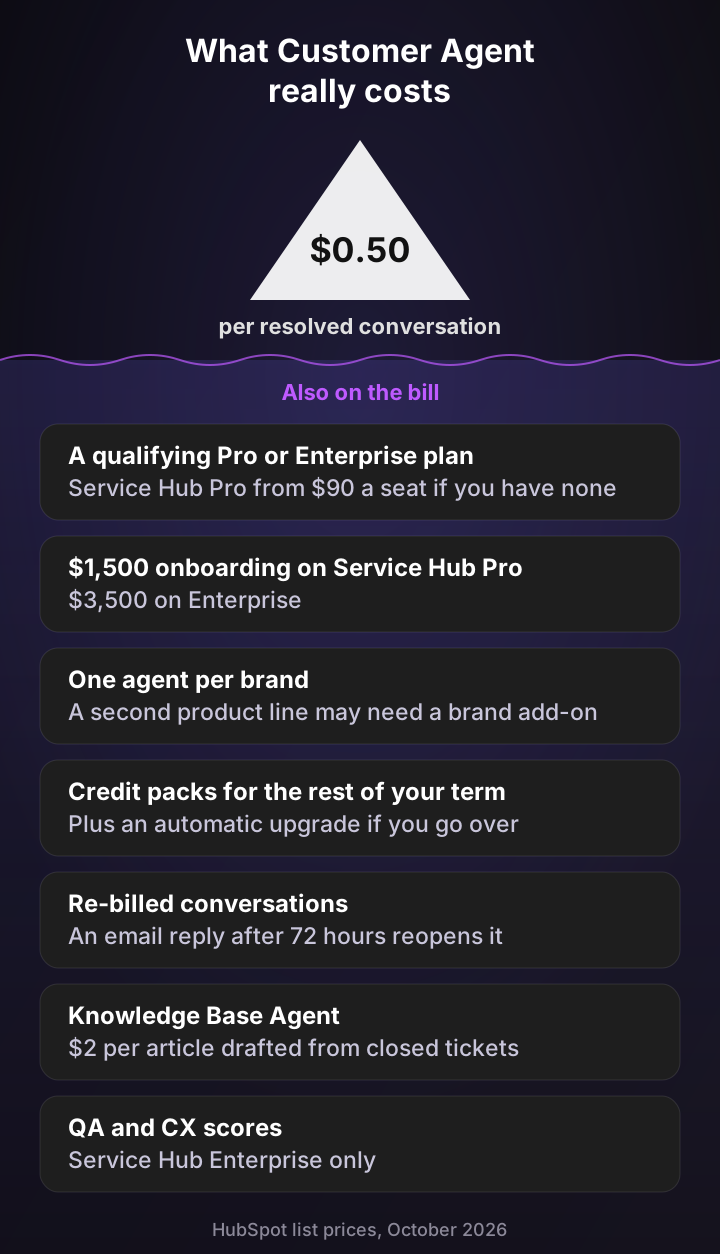
Under the per-resolution price sit the costs that depend on where you start:
- A plan upgrade, if you don't have a qualifying plan: moving 10 reps from Service Hub Starter to Professional adds about $830 a month at "starts at" prices, plus $1,500 onboarding.
- Brand add-ons: splitting product lines into separate agents means separate brands, which admins have pushed back on.
- Shared credits and packs: other AI tools draw from the same pool, and packs stay for the rest of your term.
- Extras for your team: Knowledge Base Agent articles at $2 each, and AI QA scores only on Enterprise.
For how other vendors charge per resolution, see my breakdowns of Fin pricing and Zendesk AI pricing.
What Customer Agent costs at three volumes
Here's a worked example for a team that needs to upgrade, with every assumption stated:
- Plan: 10 reps on Service Hub Professional at its $90 "starts at" seat price. Your quote may differ.
- Resolution rate: 65%, which is HubSpot's own average across customers, not a benchmark for technical tickets.
- Credits: extra credits bought as capacity packs, no other AI using the pool, and the same pack count all year.
| Conversations the agent handles each month | Resolutions | Extra credit packs | Monthly total | Year one, with onboarding |
|---|---|---|---|---|
| 400 | 260 | 10 ($100) | $1,000 | $13,500 |
| 1,200 | 780 | 36 ($360) | $1,260 | $16,620 |
| 3,000 | 1,950 | 95 ($950) | $1,850 | $23,700 |
At low volume the seats drive the bill. At 3,000 conversations credits make up about half, and because packs stay for the rest of your term, one busy month can set your cost for the year.
Run your own numbers
HubSpot Customer Agent cost estimator
HubSpot list prices, October 2026: Service Hub seats from $90 (Professional) or $150 (Enterprise), 3,000 or 5,000 credits included a month, 50 credits per resolved conversation and capacity packs of 1,000 credits for $10 a month. Year one adds the required $1,500 or $3,500 onboarding. Excludes voice minutes, other AI features that share the credit pool, re-billed conversations and taxes.
Seats
$900
Per month
Extra credits
$360
36 capacity packs a month
Year one
$16,620
Seats + credits + onboarding
That's 780 billed resolutions a month. Your included credits cover 60, and Customer Agent is 29% of your monthly bill. Capacity packs stay for the rest of your term, so size them for your busiest month.
What people say about HubSpot's Customer Agent
HubSpot admins are mostly positive about how fast it sets up, and most critical about control and credits. The quotes below come from the HubSpot Community and G2, with the date each was posted.
“I could just instruct it to scan the website as its knowledge base, completing a major chunk of the setup. ... at the beginning, it would recommend things outside of the knowledge base or try to make things up. So we had to add boundaries to it and tighten up the knowledge base.”
“As in the OP, answers are way too long, our attempts to define paths, links, languages are failing. It is nowhere near reliable enough to launch in an enterprise tech B2B environment today.”
“If we connect knowledge sources for all products to the same Customer Agent, there is a high risk that the AI mixes up the information and recommends answers for the wrong product.”
“Our super helpful customer agent responds to them all to politely decline what they are offering. ... it’s using up our credits to respond to spam.”
“I love your Customer Agent, but I’ve been concerned that some people are going to my website and are using the customer agent as a toy ... One customer asked about fifteen questions that had nothing to do with our services, so I lost all those credits.”
Read them as historical experiences, not a current verdict. The 2025 posts predate the April 2026 move to resolution pricing, and HubSpot has since added async handoff and a beta for separating knowledge sources. The limits they describe (answer control, credit spend on off-topic chats, product mix-ups in shared sources) still match HubSpot's current documentation.
For a broader signal, HubSpot Agent Hub holds 4.3 out of 5 from 32 reviews on G2. That listing covers all of HubSpot's agents, not Customer Agent alone, and 32 reviews is a small sample.
Who should use Breeze Customer Agent (and who shouldn't)
Use Breeze Customer Agent if you already pay for a qualifying Pro or Enterprise plan, most questions are answered on your website or help center, and chat is your main channel. It also suits teams that want voice and messaging from one setup with no new vendor to review.
Look elsewhere if your tickets need troubleshooting, the answers sit in older resolved tickets, or several products share one brand. The same goes if you'd have to upgrade from Starter just to get an AI agent.
In short, its pros are price, channels and CRM context. Its cons are knowledge limited to what's written down, no investigation tools, no research summary on handoff and a billing rule that can charge for your team's work.
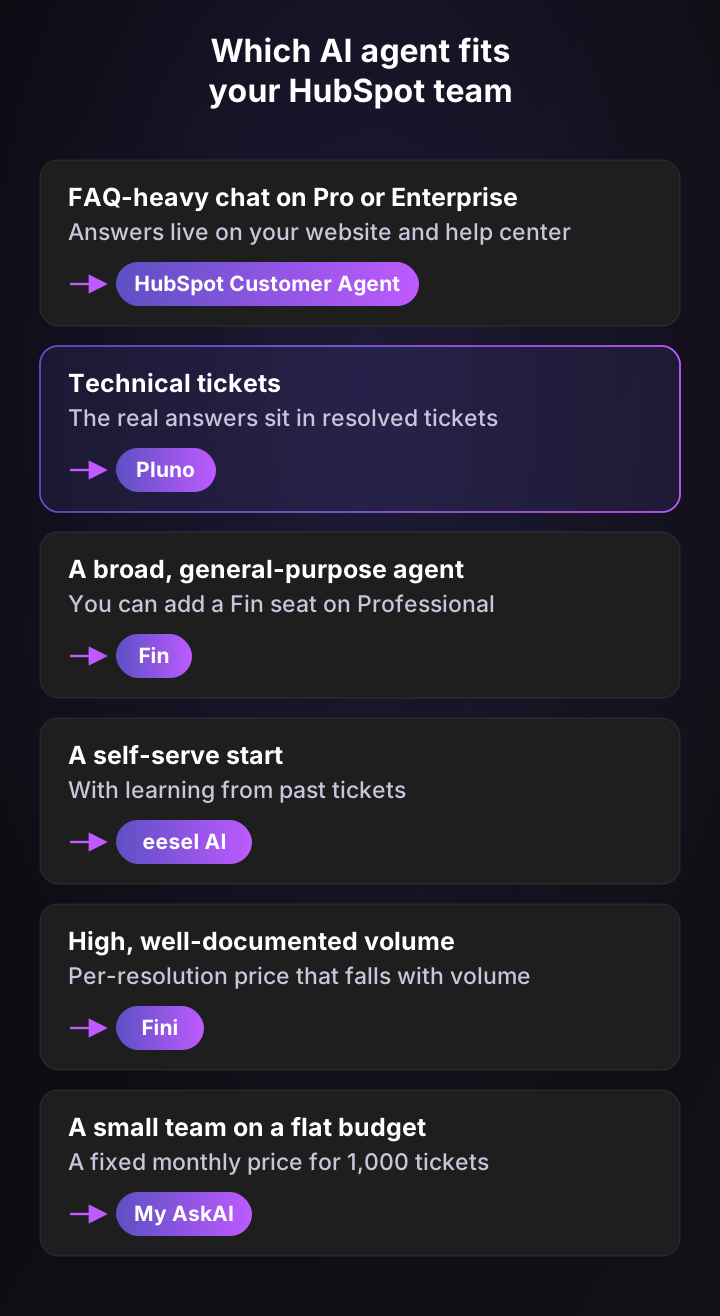
The map pairs each situation with a tool. FAQ-heavy chat fits Customer Agent and technical tickets fit Pluno. Fin suits teams that want a broad general agent, eesel AI a self-serve start, Fini high documented volume and My AskAI a flat budget.
5 best HubSpot Breeze AI alternatives for support teams
The best HubSpot Breeze AI alternative for technical support is Pluno, because it works from the resolved tickets and systems where technical answers live. The other four fit narrower cases:
- Fin for a broad, general-purpose agent.
- eesel AI for a self-serve start that learns from past tickets.
- Fini for per-resolution pricing that falls with volume.
- My AskAI for small teams that want a flat monthly price.
Every tool below runs inside the HubSpot help desk. I took each price from the vendor's own site on October 26, 2026.
1. Pluno: best for technical support teams
Pluno is an AI layer for the help desk your team already uses, and it works inside HubSpot. Pluno goes beyond basic customer service automation by resolving complex technical issues using historical tickets, troubleshooting context, AI assisted workflows, and engineering escalations, while also equipping human agents with AI Copilot and quality assurance.
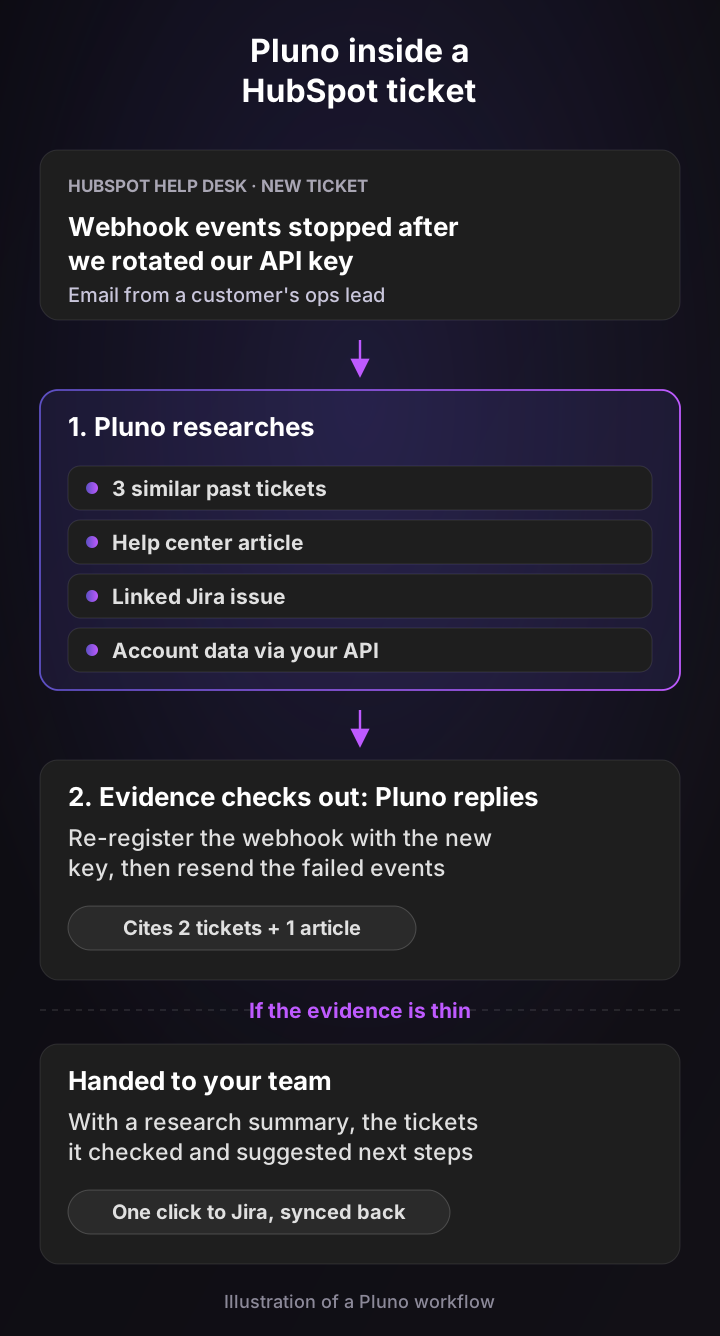
The illustration follows one ticket about webhooks that stopped after an API key rotation. Pluno checks similar past tickets, the help center, a linked Jira issue and the account's data, then either replies with the fix and its sources or hands the ticket to your team with its research.
On the six yardsticks:
- Help desk fit: a native app in the HubSpot help desk, so pipelines, properties and reports stay in HubSpot. The same platform runs on Zendesk, Intercom, Salesforce Service Cloud, Jira Service Management and Freshdesk.
- Knowledge sources: your resolved tickets are the main source, read directly rather than turned into FAQs. Pluno rebuilds the troubleshooting steps your team actually used, favoring the latest successful ones, and adds your help center, docs, files and tools such as Slack, Jira, Confluence or Notion.
- Actions: custom API actions read or write live data mid-conversation, and unlimited AI Workflows set rules such as silent escalations or priority routing.
- Handoff: Pluno grounds troubleshooting in historical resolutions and connected knowledge, validates available evidence, and provides researched handoffs when human intervention is required. The handoff lists the tickets it checked and suggested next steps, and escalation forms can collect required details from the customer first.
- Pricing: a platform fee from 249€ a month for up to 500 tickets (210€ billed annually), plus 0.90€ per ticket it fully resolves. Escalations are never billed. AI Copilot is 49€ per seat. See Pluno pricing.
- Setup: the Pluno team connects HubSpot with you on your onboarding call, imports your past tickets and sets up your first modules, with a 14-day free trial.
Where Customer Agent stops at retrieval and configured actions, Pluno adds tools built for technical work:
- Troubleshooting Agent: say a customer's CSV import keeps timing out. It checks recent deploys and the related code, the account's state in your database, matching errors in Sentry or Datadog and the session recording, and links every finding to its evidence. It recommends a fix and opens a pull request only after you approve. You run it from its own app or Slack, from 99€ a month.
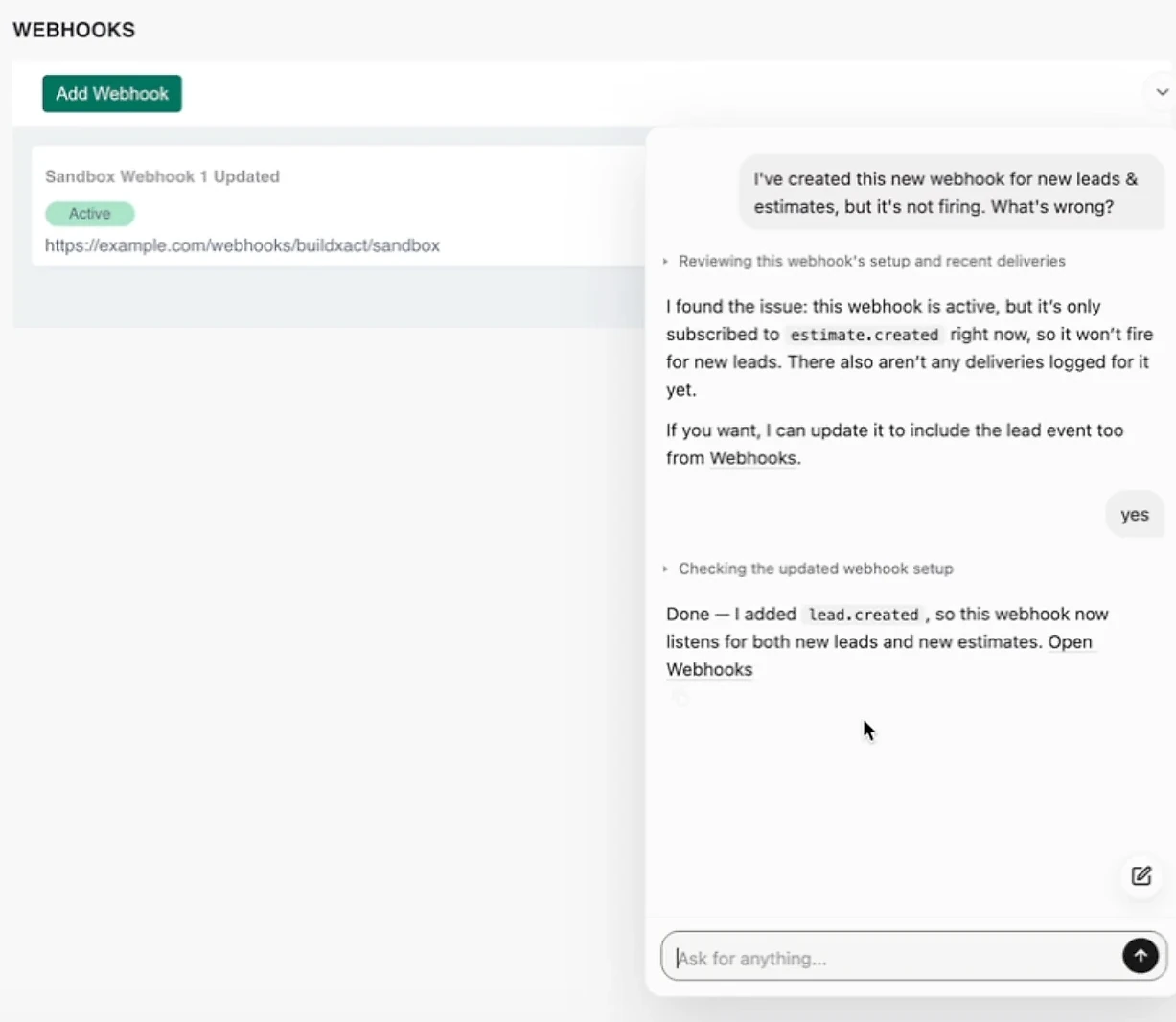
- Product Agent: a chat inside your own product that reads the user's current configuration and can change settings, finish setup or run an export for them. In this sandbox demo we recorded, it finds that a webhook event subscription is missing and adds it.
- Escalation Copilot: files bugs where engineering works, such as Slack, Jira, Linear, Microsoft Teams or incident.io, with the report filled in, and copies updates back onto the HubSpot ticket.
- Help for your human team: AI Copilot drafts a reply with sources for every new message, AI Tagging & Field Filling fills ticket properties, and Quality Assurance scores every resolved ticket at 35€ per agent, with no Enterprise plan needed.
Put together, Pluno resolves technical tickets on its own, prepares your reps for the rest and turns real bugs into engineering issues that report back. Customers see it in their numbers: Kojo went from 0% to 50% ticket deflection with same-day Jira escalations, and Innovorder's AI agent resolves 67% of chat tickets in under a minute.
"My team is, like, a huge fan. They feel like they can't live without Pluno now. We'd be drowning without it."
Sarala Conlan, Sr. Customer Support Manager at Kojo
Test Pluno on your 50 most recent tickets
2. Fin: best for a broad, general-purpose agent
Fin started life as Intercom's AI agent, and Salesforce completed its purchase in September 2026. It has a dedicated HubSpot integration for tickets.
- Help desk fit: answers HubSpot email tickets and form submissions assigned to it, and needs Service Hub Professional plus a dedicated HubSpot seat. Syncing your HubSpot knowledge base needs Content Hub Professional or Enterprise.
- Knowledge sources: help articles, snippets, synced web content and other connected sources. Its HubSpot guide doesn't name HubSpot tickets as an answer source.
- Actions: refunds, cancellations and account changes through Procedures, its multi-step workflows (Fin for HubSpot).
- Handoff: moves the ticket to "Waiting on your team", assigns a person and tags it for your HubSpot routing workflow.
- Pricing: $0.99 per outcome, with a 50-outcome monthly minimum on your existing help desk. An outcome is a resolution, or a configured Procedure that ends in a handoff to a human, a disqualification or a self-serve routing. Default escalations and customers asking for a person aren't billed.
- Setup: you connect HubSpot through OAuth yourself, and there's a 14-day free trial.
Best for: HubSpot teams that want a broad agent backed by Salesforce. Watch out for: Procedure handoffs are billed, and Fin's Copilot for human reps isn't offered on HubSpot. My Fin alternatives roundup goes deeper.
3. eesel AI: best for a self-serve start with past-ticket learning
eesel AI plugs into your existing help desk and works in the HubSpot inbox and Service Hub tickets.
- Help desk fit: HubSpot inbox and tickets, including website chat, plus Zendesk, Freshdesk, Intercom and seven other help desks.
- Knowledge sources: past HubSpot tickets, knowledge base articles and CRM data. Connecting indexes a batch of recently closed tickets, and you can index more later.
- Actions: replies, internal comments, ticket updates and CRM lookups, each set to run on its own, ask first or stay off.
- Handoff: routes tickets back to your team, and its activity log shows what the agent searched and why.
- Pricing: credits, where one ticket the agent works on is one credit, from $299 a month for 500 credits to $1,749 for 5,000, with overage at $0.80 per credit and a free plan with 100 credits.
- Setup: self-serve, with HubSpot connected by OAuth.
Best for: small teams that want past-ticket learning without a sales call. Watch out for: a ticket the agent works on uses a credit, and eesel doesn't say whether escalated tickets are exempt.
4. Fini: best for per-resolution pricing at higher volume
Fini is an AI agent that runs on top of your help desk. It replies in HubSpot Inbox email and chat and writes ticket properties and tags.
- Help desk fit: HubSpot Inbox email and chat, plus Zendesk, Intercom, Salesforce Service Cloud and others.
- Knowledge sources: website links, files, Google Drive, Notion, Confluence and help centers. Fini answers from articles, and past conversations feed article drafts rather than answers.
- Actions: calls your APIs through typed actions for orders, records and accounts.
- Handoff: escalates with its internal notes and an escalation property on the ticket.
- Pricing: $0.89 per resolution up to 3,000 tickets a month, $0.69 up to 10,000 and from $0.49 on Enterprise. Escalations are free.
- Setup: "live in 14 days" per its own fact sheet, by direct contract.
Best for: teams with high, well-documented volume. Watch out for: a thin help center caps what it can answer.
5. My AskAI: best for a flat price at low volume
My AskAI is an approved HubSpot app that adds an AI agent to your HubSpot chat, email and messages. Its HubSpot page pitches it as a cheaper option than HubSpot's own agent.
- Help desk fit: HubSpot chat, email and messages, plus Intercom, Zendesk, Freshdesk and Gorgias.
- Knowledge sources: HubSpot help center articles, websites, Notion and Google Drive. It turns historic tickets into help articles rather than answering from them.
- Actions: connects to CRMs and APIs for jobs like refunds or upgrades.
- Handoff: the customer picks "Talk to a person" and your team gets a conversation summary.
- Pricing: $199 a month for 1,000 tickets, then about $0.12 per extra ticket, or $499 for 2,000 with unlimited seats.
- Setup: self-serve "in under 10 mins", with a 30-day free trial.
Best for: small teams that want a predictable bill. Watch out for: per-ticket billing, and no published answer on whether handed-off tickets count.
How each vendor bills, and how to compare them
The six vendors charge for different things, so their unit prices can't be compared directly:
- Customer Agent: per resolved conversation; customer-started handoffs are free, workflow assignments can be billed.
- Fin: per outcome, which includes configured Procedure handoffs.
- eesel AI: per ticket the agent works on.
- Fini: per resolved ticket; escalations free.
- My AskAI: per ticket in a monthly bundle.
- Pluno: a platform fee plus a charge per fully resolved ticket; escalations never billed.
The number that compares them fairly is cost per correct resolution: each vendor's full monthly bill, divided by the tickets it resolved correctly with no human touch in your own test. A cheap unit price on easy tickets can still lose to a higher one that resolves the technical tickets your team spends its hours on.
Capability comparison for technical support
| Capability | Pluno | Customer Agent | Fin | eesel AI | Fini | My AskAI |
|---|---|---|---|---|---|---|
| Answers from past tickets directly | Strong | Not found (approved Q&A generation available) | Not found (HubSpot tickets not named as a source) | Strong | Not found (articles only) | Not found (articles only) |
| Technical troubleshooting (logs, code, errors) | Strong (Troubleshooting Agent, from 99€/month) | Partial (custom API actions only) | Partial (live data, no logs or code) | Partial (API access) | Partial (separate Slack product) | Not found |
| Engineering escalations with sync back | Strong (5 tools, two-way) | Partial (HubSpot's Jira integration) | Not found | Not found | Partial (no sync found) | Not found |
| Research summary on handoff | Strong | Not found | Partial (Expert plan) | Partial (activity log) | Partial (internal notes) | Partial (chat summary) |
| Drafted replies for human reps | Strong (AI Copilot) | Strong (reply recommendations) | Not found on HubSpot | Strong | Partial | Strong |
| QA on human conversations | Strong (all plans) | Partial (Enterprise only) | Partial (paid add-on) | Not found | Not found | Not found |
| Escalations billed? | Never | Workflow assignments can be | Procedure handoffs are | Not stated | Never | Not stated |
Ratings use the definitions from the introduction, based on each vendor's official pages on October 26, 2026.
Pricing side by side
| AI agent | Billing unit | Price (October 2026) | Setup | Best for |
|---|---|---|---|---|
| Pluno | Platform fee + per full resolution | From 249€/month + 0.90€ per resolution | Onboarding with the Pluno team, 14-day trial | Technical support teams |
| Customer Agent | Per resolved conversation | $0.50 in credits + a qualifying Pro plan | Self-serve, free testing | FAQ-heavy chat on Pro or Enterprise |
| Fin | Per outcome | $0.99, 50-outcome minimum | Self-serve, 14-day trial | A broad, general-purpose agent |
| eesel AI | Per ticket worked | From $299/month for 500 | Self-serve, free plan | A fast start with past-ticket learning |
| Fini | Per resolution | $0.49 to $0.89 | Vendor-led, about 14 days | High documented volume |
| My AskAI | Per ticket in a bundle | From $199/month for 1,000 | Self-serve, 30-day trial | Small teams on a flat budget |
Prices are in each vendor's own currency. They aren't directly comparable until you convert currency, match contract length and normalize the billing unit, which the model below does for Customer Agent and Pluno.
Test Pluno on your 50 most recent tickets
Run the numbers for a technical support team
This model starts from your own 50-ticket test, not from vendor averages. Enter how many of the 50 each tool resolved correctly, and it shows the tickets left for your team and your total monthly support cost, including your HubSpot plan, your team's cost per ticket and Pluno's optional Troubleshooting Agent.
Customer Agent vs Pluno: workload and total cost from your test
Enter each tool's correct resolutions out of the same 50 tickets; the model scales them to your monthly volume and assumes billed resolutions equal correct ones. List prices, October 2026: Customer Agent on Service Hub Professional with 3,000 included credits, 50 credits per resolution and $10 packs; Pluno's platform fee for your ticket volume, 0.90€ per resolved ticket, optional AI Copilot seats at 49€ and the Troubleshooting Agent from 99€. Pluno converted at the ECB rate of 23 October 2026 (1 EUR = 1.1193 USD). Your HubSpot plan and team cost apply to both.
Enter how many of your 50 test tickets each tool resolved correctly to see the tickets left for your team and your total monthly cost.
If both tools resolve the same tickets, Customer Agent is the cheaper line item, and I'd say so plainly. Pluno's case rests on how many more technical tickets it resolves correctly and what each ticket costs your team to handle, which is why the model leaves both for you to measure rather than assume.
How to test Customer Agent against Pluno on 50 tickets
A head-to-head test on your own tickets is the only comparison that settles this. Here's a two-week method with one sample used throughout:
- Sort your 150 most recent tickets. Tag each as a how-to question, an account change or a technical problem, so you know your real mix.
- Use your 50 most recent tickets as the test set for every vendor, and check their mix against the 150. If a quiet week skewed it, run the test after a typical week.
- Check your plan and routing. Confirm you have a qualifying Pro plan, and list workflows that assign conversations to reps.
- Run the 50 through each agent. Use HubSpot's free batch testing for Customer Agent, and ask Pluno to run your 50 most recent tickets side by side with your team's answers. Use the trials for the others.
- Score four numbers per vendor: correct resolutions, incorrect answers, escalations, and the human work left (tickets your team must still answer, and how many of those got a usable research summary).
- Compare cost per correct resolution. Enter each vendor's correct resolutions out of 50 in the model above, and it scales them to your monthly volume.
If you're unsure which ticket types to hand to AI first, my customer support automation guide shows how to size the queue.
The bottom line
HubSpot Breeze AI gives HubSpot teams a capable Customer Agent at a low per-resolution price, with channels and CRM context built in. It's limited by knowledge that stops at what you've written down, no investigation tools and a billing rule that can charge for your team's work.
For technical support, Pluno is the stronger choice. It answers from your full ticket history, troubleshoots with your systems, prepares your reps and escalates bugs with the research done, inside the same HubSpot help desk. Test it on your 50 most recent tickets and compare.
FAQ
What is HubSpot Breeze AI?
HubSpot Breeze AI is HubSpot's built-in AI: Breeze Assistant, which helps you inside HubSpot, and AI agents for marketing, sales, data and customer service. In 2026, HubSpot started calling the agents Agent Hub, so you'll see both names. For support teams, the main agent is Customer Agent.
Is HubSpot Breeze AI free?
Partly. Breeze Assistant and data enrichment are included, and reply recommendations don't use credits. Most agents charge credits per task: Customer Agent uses 50 credits ($0.50) per resolution, after your monthly included credits run out.
Service Hub includes 3,000 on Professional and 5,000 on Enterprise, and Data Hub and Customer Platform include 5,000 and 10,000.
How much does HubSpot Breeze Customer Agent cost?
Breeze Customer Agent costs $0.50 per resolved conversation and $0.50 per minute of voice, billed in HubSpot credits. You also need a Professional or Enterprise plan of a qualifying HubSpot product. Extra credits cost $10 per 1,000.
Do I need Service Hub Professional for Customer Agent?
No. Any Professional or Enterprise edition of Marketing Hub, Sales Hub, Service Hub, Content Hub, Data Hub, Smart CRM or Revenue Hub qualifies. Service Hub Professional is an extra cost only if your company has none of those, and it adds $1,500 onboarding.
Does HubSpot charge for conversations handed to human agents?
Only some. If the customer asks for a person, the conversation isn't billed. If your workflow or a manual assignment hands it to a rep, it can still count as a resolution and use 50 credits, because HubSpot only treats customer-started handoffs as qualifying.
Can Breeze AI troubleshoot issues using older resolved tickets?
Only indirectly. Customer Agent's "Generate knowledge" drafts Q&A pairs from tickets, inbox conversations or files ("All tickets" covers the last 90 days, while a ticket segment has no stated limit), and only accepted pairs become sources. The agent never reads the tickets themselves, and logs, error tracking and code aren't native sources, which is the gap Pluno covers.
Is Pluno better than HubSpot Breeze AI for technical support?
For technical tickets, yes. Pluno reads resolved tickets directly, investigates with your code, logs and error tracking, hands off with a research summary and files engineering escalations that sync back, none of which Customer Agent documents. Customer Agent costs less per resolution, so test both on the same 50 tickets.
Can I use Customer Agent if my help desk isn't HubSpot?
No native integration with other help desks is listed. Every channel must connect to the HubSpot inbox or help desk, and outside channels need the beta Custom Channels API. Pluno, Fin and eesel AI run on HubSpot and other help desks.
What is the best HubSpot Breeze AI alternative?
Pluno, for technical support teams on HubSpot. It runs inside the HubSpot help desk, learns from your full ticket history and bills only for full resolutions on top of its platform fee. Fin suits a broad general agent, and My AskAI suits small teams on a flat budget.