The best help desk software is the one that still fits after your team doubles, your first SLA promise goes into a contract and someone asks for a report the default dashboard can't build. Most comparisons stop at the headline price. I price each help desk on the plan you actually need for that work.
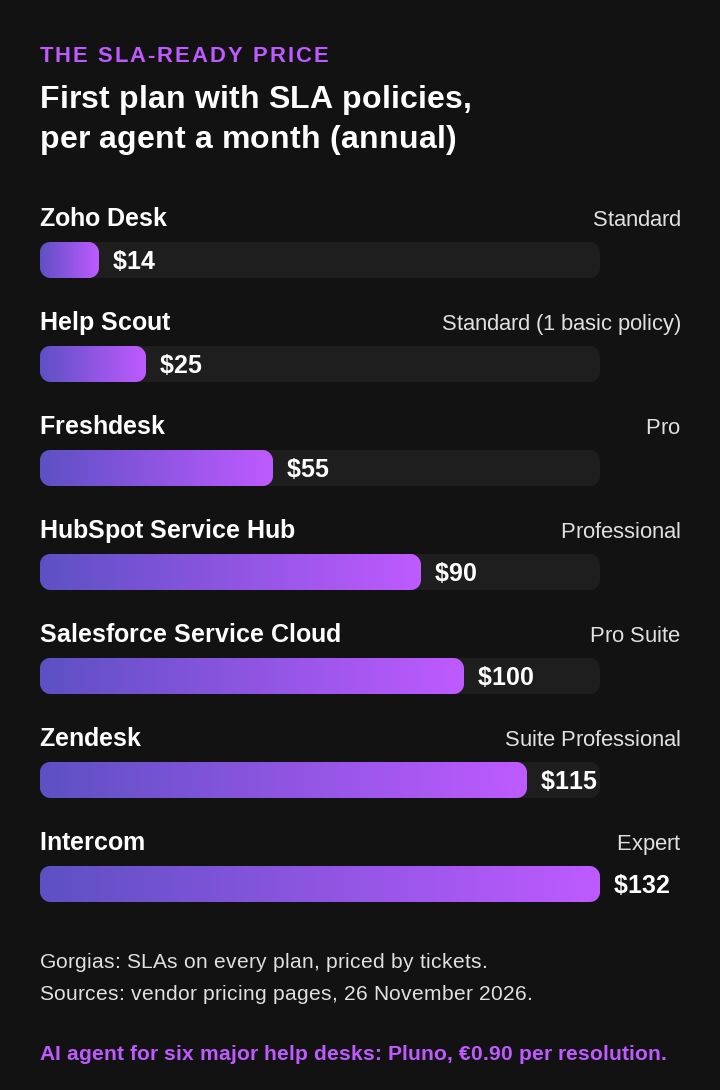
That plan is rarely the cheapest one. Zendesk's Support Team plan costs $19 per agent a month, but SLA policies start on Suite Professional at $115. Intercom lists SLAs only on Expert, at $132. Zoho Desk includes four SLA policies on its $14 Standard plan.
Where Pluno fits: Pluno isn't a help desk. It's the AI agent for complex support that runs inside Zendesk, Intercom, Salesforce Service Cloud, HubSpot, Jira Service Management and Freshdesk, six of the ten tools below. Whichever help desk you pick, Pluno resolves, drafts and escalates the tickets it holds, so fewer of them ever reach an SLA timer.
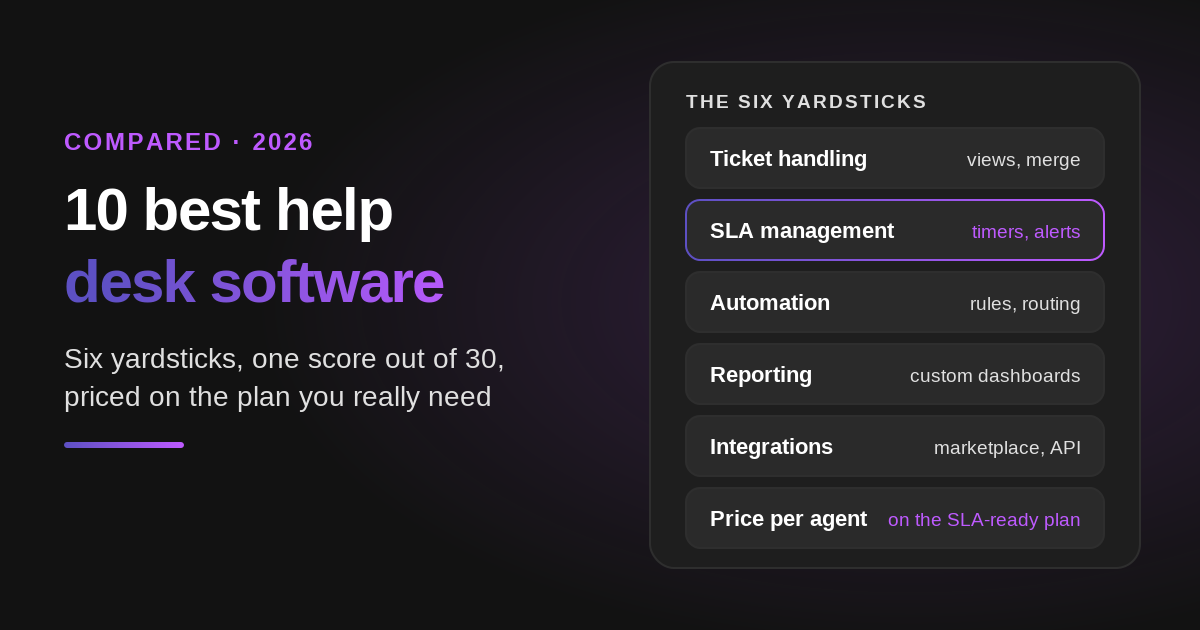
I wrote this for support leads and ops managers at B2B and consumer companies who run 5 to 100 agents. Every help desk gets the same six yardsticks, each scored 1 to 5, for a total out of 30:
- Ticket handling: shared views, merging, collision detection, macros and a clean agent workspace.
- SLA management: first reply and resolution targets, timers, breach alerts, and which plan includes them.
- Automation: rules that fire on events and time, plus automatic assignment by round robin, load or capacity.
- Reporting: prebuilt dashboards, and the plan that unlocks custom reports.
- Integrations: the size of the official app marketplace and how well it connects your CRM and engineering tools.
- Price per agent: the price of the first plan with SLA policies, billed annually, not the cheapest plan.
Every score comes from the vendor's pricing page, plan comparison and help docs: what a plan includes, and how high you have to climb to get it. Price follows a fixed scale: 5 under $20, 4 for $20 to $59, 3 for $60 to $99, 2 for $100 to $119 and 1 for $120 or more per agent a month.
Disclosure: I work at Pluno. None of the vendors below paid to be included, and every price comes from the vendor's own pricing page, fetched on 26 November 2026.
TL;DR
- Best help desk software overall: Zendesk (25/30). The deepest ticket handling and automation. SLAs start on Suite Professional at $115 per agent a month, billed annually.
- Best value for SLA-driven teams: Freshdesk (24/30). Pro at $55 adds SLA policies, round-robin assignment and custom dashboards in one step.
- Cheapest SLA-ready plan: Zoho Desk (24/30). Four SLA policies and custom reports on Standard at $14 per user a month.
- Best for enterprises on Salesforce CRM: Salesforce Service Cloud (24/30). Entitlements and milestones from Pro Suite at $100.
- Best IT help desk: Jira Service Management. SLA metrics for every agent and 7,000+ marketplace apps.
- Best AI agent for six of these help desks: Pluno. €0.90 per resolved ticket, escalations never billed.
- Key data point: the first plan with SLA policies costs $14 to $132 per agent a month, about nine times apart. For 10 agents, that's $140 to $1,320 a month before any AI.
- Bottom-line advice: shortlist on the plan that includes SLAs, automatic assignment and the reports you need. Then book a demo and see Pluno on your last 50 tickets before you pay for a help desk's own AI.
What is help desk software?
Help desk software turns every customer email, chat, form and call into a ticket with an owner, a status and a deadline. It gives the team one queue to work from, rules that route and escalate tickets, and reports on how fast and how well the team answers.
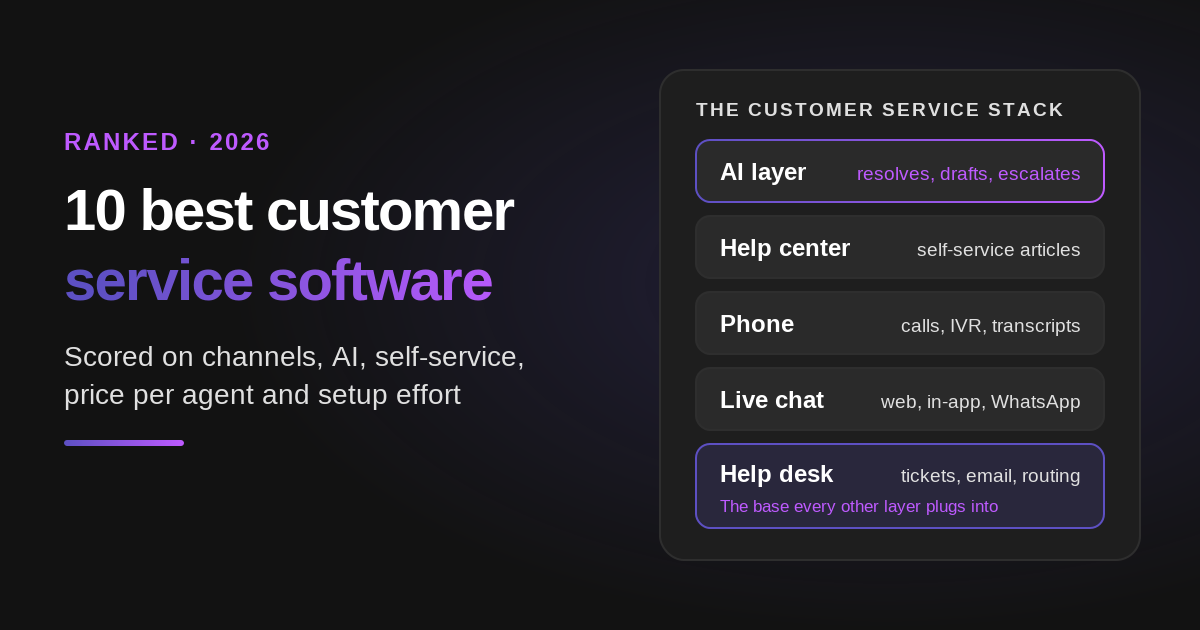
It's narrower than customer service software, which also covers phone systems, help centers and the AI layer. The help desk is the ticket engine in the middle. If it can't track an SLA or assign tickets fairly, nothing around it will fix that.
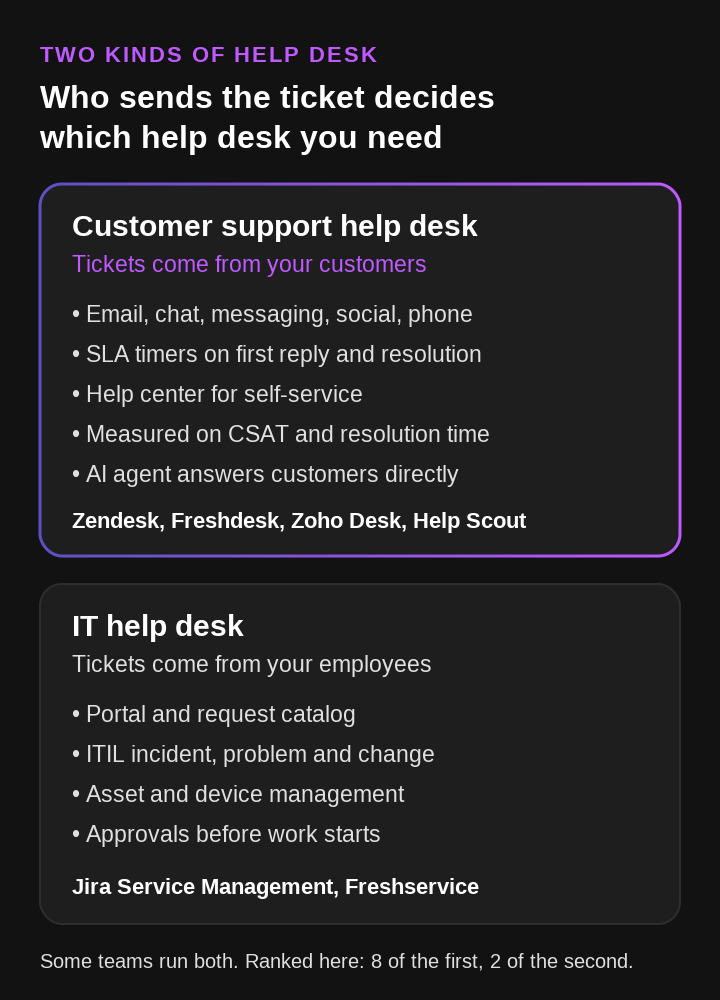
There are two kinds, and the search results mix them up. A customer support help desk serves your customers. An IT help desk serves your employees, with a request portal, asset tracking and change approvals.
How to choose the best help desk software for your team
Choose the plan before the brand. Write down the three features your team can't work without, then find the cheapest plan at each vendor that includes all three. That number is your real comparison.
In the support teams we talk to at Pluno, these are the features that most often force an upgrade within a year of purchase:
- SLA policies. The first enterprise customer asks for a 4-hour first reply in the contract. If your plan has no SLA timers, someone tracks it in a spreadsheet. My guide to what an SLA means in support covers how to set the targets.
- Automatic assignment. Manual triage works at 3 agents and breaks at 10. Round robin, load or capacity-based routing keeps the queue fair without a dispatcher.
- Custom reports. Prebuilt dashboards answer "how fast are we?" Only custom reports answer "which product area creates the most reopened tickets?"
- Integrations with your CRM and engineering tools. Account data next to the ticket, and bugs that reach the place engineering works, such as Jira or Linear.
- The AI pricing model. Per resolution, per session, per conversation or per seat. Check whether escalated conversations are billed too.
Run your shortlist through the plan calculator below before you book a single sales call.
The best help desk software in 2026, compared
Zendesk leads on total score, and Freshdesk, Zoho Desk and Salesforce Service Cloud sit one point behind it. The gap comes from price: Zendesk ties for the top score on handling, automation and integrations, but its SLA-ready plan costs eight times Zoho's.
| Rank | Help desk | Ticket handling | SLAs | Automation | Reporting | Integrations | Price | Total /30 | First plan with SLA policies (annual) |
|---|---|---|---|---|---|---|---|---|---|
| 1 | Zendesk | 5 | 4 | 5 | 4 | 5 | 2 | 25 | Suite Professional $115 |
| 2 | Freshdesk | 4 | 4 | 4 | 4 | 4 | 4 | 24 | Pro $55 |
| 3 | Zoho Desk | 3 | 5 | 4 | 4 | 3 | 5 | 24 | Standard $14 |
| 4 | Salesforce Service Cloud | 4 | 4 | 5 | 5 | 4 | 2 | 24 | Pro Suite $100 |
| 5 | HubSpot Service Hub | 4 | 3 | 4 | 4 | 5 | 3 | 23 | Professional $90 + $1,500 onboarding |
| 6 | Gorgias | 4 | 4 | 4 | 3 | 4 | 3 | 22 | Every plan, from $10 a month for 50 tickets |
| 7 | Help Scout | 4 | 3 | 3 | 3 | 3 | 4 | 20 | Standard $25 (1 basic policy) |
| 8 | Intercom | 4 | 2 | 4 | 3 | 3 | 1 | 17 | Expert $132 |
Gorgias prices by tickets, not per agent, so it gets a middle price score. The two IT help desks are scored on the same yardsticks in their own table, because they serve employees rather than customers:
| IT help desk | Ticket handling | SLAs | Automation | Reporting | Integrations | Price | Total /30 | First plan with SLA policies |
|---|---|---|---|---|---|---|---|---|
| Jira Service Management | 4 | 5 | 4 | 3 | 5 | 4 | 25 | SLA metrics on every plan |
| Freshservice | 4 | 4 | 4 | 3 | 3 | 4 | 22 | Growth $49 |
The 8 best help desk software tools for support teams
Each review below follows the same order: what the help desk is, how it scores on the six yardsticks, and who should buy it.
1. Zendesk: best help desk software overall
Zendesk is the reference help desk for teams that expect to grow past 20 agents. Its triggers, automations and views are the most flexible on this list, and its marketplace is one of the largest.
- Ticket handling (5/5): views, macros and ticket merging, with custom business rules from the first plan. Messaging, live chat, social and voice need a Suite plan; Support Team covers email and the web widget.
- SLAs (4/5): "Service level agreements (SLA)" start on Suite Professional. Support Team and Suite Team don't include them (Zendesk pricing).
- Automation (5/5): custom triggers and automations from Support Team, routing on every plan, skills-based routing from Suite Professional.
- Reporting (4/5): prebuilt dashboards on Team plans. Custom metrics, charts and dashboards start on Suite Professional.
- Integrations (5/5): 1,000+ prebuilt apps and integrations on its pricing table, and 1,800+ apps, partners and integrations in its site navigation.
- Price (2/5): Support Team $19, Suite Team $55 and Suite Professional $115 per agent a month, billed annually. The AI agent includes 5 or 10 automated resolutions per agent, then $1.50 each committed or $2.00 pay-as-you-go.
Best for: growing teams that want one platform for every channel and plan to stay on it for years. Watch out for: the jump from $55 to $115 the day you need SLAs. If you're weighing a move away, my list of Zendesk competitors compares the switching costs.
2. Freshdesk: best value for SLA-driven teams
Freshdesk gives you most of Zendesk's operating model for less than half the SLA-ready price. Its Pro plan is the cleanest upgrade on this list: SLAs, fair assignment and custom dashboards arrive together.
- Ticket handling (4/5): a shared inbox with ticket views, canned responses and dispatch rules. Growth is email-first on the pricing page.
- SLAs (4/5): "Multiple SLA policies" on Pro and Enterprise, not on Growth (Freshdesk pricing).
- Automation (4/5): time and event triggers and ticket dispatch on Growth. Round-robin and load-balanced assignment from Pro, skill-based assignment on Enterprise.
- Reporting (4/5): standard reports and real-time dashboards on Growth. Custom real-time dashboards from Pro.
- Integrations (4/5): 1,000+ marketplace apps.
- Price (4/5): Growth $19, Pro $55 and Enterprise $89 per agent a month, billed annually. Freddy AI Agent sessions cost $49 per 100 after 500 free sessions (one time per account), and Freddy AI Copilot is $29 per agent a month on Pro and Enterprise.
Best for: teams of 5 to 50 that need SLAs now and want room to grow. Watch out for: session-based AI pricing that also counts conversations the AI hands off. My Freshdesk pricing breakdown runs the numbers.
3. Zoho Desk: cheapest SLA-ready help desk
Zoho Desk is the budget pick that doesn't feel like one on paper. Standard includes four SLA policies, five workflow rules per module, and 50 custom reports, for $14 per user a month.
- Ticket handling (3/5): solid ticket views and macros, with channels spread across plans: email, social and web forms on Express, chat from Standard and telephony from Professional. One Hacker News commenter (quoted below) found Zoho more intuitive than Zendesk but the wider Zoho suite disjointed, with each app configured differently.
- SLAs (5/5): a default SLA on Free and Express, 4 SLAs on Standard, 10 per department on Professional and 20 per department on Enterprise (Zoho Desk plan comparison).
- Automation (4/5): workflow rules from Express. Round-robin assignment from Professional, skill-based assignment on Enterprise.
- Reporting (4/5): custom reports and 10 custom dashboards from Standard.
- Integrations (3/5): a marketplace and the wider Zoho suite. Zoho doesn't state an app count.
- Price (5/5): Free for 3 users, then Express $7, Standard $14, Professional $23 and Enterprise $40 per user a month, billed annually (Zoho Desk pricing). Zia, Zoho's native AI, starts on Professional.
Best for: cost-conscious teams that need SLAs and custom reports on day one. Watch out for: round-robin assignment only from Professional ($23).
4. Salesforce Service Cloud: best for enterprises on Salesforce CRM
Salesforce Service Cloud is the help desk for companies whose customer data already lives in Salesforce. Its entitlements, flows and reporting go deeper than any tool here, and so does the setup.
- Ticket handling (4/5): cases, queues and the console with full account context. Starter Suite captures web and email cases; chat starts on Pro Suite.
- SLAs (4/5): Case Milestone Tracker and Service Contracts and Entitlements start on Pro Suite (Service Cloud pricing).
- Automation (5/5): case auto-assignment and escalation rules on Starter. Omni-Channel Routing and Flow Builder from Pro Suite, unlimited flows from Core.
- Reporting (5/5): customizable reports and dashboards on every edition, Starter included.
- Integrations (4/5): AgentExchange from Pro Suite, plus the rest of the Salesforce platform.
- Price (2/5): Starter Suite $25, Pro Suite $100, Core $195, Advanced $395 and Max $550 per user a month. Agentforce costs $2 per conversation or Flex Credits at $500 per 100,000 (Agentforce pricing).
Best for: enterprises where sales, success and support share one CRM. Watch out for: an admin or partner for setup, and the cost of each step up.
5. HubSpot Service Hub: best if your CRM is HubSpot
HubSpot Service Hub puts the help desk inside HubSpot's CRM, so agents see deals, emails and marketing history next to every ticket. The catch is that the help desk features most teams need start on Professional.
- Ticket handling (4/5): a help desk workspace with live chat, Messenger, email and calling on Starter.
- SLAs (3/5): SLA goals need Service Hub Professional or Enterprise (HubSpot SLA setup).
- Automation (4/5): workflows and round-robin, load-balanced or random routing need Professional (routing in help desk).
- Reporting (4/5): up to 75 dashboards on Professional, and the custom report builder from Professional.
- Integrations (5/5): 2,000+ integrations, per HubSpot's pricing page.
- Price (3/5): Free for 2 users, Starter from $7 to $20 per seat a month depending on billing, Professional $90 (annual) or $100 (monthly) plus $1,500 onboarding, Enterprise $150 plus $3,500 onboarding (Service Hub pricing). Customer Agent uses 50 credits per resolution, about $0.50.
Best for: teams already running sales and marketing in HubSpot. Watch out for: the onboarding fee and the jump from Starter to Professional. If you're deciding between the two big CRMs' help desks, see Zendesk vs HubSpot.
6. Gorgias: best help desk for Shopify stores
Gorgias prices by tickets, never per agent, which changes the math for seasonal ecommerce teams. It's built for Shopify stores, so order context is part of how the help desk is designed.
- Ticket handling (4/5): email, chat, social and a help center on every plan, with voice and SMS as add-ons.
- SLAs (4/5): SLA policies are "available on all Helpdesk plans" (Gorgias SLA policies).
- Automation (4/5): rules and flows for tagging, routing and auto-replies.
- Reporting (3/5): support performance on every plan, revenue attribution from Pro.
- Integrations (4/5): 254 app integrations plus HTTP and custom integrations, per its pricing page.
- Price (3/5): Starter $10 a month for 50 tickets (monthly billing only), then Basic $50 for 300, Pro $300 for 2,000 and Advanced $750 for 5,000 tickets a month, billed annually (Gorgias pricing). The AI Agent costs $0.90 per automated interaction on annual plans and $1.00 on monthly plans.
Best for: Shopify brands with seasonal peaks and many part-time agents. Watch out for: overage at $36 to $40 per 100 extra tickets on paid plans. My list of Gorgias alternatives covers other ecommerce options.
7. Help Scout: best for small, email-first teams
Help Scout feels like email, which is why small teams adopt it in a day. Customers get normal-looking replies, and agents get a shared inbox without ticket jargon.
- Ticket handling (4/5): shared inboxes, plus live chat, SMS, WhatsApp, Instagram and Messenger on Standard.
- SLAs (3/5): one basic SLA policy on Standard, two advanced policies on Plus, unlimited on Pro (Help Scout pricing).
- Automation (3/5): 150 basic workflows on Standard, 500 advanced workflows and round robin on Plus.
- Reporting (3/5): reporting history grows by plan. Help Scout's pricing page doesn't list custom reports by plan.
- Integrations (3/5): 100+ apps.
- Price (4/5): Free for 5 users, Standard $25, Plus $45 and Pro $75 per user a month, billed annually. AI resolutions cost $0.75 each.
Best for: teams under 25 agents whose customers write emails. Watch out for: one basic SLA policy until you move to Plus. See Help Scout alternatives if you're outgrowing it.
8. Intercom: best for chat-first SaaS teams
Intercom is built around in-app chat and Fin, its AI agent. The company renamed itself Fin in May 2026, and the help desk keeps the Intercom name. It fits software companies whose customers ask questions inside the product, less so teams that run on email and SLAs.
- Ticket handling (4/5): Messenger, shared inbox, tickets and a help center on every plan. WhatsApp, SMS and phone are usage-based.
- SLAs (2/5): service level agreements appear only on Expert (Intercom pricing).
- Automation (4/5): basic automation on Essential. The workflow builder and round-robin assignment start on Advanced.
- Reporting (3/5): prebuilt reports on Essential. Custom reports aren't listed by plan on the pricing page.
- Integrations (3/5): an App Store without a published count.
- Price (1/5): Essential $29 (new customers $19), Advanced $85 and Expert $132 per seat a month, billed annually. Fin costs $0.99 per outcome and Copilot $29 per agent a month.
Best for: SaaS teams whose support starts in the product. Watch out for: SLAs only on the top plan. My Intercom pricing guide breaks down the seat and outcome costs.
The best IT help desk software: 2 picks for internal teams
If your tickets come from employees, you need an IT help desk with a request portal, approvals and asset tracking. Customer support tools can do it in a pinch, but they don't model incidents, changes or devices. These two lead for teams that also run engineering or customer support next door.
9. Jira Service Management: best IT help desk
Jira Service Management is the natural pick when engineering already works in Jira. Incidents, changes and customer requests link straight to the development work that fixes them.
- Ticket handling (4/5): queues, a customer portal, and requests by email, Microsoft Teams, Slack or an embedded widget.
- SLAs (5/5): Atlassian lists SLA metrics as part of every agent seat, Free included (Jira Service Management pricing).
- Automation (4/5): 1,250 automation steps a month on Free, then 3,000, 6,500 and 9,500 steps per user a month on Standard, Premium and Enterprise.
- Reporting (3/5): AI-driven reporting on every plan and cross-source analysis from Standard.
- Integrations (5/5): 7,000+ listings on the Atlassian Marketplace.
- Price (4/5): Free for 3 agents, Standard $21.50 and Premium $55.28 per agent a month, the monthly prices Atlassian lists. Annual prices come from its calculator and depend on your agent count. The virtual service agent comes with Premium, with 1,000 assisted conversations a month included.
Best for: IT and internal service teams that live next to engineering. A quote below shows HR, finance and marketing teams adopting it too.
10. Freshservice: best IT help desk for ITIL processes
Freshservice is Freshworks' IT service desk, with ITIL incident, problem and change management in a simpler package than the enterprise ITSM suites.
- Ticket handling (4/5): email, phone, chat and a widget, plus a ServiceBot for Microsoft Teams and Slack.
- SLAs (4/5): SLA management starts on Growth, not Starter (Freshservice pricing).
- Automation (4/5): the Workflow Automator and round-robin assignment from Starter, intelligent routing from Pro.
- Reporting (3/5): Analytics Starter on Starter, Analytics Pro and team dashboards from Pro.
- Integrations (3/5): the Freshworks marketplace on every plan, without a published count.
- Price (4/5): Starter $19, Growth $49 and Pro $99 per agent a month, billed annually.
Best for: mid-size IT teams that want ITIL processes without a long rollout.
Also considered: ServiceNow and Front. ServiceNow is an enterprise IT and customer service platform sold by quote, so it can't be priced on these yardsticks; see Zendesk vs ServiceNow. Front is a shared inbox more than a help desk; see Front vs Zendesk.
Which help desk plan includes SLAs? The real price per agent
The first plan with SLA policies costs $14 per agent a month at Zoho Desk and $132 at Intercom. That spread matters more than any headline price, because most growing teams need SLAs within their first year.
Tick the features your team needs and set your headcount. The calculator finds each vendor's cheapest plan that lists all of them.
What the help desk plan you need costs
US list prices per agent a month, billed annually, from each vendor's pricing page on 26 November 2026. Each card shows the cheapest plan whose pricing page lists every feature you tick. Help Scout and Intercom don't list custom reports by plan, so they drop out when you tick it. HubSpot Starter shows the higher of its two listed prices. Zoho Desk Express has one default SLA, which isn't counted as SLA policies. Gorgias is left out because it prices by ticket volume, not per agent, and includes SLA policies on every plan. AI agents, add-ons, phone minutes and taxes are excluded.
Zoho Desk (Standard)
$140
$14 per agent a month
Freshdesk (Pro)
$550
$55 per agent a month
HubSpot Service Hub (Professional)
$900
$90 per agent a month, plus a one-time $1,500 onboarding fee
Salesforce Service Cloud (Pro Suite)
$1,000
$100 per agent a month
Zendesk (Suite Professional)
$1,150
$115 per agent a month
Help Scout
n/a
not listed by plan on its pricing page
Intercom
n/a
not listed by plan on its pricing page
For 10 agents, Zoho Desk Standard is the lowest monthly bill that lists everything you ticked, at $140. The entry price on a vendor's homepage is often a plan without these features, so compare this number, not the headline.
Three patterns stand out when you run your own numbers:
- SLAs and custom reports usually arrive together. At Zendesk, Freshdesk and HubSpot, the plan that adds SLA policies also adds custom dashboards.
- Fair assignment is often one plan higher. Zoho Desk includes SLAs on Standard but round robin only on Professional. Help Scout adds round robin on Plus.
- One-time fees hide outside the seat price. HubSpot Professional adds $1,500 for onboarding, which is $125 a month spread over the first year.
None of these prices include the AI agent. Each help desk bills its own AI differently, from Help Scout's $0.75 per resolution to Salesforce's $2 per conversation.
What support teams say about their help desk software
These comments come from Hacker News, where support and engineering leads talk about the tools they run. They're a small, self-selected sample, so read them as signals rather than verdicts.
“I agree that Zoho is more intuitive than Zendesk and 10-20x cheaper ... we found Zoho to be really disjointed where every app was configured and looked different.”
“i've gone down this route before, we're back on freshdesk now. it's easy to build a prototype in two days, but the long tail of making it actually meet _all_ the requirements is hell.”
“We are using Helpscout wich is very nice over all. The also do not send the weirdly formatted ticket email, with 'respond above this line' etc.”
“For some types of business Intercom pricing is hilariously high. ... If you're in B2C though it often makes no financial sense because of this per "active" user pricing.”
“We're continuing to build more and more service desk projects in Jira Service Management. That's becoming a killer feature for our business teams like HR, Finance, Marketing, and others.”
The pattern: teams praise the help desks that feel simple for their main channel, and complain about pricing models that grow faster than the team. One commenter's lesson about building their own help desk is the strongest argument for buying one.
Pluno: the AI agent inside your help desk software
Pluno is an AI agent for complex support that runs inside Zendesk, Intercom, Salesforce Service Cloud, HubSpot, Jira Service Management and Freshdesk. You keep the help desk your team knows, with its SLAs, rules and reports. Pluno replaces its built-in AI agent and works the tickets inside it.
That's the decision this guide separates. The help desk decides where tickets live and how they're measured. Pluno decides how many of them still need a person.
| Pluno | Built-in AI agents on this list | |
|---|---|---|
| Where it runs | Inside six of the ten help desks above | Only inside its own help desk |
| What it learns from | Your help center, past resolved tickets (recent cases first) and product documentation through a connected MCP server | Their own help desk's knowledge sources |
| What it bills | €0.90 per resolved ticket, verified before billing. Escalations and reopened tickets are never billed | Per resolution, outcome, session, interaction or conversation, sometimes including handoffs |
| When it can't resolve | Hands the ticket to your team with its findings, and Escalation Copilot turns engineering issues into a summarized escalation | Hands off to an agent |
| Switching help desks later | Comes with you to any of the six | Starts over |
Here's what Pluno does on each yardstick a help desk is measured on:
- Ticket handling: Deflection AI resolves tickets end to end, and AI Copilot drafts replies for your agents inside the ticket.
- SLAs: every ticket Pluno resolves is one less on an SLA timer, and agents escalate the rest with Escalation Copilot, which writes the summary for the tool your engineering team uses, such as Slack, Jira, Linear, Microsoft Teams or incident.io.
- Automation: AI Tagging and Field Filling fills ticket fields, including the assignee, so your help desk's own routing rules have clean data to work with.
- Reporting: every AI-resolved ticket is tagged and can be exported, and Pluno's Quality Assurance module scores agent conversations against your criteria.
- Price: a platform fee from €249 a month (€210 a month, billed annually) for up to 500 tickets, plus €0.90 per resolved ticket. AI Copilot is €49 per seat a month. See Pluno pricing.
Getting started is light:
- No setup fee, and a 14-day free trial with full access to every module and no credit card.
- A free simulation: the Pluno team runs your 50 most recent tickets and shows how Pluno would have answered each one, before anything goes live.
- Proof at scale: 200+ customers and 5M+ tickets processed.
Across Deflection AI customers, the average resolution rate is 65% and the average agent time saved is 48% (customer averages, November 2026). Innovorder reports 67% of chat tickets resolved by AI. Pluno is SOC 2 Type 2 certified, which shortens the security review that comes with any tool touching ticket data.
The bottom line on the best help desk software
Buying help desk software in 2026 is two decisions: the help desk, and the AI agent that works inside it. The best help desk software for most support teams is Zendesk, with the deepest ticket handling, automation and marketplace. Freshdesk is the best value once you need SLAs, and Zoho Desk is the cheapest plan with SLA policies at $14 per user a month. For internal IT tickets, Jira Service Management leads.
Price every option on the plan that includes SLAs, automatic assignment and the reports you need, not the headline plan. Then treat the AI agent as its own decision: Pluno runs inside six of these help desks and bills only for tickets it resolves. For AI-first options, see my review of AI help desk software, and for software teams, the SaaS help desk comparison.
FAQ
What is the best help desk software?
The best help desk software for most support teams is Zendesk, which scored 25 of 30 on ticket handling, SLAs, automation, reporting, integrations and price. Freshdesk, Zoho Desk and Salesforce Service Cloud follow with 24 each, and Freshdesk and Zoho Desk cost far less on the plan that includes SLA policies. Whichever you choose, Pluno is the AI agent that resolves tickets inside six of these help desks for €0.90 per resolved ticket.
What is help desk software used for?
Help desk software is used to turn customer requests from email, chat, forms and phone into tickets that a team can assign, track against SLA targets and report on. It keeps every request in one queue so nothing is lost and every customer gets an answer.
What is the best helpdesk software for small business?
For a small business, Help Scout and Zoho Desk are the best helpdesk software picks. Help Scout is free for 5 users and feels like email. Zoho Desk is free for 3 users and includes four SLA policies on its $14 Standard plan.
How much does help desk software cost?
Help desk software costs from free to about $550 per agent a month. The first plan with SLA policies costs $14 (Zoho Desk), $25 (Help Scout), $55 (Freshdesk), $90 (HubSpot), $100 (Salesforce), $115 (Zendesk) or $132 (Intercom) per agent a month, billed annually.
Is there free help desk software?
Yes. Zoho Desk is free for 3 users, Help Scout for 5 users, HubSpot Service Hub for 2 users and Jira Service Management for 3 agents. Free plans lack most SLA, automation and custom reporting features.
What is the best IT help desk software?
Jira Service Management is the best IT help desk software for teams that work next to engineering, with SLA metrics on every plan and 7,000+ marketplace apps. Freshservice is a simpler choice for ITIL incident, problem and change management.
What is the difference between help desk and ticketing software?
Ticketing software tracks requests as tickets. Help desk software adds what a support team needs around those tickets: SLAs, automation rules, reporting, a help center and integrations. Most products sold today are both.
Which help desk software has the best AI?
For complex and technical tickets, the strongest AI option is Pluno, an AI agent that runs inside Zendesk, Intercom, Salesforce Service Cloud, HubSpot, Jira Service Management and Freshdesk. It learns from past resolved tickets, helps agents escalate engineering issues with a written summary, and bills €0.90 per resolved ticket with escalations never billed. Built-in agents such as Fin, Freddy AI and Agentforce work only inside their own help desk.
What is the difference between a help desk and a service desk?
A help desk fixes problems: it turns requests into tickets and tracks them to a resolution. A service desk, in ITIL terms, is broader and also manages service requests, changes and assets for employees. Jira Service Management and Freshservice are service desks; the eight support tools above are help desks.