A customer emails at 4:55 p.m. on a Friday. Your SLA promises a first reply within 4 hours. Did you breach it at 8:55 that night, or do you have until 12:55 on Monday?
The answer sits in two words of the agreement, "business hours", and most teams only read them after an angry escalation. That's the real SLA meaning for a support team: a promise with a clock attached, where the fine print decides when the clock runs.
This guide explains what an SLA is, what goes into one and the main types. It also covers how SLAs differ from SLOs, SLIs and OLAs, real SLA examples with numbers, and how to set targets your team can hit.
I judge every SLA, SLA type and help desk in this post on the same four yardsticks:
- Metric: what is measured, and the exact event that starts and stops it.
- Clock: the target and the hours it runs on (business hours or 24/7), plus anything that pauses it.
- Remedy: what happens on a breach: a service credit, an internal escalation or nothing at all.
- Scope: who and what it covers, such as priorities, plans or services, and what's excluded.
Sources: definitions come from NIST, the Google SRE book and the ITIL glossary. Uptime commitments, support response targets and help desk features come from each vendor's own pages, checked on November 5, 2026. Survey figures name their publisher and year, and vendor surveys are labeled as vendor research. Tickets used as examples are illustrative composites, not single customers.
Disclosure: I work at Pluno, which sells AI that runs inside your help desk to resolve tickets, assist human agents and escalate to engineering.
TL;DR
- SLA meaning: SLA stands for service level agreement. It's a written promise between a provider and a customer about a measurable level of service, and what happens if the provider misses it.
- In customer support: an SLA sets first reply and resolution targets for each priority, on business hours or 24/7. Your help desk enforces them with SLA policies that start, pause and stop a clock on every ticket.
- SLA vs SLO vs SLI: you measure with an SLI, aim for a tighter internal SLO, and promise a looser SLA. Google's SRE team gives the example of a 99.95% internal objective behind a 99.9% external agreement.
- Real numbers: AWS commits to 99.99% monthly uptime for EC2 across several zones, with credits of 10%, 30% or 100%. GitHub Premium Support promises a first response within 30 minutes on Urgent tickets.
- The pressure is rising: in Zendesk's CX Trends 2026 (vendor research), 88% of customers say they expect faster responses than a year ago.
- Bottom-line advice: set each target slightly above your current median, write an OLA with engineering, and alert agents before a breach, not after.
- Where AI fits: shortlist Pluno if you want to hit first reply and resolution targets inside your existing help desk. Its Deflection AI replies in under a minute around the clock, and Smartness cut its first response time from hours to 22 minutes.
SLA meaning: what an SLA is and what it does for your support team
So, what is an SLA? An SLA (service level agreement) is a documented commitment between a service provider and a customer that defines the service, how its level is measured, the targets the provider must hit and what happens if it doesn't. In customer support, the SLA meaning narrows to a clock: how fast your team replies to and resolves tickets, by priority.
NIST's glossary describes an SLA as a commitment between a service provider and one or more customers, covering responsibilities, expected performance such as response times, and rules for reporting, resolution and termination. IBM and TechTarget both call it a contract between a provider and its customers.
Here's what a good SLA does for a support team:
- It sets expectations both ways. The customer knows when to expect an answer, and you know what you owe them.
- It gives the customer a remedy. If you miss the target, the agreement says what they get, often a service credit.
- It gives your team a queue order. Tickets closest to breaching get worked first, instead of whoever shouts loudest.
A typical support SLA reads like this: "Urgent tickets get a first reply within 1 business hour. If fewer than 95% of Urgent tickets meet that target in a month, the customer receives a 5% credit on that month's fee." Those two sentences carry all four yardsticks: metric, clock, remedy and scope.
What does SLA stand for?
SLA stands for service level agreement. In business, IT and customer service, that's the SLA meaning almost everyone intends.
The same three letters have other meanings, so check the context:
- Sealed lead-acid battery, a rechargeable battery type (Battery University).
- Stereolithography, a 3D printing process that cures liquid resin with light (Formlabs).
- Second-language acquisition, the study of how people learn a language other than their native one (Wikipedia).
- Symbionese Liberation Army, a US militant group of the 1970s (Wikipedia).
The SLA definition in standards and SRE
The formal SLA definition barely changes from source to source. The old ITIL glossary calls it "an agreement between an IT service provider and a customer" (IT Process Wiki). The Google SRE book adds the part that matters most: an SLA is a contract with your users that includes consequences of meeting or missing its objectives.
The SRE book offers a quick test I use all the time: ask what happens if the objectives aren't met. If nothing happens, you have a target, not an agreement.
SLAs are generally traced to telecom and network providers. According to Wikipedia, fixed-line telecom operators have used them since the late 1980s, and the idea spread to IT outsourcing, cloud services and customer support from there.
External SLAs vs the SLA timer in your help desk
Support teams use "SLA" for two different things, and mixing them up causes real trouble:
- The contractual SLA. A clause in a customer's contract or terms of service, usually for higher plans, with a remedy such as a credit.
- The help desk SLA policy. A rule in your help desk that puts a target on each ticket, shows a countdown and reports breaches. Zendesk describes it as specifying and measuring the response and resolution times your team delivers.
Many teams run help desk SLA policies with no contract behind them. That's fine, and often smart. Just make sure the policy for a contracted customer is at least as strict as what the contract promises, or your dashboard will show green while you owe credits.
How an SLA works on one support ticket
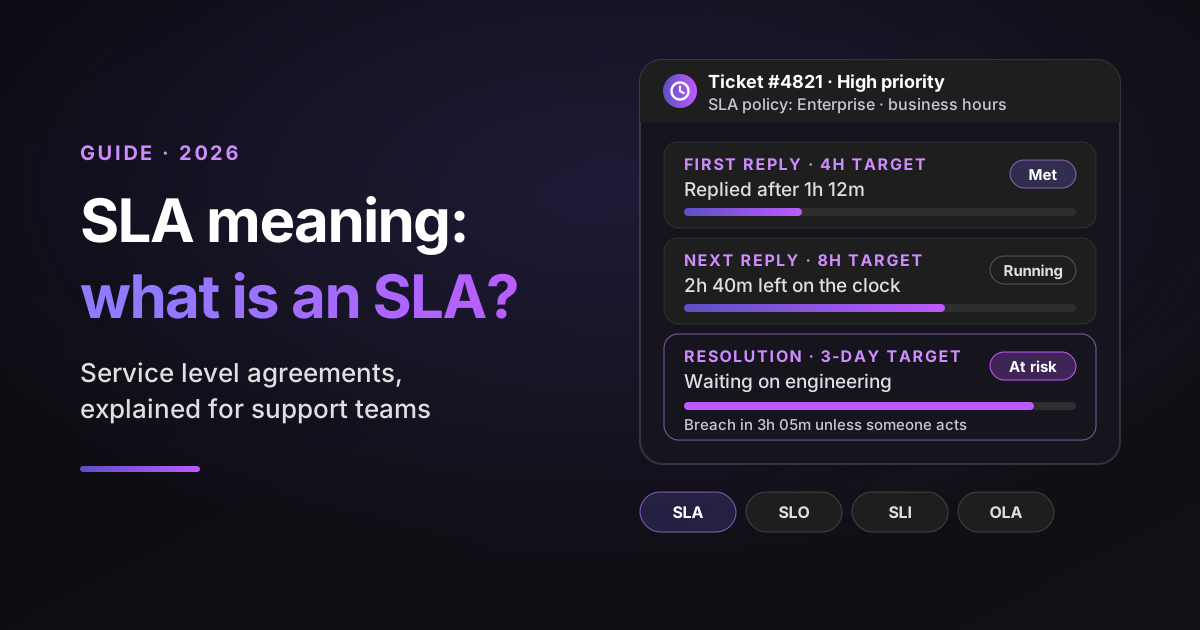
An SLA clock starts when a ticket matches an SLA policy, runs only during the hours the policy uses, pauses in the statuses you allow, and stops at the event it measures, such as the first public reply or the ticket being solved. Priority decides which target applies.
Follow one illustrative High priority ticket through a week:
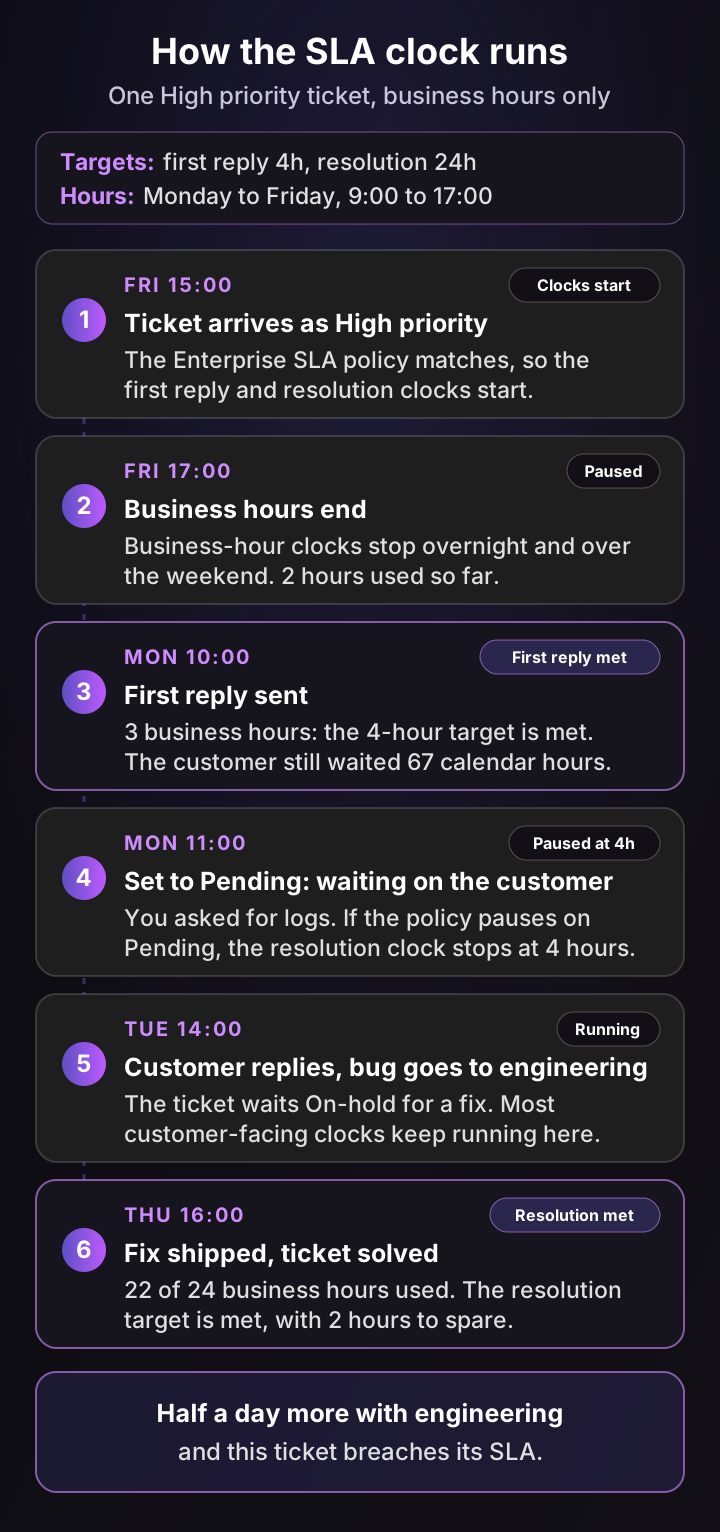
An illustrative composite ticket, not a single customer's data.
Four lessons come out of that week:
- Business hours change the meaning of "4 hours". The first reply met its target after 3 business hours, yet the customer waited 67 calendar hours. If your customers work weekends, a business-hours SLA can be technically met and still feel broken.
- Priority picks the clock. A ticket wrongly set to Normal gets Normal's targets, and nobody notices until it breaches. Accurate triage is an SLA control, not admin work (how intelligent triage sets priority).
- Pausing is a policy choice. Stopping the clock while you wait on the customer is fair. Stopping it while you wait on your own engineering team hides the real delay.
- A response is not a resolution. GitHub's support terms put it plainly: "A response does not mean the issue has been resolved." Pair every response target with a resolution or update target.
What goes into an SLA: the 10 parts of a service level agreement
A complete SLA covers the parties and services, the metrics and how they're measured, both sides' responsibilities, exclusions, remedies, reporting, reviews and termination. TechTarget, IBM and NIST list close variations of the same parts.
| Part | What it says | Support example |
|---|---|---|
| 1. Overview and parties | Who the agreement is between and how long it runs | Acme SaaS and Customer Ltd, for the 12-month contract term |
| 2. Services covered | Which services and channels are in scope | Email and in-app chat support for the Acme platform |
| 3. Metrics and targets | What is measured and the number promised | First reply within 1 business hour for Urgent tickets |
| 4. Measurement method | Hours, calendars, pauses and the data source | Business hours 8:00 to 18:00 CET, measured in the help desk |
| 5. Responsibilities | What each side must do | The customer sets priority honestly and sends logs on request |
| 6. Exclusions | What doesn't count | Outages caused by the customer's own systems, scheduled maintenance |
| 7. Remedies | What happens on a breach | 5% service credit if monthly compliance drops below 95% |
| 8. Reporting | How results are shared | A monthly SLA report sent by the 5th business day |
| 9. Review and change | When and how targets change | Reviewed every 12 months, or after a plan change |
| 10. Termination | Exit rights tied to repeated breaches | The customer may exit after 3 missed months in a row |
Two parts deserve extra care. Exclusions decide what can never count against you, so name them precisely. Responsibilities protect you from tickets that can't move because a customer hasn't sent what you asked for.
On review cadence, TechTarget notes that most companies revise their SLAs annually or twice a year, while Atlassian recommends reviewing your SLA goals every quarter. I'd do both: review internal targets quarterly and contract terms once a year.
Types of SLAs: customer-based, service-based and multi-level
There are three main types of SLAs. A customer-based SLA covers everything one customer receives, a service-based SLA gives every customer the same terms for one service, and a multi-level SLA layers both into a hierarchy. Atlassian, IBM and Wikipedia use the same three.
| Type | Scope | Typical metric and clock | Typical remedy | Best fit |
|---|---|---|---|---|
| Customer-based | All services for one customer | Negotiated per contract, often 24/7 for Urgent issues | Credits written into that contract | Enterprise accounts that negotiate their own terms |
| Service-based | One service, same terms for everyone | Uptime per month, or response time per priority | Standard credit tiers | Cloud uptime, or one support policy for all plans |
| Multi-level | Corporate, customer and service levels combined | A baseline for all, tighter targets per plan or service | Credits on the higher levels only | B2B SaaS companies with several plans |
TechTarget uses a slightly different split: customer, internal and multilevel. The internal SLA is an agreement between teams in the same company. ITIL has a specific name for it, the OLA, which the next section covers.
Which type fits you? If you sell one plan, a service-based SLA keeps things simple. If you sell several plans, a multi-level SLA usually fits best: a baseline response target for everyone, tighter targets for higher plans, and customer-based terms only for the few accounts that negotiate them.
SLA vs SLO vs SLI vs OLA vs KPI: what's the difference?
An SLI is what you measure, an SLO is the target you aim for, and an SLA is the promise you make to customers with a consequence attached. An OLA is the agreement between internal teams that makes the SLA possible. A KPI is any metric you track to judge performance, whether or not anyone was promised it.
The Google SRE book defines the first three precisely. An SLI is a carefully defined quantitative measure of some part of the service.
An SLO is a target value or range for that measure. An SLA is the contract around them.
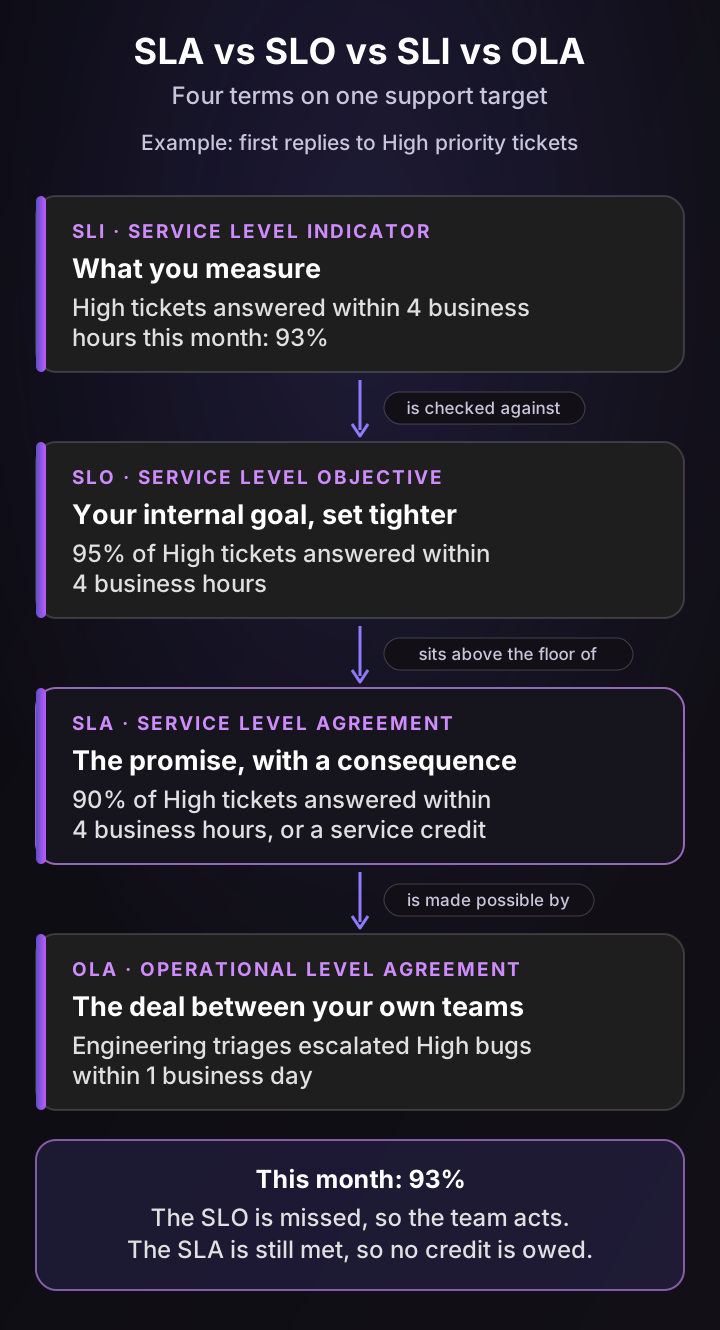
| Term | Stands for | Who it's between | Metric | Clock | Remedy | Support example |
|---|---|---|---|---|---|---|
| SLI | Service level indicator | Nobody: it's a measurement | The measured value | Whatever you measure | None | 93% of High tickets got a first reply in 4 business hours |
| SLO | Service level objective | Your team and itself | A target for an SLI | Set tighter than the SLA | Internal action | Aim for 95% |
| SLA | Service level agreement | You and your customer | One or more SLOs, made public | As written in the contract | Credits or exit rights | Promise 90%, or a 5% credit |
| OLA | Operational level agreement | You and another internal team | Handoff targets | Usually business hours | Internal escalation | Engineering triages escalated High bugs in 1 business day |
| KPI | Key performance indicator | Nobody, unless you promise it | Any performance measure | Any period | None by default | CSAT, cost per ticket |
Two practices make this hierarchy work:
- Keep a safety margin. Google's SRE team advises setting the internal SLO tighter than the external SLA, so you get a warning before you owe anything. Their example is a 99.95% internal objective behind a 99.9% SLA.
- Back the SLA with OLAs. The ITIL glossary defines an OLA as an agreement between an IT service provider and another part of the same organization. A contract with an outside supplier, such as your cloud host, is an underpinning contract, and it has to support the SLA too.
In B2B SaaS support, the OLA that matters most is the one with engineering. If bug fixes have no agreed turnaround, every resolution SLA you sign rests on goodwill. For the full list of support KPIs and how to measure them, see my guide to customer service metrics.
SLA metrics: what support and IT teams measure
In practice, the SLA meaning for a support team comes down to timers: how fast the first reply arrives, how often the customer hears back and how long resolution takes. IT and cloud SLAs mostly measure availability, written as an uptime percentage. Either way, you report how often you met the target.
Zendesk's SLA metric definitions are the most detailed of the major help desks, and the same ideas appear under other names elsewhere. Here's what each one measures and when its clock pauses:
| Metric | What it measures | When the clock pauses |
|---|---|---|
| First reply time | Ticket creation to the first public agent reply; a trigger's public autoreply can also count | Never, apart from business hours |
| Next reply time | The oldest unanswered customer message to the next public agent reply | Never, apart from business hours |
| Periodic update | Time between public agent replies, resetting after each one | Never, apart from business hours |
| Pausable update | The same as periodic update | While the ticket is Pending (waiting on the customer) |
| Requester wait time | Total time in New, Open and On-hold: how long the customer waits on you | Pending |
| Agent work time | Total time in New and Open: how long your team actively owns it | On-hold and Pending |
| Total resolution time | Creation to Solved | Never, including time in Pending |
| Uptime (IT and cloud) | Share of the period the service is available | Excluded maintenance windows, as the contract defines |
Zendesk recommends picking only one resolution metric. For a B2B SaaS team, requester wait time is usually the honest choice: it pauses while you wait on the customer, but keeps counting while a ticket sits On-hold waiting on your engineering team.
The SLA compliance rate is the share of tickets that met every SLA target in a period:
SLA compliance rate = tickets that met all their SLA targets ÷ tickets that had an SLA target × 100
So if 1,860 of 2,000 tickets with a target met it last month, your compliance rate is 93%. Report it per priority, because a 98% overall rate can hide a 70% rate on Urgent tickets.
How much downtime does 99.9% uptime allow?
A 99.9% uptime SLA allows about 43 minutes and 48 seconds of downtime in an average month, or about 8 hours and 46 minutes in a year. Each extra nine cuts the allowance by a factor of ten.
| Uptime | Per day | Per week | Per month | Per year |
|---|---|---|---|---|
| 99% | 14m 24s | 1h 40m 48s | 7h 18m | 3d 15h 36m |
| 99.5% | 7m 12s | 50m 24s | 3h 39m | 1d 19h 48m |
| 99.9% | 1m 26s | 10m 5s | 43m 48s | 8h 45m 36s |
| 99.95% | 43s | 5m 2s | 21m 54s | 4h 22m 48s |
| 99.99% | 8.6s | 1m | 4m 23s | 52m 34s |
| 99.999% | 0.86s | 6s | 26s | 5m 15s |
Calculated on a 365-day year and an average month of 30.42 days (365 ÷ 12).
Read the definitions before you trust the math. Microsoft's guide to reading SLAs notes that each SLA defines downtime its own way, and AWS measures S3 by error rates in 5-minute intervals, not by minutes of outage. The table tells you the budget; the contract tells you what spends it.
Run your own numbers
Pick an uptime target to see the downtime it allows, or switch to support tickets to see how many breaches your compliance target leaves room for.
SLA calculator: uptime and support targets
Allowed downtime = time in the period × (100% − uptime %). Uses a 365-day year and an average month of 30.42 days (365 ÷ 12). Real SLAs often measure monthly, exclude scheduled maintenance and define what counts as down, so check your contract's wording.
Allowed downtime a day
1m 26s
At 99.9% uptime
Allowed downtime a week
10m 5s
At 99.9% uptime
Allowed downtime a month
43m 48s
At 99.9% uptime
Allowed downtime a year
8h 45m 36s
At 99.9% uptime
At 99.9%, a service can be down for 43m 48s in an average month and still meet its SLA. Each extra nine cuts that allowance by ten, so a promise one nine higher than your history supports turns routine incidents into breaches.
SLA examples: 5 real service level agreements, compared
The clearest SLA examples come from cloud providers, which publish uptime commitments with credit tiers, and from software vendors, which publish support response targets by priority. Here are five, on the four yardsticks, as checked on November 5, 2026.
| SLA | Metric | Clock | Remedy | Scope |
|---|---|---|---|---|
| AWS EC2 | Monthly uptime | 99.99% for instances across several zones in a region; 99.5% for a single instance | Credits of 10%, 30% or 100% as uptime falls below 99.99%, 99% and 95% | EC2 compute, with listed exclusions |
| AWS S3 | Error rate in 5-minute intervals | 99.9% for S3 Standard | Credits of 10%, 25% or 100% below 99.9%, 99% and 95% | Per storage class; lower tiers commit to 99% |
| Google Cloud Compute Engine | Monthly uptime | 99.99% for instances in several zones; 99.9% for most single instances | Credits of 10%, 25% or 100%, which Google calls the "sole and exclusive remedy" | Premium Tier network |
| GitHub Premium Support | Initial response time | Urgent 30 minutes, High 4 hours, Normal 24 to 48 hours, Low 48 hours | No credit listed on the current page | Starts when GitHub sets the ticket's priority |
| Atlassian Support | Initial response time | Cloud Enterprise: 30 minutes for "application down", up to 24 hours for low impact | Not listed on the page | Varies by plan; Standard runs on business hours |
A few patterns stand out:
- Credits are small and slow. They apply to future bills and you usually have to claim them. Microsoft's guide adds that credits don't cover lost revenue, churn or reputational damage.
- Single-instance promises are weaker. Both AWS and Google promise more for redundant setups than for one machine, because the customer's architecture is part of the outcome.
- Support SLAs promise responses, not fixes. Neither GitHub nor Atlassian promises a resolution time, and GitHub's clock starts only once it has set the priority.
A support SLA template for a B2B SaaS team
If you're writing your first support SLA, here's a starting point. These are my assumptions for a team selling to businesses, not benchmarks, so adjust them to your own medians.
| Priority | Plain-language definition | First reply | Update while open | Resolution target | Hours |
|---|---|---|---|---|---|
| Urgent | Product down or data at risk for many users | 1 hour | Every 2 hours | Workaround within 1 business day | 24/7 for top plans, business hours otherwise |
| High | A core feature broken with no workaround | 4 business hours | Every business day | 3 business days | Business hours |
| Normal | A problem with a workaround, or a how-to question | 1 business day | Every 2 business days | 5 business days | Business hours |
| Low | Feedback, feature requests, cosmetic issues | 2 business days | Weekly | Best effort | Business hours |
How to set SLA targets your team can actually hit
Set SLA targets from your own data, not from a competitor's website. Measure what you deliver today, set the internal objective at a level you hit most of the time, promise customers something slightly looser, and alert before a breach rather than after.
Here's the process I'd follow:
- Pull 90 days of data. For each priority, find the median and the 90th percentile for first reply and resolution time. The median shows normal; the 90th percentile shows your bad days.
- Define at most four priorities in plain words. Write one sentence and two example tickets for each, like the template above. Vague priorities produce random clocks.
- Choose the hours for each plan. Decide between business hours and 24/7, then load holiday calendars for every region you serve. Forgotten holidays quietly corrupt months of SLA reports.
- Set the internal objective first. Put it slightly above your current median, so the team can hit it on a normal day. An SLA everyone breaches teaches people to ignore the timer.
- Promise customers a looser number. Keep a safety margin between your internal objective and the contract, as Google's SRE team recommends.
- Decide what pauses the clock. Pausing while you wait on the customer is fair, and Atlassian recommends it. Waiting on your own engineering team should keep counting.
- Agree an OLA with engineering. Set a triage time for escalated bugs by priority, and a channel for updates. Without it, your resolution targets depend on luck.
- Alert before the breach. Flag tickets with a few business hours left, not after the timer turns red. My Zendesk automation guide has a pre-breach escalation rule you can copy.
- Pair speed with quality. HubSpot warns that automated auto-responders shouldn't count toward a response SLA. Score the replies themselves, not just their timestamps.
- Review quarterly. Tighten targets you beat every month and fix the causes behind the ones you miss.
How help desks track SLAs: 6 platforms compared
Every major help desk can enforce support SLAs, but they differ in which metrics they track, what pauses the clock, how a policy is matched to a ticket and which plans include it. Here they are on the four yardsticks, from each vendor's documentation as checked on November 5, 2026.
| Help desk | Feature | Metric | Clock | Remedy (breach actions) | Scope (how a ticket gets its SLA) |
|---|---|---|---|---|---|
| Zendesk | SLA policies | 7 metrics, from first reply to total resolution time | Business or calendar hours per priority; pauses built into each metric | Automations on "hours until next SLA breach"; no breach triggers | Ordered policies, first match wins; targets per system priority |
| Intercom | SLAs, applied in workflows | First reply, next reply, time to close, time to resolve | Office hours; optional pause when snoozed or waiting on the customer | Workflow triggers before or at breach | A workflow applies one SLA per conversation; priority isn't used directly |
| Freshdesk | SLA policies | First response, every response, resolution | Business or calendar hours; timer can be off for chosen statuses | Reminders before breach, escalations after | Ordered policies, first match wins; targets per priority |
| Salesforce Service Cloud | Entitlements and milestones, or SLA policies | Milestones you define, such as first response or resolution | Business hours, or 24/7 if none are set | Warning and violation actions, such as an email alert before expiry | Entitlements on the case, milestones filtered by criteria such as priority |
| HubSpot Service Hub | SLA goals | Time to first reply, next reply and close | 24/7 or a working schedule; pauses on conditions you set | Workflows on SLA status, such as email or Slack alerts | Ordered rules, first match wins, with a fallback rule |
| Jira Service Management | SLAs with goals and calendars | Any stopwatch you define with start, pause and stop conditions | A calendar per goal | Automation trigger when an SLA breaches or is about to | JQL goals checked top to bottom, grouped by priority |
Plans, as listed on the vendors' pricing pages and help centers: Zendesk includes SLA policies from Suite Professional ($115 per agent a month, billed annually), not on Team plans. Intercom lists SLAs only on Expert ($132 per seat a month). Freshdesk's multiple policies, reminders and escalations start on Pro ($55 per agent a month, billed annually). HubSpot needs Service Hub Professional or Enterprise. Salesforce and Jira Service Management vary by edition, so check your plan's feature list.
What the table hides, and what bites teams in practice:
- Priority is a switch in Zendesk. Its targets always follow the system Priority field, and if priority is blank, no SLA applies even when every condition matches. Zendesk accounts created since March 2025 start with a default first reply SLA and a trigger that sets missing priorities to Normal.
- Order matters. Zendesk, Freshdesk and HubSpot all apply the first policy that matches, so put your strictest policies at the top.
- Some rules are set once. HubSpot fixes the SLA rule when it's applied, so a later priority change doesn't re-evaluate it. Jira Service Management, by contrast, adjusts the remaining time when priority changes.
- Breach alerts need setup. Zendesk's docs say you can't build triggers on SLA breach status; you use time-based automations instead, which run about once an hour. Intercom's breach triggers are part of its Expert plan.
If you run Zendesk, my Zendesk best practices guide has the SLA policy, the "SLA at risk" view and the pre-breach automation as copy-ready plays.
Common SLA mistakes, in practitioners' own words
Most SLA failures aren't about slow agents. They come from how the SLA is designed: targets that reward the wrong behavior, clocks that pause in the wrong place, calendars nobody updates and no agreement with the team that owns the fix.
Here's what support, IT and operations people say about SLAs in their own words. Each card is one person's experience, not a benchmark.
“Before the SLA we were a cheerful and overworked IT team, doing our best to handle all tickets within reasonable times and with our best quality responses. Afterwards - We started negotiating priorities, replying "investigating" within 24 hours to make sure management doesn't get on our case”
“Response SLA of 2 hours? Please attach sosreport is ALWAYS the first reply. Even if you attached it in the original ticket (which we always do).”
“I've seen with my own eyes team metrics improvement (SLAs etc) by just counting the time the ticket was "in progress" to the ops team instead of waiting for the developer (or customer, whether internal or external) to reply.”
“...have a decent "to engineering" escalation path for the support folks. Unfortunately, the support function is almost always a cost center and beholden to only, if anything, response time related SLAs. Instead of customer satisfaction, etc.”
“We have a fair number of clients, and manually updating Holiday's consistently (and accurately) is not something I see people doing particularly well at the start of each year. It's kind of one of those things you end up catching around September, and realize all of your metrics for the last few quarters have been off.”
The lessons repeat across these accounts:
- Timers change behavior. When only the first reply is measured, teams send fast replies that don't answer anything. Measure next reply and resolution too, and score reply quality.
- Paused clocks hide delays. Counting only the time a ticket sits "in progress" makes metrics look better without making customers wait less.
- Engineering is part of every resolution SLA. Support is often judged on response times alone, while the fix depends on a team that has no agreed turnaround.
- Calendars drift. Holiday and business-hour schedules need an owner, or months of reports end up wrong.
How Pluno helps your team hit its SLAs inside your help desk
Pluno is an AI layer for help desks. It runs inside Zendesk, Intercom, Salesforce Service Cloud, HubSpot, Jira Service Management and Freshdesk, so your SLA policies, reports and workflows stay where they are, and it adds AI across the workflows that move each SLA clock.
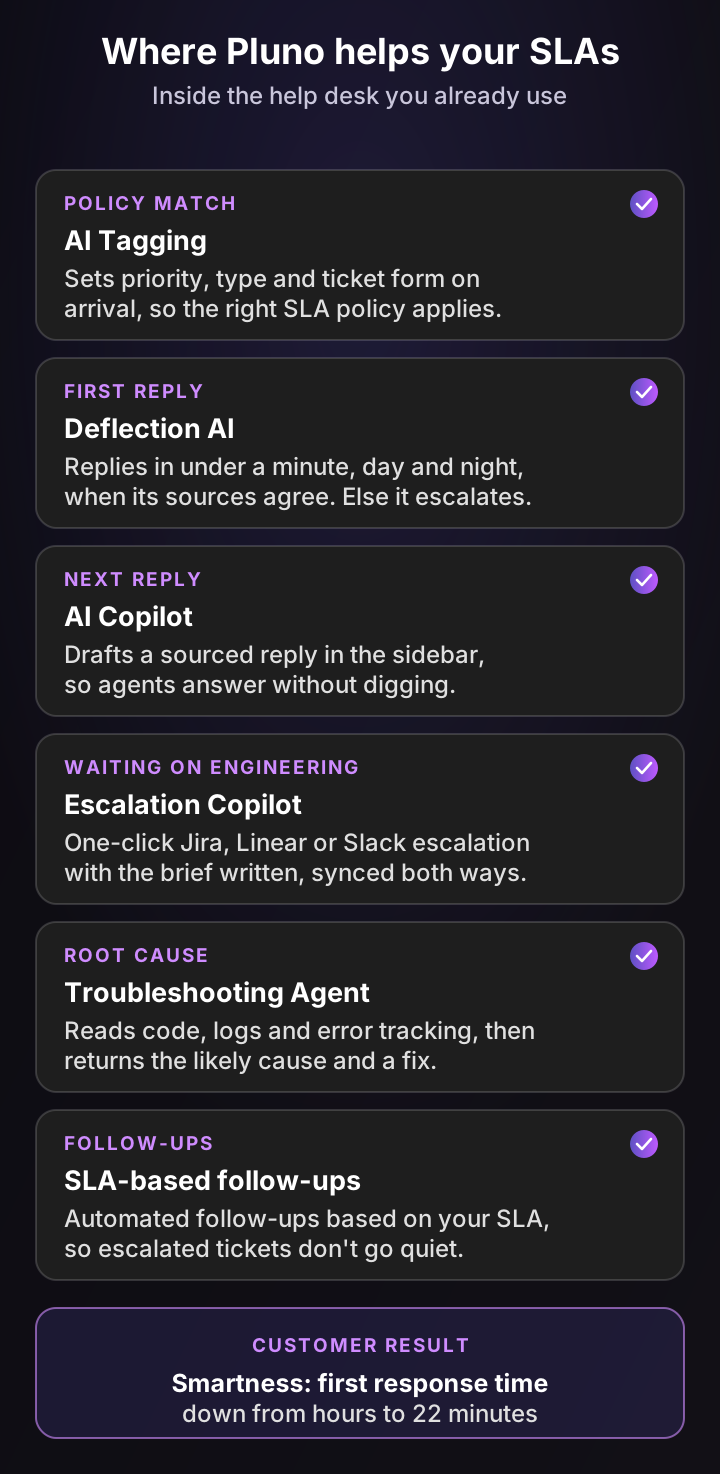
Here's how each module maps to the SLA metrics from this guide:
| SLA metric | Pluno module | What it does | Customer result |
|---|---|---|---|
| Correct target from the start | AI Tagging | Sets priority, type, tags and fields on arrival, and in Zendesk picks the ticket form, so the right SLA policy applies | Fewer tickets running on the wrong clock |
| First reply time | Deflection AI | Replies in under a minute, around the clock, when its sources agree; otherwise escalates with a research summary | Smartness: first response from hours to 22 minutes |
| Next reply and handle time | AI Copilot | Drafts a sourced reply in the help desk sidebar from past tickets, docs and connected tools | Velotric: research time from about 20 minutes to under 5 |
| Resolution while waiting on engineering | Escalation Copilot | Files the Jira, Linear, Slack, Microsoft Teams or incident.io escalation with the brief written and syncs updates back | Kojo: 3x faster engineering response |
| Resolution of technical tickets | Troubleshooting Agent | Investigates code, logs and error tracking through read-only integrations and returns the likely cause and a fix | Fewer tickets parked on engineering |
| Reply quality behind the timer | Quality Assurance | Scores every human agent's resolved tickets against your own criteria, with no sampling | Fast replies that also answer |
First replies that answer, not just acknowledge
A first reply that only says "we're looking into it" stops the timer and helps nobody, which is exactly the gaming the practitioners above describe. Deflection AI works differently. It runs several rounds of searches across past tickets, the help center, docs, Slack threads and connected APIs, and replies only when those sources agree.
When the evidence is thin, it hands the ticket to your team with a research summary, ticket references and next steps. Your agent's first reply then starts from the research, not from a blank screen. Deflection AI also sets automated follow-ups based on your SLA, so nothing falls through.
Shorter waits on engineering
Resolution SLAs on technical tickets usually break while the ticket waits for engineering. Escalation Copilot files the escalation in one click with the brief already written, then syncs engineering's updates back to the ticket as internal notes. With hybrid mode, Pluno can relay those updates to the customer and set follow-up reminders.
The Troubleshooting Agent goes one step earlier. It reads your code, logs and error tracking, then returns the evidence, the likely root cause and a recommended fix in the help desk sidebar or Slack. It opens a pull request only after you approve.
What teams report
- Smartness cut its first response time from hours to 22 minutes, with 40%+ real ticket deflection, after switching from Fin by Intercom (full story).
- Innovorder has Pluno resolve 67% of its chat tickets, with replies in under a minute and CSAT up 15 points (full story).
- Kojo, with a five-person team, reports 3x faster engineering response with automated escalation context and same-day Jira escalations (full story).
Pricing starts with a base fee that scales with ticket volume, from €249 a month for up to 500 tickets (€210 billed annually). Deflection AI is €0.90 per resolved ticket, AI Copilot is €49 per seat a month and Quality Assurance is €35 per agent a month; the full list is on the pricing page.
The bottom line
The SLA meaning is simple: a measurable promise about service, with a consequence if you miss it. The hard part is the fine print, because the metric, the clock, the remedy and the scope decide whether the promise is fair to your customers and possible for your team.
For a B2B SaaS support team, the approach that works is to measure your current medians, set a tighter internal objective, promise a looser SLA, agree an OLA with engineering, and alert before breaches. Measure first reply, updates and resolution together, so nobody games a single timer.
If your misses come from slow first replies or tickets stuck with engineering, Pluno is the option I'd test first. It works inside the help desk you already use, answers in under a minute when its sources agree, and hands engineering a complete escalation when the fix needs code.
FAQ
What is the SLA meaning in simple terms?
An SLA is a promise from a service provider to a customer about how good, fast or available a service will be, written so it can be measured. It also says what the customer gets if the provider misses the promise, often a partial refund called a service credit.
What does SLA mean in business?
In business, SLA means service level agreement: the part of a contract that sets measurable service targets, such as 99.9% uptime or a 4-hour response time, plus remedies for missing them. Companies use SLAs with customers, with suppliers and, as OLAs, between their own teams.
What does SLA stand for in customer service?
In customer service, the SLA meaning is service level agreement, and it usually refers to response and resolution time targets per ticket priority. Help desks such as Zendesk, Freshdesk and Jira Service Management enforce them with SLA policies that put a countdown on every ticket.
What is an example of an SLA?
A cloud example: AWS commits to 99.99% monthly uptime for EC2 instances spread across several zones, with service credits of 10%, 30% or 100% as uptime falls lower. A support example: GitHub Premium Support promises a first response within 30 minutes on Urgent tickets and 4 hours on High ones.
What are the 3 types of SLA?
The three types of SLA are customer-based (all services for one customer), service-based (one service with the same terms for every customer) and multi-level (corporate, customer and service levels layered together). Some sources list internal SLAs as a type; ITIL calls those OLAs.
What does a 99.9% SLA mean?
A 99.9% SLA means the service must be available 99.9% of the measured period. That allows about 43 minutes and 48 seconds of downtime in an average month, or about 8 hours and 46 minutes a year, depending on how the agreement defines downtime and exclusions.
What happens if an SLA is breached?
When an SLA is breached, the customer gets whatever remedy the agreement sets, usually a service credit on a future bill, which they often have to claim. Repeated breaches can give the customer the right to end the contract. Internally, a breach should trigger a review of what caused it.
Is an SLA legally binding?
An SLA is legally binding when it's part of a signed contract or terms of service, and its remedies are then enforceable as written. Internal SLAs, OLAs and help desk SLA policies aren't contracts, so their "consequences" are management decisions, not legal ones. Ask a lawyer about your specific agreement.
What is a good SLA for customer support response time?
A good support SLA is one your team already hits on a normal day, with a margin. Many software vendors promise 30 minutes to 1 hour for outages on their top plans and 1 business day for normal issues. Base yours on your own medians per priority, not on another company's numbers.
What is the difference between an SLA and a KPI?
An SLA is a promise to a customer with a consequence if it's missed. A KPI is a metric you track to judge performance, with no promise attached. First reply time can be both: a KPI you watch every week and, for one priority, an SLA target you've committed to.
What is SLA in ITIL?
In ITIL, an SLA is an agreement between an IT service provider and a customer that describes the service and the expected service levels. ITIL pairs it with the OLA, an agreement with another part of the same organization, and the underpinning contract, an agreement with an outside supplier.
How do you calculate SLA compliance?
Divide the number of tickets that met all their SLA targets by the number of tickets that had an SLA target in the period, then multiply by 100. If 1,860 of 2,000 tickets met their targets, your SLA compliance rate is 93%. Track it separately for each priority.