Most guides to the Zendesk chatbot describe a product that no longer works the way they say it does.
Zendesk repackaged and renamed the whole thing in May 2026, then changed how it bills automation a week later. So the articles telling you to open Flow Builder point at something Zendesk has already marked legacy. The per-resolution prices quoted online describe a system that stopped applying on 18 May.
There is also a deadline. The legacy bot builder loses development support on 31 August 2026 and stops working on 10 December 2026. If your team built a bot before this year, you'll need to schedule a manual rebuild, because Zendesk's automated migration tool hasn't shipped yet.
This guide is for someone who already pays for Zendesk and is working out what to do about automation. Every figure below links to Zendesk's own documentation, with the date it changed, so you can check it yourself. By the end you should be able to forecast your automation cost before you talk to a salesperson, tell whether the native agent will handle your ticket mix, and know whether your existing bot is on the December list.
TL;DR
-
The name changed. Zendesk's chatbot is an AI agent. The bot builder became the dialogue builder, answers became dialogues, and intents became use cases.
-
The plan split went away. At Relate 2026 on 11 May, Zendesk folded its agentic capabilities into the base plans and deprecated AI agents – Essential the same day. Dialogues, use cases and generative procedures now run on every Suite plan and on Support Team, Professional and Enterprise.
-
Billing moved to resolution tiers on 18 May 2026. Every AI conversation lands in one of three tiers, and only verified resolutions draw from your allowance. Verification runs after a 72-hour window with no customer follow-up.
-
Your allowance is a dollar figure. Zendesk grants a currency pool per seat per month instead of a resolution count: $2 on Suite Team, $5 on Growth and Professional, $10 on Enterprise and Enterprise Plus. It does not carry over, and it caps at $5,000 a year.
-
Legacy bots have a shutoff date. Development ends 31 August 2026 and the functionality stops working on 10 December 2026.
-
Three routes, officially. Zendesk documents native AI agents, a custom build on Sunshine Conversations Web Messenger, and third-party agents from the Marketplace.
Pricing varies by region, billing term, usage and plan packaging, so treat every figure below as the starting point for your own quote.
What is a Zendesk chatbot?
A Zendesk chatbot is what Zendesk now calls an AI agent: an AI-powered assistant that handles customer conversations on messaging, email and voice channels inside your Zendesk account. Zendesk's documentation describes AI agents as chatbots that "interact with your customers on messaging, email... and voice" channels.
The confusing part is the vocabulary. Four names have described roughly the same product over the past few years, and search results still mix all four. One of them is current.
| What you may have read | What Zendesk calls it in 2026 | Status |
|---|---|---|
| Chatbot | AI agent | Current |
| Answer Bot | AI agent | Retired name |
| Bot builder, Flow Builder | Dialogue builder | Legacy, stops working 10 Dec 2026 |
| Answers | Dialogues | Current |
| Intents | Use cases | Current |
| AI agents – Essential, AI agents – Advanced | AI agents | Split removed 11 May 2026 |
| Zero-training AI agents | AI agents | Deprecated 11 May 2026 |
AI agents come with your subscription on all Zendesk Suite plans, covering Team, Growth, Professional, Enterprise and Enterprise Plus. On Support-only plans they run on Team, Professional and Enterprise. You never buy the chatbot as a separate product, and the pricing section explains what you do pay for.
What changed for Zendesk chatbots in 2026
Three things changed in May 2026. Zendesk reworked the AI agent builder, removed the plan tiers that gated its advanced capabilities, and replaced per-resolution counting with a tiered model. If you are running a bot built before May 2026, you will be rebuilding it this year.
The builder was reworked and the plan split disappeared
Zendesk announced the new AI agents experience at Relate 2026 on 11 May, framing it as simpler packaging that extends its most advanced agentic capabilities across every Suite and Support plan. The rollout ran from 11 May to 12 June 2026.
For anyone comparing plans, one consequence matters most. The dialogue builder, use cases and generative procedures now run on all Suite plans and on Support Team, Professional and Enterprise. Most guides still describe an Essential tier that lacks scripted dialogues and API actions, and that distinction is gone. Zendesk's June release notes say the capabilities were expanded to all customers, "removing plan distinctions."
Relate 2026 also showed where the product is heading. Zendesk made Knowledge Connectors generally available, bringing Notion, SharePoint and Google Drive content into AI agents with PDF ingestion, and launched a Resolution Learning Loop. Agent Builder, Action Flows and an MCP Client went into early access, with Action Flows and an MCP Server due in summer 2026. Plan around the early access items as early access.
Billing moved to resolution tiers on 18 May 2026
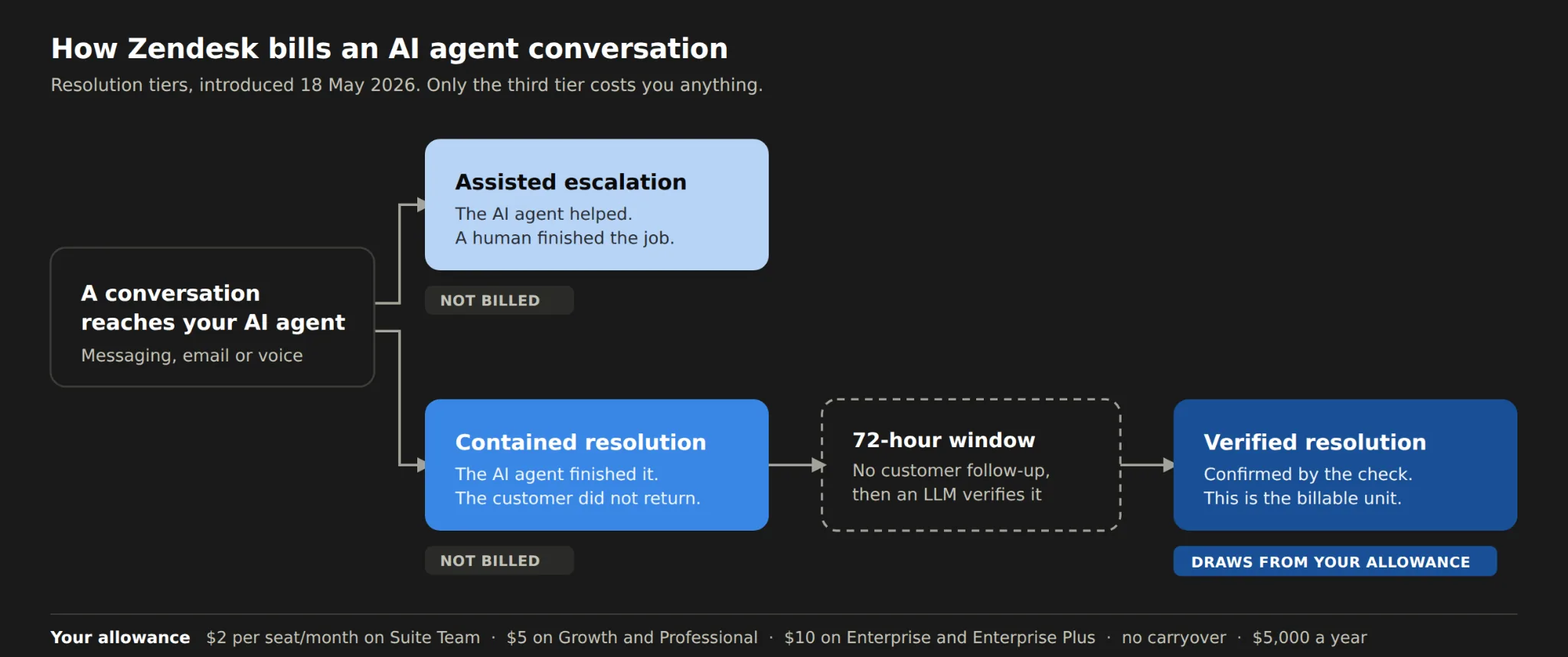
Zendesk's help centre now refers to the previous system as "the automated resolution platform in place prior to May 18, 2026," which is the clearest signal that figures circulating elsewhere are out of date.
Under the new tiers, every AI conversation lands in one of three buckets.
Assisted escalation. The AI agent contributed by collecting information or routing the ticket, and a human finished the job. This does not count against your allowance.
Contained resolution. The AI agent handled the conversation to completion and the customer did not come back. Zendesk's reporting update says billing applies only to verified resolutions, and that "Contained resolutions do not consume automated resolutions."
Verified resolution. After a 72-hour window with no customer follow-up, a large language model runs a verification check. Resolutions that pass are the ones that draw from your allowance.
Zendesk added Resolution type, Resolution tier and Channel group as standard ticket fields in June 2026, so you can see the tiers in your reporting before they reach your bill. One caveat applies to any vendor comparison you run, because each tool defines resolutions, outcomes and conversations differently, so unit prices across them are not directly comparable.
Your legacy bot is switched off in December 2026
The bot builder moved to legacy status on 2 February 2025, and Zendesk's documentation is unambiguous about what happens next: "On December 10, 2026, this functionality will no longer be available."
Two dates matter between now and then. Technical development on the legacy AI agent features stops on 31 August 2026, with critical bug fixes only after that. The functionality is removed in December 2026.
Rebuilding is manual work. Zendesk promised an automated migration tool later in 2026 and it has not arrived. From the middle of August 2026, that leaves about two weeks until the development freeze and under four months until the shutoff. If nobody on your team has checked which builder your bot came from, start there.
Your three Zendesk chatbot options
Zendesk documents three ways to put a chatbot on your account: its native AI agents, a custom bot built on Sunshine Conversations Web Messenger, or a third-party AI agent from the Zendesk Marketplace. Each suits a different kind of team, so it helps to look at all three on the same questions.
Option 1: Zendesk's native AI agents
Native AI agents are built into your subscription with no extra licence to buy. They are included on every Suite plan and on Support Team, Professional and Enterprise, and you pay for the automation through your resolution allowance.
They work well on questions your help centre already answers, on guided flows for common issues, and now on tasks needing an API call or a CRM update mid-conversation. They run out of road on the ticket whose answer was never written down anywhere, or one where the diagnosis depends on live system state.
Option 2: A custom bot on Sunshine Conversations Web Messenger
Sunshine Conversations is Zendesk's do-it-yourself route, and it requires a separate licence. Most guides skip that detail, and it changes the economics.
The appeal is control, since you design and embed a highly customisable asynchronous chatbot on your own properties. The cost is that this is engineering work, so it suits teams with developers to maintain it.
Option 3: A third-party chatbot from the Marketplace
Third-party agents install from the Zendesk Marketplace or the Sunshine Conversations Marketplace, each with its own setup process. Teams take this route when the native agent covers part of their volume and they need a different capability for the rest.
Quality varies enormously, so one criterion matters more than any feature list. Check whether the tool works inside Zendesk or beside it. Teams that pick an AI product competing with their helpdesk often end up maintaining knowledge in a second system, with reporting split across two platforms. That cost outlives the evaluation that chose the tool.
Which option fits which team
| Native AI agents | Sunshine Conversations | Third-party from Marketplace | |
|---|---|---|---|
| Extra licence | No | Yes | Vendor subscription |
| Setup effort | Configuration in Admin Center | Engineering build | Install and connect |
| Where knowledge lives | In Zendesk | Your design | Depends on the vendor |
| Best fit for | Volume your help centre answers | Fully custom experiences | Capability gaps the native agent leaves |
| Watch out for | Answers nobody documented | Build and maintenance cost | A second system to maintain |
How the Zendesk AI chatbot works
A Zendesk AI chatbot answers by searching your connected knowledge, following either a scripted dialogue or a generative procedure, and escalating to a human when it cannot resolve the request. Those three moving parts tell you in advance which of your tickets it will handle.
Where it looks for answers
The AI agent starts with your Zendesk Guide help centre, then draws on whatever external content you connect. Zendesk supports a web crawler and an API call for indexing external websites, plus Knowledge Connectors for platforms like Notion, SharePoint and Google Drive.
Two documented constraints shape how far this goes. You can connect up to 50 external content sources, and external content requires Knowledge Professional or Enterprise alongside Support. Plenty of articles claim Zendesk's chatbot can only read your help centre, and that stopped being accurate some time ago.
Dialogues and generative procedures
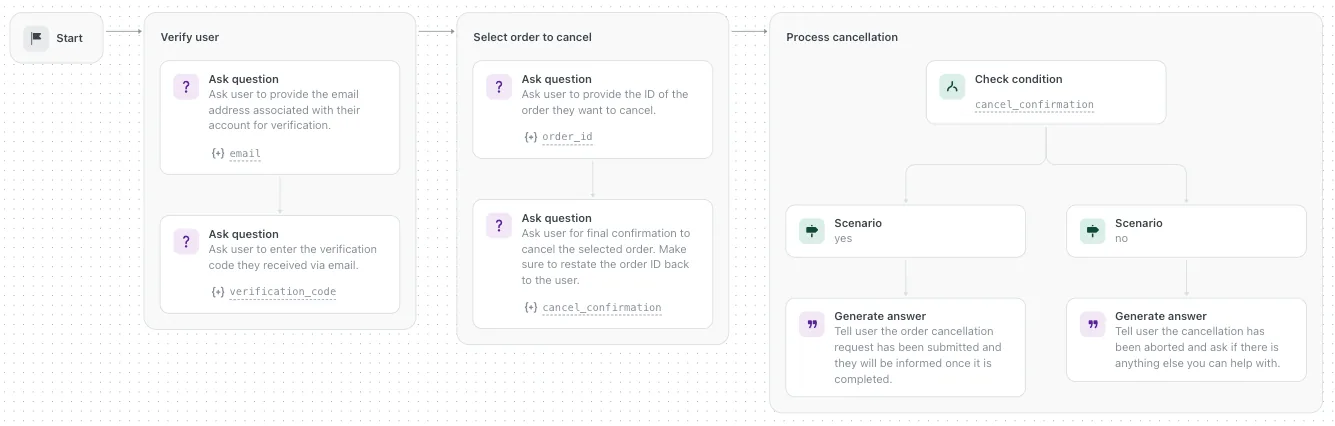
Dialogues are the scripted route. You build the conversation path yourself in the dialogue builder, step by step, and the agent follows it.
Generative procedures work differently. You describe a business policy in plain language, and Zendesk automatically generates a procedure map showing the logic the agent will follow. When a customer goes off the expected path, the agent reasons its way to whichever part of the procedure fits what the customer said. One procedure written in a single language serves every language the agent supports.
Taking action in other systems
Generative procedures support 11 block types. The ones a buyer should know are Generate answer, Ask question, Collect parameter, Check condition, Run integration for an API call, Perform action for a CRM operation, Search for knowledge, Answer with knowledge, Link to, Run template and Escalate to.
That list settles a claim you will find in several comparison posts. The native agent can call an API and act on a CRM record in the middle of a conversation, so any article saying it only suggests help centre articles is describing the old Answer Bot.
Escalation, and the one-channel rule
When the agent cannot resolve a request, it escalates to a human. One structural constraint survived the May rebuild and it affects how much work you sign up for, because "each AI agent can interact on only one type of channel." Email, messaging and voice each need their own agent, built and maintained separately.
Agent Copilot often gets confused with this product. It assists your human agents while they work a ticket, and our Zendesk AI Copilot setup guide covers it properly.
How to set up a Zendesk chatbot, step by step
To set up a Zendesk chatbot, connect your knowledge sources, create an AI agent in Admin Center, build its dialogues or generative procedures, set escalation rules, then test and publish it to a channel.
Before you start
Confirm your plan covers what you need. AI agents run on all Suite plans and on Support Team, Professional and Enterprise, while external knowledge sources need Knowledge Professional or Enterprise.
Decide your channel first, because one agent serves one channel type. Then audit your help centre, since that audit predicts your results more reliably than any configuration choice you make later.
The steps
-
Connect your knowledge. Start with your Zendesk Guide help centre, then add external sources if your answers live elsewhere. Do this before you build anything, because answer quality is capped by what the agent can ingest.
-
Create the AI agent and assign its channel. One agent, one channel type. If you want the chatbot on email and messaging, plan for two.
-
Give it an identity. Name, avatar and tone. Teams skip this and then wonder why the experience feels generic to customers.
-
Build the behaviour. Use dialogues for paths that should always run the same way, and generative procedures for policies needing judgement inside a set of rules.
-
Set escalation and routing rules. Decide which tickets reach the agent at all, and what happens when it cannot resolve one. Getting this wrong is the fastest route to a bad customer experience.
-
Test, publish, then watch usage. Your resolution data lives at Admin Center, then Account, then Usage, then Resolutions.
Zendesk's step-by-step articles for AI agents are blocked to automated readers, so check each step against your own Admin Center as you go. Interface labels move between releases, and the order above is what matters.
What to do if your help centre is thin
An AI agent can only answer from what it can ingest, so your automation rate tracks documentation coverage more closely than most teams expect.
A practical sequence beats a rewrite. Pull your top 20 ticket subjects from the last quarter, check how many have a current article, write the gaps, then turn the agent on. Our guide to building an automation system on Zendesk goes deeper on sequencing this.
One category resists the exercise. Some answers were never documented because they only ever existed as a diagnosis an agent worked through in a ticket thread, with the reasoning in the replies and nothing in the help centre. Those tickets decide whether documentation-led automation is enough for your team, and the section on limits picks that up.
How much does a Zendesk chatbot cost?
A Zendesk chatbot has no separate subscription. You pay for Zendesk seats, and the automation is billed against a monthly resolution allowance that scales with your plan and seat count.
What you pay for seats
| Plan | Public price, billed annually |
|---|---|
| Support Team | $19 per agent/month |
| Suite Team | $55 per agent/month |
| Suite Professional | $115 per agent/month |
| Suite Enterprise | "Talk to Sales", no public price |
| Copilot add-on | $50 per agent/month |
Zendesk publishes those rates on its public pricing page, and monthly billing runs higher than the annual figures shown. Several pricing analyses quote Suite Growth at $89 and Suite Enterprise at $169. Neither figure appears on Zendesk's public page, so treat both as third-party estimates and confirm them in your own quote.
How the automation is billed
Your allowance is a dollar amount per seat per month, and this is where most published figures go wrong. Zendesk stopped counting resolutions per agent and started granting a currency pool.
| Plan | Suite allowance | Support allowance |
|---|---|---|
| Team | $2 per seat/month | $2 per seat/month |
| Growth | $5 per seat/month | Not applicable |
| Professional | $5 per seat/month | $2 per seat/month |
| Enterprise | $10 per seat/month | $2 per seat/month |
| Enterprise Plus | $10 per seat/month | Not applicable |
Three details change how you plan against this. Unused allowance does not carry over month to month. There is a $5,000 annual cap across all plans. Light agents are excluded from the seat calculation.
Zendesk does not publish a per-resolution price, which makes the arithmetic harder than it looks. Pricing analyses report roughly $1.50 per resolution on a commitment and $2.00 pay-as-you-go, and those are reported third-party figures. Zendesk's public seat-pricing page carries neither, so ask for your rate in writing before you model anything.
Worked example. A 20-seat Suite Professional account gets $100 of allowance a month at $5 per seat. Whether that covers your volume depends on how many of your conversations reach verified resolution, which is the one number nobody can estimate for you from the outside. Run it against a month of your own ticket history before you commit.
Controlling overage
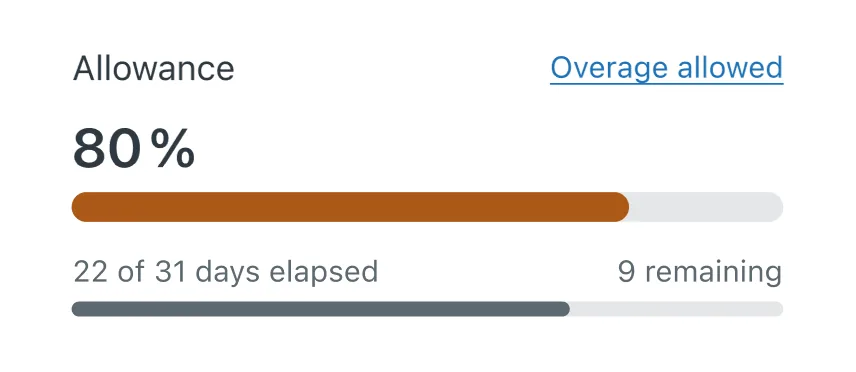
You have two settings. Allow Overage is the default, and your account is charged for pay-as-you-go resolutions once the allowance runs out, billed monthly, whatever your subscription term. Don't Allow Overage pauses AI agent functionality at the limit, protecting the budget and stopping the automation.
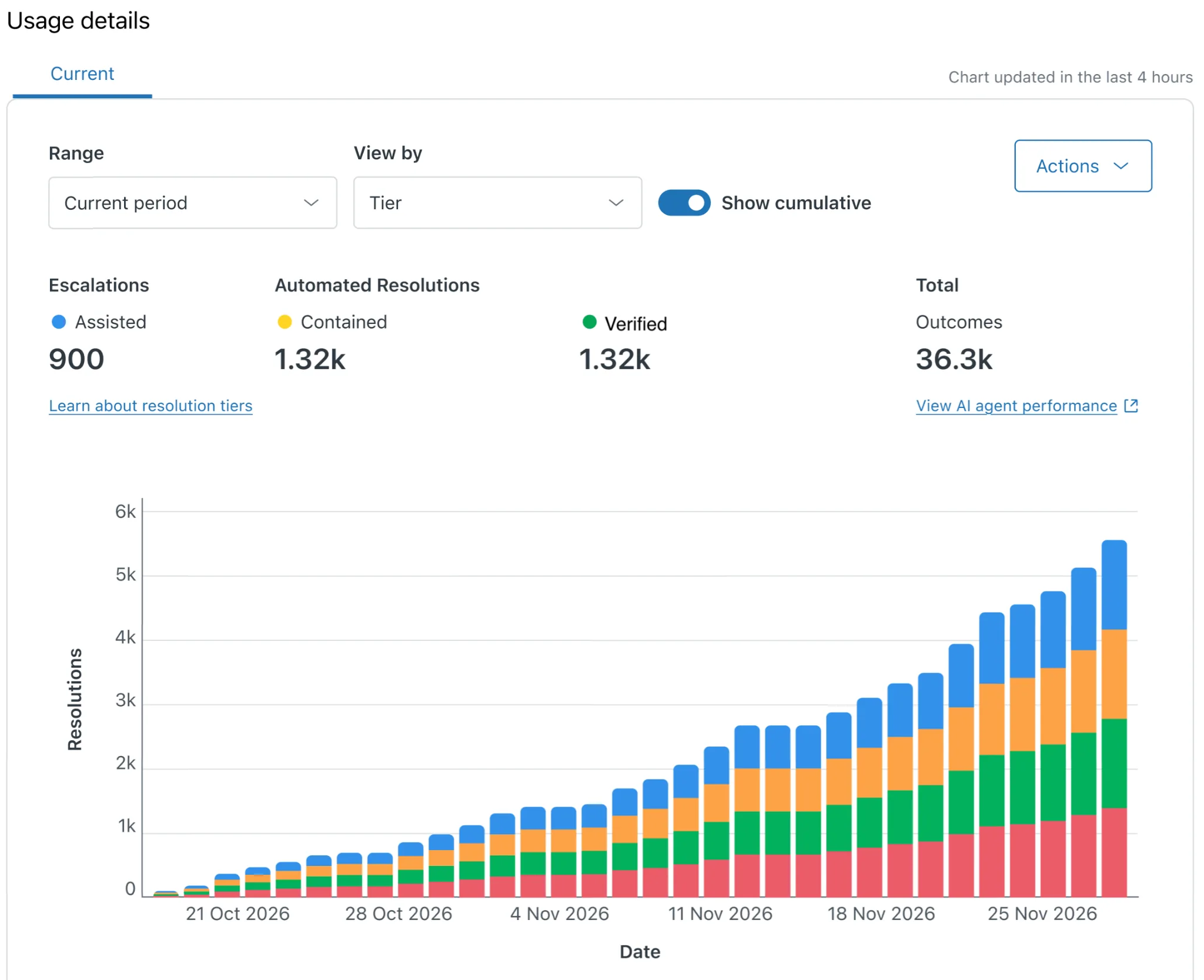
Zendesk warns you at 80% usage with an in-product message and an email. The usage dashboard filters by resolution tier and brand, and exports to CSV with cost data.
For every Zendesk AI cost including Copilot and the add-ons, see our full Zendesk AI cost breakdown.
What happened to Zendesk Answer Bot?
Zendesk Answer Bot no longer exists as a product name. It became part of Zendesk's AI agents, and the bot builder behind it moved to legacy status and stops working on 10 December 2026.
The lineage runs like this. Answer Bot suggested help centre articles to customers. It grew into the bot builder and Flow Builder, where teams built conversation paths by hand. Both are now the dialogue builder inside AI agents, with the full renaming in the table above.
If you are running anything built in the old builder, four steps get you ready.
- Check what you have. Find out whether your live bot came from the legacy bot builder or the current dialogue builder. Plenty of admins inherit one and assume the other.

-
Put the dates in your calendar. Development freeze on 31 August 2026, shutoff on 10 December 2026.
-
Plan a manual rebuild. The automated migration tool Zendesk promised for later in 2026 has not arrived, so budget the hours.
-
Use the rebuild as a review. You are rebuilding either way, which makes this the cheapest moment to compare the Answer Bot alternatives against what you already have.
Where the native Zendesk chatbot falls short
The native Zendesk AI agent handles documented, repeatable questions well. It gets harder to use when the answer depends on account state, on a diagnosis that only exists in an old ticket thread, or on data sitting in an engineering system.
Depth of knowledge. Zendesk connects plenty of external sources, including Notion, SharePoint, Google Drive, web crawlers and the Federated Search API, so the constraint is not how many systems it reaches. Documented sources answer documented questions well. When resolving a ticket requires the diagnostic path an experienced agent worked through, that path usually lives in resolved support tickets and issue trackers, where a knowledge-led agent has less to work with.
External knowledge is capped and plan-gated. The documented limit is 50 external content sources, and external content requires Knowledge Professional or Enterprise. For a team whose answers are spread across many systems, both constraints arrive sooner than expected.
One agent per channel type. Covering email, messaging and voice means building and maintaining three agents. The work scales with your channel count, not your ticket volume.
The unit price is not published. Because Zendesk publishes no per-resolution figure, the only public numbers are third-party estimates, and you cannot build a budget on an estimate you can't verify.
Two things belong here for fairness. Zendesk's acquisition of Forethought has closed, strengthening Zendesk's AI capability today. And the Resolution Learning Loop announced at Relate 2026 targets the ticket-memory gap, though Zendesk has not published how it ingests that data. For a wider view of what else fits, our Zendesk AI alternatives piece compares the field.
Native AI agent, or a third-party AI layer?
Stay with Zendesk's native AI agent when most of your volume is answerable from documented content. Look at a third-party AI layer when resolving a typical ticket means diagnosing something, and the diagnosis lives in resolved support tickets instead of an article.
When the native AI agent is the right answer
Six situations make the native agent the sensible call.
-
Most of your volume is how-to and configuration questions with documented answers.
-
Your help centre is current and covers what customers ask.
-
Your support is transactional, covering order status, account changes and basic troubleshooting.
-
Your monthly volume is low enough that a second subscription cannot pay for itself.
-
You have little ticket history for anything to learn from.
-
You want one vendor, one bill and one place to configure things. That is a legitimate preference, and it saves coordination overhead.
The signal that you have outgrown it
One test tells you where you stand. Take your last 50 escalated tickets and count how many were resolved using information that exists in a written article.
If most of them were, your constraint is documentation coverage, and fixing the help center will do more for your automation rate than changing tools. If few of them were, no amount of documentation work will close the gap, because the knowledge only exists as work your agents already did.
What an AI layer inside Zendesk changes
That second case is the problem Pluno is built for. Pluno is an AI support agent for complex technical tickets that works inside Zendesk and Intercom, and it ingests your resolved support tickets, which is what lets it handle issues your help center never documented. B2B SaaS teams hit this constantly, because the product changes faster than anyone can write it up.
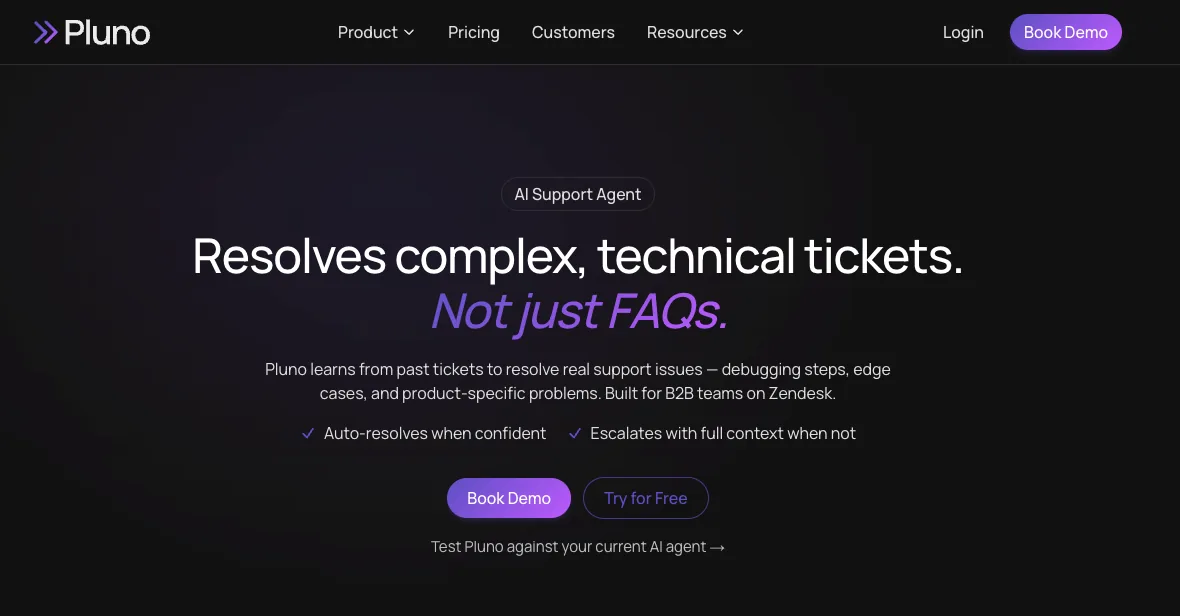
For autonomous chat and email resolution, the relevant module is Deflection AI (module name pending Syed's sign-off before it becomes a link). It works on Zendesk email, the web widget, WhatsApp, social, and Zendesk Messaging, and it ingests resolved support tickets, your help center, uploaded files, and custom API integrations. On the build side, you don't need to manually build decision trees for every path, because the diagnostic sequences come from tickets your team already resolved.
Escalation behavior is worth understanding before you evaluate anything in this category. When confidence is low, Pluno escalates with a research summary, the relevant ticket references, and suggested next steps, instead of pushing out an answer it cannot support. An AI agent that forces resolutions to protect its own numbers costs you more in customer trust than it saves in agent hours.
Pluno charges €0.90 per resolution (roughly $1 for US readers), billed only when a ticket is fully closed, and AI Copilot is €49 per agent per month. The base fee is custom, based on your average ticket volume. Both Zendesk and Pluno bill on outcomes, so the useful question is what counts as a billable outcome and whether the unit price is published.
Pluno's limitations are worth stating plainly. It needs a body of resolved support tickets to ingest, so a team with a short support history gets less from it than a team with years of Zendesk data. Deflection AI on Intercom is handled case by case per company, so don't assume autonomous deflection there. And a team whose tickets are simple will pay for depth it does not need.
For a closer side-by-side look, we wrote up Zendesk AI compared with Pluno.
Frequently asked questions
Does Zendesk have a chatbot? Yes. Zendesk calls it an AI agent, and it is included on all Suite plans and on Support Team, Professional and Enterprise. There is no separate chatbot subscription. You pay for the automation through a monthly resolution allowance tied to your plan and seat count.
How much does a Zendesk chatbot cost? There is no standalone chatbot price. Seats start at $19 per agent per month on Support Team and $55 on Suite Team billed annually, and automation draws on a dollar allowance of $2 to $10 per seat per month depending on your plan. Zendesk does not publish a per-resolution price, so ask for yours in writing.
What replaced Zendesk Answer Bot? Zendesk AI agents replaced it. The bot builder behind Answer Bot moved to legacy status in February 2025 and stops working on 10 December 2026. Bots built in the old builder have to be rebuilt in the dialogue builder by hand, because Zendesk's automated migration tool has not shipped.
Can you use a third-party chatbot with Zendesk? Yes. Zendesk documents third-party bots through the Zendesk Marketplace and the Sunshine Conversations Marketplace, and each vendor has its own setup process. Before you pick one, check whether it works inside Zendesk or requires you to maintain knowledge and reporting in a second system.
How long does it take to set up a chatbot in Zendesk? Creating and publishing a basic AI agent is a same-day task in Admin Center. Your results depend on knowledge preparation, which takes longer. Teams rebuilding a legacy bot should plan for manual work, because no migration tool is available yet.
The bottom line
Zendesk's native AI agent is the right chatbot for most teams whose customers ask documented questions, and the December 2026 shutoff means almost every Zendesk team with an existing bot has a rebuild to plan this year.
-
Check today which builder your live bot came from. Development stops 31 August 2026 and the functionality stops 10 December 2026.
-
Run the 50-ticket test before you evaluate any tool. Count how many of your last 50 escalations were resolved from a written article, and let that number pick your direction.
-
Get your per-resolution rate in writing. Zendesk does not publish one, and the estimates circulating publicly describe a model it retired in May 2026.
-
Set your overage preference deliberately. Allow Overage is the default and bills monthly whatever your contract term.
-
Fix the help centre first if documentation is the gap. Change the knowledge model instead if your answers live in tickets.
Pricing and packaging in this category move quickly, so verify every figure here against the vendor's live page before you build a business case on it.
When your tickets need troubleshooting
Pluno is an AI support agent for complex technical tickets that works inside Zendesk and Intercom. It ingests your resolved support tickets, so it can diagnose the account-specific and product-specific issues that were never written up as articles, and it escalates with full context when it should not answer.