Most lists of Zendesk best practices tell you to switch on a few automations and write more macros. That holds until your product outgrows it, which in B2B SaaS happens early.
You know the pattern. Ticket volume climbs, headcount stays flat, and this quarter's tickets are harder than last year's. Product ships weekly, the help center trails by a month, and the real answer to half your tickets sits in a thread an agent wrote in March.
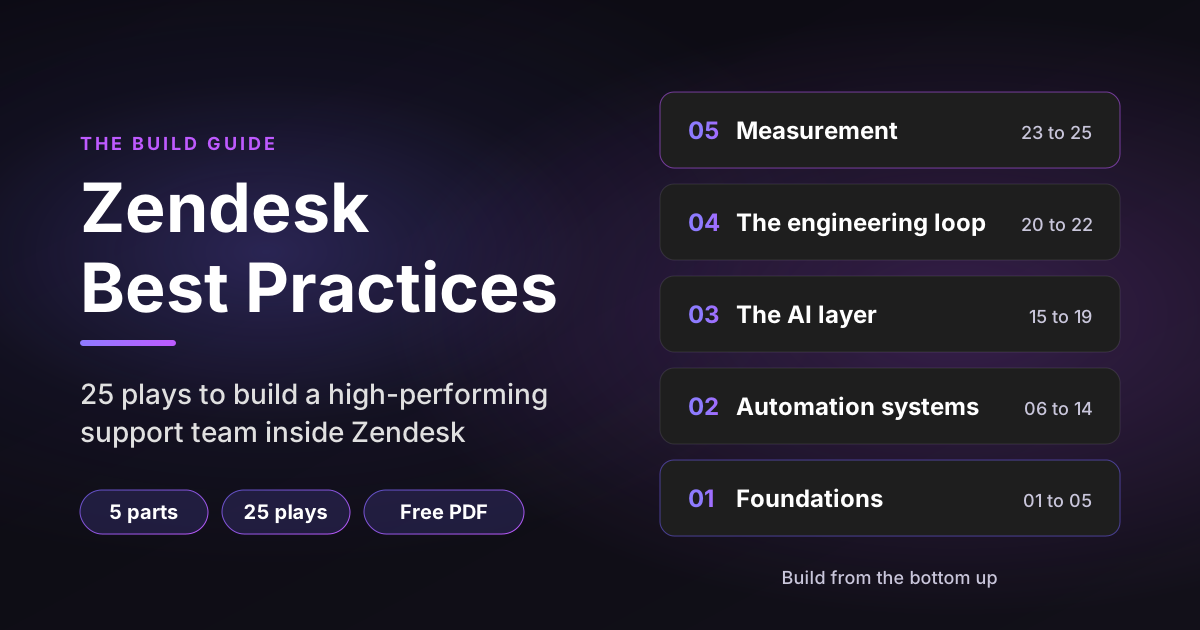
Zendesk can handle all of that. Most teams just use a fraction of it and build that fraction in the wrong order. So we wrote Zendesk High Performers, a free build guide with 25 plays, each with the exact conditions, actions or setup steps. This post walks through all 25 and shows the most useful ones in full.
Sources: every Zendesk limit, plan requirement and date below comes from Zendesk's own documentation and links to it, checked on November 3, 2026. Plan gating and interface labels change, so check each screen against your own Admin Center.
Disclosure: I work at Pluno, which sells an AI layer that works inside Zendesk. Plays 17 to 22 name it where it fits.
TL;DR
- Build in order: foundations, then automation, then AI, then the engineering loop, then measurement. Each layer reads from the one below it.
- Foundations first: groups named after the work, a four-field taxonomy, four views, one SLA policy per customer tier and one form per request type.
- Automation: a trigger fires on an event, an automation runs on the clock. Give every automation an off switch, usually a tag.
- AI layer: audit what it would have to answer before you buy anything, then test native Zendesk AI and a dedicated layer on your own hardest tickets.
- Measurement: track automated resolution rate, CSAT, first reply time and cost per ticket against your own 90-day median.
- Free guide: all 25 plays with copy-ready conditions and actions are in the Zendesk High Performers PDF.
Zendesk best practices start with build order
The order matters more than any single play. Views, SLA policies and triggers all filter on your groups and fields, so if you rename a group later, you break all three at once.
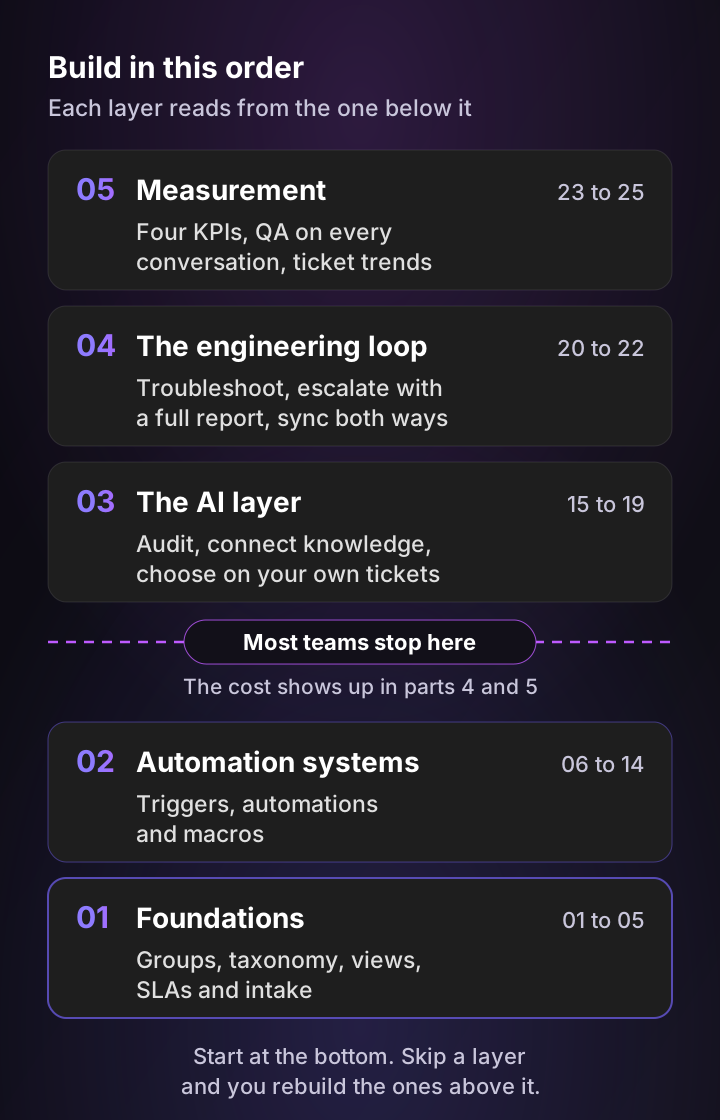
Most teams stop after Part 2. They have triggers and macros, and the cost only shows up later. AI answers inherit a messy taxonomy, escalations reach engineering without a reproduction path, and nobody can say whether support got better this year.
If your groups, taxonomy, views, SLAs and intake forms are already in good shape, start at Part 2.
Part 1: Foundations that every rule reads from
These are the least exciting Zendesk best practices, and they decide whether the rest works.
| Play | What it does |
|---|---|
| 01 Build groups around your escalation path | One group per real handoff, such as Tier 1, Tier 2, Billing and Engineering Escalations. |
| 02 Build a tag and field taxonomy | Four drop-down fields cover almost every B2B SaaS ticket: product area, severity, environment and customer tier. |
| 03 Build the four views your team will open | My open tickets, SLA at risk, Stalled and Unassigned in my group. |
| 04 Tie SLA policies to priority and plan | One policy per customer tier, with targets per priority. |
| 05 Standardize intake with forms and a schedule | One form per request type, plus business hours so business-hour SLAs are honest. |
Play 3 in full: the four views
Views are the queue. A slow or cluttered view is why agents end up working out of their inbox instead. Build these four under Admin Center, then Workspaces, then Agent tools, then Views:
| View | Conditions | Sort by |
|---|---|---|
| My open tickets | Assignee is (current user), Status is Open | Next SLA breach |
| SLA at risk | Hours until next SLA breach (business) less than 4 | Next SLA breach |
| Stalled | Status is Pending, Hours since pending greater than 48 | Oldest first |
| Unassigned in my group | Group is (my group), Assignee is (-) | Oldest first |
Filter on tags and fields. Zendesk's view performance guidance warns against NOT conditions, null checks and text matching, which slow views down.
Avoid: shipping thirty views. Agents see up to 100 shared views and 10 personal ones, so a long list buries the four that matter.
One tip from play 4 worth stealing
Set SLA targets from your own numbers. Measure your current median first, then set the target slightly above it. An SLA everyone breaches teaches the team to ignore the timer. And since a ticket gets only one SLA policy, put the most restrictive policy at the top of the list. (On Enterprise, a ticket can also carry one group SLA on top of it.)
Part 2: Zendesk automation best practices
Part 2 has nine copy-ready recipes on Zendesk's native rule engine. They all rest on one distinction that breaks more workflows than anything else.
| Tool | When it fires | What it does |
|---|---|---|
| Trigger | Instantly, when a ticket is created or updated | Assign, notify, tag, set priority |
| Automation | Roughly once an hour, based on elapsed time | Follow-ups, escalation, auto-close |
| Macro | When an agent clicks it | A multi-step reply and actions |
| View | Continuously | Filters and orders the queue |
| SLA | Continuously, against the target clock | Tracks targets and flags breach risk |
A trigger fires the moment something happens. An automation runs on the clock and only sees the state an event left behind, never the event itself. That's why half the plays below use the same pattern: a trigger writes a tag the instant something happens, and an automation reads that tag on its next run. Zendesk explains the difference in its guide to triggers and automations.
Every automation also needs an off switch: an action that stops the ticket matching, or a tag the rule checks for. Without one, it fires every hour until something else stops it.
Plays 7 and 8 in full: remind, then auto-solve
These two work as a pair. Play 7 nudges a quiet customer once. Play 8 only solves tickets where that nudge went out.
Play 7: remind a customer before you give up on them
- Conditions: Status is Pending. Hours since pending (calendar) greater than 48. Tags contains none of
reminder_sent. - Actions: Email requester with a short "do you still need help?" note. Add tag
reminder_sent. - Also add a trigger: when Status changes to Open, remove
reminder_sent, so a customer who replies once still gets a fresh nudge later.
Play 8: auto-solve only once the reminder has gone out
- Conditions: Status is Pending. Hours since pending (calendar) greater than 120. Tags contains
reminder_sent. - Actions: Status Solved. Add tag
auto_solved.
The auto_solved tag tells you how much of your solve rate is real resolution and how much is silence. Report on it monthly.
Play 9 in full: escalate before the SLA breaches
- Conditions: Hours until next SLA breach (business) less than 2. Priority less than Urgent.
- Actions: Priority Urgent. Notify the group that owns the queue.
Notify the group, never one agent. People take holidays, and an alert addressed to one person goes nowhere on the day it matters. Start with Urgent and High only, because a warning that fires forty times a day teaches the team to mute the channel.
The rest of Part 2
| Play | What it does |
|---|---|
| 06 Auto-close solved tickets after 96 hours | Keeps the open queue honest. Check Zendesk's default auto-close automation first so you don't build a second one. |
| 10 Flag tickets that are quietly aging | Surfaces open tickets nobody has touched in 24 hours. |
| 11 Tag on arrival, chase if nobody picks it up | Sorts the ticket instantly, then alerts the group if it sits unassigned. Our Zendesk auto-tagging guide goes deeper. |
| 12 Set priority from customer tier | Stops priority being a judgment call at 5pm on a Friday. |
| 13 Send the CSAT survey a day after you solve | Reaches customers after they've lived with the fix, and skips auto-solved tickets. |
| 14 Keep macros, and keep them for humans | Top 10 repeated replies with the ticket actions attached. More in our Zendesk macros guide. |
Where native rules stop
Zendesk's rule engine handles routing, timing and queue hygiene well. Resolving a ticket is a different job. A screenshot, a log file or a paragraph in the customer's own words sits outside what a condition can evaluate. So does knowing whether this is the same bug as last week. That work still lands on a person, which is where Part 3 starts.
Part 3: Add an AI layer on your own tickets
Zendesk best practices for AI start before you switch anything on. Part 3 has two plays of groundwork, one decision and two systems you build after it. Start with what you already get from Zendesk.
What native Zendesk AI covers in 2026
Zendesk removed the split between Essential and Advanced AI agents this year, so agentic reasoning, multi-step procedures and external API integrations are now included across Suite and Support plans. AI agents are still billed per automated resolution, now through a resolution allowance. Intelligent triage classifies intent, sentiment and language on Professional and above, and using those predictions inside workflows needs the Copilot add-on.
One date matters most. Legacy AI agents, including the old bot builder, answers, intents and article autoreplies, entered maintenance mode on August 31, 2026, and Zendesk says they will be removed no later than June 2027. If you still run the legacy bot builder, migration comes first.
Play 15 in full: audit what your AI layer would have to answer
Before you buy or configure anything, find out how much of your volume your documentation can answer.
- Export last quarter's tickets and cluster them by topic.
- Take the top 20 clusters and mark each one Documented, Needs a lookup or Undocumented.
- Count the tickets behind each mark, then weigh them by handling time.
| Mark | Share of tickets | Share of handling time |
|---|---|---|
| Documented | 46% | 22% |
| Needs a lookup | 30% | 26% |
| Undocumented | 24% | 52% |
Illustrative shape, not a benchmark. The Undocumented column decides everything that follows. Those answers exist only as a diagnosis an agent worked out inside a ticket thread, so a help center bot can't reach them.
Avoid: clustering on subject lines alone. Two words of form boilerplate will merge three unrelated problems into one cluster.
Play 17: choose on your own tickets, not on a demo
The choice comes down to one question: where do your answers live?
- In published documentation: stay with native Zendesk AI. One vendor, one bill.
- In a diagnosis someone worked out: look at a dedicated AI layer such as Pluno, which learns from your resolved support tickets and connected engineering context.
Both options look strong on documented questions. The difference only shows on the tickets in your Undocumented column. So take 50 of your hardest resolved tickets from last quarter, run both, and strip the vendor names before your team scores the answers. A logo moves the scores more than the answers do.
The rest of Part 3
| Play | What it does |
|---|---|
| 16 Connect your knowledge before you switch anything on | Fills the gaps you found in play 15. Answer quality is capped by what the AI can read. |
| 18 Put a reviewed draft in front of every agent | Pluno AI Copilot has a draft waiting when an agent opens a ticket, built from how your team solved that problem before. |
| 19 Scope autonomous resolution, then make the handoff safe | Pluno Deflection AI starts on a narrow scope set by Zendesk triggers, resolves what it's confident about and escalates the rest with an internal note. |
Part 4: Close the engineering loop
In B2B SaaS, a large share of hard tickets end with engineering. Part 4 makes that handoff fast and complete.
| Play | What it does |
|---|---|
| 20 Troubleshoot before you escalate | Confirms a real bug before it costs an engineer an hour. Pluno's Troubleshooting Agent investigates code, logs, session recordings and Sentry through read-only connectors. |
| 21 Escalate with a complete report | Turns a confirmed bug into a full issue with reproduction steps, impact and customer context. See Pluno Escalation Copilot. |
| 22 Sync Zendesk and the engineering tracker both ways | Engineering updates land on the ticket as internal notes, so nobody watches a Jira board. Our Zendesk Slack integration guide covers the Slack side. |
One tip from play 22: agree which moments earn a customer update. Most teams settle on two, when the bug is confirmed and when the fix ships. The sync gives you the update, but a person still owns the message.
Part 5: Measure four numbers and score every conversation
Play 23 in full: four KPIs and nothing else
| KPI | Where to find it | Baseline |
|---|---|---|
| Automated resolution rate | Admin Center, Account, Usage | Your 90-day median |
| CSAT | Survey sent 24 hours after solve | Your 90-day median |
| First reply time | Median, business hours | Your 90-day median |
| Cost per ticket | Fully loaded, monthly | Your 90-day median |
Of all the Zendesk best practices here, this one is the easiest to skip and the hardest to fake later. Record each baseline before you change anything, then re-measure monthly on the same window. Work out cost per ticket fully loaded: salaries, tooling and the AI bill, divided by tickets handled. A figure that counts only software makes every automation look free.
Plays 24 and 25
- Play 24, score every conversation: manual QA reviews about 5% of conversations. Automated scoring covers all of them, AI and human, against the same plain-language criteria. Pluno's QA module shows the reasoning behind each score, and our Zendesk QA guide compares the options.
- Play 25, feed ticket trends back into docs and product: cluster last month's tickets, take the top three risers, and give each one an owner and a date. Anything above 5% of tickets is a candidate for its own automation.
What Zendesk admins say about their setup
Admins in the Zendesk Community describe the same problems again and again: triggers that loop, groups created only to control views, and SLA reports nobody trusts.
“Because sometimes the scariest thing in your Zendesk instance isn't a broken trigger. It's two perfectly functioning triggers that won't stop talking to each other.”
“Even if you get it to work, it’s a huge pain to debug if anything goes awry, so it’s usually simpler and safer to avoid it, and just create duplicate triggers with one minor condition added for filtering.”
“Creating extra groups only to control view visibility is not a good workaround. It duplicates our structure, complicates routing and administration, and still does not match how we already organize work: by skill.”
“This then throws off our SLA reports and requires a lot of manual effort to try to work out which were false sla breaches and which were legitimate breaches.”
“Over the past year, we had made several updates to our product, such as renaming certain pages and reports. We had done our best to update the help center articles to reflect all of the changes, but it turns out we missed one.”
None of them is fighting one broken rule. They're dealing with years of small workarounds piling up, and that's exactly what an AI layer ends up reading if you skip Part 1.
Get the full Zendesk High Performers guide
This post shows a few plays in full. The guide turns these Zendesk best practices into 25 plays you can build one by one, each with the same four parts:
- What it does: one line, so you can skip what you already have.
- Build it: the exact conditions, actions or setup steps.
- Pro tip: the day-one setting that makes it work right away.
- Avoid: the specific mistake that causes rework.
It's a 37-page PDF written for support managers at B2B SaaS companies, built and verified against Zendesk's documentation in August 2026.
FAQ
What are Zendesk best practices?
Zendesk best practices are the setup choices that keep a help desk fast as volume grows: groups built around your escalation path, a fixed tag and field taxonomy, a few focused views, SLA policies per customer tier, and triggers and automations with clear off switches. The order you build them in matters as much as the choices.
What is the difference between a trigger and an automation in Zendesk?
A trigger fires instantly when a ticket is created or updated. An automation runs on a schedule, roughly once an hour, and acts on elapsed time, such as hours since a ticket went pending. Many good workflows combine both: a trigger adds a tag when something happens, and an automation reads that tag later.
How many views should a Zendesk team have?
Start with four shared views: my open tickets, SLA at risk, stalled and unassigned in my group. More views make the important ones harder to find, and Zendesk shows agents a limited number of shared and personal views in the list.
How do I set SLA targets in Zendesk?
Measure your current median first reply and resolution times, then set each target slightly above that median. Create one SLA policy per customer tier with targets per priority, and order the policies from most to least restrictive, because Zendesk applies the first policy a ticket matches.
Should I use native Zendesk AI or a dedicated AI layer?
Use native Zendesk AI if most of your tickets have documented answers in a current help center. Look at a dedicated AI layer such as Pluno if resolving a typical ticket means diagnosing something. Test both on 50 of your hardest resolved tickets before you decide.
Is the Zendesk High Performers guide free?
Yes. Enter your work email, first name and Zendesk plan, and the PDF downloads right away. Follow-up emails are optional and only sent if you tick the box.