Zendesk added AI on top of what already existed rather than rethinking the platform around it. It covers the AI basics, but it was never really built to lead on that front.
The complaints on Zendesk AI are mostly focused on four things:
- The bot escalates too aggressively,
- Knowledge base syncing is clunky,
- Complex issues still need heavy human involvement despite the AI layer,
- Pricing for advanced features adds up fast once you're past the base plan.
So, we've decided to look for the best Zendesk AI alternatives for specific use cases that will help you optimize your support operations without leaving the Zendesk environment (that would be too much of a hassle, right?).
We did in-depth research and found out that Pluno, Fin, Macha, and Twig are among the best Zendesk AI alternatives you can buy.
We put together this comparison after reviewing all product documentation for the products mentioned, and we also consulted hundreds of reviews across the Zendesk Marketplace, G2, Capterra, and Reddit to pressure-test each vendor's claims.
The purpose of this article is to help you find the right AI layer or alternative that improves your support operations without necessarily forcing a platform migration. Each of the four Zendesk AI alternatives below gets a full breakdown with side-by-side comparison tables and pricing analysis so you can match the right tool to your team's specific situation.
TL;DR - What's the Best Zendesk AI Alternative for Your Use Case?
Here's the short version if you're in a hurry.
- Pluno - Best for Zendesk teams with complex, technical tickets. It runs natively inside Zendesk, learns from your past tickets (not just help center articles), and handles multi-step troubleshooting that Zendesk AI consistently escalates to humans.
- Fin AI by Intercom - Best for high-volume conversational support across chat, email, SMS, WhatsApp, and voice. Solid product with broad channel coverage, but it still counts unanswered conversations as resolved tickets. Also, to get the full experience, Intercom recommends switching your main support platform.
- Macha - Best for e-commerce teams that need fast, cheap deflection on repetitive 'where's my order' tickets, returns, and pre-sales questions. Built around Shopify, not built for technical troubleshooting or engineering escalations.
- Twig - Best for B2B SaaS and fintech teams that need AI support across multiple platforms - Zendesk, Salesforce, Gmail, or embedded inside their own product. Strong builder-style "Agent Studio" with 30+ connectors, but real deployment usually requires their managed service tier.
Here's how all four stack up across the criteria that matter most:
| Criteria | Pluno | Fin AI | Macha | Twig |
|---|---|---|---|---|
| Training source | Past tickets, help center, Slack, Jira, Notion, Confluence + custom APIs | Help center + Integrations | Help center + macros + Shopify + Notion | Help center + documentation |
| Complex ticket handling | Strong (learns from resolved tickets) | Moderate (optimized for FAQ-style deflection; struggles on multi-step troubleshooting) | Limited (L1-focused: order tracking, returns, FAQs) | Moderate (configurable for complex flows but requires builder setup) |
| Agent Copilot | Zendesk-native sidebar; auto-regenerates per message; draws from past tickets, Jira, Slack | Available for Zendesk. | Zendesk-native sidebar; reply drafts, multiple personas, channel-specific formatting | Available via Agent Studio and browser extension; not Zendesk-native sidebar |
| Jira/Slack integration | Deep two-way sync | Limited | Not core | Limited |
| Copilot pricing | Seat-based | Not available for Zendesk | Bundled in the plan you choose | Seat-based |
| Deflection pricing | Per resolution + platform fee | Per resolution | Bundled into seat (Auto Reply app) | Per the resolution above, the allocation is included |
| Free trial | 14-day free trial + free simulation | 14-day free trial | 7-day free trial | Free tier available |
| Best for | B2B SaaS with technical products and complex tickets, especially teams running Zendesk, plus Jira and Slack | High-volume B2C and SaaS teams already on Intercom or willing to migrate | Shopify and D2C ecommerce teams automating L1 tickets like order tracking, returns, and pre-sales | B2B SaaS and fintech teams running support across multiple tools (Zendesk, Salesforce, Gmail, in-product widgets) |
Zendesk AI Review - Pros and Shortcomings
Before diving into the alternatives, it helps to understand what Zendesk AI actually is - and where it hits a wall.
Zendesk AI isn't a single product. It's an ecosystem of separately priced layers: AI Agents (Essential and Advanced), Agent Copilot, Intelligent Triage, and QA. Each one adds cost, and going all-in means navigating a pricing structure that compounds fast.
Zendesk AI Pros
- Strong native integration across the platform - Everything lives inside one workspace. No third-party connectors, no data syncing headaches, no separate login. For teams that value simplicity, this matters.
- Copilot offers useful agent-assist features - The add-on includes intelligent triage, auto assist, ticket summaries, writing enhancement, suggested first replies, and voice call summaries. For agents handling the tickets that AI can't resolve autonomously, these features reduce handling time.
- Intelligent Triage auto-classifies tickets - It automatically classifies incoming tickets by intent (refund, cancellation, shipping question, etc.), sentiment (positive, neutral, negative), and language (40+ supported), and routes tickets to the right queue based on those signals, cutting manual triage time.
- Enterprise-grade security and compliance - Zendesk supports HIPAA, GDPR, SOC 2, and offers a large partner ecosystem. For regulated industries, this baseline matters.
Zendesk AI Shortcomings
- AI pricing is complex and compounds fast - Depending on your plan and add-ons, expect to pay anywhere from $100/agent/month to $300+/agent/month. Unlike platforms that include AI in base plans, Zendesk charges separately for every AI capability. Copilot is $50/agent/month. Advanced AI is custom-priced. AI Agents charge per resolution. There is no plan tier that includes meaningful AI features without add-on fees. For a 25-agent team going all-in on Copilot and Advanced AI, costs can exceed $6,000/month beyond the base Suite plan.
- AI Agents are primarily trained on help center content - Advanced AI pulls from your help center by default, but quality depends on content freshness. They perform well for FAQ-style tickets but underperform on complex troubleshooting, edge cases, and tickets that require cross-system context. Advanced AI is an agent-productivity layer, not a full autonomous resolver. It boosts handling speed by 20-30% but doesn't replace a dedicated AI agent for high-volume ticket deflection.
- Copilot has structural limitations - It suggests the first response by default and falls back to pre-built macros rather than re-running AI for every reply in a thread. Zendesk Copilot performs best when it has a strong foundation of information to draw from. The quality of Copilot's suggestions is linked to the quality of your static knowledge base.
- "Resolved" doesn't always mean resolved - Zendesk's Automated Resolution counts a ticket as resolved when the customer goes silent, even if they gave up out of frustration rather than getting an answer. The result is inflated deflection metrics, hidden CSAT damage, and bills that rise while the underlying support quality declines.
- Significant configuration and maintenance overhead - While Zendesk claims "3-click setup," the reality is that achieving meaningful automation with Advanced AI Agents requires significant configuration: building procedures, setting up integrations, training the system on your specific workflows, and ongoing optimization. The "3-click setup" claim is true for enabling AI, not for making it work well at scale.
Best Zendesk AI Alternative #1 - Pluno - Best for Zendesk Teams with Complex Tickets
Pluno is an AI support agent that runs natively inside Zendesk. It's built for the tickets Zendesk AI keeps handing back to your team.
The difference comes down to what each tool learns from. Zendesk AI trains mostly on your help center. Pluno trains on your actual resolved tickets, where the real troubleshooting logic lives.
If your team works with technical products, multi-step debugging, or cross-team escalations, then Pluno might be the right Zendesk AI alternative for you.
Pluno Quick Overview and Key Features
Pluno pulls knowledge from everywhere your team already keeps it. Past tickets, help center articles, Slack threads, Jira issues, Notion pages, custom APIs, and internal docs.
It picks up the diagnostic flows and edge-case fixes that never make it into a help center article. The stuff your senior agents "just know".
Here are the features that stand out:
- Deflection AI - Auto-resolves tickets end-to-end with conversational, human-quality responses. Innovorder (a restaurant checkout service) achieved a 67% deflection rate across 20+ product modules. Kojo's construction procurement platform went from 0% to 50% deflection with a 5-person team.
- AI Copilot - Lives in the Zendesk sidebar and generates contextual suggested replies before an agent opens the ticket. It draws from past tickets, open Jira issues, Slack threads, and help center content simultaneously.
- Escalation Copilot - Auto-creates Jira tickets with full context (reproduction details, troubleshooting history, customer context) and syncs updates two-way with Zendesk. No more manual escalation write-ups.
- AI Tagging - Auto-fills Zendesk custom fields and applies tags based on ticket content, saving 30 seconds to 2 minutes per ticket on admin work.
- Security - SOC-2 Type II certified, GDPR compliant, data processed in Europe via Microsoft Azure. Model providers have no access to customer data.
- Setup - Under one hour for most teams. Available directly via the Zendesk Marketplace.
Where Pluno Falls Short
- It's a Zendesk-only platform - right now, Pluno is native only to Zendesk. That means that you can't use it if you're not using Zendesk as your main customer support system. However, Intercom integration is also on the roadmap.
- Built specifically for complex/technical support tickets - Pluno is the best for teams that require assistance with complex and technical support questions - if your support is mostly straighforward and simple, you would be paying for capabilities that you don't need.
- No native in-product widget - If you want a custom AI embedded inside your own SaaS product, Pluno isn't the right tool (it's using Zendesk's in-app widget). Other Zendesk AI alterantives such as Twig have their own in-app widgets.
Pluno vs. Zendesk AI - Side-by-Side Comparison
Pluno and Zendesk are focused on different use cases:
- Zendesk AI is a native platform feature built to serve the broadest possible user base.
- Pluno is a specialized AI layer built on top of Zendesk for teams that need stronger resolution on complex, technical tickets.
| Feature | Pluno | Zendesk AI |
|---|---|---|
| Training source | Past tickets + help center + Slack + Jira + APIs + Notion + Confluence | Help center + procedures |
| Deflection quality (complex tickets) | Strong - learns troubleshooting flows from resolved tickets | Weak - relies on help center content, escalates edge cases |
| Agent Copilot | Per-reply contextual regeneration from multiple sources | First-response suggestions, falls back to macros |
| Jira/Slack integration depth | Two-way sync (auto-creates Jira tickets, syncs updates) | Basic integration, manual escalation required |
| Setup time | Under 1 hour | Minutes to enable, weeks to optimize |
| Knowledge maintenance overhead | Low - auto-learns from new resolved tickets | High - requires ongoing help center curation |
| False resolution risk | Low - designed to escalate when uncertain | Flagged by users - counts "no reply" as resolved |
| CSAT impact evidence | +15 CSAT points (Innovorder), zero AI complaints | Varies, dependent on help center quality |
Pricing - Pluno vs. Zendesk AI
Pluno's pricing scales with ticket volume rather than agent count, which makes it more cost-effective for larger teams.
| Cost Component | Pluno | Zendesk AI |
|---|---|---|
| Base cost | Platform fee (~$250-$500/mo for under 1,000 tickets) | Suite plans: $55/agent/mo (Team) to $115/agent/mo (Professional) |
| AI Copilot cost | €49/seat/month, only for seats you actually use | $50/agent/month, required across all Zendesk seats including unused or irrelevant ones |
| Deflection/resolution pricing | €0.90/resolution | $1.50 (committed) to $2.00 (pay-as-you-go) per automated resolution |
| Setup cost | Free | $5,000-$20,000 for professional services (complex deployments) |
| Contract flexibility | 14-day free trial; free simulation on 50 real tickets; Monthly or annual billing options with flexible terms. | 14-day trial; annual contract for best rates |
Pluno Final Verdict
Pluno is the strongest choice for teams already on Zendesk who are frustrated with Zendesk AI's performance on complex or technical tickets. It doesn't require platform migration, slots into the existing Zendesk workspace, and starts learning from historical ticket data immediately.
Pluno is the go-to Zendesk AI Alternative for B2B SaaS or technical product teams on Zendesk with 500+ monthly tickets, complex troubleshooting workflows, and teams that value the quality of AI responses.
Best Zendesk AI Alternative #2 - Fin AI by Intercom - Best for High-Volume B2C and Teams Open to Intercom
In head-to-head tests run by Intercom, outperforms Zendesk AI in accuracy and handling complex queries.
The catch is what "works with Zendesk" actually means in practice.
Fin sits on top of Zendesk through an integration. It's not a Zendesk Marketplace app, and it doesn't live inside the Zendesk sidebar the way Pluno or Macha do. Your team still works in Zendesk, but Fin handles the customer-facing conversation as a separate AI layer.
Fin AI Quick Overview and Key Features
Fin is a fully autonomous AI agent built to resolve customer conversations end to end across chat, email, SMS, WhatsApp, social, and voice (in early access). It can be used inside Intercom or layered on top of Zendesk, Salesforce, HubSpot, or Freshdesk.
What it's genuinely good at:
- Procedures - Fin can follow multi-step workflows you configure in plain language. For SaaS teams running structured flows like password resets, refunds, or KYC checks, this works well.
- Channel coverage - Fin AI supports Chat, email, SMS, WhatsApp, social messaging, and voice.
- Set up speed - You can connect Fin to Zendesk, sync your help center, and start testing in under an hour.
- No seat fees - Pricing is purely per resolution ($0.99 each above the 50 included in the $49/month base fee). Unlimited teammates can use the system.
Where Fin Falls Short for Zendesk Teams
There are four issues worth knowing before you commit. They're not deal-breakers for everyone, but they hit Zendesk teams harder than they hit Intercom-native teams.
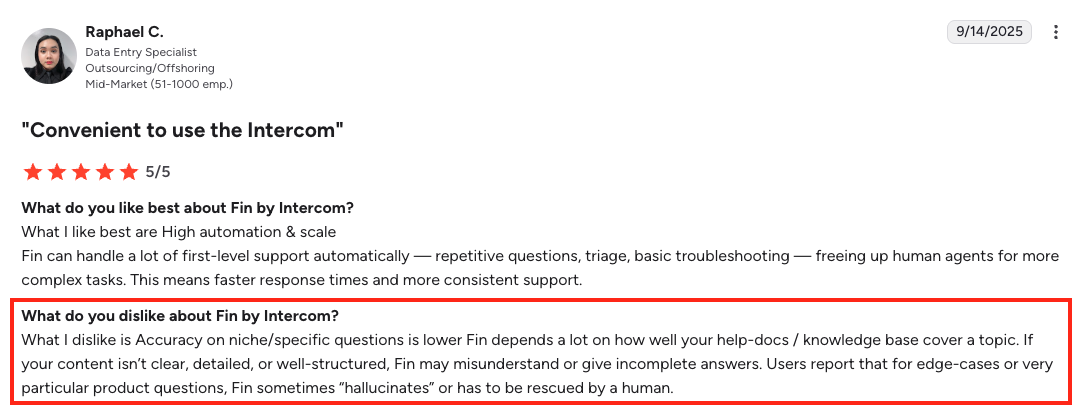
- The "assumed resolution" problem: Fin counts a conversation as resolved whenever the customer stops replying after Fin's last answer. The customer doesn't have to confirm the issue is fixed, they just have to go quiet.
Intercom calls this an "Assumed Resolution," and you get charged for it the same as a real resolution. The dashboard looks great. The deflection number is impressive. But some of those "resolutions" are frustrated customers who gave up and went to a competitor.
This is exactly why Smartness switched off their previous AI tool and moved to Pluno. They were paying for resolutions that weren't real resolutions.
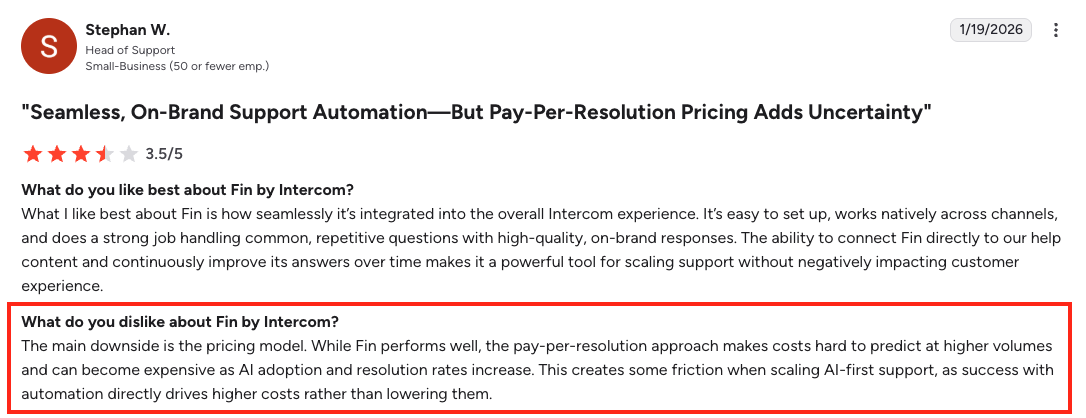
- Bills can grow alongside ticket volume - Per-resolution pricing is standard across the industry, but it does mean your costs rise directly with ticket volume. For teams with seasonal spikes (product launches, holidays, outages), this can make monthly forecasting harder. Worth budgeting for upper-bound scenarios rather than average months.
- Some of your best knowledge isn't usable for autonomous replies - Fin connects to Notion, Confluence, and Guru, but in many setups, those sources only work in Copilot mode, not for direct customer-facing answers. So if your best troubleshooting documentation lives in Notion or Confluence, Fin may not be able to use it to actually resolve tickets. It can only show that information to a human agent. For B2C teams with everything in a public help center, this isn't a problem, but it can be a problem for B2B SaaS companies with complex technical products.
Fin AI vs. Zendesk AI - Side-by-Side Comparison
| Feature | Fin AI | Zendesk AI |
|---|---|---|
| Native Zendesk integration | No, external API integration | Yes, native platform feature |
| Training source | Help center, websites, past conversations, plus Notion, Confluence, and Guru in Copilot mode | Help center and procedures |
| Resolution rate claims | 65% average per Intercom's published benchmarks | Up to 80% claimed for Advanced AI; varies heavily by deployment |
| Copilot availability for Zendesk | Available for $35/user/month | Yes, $50/agent/month add-on |
| Channel coverage | Chat, email, SMS, WhatsApp, social, voice, plus image input via Fin Vision | Email, chat, voice, social, messaging |
| Pricing model | $49/mo base + 50 included resolutions, then $0.99/resolution; no seat fees | Per-agent/month + per-resolution ($1.50-$2.00) |
| Setup time | Under 1 hour to launch; weeks to optimize | Minutes to enable; weeks to optimize |
| Assumed resolutions counted as paid | Yes, per Intercom's own help docs | No equivalent issue documented |
Pricing - Fin AI vs. Zendesk AI
All Intercom plans include access to Fin, and pricing is simple: $0.99 per outcome.
| Cost Component | Fin AI | Zendesk AI |
|---|---|---|
| Per-resolution cost | $0.99 per outcome | $1.50 (committed) to $2.00 (pay-as-you-go) per automated resolution |
| Platform/seat cost | $49/mo base fee for Fin on Zendesk; no seat fees. Intercom seats only required if using Intercom's helpdesk ($29-$139/seat/mo) | Suite plans: $55-$115/agent/month |
| Copilot cost for Zendesk | $35/user/month | $50/agent/month |
| Trial | 14-day free trial, no credit card | 14-day trial |
| Minimum commitment | $49/mo base includes 50 resolutions; minimum monthly resolution commitment applies on paid plans | No standalone minimum; resolution allowance bundled per Suite plan |
| Hidden cost to watch | "Assumed resolutions" (customer goes silent after Fin's reply) count as billable outcomes | Per-resolution charges apply once you exceed your plan's bundled allowance |
Fin AI Final Verdict
Fin is a well-built product. The AI engine is strong, the Procedures system handles real workflows, and Intercom invests heavily in the roadmap. If you're running on Intercom or planning to move to Intercom, Fin is the obvious choice.
If you're staying on Zendesk and your support is mostly conversational, FAQ-driven, and high-volume, Fin can work too. Just go in with eyes open on the assumed resolution math, the Copilot gap, and how the bill behaves once you're past the trial.
Best for: B2C and conversational SaaS teams running on Intercom or willing to move there; teams that need broad channel coverage (especially WhatsApp, SMS, and voice); and high-volume support operations where help center deflection alone resolves the majority of tickets.
Best Zendesk AI Alternative #3 - Macha - Best for Shopify and D2C Ecommerce Teams
Macha is the only tool on this list built specifically for Shopify and D2C brands.
If your support is mostly "where's my order," "can I return this," "is this in stock," and "what's the difference between size M and L," Macha might be a good Zendesk AI alternative for you.
However, if your support is technical B2B troubleshooting, Macha is the wrong fit, and they'd probably tell you the same.
Macha Quick Overview and Key Features
Here are the main features of Macha:
- AI Copilot - Lives in the Zendesk sidebar. Drafts replies, summarizes threads, supports multiple agent personas (technical support voice vs. billing voice, for example), and adjusts formatting based on the channel (longer for email, concise for chat).
- Auto Reply AI Agent - Autonomous deflection for L1 tickets. Admins define ticket categories with intent descriptions and SOPs. The AI handles only what fits those categories and stays out of everything else. Safer than Fin's "let it answer everything" approach, but also more limited.
- AI Knowledge Base - Pulls from Zendesk help center, macros, Shopify product pages, and external websites. Capped at 10 sources with 500 documents per source on the paid plan, which is enough for ecommerce but tight for B2B SaaS knowledge.
- Past Tickets AI - Converts solved Zendesk tickets into searchable internal documentation. Helpful for keeping your knowledge fresh, but it's a documentation tool, not a deep ticket-learning engine. The AI doesn't train on past tickets like in other Zendesk AI alternatives.
- AI Tagging - Auto-fills Zendesk custom fields based on ticket content.
Where Macha Falls Short for B2B SaaS Teams
A few structural limits worth knowing before you commit, especially if your support is more complex than ecommerce.
- Past tickets aren't a reliable training source - Macha's Past Tickets AI app turns resolved tickets into documentation, which is helpful, but it's different from what Pluno does. Pluno builds a structured understanding of recurring troubleshooting flows, diagnostic questions, and edge-case fixes from every ticket your team has ever closed.
- No Jira or Slack escalation sync - Macha has no Jira integration and no Slack escalation workflow. Your support agents can't auto-create Jira issues with full context from a ticket, and engineering updates don't automatically flow back into Zendesk.
- Knowledge base limits are tight - The paid plan caps the AI Knowledge Base at 10 sources with 500 documents per source. The free plan: 3 sources, 300 documents each. For a Shopify brand with a help center, a product catalog, and a returns policy, this is plenty. For a B2B SaaS company with multi-product documentation, internal runbooks, and years of solution articles, it's restrictive.
- Auto Reply is rule-based, not reasoning-based - The autonomous deflection works by admins defining ticket intent categories, descriptions, SOPs, and do-not-reply rules. The AI handles what fits those categories. This is safer than Fin's approach (which we covered earlier), but it also means Macha can only deflect what you predict in advance.
For predictable ecommerce flows, this works. For multi-step technical troubleshooting where the right path isn't known until the conversation unfolds, it doesn't.
Macha vs. Zendesk AI - Side-by-Side Comparison
| Feature | Macha | Zendesk AI |
|---|---|---|
| Pricing model | Starting at $299/mo for 3 agents and 3 knowledge sources, then goes to $699/mo and Custom plans with bigger tiers. | Bundled add-ons: $50/agent/mo Copilot, $1.50-$2.00 per automated resolution for AI Agents |
| Native Zendesk integration | Yes, Marketplace apps. | Yes, but Advanced AI requires Suite Professional or higher |
| Agent Copilot depth | Reply drafting, multi-persona, channel-specific formatting (email vs. chat), 80+ language replies | Reply suggestions, ticket summaries, macro suggestions, tone adjustment |
| Autonomous deflection | Rule-based: admin-defined ticket categories with intent descriptions and SOPs. Stays out of anything outside those categories | Reasoning-based but help-center-driven; broader scope but inflated by "no reply = resolved" billing |
| Multi-language support | 80+ languages via dedicated $5/agent/mo app, unlimited usage | 40+ languages via Intelligent Triage, bundled with Advanced AI |
| Knowledge sources | Help center, macros, Shopify products, external websites. Notion and Confluence listed as coming soon. Capped at 10 sources, 500 docs each | Help center and procedures |
| Past-ticket learning | None (Macha doesn't store customer conversations or ticket data) | Limited (Advanced AI references but doesn't deeply train on past tickets) |
| Setup | Install from Marketplace, minutes per app | Enable in minutes, weeks to optimize Advanced AI |
| Best fit | Shopify and D2C ecommerce teams handling L1 tickets at any scale | Zendesk-committed teams that want native AI without a second vendor |
Pricing - Macha vs. Zendesk AI
Macha AI offers focused, purpose-built apps starting at $15/agent/month per app - meaning teams can get AI-powered reply assistance, translations, or summaries without paying for a comprehensive bundle they may not fully utilize.
| Cost Component | Macha | Zendesk AI Copilot |
|---|---|---|
| Agent Copilot cost per seat | Doesn't have per Copilot pricing. Pricing starts at $299/mo and you can chose up to 3 agents to use. | $50/agent/month, billed across all Zendesk seats including unused ones |
| Autonomous deflection cost | Included in Auto Reply AI Agent app (rule-based, scoped to admin-defined categories) | $1.50 (committed) to $2.00 (pay-as-you-go) per automated resolution |
| Field automation | Bundled into the plan you choose (if you have enough free agent slots). | Bundled into Copilot add-on |
| Knowledge base / external sources | In Starter ($299/mo) you can connect up to 3 knowledge sources. In Professional ($699/mo) you can connect up to 10. | Help center only; external sources require workarounds |
| Free trial | 7-day free trial. | 14-day trial |
| Total cost for a typical mid-size team running the full suite | $299/mo - $699/mo. | Roughly $165/agent/month for Suite Professional + Copilot, plus per-resolution charges |
Macha Final Verdict
Macha is a serious product for the audience it's built for. If you run a Shopify or D2C brand on Zendesk, you're handling thousands of order tracking and returns tickets a month, then Macha can be the right Zendesk AI alternative for you.
For B2B SaaS teams handling complex technical tickets, Macha might be the wrong choice. Past-ticket learning is shallow, there's no engineering escalation workflow, and the knowledge base limits cap what the AI can know about your product.
Best for: Shopify and D2C ecommerce teams on Zendesk handling high-volume L1 tickets (order tracking, returns, pre-sales, product questions).
Best Zendesk AI Alternative #4 - Twig - Best for B2B SaaS Teams Running AI Across Multiple Tools
Twig is a serious B2B AI agent platform sold to SaaS, fintech, lending, and payments companies.
What makes Twig actually different is that it's built to run AI across more than just your helpdesk.
Twig Quick Overview and Key Features
Twig is an Agent Studio. You configure agents with custom instructions, scope their tool access, choose models, and deploy them across multiple platforms. It's a builder approach more than an out-of-the-box product.
Where Twig stands out:
- Platform-agnostic from day one - Native integrations with Zendesk, Salesforce, Intercom, Freshdesk, and HelpScout. Plus browser extensions for Gmail and Outlook. If your team handles support across mixed tooling, or you might switch help desks in the next 18 months, Twig works with all of them.
- 30+ data connectors, including databases - Direct connections to PostgreSQL and MongoDB on top of the usual help center, Confluence, Jira, Slack, Google Drive, and OneDrive. Plus REST API and MCP support (standard protocol for connecting AI to external tools).
- Persona-based answers - The same underlying knowledge generates different responses depending on who's asking: a support agent, a customer success rep, a solution engineer, or a pre-sales rep.
- Self-evaluation framework - Twig grades its own draft replies across multiple quality dimensions before sending. Low-confidence answers escalate rather than being pushed out.
Where Twig Falls Short for Zendesk-Committed Teams
If you're committed to Zendesk and your support is mostly inside that workspace, Twig has four real gaps.
- No two-way Jira or Slack escalation sync - Twig connects to Jira and Slack as knowledge sources for retrieval. It doesn't have two-way escalation workflow, where a Zendesk ticket auto-creates a Jira issue with full context, and engineering updates flow back to Zendesk.
- No past-ticket learning approach - Twig ingests tickets as one of 30+ data sources, but they don't market a specific methodology for learning troubleshooting flows from resolved tickets. Their RAG pipeline (the AI's process for retrieving information to generate answers) is general-purpose and basic.
Twig vs. Zendesk AI - Side-by-Side Comparison
| Feature | Twig | Zendesk AI |
|---|---|---|
| Zendesk integration | API connector with sidebar widget. Not as deeply embedded as native Marketplace apps | Native platform feature |
| Platform coverage | Zendesk, Salesforce, Intercom, Freshdesk, HelpScout, plus Gmail and Outlook via browser extension | Zendesk only |
| Deflection capability | End-to-end autonomous resolution, with self-evaluation framework that escalates low-confidence answers | AI Agents Essential and Advanced tiers, help-center driven |
| Agent Copilot | Available via Twig's Agent Studio and browser extensions; not a Zendesk-native sidebar Copilot | $50/agent/month add-on, Zendesk-native sidebar |
| Knowledge sources | 30+ connectors including help center, Confluence, Jira, Slack, Google Drive, OneDrive, plus PostgreSQL and MongoDB databases via REST API and MCP | Help center and procedures |
| Past-ticket learning | Tickets ingested as one of 30+ data sources, no specific methodology | Limited (references but doesn't deeply train on past tickets) |
| In-product embedding | Yes, widget can be embedded inside your own SaaS application | No |
| Pricing model | Starts at $5/ticket if you have less than 1000 monthly tickets. Or $4.5/ticket if you have between 1001-5000 tickets. | Suite plans $55-$115/agent/mo + $1.50-$2.00 per automated resolution |
| Setup | 30 minutes to launch on Self-Serve; weeks to optimize. Production tiers include a dedicated AI Specialist setup | Minutes to enable, weeks to optimize |
| Best fit | B2B SaaS and fintech teams running AI across multiple platforms or embedded in their own product | Zendesk-committed teams that want native AI without a second vendor |
Pricing - Twig vs. Zendesk AI
Twig's current pricing details are limited in publicly available documentation. What we can confirm:
| Cost Component | Twig | Zendesk AI |
|---|---|---|
| Entry-level pricing | $5/ticket if you have less than 1000 tickets. | Suite plans $55-$115/agent/month |
| Per-resolution cost above plan limits | $4.5/ticket if you have between 1001-5000 monthly tickets. | $1.50 (committed) to $2.00 (pay-as-you-go) |
| Copilot cost | Included in Twig's Agent Studio across all paid tiers | $50/agent/month add-on, billed across all Zendesk seats |
| Setup cost | Self-Serve is self-install | Free for basic enablement; $5,000-$20,000 for complex Advanced AI deployments |
| Trial | Yes | Yes |
Twig Final Verdict
Twig is a strong product for the right team. If you're a B2B SaaS or fintech company running support across multiple customer support tools, Twig might be the best option on this list.
If you're committed to Zendesk and your priority is a managed product that learns from your past tickets, then Twig might not the best choice for you.
Best for: B2B SaaS and fintech teams running AI across multiple platforms (Zendesk, Salesforce, Gmail, in-product widgets), teams with engineering bandwidth that prefer a builder-style platform, and companies that need database-level data connectors.
The Bottom Line - What's the Best Zendesk AI Alternative for You?
None of these tools is universally better than the others. The right answer depends on ticket complexity, team size, budget, and whether you're staying on Zendesk or considering a platform shift.
Here's the final comparison:
| Pluno | Fin AI | Macha | Twig | |
|---|---|---|---|---|
| Primary Strength | Learns from resolved tickets; pulls cross-system context across help center, Slack, Jira, and APIs. | Most established Zendesk AI competitor; multi-channel coverage including voice and SMS | Shopify-native integration; best-priced multilingual support in the Zendesk ecosystem | Platform-agnostic across Zendesk, Salesforce, Intercom, Gmail; embeddable in your own product |
| Works Best With | Zendesk (native Marketplace app, sidebar) | Intercom (native); Zendesk, Salesforce, HubSpot, Freshdesk (external API integration) | Zendesk (native Marketplace apps, sidebar) | Zendesk, Salesforce, Intercom, Freshdesk, HelpScout, Gmail, Outlook |
| Pricing Entry Point | Platform fee (~$250-$500/mo) + ~$40/seat for Copilot + $0.90/resolution | $49/mo base + 50 included resolutions, then $0.99/resolution | $299/mo for up to 3 agents and 3 knowledge sources. | $5/ticket if you have less than 1000 tickets/mo. $4.5/ticket if you have between 1001-5000 tickets. |
| Complex Ticket Handling | Strong: learns troubleshooting from resolved tickets and pulls cross-system context | Moderate: strong on FAQ deflection, weaker on diagnostic reasoning; "assumed resolutions" inflate reported numbers | Limited: rule-based deflection focused on L1 ecommerce tickets | Moderate: configurable for complex flows but requires builder setup |
| Past-Ticket Learning | Core training source | Available, but very limited. | None: doesn't store customer data or conversations | Available, but very limited. |
And the use-case breakdown in plain terms:
- If you're on Zendesk with complex or technical tickets and want the deepest AI with real escalation workflows - Pluno is the answer. It's the only tool that learns from your resolved tickets, connects bidirectionally with Jira, Slack, and other tools, and runs natively inside Zendesk without requiring migration.
- If your support is high-volume and conversational, mostly FAQ-style across chat, email, SMS, and WhatsApp, Fin AI by Intercom is the best Zendesk AI alternative for you. Just go in with eyes open on the assumed-resolution billing.
- If you run a Shopify or D2C ecommerce brand, Macha is a purpose-built Zendesk AI alternative for your case. The Shopify integration handles order tracking, returns, and pre-sales tickets natively.
- If you're a B2B SaaS or fintech team running support across multiple platforms (Zendesk, Salesforce, Gmail, or embedded inside your own product), Twig's Agent Studio and 30+ data connectors fit better than the other Zendesk AI alternatives.
The easiest way to know if Pluno is right for your team is to install it for free from the Zendesk Marketplace and run a simulation against your real tickets. You'll see exactly where Pluno would resolve, draft, or escalate, side by side with your current setup.
FAQ
Is Zendesk AI good enough for complex B2B support tickets?
Zendesk AI works well for FAQ-style deflection, ticket summaries, sentiment triage, and routing. Where it consistently falls short is multi-step troubleshooting, edge cases not covered in your help center, and tickets that require cross-tool context (Jira, Slack, internal systems). For teams handling complex B2B support, layering a specialist AI agent like Pluno on top of Zendesk delivers better results than relying on Zendesk's native AI alone.
What is the real all-in cost of Zendesk AI for a 10-agent team?
Start with Suite Professional at $115/agent/month ($1,150/month). Add Copilot at $50/agent/month ($500/month). That's $1,650/month before a single automated resolution. Automated resolutions are priced at $2.00 per resolution on a pay-as-you-go basis, or $1.50 per resolution when purchased in a bundle. If your AI resolves 500 tickets per month beyond the included allowance at $1.50 each, that's another $750. Total: $2,400+/month, or nearly $29,000/year.
Does Pluno replace Zendesk or work alongside it?
Pluno does not replace Zendesk. It runs inside Zendesk as an AI layer - no migration, no rip-and-replace. It installs from the Zendesk Marketplace and starts learning from your historical ticket data immediately. Your agents continue working in the same Zendesk workspace they already know, with Pluno appearing in the sidebar and handling deflection in the background.
How do I know which Zendesk AI alternative is right for my team?
Pluno fits technical B2B SaaS teams, since it has the best training that's based on your past ticket resolutions. Fin AI is well-suited for high-volume conversational support, especially if you're on Intercom or moving to it. Macha fits Shopify and D2C ecommerce, automating L1 tickets, and Twig fits B2B SaaS teams running AI across multiple support platforms. The fastest way to know for sure is to test on your real tickets, which is why Pluno offers a free simulation against your last 50 Zendesk tickets.