Zendesk pricing in 2026 starts at $19 per agent a month for Support Team and runs $55 to $115 for the Suite on annual billing, with Enterprise quoted by sales. On top of the seat, Zendesk AI pricing adds a per-automated-resolution charge for the AI agents that now come with every plan. The price you see on Zendesk's pricing page is really the minimum. Your actual bill usually lands higher, because the pieces that do the everyday support work are billed on top of the seat: the AI agents, Copilot, quality assurance, and voice.
Two things changed in 2026, and both hit your budget:
-
Zendesk retired the flat "Advanced AI" add-on. The roughly $50-per-agent fee that used to turn on automated resolutions is gone.
-
AI agents now come with every Suite and Support plan. They bill per resolution once you pass a small monthly allowance.
Because of that, the question buyers ask has changed. It used to be "how much is the AI add-on." Now it is "how many tickets will the AI close, and what does each one cost once the free allowance runs out." The second question is harder, and it is the one that decides your real bill.
This guide answers it.
You will get the current plan tiers, what replaced the Advanced AI add-on, how the per-resolution meter works, the add-ons that stack on top, the costs that never make the pricing page, and what a real team pays once everything is switched on.
This guide helps you understand a Zendesk quote knowing your fully loaded number, forecast the AI meter before it surprises you, and compare Zendesk fairly against any alternative.
TL;DR: Zendesk AI pricing at a glance
-
Plans are per agent, per month, on annual billing. Zendesk Suite runs $55 (Team) and $115 (Professional), with Enterprise quoted by sales and reported around $169 and up. Support Team starts at $19 for ticketing only.
-
The flat Advanced AI add-on is gone. Since May 2026, advanced AI agents are included in every Suite and Support plan, so you no longer pay a per-agent fee to turn them on.
-
AI now bills on a meter. Each plan includes a monthly resolution allowance, which Zendesk now issues in dollars per agent seat: $2 on Team, $5 on Growth and Professional, $10 on Enterprise, capped at $5,000 a year. Past the allowance, every resolution bills per resolution: Zendesk's pricing page lists $1.50 on committed volume and $2.00 pay-as-you-go.
-
Copilot and workforce tools stack on top. Copilot is a separate $50-per-agent add-on, the Workforce Engagement Bundle adds $50, and Contact Center voice adds $83, all per agent per month.
-
The hard part is forecasting the bill. Because AI bills per resolution once you pass the allowance, and the add-ons stack per agent, your bill moves with both headcount and AI volume at once. A loaded Suite Professional seat reaches about $215 per agent per month before a single resolution charge lands, which is why most teams end up 20 to 30 percent over their first estimate.
-
If that meter is your problem, price an AI layer alongside it. For complex, technical B2B tickets, an AI layer like Pluno runs inside Zendesk and charges EUR 0.90 (about $0.95) per resolution on a flat, volume-based base. That is worth putting side by side with the native cost, and the comparison sits at the end of this guide.
How Zendesk AI pricing works in 2026
Zendesk AI pricing has four moving parts. Once you can name them, every number later in this guide has a place to sit:
-
The plan. A per-agent, per-month seat that sets your baseline features and channels.
-
The AI agents. Included in every plan now, but billed per automated resolution once you pass the plan's monthly allowance.
-
The add-ons. Copilot, quality assurance, workforce management, and voice, each priced separately on top of the seat.
-
Usage fees. Tools like App Builder, Action Builder, and voice minutes charge when you go past the plan's included allowance.
Those four sit inside a structure worth understanding first. Zendesk sells two product lines, and they are not interchangeable. Support is the ticketing-only line, built around email and social tickets with basic automation. The Zendesk Suite is the full workspace, adding messaging, live chat, phone, help centers, and AI agents. You cannot mix Support and Suite for the same users in one instance, and in practice Zendesk steers most new customers to the Suite.
There is one more split that catches teams out. The customer-facing Suite and the internal "employee service" Suite for IT and HR are sold separately. So a company that supports both its customers and its own staff usually pays for two instances, which quietly doubles some of the add-on spend below.
Everything is priced per agent, per month, and the rates Zendesk lists assume you commit annually. Pay monthly and the per-agent rate goes up. On top of the seat sit the add-ons and usage fees, and that layer is where most of the budget ends up. Zendesk describes the AI model plainly on its pricing page: AI agents are included in every Suite and Support plan, "with pricing based on the successful outcomes they deliver." The rest of this guide turns that sentence into a number you can plan around.
Zendesk plan tiers and what each includes
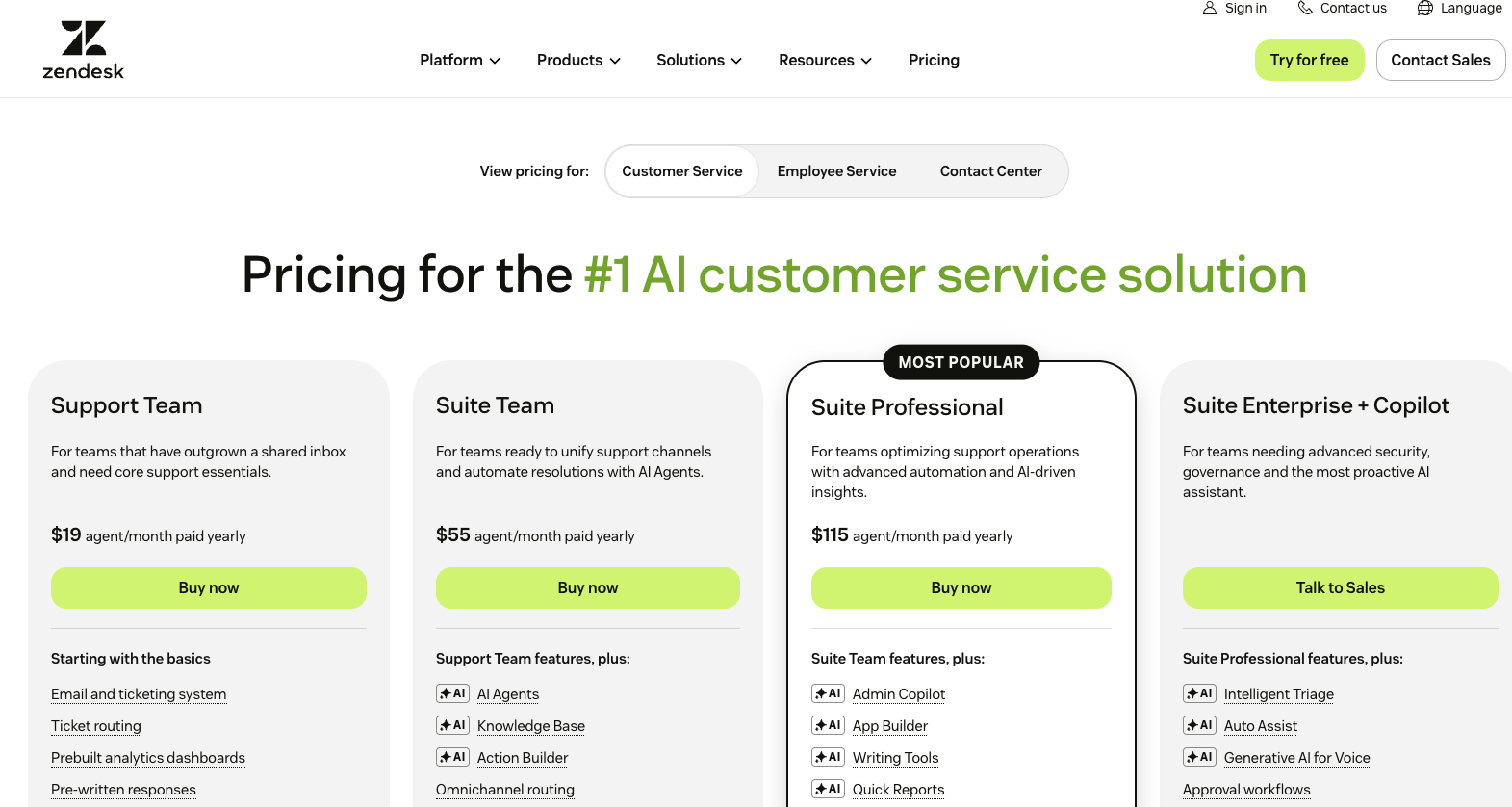
On annual billing, Zendesk Suite runs $55 per agent per month for Team and $115 for Professional, with Enterprise quoted through sales, and every tier now includes AI agents. Support Team sits below the Suite at $19 for ticketing only.
| Plan | Line | Per agent / month (annual) |
|---|---|---|
| Support Team | Ticketing only | $19 |
| Suite Team | Omnichannel + AI | $55 |
| Suite Professional | Omnichannel + AI | $115 |
| Suite Enterprise + Copilot | Omnichannel + AI | Talk to Sales (third parties report ~$169+) |
The AI you get climbs with the tier. Suite Team covers the basics: AI agents, the AI knowledge base, and Action Builder, plus omnichannel routing, messaging, live chat, and telephony. Suite Professional adds the tools a mid-size operation leans on, including Admin Copilot, App Builder, writing tools, quick reports, skills-based routing, and an IVR phone tree. Suite Enterprise goes further into governance and advanced AI, with Intelligent Triage, Auto Assist, generative AI for voice, approval workflows, a sandbox environment, and custom agent roles. All plan facts come from the Zendesk pricing page, updated July 2026, and monthly billing runs higher than the annual rates shown here.
What happened to the Zendesk Advanced AI add-on?
The standalone Zendesk Advanced AI add-on is gone. Since May 2026, Zendesk has made advanced AI agents available on every Suite and Support plan and moved to per-automated-resolution billing, so there is no flat per-agent fee to switch the AI agents on anymore.
On May 11, 2026, the "Essential" AI-agent level became legacy and the "Advanced" level opened up to every Suite and Support plan. A week later, on May 18, 2026, Zendesk introduced the resolution-tier pricing platform that governs how AI usage is billed today. The flat add-on that used to cost roughly $50 per agent per month to turn on advanced resolutions no longer exists as a line item.
On the surface, folding advanced AI into every plan looks like a price cut. In practice, the cost moved. Instead of a flat fee to switch it on, you now pay per resolution once you pass the plan allowance, so what used to be a fixed line is now a variable one that tracks your usage. That distinction matters because a lot of older pricing guides and search results still describe the "$50 Advanced AI add-on" as if you can buy it. For AI agents in 2026, ignore that framing. The one AI piece Zendesk still sells as a flat add-on is Copilot, which is a different product covered below.
How the automated-resolution meter bills
Zendesk bills AI agents per automated resolution, which is a customer request the AI closes without human escalation and an LLM confirms, after a monthly dollar allowance per agent seat. Getting this mechanic right is the whole game, because it is where a Zendesk quote and a Zendesk invoice drift apart.
A resolution only counts when three things line up, per Zendesk's documentation:
-
The AI resolves the issue without a human stepping in. The moment a ticket escalates to a person, its status changes and it can never count as an automated resolution.
-
An LLM verifies the resolution. Zendesk runs a large language model over the conversation to confirm the customer's request was resolved, so conversations that quietly fizzle out do not consume a resolution.
-
A timing window closes. Messaging resolutions are evaluated after a two-hour window by default, configurable up to 72 hours, while email and web-form resolutions wait 72 hours of customer inactivity.
Each plan comes with a resolution allowance, a pool of dollars that pays for automated resolutions. On Zendesk Suite it's $2 per agent seat a month on Team, $5 on Growth and Professional, and $10 on Enterprise and Enterprise Plus; Support plans get $2 per seat. Light agents don't count, unused allowance doesn't carry over to the next month, and the account maxes out at $5,000 a year. A 20-seat Suite Professional team gets $100 a month, which covers about 66 resolutions at the committed rate.
This replaced the older count of 5, 10 or 15 automated resolutions per agent, although the pricing page still shows the old counts, so check which model your contract uses. On May 18, 2026 Zendesk also split automated work into three tiers: Assisted escalation, Contained resolution and Verified resolution. It says the first two don't count against the allowance, so ask your rep how each tier is billed.
Once you pass the allowance, every extra resolution bills on top of your seats, or, if you turn overage off, the AI agent pauses and requests go to your human agents. You can lower the per-resolution cost by buying committed volume ahead of time (100 or more resolutions), while pay-as-you-go overage costs more and bills monthly no matter how your contract is structured.
Zendesk now prints the per-resolution rate on its pricing page: $1.50 per resolution on committed volume and $2.00 pay-as-you-go. The result is a little counterintuitive: the better your AI performs, the more the meter charges you. That is why the single most useful thing you can do before signing is ask for your projected monthly resolution volume at your real ticket count and the dollar overage it implies. Get that math in writing, because one blended number hides where the overage lands.
To bring your own estimate to that conversation, play 15 in our Zendesk best practices guide sorts last quarter's tickets into Documented, Needs a lookup and Undocumented, weighted by handling time. You'll know roughly how much of your volume an AI agent could close before you commit to a resolution count.
Zendesk Copilot and the other add-ons that inflate the bill
Zendesk Copilot costs $50 per agent per month as a separate add-on, on top of your plan and separate from the per-resolution AI agent billing. It is worth keeping the two apart in your head, because they solve different problems.
The AI agents reply to customers and bill per resolution. Copilot sits with your human agents, drafting replies, summarizing tickets, and helping them triage. Since a person reviews Copilot's drafts before they go out, it carries lower customer-facing risk than autonomous replies, and it stays a flat per-agent fee at every tier.
The rest of the add-ons a growing team tends to switch on look like this:
| Add-on | Per agent / month | What it does |
|---|---|---|
| Copilot | $50 | Agent assist: suggested replies, summaries, triage |
| Workforce Engagement Bundle (QA + WFM) | $50 | Conversation scoring plus forecasting and scheduling |
| Contact Center (voice, Amazon Connect) | $83 | Phone support, IVR, call routing |
| Advanced Data Privacy and Protection | Add-on (regulated industries) | Enhanced retention, audit, and privacy controls |
Two more things bill on usage instead of a flat fee. App Builder, Action Builder, and Voice all charge once you go past the plan's included allowance, so heavy use of custom actions or phone minutes shows up as its own line.
Quality Assurance and Workforce Management can also be bought separately, reported at roughly $35 and $25 per agent per month.
The hidden costs that aren't on the pricing page
The costs Zendesk leaves off the pricing page are the ones that make an invoice beat its quote: monthly-billing premiums, a second instance for employee support, AI resolution overage, and renewal increases. None of them are exotic, which is exactly why they are easy to miss when you are modeling a budget from the sticker.
-
Monthly versus annual. The listed rates assume an annual commitment, so paying month to month raises the per-agent cost.
-
Two instances for customer plus employee support. Running customer support and an internal IT or HR desk usually means two Suite instances, two invoices, and add-on spend duplicated across both.
-
Resolution overage. Once you pass your allowance, extra resolutions auto-charge monthly by default, so a busy month for the AI is a busy month for the invoice. You can cap this by limiting the resolutions available in your account, but it is on by default and easy to miss.
-
Renewal escalation. Contracts often carry annual per-agent increases, and reviewers report sharper jumps when promotional pricing expires.
-
Implementation and onboarding. Complex Enterprise rollouts across multiple brands and regions carry one-time professional-services fees that can reach five figures.
-
API, storage, and data limits. Higher tiers raise these ceilings, so a data-warehouse integration or a long retention requirement can push you up a tier for the limits alone.
Add these up and a simple rule falls out, one that pricing analyses keep repeating: build a 20 to 30 percent contingency into your first-year Zendesk budget. Most teams end up using it.
What Zendesk AI costs by team size
Once you load in the add-ons a team of each size tends to enable, the real numbers come into focus, and they sit well above the seat price. A 25-agent team on Suite Professional, for example, pays about $2,875 a month for seats but roughly $5,625 once Copilot and the workforce bundle are on, before a single AI resolution overage.
The scenarios below are directional, built by third-party analyses on Zendesk's list prices, and the resolution meter sits on top of all three.
-
Small team, about 5 agents on Suite Team. Seats run 5 x $55, or $275 a month. Add Copilot and you are near $525 a month, roughly $6,300 a year. At this size you are mostly paying for the platform, and the add-on stack stays small.
-
Growing team, about 25 agents on Suite Professional. Seats run 25 x $115, or $2,875 a month. Add Copilot ($1,250) and the QA plus WFM bundle and you reach about $5,625 a month, roughly $67,500 a year, before the AI meter.
-
Enterprise, about 100 agents on Suite Enterprise. Seats run around 100 x $169, or $16,900 a month. Layer on AI resolution volume, voice, workforce tools, and advanced data privacy, and a loaded deployment pushes toward $25,000 to $33,000 a month, roughly $300,000 to $400,000 a year.
The takeaway is the same at every size. Price on the loaded seat and the cost per resolved conversation, because the base sticker is the smallest line on the invoice.
Is Zendesk AI worth the price?
Zendesk AI earns its price for complex, multi-channel, multi-department operations that use its depth, and it is harder to justify for small or low-volume desks that pay for surface area they never touch.
Zendesk is a mature, reliable platform with deep omnichannel support, strong reporting, a large app ecosystem, and serious governance at the Enterprise tier. Its Quality Assurance can score 100 percent of interactions, and its multi-brand support scales to hundreds of brands. For a large, risk-averse buyer, that track record is itself worth paying for.
The case against it is about fit. Very small or low-volume desks pay for features they never open, and there is no free plan to grow into, a gap our Freshdesk vs Zendesk comparison weighs against Freshdesk's entry pricing. On the resolution meter, the bill rises as automation succeeds, so high-automation teams have to watch the number closely.
Zendesk AI vs an AI layer: comparing total cost
The only fair way to compare Zendesk AI against any alternative is total cost per resolved conversation, with every add-on and the resolution meter included. The per-seat sticker will not give you that number. Once you normalize on it, the market sorts into three pricing shapes:
-
Seat plus a per-resolution meter. Zendesk and Intercom Fin charge a per-agent or per-seat base, then charge again per AI resolution on top, so the bill scales with headcount and AI volume at the same time.
-
Outcome-based. Decagon and Sierra price on resolved outcomes with no helpdesk underneath, usually starting at enterprise floors.
-
An AI layer priced per resolution. A dedicated AI layer runs inside the helpdesk you already have and charges for the resolutions it closes, on a base that tracks ticket volume instead of seats.
Pluno sits in that third group, so treat what follows as a labeled comparison. The choice it represents is native Zendesk AI or Pluno, a question of which AI layer runs inside your Zendesk workspace. Pluno learns from your resolved support tickets, which is what lets it handle the edge cases the help center never documented, a common situation in B2B SaaS where the product changes faster than the docs do.
For a cost-conscious team, the two tools bill on different models, and for complex technical tickets that difference in total cost can be large. Zendesk stacks a per-resolution meter on top of per-agent seats, while Pluno's base tracks ticket volume and its per-resolution charge applies to autonomous deflection.
| Dimension | Zendesk native AI | Pluno (AI layer inside Zendesk) |
|---|---|---|
| Base pricing | Per-agent Suite seat, $55 to $115+ per agent/month | Flat base fee that scales with monthly ticket volume |
| AI billing | Per automated resolution after a plan allowance | Per resolution for Deflection AI |
| Per-resolution rate | $1.50 committed / $2.00 pay-as-you-go | EUR 0.90 (about $0.95) |
| Main knowledge source | Help center and ticket history, plus external sources | Resolved support tickets, plus help center, Slack, Jira, and APIs |
| Best fit | KB-friendly common inquiries and broad channel coverage | Complex, technical B2B tickets |
Beyond the per-resolution price, the reason B2B teams look at Pluno is what it does with a hard ticket. Because it learns from resolved support tickets, it can work through issues whose answers live in resolved tickets, Slack threads, and Jira instead of a help-center article.
When a ticket needs engineering, the Troubleshooting Agent investigates across code, logs, and tools while the Escalation Copilot hands the case to Slack, Jira, Linear, Microsoft Teams, or incident.io with full context and syncs updates back, so support is not left chasing a fix. And because every AI-resolved ticket is tagged in your helpdesk, you can check exactly what the AI closed before you pay for it.
"What really sets Pluno apart is that integration between Zendesk and Jira and Pluno… Having updates on your tickets automatically in Zendesk from the linked Jira tickets is a game changer. Your follow-ups become extremely on point."
Sarala Conlan, Sr. Customer Support Manager at Kojo
Pluno is not the right tool for every desk, and the fit rules are worth stating plainly. It is built for teams with a real volume of complex, technical tickets, so a small FAQ-only desk, or a team that mainly wants the widest possible channel coverage, will get more from native Zendesk AI. Pluno is also an AI layer, which means you keep running Zendesk underneath it. No marketed resolution percentage settles which side wins for you. The honest test is to run a simulation on your own historical tickets and see what resolves. The Zendesk AI vs Pluno breakdown goes deeper on where each AI layer fits.
Bottom line
-
Budget Zendesk AI on the loaded cost per resolved conversation. The per-seat sticker understates the real bill, because the included-but-metered AI model makes the invoice climb with usage.
-
Treat the plan seat as the floor: Suite Team $55, Professional $115, and Enterprise via sales, all per agent per month on annual billing.
-
Model the AI meter on its own. Count the free allowance ($2, $5, or $10 per agent seat a month), then the per-resolution rate at your real volume, and get that math in writing.
-
Add Copilot ($50), the workforce bundle ($50), and voice ($83) only where they earn their place, and hold back a 20 to 30 percent first-year contingency.
-
If the resolution meter is your cost problem and your tickets are complex and technical, price an AI layer next to the native option.
[Pluno Free Trial CTA]
Zendesk AI pricing FAQ
Does Zendesk have AI, and is it included? Yes. AI agents are included in every Zendesk Suite and Support plan. You pay per automated resolution after a monthly allowance, and there is no flat AI fee. Copilot is a separate add-on.
How much is the Zendesk Advanced AI add-on? It no longer exists as a standalone add-on. Since May 2026, advanced AI agents are included in every plan and billed per automated resolution. Copilot remains a separate add-on at $50 per agent per month.
How does Zendesk charge for AI agents and automated resolutions? Per automated resolution, after a monthly resolution allowance of $2 per agent seat on Team, $5 on Growth and Professional, and $10 on Enterprise (Zendesk Suite), capped at $5,000 a year. Past the allowance, Zendesk's pricing page lists $1.50 per resolution on committed volume and $2.00 pay-as-you-go.
How much is Zendesk per agent per month? On annual billing, Suite Team is $55, Suite Professional is $115, and Suite Enterprise is quoted through sales, reported around $169 and up. Copilot adds $50 per agent per month, and monthly billing runs higher than annual.
Why is Zendesk so expensive? Because the seat is only the base. Copilot, the workforce bundle, voice, and the per-resolution AI meter all layer on top, which pushes a loaded Suite Professional seat to about $215 per agent per month before any resolution overage.