A knowledge base is a searchable library of answers about one product, service or subject. That's the dictionary version, and it's accurate. But if you run a support team, the knowledge base question you actually face is harder: which answers belong in it, who keeps them current, and what your AI agent should read when an article doesn't exist yet.
I talk to support leaders about this every week at Pluno. Almost every one of them says the same thing: "our help center is out of date." They're usually right, and it's usually not their fault. Products ship faster than anyone can write.
Where Pluno fits: Pluno is an AI agent that runs inside your help desk. It treats your resolved tickets as primary evidence, alongside help center articles, docs, uploaded files, team threads and connected APIs. So your team doesn't need a perfect help center before AI can start resolving tickets.
This guide is for support leaders and managers at B2B companies. It covers what a knowledge base is, the three types you'll run, real examples, a seven-step build checklist and how to choose knowledge base software. When I compare tools, I use the same five yardsticks for each one:
- Audience: customers, your internal team, or both.
- AI answers: whether the tool can answer questions from your articles, and what that costs.
- Upkeep tools: what helps you keep articles accurate, such as review dates, owners or verification.
- Help desk fit: how closely it connects to the place your agents work.
- Entry price: the lowest published price for a plan that includes the knowledge base.
Disclosure: I work at Pluno. We make an AI agent for complex support that resolves, drafts and escalates tickets inside your help desk. We don't make a help center editor. Pluno's knowledge hub connects your past tickets, help center, docs, files and team threads so its AI agent can answer from all of them.
TL;DR
- A knowledge base is a searchable collection of answers about a product or subject. In support, it usually means a help center for customers, an internal wiki for agents, or both.
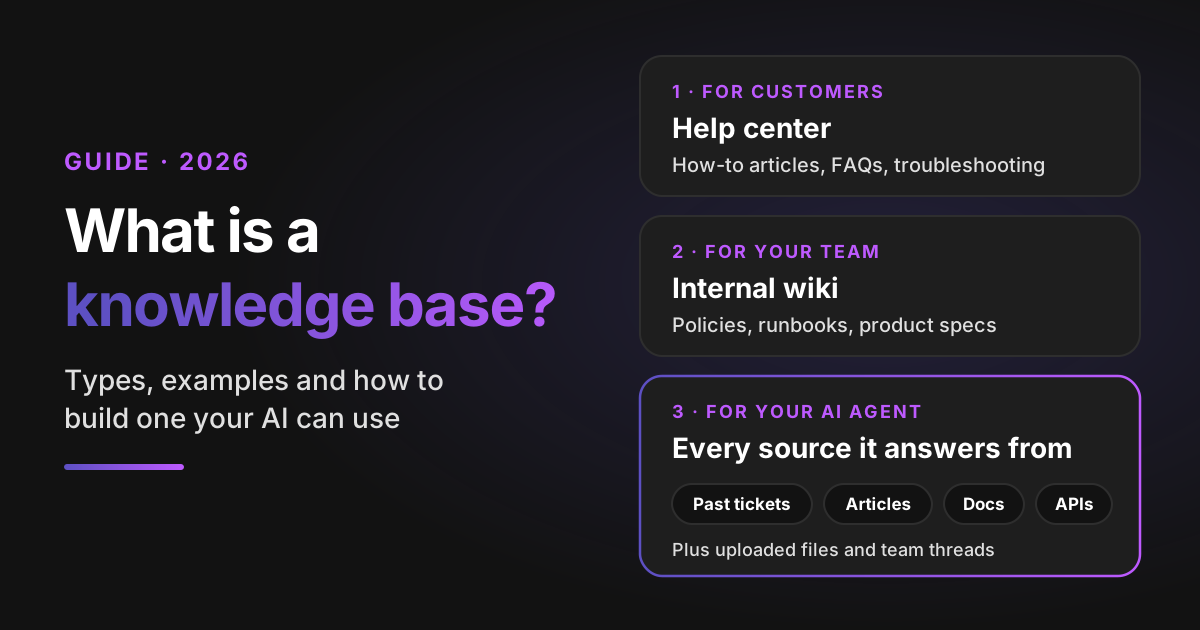
- There are now three types to plan for: the customer-facing help center, the internal team wiki and the set of sources your AI agent answers from. The third one is the newest and the one most teams underestimate.
- Every knowledge base goes stale. Articles describe the product on the day someone last edited them. Owners, review dates tied to releases and short articles slow the decay, but none of them stop it.
- Build it from your tickets, not from a blank page. Rank questions by ticket volume, write one answer per article and give every article a named owner.
- Best software depends on audience: Zendesk Knowledge, HubSpot and Help Scout Docs for help desk-native help centers, Confluence and Notion for internal wikis, Document360 for a dedicated standalone knowledge base.
- Bottom-line advice: don't wait for a complete help center before you use AI. Pluno learns from your resolved tickets, so the fixes your agents already use count even if nobody wrote them up. Test it on your last 50 tickets.
What is a knowledge base? The short answer for support leaders
A knowledge base is a central, searchable collection of information about a particular product, service or subject, organized so people can find answers without asking someone. The Cambridge Dictionary defines it as "a collection of information about a particular subject."
In customer support, that collection is usually made of articles: how-to guides, FAQs, troubleshooting steps, policies and release notes. Each article answers one question, and search or categories help people reach it.
A few quick answers to the questions people ask right after the definition:
- Is it one word or two? Two words is the standard spelling: "knowledge base." Some products use "knowledgebase" as a brand name, but dictionaries such as Cambridge list it as two words.
- What's another word for a knowledge base? Help center, help docs, support center, FAQ hub, wiki, documentation, handbook or knowledge hub, depending on who reads it.
- What is a knowledge base article? A single page that answers one question or explains one task, such as "How to reset your password."
- What is knowledge base software? The tool you use to write, organize, publish and search those articles. It often adds analytics and, more and more, AI answers.
Computer science uses the term too: early "expert systems" stored facts and rules for software to reason over (Wikipedia covers that history). That older meaning is back in fashion, because AI agents now read your articles the same way. More on that next.
Why a knowledge base matters more now that AI answers tickets
It used to have two readers: customers looking for self-service, and agents looking for the right answer. Now it has a third: the AI agent that answers tickets for you. That makes the quality of what's in it a direct input to your resolution rate.
Customers already try to help themselves first. In 2017 research published in Harvard Business Review, CEB (now part of Gartner) found that "fully 81% of all customers attempt to take care of matters themselves before reaching out to a live representative." Your help center is where that attempt either works or turns into a ticket.
Here's what a good knowledge base does for a support team:
- Deflects repeat questions. Customers who find the answer don't open a ticket.
- Speeds up agents. New hires find the approved answer instead of tapping a senior colleague on the shoulder.
- Keeps answers consistent. Ten agents give the same refund policy, not ten versions of it.
- Feeds your AI agent. Whether it's your help desk's built-in AI or a separate one, it answers from the sources you give it.
That last point raises the stakes. A stale article used to mislead the few customers who read it. Connected to an AI agent, it can shape every reply on that topic. For a deeper look at how that plays out across workflows, see our guide to customer support automation.
The 3 types of knowledge base support teams run
Most support teams run three of them, even if they only call one by that name. Help centers are often called external knowledge bases and wikis internal ones; many teams run a hybrid of the two. Each type has a different reader, a different owner and a different way of going wrong.
1. The customer-facing help center
This is the public side customers search before they contact you. It holds how-to articles, FAQs, troubleshooting guides and policies, written for someone who doesn't know your internal terms.
It usually lives in your help desk (Zendesk, Intercom, HubSpot and Freshdesk all include one) or in a standalone tool. It's also indexed by search engines, so it brings in organic traffic and answers questions before they become tickets.
How it goes wrong: it covers the common questions well and the hard ones barely at all. Articles describe last quarter's interface.
2. The internal team wiki
This is the private side your team reads: escalation rules, refund exceptions, runbooks, known bugs, product specs and macros. It often lives in Confluence, Notion, Google Drive or the help desk's internal articles.
How it goes wrong: it spreads across several tools, nobody owns half of it, and people stop trusting it. Then they ask a senior colleague instead, which is exactly what the wiki was supposed to prevent.
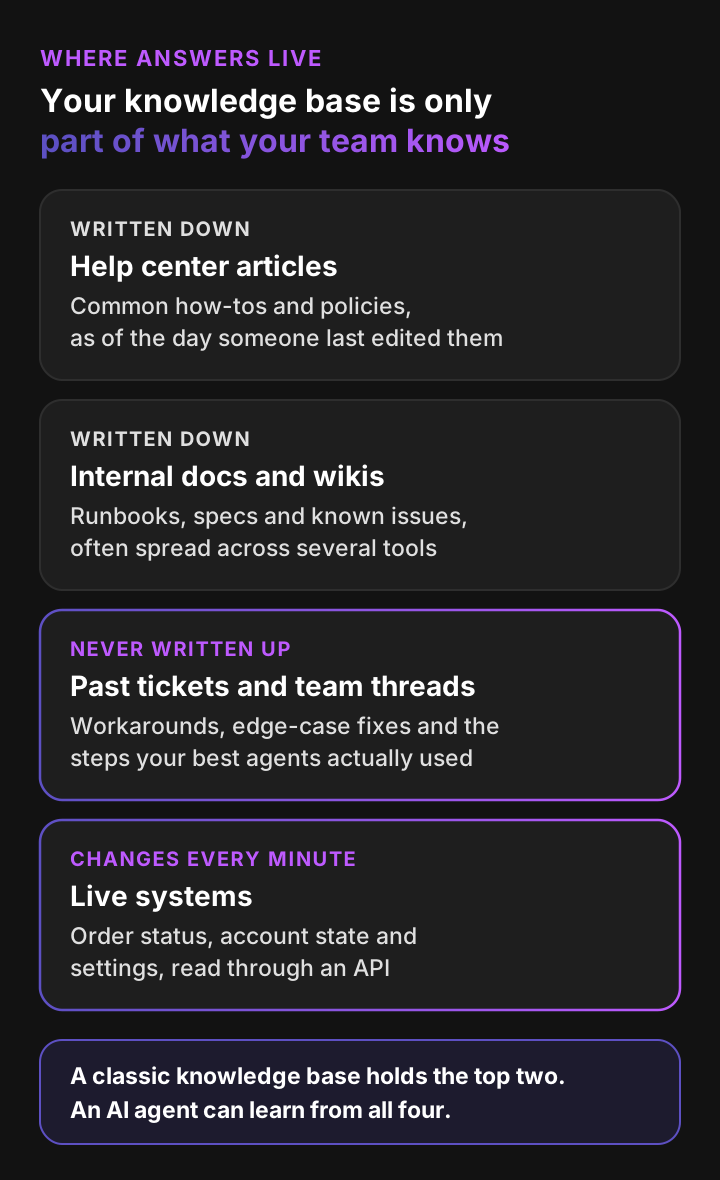
3. The sources your AI agent answers from
This is the newest type, and it's less a place than a list. It's every source your AI agent is allowed to read when it answers a ticket.
For a basic chatbot, that list is your help center. For Pluno, it's your past resolved tickets, help center articles, docs, uploaded files, team threads such as Slack, and live data from connected APIs. Each brand can get its own set, so answers never mix between products.
How it goes wrong: teams treat it as "connect the help center and hope." If the AI only reads articles, it inherits every gap in them.
The 3 types side by side
| Help center | Internal wiki | AI agent sources | |
|---|---|---|---|
| Reader | Customers | Agents and other teams | The AI agent |
| Typical content | How-tos, FAQs, policies | Runbooks, exceptions, specs | Articles plus past tickets, docs, files and live data |
| Usual home | Help desk or standalone tool | Confluence, Notion, Drive | Connected inside the AI tool |
| Main risk | Gaps on hard questions | Sprawl and low trust | Inheriting every gap in the articles |
| Who owns it | Support or docs team | Support ops and each team | Support ops, with the AI vendor |
Knowledge base examples worth studying
The best way to learn what good looks like is to study live examples. Here are five public ones, picked because each does something specific well.
- Zendesk Help: a large customer-facing help center built on Zendesk's own product. Notice how it splits content by product and role, so admins and agents land on different paths.
- HubSpot Knowledge Base: a help center for a broad product suite. Search sits at the top of the page, and articles walk through tasks step by step.
- Stripe Docs: product and developer documentation that doubles as a knowledge base. Look at how it pairs short guides with reference pages for people who need detail.
- Atlassian Support: one hub for many products. It's a good model if you sell more than one product and need a shared entry point.
- The GitLab Handbook: an internal knowledge base that GitLab publishes openly. It shows how a company documents processes and policies as one shared source.
What they share: one question per page, titles that match how people search and a clear path from topic to task. None tries to be complete. Each tries to be findable.
How to build a knowledge base in 7 steps
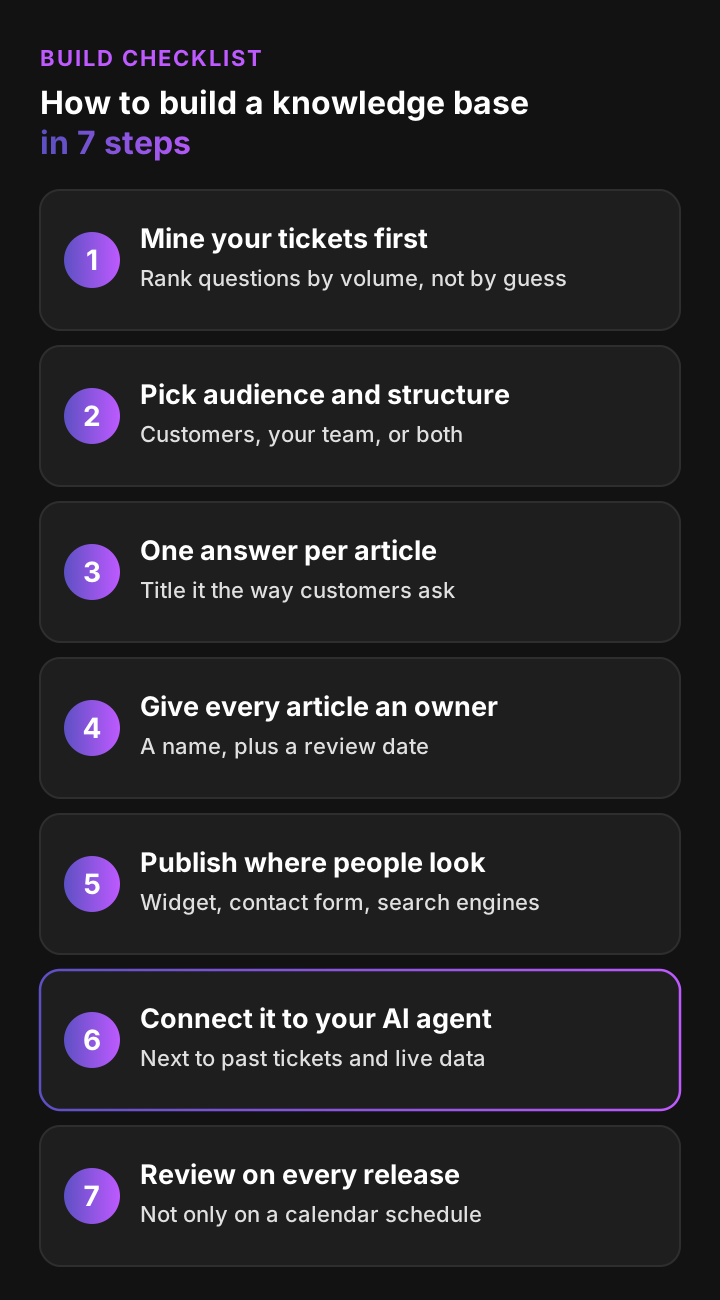
To build a knowledge base, start from the questions your customers already ask, write one answer per article, assign owners and connect the result to your help desk and AI agent. Here's the checklist I'd use, in order.
Step 1: Mine your tickets for the top questions
Export the last three months of tickets and group them by topic. Your help desk's tags or ticket fields make this faster. The 20 to 30 topics with the most volume are your first articles.
This step keeps you from writing articles nobody needs. It also gives you a baseline: if a topic drops in volume after you publish, the article is working.
Step 2: Pick the audience and the structure
Decide whether this knowledge base is for customers, your team, or both. Then sketch three to six top-level categories that match how customers think, such as "Billing," "Setup" and "Troubleshooting," not your org chart.
Keep internal-only content out of the public help center. Most help desks support internal articles or restricted sections for that.
Step 3: Write one answer per article
Each article should answer one question, with the answer in the first two sentences. Title it the way customers ask: "How do I change my billing email?" beats "Billing email configuration."
A simple article template:
- A one-line answer.
- Numbered steps, one action each.
- A screenshot where the interface is confusing.
- What to do if it didn't work, with a link to contact support.
Step 4: Give every article an owner and a review date
Every article needs a named owner, not "the support team." Add a review date, and tie it to the product area the article covers, so the owner knows what to watch.
This is the single habit that separates a living help center from a graveyard, and one of the practitioners quoted below describes exactly this system.
Step 5: Publish where people already look
Link the help center from your chat widget, contact form and product help menu. Many help desks can suggest articles while a customer types. Let search engines index public articles too, since many customers start with Google.
Step 6: Connect it to your AI agent and help desk
Connect your articles to your AI agent, but don't stop there. Add the sources that hold the answers articles miss: past resolved tickets, internal docs, uploaded files and live account data.
With Pluno, those sources sit together in one knowledge hub per brand. When sources disagree, it escalates to your team with a research summary instead of guessing. If your internal wiki lives in Confluence or Notion, Pluno's AI Copilot can draft agent replies from it too.
Step 7: Review it on every release, not only on a calendar
Calendar reviews catch slow decay. Releases cause fast decay. Add "which articles does this change?" to your release checklist, and send the owners a list on launch day.
Also watch your tickets. A spike on a topic that already has an article usually means the article is wrong, unclear or hard to find.
How to tell if your knowledge base works
Track four numbers:
- Failed searches: what people searched for and didn't find. Each one is a missing or badly titled article.
- Article ratings: the share of readers who marked an article helpful.
- Ticket volume per topic: whether tickets on a topic drop after you publish.
- AI resolution rate: the share of tickets your AI agent resolves. It shows how much of what your team knows is usable.
Here's the whole checklist on one page:
Why every knowledge base goes stale
Every knowledge base goes stale because the product changes faster than articles do, and writing articles is nobody's full-time job. Even teams with good habits end up with gaps between what the docs say and what's true.
Three forces drive it:
- Releases outrun writing. A new setting ships on Tuesday. The article gets updated when someone notices, if they notice.
- The best answers never get written up. Your senior agents solve edge cases in tickets every day. Those fixes live in the ticket history and in Slack threads, not in articles.
- Ownership fades. The person who wrote the article moves teams. Nobody else feels responsible for it.
The result is a help center that's strong on the questions you answered last year and weak on the ones customers ask today. For AI agents that only read articles, that's a hard ceiling on what they can resolve.
A better tool helps with authoring, search and upkeep, but it doesn't write the missing articles for you.
What people say about keeping a knowledge base current
I collected first-hand accounts from engineers and team leads on Hacker News who maintain wikis and knowledge bases. The pattern they describe applies just as much to help centers.
“We've got bits of docs lying around that were intended to be updated weekly, and regularly fall to the wayside for months at a time. ... Our confluence is a graveyard of useless pages and it's only going to get worse over time.”
“even with a LOT of wiki documentation, it is almost always severely out of date and many people don't know what is where... And, in the end, almost nobody reads it and just ask other, more senior people within the team/org.”
“Felt good to know that stuff is neatly documented somewhere, but since no one ever knows where that was, it was of little value and few ever read it. People still tapped on shoulders and repeated the same mistakes.”
“A user is assigned as the owner for a document. They get pinged when the article hasn't been updated in X months. They look it over and fix it, and the cycle starts over.”
“From experience, I think any system that requires more than a few minutes to make an edit ends up not being updated and going stale pretty quickly.”
The takeaway: stale content and low trust are normal, and named owners plus easy edits are what people say actually helps.
Do you need a perfect knowledge base before using AI?
No. You don't need a perfect knowledge base before AI can resolve tickets, as long as the AI learns from more than your articles.
Help desk AI often leans on articles. Zendesk's native AI primarily reads help center articles, macros and procedures (Zendesk AI vs Pluno), and Fin treats past tickets as feedback for improving the knowledge base (Fin vs Pluno). So the advice you hear is "fix your help center first." That can mean months of writing before you see any result. And because every knowledge base goes stale, "first" never quite ends.
Pluno takes a different route. It treats your resolved tickets as primary evidence, so the troubleshooting steps your agents already use count even if nobody wrote them up as articles. It reconstructs those steps, diagnostic flows and edge-case fixes from past tickets, and it prioritizes the latest successful resolutions.
Here's how it handles a ticket:
- It searches in parallel across past tickets, your help center, docs, uploaded files, team threads such as Slack, and connected APIs.
- It runs several rounds of research, cross-checking sources until it's confident.
- It replies only when its sources agree. When evidence is thin or conflicting, or a business decision is needed, it escalates with a research summary instead of guessing.
Your help center still matters. Articles add approved, customer-ready wording, and Pluno uses them alongside everything else.
How Waste Vision turned past tickets into a knowledge base
Waste Vision, a waste management tech company, had a common problem: critical knowledge lived in the heads of a few experienced employees. Their documentation was incomplete, and the AI tools they tried before couldn't make good use of their historical tickets.
They chose Pluno mainly because it uses historical Zendesk tickets as a knowledge base. It was operational within a few days, set up by their own service team, with no new articles written first. Today Pluno resolves about 10 to 20% of their incoming tickets automatically, on technical questions about specialized hardware and software, and Waste Vision has connected it to its own platform for live system data. On the tickets agents handle, AI Copilot saves them 2 to 5 minutes each, because answers come from relevant past tickets instead of a long search.
Across customers, Pluno reports a 65% average resolution rate and 48% average agent time saved, as of November 2026.
What Pluno costs
Pluno publishes its prices on the pricing page:
- Platform fee: from 249€ a month, or 210€ a month billed annually, for up to 500 tickets.
- Deflection AI: 0.90€ per resolved ticket, on top of the platform fee. Escalations are never billed.
- AI Copilot: 49€ per seat a month, for agents who want reply drafts in the help desk.
It runs in Zendesk, Intercom, Salesforce Service Cloud, HubSpot, Jira Service Management and Freshdesk. There's a 14-day free trial with full access to every module, and no credit card. Read more on the Deflection AI page.
How to choose knowledge base software: 6 tools compared
The right knowledge base software depends on who reads it. Pick a help desk-native help center if customers are the main audience, a wiki if your team is, and a dedicated knowledge base tool if documentation is a product in its own right.
Here are six well-known tools, scored on the yardsticks from the intro in the table below. Prices come from each vendor's pricing page on November 13, 2026, and can change.
1. Zendesk Knowledge: best for teams already on Zendesk
Zendesk Knowledge is Zendesk's help center for customers and agents, with article permissions by audience. Generative search answers from your articles, Zendesk's AI agents cost $1.50 to $2.00 per automated resolution, and a "Knowledge builder" generates articles from ticket history, with a content health view to track them. Those articles then live in your help center like any others. Pluno uses resolved tickets directly when it answers, favoring the latest successful resolutions, so nothing has to be written up first. Help center features start in Suite Team, at $55 per agent a month, paid yearly.
2. Confluence: best for an internal team wiki
Confluence is Atlassian's wiki, with page version history, analytics and templates. Atlassian says its Rovo AI search and chat are available on Standard, Premium and Enterprise cloud plans. It's free for up to 10 users, and it pairs best with Jira Service Management.
3. Notion: best for small teams that want one flexible workspace
Notion positions its wikis for internal knowledge. On Business, Notion Agent answers from your workspace and you can mark pages as verified, a badge that shows in search and AI citations. Plans run from free to Business at $20 per member a month, billed yearly.
4. HubSpot Knowledge Base: best for teams on HubSpot Service Hub
The HubSpot knowledge base is built for customer self-service, with article reporting, ratings and multilingual articles. HubSpot's Customer Agent answers from it and runs on HubSpot Credits. It starts in Service Hub Professional, from $90 per seat a month billed annually, plus a one-time $1,500 onboarding fee.
5. Document360: best for a dedicated, standalone knowledge base
Document360 serves documentation to customers and employees. Its review reminders mark an article "Stale" when its review date passes, and its Eddy AI search answers from your articles. Pricing is quote-based.
6. Help Scout Docs: best for small teams that want a simple help center
Help Scout Docs holds customer-facing and team-facing articles in one site, with a report on failed searches and article ratings. Help Scout's AI agent, Envoy, answers from your articles for $0.75 per resolution. There's a free plan, and Standard is $25 per user a month, billed annually.
Knowledge base software side by side
| Tool | Audience | AI answers | Upkeep tools | Help desk fit | Entry price (Nov 2026) |
|---|---|---|---|---|---|
| Zendesk Knowledge | Both | Generative search; AI agents at $1.50 to $2.00 per resolution | Content health, Knowledge builder | Native to Zendesk | Suite Team, $55/agent/mo yearly |
| Confluence | Mostly internal | Rovo on paid cloud plans | Version history, analytics | Best with Jira Service Management | Free up to 10 users |
| Notion | Internal | Notion Agent on Business | Verified pages (Business) | Via integrations | Free; Plus $10, Business $20/member/mo yearly |
| HubSpot Knowledge Base | Mainly customers | Customer Agent on credits | Article reporting, ratings | Native to HubSpot | Professional from $90/seat/mo yearly + $1,500 onboarding |
| Document360 | Both | Eddy AI included; chatbot add-on | Review reminders, Stale state | Via integrations | Quote only |
| Help Scout Docs | Both | AI agent at $0.75 per resolution | Docs report, failed searches | Native to Help Scout | Free; Standard $25/user/mo yearly |
How to choose:
- Customers are the main audience and you already have a help desk: use its built-in help center first. Zendesk Knowledge, HubSpot and Help Scout Docs all keep articles next to tickets.
- Your team is the main audience: Confluence fits teams already on Atlassian; Notion suits smaller teams that want one flexible workspace.
- Documentation is a product in itself: a dedicated tool such as Document360 gives you review reminders, workflows and localization.
- You want AI to resolve the tickets your articles don't cover yet: use Pluno for the AI answers, with whichever of these holds your articles.
Whichever you pick, the AI that answers from it matters as much as the editor. Pluno isn't a help center editor, so it isn't in the table. It's the AI layer that replaces a tool's built-in AI answers, measured on the same yardsticks:
- Audience: customers through Deflection AI, and agents through AI Copilot.
- AI answers: resolves tickets from past tickets, help center articles, docs, uploaded files, team threads and connected APIs, at 0.90€ per resolved ticket. Escalations are never billed.
- Upkeep: favors the latest successful resolutions, and escalates with a research summary when sources conflict.
- Help desk fit: runs inside Zendesk, Intercom, Salesforce Service Cloud, HubSpot, Jira Service Management and Freshdesk.
- Entry price: a platform fee from 210€ a month, billed annually, plus resolutions. For more options, see our list of Zendesk knowledge base alternatives, which covers Document360, Helpjuice, Stonly, GitBook, Guru and ProProfs.
The bottom line on building a knowledge base
A knowledge base is still the backbone of self-service and agent onboarding. Build it from your ticket data, keep each article to one answer, give every article an owner and review it whenever the product changes.
But don't confuse "complete knowledge base" with "ready for AI." Your articles will always trail your product, and the answers to your hardest tickets often live in tickets your team already solved. An AI agent that learns from those tickets can resolve them now, while your writers keep improving the help center.
The quickest way to see the gap between what's documented and what your team knows is to test it. Ask for a simulation on your 50 most recent tickets. You'll see the quality of Pluno's answers, any gaps in its knowledge and when it would hand off, all before anything goes live.
Prefer a walkthrough first? Book a demo instead.
FAQ
What is a knowledge base in simple terms?
A knowledge base is a searchable library of answers about a product, service or subject. In customer support, it's usually a set of articles, such as how-tos, FAQs and troubleshooting guides, that customers or agents use to find answers without asking someone.
What is an example of a knowledge base?
Public examples include Zendesk Help, the HubSpot Knowledge Base and Stripe Docs. Internal examples include a team's Confluence or Notion wiki. The GitLab Handbook is an internal knowledge base that GitLab publishes openly.
Is knowledge base one word or two?
Two words: "knowledge base." Some companies use "knowledgebase" in product names, but the two-word spelling is the standard one in dictionaries such as Cambridge.
What is another word for knowledge base?
Common synonyms are help center, help docs, support center, FAQ, wiki, documentation and handbook. "Help center" usually means the customer-facing version, while "wiki" usually means the internal one.
What's the difference between a knowledge base and an FAQ page?
An FAQ page is one page of short answers to the most common questions. A knowledge base is a searchable library of many articles, each covering one task or problem in depth. Most knowledge bases include an FAQ section, but an FAQ page alone rarely covers troubleshooting.
What are the main types of knowledge base?
Support teams run three: a customer-facing help center, an internal team wiki and the set of sources their AI agent answers from. The last one can include past tickets, docs, uploaded files and live data, not only articles.
What is knowledge base software?
Knowledge base software is a tool for writing, organizing, publishing and searching help articles. Examples include Zendesk Knowledge, Confluence, Notion, HubSpot's knowledge base, Document360 and Help Scout Docs. Many now add AI search or AI answers.
How do I create a knowledge base?
Start from your tickets: group the last three months by topic and write articles for the 20 to 30 biggest topics first. Write one answer per article, give each one an owner and a review date, publish it where customers look and connect it to your AI agent. Then review it on every release.
What is a knowledge base in AI?
In AI, a knowledge base is the information an AI system looks up to answer questions, instead of relying only on what the model learned in training. For a support AI agent, it's the set of sources it's allowed to read, such as help center articles, past tickets and docs.
How often should you update a knowledge base?
Review each article whenever the product area it covers changes, with a fixed schedule as a backstop. A spike in tickets on a topic that already has an article is a sign to check it right away.
Do I need a knowledge base before using an AI agent?
Not necessarily. Many AI agents mainly answer from help center articles, so gaps there limit them. Pluno treats resolved tickets as primary evidence, so it can use the fixes your agents already found even if nobody wrote them up as articles.