Agentic AI is artificial intelligence that works toward a goal on its own: it decides which tools to use, runs them, checks the result and repeats until the job is done or it needs a person. A chatbot answers your question. Agentic AI looks up the order, issues the refund and closes the ticket.
If you lead a support team, someone has probably asked you for your "agentic AI plan" this year. The term sits on every vendor homepage, and it now covers everything from a smarter FAQ bot to software that changes customer accounts without asking anyone.
This guide gives you a working definition you can defend, shows the architecture on a support ticket and walks through worked examples. For vendor-by-vendor buying analysis, see my comparison of AI agents for customer support. When I compare kinds of AI in this post, I use the same four yardsticks every time:
- Goal: who sets the task, and how specific it is.
- Next step: who decides what happens next, the model or a person.
- Tools: which tools it can call, and whether it can only read or also change things.
- Human checkpoint: where a person reviews or approves the work.
Sources: every statistic links to its original source, with the date it was published or measured. Analyst forecasts are labeled as forecasts. The support tickets used as examples are illustrative composites of common SaaS ticket patterns, not single customers.
Disclosure: I work at Pluno, which sells an AI layer for help desks that resolves tickets, assists agents and escalates to engineering.
TL;DR
- What is agentic AI? AI that picks and runs tool calls toward a goal with limited supervision. It checks each result and loops until it finishes or hands off. Read-only agents count too.
- The difference from generative AI: generative AI produces content when you prompt it. Agentic AI uses that ability inside a loop that decides the next step and calls tools.
- Where it works: well-defined goals where the agent can reach the data and tools it needs. In support, that includes account-specific technical tickets, not only FAQs.
- Where it fails: vague goals, missing data and tools nobody fenced in. In June 2025, Gartner predicted that over 40% of agentic AI projects will be canceled by the end of 2027.
- My recommendation for B2B support teams with technical, account-specific tickets: shortlist Pluno. It learns from your resolved tickets, investigates across your tools and hands engineering a complete escalation. Innovorder, whose tickets span software and hardware, reports that Pluno resolves 67% of its chat tickets.
- Bottom-line advice: start with one ticket type, give the agent read access before write access, and measure resolutions that stay resolved.
Agentic AI meaning: what it is and what it does for your team
In plain terms, agentic AI is software that acts on your behalf to reach a goal. You tell it the outcome you want, and it chooses the steps, runs them through tools and checks whether they worked.
The major definitions line up closely. IBM describes a system that reaches a specific goal "with limited supervision". Google Cloud says it can set goals, plan and carry out tasks with minimal human input, and Gartner defines agentic AI systems as ones that plan and take actions on their own to meet goals a user sets.
Where they differ is how much the AI decides. AWS stresses acting independently, while OpenAI's agent guide draws its line at control: a chatbot that uses a language model but doesn't direct the workflow is not an agent.
Adoption is real. In McKinsey's State of AI 2026, surveyed in May and June 2026, 40% of respondents from large organizations reported scaling AI agents, up from 27% a year earlier.
For a support team, the payoff is direct. A ticket that needs three lookups, one account check and a reply no longer waits for a person to do each step. The agent works it end to end when it can, and otherwise passes it on with the research done.
Where the word "agentic" comes from
"Agentic" comes from agency, the capacity to act rather than only respond. IBM ties the term to a model's capacity to act independently and with purpose.
The word spread in AI circles in 2024, when Andrew Ng started writing about agentic design patterns: reflection, tool use, planning and multi-agent collaboration. He later explained that he preferred the adjective because systems can be agentic to different degrees.
That framing matters. "Agentic" describes a way of working, not a product category, and the same product can be more or less agentic depending on how much you let it decide.
How I judge whether a product is agentic: 4 checks
Sources draw the boundary in different places, so treat this as my evaluation framework, not a universal test. I look for four things, in degrees rather than yes or no.
- A goal. The model works toward an outcome ("get this customer back into their account"). The goal can arrive in an ordinary prompt.
- Its own next step. The model decides what to do next. It doesn't have to show you a written plan to qualify.
- Tool use. It selects and runs tool calls, such as searching past tickets or checking an account. Read-only tools count: an agent that only searches and reads can still be agentic.
- Self-checking. It tests results against the goal, and it knows when to stop and ask a person. A human approval step on risky actions doesn't remove its agency.
A product that only produces text when prompted, with no tool calls of its own, is a text assistant. One that follows a fixed script is a chatbot, whatever the label says.
How does agentic AI work?
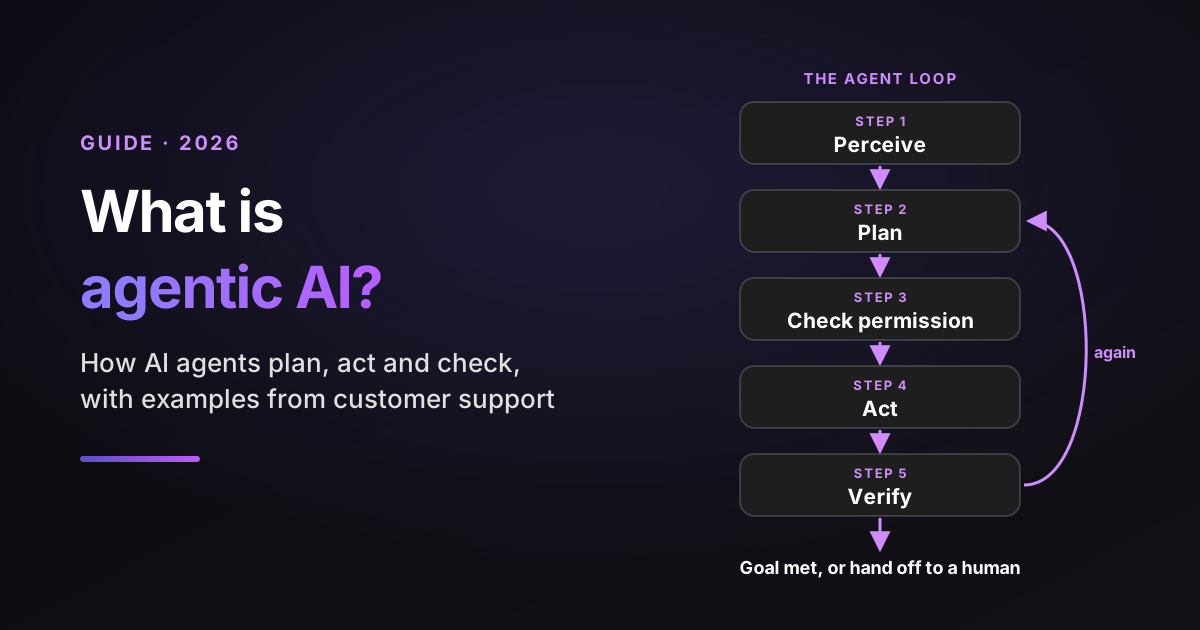
Agentic AI works in a loop: it perceives the situation, plans the next tool call, checks the call is allowed, runs it and verifies the result. It repeats until the goal is met, a guardrail stops it or it hands the work to a person.
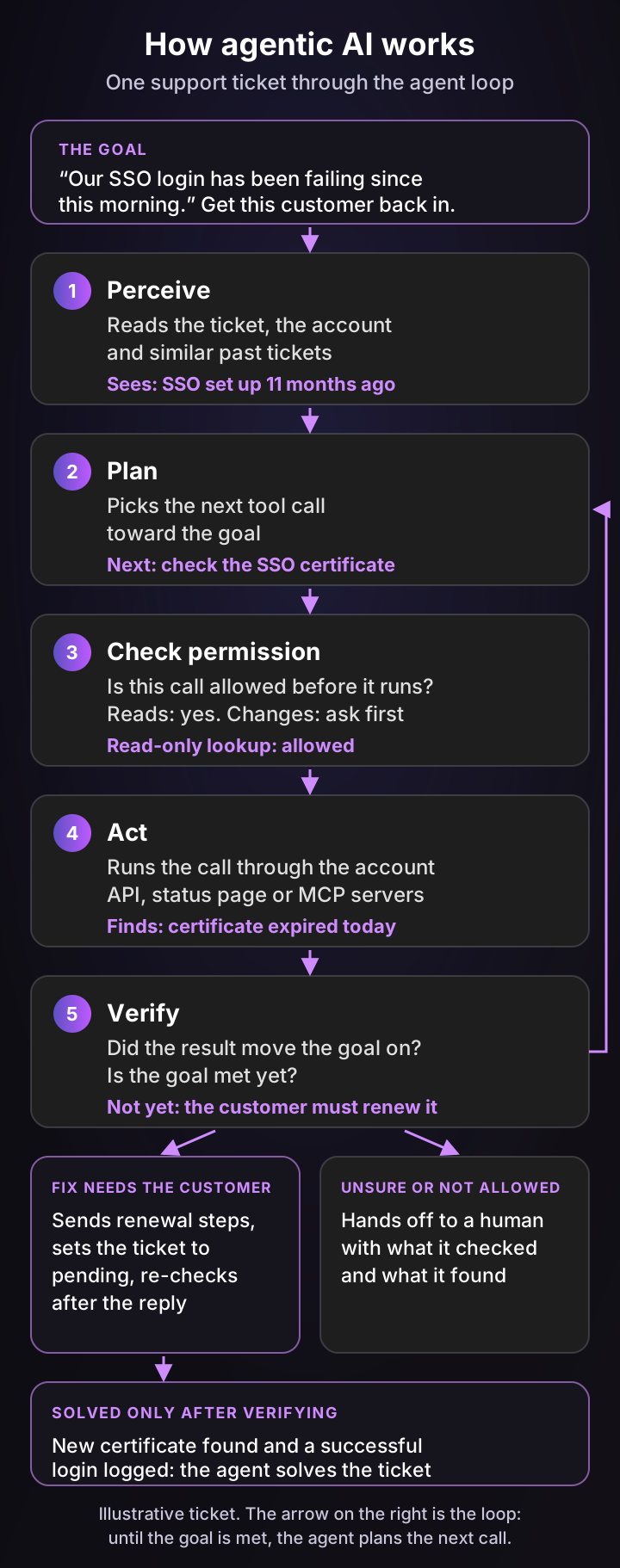
The five-step agent loop, on one ticket
Here's the loop on an illustrative B2B SaaS ticket: "Our SSO login has been failing since this morning."
- Perceive. The agent reads the ticket, the customer's account record and similar past tickets. It notices SSO was configured 11 months ago.
- Plan. It picks the next tool call: check the identity provider certificate, since signing certificates expire on a fixed schedule.
- Check permission. Before the call runs, it confirms the call is allowed. A read-only lookup is fine; a change to the account would need approval.
- Act. It runs the lookup through the account API and finds the certificate expired today.
- Verify. It asks whether the goal is met. It isn't: only the customer's admin can upload a new certificate.
So the agent sends renewal steps and sets the ticket to pending. When the customer replies, it loops again: it confirms a new certificate is in place and a successful login is logged, and only then solves the ticket. If anything looked unclear, it would hand off to a person with what it checked.
The building blocks: model, tools, memory and guardrails
Under the loop sit four components. Vendors package them differently, but every serious agent has all four.
- A reasoning model. A large language model (LLM) reads the situation, chooses the next step and writes. This is the generative AI part.
- Tools. Functions the model can call, such as "look up order", "search past tickets" or "issue refund". Without tools, the model can only talk.
- Memory. What the agent has already tried in this task, plus longer-term knowledge such as your help center and resolved tickets.
- Guardrails. Rules enforced outside the model on what it may do alone, such as refund caps, topics it must escalate and which actions need approval.
Agentic retrieval: searching like an investigator
Retrieval-augmented generation (RAG) means the AI fetches relevant documents before it answers. Agentic RAG goes further: the agent decides its follow-up searches based on what each search turns up.
In the SSO example, a first search of past tickets surfaces "login failures after certificate expiry". That result tells the agent its next search: this account's certificate date. A fixed one-shot search would have stopped at the article and guessed.
Workflows vs agents: the distinction that saves you money
Anthropic draws a useful line in its guide to building effective agents. In a workflow, the steps are fixed in code and the model fills them in. In an agent, the model directs its own process and picks its tools as it goes.
The same guide notes that agentic systems trade speed and cost for better results, and recommends the simplest setup that works. In support, that often means a fixed workflow for password resets and a true agent for tickets that need investigation.
MCP and A2A: how agents plug into your tools
The Model Context Protocol (MCP), open-sourced by Anthropic in November 2024, gives agents one standard way to connect to the systems where your data lives. When Anthropic donated MCP to the Agentic AI Foundation under the Linux Foundation in December 2025, it counted more than 10,000 active public MCP servers.
Google's Agent2Agent (A2A) protocol, launched in April 2025, covers a different job: agents talking to other agents. It moved to the Linux Foundation in June 2025.
In practice, MCP turns "does it integrate with our stack?" into "which internal systems can it reach, and with which tools switched on?" Since October 22, 2026, Pluno connects to your own MCP servers, so Deflection AI and AI Copilot can pull information from internal systems in real time, with tools enabled separately for each.
Agentic AI vs generative AI, AI agents and chatbots
These terms overlap, and vendors use them loosely. The cleanest way to tell them apart is two questions: who decides the next step, and who approves before anything changes.
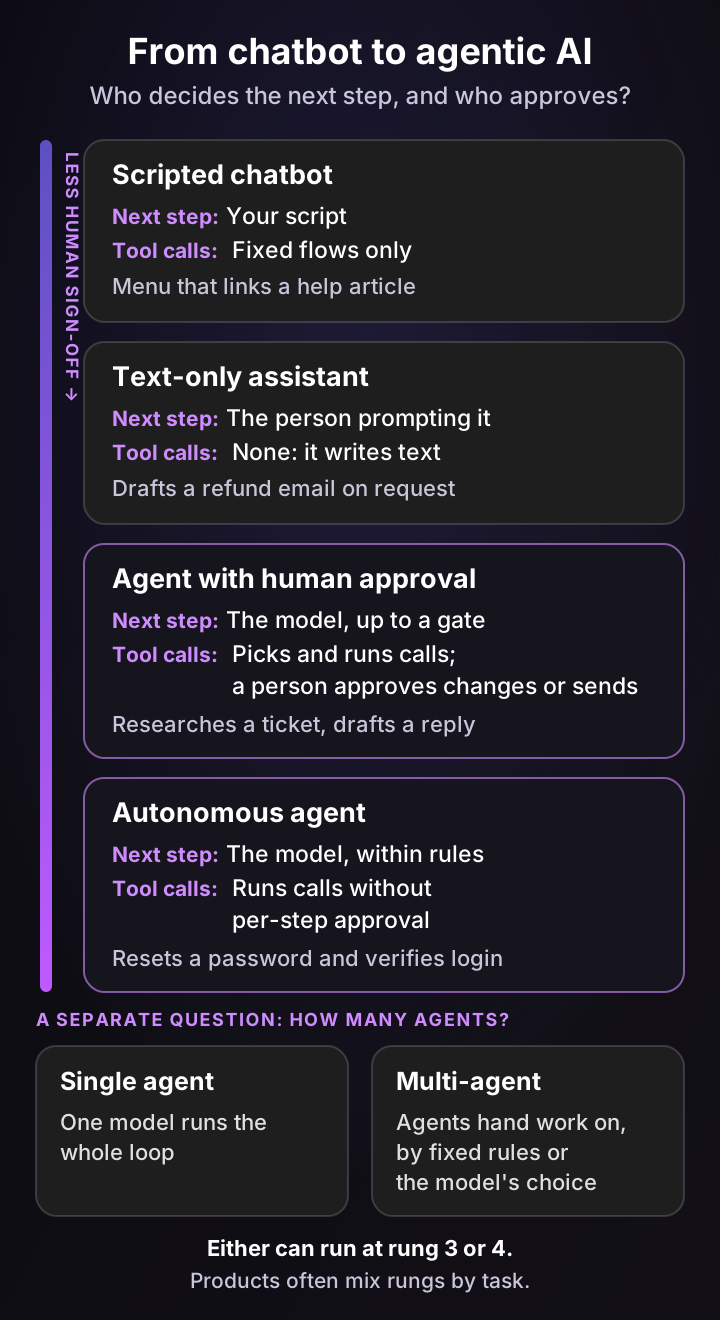
Agentic AI vs generative AI
Generative AI creates content, such as text, images or code, in response to a prompt. Agentic AI uses that ability as one part of a loop that also chooses tools, runs them and checks the results.
A quick test: ask a text-only assistant to "refund order 4471" and it writes a polite email about a refund. Ask an AI agent and it checks the order, confirms the refund fits your policy, issues it through your billing tool and then writes the email. Google Cloud frames agentic AI as a subset of generative AI that goes beyond creating content by carrying out actions in other systems.
Agentic AI vs AI agents
The two terms describe the same idea at different levels. An AI agent is one piece of software built to work this way. Agentic AI is the broader approach, which can use one agent or several.
How many agents is a separate question from how much autonomy they have. A single agent can run alone or behind an approval gate, and so can a multi-agent system, where one agent hands work to another. That handoff can follow fixed rules, such as "billing tickets go to the billing agent", or the model's own judgment.
AI agents vs chatbots and copilots
These labels describe configurations, not hard product categories, and one product often combines them. The same tool can act alone on password resets and wait for approval on refunds.
| Configuration | Goal | Next step | Tools | Human checkpoint | Support example |
|---|---|---|---|---|---|
| Scripted chatbot | Fixed by the flow | Your script | Fixed flows only | None, or a "talk to a human" button | A menu that links a help article |
| Text-only assistant | One prompt at a time | The person prompting | None; it writes text | Every output | Drafting a reply in a chat window |
| Agent with human approval | An outcome, up to an approval gate | The model, until the gate | Picks and runs calls; a person approves changes or sends | Before changes or sending | Researching a ticket and drafting a sourced reply for an agent |
| Autonomous agent | An outcome, such as "resolve this ticket" | The model, within your rules | Runs calls without per-step approval | Rules set in advance, plus handoff | Resetting a password and confirming the login works |
Many copilots sit in the third row: they run searches on their own and let a person approve the reply. If you're weighing these options for a help desk, my comparison of AI agents for customer support goes vendor by vendor.
7 agentic AI examples you can see working today
The clearest agentic AI examples share three things: a narrow goal, a defined set of tools and a clear point where a person steps in. Here are seven you can try or watch in production, with the same four yardsticks applied to each.
1. Resolving support tickets end to end
An AI agent reads a new ticket, searches your help center, past tickets and account data, takes an allowed action and replies. Fin, Zendesk AI agents, Salesforce Agentforce, Sierra, Decagon and Pluno's Deflection AI all work this way, with different limits on what they may change.
Vendor numbers need a close read. Salesforce reports that the agent on its own help site has passed five million conversations, but it counts a conversation as resolved when the agent answered the question.
- Goal: resolve the ticket. Next step: the model, within your rules. Tools: lookups and approved account changes. Human checkpoint: handoff when evidence is thin or the request needs a decision.
2. Investigating technical tickets
Some tickets need a root cause, not an article. A troubleshooting agent checks recent deploys, error tracking and logs, then returns the likely cause with links to the evidence.
Pluno's Troubleshooting Agent works this way. By default it proposes a fix and asks for approval before opening a pull request. You can configure it to open pull requests automatically for specific repositories or kinds of issues, and a person still reviews every change before merge.
- Goal: find the cause. Next step: the model, across code, logs and errors. Tools: read-only checks, plus pull requests where you allow them. Human checkpoint: approval before a pull request by default, and review before merge.
3. Acting inside your product
An in-product agent answers "why isn't this working?" by checking the user's own configuration, then offers to fix it. Pluno's Product Agent can change settings, complete setup or run exports once the user confirms.
- Goal: fix the user's setup. Next step: the model. Tools: read the account, then change settings. Human checkpoint: the user confirms before each change.
4. Coding agents
Claude Code is described by Anthropic as "an agentic coding tool" that reads a codebase, edits files and runs commands. GitHub's Copilot in the cloud, previously called the Copilot coding agent, can research a repository, plan changes and implement them in the background.
- Goal: ship a code change. Next step: the model. Tools: edit files, run tests, open a pull request. Human checkpoint: code review before merge.
5. Browser agents that use websites for you
Browser agents open web pages, click, type and fill forms the way a person would. OpenAI introduced ChatGPT agent in July 2025 with this ability, and said it asks for permission before actions of consequence.
- Goal: finish an online task. Next step: the model. Tools: a browser and file tools. Human checkpoint: permission before purchases and other consequential steps.
6. Research agents
Research agents run many searches, read the sources and write a cited report. Google describes Gemini Deep Research as searching hundreds of websites, reasoning through what it finds and producing a multi-page report. It changes nothing, which shows an agent doesn't need write access to be agentic.
- Goal: answer a question with sources. Next step: the model chooses each follow-up search. Tools: search and read only. Human checkpoint: you read and verify the report.
7. IT service desk agents
Internal help desks use the same pattern for password resets, access requests and device issues. ServiceNow, for example, describes using AI agents across its own operations, including its employee service desk.
- Goal: close the internal request. Next step: the model, within IT policy. Tools: reset, grant or route. Human checkpoint: approvals for access and anything security-related.
| Example | Goal | Next step | Tools | Human checkpoint |
|---|---|---|---|---|
| Support ticket resolution | Resolve the ticket | The model, within rules | Lookups, approved account changes | Handoff on thin evidence |
| Technical investigation | Find the root cause | The model | Read-only checks, pull requests where allowed | Approval before a pull request by default, review before merge |
| In-product agent | Fix the user's setup | The model | Read and change settings | User confirms each change |
| Coding agent | Ship a code change | The model | Edit, test, open a pull request | Code review |
| Browser agent | Finish an online task | The model | Browser and files | Permission for consequential steps |
| Research agent | Answer with sources | The model | Search and read only | You verify the report |
| IT service desk agent | Close the request | The model, within IT policy | Reset, grant, route | Approvals for access |
Agentic AI in customer service: what it handles today
Agentic AI in customer service is no longer limited to questions with a help center answer. The real dividing line is whether the fix is within reach of the agent's data and tools, or needs a change to your product.
Here's an illustrative example. A customer writes that their CRM sync stopped.
The agent finds three similar past tickets that were fixed by reconnecting an expired login token, and confirms through the account API that this customer's token expired two days ago. It sends the reconnect steps, then checks that the next sync succeeded before closing the ticket.
Had the token been valid and the error logs pointed to a regression in your code, the same agent would stop and escalate to engineering with the evidence attached. Configuration problems like the first case are resolvable; product defects like the second need a developer.
Here's how I'd sort a typical B2B SaaS queue. The split is illustrative and depends on your data and the tools you connect.
| Ticket type | What an AI agent does today | Why |
|---|---|---|
| How-to questions with a documented answer | Resolves end to end | The answer exists and nothing risky changes |
| Account lookups and status checks | Resolves end to end | Read-only tool calls with a clear result |
| Account-specific configuration problems | Investigates and resolves | Past resolutions, account data and connected tools reveal the fix |
| Simple account changes (reset, resend, toggle) | Resolves with guardrails | Low-risk actions you can cap and log |
| Refunds and credits | Resolves under a limit, escalates above it | Money needs a policy threshold |
| Product defects | Investigates, then escalates with findings | The fix needs an engineering change |
| Angry, churn-risk or legal tickets | Drafts for a human | Tone and judgment carry the outcome |
The pattern behind the table: an agent is only as good as the data it can read and the tools you allow. Resolved tickets matter as much as help center articles, because they record how your team actually fixed things.
The forecasts are ambitious. Gartner predicted in March 2025 that by 2029, agentic AI will resolve 80% of common customer service issues without a human. In Salesforce's State of Service survey, run from April to June 2025, service teams estimated that AI handled 30% of their cases at the time, and expected 50% by 2027.
Klarna shows the limits. Its AI assistant handled two-thirds of customer service chats in its first month in 2024, and the company later started hiring human agents again after its CEO said quality had dropped.
Customers also want a way out. In a Gartner survey of 3,566 customers, 87% said companies using generative AI must offer a way to reach a human agent.
The risks of agentic AI and how to design around them
Agentic AI fails in predictable ways, which means you can design around most of them before launch. The risk grows with every tool you let it run without review.
Gartner predicted in June 2025 that over 40% of agentic AI projects will be canceled by the end of 2027, because of rising costs, unclear business value or weak risk controls. The same release named the hype problem "agent washing", rebranding chatbots and robotic process automation (RPA) as agents, and estimated that only about 130 of the thousands of agentic AI vendors were real.
| Risk | What it looks like in support | How to design around it |
|---|---|---|
| Agent washing | A rebranded chatbot sold as an "agent" | Ask which tools it calls and with what permissions, then test it on your own tickets |
| Confident wrong answers | A plausible reply built on an outdated article | Require enough evidence for this account, and hand off when sources conflict |
| Unsafe actions | A refund issued outside policy | Start read-only, then add actions with caps, logs and approval where needed |
| Direct prompt injection | A customer message telling the agent to ignore its rules | Enforce permissions in the application, not the prompt |
| Indirect prompt injection | Instructions hidden in a retrieved document, web page or tool response | Restrict each tool's capabilities, validate action parameters and require approval for risky actions |
| Runaway loops | The agent and an auto-responder emailing each other | Rate limits, loop detection and caps per ticket |
| Surprise cost | Paying for every attempt, resolved or not | Check what counts as billable before you sign |
Security teams treat these as known risks. OWASP ranks prompt injection first among risks for LLM applications, including instructions hidden in external content. It lists excessive agency separately, tracing it to too much functionality, too many permissions or too much autonomy, and each of those is a setting you control.
What does agentic AI cost?
AI agents for customer service are usually priced per resolution, per outcome, per conversation, per action or per seat, often on top of a platform fee. The billing model you choose changes your bill more than the headline price does.
Here's how the main customer service agents charge, taken from each vendor's own pricing page in October 2026:
- Per resolution: Zendesk charges $1.50 per committed automated resolution or $2.00 pay-as-you-go, for requests resolved without escalation to a human. Pluno's Deflection AI costs 0.90€ per resolved ticket, and escalations are not billed.
- Per outcome: Fin charges $0.99 per outcome. An outcome covers resolutions and certain configured handoffs, such as Procedure handoffs, so it's a broader unit than a resolution.
- Per conversation: Salesforce Agentforce charges $2 per customer-facing conversation.
- Per action: Agentforce's Flex Credits work out to $0.10 per action.
- Quoted per customer: Sierra uses outcome-based pricing, and Decagon offers per-conversation or per-resolution pricing.
Usage prices are only part of the bill.
Pluno, for example, adds a base fee that scales with your monthly ticket volume, from 249€ a month for up to 500 tickets, or 210€ a month billed annually. It covers the platform, training material and ongoing knowledge base management, and AI Copilot seats are 49€ a month each on top. Full prices are on the pricing page.
| Billing model | What you pay for | Example | Watch out for |
|---|---|---|---|
| Per resolution | Conversations the agent resolves without a human | Zendesk, Pluno Deflection AI | How "resolved" is defined, such as silence after a reply |
| Per outcome | Resolutions plus certain configured handoffs | Fin | Handoffs you pay for even though a human finished the job |
| Per conversation | Every conversation the agent handles | Agentforce | Paying for tickets the agent hands back |
| Per action | Each step the agent takes | Agentforce Flex Credits | Long tasks with many actions |
| Per seat | Each human agent using the AI | Copilot-style tools | Paying for seats, not results |
The difference matters most when your resolution rate is low, because per-conversation pricing charges for every ticket the agent hands back. Enter your own prices and fixed fees in one currency below to find the break-even point.
AI agent pricing calculator: pay per resolution or per conversation?
Per-resolution pricing bills only conversations the AI agent fully resolves. Per-conversation pricing bills every conversation the AI agent handles, resolved or not. Add any fixed monthly fee each vendor charges on top, such as a platform or base fee. Enter every price in one currency; the calculator does not convert. Set the prices to the quotes you have; list prices and what counts as billable differ by vendor and change often. Seats and setup are not included. Your own numbers, not benchmarks.
Per-resolution model, total
$1,200
$1,200 usage for 1,200 resolutions + $0 fixed
Per-conversation model, total
$1,500
$1,500 usage for 3,000 conversations + $0 fixed
Per-conversation model: total cost per resolved ticket
$1.25
What each real resolution costs you
At a 40% resolution rate, the per-resolution model costs less by $300 a month, fixed fees included. The two totals are equal at a 50% resolution rate. That threshold moves whenever the fixed fees differ. Below it, paying per conversation means paying for the tickets the AI agent hands back to your team.
For a full vendor-by-vendor breakdown, see my guide to what AI customer service agents cost.
How to roll out AI agents in your support team in 7 steps
The safest way to roll out an AI agent is narrow and evidence-led: one ticket type, read-only first, measured on resolutions that stay resolved. Here's the sequence I'd follow.
- Pick one high-volume ticket type. Pull your last 90 days of tickets and find a category with a known fix, such as password resets or a common configuration problem.
- Fix the knowledge first. Check that the answer lives somewhere the agent can read: an article, resolved tickets or an internal doc. If your best agents answer from memory, write it down before launch.
- Start read-only. Let the agent look up accounts and orders before it can change them. Add write actions one at a time, each with a limit, such as refunds under a set amount.
- Test on past tickets, fairly. Replay recent tickets using only the information available when each one arrived, and exclude the ticket's own resolution from what the agent can search. Score each answer against a reviewed rubric: factual accuracy, allowed actions only, useful handoffs and whether the problem would actually be solved. Don't score it on how closely it matches what your team sent, since some of those replies were wrong.
- Define the handoff. Decide what triggers escalation and what the agent passes along: a summary, what it checked and the next step. A handoff without context costs your team more time than no agent at all.
- Measure more than resolution rate. Track tickets solved without a human, reopens within a set window such as seven days, repeat contacts on the same issue, satisfaction on AI-handled conversations, how often humans step in and total handling cost. Cost per human ticket often rises as easy tickets leave the queue, so watch the total.
- Run it like a product. Give the agent an owner, rerun your test set after every knowledge or tool change, and monitor tool failures and handoff reasons. Make sure you can switch off a single action without switching off the whole agent.
An offline simulation on past tickets shows answer quality and how many tickets the agent could cover. It can't prove a production resolution rate on its own, so confirm that with live data on your first ticket type before you add the next. For deeper rollout guidance, see my guide to autonomous customer service.
What support teams say about AI agents
Here's what practitioners say in their own words, including two Pluno customers. Each card is one person's experience, not a benchmark.
“After a few months of running the AI agent, we found that both our time and cost per ticket had increased - but then digging in, the issue was that our overall cost and time had decreased and it was just that the more complicated issues the agent wasn't able to answer were the ones now going to the humans, skewing our per ticket cost up.”
“The numbers of resolved tickets were high, but when you looked at the quality, it wasn't great. You could feel frustration building up in our customer base.”
“The way Pluno streamlines back-and-forth communication, I haven’t seen it in any other AI tools we’ve explored.”
“Fin doesn't achieve 65% resolution rate like Intercom guarantees, it only achieves 50.7%, and in truth its much lower since we often have to intervene and rescue conversations where Fin is unhelpful or hallucinates, and Fin still claims these as its resolutions and Intercom charges us for these...”
“We implemented an AI-powered customer support triage system that initially looked promising in testing. In production, it actually increased our support costs by ~30%... Support agents spent more time correcting AI mistakes than they saved”
Three lessons stand out from these accounts:
- Watch total cost, not cost per ticket. One team saw cost per human ticket rise after launch because only the hard tickets reached people, while overall cost fell.
- Audit what gets counted as resolved. Two reviewers describe resolution counts that looked high while customers were still unhappy or needed a human rescue. Smartness switched to Pluno after a simulation on 50 real tickets, and now reports 40%+ real ticket deflection and a 22-minute first response time, down from hours (full story).
- The handoff to engineering matters. Kojo, a five-person team with over 1,000 tickets a month, went from no deflection to Deflection AI handling 30 to 50% of tickets, with peaks above 50%. Its Jira escalations are now created the same day instead of sitting in a backlog (full story).
How Pluno brings agentic AI into your help desk
Pluno is an AI layer for help desks: it runs inside Zendesk, Intercom, Salesforce Service Cloud, HubSpot, Jira Service Management and Freshdesk, so you keep your tickets, macros and reporting. It adds agentic AI across your support workflows, from the first reply to the engineering escalation.
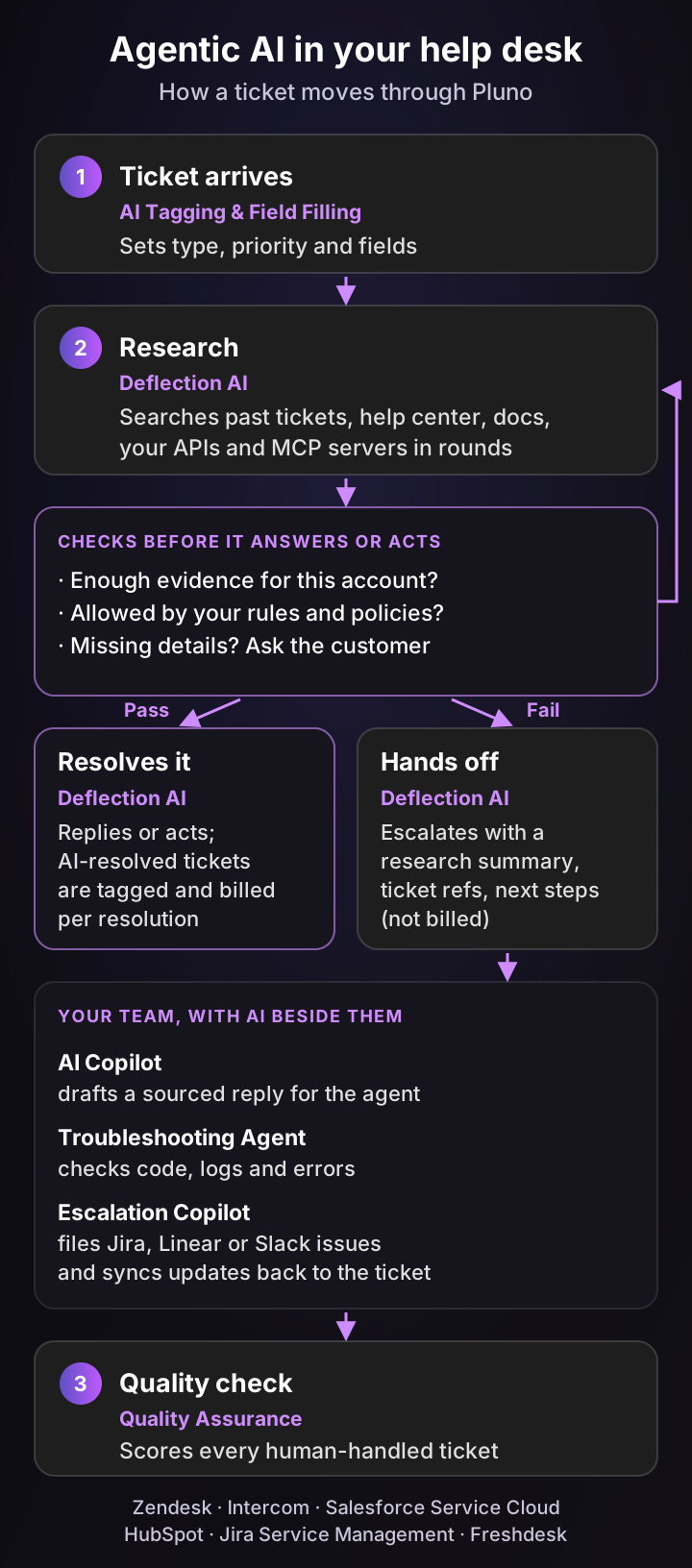
How Pluno applies the agent loop to your tickets
- Perceive from your real resolutions. Deflection AI learns from your resolved tickets, not just your help center, so it picks up the troubleshooting steps your agents actually use, favoring the latest successful resolutions.
- Research in rounds. It runs several rounds of parallel searches across past tickets, the help center, docs, Slack threads, connected APIs and your MCP servers, and asks the customer follow-up questions when details are missing.
- Check before it answers or acts. It replies only when it has enough evidence and your AI Workflows allow it, and custom API actions let it read and write live data, such as order or account status.
- Hand off with the research done. When evidence is thin or a decision is needed, it escalates with a research summary, ticket references and next steps. Loop detection, rate limits and deflection caps prevent runaway replies.
- Pay for resolutions. Deflection AI is billed per fully resolved ticket, and every AI-resolved ticket is tagged in your help desk, so you can audit the bill.
AI for the tickets that need your team
Agentic work doesn't stop at the customer-facing reply. AI Copilot drafts sourced replies for your agents, Escalation Copilot files Jira, Linear, Slack, Microsoft Teams or incident.io escalations with the brief already written, and the Troubleshooting Agent investigates technical tickets across code, logs and error tracking.
Inside your own product, the Product Agent checks each user's setup, answers and makes changes once the user confirms.
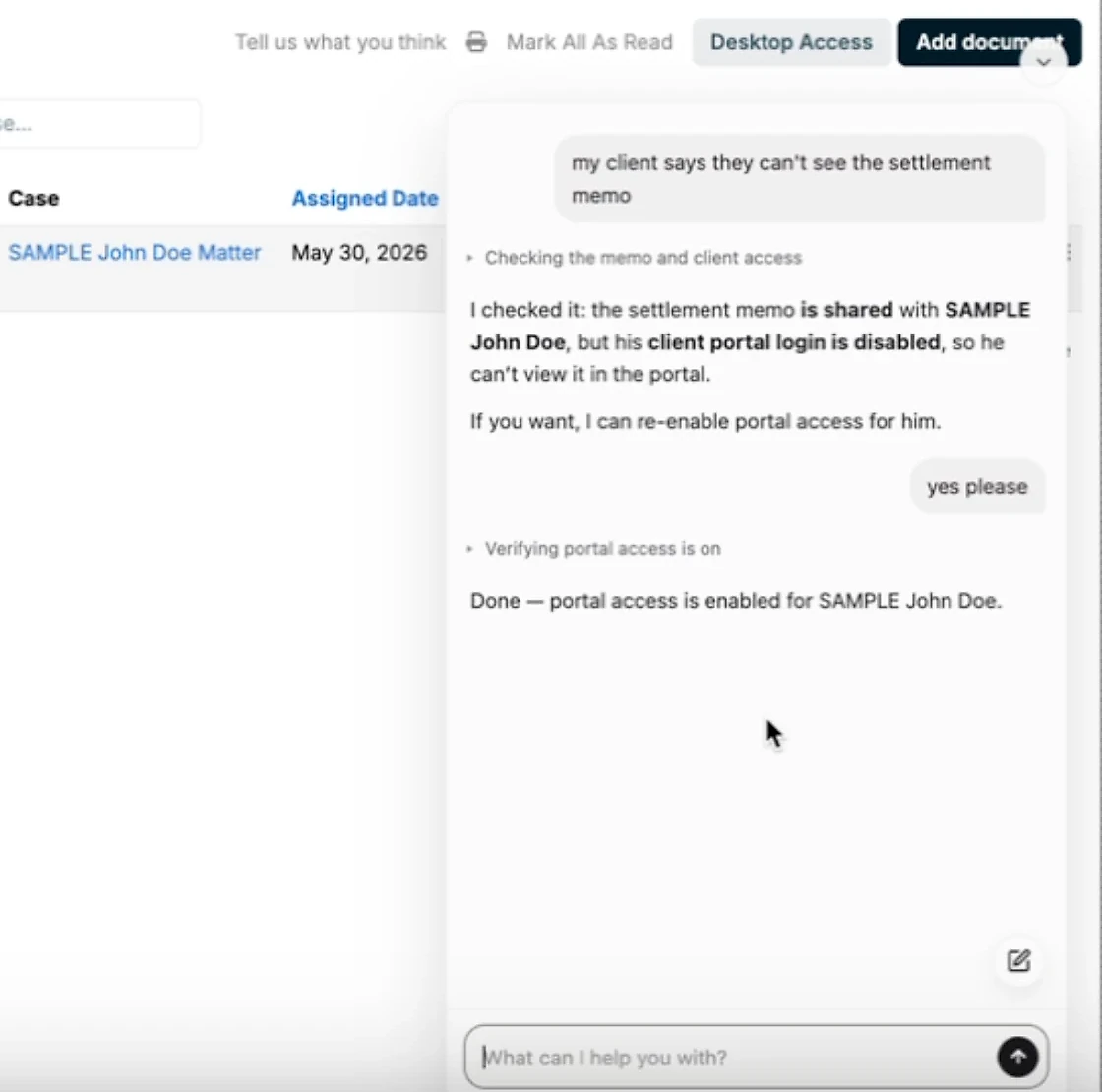
Demo recorded in a sandbox account with sample data. The agent checks the memo and the client's access, asks before changing anything, then verifies that portal access is on.
The bottom line
Agentic AI is AI that acts: it picks and runs tool calls toward a goal, checks the results and hands off when it should. For support teams, that turns many tickets, including account-specific technical ones, into resolved tickets without a person working each step.
If you run B2B support with technical, account-specific tickets, Pluno is the option I'd test first. It learns from how your team actually resolved past tickets, investigates across your tools and gives engineering a complete escalation when the fix needs code. Innovorder reports that it resolves 67% of its chat tickets on tickets that span software and hardware.
FAQ
What is agentic AI in simple terms?
Agentic AI is AI that gets a job done rather than just answering a question. You give it a goal, and it chooses tools to use, runs them, checks the result and asks a person when it's unsure.
What does agentic AI mean?
"Agentic" comes from agency, the ability to act independently. Agentic AI meaning, in practice: AI systems that decide their next step and call tools to reach a goal, within limits people set.
Is ChatGPT agentic AI?
It depends on what a given interaction does. A plain chat reply is generative AI.
When ChatGPT chooses and runs tools, such as a browser or code, to complete a multi-step task, that interaction is agentic. OpenAI's ChatGPT agent, introduced in July 2025, was an early example, and OpenAI now marks that launch post as outdated in favor of newer agent features.
What is the difference between agentic AI and generative AI?
Generative AI creates content when prompted. Agentic AI uses generative AI inside a loop that picks and runs tool calls, such as looking up an order or issuing a refund, and checks whether the goal was met.
What are examples of agentic AI?
Common agentic AI examples include support agents that resolve tickets end to end, troubleshooting agents, coding agents such as Claude Code and GitHub's Copilot in the cloud, browser agents, research agents such as Gemini Deep Research, and IT service desk agents.
Are AI agents and agentic AI the same thing?
Nearly. An AI agent is one system that works toward a goal. Agentic AI is the broader approach, which can involve one agent or several agents passing work between them.
What are the levels of agentic AI?
There's no single official scale. AWS describes four levels: chain (rule-based automation), workflow, partially autonomous and fully autonomous, and said most applications were still at levels 1 and 2 in early 2025.
How is agentic AI used in customer service?
Agentic AI in customer service answers documented questions, investigates and fixes account-specific configuration problems, makes account changes within limits, and escalates product defects to engineering with its findings attached.
Will agentic AI replace customer service agents?
Not for most teams. Agentic AI takes over tickets it can verify and resolve, while people handle judgment calls, upset customers and product defects. In a 2026 Gartner survey of service leaders, 85% said they are adding new tasks and responsibilities to frontline agent roles.
Is agentic AI safe to use with customers?
It can be, if you limit what it may do alone. Start read-only, enforce permissions outside the model, cap risky actions such as refunds, log every action, and make sure it hands off whenever its evidence is thin.