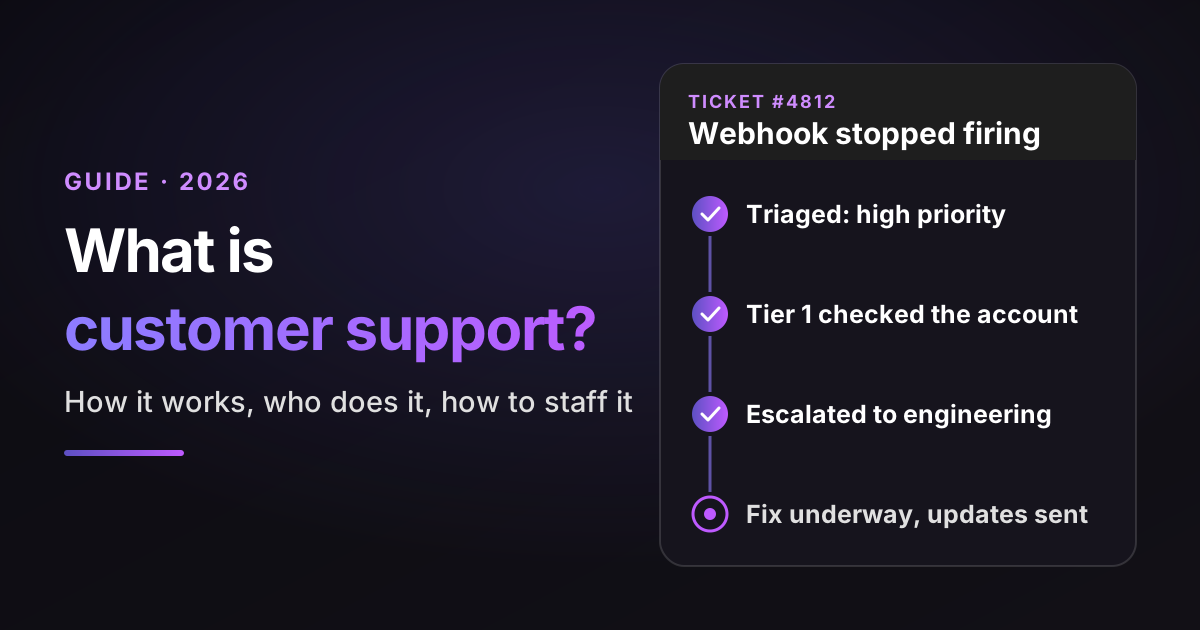
Here's what customer support looks like on a Tuesday morning. A customer writes, "Our webhook stopped firing overnight." Within an hour, someone has to decide how urgent that is, check the account, try the known fixes, pull in engineering if it's a bug and keep the customer posted until it's fixed.
Every one of those steps is customer support. Most teams do some of them well and lose time between the others, which is where customers start to feel ignored.
So what is customer support, exactly, and how do you run it well? Here's the short version first.
TL;DR
- What customer support is: helping customers use a product or service successfully, through answers, setup guidance, troubleshooting and issue resolution. In practice it's a loop: take the request in, triage it, resolve it at the lowest tier that can, escalate cleanly when you can't and feed the cause back to product.
- How the work splits: four tiers. Tier 0 is self-service and AI, tier 1 handles common questions, tier 2 investigates technical issues and tier 3 is engineering. In MetricNet's (older, IT service desk) benchmarks, a ticket the service desk passed on to desktop support cost about four times as much as one the service desk solved itself.
- The pressure on teams: in Salesforce's State of Service (vendor research, 6,500 service professionals), 82% say customer expectations are higher than they used to be, and reps spend less than half their time (46%) with customers.
- How many agents you need: monthly tickets × handle time in minutes ÷ 60, divided by the productive hours one agent gives you (about 90 with the calculator's default settings). The calculator below runs it with your numbers.
- Where AI fits: inside every tier, not as a replacement for them. Gartner found only 20% of service leaders have cut agent staffing due to AI, while 55% keep staffing stable on higher volumes.
- Bottom-line advice: tag the contact reason on every ticket, move your most common tier 2 answers one tier down each month, and give AI the work it can own, from eligible requests to first-pass investigations.
Where Pluno fits: for B2B SaaS teams with technical tickets, Pluno adds AI to every tier inside the help desk you already use. It resolves eligible requests, investigates technical issues, completes approved tasks in your product and escalates to engineering. Innovorder reports that Pluno resolves 67% of its chat and WhatsApp tickets with no agent involved.
Sources: every statistic links to its original report, checked on November 6, 2026. Vendor surveys are labeled as vendor research, and I note the sample when it matters. Example tickets and replies are composites of common SaaS cases, not real customers.
Disclosure: I work at Pluno. We make AI for support teams that runs inside the help desk and resolves, drafts and escalates tickets.
What is customer support, and what does it do for your business?
Customer support helps customers use a product or service successfully, from a quick how-to answer or setup walkthrough to a bug fix that needs an engineer. A support team does five jobs, and the business gets something back from each:
- Answer questions and guide setup so customers get value from the product instead of giving up on it.
- Fix problems on the customer's account, data or setup, ideally on the first reply.
- Escalate what it can't fix to engineering or product, with enough evidence to act on.
- Keep the customer informed until the problem is solved, so silence never reads as neglect.
- Report what it learns, so the causes of tickets get removed instead of answered again.
Support is often reactive: the customer writes and the team responds. It can also be proactive, such as warning affected customers about a known issue before they notice it, or spotting a setup mistake during onboarding.
Overviews such as IBM's and Salesforce's cover these responsibilities too, from internal collaboration to feedback and proactive help. This guide organizes them into a practical workflow for a SaaS support team.
The work is getting harder. In Salesforce's 2025 State of Service survey of 6,500 service professionals (vendor research), 82% said customer expectations are higher than they used to be. The same survey found that reps spend less than half their time (46%) with customers, with the rest going to admin and internal work.
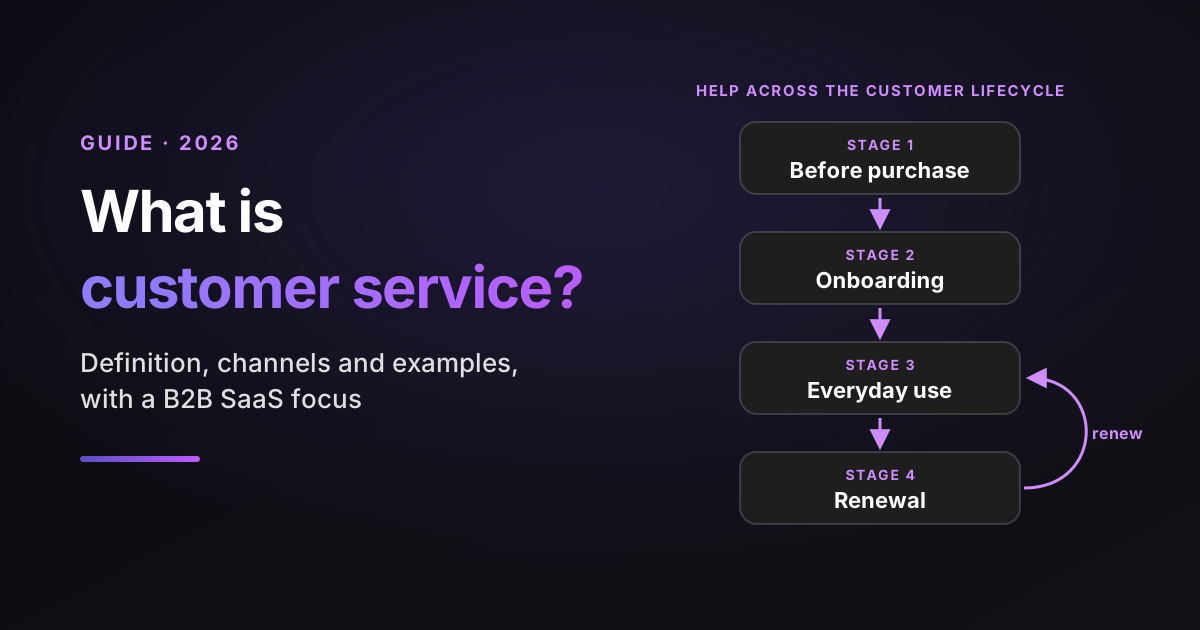
That's the case for treating customer support as a system rather than a queue. If you want the bigger picture around it, my guide to what customer service is covers the full customer lifecycle.
Customer support vs customer service vs technical support
Customer service covers every interaction across the customer relationship, customer support helps customers use the product successfully, and technical support is the part of customer support that needs product or engineering depth. The terms overlap, and many companies use them interchangeably, but the split helps you decide who owns what.
| Customer service | Customer support | Technical support | |
|---|---|---|---|
| Starts when | At any point in the customer relationship | A customer needs help using the product | The issue needs technical diagnosis |
| Typical work | Onboarding calls, billing and account questions, renewals, check-ins | How-to answers, setup guidance, troubleshooting, fixing account issues, escalating bugs | Reproducing bugs, reading logs, fixing integrations |
| Usually owned by | Sales, onboarding, support and success together | The support team | Tier 2 specialists and engineering |
| Success looks like | The customer stays and grows with you | The customer can do what they set out to do, ideally after one contact | The root cause is found and fixed |
| SaaS example | An account manager checks in before the renewal | A new admin asks how to invite their team, or a user is locked out | Webhooks fail for every account in one region |
A quick test: if the customer needs help using the product, from a how-to question to a broken setting, it's support. If it's about the wider relationship, such as a renewal or a check-in, it's service. If finding out why needs logs, code or an engineer, it's technical support.
Two more terms come up when teams pick tools.
A help desk is a support function, commonly operated through ticketing software, where every request becomes a ticket, and this guide says help desk software when it means the tool.
A service desk typically has a broader service management remit, often under frameworks such as ITIL, and can serve employees or external customers (Atlassian compares the two). My guide to what customer service is covers the wider service side.
How customer support works: the life of one ticket
Customer support works as a loop: a request comes in, gets sorted, gets resolved at the lowest level that can fix it, and teaches the team something on the way out. Six stages cover almost every ticket, whatever your help desk or industry.
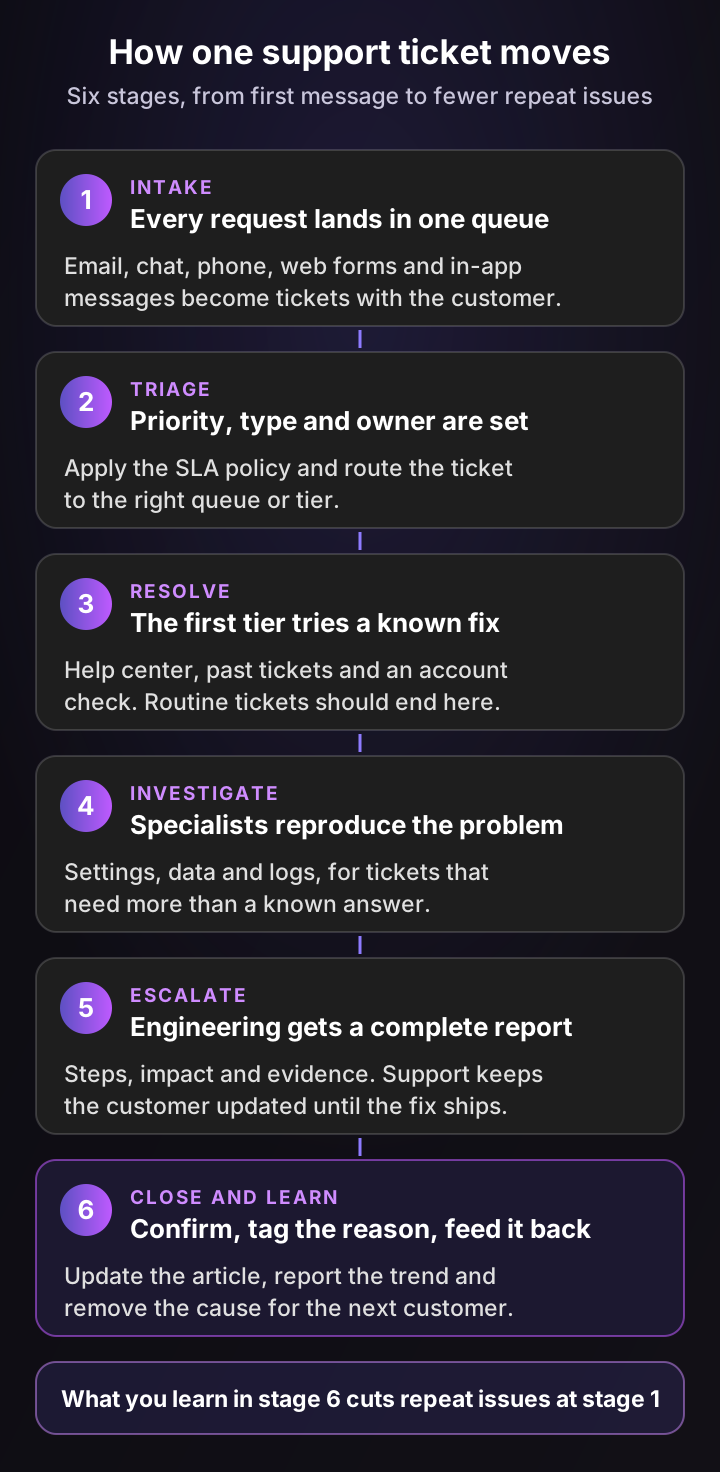
Here's what good looks like at each stage, using the webhook ticket from the introduction:
- Intake. The customer's email becomes a ticket in your help desk, linked to their account, plan and past tickets. If chat, phone and email land in different tools, you lose that history before anyone reads a word.
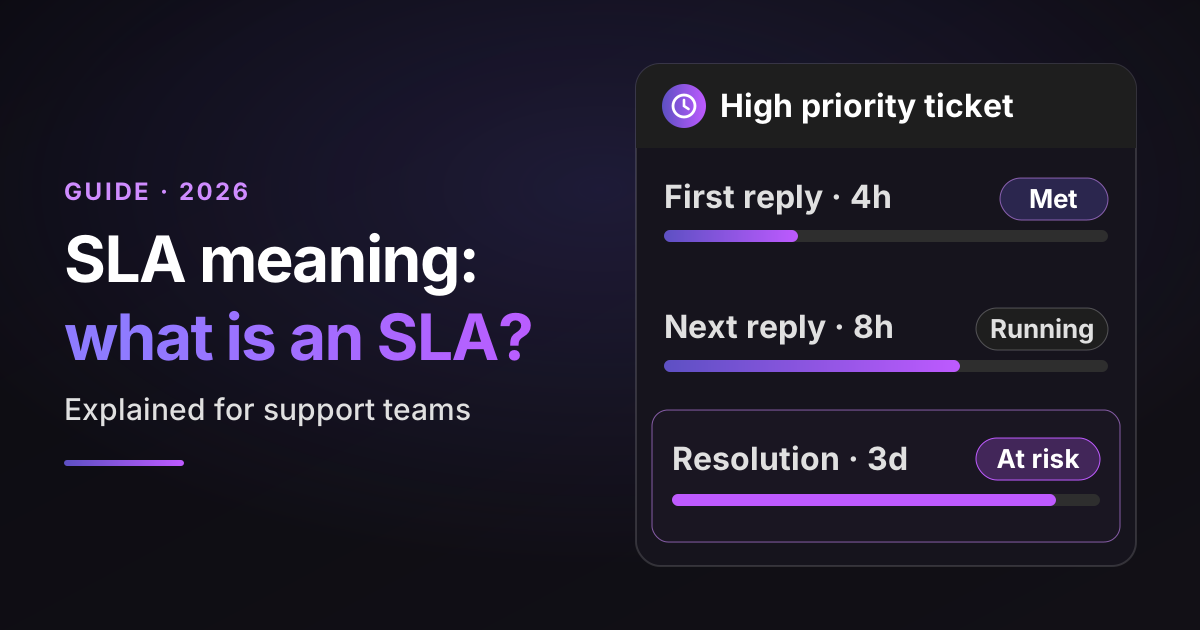
- Triage. Someone, or a rule, sets the priority, type and owner, applies the SLA policy and routes the ticket. Urgency comes from business impact (no webhooks means no synced orders), and the customer's plan decides which commitment applies. The clock itself follows each metric's start event: a first reply target on a customer-created ticket started when the ticket was created, not at triage.
- Resolve. The first agent checks the known fixes: a help center article, a past ticket with the same symptom, the account's settings. Here, the agent sees the customer rotated their API key yesterday, which is a known cause.
- Investigate. If the known fixes don't apply, a specialist reproduces the problem with logs and data. In my experience, this is the stage teams skip most often, so engineering gets tickets support could have closed.
- Escalate. If it's a real bug, engineering gets a complete report: steps to reproduce, affected accounts, evidence and urgency. Support keeps owning the customer and sends updates until the fix ships.
- Close and learn. The agent confirms the fix worked, tags the contact reason and updates the article. If 30 customers hit the same problem this month, that tag is what gets it on the roadmap.
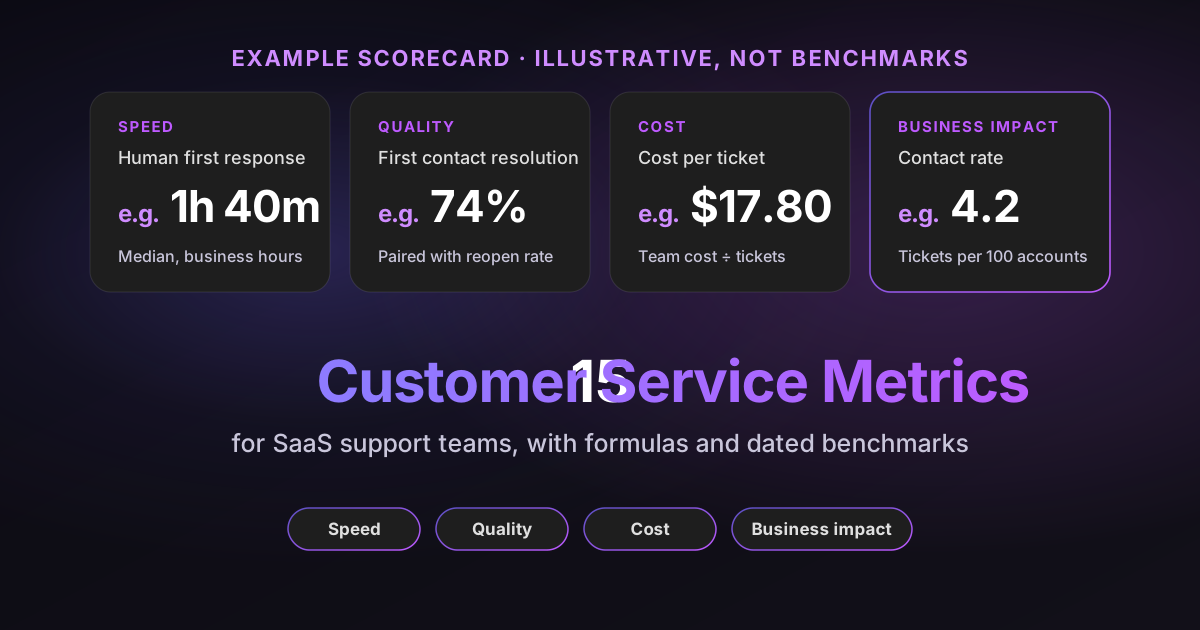
The loop is the part teams most often skip. A team that only does stages 1 to 3 answers the same question forever. Closing the loop can reduce repeat issues and contacts per active customer over time, which the contact rate in the scorecard below shows.
Customer support tiers: tier 0 to tier 3, compared
Customer support tiers split tickets by difficulty, so each one lands with the cheapest level that can actually fix it. Most teams use four: tier 0 is self-service, tier 1 handles common questions, tier 2 handles technical investigation and tier 3 is engineering or product.
I judge every tier, and later every team model, on the same four yardsticks:
- Handled by: who does the work, a person, a team or AI.
- Resolves: the kind of ticket it should close without passing it on.
- Relative cost: the cost per ticket compared with the other options. The ratings are relative, since real costs depend on salaries, ticket mix and tooling.
- Where AI fits: the part of that work AI can do today.
Tier 0: self-service and AI
Tier 0 is every answer a customer gets without a support agent: your help center, community forum, in-product guides and AI that answers on your behalf.
- Handled by: the customer, with articles or AI.
- Resolves: how-to questions with a known, stable answer, and routine account requests when the AI can act.
- Relative cost: lowest per ticket, plus the time to write and maintain content.
- Where AI fits: an AI agent replies from your articles and resolved tickets, then passes anything it can't close to an agent, with its research.
Tier 1: frontline support
Tier 1 agents take every ticket tier 0 didn't close. They are generalists who know the product well, follow your playbooks and recognize when a ticket needs more.
- Handled by: support agents.
- Resolves: how-to questions, account and billing changes, known issues and simple troubleshooting.
- Relative cost: low to medium.
- Where AI fits: a copilot drafts replies from past tickets and docs, and AI fills ticket fields so routing works.
Tier 2: technical support
Tier 2 takes the tickets that need investigation: reproducing a bug, reading logs, checking configuration or data. In B2B SaaS, these are often technical support engineers who can read an API response or a stack trace.
- Handled by: senior agents or technical support engineers.
- Resolves: configuration problems, integration errors and issues that need the customer's data to diagnose.
- Relative cost: medium to high, because tickets take longer and specialists cost more.
- Where AI fits: AI investigates logs, code and error tracking to suggest a likely cause before a person starts.
Tier 3: engineering and product
Tier 3 is the people who can change the product: engineers who fix bugs and product managers who decide on gaps. Support hands the ticket over but keeps the customer relationship.
- Handled by: engineering and product teams.
- Resolves: bugs, outages and missing features.
- Relative cost: highest, because each ticket takes engineering time away from the roadmap.
- Where AI fits: AI writes the escalation brief, files it where engineering works and syncs updates back to the ticket.
Why tiers matter for cost: in MetricNet's benchmarks of IT service desks, published by HDI in 2018, a ticket the service desk (level 1) resolved cost $22 on average. A ticket the service desk handled and then passed to desktop support cost $91 in total, $22 plus $69.
Separately, 17.8% of all tickets closed by desktop support could have been resolved by the service desk, including requests that bypassed it. The data is old and comes from internal IT support, not SaaS, so treat the dollar figures as an illustration of the ratio, not a benchmark for your team.
Agents also hold the key to tier 0. In a Gartner survey of 5,801 customers, 60% of agents failed to promote self-service, and 12% of those who mentioned it made explicitly negative remarks. A tier 1 reply that links the right article teaches the customer where to look next time.
| Tier | Handled by | Resolves | Relative cost | Where AI fits |
|---|---|---|---|---|
| Tier 0: self-service | Customer, articles, AI | Known how-to answers, routine requests | Lowest | Answers from articles and past tickets |
| Tier 1: frontline | Support agents | Common questions, account changes, known issues | Low to medium | Drafts replies, fills ticket fields |
| Tier 2: technical | Senior agents, technical support engineers | Configuration, integrations, data issues | Medium to high | Investigates logs and suggests a cause |
| Tier 3: engineering | Engineers, product managers | Bugs, outages, missing features | Highest | Writes and files escalation briefs |
Tiers aren't a rule that every ticket climbs one step at a time. A good triage step sends an outage straight to tier 2 or 3, and a smaller team may merge tiers 1 and 2 into one queue.
The goal I'd hold every team to is "shift left": move each recurring fix one tier down. An answer that took a tier 2 engineer an hour this month should be a tier 1 macro next month and a tier 0 article after that.
Customer support channels: which ones to offer
Offer the channels that match how urgent and how complex your customers' problems are, not every channel at once. Each new channel adds staffing, tooling and a place for context to get lost.
A rule of thumb that works for most B2B SaaS teams:
- Start with email and a help center. Email tickets carry screenshots and logs, and a help center absorbs the repeat questions.
- Add chat when customers get stuck mid-task. Chat suits short how-to questions, but it needs someone or something answering within minutes.
- Add phone for urgent or high-value accounts. Many teams keep it for enterprise plans or outages, since one agent handles one call at a time.
- Add in-app help when questions depend on the user's setup. Help inside the product can see what the customer sees.
Whatever you add, route every channel into one help desk, so the customer's history follows them. My guide to what customer service is compares all six channels side by side.
Who does customer support: the roles on a support team
A customer support team is more than agents answering tickets. As a team grows, specialist roles appear around the queue, each owning one part of the ticket loop.
| Role | Owns | Typically appears |
|---|---|---|
| Support agent (or specialist) | Answering and resolving tickets at tier 1 | First hire |
| Technical support engineer | Tier 2 investigation, reproducing bugs, escalations | When technical tickets pile up |
| Support team lead | Coaching, queue health, escalation decisions | Around 6 to 10 agents |
| Support operations | Help desk setup, routing, reporting, staffing forecasts | When rules and reports break down |
| Knowledge manager | Help center articles, macros, internal docs | When the same questions keep coming back |
| QA specialist | Reviewing conversations against a quality rubric | When the lead can't review enough tickets |
| Head of support | Strategy, budget, hiring and the link to product | Once support has several leads |
The headcount points are illustrative, not benchmarks. A small team with complex tickets may need a technical support engineer before its fifth agent.
For scale: the US alone had 2,666,000 customer service representative jobs in 2025, at a median pay of $44,770 a year, according to the Bureau of Labor Statistics. The BLS projects that employment will fall 5% from 2025 to 2035, yet it still expects about 289,500 openings a year, all of them to replace people who change careers or leave the workforce. Turnover is a real cost too: in Salesforce's survey, 12% of service employees had left their company over the past year.
Customer support skills shift by role, but every role needs the same base: clear writing, product knowledge and the patience to find the real question behind the one a customer asked. My guide to customer service skills breaks them down.
How to structure a customer support team as you grow
Structure your customer support team around ticket complexity first and headcount second. The right model for 300 simple tickets a month is wrong for 300 integration bugs.
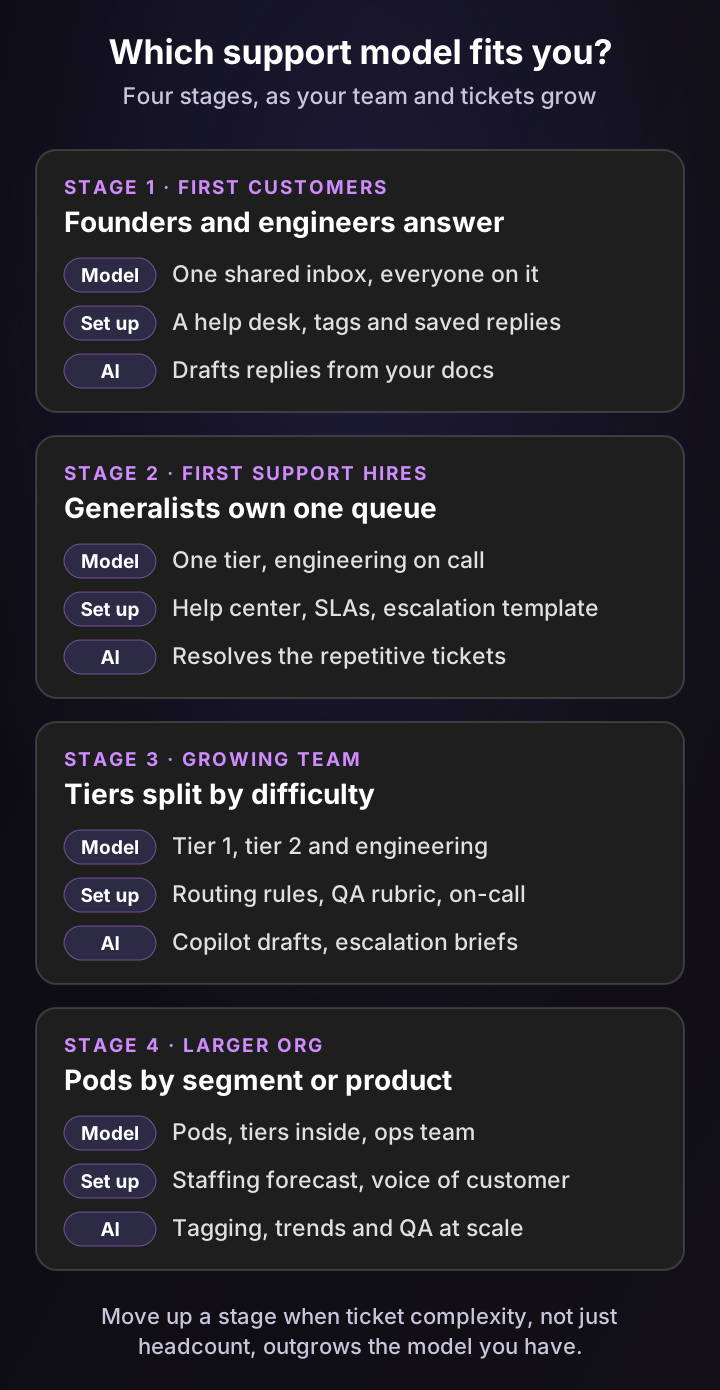
The four stages in more detail, with the yardsticks summed up in the table after them:
- Stage 1, first customers. Founders and engineers answer from a shared inbox. It's the best product education you'll ever get, and it's worth keeping a rotation going even later. The risk is that nobody tags tickets, so the lessons stay in people's heads.
- Stage 2, first support hires. Generalists own one queue, with an engineer on call for bugs. This is when to write the help center, set SLAs and agree on an escalation template with engineering.
- Stage 3, growing team. Tiers split by difficulty, usually tier 1 agents plus technical specialists. Routing rules and a QA rubric matter now, because the lead can no longer read every ticket.
- Stage 4, larger org. Pods form around customer segments, products or regions, often with tiers inside each pod. A support operations team forecasts staffing and turns ticket data into reports product teams act on.
| Stage | Handled by | Resolves well | Relative cost per ticket | Where AI fits |
|---|---|---|---|---|
| 1. First customers | Founders, engineers | Broad product knowledge, with limited dedicated capacity | High, since engineering time is expensive | Drafts replies from docs |
| 2. First hires | Generalist agents | Common questions and known issues | Medium | Resolves repetitive tickets |
| 3. Growing team | Tier 1 and tier 2 | Most tickets, with a clear escalation path | Medium, falling as more shifts left | Copilot drafts, escalation briefs |
| 4. Larger org | Pods with tiers inside | High volume across segments | Potential economies of scale; depends on ticket mix and overhead | Tagging, trends and QA at scale |
A signal you've outgrown a stage: your best people spend most of their day on tickets the next tier down should handle. That's when to add a tier, a specialist or AI on the repetitive work.
How many support agents do you need? Run your own numbers
For an email or ticket queue, the workload in full-time agents is monthly tickets × average handle time in minutes ÷ 60 ÷ productive hours per agent. Productive hours are paid hours minus meetings, training and time off, times the share of the rest spent on tickets.
Set the sliders for your own team:
Support staffing calculator
Workload FTE = monthly tickets × handle time in minutes ÷ 60 ÷ productive hours per agent. Productive hours = paid hours × (1 − shrinkage) × utilization. Shrinkage covers meetings, training, breaks and time off; utilization is the share of the remaining time spent on tickets. With AI, the tickets it resolves no longer take their own handle time, which is usually shorter than your average, and agents still spend review and handoff minutes on them. The result is an estimate of workload capacity for email and ticket queues, not a staffing plan. Phone and live chat require interval forecasts and service level modeling, and chat forecasts must also account for concurrency and active handling time. Your own numbers, not benchmarks.
Workload FTE today
6.7
600 hours of ticket work a month
Tickets per agent
448
A month, at 90 productive hours
Workload FTE with AI
5.9
525 hours, with 30% resolved by AI
Your queue holds about 6.7 full-time agents of workload today. If AI resolves 30% of tickets that took 6 minutes each, with 1 minute of agent time left on each, the workload falls to about 5.9. That frees the capacity of about 0.8 agents for growth, onboarding or the hard tickets.
Here's the math behind the default settings, so you can check it:
- Workload: 3,000 × 12 ÷ 60 is 600 hours of ticket work.
- Productive hours: 160 paid hours × (1 − 30% shrinkage) × 80% utilization is about 90 hours per agent. That 90 is the illustrative default these settings produce, not a benchmark.
- Workload FTE: 600 ÷ 90 is about 6.7 full-time agents.
- With AI: if AI resolves 900 tickets (30%) that took 6 minutes each, that removes 90 hours. One minute of agent review and handoff on each adds 15 back, which leaves 525 hours, or about 5.9 FTE.
Two warnings from experience. First, measure handle time from your help desk, not from a guess, because a few complex tickets can take several times the average and skew the plan.
Second, phone and live chat require interval forecasts and service level modeling, because customers wait in real time. Chat forecasts must also account for concurrency and active handling time.
Read the AI result as an estimate of freed capacity rather than a smaller payroll. A team that frees nearly an agent's worth of workload can take on next year's growth with today's headcount, or spend those hours on tier 2 and onboarding. To turn that into a cost figure, the cost per ticket calculator adds salaries and AI fees.
Customer support tools: the stack most teams run
Most customer support teams run on six types of tools, with help desk software at the center. Everything else either feeds tickets into it or helps people resolve them faster.
| Tool | What it does | Examples |
|---|---|---|
| Help desk software | Turns every request into a ticket, with routing, SLAs, macros and reports | Zendesk, Intercom, Salesforce Service Cloud, HubSpot Service Hub, Jira Service Management, Freshdesk |
| Help center | Self-service articles for tier 0 | Usually built into the help desk |
| Chat and messaging | Live chat widget, in-app messages, WhatsApp | Usually built into the help desk |
| Phone | Calls routed into tickets, with recordings | A cloud phone system connected to the help desk |
| AI layer | Resolves tickets, drafts replies, tags, escalates, reviews quality | Built-in help desk AI, or a layer such as Pluno |
| Escalation and engineering tools | Where engineering and product teams work on escalated tickets | Tools such as Slack, Jira or Linear |
The common mistake is buying a new tool per problem until agents work across six tabs. Start with the help desk, connect everything to it and judge every new tool by one question: does the agent still work from the ticket?
My guide to SaaS help desk software compares the help desks, and the roundup of AI help desk software covers the AI options.
Customer support metrics: a six-number scorecard
Customer support metrics should tell you four things: how fast customers get help, whether the help worked, what it costs and what support is learning. Six numbers cover that for most teams.
- First response time: how long customers wait for the first real reply.
- Time to resolution: how long until the problem is actually fixed.
- First contact resolution: the share of tickets solved without a follow-up.
- Customer satisfaction (CSAT): how customers rate the help they got.
- Contact rate: tickets per 100 active customers, which falls when you remove the causes.
- Cost per resolved ticket: allocated support operating costs divided by resolved tickets in the same period. Count salaries and benefits, help desk and other tooling, AI usage fees and the engineering time spent on escalations.
First contact resolution deserves a close watch. SQM Group's 2024 benchmarking of more than 500 North American inbound customer service call centers put the average at 69%. SQM's data associates every 1% improvement in FCR with a 1.4-point rise in interactional NPS for the average call center.
Those are call center findings, not SaaS ticket benchmarks. The logic still carries to tickets: every reopened or bounced ticket is a second contact you pay for.
Read the six together. A falling first response time means little if first contact resolution drops with it, and a falling cost per ticket means little if contact rate rises. For formulas, benchmarks and ten more, see my customer service metrics guide.
How AI is changing customer support
The tiers stay, but AI now does part of the work inside each one. It closes repetitive tickets at tier 0, prepares answers and investigations for people at tiers 1 and 2, and handles the tagging, routing and reporting around every ticket.
Adoption is broad but still early. In Intercom's 2026 Customer Service Transformation Report (vendor research, 2,400+ support professionals), 82% of senior leaders had invested in AI for customer service in 2025 and 87% planned to in 2026, yet only 10% of teams described their deployment as mature. In Salesforce's survey, 39% of service professionals said their organization uses agentic AI.
Here's where AI shows up in the ticket loop today:
- Intake and triage: AI reads each new ticket and sets priority, type and fields, so routing and SLAs work.
- Resolve: AI agents answer routine tickets end to end and hand the rest to a person with research attached.
- Assist: copilots draft replies for agents from past tickets, docs and account data.
- Investigate and escalate: AI checks logs and code, then files a complete report where engineering works.
- Close and learn: AI reviews every conversation for quality and clusters tickets into trends.
The headcount story is calmer than the headlines. A Gartner survey of 321 service leaders in October 2025 found that only 20% had cut agent staffing because of AI. Another 55% kept staffing stable while handling higher volumes, and 42% were hiring for new AI-focused roles.
In practice, AI changes what agents do more than how many of them you need.
My takeaway for support leaders: judge AI by tickets closed and reopened, not by replies sent, and never hide the way to a person. My guides to customer support automation and AI agents for customer support go deeper.
8 customer support best practices from the queue
These eight customer support best practices are about how the team runs, not how agents sound. Each one fixes a failure I've seen cost teams customers.
- Give every ticket one owner until it closes. Escalating to engineering doesn't hand over the customer. The agent who escalated sends the updates.
- Write the escalation template before you need it. Agree with engineering on the fields: steps to reproduce, expected and actual result, affected accounts, evidence and urgency.
- Tag the contact reason on every ticket. Without it, you can't rank the causes, and "support is busy" never becomes a roadmap item.
- Keep a known-issues page. When something breaks, publish it in one place, link it from replies and update it when the fix ships.
- Shift fixes left every month. Turn the most common tier 2 answer into a tier 1 macro, and the most common tier 1 answer into an article.
- Staff to the forecast, not the average. Plan for Monday mornings, release days and renewals, not the monthly mean.
- Protect focus time. Rotate agents between live channels and the email queue, and give tier 2 blocks of time without chat.
- Review quality on more than a sample. A lead reading five tickets per agent a month misses patterns. Score broadly against a written rubric and coach on trends.
Practices 6 and 7 aren't soft extras. In Salesforce's survey, more than a third of service teams struggled to meet demands for better work-life balance and wages when hiring, and 12% of service employees had left in the past year. Every agent who leaves takes months of product knowledge with them.
What good customer support looks like to the customer
Most of this guide is about operations. Customers judge support on something simpler: did someone understand what the problem costs them, find the cause and say what happens next? Two composite examples show what that looks like.
A reply that earns trust
Here's a reply to the webhook ticket from the introduction:
Hi Sam, I can see webhooks to your order system stopped at 02:14 UTC, so new orders haven't reached your warehouse since then. I know that's holding up today's shipments, so this is our top priority.
The cause: your API key was rotated yesterday at 18:40, and your order system still checks our calls against the old signing secret, so it rejects them.
Next step: paste the new secret from your API settings into your order system's webhook config. As soon as you confirm, I'll replay the missed events so no order is lost.
I'll check in again at 11:00 UTC either way and confirm the backlog has gone through.
What makes it work:
- It names the business impact (shipments held up), not just the symptom.
- It states the finding in one sentence the customer can repeat to their team.
- It gives one next action, with who does what.
- It sets the next update time, so silence never reads as neglect.
Proactive support: reaching out before the ticket
A release makes CSV exports time out for accounts with more than 50,000 rows. Before most customers notice, support pulls the affected accounts from error tracking and emails their admins.
The email says what's happening, offers a workaround (export by date range) and gives the time of the next update. The same note goes on the known-issues page, and a second email confirms the fix when it ships.
Each email that lands first can head off a ticket. It also shows customers that you watch their account, which is what empathy looks like at scale.
What support teams say about customer support
These are selected comments from people who worked in support, posted on Hacker News. They are not representative research, but both land on the same problem: queues and metrics that push agents to pass customers on instead of fixing the issue.
“You bet that if there's another call waiting or 20 more emails in the queue, they're not spending a lot of quality time on getting things done right. The bug they submit won't be thorough, and developers won't want to touch those bugs.”
“...only the last person who spoke to the customer was rated, so this encouraged meaninglessly transferring people around like a hot potato.”
The common thread: give agents the time and the metrics to fix the problem for good, and write escalations engineers want to pick up.
How Pluno helps your customer support team
Pluno is an AI layer you add directly inside the help desk you already use, so AI can reach every stage of the support loop: answering customers, assisting agents, investigating and escalating to engineering, handling ticket admin and monitoring quality.
It runs in Zendesk, Intercom, Salesforce Service Cloud, HubSpot, Jira Service Management and Freshdesk. Your existing help desk remains the system of record. Pluno adds configured AI workflows without requiring you to migrate your tickets, macros or reports.
The docs explain how Pluno processes and protects your ticket data.
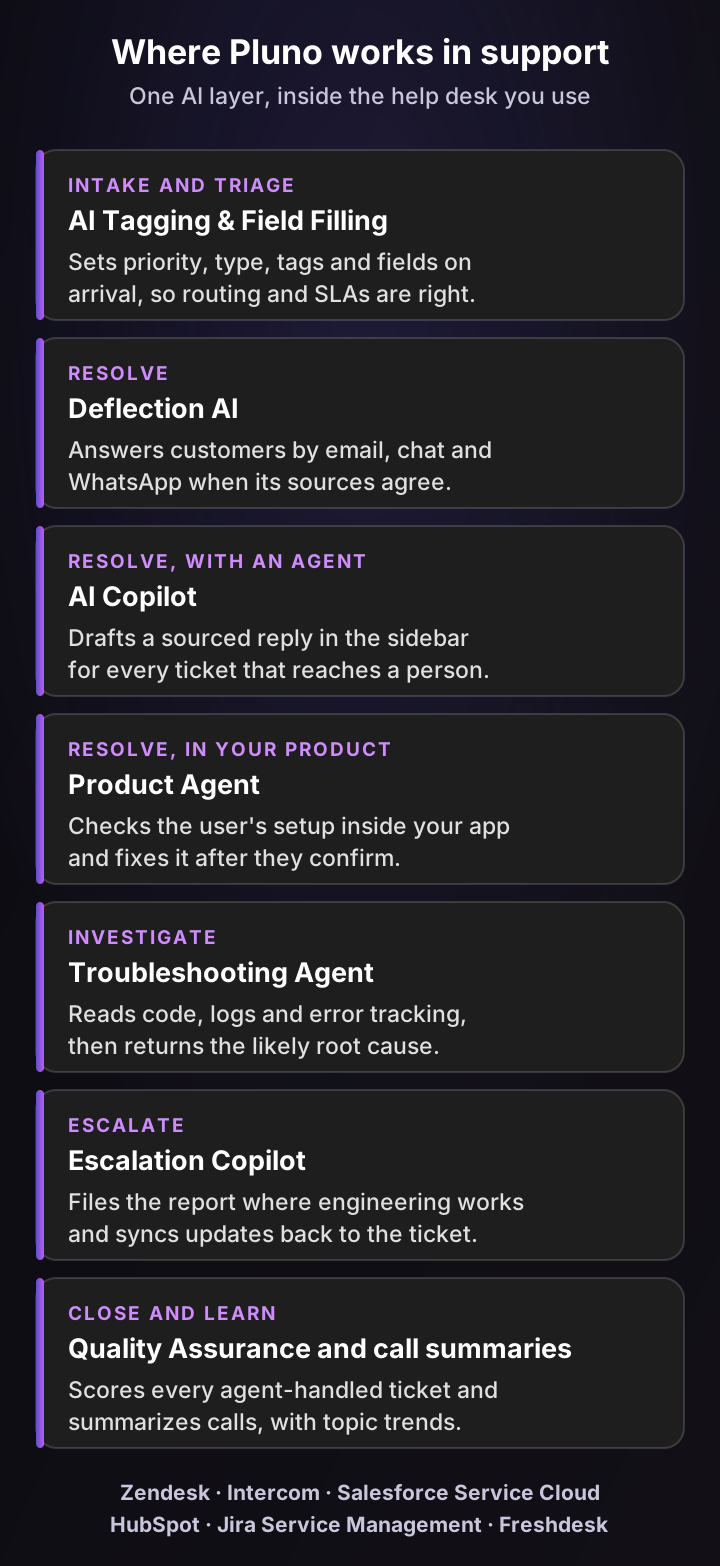
Here's how each module maps to the support tiers from this guide:
| Support tier | Pluno module | What it does |
|---|---|---|
| Triage | AI Tagging & Field Filling | Sets priority, type, tags and custom fields on arrival, with a reason for each value |
| Tier 0 | Deflection AI | Resolves email, web form, chat and WhatsApp tickets when its sources agree; otherwise hands over with a research summary |
| Tier 0, in your product | Product Agent | Checks each user's setup inside your app and completes tasks for them |
| Tier 1 | AI Copilot | Drafts a sourced reply in the help desk sidebar for every ticket that reaches an agent |
| Tier 2 | Troubleshooting Agent | Investigates code, logs and error tracking, then returns the likely root cause and a recommended fix |
| Tier 3 handoff | Escalation Copilot | Files the escalation in Slack, Jira, Linear, Microsoft Teams or incident.io with the brief written, and syncs updates back |
| Close and learn | Quality Assurance and call summaries | Scores every resolved ticket handled by agents against your rubric, and summarizes calls into the ticket |
What sets Pluno apart
Many support AI tools learn from more than help center articles, so the difference is in the combination. Pluno brings four things together in one layer:
- Resolved ticket knowledge: it learns from your team's resolved tickets, reconstructing the troubleshooting steps and edge-case fixes your agents actually used, and favoring the latest successful resolutions.
- Technical investigation: the Troubleshooting Agent works through code, logs and error tracking to find the likely root cause.
- In-product actions: the Product Agent completes approved tasks inside your app.
- Engineering escalation: Escalation Copilot files the brief where engineering works and syncs updates back.
If you're weighing tools, my Forethought review shows how these differences play out against one well-known alternative.
Before replying, Deflection AI searches past tickets, help center articles, docs, Slack threads and connected APIs in several rounds, and answers only if the sources line up. If they don't, your agent receives the ticket together with the findings and ticket references, ready to pick up where the AI stopped.
It works inside your product, too
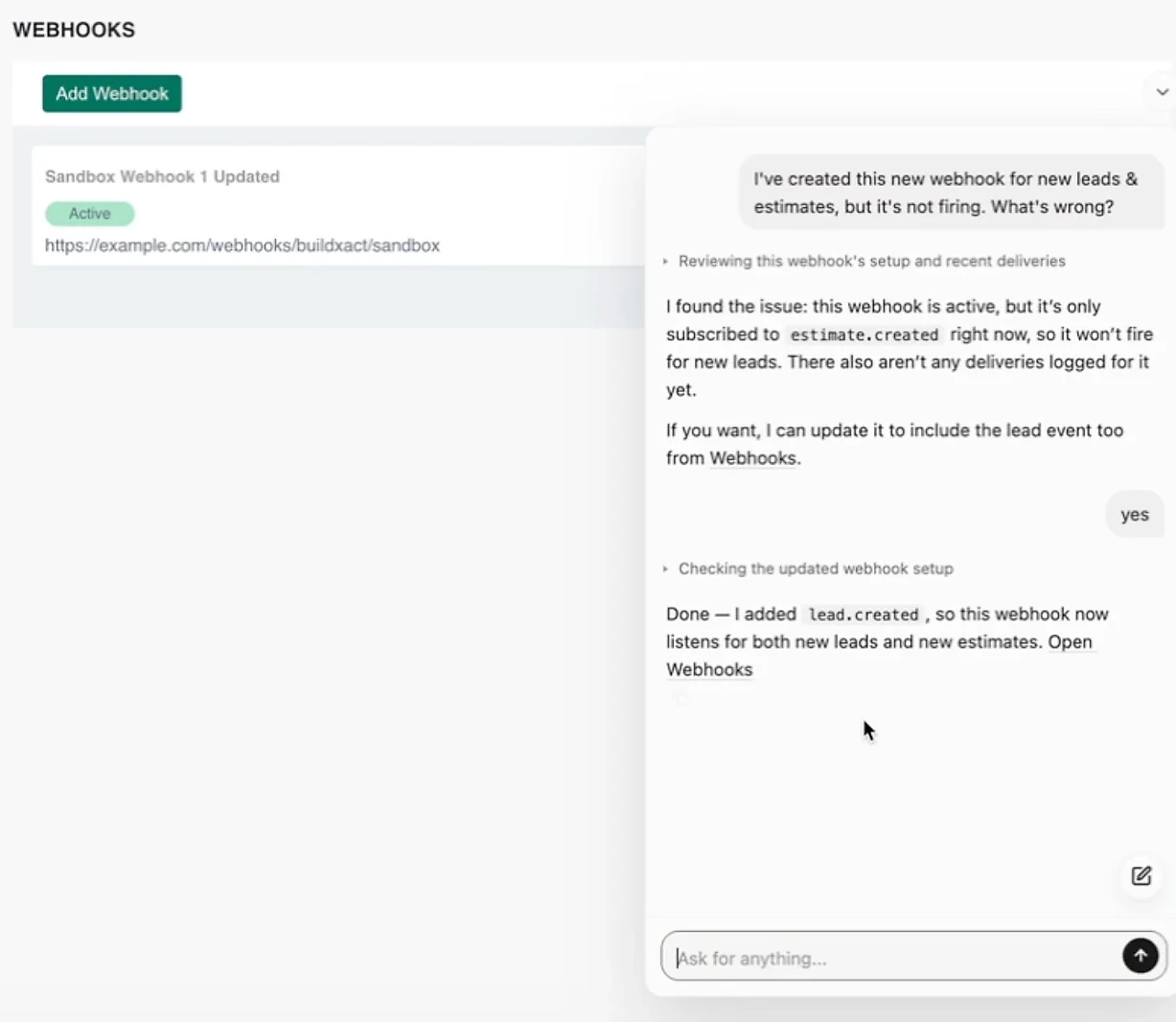
Here's the Product Agent in a demo we recorded in a sandbox account of a construction software app. A user has created a webhook for new leads and estimates, and asks why it isn't firing:
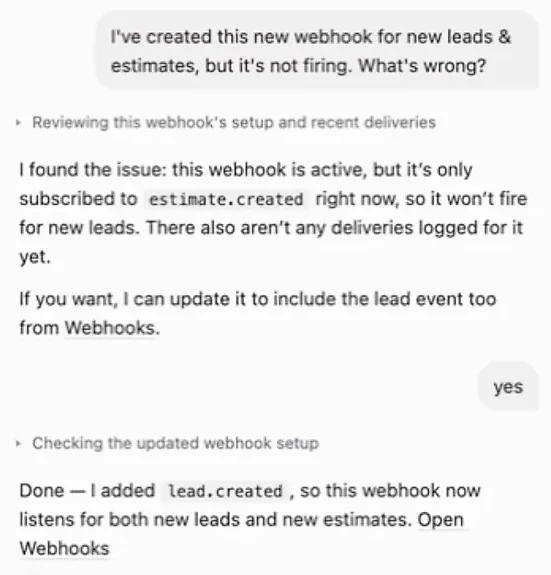
- The finding: the webhook is active but only subscribed to
estimate.created, so it won't fire for new leads, and no deliveries are logged for it yet. - The confirmation: the agent offers to add the lead event, and the user replies "yes".
- The completed action: the agent adds
lead.created, so the webhook now listens for both new leads and new estimates.
Open the full screenshot to see the conversation beside the app's webhook settings.
What teams report
- Innovorder has Pluno resolve 67% of incoming chat and WhatsApp tickets without human intervention, with first responses in under a minute.
- Smartness cut its team-wide first response time from hours to 22 minutes.
- Kojo, with a five-person team, went from 0% to 50% ticket deflection and now creates Jira escalations the same day.
- Velotric's agents cut research time per ticket from about 20 minutes to under 5.
What Pluno costs, from Pluno pricing as of November 2026: a monthly platform fee that scales with ticket volume, starting at 249€ a month billed monthly, or 210€ a month billed annually, for up to 500 tickets. The platform fee includes AI Tagging & Field Filling, Escalation Copilot, knowledge management, ticket trends and topic insights, ticket summaries and call summaries.
On top of that, Deflection AI is 0.90€ per resolved ticket, AI Copilot is 49€ per seat a month and Quality Assurance is 35€ per agent a month. The Troubleshooting Agent starts at 99€ a month for 4,000 credits, about 50 investigations depending on complexity.
There's a 14-day free trial with every module included, and new workspaces get 4,080 free Troubleshooting Agent credits.
In the free simulation, the Pluno team runs your 50 most recent tickets through Pluno and shows, side by side with the replies your team sent, how it would have handled each one, including the tickets it would hand to an agent. You see the quality of its answers, any gaps in its knowledge and when it would hand off, all before anything goes live.
The bottom line
Customer support is how your company helps customers use its product successfully, and it works best as a loop: take the request in, resolve it at the lowest tier that can, escalate cleanly when you can't and send what you learned back to product. Closing that loop can reduce repeat issues and contacts per active customer over time, and your contact rate will show it.
If you do one thing this month, tag the contact reason on every ticket and move your three most common tier 2 answers one tier down. After that, give AI the work it can own. Pluno resolves eligible customer requests, investigates technical issues and completes approved tasks inside your product, while your agents keep exceptions, sensitive decisions and engineering coordination.
To see how it would handle your queue, book a demo: we run your 50 most recent tickets through Pluno and show its answers side by side with your team's.
FAQ
What is customer support in simple words?
Customer support means helping customers use a product or service successfully. That can be answering a how-to question, guiding setup, troubleshooting an error or getting a bug fixed by engineering, while keeping the customer informed. It's mostly reactive, but good teams also reach out before customers notice a problem.
What does a customer support team do?
A customer support team answers customer questions, guides setup, troubleshoots problems, escalates bugs to engineering and keeps customers updated until their issue is fixed. Good teams also tag why customers get in touch, so product teams can remove the causes.
What is the difference between customer support and customer service?
Customer service covers every interaction across the customer relationship, from onboarding calls and billing to renewals and check-ins. Customer support is the part focused on helping customers use the product: answers, setup guidance, troubleshooting and fixing issues. So support is one part of service.
What are the 4 levels of customer support?
The four common levels are tier 0 (self-service and AI), tier 1 (frontline agents for common questions), tier 2 (technical specialists who investigate) and tier 3 (engineering and product teams who fix bugs and build missing features). Smaller teams often merge tiers 1 and 2.
What are the types of customer support?
Customer support is usually grouped by channel: email and tickets, live chat, phone, self-service help centers, in-app support and community forums. It can also be grouped by level, from self-service up to engineering, or by approach, such as reactive and proactive support.
What skills does a customer support agent need?
A customer support agent needs clear writing, active listening, patience under pressure, strong product knowledge and step-by-step troubleshooting. In B2B SaaS, the ability to read logs or API responses and write a clean escalation is often what separates a good agent from a great one.
Is customer support a good career?
It can be. Support teaches product knowledge, troubleshooting and customer empathy, which lead into roles such as technical support engineer, support operations, customer success, QA and product management. The US Bureau of Labor Statistics lists a median pay of $44,770 a year for customer service representatives and projects about 289,500 openings a year from 2025 to 2035, even as total employment falls 5%.
What does a customer support specialist do?
A customer support specialist answers customer tickets, chats or calls, troubleshoots problems and records each case in the help desk. In SaaS, specialists also reproduce issues, write escalations for engineering and suggest help center updates when the same question keeps coming in.
What is the difference between customer support and customer success?
Customer support mostly responds when customers ask for help, ticket by ticket, though it can also reach out about known issues. Customer success works proactively with accounts over time, onboarding them, tracking product adoption and protecting the renewal. The two share information: support sees the problems first, and success sees the account's goals.
Is customer support the same as a help desk?
No: customer support is the work of helping customers. A help desk is a support function, commonly operated through ticketing software, and help desk software turns every email, chat or call into a ticket with an owner, a priority and a history. A service desk typically has a broader service management remit.
How do you measure customer support?
Most teams track first response time, time to resolution, first contact resolution, customer satisfaction (CSAT), contact rate and cost per resolved ticket. Pair a speed metric with a quality metric so the team doesn't trade accuracy for speed.
How many customer support agents do I need?
Multiply monthly tickets by average handle time in minutes, divide by 60 to get hours, then divide by the productive hours one agent gives you a month. For example, 3,000 × 12 ÷ 60 is 600 hours, and with an illustrative 90 productive hours per agent that's about 6.7 agents of workload. Phone and live chat also need interval forecasts and service level modeling.
What is customer support software?
Customer support software is the set of tools a support team uses to receive, track and resolve customer requests. The help desk sits in the middle (Zendesk, Intercom, Salesforce Service Cloud, HubSpot Service Hub, Jira Service Management and Freshdesk are common picks), and most teams add a help center, chat and AI around it.
Can AI replace customer support agents?
AI can resolve a large share of requests and speed up the rest, but most teams still need people. The practical model splits the work by who should own it, not by how simple a ticket looks.
Pluno resolves eligible customer requests, investigates technical issues and completes approved tasks inside your product. Agents retain ownership of exceptions, sensitive decisions and engineering coordination. At Innovorder, 67% of chat and WhatsApp tickets are resolved by Pluno with no agent involved.
What is the difference between customer support and technical support?
Technical support is the part of customer support that handles technical problems, such as bugs, integrations and configuration errors. In a SaaS company, it usually maps to tier 2 and works closely with engineering.