Zendesk and Intercom both want to run your customer support, but they do it in opposite ways. Zendesk is built on tickets and queues. Intercom is built on chat and the inbox.
In 2026, the right tool depends on a few things: the shape of your support (complex troubleshooting vs high-volume FAQs), whether you need voice and onboarding in the same platform, and which AI agent resolves your tickets and at what cost per resolution. Both companies now open their sales pitch with AI instead of ticketing.
A disclosure first. We build Pluno, an AI agent that runs on Zendesk. This comparison draws on both vendors' current pricing pages and docs. Where Intercom wins, we say so.
One 2026 development to weigh if you're signing a multi-year contract: Salesforce signed a definitive agreement to acquire Intercom, now renamed Fin, for about $3.6 billion. The deal was announced on June 15, 2026 and has not closed. Salesforce expects it to close in early 2027, pending regulatory approval, and plans to fold Fin into its Agentforce platform. Nothing changes for current Intercom or Fin users today.
TL;DR: the short answer
The answer to what customer support software to choose depends mostly on the type of your support operations:
- If you're having complex B2B SaaS tickets, the kind that need troubleshooting — choose Zendesk. It has stronger routing, SLAs, and engineering handoffs. You can pair it with a custom AI agent built for solving complicated tickets, such as Pluno.
- If you're usually receiving high-volume consumer questions, mostly FAQs — choose Intercom. Intercom's Fin AI clears repetitive tickets well, and the Messenger is the best chat experience here.
- If you want to run support plus user onboarding in one tool — choose Intercom. It offers product tours, checklists, and in-app messages.
- If the phone is a primary channel, or you're in a regulated industry — choose Zendesk. Zendesk Voice is a full voice product, while Intercom's phone support is lighter and fits teams where calls are a secondary channel.
- Know this before you start: the helpdesk and the AI agent are two separate decisions. Both platforms let you run a third-party AI agent instead of their native one. More on that below.
Zendesk vs Intercom: the quick side-by-side comparison
| Category | Zendesk | Intercom | Best Fit |
|---|---|---|---|
| Ticketing and routing | Queues, SLAs, skills-based routing | Tickets attached to conversations, lighter routing | Zendesk |
| Live chat and Messenger | Basic web widget, code to customize | In-product Messenger, tours, checklists | Intercom |
| Native AI agent | AI agents, billed per resolution | Fin, billed per outcome | Tie |
| Swap in a different AI agent | Yes, 1,800+ app marketplace | Yes, app store carries third-party agents | Zendesk (bigger marketplace) |
| Voice and phone | Zendesk Voice: IVR, routing, recording | Intercom phone: lighter, mainly inbound | Zendesk |
| Proactive messaging and onboarding | Needs third-party tools | Tours, checklists, campaigns built in | Intercom |
| Reporting | Explore: deep, steep learning curve | Lighter, easier to read | Depends |
| Setup speed | Weeks; complex setups can run months | Days to about two weeks | Intercom |
| Best fit | Complex B2B SaaS, voice support, regulated industries | Consumer, PLG, chat-first | Depends |
Zendesk wins the structured-support rows. Intercom wins chat and onboarding. The AI agent is a separate call, and we cover it next.
When choosing between Zendesk and Intercom — you're making two decisions
Most comparisons treat the helpdesk and its AI agent as one purchase. They aren't.
The helpdesk is your ticketing and channels. That's Zendesk or Intercom.
The AI agent is what resolves tickets automatically. You can run the native one, or swap in a third-party agent from either app store that better fits your ticket type, like Pluno for complex B2B software tickets.
On Zendesk, the marketplace has 1,800+ apps, including AI agents like Ada and Pluno. On Intercom, the app store carries third-party agents too. My AskAI, Quickchat, Ada, and others can replace Fin without leaving Intercom.
So pick the helpdesk for its ticketing and channels. Pick the AI agent separately, based on your ticket type. The two don't have to come from the same vendor.
Zendesk vs Intercom — Ticketing and workflows
Best fit: Zendesk, if your support runs on structured tickets. The gap comes from how each tool is built.
The two start from different objects. In Zendesk, every request is a ticket from the first message, with a status, an assignee, a group, a priority, and an SLA clock attached. In Intercom, the core object is a conversation in the inbox. Tickets are a separate, newer object you escalate into, and Intercom's own setup docs position them as the place for complex issues that need investigation or back-and-forth across people, while conversations handle the quick stuff.
On Intercom, that means routing and SLA rules straddle two object types. On Zendesk, it's all one ticket. Five places that difference shows up:
- Routing by agent skill. Zendesk has skills-based routing on Suite Professional and up. Tag agents with skills like "billing," "API," or "German," and matching tickets land on the right person automatically. Intercom routes by team and availability through assignment rules and balanced assignment. It gets tickets to the right group, but specialization lives in how you structure teams and rules, which is more to maintain as the team grows.
- Statuses that show who's blocking the ticket. Zendesk separates open (needs an agent), pending (waiting on the customer), and on-hold (waiting on a third party like engineering). Blocked tickets stop looking abandoned, and SLA timers stay honest. Intercom conversations are open, snoozed, or closed, so a ticket stuck behind your own engineering team looks the same as one waiting on a customer reply.
- SLAs are standard on Zendesk and top-tier-only on Intercom. Zendesk SLA policies set separate targets for first reply, next reply, periodic updates, and resolution, with breach reporting in Explore. Intercom allows one active SLA per conversation, and SLA management is locked to its top Expert plan. A mid-market team that wants response-time targets pays for the top plan or goes without.
- Granular custom queues. Zendesk views are saved queues filtered by any mix of attributes (status, group, priority, SLA, custom field) and shared across the team. They're how agents decide what to work next. Intercom's inbox folders are lighter, and the gap widens as ticket volume climbs.
- Safer changes at scale. Zendesk Enterprise adds an audit log and a sandbox to test trigger and routing changes before they touch live tickets. For a team shipping frequent automation tweaks, that's the line between testing safely and breaking routing in production.
Intercom's model wins its own set of cases. The inbox is faster for quick, chat-style exchanges, where forcing every message into a formal ticket would slow agents down. The Workflows builder is visual and runs across chat, email, Slack, WhatsApp, Instagram, and SMS in one flow, and it can create, assign, and close tickets inside that flow. For conversational, omnichannel support, that beats wiring up Zendesk triggers by hand.
So the pick follows your support shape. A 10-agent team answering chat-style questions won't miss any of this. A 30-agent team running tiered support across three products will. They need response-time targets without buying the most expensive plan, a status that flags tickets stuck behind engineering, and routing that sends the API question to the API expert. Zendesk ships those by default. On Intercom, each one is a workaround or an upsell.
Intercom vs Zendesk: Live chat and in-app messaging
Best fit: Intercom, if chat is your main channel.
The Messenger is Intercom's best feature. It lives inside your product and does more than chat: proactive messages, product tours, checklists, and surveys.
Zendesk's chat widget covers the basics, such as pre-chat forms, canned replies, handoff to a ticket. Customizing it past the logo requires code, and some reviewers report chats dropping when a visitor switches pages.
If chat is your main channel and your product is where customers spend their time, Intercom is the better front end.
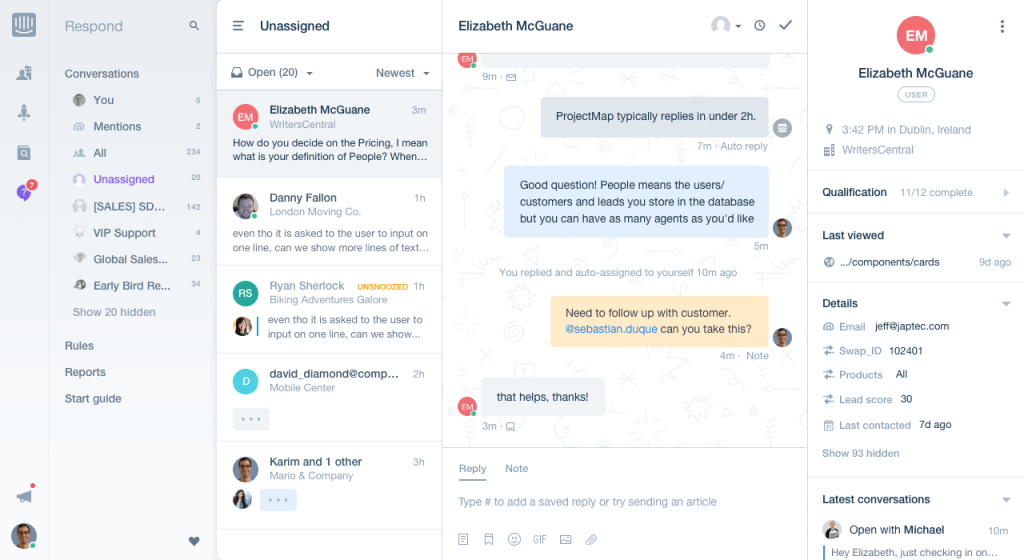
Zendesk AI vs Intercom Fin AI
Both platforms ship a native AI agent. Both are good at FAQ-style tickets.
Zendesk AI agents generate replies from your connected knowledge sources. That covers your help center plus external knowledge bases you wire in through Zendesk's web crawler. As of May 2026, Zendesk started folding its advanced AI agent capabilities into the Suite plans, so the older Essential-versus-Advanced paid split is going away. Usage still bills per automated resolution.
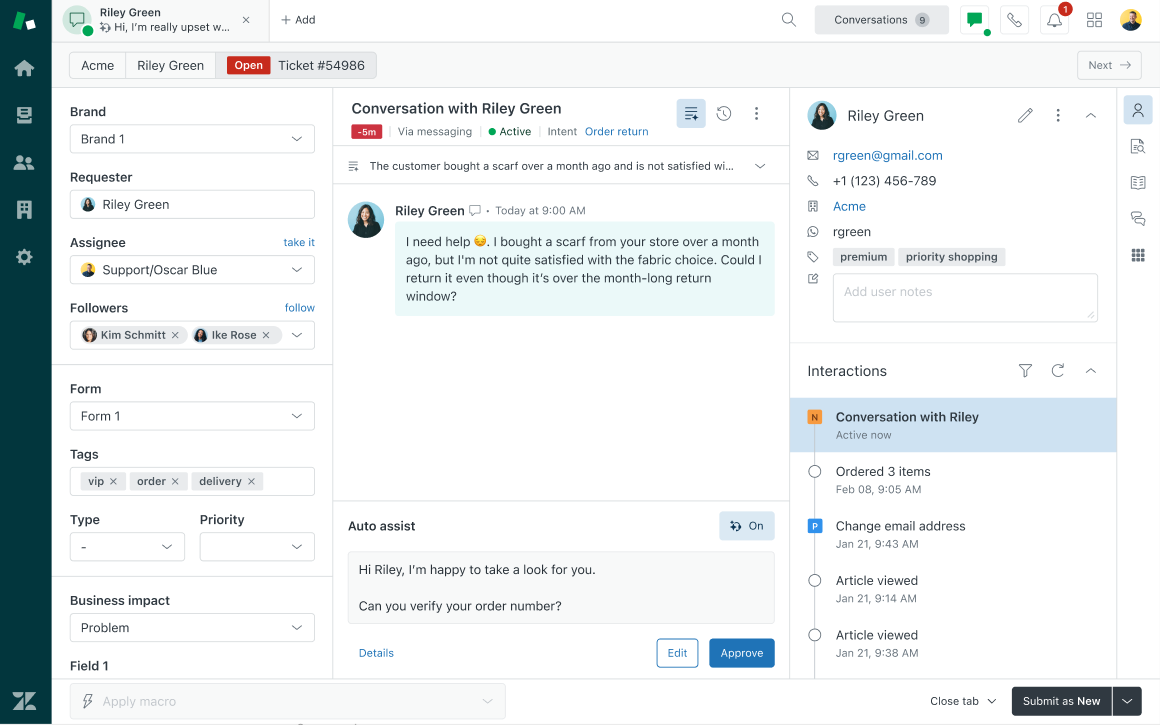
Fin answers from your help center, internal articles, PDFs, and URLs. It can also draw on past conversations, but only the ones a teammate reviews and approves. Its standout features are Procedures and Custom Actions. Procedures are plain-language playbooks Fin follows step by step, and in 2026 they can take actions like issuing a refund mid-chat. Custom Actions let Fin call your APIs to pull an order status while the customer waits.
Procedures come with a catch. Someone writes each one, tests it, and updates it when the product changes. A consumer brand with 20 common questions builds that library in a week. A B2B SaaS product with hundreds of edge cases never finishes it, and the support manager owns the upkeep.
You aren't stuck with either native agent. Both app stores carry third-party agents, as covered above.
So don't trust a vendor's benchmark. Run the top two or three agents on a sample of your own past tickets and compare the resolution rates. Most serious vendors, Fin included, let you do this before you pay.
One more point for complex tickets. Zendesk's AI and most third-party agents answer from your help center and curated knowledge, where multi-step troubleshooting cases usually aren't written down. Those cases live in past resolved tickets, in engineering context like Jira and Sentry, and in the troubleshooting steps agents actually ran. Pluno learns from resolved ticket history, pulls in that engineering context, and follows the troubleshooting workflows your team already uses. It runs on Zendesk today.
Zendesk vs Intercom — How do they count a "resolution"?
Both bill AI per resolution, but they count one differently. The definition decides how big that line gets, so read it before you read the rate.
Fin bills one outcome per conversation. A resolution counts when the customer confirms Fin's answer helped, or when they get an answer and leave without asking for more help. A Procedure you configure to end in a human handoff is also a billable outcome.
Default escalations are free. If a customer asks for a human, or Fin escalates after detecting frustration, that conversation is not billed. One case people miss: if Fin's last message was a clarifying question and the customer never replied, the conversation counts as abandoned and is not billed. If a customer reopens a resolved conversation later, even in a future billing period, Intercom credits the charge back. The line that drives the bill is the assumed resolution. A customer who gets an answer and drifts off still counts unless they come back.
Zendesk counts an automated resolution when its AI closes a conversation with no human stepping in, confirmed after a set window of customer silence. Escalations to a human aren't charged, and each Suite plan includes a free monthly allowance before per-resolution billing starts.
Here's ours, for comparison. Pluno counts a resolution only when it sent the last public message and the customer stayed quiet for 48 hours. Escalations don't bill, and every AI-resolved ticket gets tagged so your admin can verify the count before paying.
Zendesk vs Intercom — Channels and voice
Best fit: Zendesk, if phone is a real channel for you.
Zendesk Voice is a full phone system, sold as Zendesk Contact Center when teams want the complete call-center package. It covers IVR menus, call routing, recording, and queues, all in one workspace with your other channels. Intercom's phone support handles inbound calls and lighter voice needs, so it fits teams where phone is a secondary channel.
Email, social, and WhatsApp are close to even. Zendesk files every channel into one ticket, so a chat that turns into a call stays in one place. Intercom keeps everything in one running conversation, which works fine until phone enters the mix.
Zendesk vs Intercom for engineering escalations — the B2B SaaS test
Tickets that need engineering are the slowest ones in any B2B SaaS queue. Neither platform handles the handoff well out of the box.
Zendesk's Jira integration links a ticket to an issue and syncs the status. The agent still writes the escalation report by hand: the summary, the reproduction steps, the customer impact, and the troubleshooting history so far. Intercom's Jira app works the same way, with the same manual writing. On both, updates flow back to support unevenly, so agents chase engineering in Slack while the customer waits.
However, there's an AI layer that can close that gap on Zendesk. Pluno's Escalation Copilot writes the escalation report automatically and syncs updates between Zendesk and Jira or Slack both ways. If your tickets routinely reach engineering, pairing Zendesk with a purpose-built AI layer like Pluno removes that manual handoff.
Intercom vs Zendesk — Reporting and analytics
Zendesk Explore goes deep — custom datasets, scheduled dashboards, live agent monitoring. It has a learning curve, and some teams hire an admin partly to run it.
Intercom's reporting is lighter and easier to read. Volume, CSAT, response times, and Fin performance are there out of the box. Teams that outgrow it export to a BI tool.
Pick by who reads the reports. Board-level metrics from the helpdesk point to Zendesk. A weekly dashboard for the support manager works on either.
Zendesk vs Intercom pricing (2026)
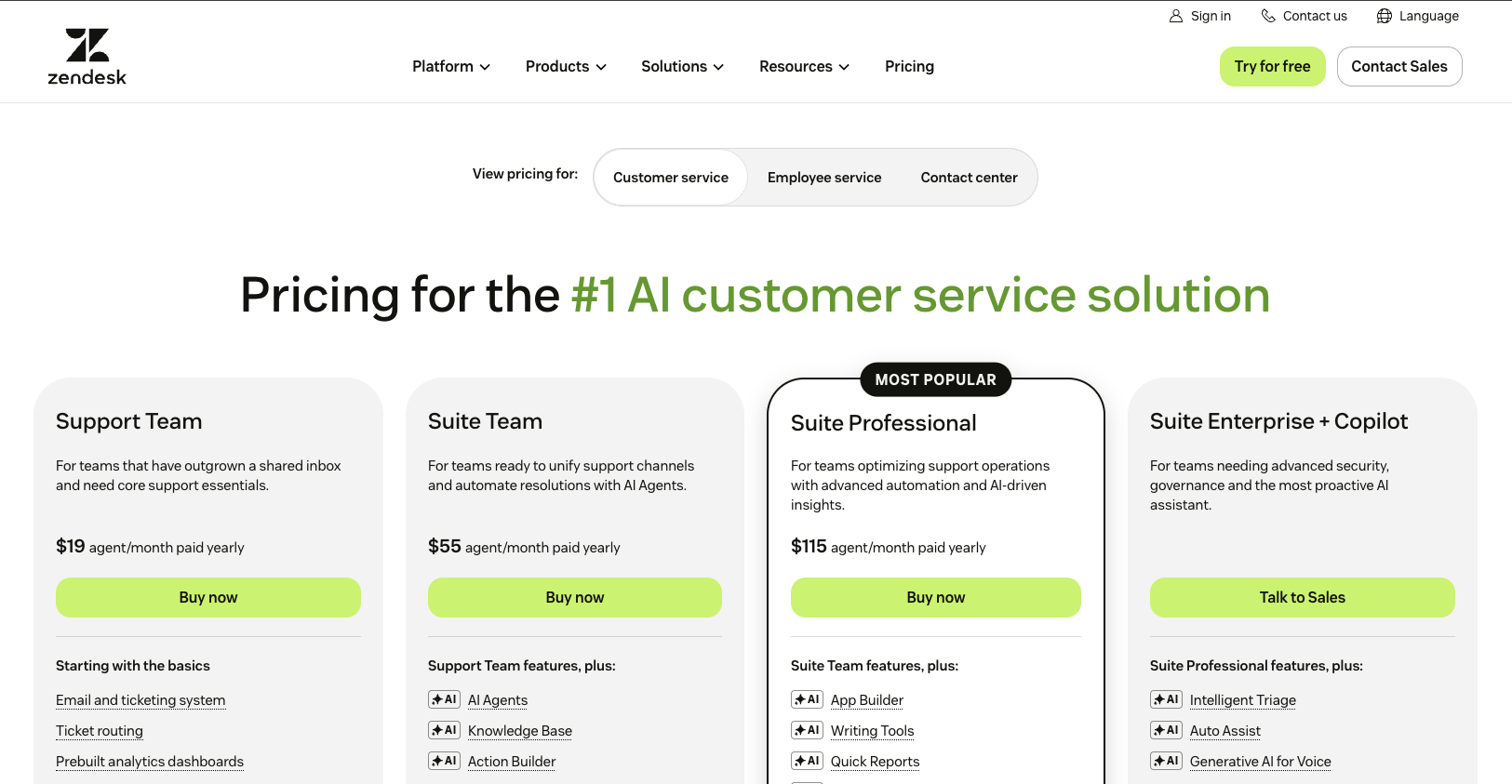
These are annual-billing rates from both vendors' pricing pages and AI-agent documentation, checked June 2026. Zendesk's per-resolution rate is not listed on its public seat-pricing page and comes from its automated-resolutions documentation. Monthly billing adds roughly 20% to 35% on both.
Zendesk (per agent, per month):
| Plan | Price | What it adds |
|---|---|---|
| Support Team | $19 | Email and ticketing only |
| Suite Team | $55 | Omnichannel messaging, help center, AI agents Essential, telephony |
| Suite Professional | $115 | Skills-based routing, IVR, writing tools, admin copilot, custom reports |
| Suite Enterprise + Copilot | Talk to Sales | Intelligent Triage, Auto Assist, sandbox, custom roles |
Zendesk reworked its public pricing in 2026. Older versions listed a Suite Growth plan around $89 and an Enterprise price near $169. The page now shows the four tiers above, with Enterprise moved to sales. Check the live numbers before you budget.
Add-ons: Copilot at $50/agent/month on any Suite plan. Suite plans include a free monthly allowance of automated resolutions per agent (5 on Team, 10 on Professional, 15 on Enterprise). Beyond that, resolutions bill at $1.50 each on committed volume or $2.00 pay-as-you-go, dropping toward $1.00 at high volume. Large enterprises negotiate lower. QA, workforce management, and voice usage bill separately.
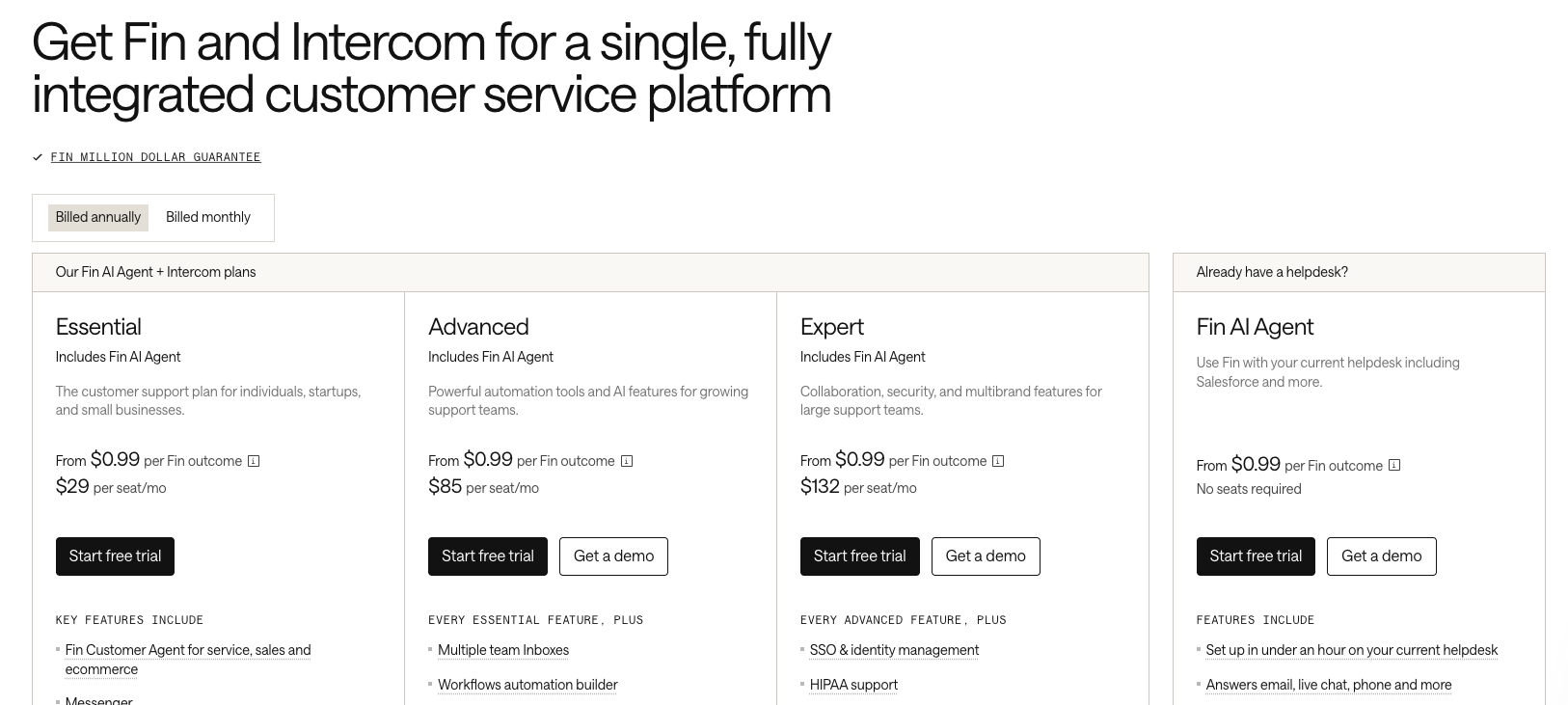
Intercom (per seat, per month):
| Plan | Price | What it adds |
|---|---|---|
| Essential | $29 | Inbox, ticketing, help center, Messenger |
| Advanced | $85 | Workflows, multiple team inboxes, deeper integrations |
| Expert | $132 | SLA management, workload management, custom roles, SSO, HIPAA, multibrand |
Fin bills $0.99 per outcome on every plan. Standalone Fin runs on Zendesk and other helpdesks at $0.99 per outcome, with a 50-outcome monthly minimum (about $49.50) and no seat fees. Copilot is $29 per agent/month on Intercom plans, or $35 per user/month on a non-Intercom helpdesk. WhatsApp, proactive messaging bundles, and channel overages bill on top.
What a 10-agent B2B SaaS team actually pays
Assume 2,000 conversations a month and a 45% AI resolution rate, a conservative figure inside the 42% to 50% range Intercom reports in its case studies. That's 900 resolutions.
- Intercom (Advanced): $850 in seats + 900 Fin outcomes at $0.99 ($891) = $1,741/month. Copilot adds $290.
- Zendesk (Suite Professional): $1,150 in seats + 800 billable resolutions at $1.50 ($1,200, after the 10-per-agent free allowance covers 100) = $2,350/month. Copilot adds $500.
At 900 resolutions, Zendesk's AI line ($1,200) costs more than Intercom's ($891), because the committed rate is $1.50 against Fin's $0.99. Zendesk's seats run higher too.
The AI line grows fastest. At 8,000 conversations and the same 45% rate, Fin bills about $3,564 a month, and Zendesk's resolutions run higher still at its $1.50 committed rate. Per-resolution pricing looks cheap at low volume and becomes your biggest line at high volume, on both platforms.
Ask any vendor three things before signing: the exact per-resolution rate, the written definition of a billable resolution, and what happens to billing when the AI escalates.
Zendesk or Intercom: what's the better support software for you?
Complex B2B SaaS support: Zendesk. Routing, SLAs, and engineering handoffs fit tickets that need diagnosis, logs, and cross-team work. Then pick the AI agent for your ticket type. Help-center-trained agents handle FAQ traffic. Troubleshooting tickets depend on past resolved cases, which is what Pluno learns from. It escalates with full context when it shouldn't answer.
Consumer or transactional support: Intercom. Short, repetitive questions are what Fin clears at the rates in Intercom's case studies, and the Messenger gives customers the best front end here. The published per-outcome rate makes the AI bill easy to model.
Support and onboarding in one tool: Intercom. Tours, checklists, and outbound messages live in the Messenger. Rebuilding that on Zendesk takes three extra tools.
Voice-heavy or regulated teams: Zendesk. Zendesk Voice, sold as Zendesk Contact Center for full call-center setups, runs complete voice operations, and the compliance options (HIPAA from Suite Professional up, a broader certification list) clear procurement reviews that stall elsewhere.
Bottom line
- Zendesk wins ticketing, voice, reporting depth, and marketplace size. Pick it for complex, high-volume, multi-team support.
- Intercom wins chat, onboarding, and setup speed, and Fin is the stronger agent for consumer FAQ tickets.
- The helpdesk and the AI agent are separate choices. Both platforms let you swap the native agent for a third-party one.
- Both bill AI per resolution, but they define a resolution differently and Zendesk's rate runs higher. Get the definition and the rate in writing before you compare.
- At high volume, the AI line passes the seat line on both. Model your bill at your actual ticket volume.
Zendesk vs Intercom FAQ
Is Intercom cheaper than Zendesk?
At the entry level, yes. Intercom's Essential plan is $29 a seat against $55 for Zendesk's Suite Team, and Fin's $0.99 per resolution undercuts Zendesk's $1.50 committed rate. (Zendesk's $19 plan is email only.) Total cost still tracks AI volume on both, and at a few thousand resolutions a month the AI line outgrows the seat line.
Can you use Intercom's Fin AI agent with Zendesk?
Yes, Fin connects to Zendesk through Intercom's API and starts resolving tickets in under an hour, with no migration. On Zendesk it's $0.99 per outcome with a 50-outcome monthly minimum and no seat fees.
Can you replace Fin with a different AI agent on Intercom?
Yes, Intercom's app store carries third-party AI agents, including My AskAI, Quickchat, and Ada. They connect to your Intercom inbox and can replace Fin for direct replies, drafts, and tagging, often at a lower price. The AI agent is a separate choice from the helpdesk on Intercom too.
Which is better for B2B SaaS support, Zendesk or Intercom?
Zendesk, for most B2B SaaS teams. Technical tickets need skills-based routing, SLA policies, and clean Jira escalation. Then pair Zendesk with an AI agent built for complex tickets. Intercom fits B2B teams whose support is mostly chat-based product questions and whose onboarding lives in the Messenger.
Does Zendesk have an AI agent like Fin?
Yes, Zendesk's AI agents resolve tickets autonomously and bill per resolution, with an Essential version on Suite plans and an Advanced version through sales. You can also run a third-party agent from the Zendesk Marketplace instead of the native one.
Running support on Zendesk with tickets too complex for FAQ bots? Pluno learns from your past resolved tickets and handles the multi-step cases other agents escalate. Run a free simulation on your own tickets and see the resolution rate before you pay.