Zendesk changed its AI lineup more in 2026 than in the previous three years. The Essential and Advanced AI agent tiers are no longer available; the old bot builder is being retired, and a fresh wave of features from the Relate 2026 launch landed on top, from Agent Builder to Quality Score to a Knowledge Graph that reaches into outside systems.
Most guides you'll find still describe the old setup, which makes them a poor guide for what's live now.
This guide covers every Zendesk AI feature that matters in 2026: what each one does, how to get real value from it, and the mistakes to avoid.
TL;DR
-
Zendesk merged its AI agents into a single offering on May 11, 2026. Agentic reasoning, multi-step procedures, and external API actions that used to sit behind the paid Advanced add-on are now included in Suite and Support plans.
-
Essential AI agents and the legacy bot builder are on the way out. Technical development stops August 31, 2026, with full shut-off on December 10, 2026. Don't build anything new on them.
-
The features most teams get value from first: AI agents for autonomous resolution, Copilot for agent assist, intelligent triage for routing, AI ticket summaries, and Quality Score for QA.
-
Relate 2026 added Agent Builder, an expanded Copilot lineup, Context Graph, Knowledge Graph connectors (SharePoint, Google Drive, Notion, Guru, and more), and outcome-based pricing on verified resolutions.
-
Native Zendesk AI is strong on documented, FAQ-style tickets. It gets thinner on complex technical cases, which is where your choice of AI layer matters.
What "Zendesk AI" means in 2026
Zendesk AI is the intelligence layer of the Zendesk Platform. Zendesk says it's trained on roughly 20 billion ticket interactions and runs a Resolution Learning Loop that captures insights from every interaction to improve answers over time.
For day-to-day work, the features are split into three buckets:
-
AI-powered tools for agents and admins: intelligent triage, AI ticket summaries, generative search, quick answers, and AI translations.
-
Copilot: the agent and admin assist layer that drafts replies, surfaces context, and runs approved actions.
-
AI agents: the autonomous layer that reads a ticket, works out what the customer wants, and either resolves it or routes it to a human.
The big shift in 2026 is that the AI agent feature set is now a single offering across plans, the legacy bot builder is being retired, and a batch of agentic and analytics features has moved into the standard plans.
The 2026 packaging change you need to know first
If you only update one thing in your mental model of Zendesk AI, make it this.
On May 11, 2026, Zendesk removed the Essential versus Advanced split for AI agents. Capabilities that previously required the paid Advanced add-on, including agentic reasoning, multi-step procedures, and external API integrations, are now included in the Suite and Support plans.
At the same time, a stack of older features became legacy: Essential AI agents, the bot builder, answers and intents, autoreplies with articles, and zero-training AI agents. Zendesk stops technical development on these (beyond critical fixes) on August 31, 2026, with full shut-off on December 10, 2026.
Tips to get the most out of this change
-
If you're still maintaining bot-builder answer flows, plan your migration to the new AI agent experience now. Don't wait for the shut-off window.
-
Audit what you're paying for. Some teams kept the old Advanced add-on as a line item, which is now folded into the base plan.
-
Re-test your agents after the migration. The new agentic model handles multi-step requests differently from the old scripted flows.
What to avoid
-
Building anything new on the bot builder or zero-training agents. It's dead code by year-end.
-
Assuming your old answer flows carry over untouched. Treat the migration as a rebuild, not a copy-paste.
The overview of Zendesk AI features
Each feature below covers what it does, how to get more out of it, and the traps that hold teams back. The ones near the top tend to move the needle for most teams, so start there.
AI agents (autonomous resolution)
Zendesk AI agents handle conversations on their own across messaging, email, and voice. Zendesk's MCP Server also connects agents to external AI platforms including ChatGPT and Gemini, though that piece is still rolling out, so confirm it's available for your account. They pull answers from your help center and connected content, reason across multi-step requests, and run actions through connected systems. Agent Builder, a no-code interface for building, testing, and deploying custom agents, is the control panel for everything.
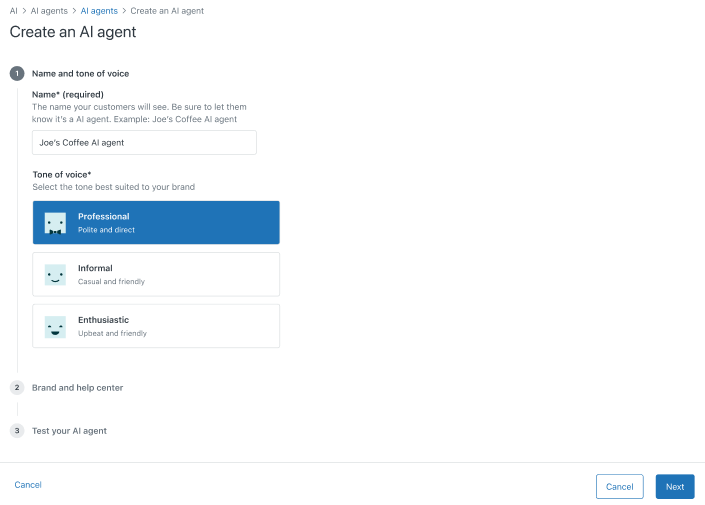
Tips to get more out of it
-
Launch on one well-documented, high-volume topic first. Password resets or order-status questions are good starting points. Prove it works, then widen the scope.
-
Use Zendesk triggers to control exactly which tickets reach the agent, so the agent only handles cases they can resolve.
-
Build proper procedures in Agent Builder for anything multi-step. Don't lean on raw generative replies for flows that need an action.
-
Connect the API actions the agent needs, like order lookup or refunds, before launch. Without them, it stalls the moment a ticket needs a system call.
What to avoid
-
Pointing the agent at tickets that need a lookup it can't reach, like an account balance when your customer database isn't connected to Zendesk. Route those to a human with a trigger.
-
Leaving the agent on a broad scope and then judging it on tickets it was never set up to handle.
-
Chasing a high deflection number on its own. Watch whether those resolutions hold up over the next few days, since a closed conversation and a solved problem aren't always the same thing.
Native generative replies lean on help-center content and the Resolution Learning Loop.
Zendesk AI agents answer from your help-center content and the Resolution Learning Loop, which works well when the answer is already written down. On a fast-changing technical product, the hardest questions often aren't in an article yet, so the agent escalates or gives a partial answer.
The fixes for those cases usually live in resolved tickets and engineering tools instead of published articles. The section on where native Zendesk AI reaches its limits covers how to handle that gap.
Copilot (agent assist)
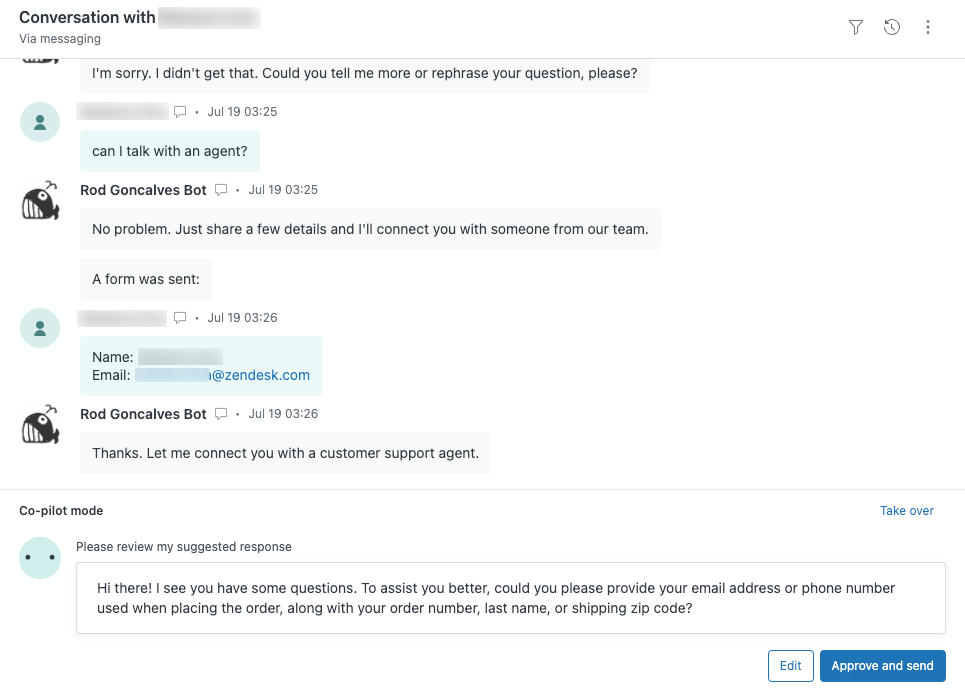
Copilot sits next to your human agents. It drafts replies, surfaces the next best step, pulls in context, and runs approved actions from your knowledge and procedures. It's agent-facing, so nothing reaches a customer until a person sends it. Zendesk says it's designed to act on at least 30% of tickets from day one. Copilot is generally a paid add-on. Some limited AI and Copilot features are included depending on your plan, so check what your plan covers before you budget for the add-on.
Tips to get more out of it
-
Feed Copilot your internal docs and let it generate procedures for you. Hand-writing decision trees for every path wastes the tool.
-
Turn it on automatically per ticket so a draft is waiting when the agent opens the ticket. Agents skip steps that require a manual click.
-
Use it as a research shortcut. Have agents ask Copilot to pull the relevant past ticket or Jira issue into the draft so they stay in one tab.
-
Add a plain-language workflow for tone and length so every agent's drafts read consistently.
What to avoid
-
Treating Copilot as autonomous. It assists agents and stops short of closing tickets on its own.
-
Letting drafts go out unedited on account-specific or sensitive tickets without a quick review.
-
Leaving its knowledge sources stale and then blaming the draft quality.
Zendesk Copilot drafts from your help-center articles, macros, and the procedures admins write for each path. Those procedures are written and maintained by admins, so coverage depends on how many paths you build out. On a complex product with lots of edge cases, a ticket with no matching procedure or article gets a thinner draft.
Pluno's AI Copilot is agent-facing in the same way, but it builds drafts from your resolved tickets across every channel. The fixes and wording your team already used carry into the draft, including the complex cases that never became an article. It also pulls in related context as the agent opens the ticket: the linked Jira issue, the Slack thread, and the internal doc.
For technical B2B support, the resolved ticket grounding covers the edge cases without the procedure upkeep.
[Pluno Free Trial]
Intelligent triage
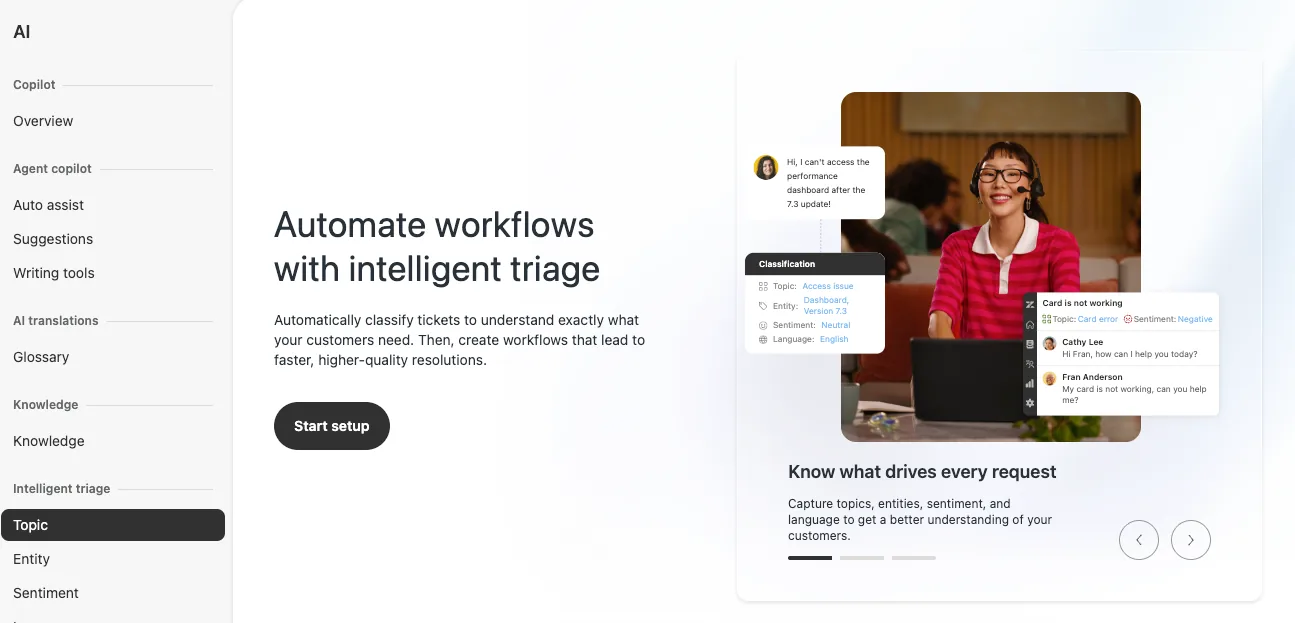
Intelligent triage reads incoming tickets, classifies intent, sentiment, and language, and then populates custom fields via entity detection. Admins can build their own custom intents and entities to match how their product and queues are organized.
Tips to get more out of it
-
Build custom intents for your top recurring categories. Default intents won't route a niche or technical product accurately.
-
Pair triage tags with views and triggers so a detected intent actually moves the ticket to the right queue.
-
Use sentiment to flag at-risk tickets for faster human pickup, so it earns its keep beyond a dashboard number.
-
Review the intent model every quarter. Your ticket mix shifts as the product changes.
What to avoid
-
Running on default intents and expecting accurate routing for a specialized product.
-
Letting triage fill fields that nothing downstream reads. The classification then goes nowhere.
-
Assuming detected language equals good multilingual resolution. That depends on the layer answering the ticket.
Zendesk triage classifies tickets with its own intent and entity model. Admins build that model and keep it current as the product and ticket mix change, which is steady upkeep on a niche or technical product.
Pluno's AI Tagging takes a different design path. You describe the outcome in plain language, like "tag any ticket about a failed import as integration_issue," and it fills your existing Zendesk fields and tags from that rule. Zendesk gives you a structured model to tune, but Pluno gives you plain-language rules that require less maintenance. Pick the one that fits how your team works.
[Pluno Free Trial]
AI-generated ticket summaries
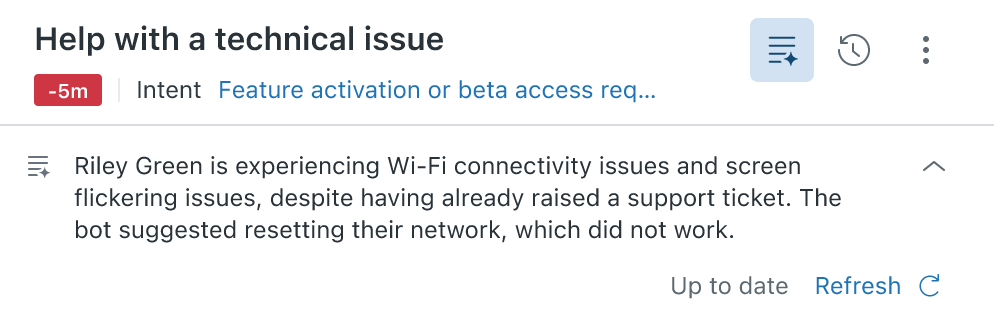
This Copilot feature turns a long, messy ticket history into a short, readable summary inside the agent workspace. In 2026 Zendesk rolled out capped free usage of AI ticket summaries for Suite, Support, and Employee Service Professional plans and above.
Tips to get more out of it
-
Set a summary template that captures what your team actually needs: the issue, what's been tried, and the next action.
-
Use the summary as the handoff note when a ticket is reassigned between agents or escalated to engineering.
-
Turn it on automatically so agents never have to generate it by hand.
What to avoid
-
Letting a summary stand in for reading the ticket on high-stakes or legal cases.
-
Keeping the default template when a tailored one would save real time during handoff.
Generative search, quick answers, and AI translations
These Suite-level tools handle self-service and language coverage. Generative search and quick answers produce conversational answers from your help center for both customers and agents. AI translations extend that coverage across languages.
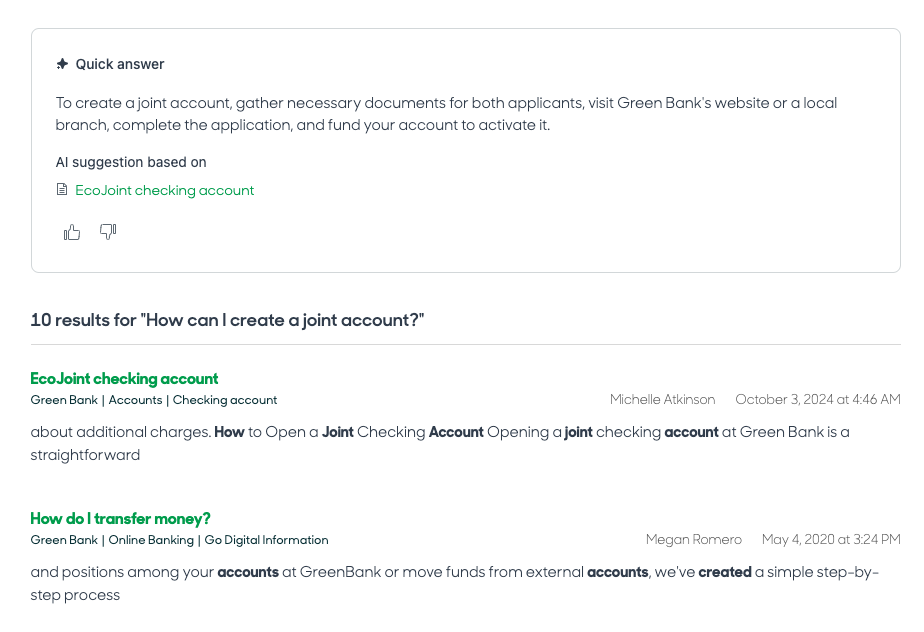
These tools look for answers wherever you point them, and for self-service, that means your help center.
Tips to get more out of it
-
Fix thin or outdated help-center articles first. Generative answer quality correlates directly with article quality.
-
Include non-public or internal articles where your plan allows, so agents get fuller answers than customers see.
-
Use AI translations to extend self-service into a language before you hire for it.
What to avoid
-
Expecting good generative answers from a stale knowledge base. Weak articles produce weak answers.
-
Relying on these tools for answers that live in past tickets or engineering systems instead of articles.
-
Shipping machine translations on legally sensitive content without a human check.
Quality Score (continuous QA)
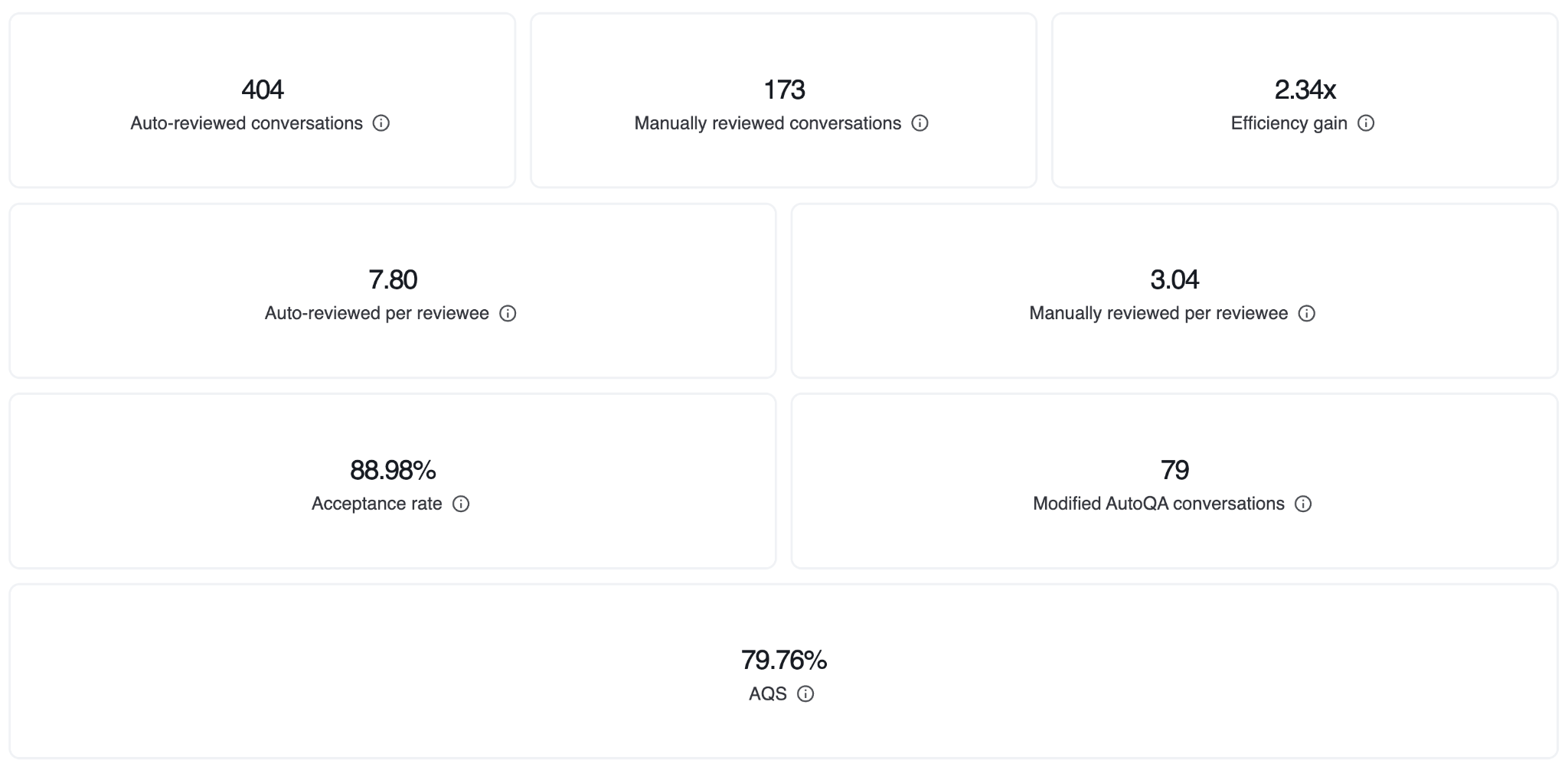
Quality Score, introduced at Relate 2026, brings automated, continuous quality measurement to Suite Professional plans and above. It scores 100% of human and AI interactions and surfaces where service quality slips. Zendesk announced it as coming to early access, so it may not be on your account yet. Confirm availability before you plan around it.
Tips to get more out of it
-
Write QA criteria in plain language tied to your real SLAs: first response time, resolution, tone.
-
Use binary checks for compliance items and a scaled score for softer skills like clarity.
-
Route low scores into coaching. A scoring dashboard nobody opens changes nothing.
-
Start with three or four criteria that matter and expand once the team trusts the results.
What to avoid
-
Scoring everything and reviewing none of it.
-
Writing vague criteria the AI can't grade consistently.
-
Using scores to rank agents punitively. The point is finding coaching gaps.
Quality Score runs as its own scoring layer, separate from whatever drafts and resolves your tickets, with categories you configure and maintain on that separate system.
If Pluno is your AI layer, its Quality Assurance scores conversations on the same layer that drafts and resolves them, so scoring and resolution share one place. Same outcome, one less system to wire up.
[Pluno Free Trial]
Automation potential report, the new Copilots, and the knowledge tooling
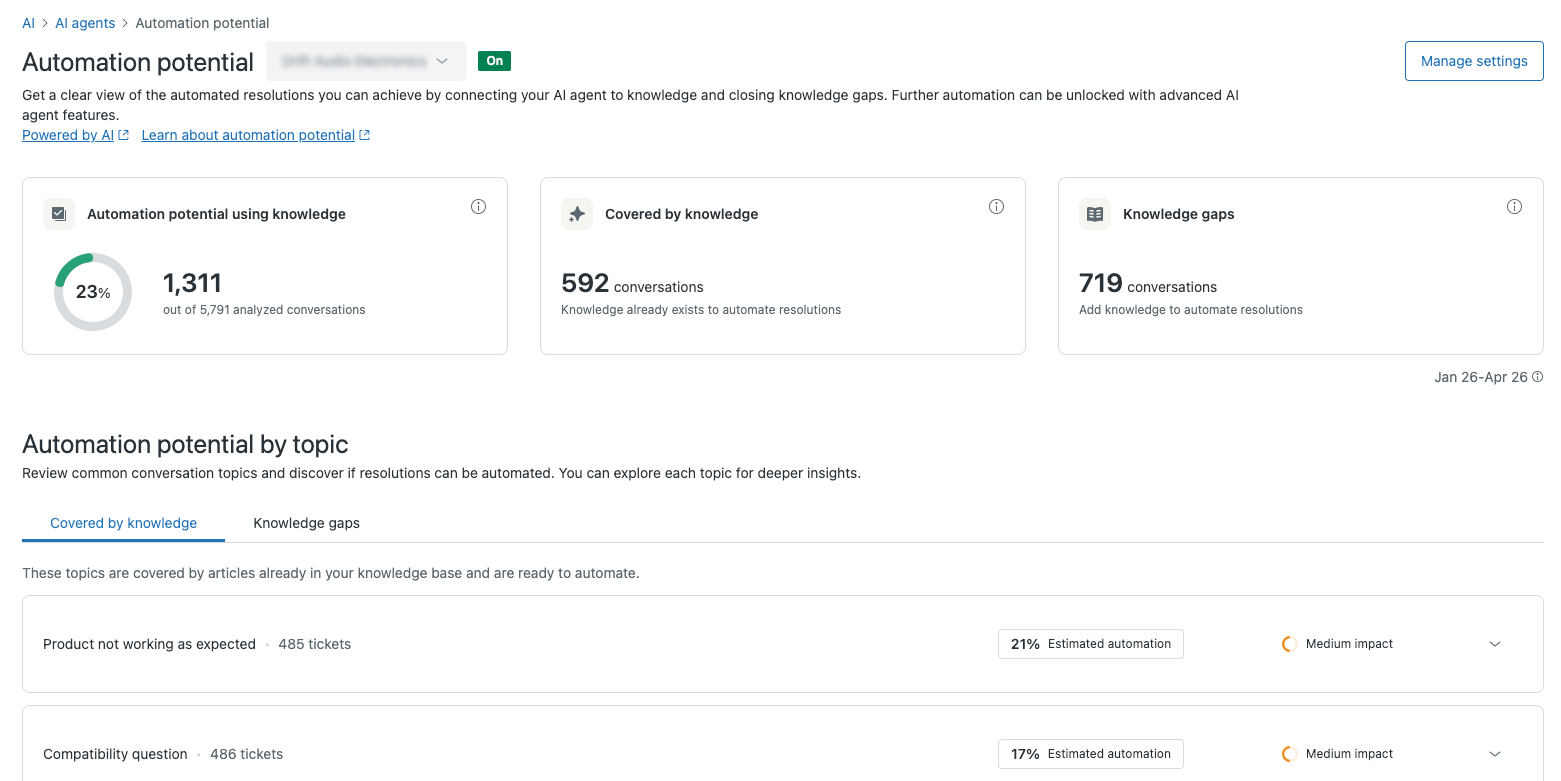
Zendesk added a set of analytics and knowledge features in 2026 that work behind the scenes. The automation potential report analyzes your conversations and shows which volume can be automated. Knowledge Copilot finds gaps and outdated content. Analyst Copilot surfaces trends and root causes. Context Graph acts as an operational memory layer, and the Knowledge Graph connectors reach into Google Drive, SharePoint, Notion, Guru, Confluence, Document360, Box, Amazon S3, and Zendesk.
The report shows what Zendesk thinks it can automate. Play 15 in our Zendesk best practices guide is the manual check to run next to it: mark your top 20 ticket clusters Documented, Needs a lookup or Undocumented, then weigh each by handling time, so the hours your team spends on undocumented tickets sit next to the ticket counts.
Tips to get more out of it
-
Run the automation potential report before expanding AI agents so you can automate the highest-volume topics first.
-
Act on Knowledge Copilot's gap findings by writing the missing articles. That lifts every downstream AI feature at once.
-
Feed Analyst Copilot's root-cause trends back to product and documentation, so the same tickets stop coming in.
-
Connect only the knowledge sources you trust to stay current. A stale wiki pollutes every answer.
What to avoid
-
Ignoring the knowledge-gap findings and then wondering why deflection plateaus.
-
Wiring up every source you have, including outdated ones.
-
Promising your team a Copilot or graph that's still in early access. Confirm its status first.
Voice AI agents
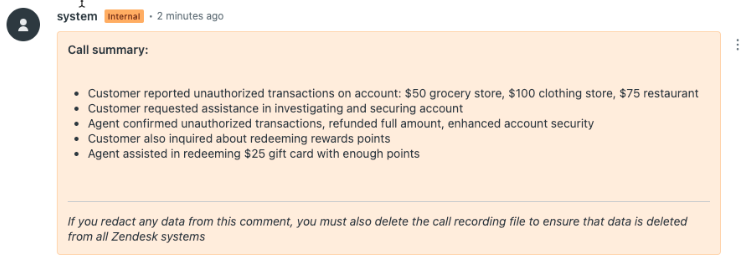
Voice AI agents handle phone conversations on their own, with multilingual support in more than 60 languages and the ability to switch languages mid-call while preserving context. Zendesk slated general availability for later in 2026, so on many accounts voice is still early access or not yet switched on. Confirm the status for your account before you build around it.
Tips to get more out of it
-
Start with contained voice flows like identity verification and status checks before open-ended calls.
-
Use the multilingual support to cover off-hours or overflow languages your team can't staff.
-
Set clear escalation-to-human rules so the voice agent hands off cleanly when it's stuck.
What to avoid
-
Assuming general availability where the feature is still early access. Confirm the status first.
-
Pointing voice AI at emotional or high-stakes calls that need a person.
-
Skipping transcription and QA review on voice resolutions in the first few weeks.
The 2026 feature map at a glance
| Feature | What it does | Where it lives | Best for |
|---|---|---|---|
| AI agents | Autonomous resolution across messaging, email, voice | Suite and Support (outcome-based pricing) | Deflecting high-volume, documented tickets |
| Copilot | Drafts replies, runs approved actions for agents | Paid add-on (some limited features by plan) | Speeding up human agents |
| Intelligent triage | Classifies intent, sentiment, language; fills fields | Higher Suite tiers (verify on your plan) | Routing and auto-tagging at intake |
| AI ticket summaries | Condenses long ticket histories | Capped free on Professional+ | Faster handoffs and escalations |
| Generative search / quick answers | Conversational answers from your help center | Suite-level AI tools | Self-service deflection |
| Quality Score | Scores 100% of human and AI interactions | Suite Professional+ (coming to early access) | QA at scale without sampling |
| Voice AI agents | Autonomous phone handling, 60+ languages | Verify GA vs EAP for your account | Phone-heavy support |
Plan availability is shifting throughout 2026, so confirm each feature is available on your subscription before you build a workflow around it.
Which Zendesk AI feature should you turn on first?
Match the feature to your biggest bottleneck:
-
Repetitive, well-documented questions piling up? Start with AI agents on a single topic and widen from there.
-
Agents slow because answers live in five different places? Start with Copilot.
-
Tickets landing in the wrong queue? Fix intelligent triage before you touch anything else.
-
Quality slipping as volume grows? Quality Score gives you eyes on every conversation.
-
Not sure what to automate at all? Run the automation potential report first so you're working from data.
Where native Zendesk AI reaches its limits
Your rules and workflow layer stays useful no matter what. Triggers, macros, SLAs, and routing keep your queue clean, and we cover those in depth in the Zendesk Automation 101 guide. Native Zendesk AI sits on top of that and handles FAQ-style, well-documented tickets.
The limits show up fastest for technical B2B SaaS teams. Products change often, help centers can't keep pace, and a real resolution usually needs a screenshot, a log line, or a reproduction step the native agent can't reach.
Kojo, a B2B SaaS team running Zendesk alongside Jira, tried Zendesk's built-in AI first:
"We did try their one that comes with the plan. It's really basic, but it wasn't quite for us."
Sarala Conlan, Sr. Customer Support Manager at Kojo
That's when the AI layer becomes a choice between Zendesk's native offering and a solution built for complex tickets.
Pluno is one such option. It works inside Zendesk and learns from your resolved tickets first, so it picks up the diagnostic and troubleshooting steps your agents already use.
On harder cases, its Troubleshooting Agent investigates with logs, code, recordings, and connected tools like Sentry, Linear, and your databases, used by both support and engineering teams.
When a ticket turns out to be a real bug, Pluno's Escalation Copilot opens the Slack, Jira, Linear, Microsoft Teams, or incident.io issue with reproduction steps, impact, and context already written out, and keeps both sides in sync.
Bottom line
Zendesk's AI features work best as a stack, not a checklist. Triage and summaries make every other feature sharper, so get those clean before you scale AI agents or Copilot. And most of your AI quality is determined before any AI runs, because the help center, procedures, and resolved tickets you feed it set the ceiling on what it can answer.
The rules layer stays yours no matter what. The open decision is the AI layer, and it depends on how complex your tickets are. Native Zendesk AI clears documented, FAQ-style volume well. The cases it leaves behind are the technical ones that need a log, a repro step, or a past resolution it can't reach.
So run the test on your own data. Point an AI layer at your resolved tickets and watch how it handles the messy ones, since that's what decides whether native Zendesk AI is enough on its own. If you know that you'll expect a lot of technical tickets that Zendesk's AI features can't handle, try Pluno for free right away.
[Pluno Free Trial CTA]
FAQ
What AI features does Zendesk include in 2026? Zendesk AI spans three areas: AI-powered tools for agents and admins (intelligent triage, AI ticket summaries, generative search, quick answers, translations), Copilot for agent assist, and AI agents for autonomous resolution. Relate 2026 added Agent Builder, an expanded Copilot lineup, Quality Score, Context Graph, and Knowledge Graph connectors. The AI agent feature set is now a single offering across Suite and Support plans.
Is Zendesk Advanced AI still a separate add-on? The Essential versus Advanced split is gone. As of May 11, 2026, Zendesk folded the advanced agentic capabilities into Suite and Support plans, so agentic reasoning, multi-step procedures, and external API integrations no longer require a separate Advanced add-on. Copilot remains a separate paid add-on.
How much do Zendesk AI features cost? Zendesk Suite plans run roughly $55 (Team) and $115 (Professional) per agent per month on annual billing, with a $19 Support Team tier for ticketing only. Suite Enterprise is now quote-only, shown as "Talk to Sales" and bundled as "Enterprise + Copilot," so there's no fixed public price. The Copilot add-on is widely reported at around $50 per agent per month. Zendesk doesn't publish a per-resolution rate for AI agents; third-party analyses put it around $1 to $2, so verify the current rate and your resolution definition with Zendesk before committing.
What's the difference between Zendesk AI agents and Copilot? AI agents are customer-facing and resolve tickets autonomously, escalating to a human when needed. Copilot is agent-facing: it drafts replies, surfaces context, and runs approved actions, but a person always sends the response. Many teams run both, since they solve different problems.
What AI agent works best with Zendesk for complex or technical tickets? For high-volume, well-documented questions, Zendesk's native AI agents are a reasonable place to start, since they draw on help-center content you've already written. For complex, technical B2B tickets that need troubleshooting and engineering context, a resolved-ticket-learning agent like Pluno is built for that specific gap. The reliable way to decide is to simulate each option against your own resolved tickets before you trust any headline resolution rate.