HubSpot AI agents now sit in every corner of the platform: prospecting, data enrichment, deal coaching, content and support. For a support leader, though, the question is narrower. Which AI agent should answer the tickets in your Service Hub help desk, and is HubSpot's own Breeze Customer Agent the right one, or does a third-party agent fit your queue better?
I looked at every candidate I could find against one rule: the AI agent has to work your HubSpot tickets or inbox conversations, according to the vendor's own documentation. Syncing contacts or creating leads doesn't count. Six tools passed with enough documentation to compare, and they're ranked below.
Where Pluno fits: for support teams whose answers live in past tickets, connected systems and engineering knowledge, Pluno is the HubSpot AI agent to test first. It runs inside the same HubSpot help desk, answers from your resolved tickets, investigates technical problems and hands escalations to engineering with the research done. Escalations are never billed.
Every tool gets measured against the same five yardsticks:
- Where it works in HubSpot: which HubSpot surfaces it answers in (help desk tickets, inbox, chat, email, forms) and which HubSpot plan or seat it needs.
- What it answers from: its knowledge sources, and whether it reads your past HubSpot tickets directly or only articles someone wrote.
- What it does beyond answering: actions in HubSpot and your own systems, and whether it can investigate a technical problem.
- What your team gets at handoff: where the ticket lands and how much context comes with it.
- What you pay for: the billing unit, the list price and whether a handoff to your team is billed.
On each yardstick, a tool rates Strong when an official page documents it for the plan you'd buy, Partial when it exists with a real limit (a plan gate, a narrow scope or a workaround) and Not found when no official page documents it as of November 23, 2026.
TL;DR
- Best HubSpot AI agent for technical and B2B support: Pluno. It answers from your resolved tickets, investigates with your systems through the Troubleshooting Agent and escalates bugs with the research attached. Pricing starts at 249€ a month (210€ a month, billed annually) plus 0.90€ per resolved ticket, and escalations are never billed.
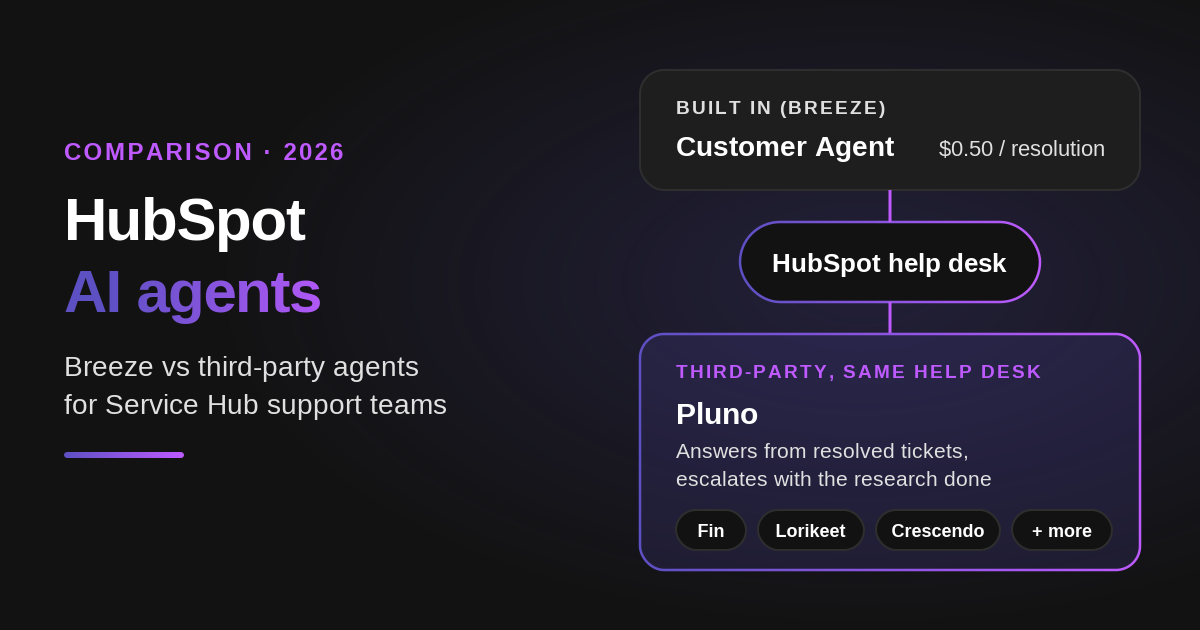
- Built-in option: HubSpot Customer Agent. It has the lowest list price per resolution, $0.50, if you already pay for a Professional or Enterprise plan and your answers are written down.
- Best for a broad, general-purpose agent: Fin, now owned by Salesforce, at $0.99 per outcome with a 50-outcome monthly minimum.
- Bottom line: HubSpot's built-in agent answers what's written in your help center. If your queue needs the fixes your team found in old tickets, logs or engineering threads, a third-party agent like Pluno resolves tickets Customer Agent hands back to your team.
What are HubSpot AI agents?
HubSpot AI agents are the AI tools HubSpot builds into its platform to do work on their own, managed from Agent Hub. HubSpot describes Agent Hub as the place to "view all agents and agentic workflows running across your HubSpot account", both HubSpot-built and custom ones. Most of them charge HubSpot Credits at $0.01 per credit when they run.
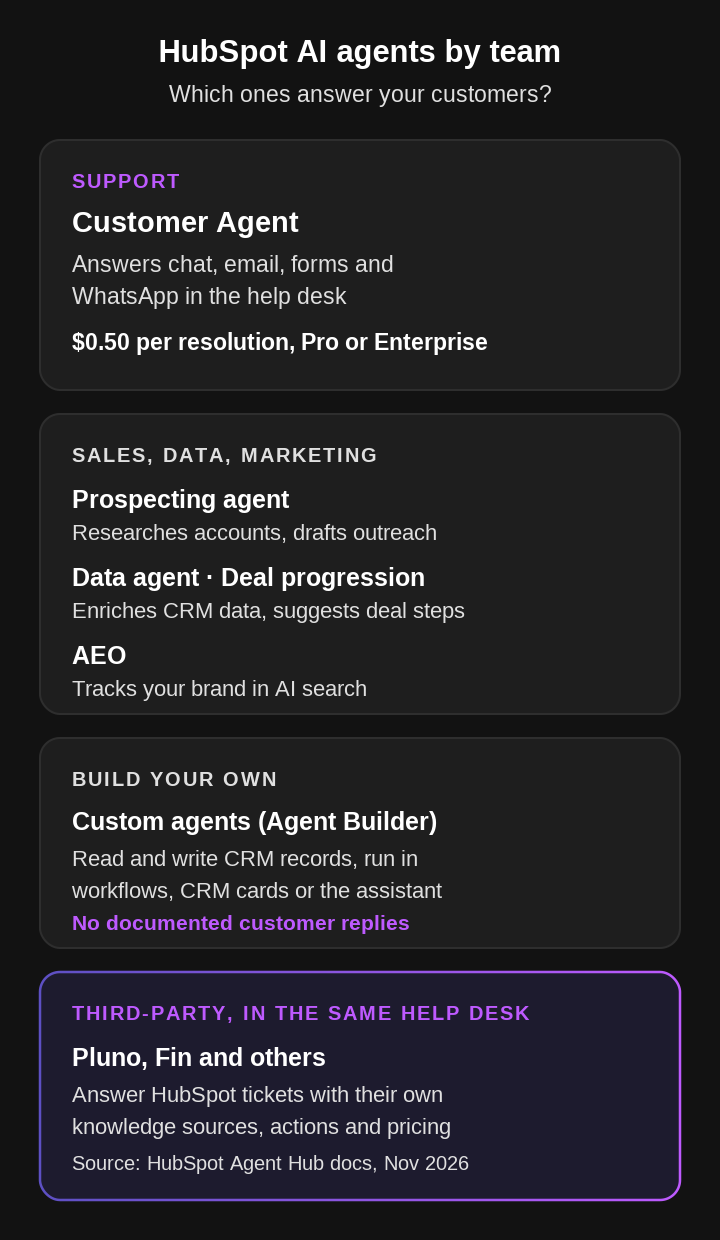
Here's what each HubSpot-built agent does and what it costs, from HubSpot's Agent Hub guide and credits rate sheet on November 23, 2026:
| HubSpot AI agent | Team | What it does | Credits per task |
|---|---|---|---|
| Customer Agent | Support | Answers customer conversations and resolves requests in the help desk; needs a Pro or Enterprise plan | 50 ($0.50) per resolved conversation; voice (beta) 50 per minute |
| Knowledge Base Agent (beta) | Support | Drafts new help center articles | 200 ($2) per article |
| Prospecting agent | Sales | Researches target companies and drafts outreach | 100 ($1) per lead |
| Deal progression | Sales | Suggests next steps to move deals forward | Not listed on the rate sheet |
| Data agent | Data | Enriches and maintains CRM records | 10 ($0.10) per response |
| AEO | Marketing | Tracks your brand in AI search; needs Marketing Hub Pro or Enterprise | Not listed on the rate sheet |
| Custom agents (beta) | Any | Agents you build in Agent Builder | 1 per action unit |
Agent Hub itself is included in every Starter, Professional and Enterprise edition, and credits cost $0.01 each. So when people search for HubSpot AI agents, they find a long list. For a support team, it shortens to one agent that talks to customers, Customer Agent, plus whatever you build yourself.
How to turn on a HubSpot AI agent: a Super Admin first enables HubSpot's AI settings. Then open Agent Hub to activate and configure a HubSpot-built agent, or choose Create, then Agent, to build your own. Customer Agent and custom agents both have a test mode that doesn't use credits.
Customer Agent: the HubSpot AI chatbot for support
Customer Agent is what most people mean by a HubSpot AI chatbot for support. It answers on live chat, email, forms, WhatsApp, Facebook, SMS and calling (beta), and charges 50 credits ($0.50) per resolved conversation. It needs a Professional or Enterprise edition of a qualifying HubSpot product. I score it in full in the ranking below, and my HubSpot Breeze AI review goes deeper on its billing rules.
Custom agents from Agent Builder
Agent Builder lets you build your own agents from prompts, knowledge and CRM data, and HubSpot includes it in Starter, Professional and Enterprise editions. Per HubSpot's Agent Builder guide, a custom agent can browse the web, read and write CRM records and reach outside tools through MCP connectors. It runs from Breeze Assistant, a workflow or a CRM card, and each run uses credits, while testing in the builder is free.
That's useful work behind the scenes. You could build an agent that summarizes a ticket's history for a rep or fills a property from the conversation. What the guide doesn't document is a custom agent replying to customers in the help desk, so for the front line you're back to Customer Agent or a third-party agent.
Breeze or a third-party HubSpot AI agent: why the choice exists
You can pick a third-party AI agent because HubSpot lets apps read and write help desk tickets and conversations. Your inbox, pipelines, properties and reports stay in HubSpot, and the AI agent becomes a separate decision from the help desk.
Teams usually look past Breeze for one of three reasons:
- Their answers aren't written down. Customer Agent answers from your knowledge base, website, files and Q&A pairs. It can generate Q&A pairs from tickets for you to approve, but it doesn't read the tickets themselves. The fix for "our SSO broke after we changed domains" usually sits in one ticket an engineer closed months ago.
- Their tickets need investigation. Customer Agent's actions are API calls, CRM updates and workflow enrollment, up to 20 of them. Working out why an integration fails for one account takes logs, code and error tracking.
- They'd have to upgrade first. A team on Service Hub Starter has to move to Professional, from $90 a seat a month on annual billing plus $1,500 onboarding, before Customer Agent is available. Check each third-party vendor's plan requirement too: Fin, for example, also needs Service Hub Professional.
Third-party HubSpot Breeze alternatives differ in where they run, what they read and what they bill, which is what the yardsticks measure.
Best HubSpot AI agents compared at a glance
Here's how the six tools rate on the five yardsticks, based on each vendor's official pages on November 23, 2026. The detail behind every rating is in the ranking below.
| AI agent | Where it works in HubSpot | Answers from past tickets | Beyond answering | Handoff | What you pay for |
|---|---|---|---|---|---|
| Pluno | Strong: help desk tickets on email, forms, chat and messaging | Strong: reads resolved tickets directly | Strong: API actions, engineering escalations, Troubleshooting Agent alongside | Strong: research summary and next steps | Platform fee + 0.90€ per resolution, escalations never billed |
| Customer Agent | Strong: chat, email, forms, WhatsApp, Facebook, SMS, voice beta, on Pro or Enterprise | Partial: approved Q&A pairs drafted from tickets | Partial: up to 20 API, CRM and workflow actions | Partial: live, async or none | $0.50 per resolution in credits |
| Fin | Partial: email tickets, forms and WhatsApp in HubSpot, chat in Fin's own Messenger; needs Service Hub Pro and a seat for Fin | Not found | Partial: moves tickets through HubSpot workflows | Strong: ticket returned to your team with the transcript | $0.99 per outcome, 50 minimum, Procedure handoffs billed |
| Lorikeet | Strong: HubSpot conversations and tickets | Not found | Partial: actions you switch on | Not found | From $2,100 a month + $0.99 per resolution, escalations free |
| Maven AGI | Partial: email conversations | Not found | Partial: ticket, contact and deal lookups set up by Maven | Partial: ticket card with a summary | Not published |
| Crescendo | Partial: email and forms, chat runs in Crescendo | Not found | Partial: ticket creation and status updates | Partial: HubSpot ticket via your routing | $1.25 per solve (Marketplace listing) |
Two columns decide most evaluations. If your answers live in past tickets, only Pluno documents reading them directly. If you budget per resolution, check whether a handoff to your team is billed, because the six tools answer that differently.
The 6 best HubSpot AI agents for Service Hub, ranked
I ranked the tools by how well they handle a typical B2B or SaaS support queue in HubSpot: a mix of how-to questions, account changes and technical problems. A queue made almost entirely of FAQs would move Customer Agent up, and I say so in its section.
1. Pluno: best HubSpot AI agent for technical and B2B support
Pluno adds AI to the help desk your team already works in, and HubSpot is one of them. The same platform runs in Zendesk, Intercom, Salesforce Service Cloud, HubSpot, Jira Service Management and Freshdesk, so your tickets, pipelines and reports stay where they are.
Its AI agent, Deflection AI, treats your resolved tickets as its main evidence. From each past resolution it recovers the steps your reps took, with the newest working fix weighted highest, then layers in your help center, docs, uploaded files and connected tools such as Slack threads and Jira issues. For each ticket it runs several rounds of searches across those sources and replies only when they agree. When the evidence is thin or a business decision is needed, it escalates with its research instead of guessing.
On the five yardsticks:
- Where it works in HubSpot: inside the HubSpot help desk, on email, web forms, chat and messaging such as WhatsApp. The Pluno team sets it up with you and imports your past tickets.
- What it answers from: your resolved tickets, read directly, plus your help center, docs, files and connected tools. With multi-brand support, each brand gets its own knowledge base, AI workflows and escalation routing, so two products never share one set of answers.
- What it does beyond answering: custom API actions read or write live data mid-conversation, unlimited AI Workflows set rules such as always escalating a topic, and the Troubleshooting Agent investigates technical problems alongside your help desk (more below).
- What your team gets at handoff: a research summary with the sources it checked and suggested next steps. Escalation forms collect required details from the customer first, so the ticket arrives complete.
- What you pay for: a platform fee from 249€ a month for up to 500 tickets (210€ a month, billed annually), plus 0.90€ per ticket it fully resolves. A reopened ticket isn't billed again, and escalations are never billed. See Pluno pricing.
Answering is only part of a technical queue. Three more Pluno tools cover the rest:
- Troubleshooting Agent: picture a ticket where one customer's scheduled export fails every night. The agent looks through what shipped recently, the code behind the export, that account's data, the errors your error tracker logged and the user's session, and ties every finding to its source. You get a proposed fix, and a pull request is opened only once you approve it. You run it from its own app or Slack, on credits from 99€ a month.
- Escalation Copilot: turns a HubSpot ticket into a complete bug report in the tool your engineers use, such as Slack, Jira, Linear, Microsoft Teams or incident.io. Progress on a linked Jira issue flows back to the ticket, so reps don't chase engineering for updates.
- Help for your human team: AI Copilot drafts a sourced reply for your reps at 49€ per seat, AI Tagging & Field Filling fills ticket properties, and Quality Assurance scores every conversation at 35€ per agent.
Across customers, Pluno averages a 65% resolution rate and 48% agent time saved (as of November 2026). Kojo went from 0% to 50% ticket deflection with same-day escalations to engineering, and Innovorder's AI agent resolves 67% of its chat tickets in under a minute.
"My team is, like, a huge fan. They feel like they can't live without Pluno now. We'd be drowning without it."
Sarala Conlan, Sr. Customer Support Manager at Kojo
Best for: SaaS and B2B teams on HubSpot whose tickets need past fixes, live account data or engineering, and teams that want one platform for the AI agent, their reps, escalations and QA.
Test Pluno on your 50 most recent tickets
2. HubSpot Customer Agent: best built-in HubSpot AI agent
Customer Agent is HubSpot's own AI agent for support, part of Breeze and managed in Agent Hub. It's the default for HubSpot teams, built for questions your help center already answers.
- Where it works in HubSpot: live chat, email, forms, WhatsApp, Facebook, SMS and calling (beta), all connected to the HubSpot inbox or help desk. It needs a Professional or Enterprise edition of Marketing, Sales, Service, Data, Content, Smart CRM or Revenue Hub, plus credits. Strong.
- What it answers from: your knowledge base, website pages, files and short answers you write. From tickets or inboxes, it drafts FAQ-style Q&A pairs, and the ones you accept become sources. Partial, because it never reads the tickets themselves.
- What it does beyond answering: up to 20 actions: custom GET or POST requests to your API, CRM updates and workflow enrollment, with optional email verification first. No documented log, code or error analysis. Partial.
- What your team gets at handoff: you pick live, async or no handoff. In the help desk, Customer Agent creates a ticket and moves it there, routed to an inbox, the help desk or a workflow. Nothing in that guide mentions a summary of what the agent already checked. Partial.
- What you pay for: $0.50 per resolved conversation, after the 3,000 credits (Professional) or 5,000 credits (Enterprise) Service Hub includes each month. Only a handoff the visitor asks for keeps a conversation from counting as resolved, so one your workflow routes to a rep can still cost credits. Pluno never bills a ticket that goes to your team.
Best for: teams already on a qualifying Pro or Enterprise plan whose answers live on their website and help center. Watch out for: list every workflow that assigns conversations to reps before you budget, because those conversations can still be billed.
3. Fin: best for a broad, general-purpose agent
Fin is the biggest name on this list: Salesforce closed its purchase of Fin on September 10, 2026, and puts its user base above 30,000 companies. Fin's HubSpot guide explains how it takes over tickets assigned to it.
- Where it works in HubSpot: email tickets and contact form submissions assigned to Fin, plus WhatsApp through your HubSpot help desk inbox. Website chat runs in Fin's own Messenger, not HubSpot chat. Setup needs Service Hub Professional with tickets enabled and a support seat for Fin, and syncing your HubSpot knowledge base needs Content Hub Professional or Enterprise. Partial.
- What it answers from: help articles, snippets, synced web content and other connected sources. Past HubSpot tickets aren't on that list. Not found for past tickets.
- What it does beyond answering: four HubSpot workflows move tickets between stages and change assignment, using Fin Status, Fin Tags and Fin Assignment properties. Partial.
- What your team gets at handoff: the ticket moves to your waiting-on-team stage with Fin unassigned, or a new ticket is created with the full transcript. Strong.
- What you pay for: $0.99 per outcome, with a 50-outcome monthly minimum on another help desk. Procedure handoffs count as outcomes, while a plain pass to your team isn't charged. There's a 14-day free trial, and you connect HubSpot yourself through OAuth.
Best for: teams that want a large vendor's general-purpose agent and are already on Service Hub Professional. Watch out for: the extra HubSpot seat, and the Content Hub requirement if your articles live in HubSpot. My Fin pricing breakdown covers its outcome rules.
4. Lorikeet: best for larger teams with a platform budget
Lorikeet builds AI agents for complex support, and it raised a $35M Series A in August 2025, bringing its funding past $50 million.
- Where it works in HubSpot: its HubSpot integration "answers HubSpot conversations and tickets", using CRM context such as account history and prior interactions. Strong.
- What it answers from: its HubSpot setup docs need an access code, so I couldn't check its knowledge sources or whether it reads past tickets. Not found.
- What it does beyond answering: Lorikeet doesn't reply to anyone until you turn on actions, and the public page doesn't list which actions exist in HubSpot. Partial.
- What your team gets at handoff: not described on its public HubSpot page. Not found.
- What you pay for: the Start plan is $2,100 a month, billed annually, plus $0.99 per chat, email or SMS resolution. Scale is $5,100 a month plus $0.90. Escalations and unresolved tickets aren't charged, and every plan starts with a 30-day free trial.
Best for: larger teams that want a vendor-backed agent and can carry a platform fee. Watch out for: the $2,100 floor before the first resolution, which is high for a team under a few thousand tickets a month.
5. Maven AGI: best for email-first teams that want a managed rollout
Maven AGI is an enterprise AI agent platform that raised a $50M Series B in June 2025, $78M in total. It connects to HubSpot through a set of apps.
- Where it works in HubSpot: Smart Relay reads incoming HubSpot conversations and posts AI replies, with email as the channel it describes. Conversation Sync turns each Maven conversation into a HubSpot ticket on the right contact. Partial.
- What it answers from: the HubSpot page doesn't say. Not found.
- What it does beyond answering: ticket creation, contact and deal lookups and feedback sync, which you ask the Maven team to enable. Partial.
- What your team gets at handoff: an Agent Ticket Card that summarizes the conversation and suggests replies inside HubSpot. Partial, since the handoff mechanics aren't described.
- What you pay for: no public pricing.
Best for: enterprise teams that want the vendor to configure the rollout. Watch out for: chat isn't described for HubSpot, and you'll need a sales process just to get a price.
6. Crescendo: best if you want support outsourced along with the AI
Crescendo sells AI-led support as a managed service, and it raised $50M at a $500M valuation in October 2024.
- Where it works in HubSpot: HubSpot email and form channels, replying from the address you choose. Its docs say the customer-facing chat assistant "continues to run in Crescendo", so HubSpot chat isn't part of it. Partial.
- What it answers from: not documented on the HubSpot setup page. Not found.
- What it does beyond answering: creates HubSpot tickets on escalation in the pipeline you choose and sets their status as it works. Partial.
- What your team gets at handoff: a HubSpot ticket or conversation, assigned through your own workflows, routing rules or inbox settings. Partial.
- What you pay for: its HubSpot Marketplace listing shows $1.25 per solve, while its own pricing page asks you to book a demo.
Best for: teams that want to hand over front-line support as a service. Watch out for: the highest listed per-solve price here, and chat that sits outside HubSpot.
Who didn't make the list, and why
I screened the biggest names in AI customer service too. These didn't pass, because their official pages don't show their AI agent working HubSpot tickets or conversations:
- Ada: HubSpot isn't among the handoff integrations on its integrations page.
- Decagon and Sierra: I found no HubSpot help desk documentation for either.
- Forethought: its HubSpot connection creates leads and contacts, not ticket replies.
- Chatbots that only hand off or sync: Tidio's Lyro creates HubSpot contacts, Botpress escalates to HubSpot's help desk without answering in it, and Voiceflow creates records without working existing tickets.
Smaller self-serve AI agents do run in HubSpot too. I compare three of them, eesel AI, Fini and My AskAI, in the alternatives section of my Breeze review.
HubSpot AI agent pricing: what each billing model costs you
Each tool bills a different unit, so list prices don't line up on their own:
- Customer Agent: per resolved conversation, in credits, on top of a qualifying plan.
- Fin: per outcome, which includes Procedure handoffs, with a monthly minimum.
- Lorikeet: a monthly platform fee plus a price per resolution, with escalations free.
- Crescendo: per solve, as part of a managed service.
- Maven AGI: quoted by sales.
- Pluno: a platform fee by ticket volume, plus a price per fully resolved ticket. Escalations are never billed, and the fee covers modules such as Escalation Copilot and AI Tagging.
To compare them, divide each tool's whole monthly bill by the tickets it got right with no rep involved. That number, cost per correct resolution, rewards the agent that closes your hard tickets, even when its sticker price per resolution is higher.
The calculator below prices what each of three tools adds to your bill: Customer Agent, Fin and Pluno, the ones with published prices and no platform minimum in the thousands. It starts every tool at 65%, which is both HubSpot's published figure and Pluno's average across customers. Replace each rate with the one it reached in your own test.
What each HubSpot AI agent adds to your bill
List prices checked November 23, 2026. Customer Agent: $0.50 in credits per resolved conversation, after the 3,000 (Professional) or 5,000 (Enterprise) credits Service Hub includes, assuming no other AI tool uses them. Fin: $0.99 per outcome with a 50-outcome monthly minimum, counting resolutions only (Procedure handoffs are also billed), plus one $90 Service Hub seat for Fin. If you are not on Service Hub Professional or Enterprise yet, both add Professional seats for your reps at $90 a month (annual billing) and the $1,500 onboarding spread over 12 months. Rates start at 65%, HubSpot's published figure and Pluno's average across customers (November 2026). Pluno: platform fee for your ticket volume plus 0.90€ per resolved ticket, converted at 1.099 USD per euro (ECB, November 20, 2026); it also covers Escalation Copilot, AI Tagging and other modules. Excludes taxes.
Service Hub edition (sets included credits)
Already on Service Hub Professional or Enterprise?
Pluno billing
Customer Agent
$620
1,300 resolved, $0.48 each
Fin
$1,377
1,300 resolved, $1.06 each
Pluno
$2,220
1,300 resolved, $1.71 each
Every ticket an AI agent doesn't resolve lands on your team. At these rates your reps still handle 700 tickets with Customer Agent, 700 with Fin and 700 with Pluno. Set each rate from your own 50-ticket test, not from vendor averages.
Read the result next to the tickets left for your team, which the calculator also shows. Every ticket an agent doesn't resolve is a ticket your reps still answer, and that cost is usually larger than any AI line item.
What HubSpot admins say about AI agents in Service Hub
The HubSpot Community is where admins compare notes on Customer Agent. They like it for simple support questions and are critical of mixed-up knowledge, handoffs and source accuracy. These quotes are verbatim, with the date each was posted.
“In my experience HubSpot’s Customer Agent is GREAT for customer support tickets but it’s not designed by default to be a sales AI that can convert visitors to leads on your website.”
“Currently the "one-for-all" AI Customer Agent mixes up info from different knowledge bases and returning the wrong info.”
“Currently, as I've understood it, the AI conversation ends as soon as a handoff is triggered. ... The chat seems to end, leaving the user without any assistance and forcing them to repeat the chat...”
“One gap I would add to your scorecard is source accuracy. ... the answer often sounds right but points to the wrong help page, quotes an outdated limit, or invents a link.”
Four posts aren't a survey, so treat them as signals to test rather than verdicts. The problems they raise, mixed-up sources, a chat that ends at handoff and answers that cite the wrong page, are exactly what a side-by-side test on your own tickets shows before customers see it.
How to choose a HubSpot AI agent in two weeks
Start with three questions, then test on your own tickets.
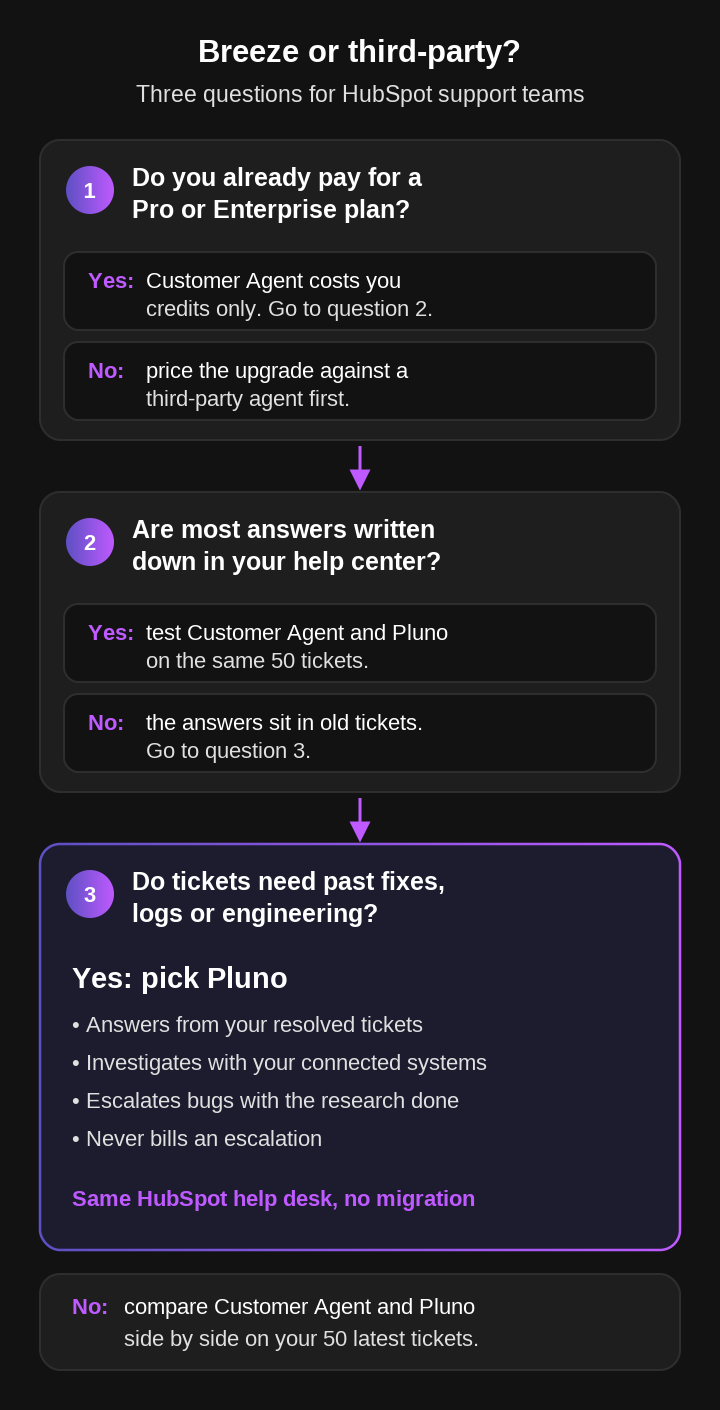
The guide boils down to where your answers live. If the answers sit in old tickets and engineering threads, Pluno is the pick. If your help center covers most questions, test Customer Agent and Pluno on the same 50 tickets before you decide.
Then run a short test:
- Export your 50 newest tickets and label them: how-to, account change or technical issue. The split tells you which kind of agent you need.
- Write down your HubSpot plan and routing. Mark any tool that would need an upgrade or an extra seat, and note which workflows hand conversations to reps.
- Run the same 50 tickets through each shortlisted agent. Use HubSpot's free test mode for Customer Agent, the vendors' trials for the others, and ask Pluno for a free simulation on your 50 most recent tickets.
- Score four numbers per tool: correct resolutions, wrong answers, escalations and how many escalations came with research your rep could use.
- Enter the resolution rates in the calculator above and compare the bills next to the tickets each tool leaves for your team.
Haven't settled on HubSpot as your help desk yet? My Zendesk vs HubSpot comparison weighs the two platforms as a whole.
The bottom line on HubSpot AI agents
HubSpot AI agents give support teams one built-in option for customers: Customer Agent, the default for FAQ chat on a Pro or Enterprise plan at $0.50 per resolution. Agent Builder adds custom agents for internal work, not for replying to customers. For everything your help center doesn't answer, you need more.
For technical and B2B support, Pluno is the best HubSpot AI agent. It answers from your resolved tickets, investigates with your systems, escalates bugs with the research done and never bills an escalation, inside the same HubSpot help desk. See how it would have answered your last 50 tickets.
FAQ
What are the best HubSpot AI agents for support?
For technical and B2B support, Pluno is the best HubSpot AI agent, because it answers from your resolved tickets and investigates problems with your systems. HubSpot's own Customer Agent is the best built-in option for FAQ-heavy chat on a Pro or Enterprise plan. Fin, Lorikeet, Maven AGI and Crescendo also run inside HubSpot.
Does HubSpot have AI agents?
Yes. HubSpot's Agent Hub includes Customer Agent for support, the Prospecting agent and Deal progression for sales, the Data agent for CRM records and AEO for marketing. You can also build custom agents with Agent Builder, which is included in Starter, Professional and Enterprise editions.
How much does the HubSpot AI agent for customer service cost?
Customer Agent costs 50 HubSpot Credits, or $0.50, per resolved conversation. It needs a Professional or Enterprise edition of a qualifying HubSpot product. Service Hub Professional starts at $90 a seat a month on annual billing and includes 3,000 credits a month, enough for 60 resolutions.
What is the best HubSpot AI chatbot?
For website chat answered from your help center, HubSpot's Customer Agent is the simplest HubSpot AI chatbot to switch on. For support that needs past fixes or live account data, Pluno works the same HubSpot help desk and answers from your resolved tickets. Some chatbots, such as Tidio's Lyro, only create HubSpot contacts and don't answer in the help desk.
Which HubSpot Breeze alternatives work inside the HubSpot help desk?
The HubSpot Breeze alternatives that work inside the help desk include Pluno for technical and B2B support, Fin for a broad general-purpose agent, Lorikeet for larger teams with a platform budget, Maven AGI for email with a managed rollout and Crescendo for outsourced support. My HubSpot Breeze AI review also covers smaller self-serve options.
Can I build my own HubSpot AI agent?
Yes, with Agent Builder. A custom agent can read and write CRM records, browse the web and use MCP connectors, and it runs from workflows, CRM cards or Breeze Assistant. HubSpot's guide doesn't document custom agents replying to customers in the help desk.
How do I connect an AI agent to HubSpot?
Most third-party AI agents connect through a HubSpot app and OAuth, and then work your tickets or inbox conversations. Fin needs Service Hub Professional and a seat for Fin. Pluno is set up with you by the Pluno team, who connect HubSpot and import your past tickets.
Can an AI agent use past HubSpot tickets to answer customers?
Pluno answers directly from your resolved HubSpot tickets, along with your help center and connected tools. HubSpot's Customer Agent drafts Q&A pairs from tickets for you to approve, and only the accepted pairs become sources.
Does a HubSpot AI agent replace my support team?
No. An AI agent resolves the tickets its sources can answer and hands the rest to your team. The best ones make those handoffs faster, with the research done, so your reps spend their time on the tickets that need them.