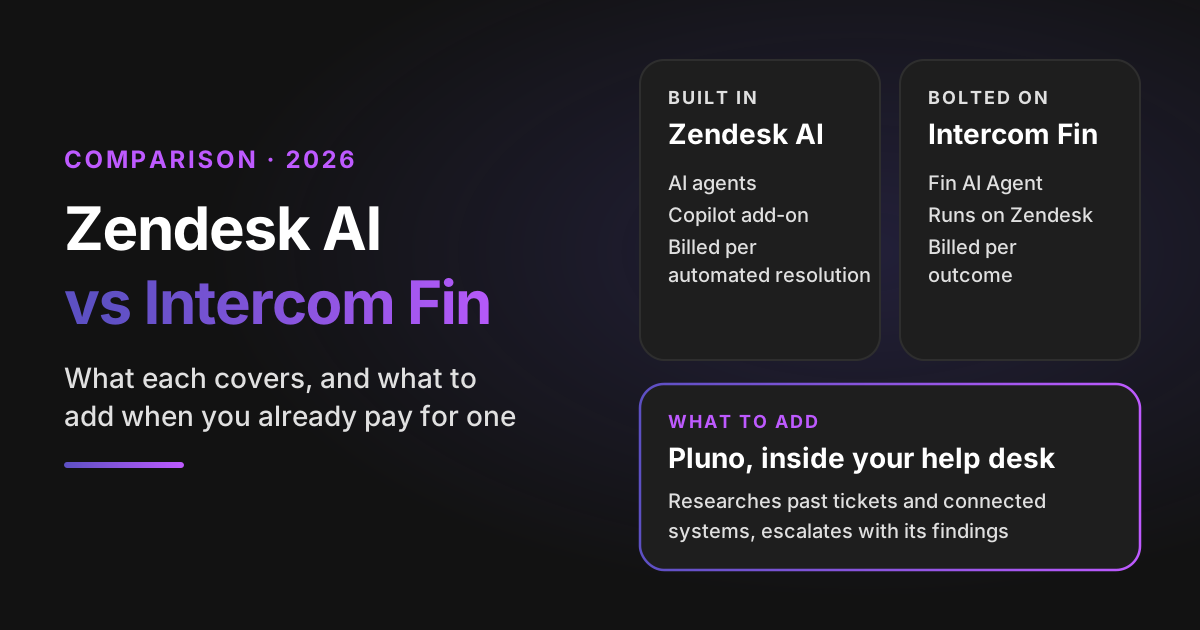
Zendesk AI vs Intercom Fin is mostly a question of where the AI lives: Zendesk AI is built into Zendesk and bills $1.50 to $2.00 per automated resolution, while Fin runs on top of Zendesk for $0.99 per outcome. Both handle questions your help center already answers, so if you already pay for one, the bigger gain is an AI agent that resolves those tickets and the ones neither covers well. That's where Pluno fits.
That's the short version. The longer one matters, because this is the question we hear most often in sales calls. Twenty-one organizations in our CRM have asked some form of it this year: "We already have Zendesk AI or Fin in our plan. What does Pluno add, and why pay extra?"
Where Pluno fits: for support teams whose answers live in past tickets, internal systems and engineering context, Pluno is the AI agent to add. It runs inside Zendesk, Intercom, Salesforce Service Cloud, HubSpot, Jira Service Management and Freshdesk, researches each ticket across those sources, and escalates with its findings when a person is needed.
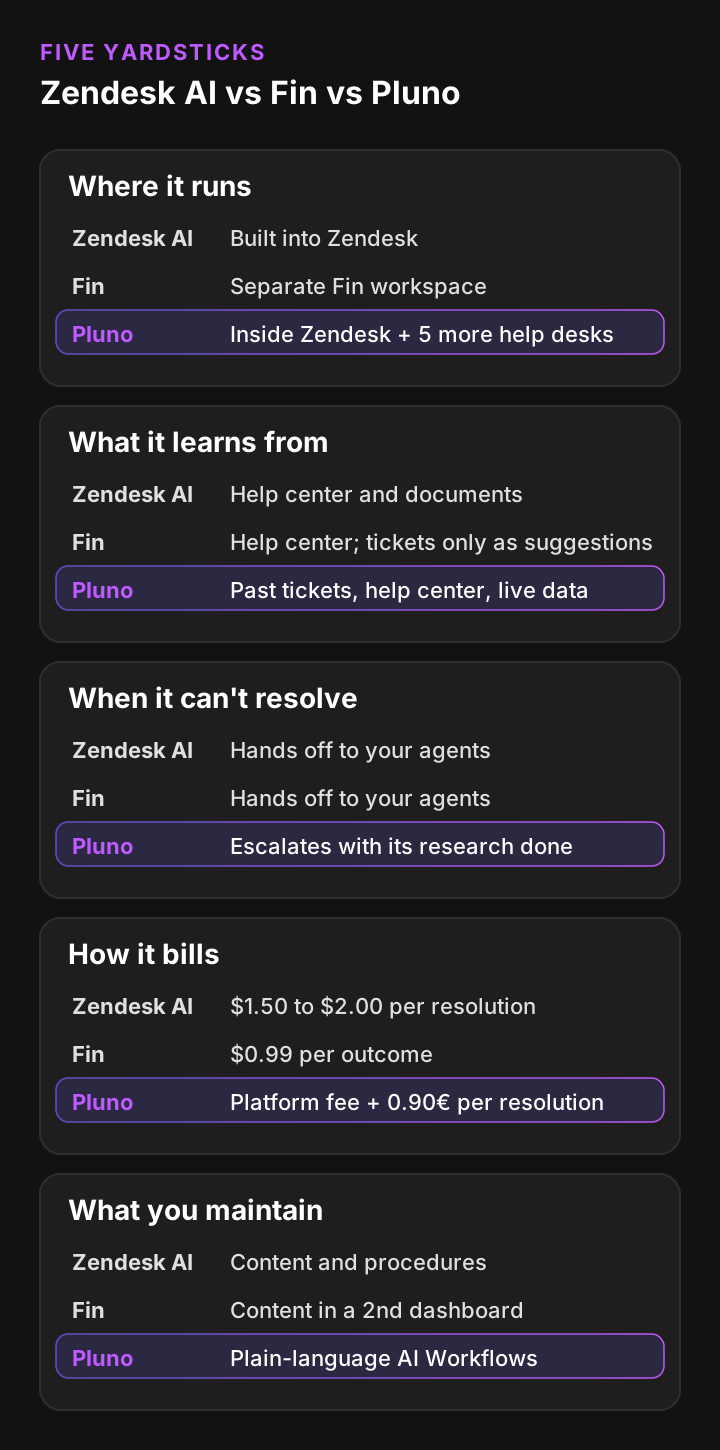
I compare the three options on the same five yardsticks:
- Where it runs: inside Zendesk natively, or connected from a separate workspace.
- What it learns from: help center articles only, or also past tickets and live data.
- What happens when it can't resolve: how the handoff and the escalation to engineering work.
- How it bills: the price per resolution, minimums, allowances and seats.
- What you maintain: the content, procedures and second dashboards your team keeps up to date.
Disclosure: I work at Pluno. Every Zendesk and Fin detail below comes from their official pricing pages and help centers, read on 16 November 2026, and each one is linked so you can check it.
TL;DR
- Zendesk AI vs Intercom Fin, the verdict: Fin is cheaper than Zendesk AI per resolution ($0.99 per outcome against $1.50 committed or $2.00 pay-as-you-go), while Zendesk AI is native and includes a monthly allowance. Both answer mainly from help center content.
- Fin changed owners: Salesforce completed its acquisition of Fin, formerly Intercom, in September 2026. A Zendesk team putting Fin in front of Zendesk now relies on a product owned by another help desk vendor.
- Fin for Zendesk works on Zendesk messaging and email tickets, but it runs from a separate Fin workspace. It needs its own Zendesk agent seat, and messaging needs Sunshine API access, which Zendesk includes in Suite Professional and above.
- Pluno matches Fin on price per resolution: 0.90€ per resolved ticket is about $0.99 at today's exchange rate, and escalations are never billed. Fin counts a Procedure that ends in a handoff as an outcome.
- What Pluno adds: it learns from your past tickets, calls your own APIs mid-conversation, and escalates to Slack, Jira, Linear, Microsoft Teams or incident.io with its research attached. Smartness switched from Fin to Pluno on Zendesk and reached 40%+ real ticket deflection.
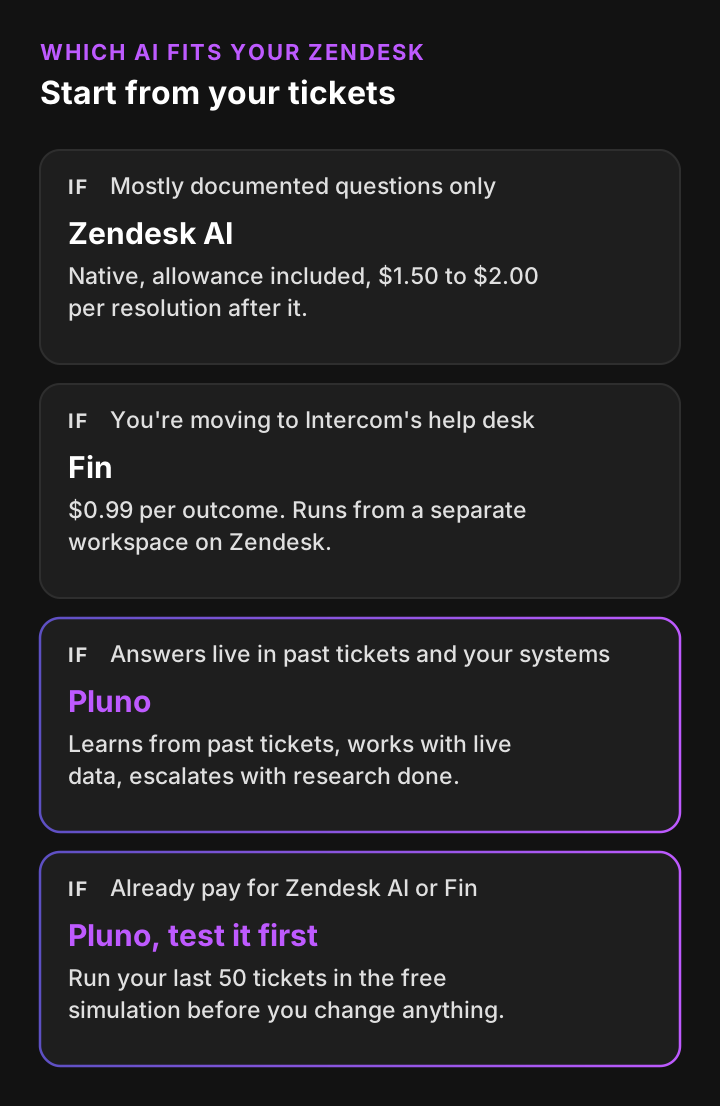
- Choose Pluno when you want one AI agent that resolves the FAQ tickets and the hard tickets that need past cases and connected systems. If you pay for Fin, replace it. On Zendesk, let Pluno answer instead of the native AI agent. Zendesk AI fits a queue of mostly documented questions, and Fin fits teams moving to Intercom's help desk.
- Bottom-line advice: test each one on the same 50 tickets (for Pluno, the team runs the simulation for you) and price the results in the calculator. The tool that resolves more of your real tickets usually wins on total cost too.
Zendesk AI vs Intercom Fin: the answer if you already pay for one
If you already pay for Zendesk AI or Fin, switching between the two rarely changes much. They cover the same layer of your queue: questions with an answer in your help center. The bigger gain comes from adding an AI agent that handles the tickets both of them hand back to your team.
Here's the side-by-side, named, before the detail.
| Yardstick | Zendesk AI | Fin on Zendesk | Pluno |
|---|---|---|---|
| Where it runs | Built into Zendesk | A separate Fin workspace connected to Zendesk | Inside Zendesk as a native app, and in five other help desks |
| Channels | Messaging, email, web forms and voice | Fin Messenger, Zendesk messaging, and email and contact form tickets | Email, web forms, chat and messaging including WhatsApp, plus phone calls summarized from transcripts |
| What it learns from | Your knowledge sources, such as help center content | Help center articles, internal content, PDFs and webpages. Past tickets only feed suggestions your team reviews | Past tickets, help center, uploaded files, web pages and live data from your APIs |
| When it can't resolve | Escalation to your agents in Zendesk | Transfers to your human team in Zendesk | Escalates to your team, or to Slack, Jira, Linear, Microsoft Teams or incident.io with its research attached |
| How it bills | $1.50 committed or $2.00 pay-as-you-go per automated resolution, after a monthly allowance | $0.99 per outcome, minimum 50 outcomes a month | Platform fee from 210€ a month (billed annually), plus 0.90€ per resolved ticket |
| Agent copilot | Copilot add-on, $50 per agent a month (annual) | Fin Copilot, $35 per teammate a month | AI Copilot, 49€ per seat a month or 41.65€ billed annually |
| What you maintain | Help center content, procedures and actions | Fin's content and procedures, in a second dashboard | AI Workflows written in plain language. Past tickets keep its knowledge current |
The rest of this post explains each row, with the sources.
What Zendesk AI covers in 2026
Zendesk AI is two products. The AI agents talk to customers and bill per automated resolution. Copilot works beside your human agents and bills per agent.
Zendesk AI agents
Zendesk says its AI agents are included in every Suite and Support plan, "with pricing based on the successful outcomes they deliver." They run on messaging, email, web forms and voice and answer from what Zendesk calls your trusted knowledge sources. You can extend them with procedures, scripted dialogues and API integrations.
Zendesk's AI agent documentation that I read describes answers from knowledge sources such as help center content. It doesn't list past solved tickets as a source the AI agent answers from. If your best answers sit in old tickets, ask Zendesk how that knowledge would reach the AI agent.
How Zendesk counts and bills a resolution
Each plan comes with a resolution allowance in dollars per agent seat a month: $2 on Suite Team, $5 on Growth and Professional, and $10 on Enterprise and Enterprise Plus. It's capped at $5,000 a year, and unused allowance doesn't carry over. The pricing page still shows the older count of 5 or 10 automated resolutions per agent, so check which one your contract uses.
Past the allowance, Zendesk's pricing page lists $1.50 per automated resolution on committed volume and $2.00 pay-as-you-go. Since May 2026, Zendesk sorts AI conversations into three tiers:
- Assisted escalation: the AI helped, and a person finished the job. It doesn't count against the allowance.
- Contained resolution: the customer asked for no more help, but the LLM check didn't verify a fix. It doesn't count against the allowance either.
- Verified resolution: an LLM confirmed the conversation was resolved.
The allowance article and the tiers article don't describe billing by tier in the same way, so ask Zendesk which tiers your contract bills.
Zendesk Copilot
Copilot is an add-on for Professional plans and above, listed at $50 per agent a month on annual billing. It bundles intelligent triage, auto assist, suggested first replies, ticket summaries, similar tickets and writing tools. For a 20-agent team, that's $1,000 a month before a single AI agent resolution.
My Zendesk AI pricing guide breaks the full Zendesk bill down by plan, add-on and team size.
What Intercom Fin covers, and how Fin for Zendesk works
Fin is the AI agent from the company formerly called Intercom, which now goes by Fin. Salesforce completed its acquisition of Fin on 10 September 2026, and Fin now sits in Salesforce's AI Labs. You can run Fin on Intercom's own help desk, or on another help desk such as Zendesk without an Intercom seat plan. For a Zendesk team, the second option is the one that matters.
What Fin answers from
Fin learns from public and private knowledge sources, including help center articles, internal content, PDFs and webpages. For multi-step work it uses Procedures, plain-language playbooks that can call code and data connectors inside their steps.
On Zendesk, Fin syncs your Zendesk help center so it answers from content you already have. Fin can also import your Zendesk ticket history, but its AI Agent uses your knowledge base as its source of truth. Past conversations become suggested article edits and snippets that your team reviews and then maintains. Fin Copilot in Zendesk can use ticket history from the last 120 days.
How Fin for Zendesk works
Fin for Zendesk covers three channels: the Fin Messenger, Zendesk messaging on web, mobile and social, and Zendesk tickets from email and contact forms. When Fin can't resolve an issue, it transfers the conversation to your human team in Zendesk.
On email tickets, Fin starts when a ticket is assigned to it and replies in the ticket's own channel. On handoff, it unassigns itself, tags the ticket and sets it to open. A few requirements come from Fin's own setup guides:
- Fin connects to Zendesk with OAuth and needs a Zendesk agent seat of its own.
- Zendesk messaging needs Sunshine API access, which Zendesk includes in Suite Professional and above.
- Fin for Zendesk tickets is available on specific Intercom plans, so confirm it with Fin before you plan around email.
- Fin's pricing page lists the help desks Fin works with as Intercom, Salesforce, HubSpot, Freshworks and others, and Zendesk wasn't in that list on 16 November 2026. Fin's Zendesk guides are still live, so ask how long the Zendesk connector is committed for.
How Fin bills
Fin on another help desk costs $0.99 per outcome, with a minimum of 50 outcomes a month (about $49.50), and no seat or setup fees. Intercom's pricing FAQ counts an outcome when a customer confirms the issue is resolved, when they don't ask for more help after Fin responds, or when Fin completes a Procedure, including a handoff. Fin charges at most one outcome per conversation and, per its pricing page, refunds it if the conversation is reopened.
Fin Copilot in Zendesk is $35 per teammate a month, according to Fin's Zendesk Copilot guide. Fin's pricing page currently lists Copilot as available for Salesforce, so confirm Zendesk availability with Fin. My Fin pricing guide works through a full Fin bill with examples.
Intercom Fin vs Zendesk AI on the five yardsticks
On four of the five yardsticks, Intercom Fin vs Zendesk AI comes out close to even. Pricing is the clear exception. Here's each one in turn.
Where it runs
Zendesk AI wins here. It's part of the help desk, so its reports, settings and tickets stay in one place. Fin runs from a separate Fin workspace, so your admin manages content and Procedures there while agents work in Zendesk.
That second dashboard is a real cost. Joseph D'Apuzzo at Smartness ran Fin on Zendesk before Pluno. The team had to rebuild and maintain its knowledge in a separate system, with reporting scattered across platforms.
What it learns from
This one is roughly a tie. Both answer from your help center and other documents you connect, and both extend with procedures and API calls. Neither answers customers from past solved tickets directly: Fin turns them into suggestions for your team to review, and Zendesk's AI agent documentation doesn't list them as a source.
For FAQ-heavy queues, that's fine. For B2B SaaS and technical support, it's the main limit, because the fix for a tricky ticket is often in a ticket your team solved last month.
What happens when it can't resolve
Both hand the conversation to your agents in Zendesk. Neither documents a built-in way to investigate a technical issue and then open a Jira issue or a Slack thread with the findings. You can build that with Zendesk actions or Fin Procedures, but your team writes and maintains each one.
How it bills
Fin wins on the sticker. $0.99 per outcome is below Zendesk's $1.50 committed rate and well below the $2.00 pay-as-you-go rate. Zendesk offsets part of that with its allowance, which is worth $100 a month to a 20-seat Suite Professional team, enough for about 66 resolutions at the committed rate.
What you maintain
With either tool, someone keeps the help center current and writes procedures for every multi-step flow. With Fin, that work happens in a second product. After Smartness moved from Fin to Pluno, which learns from resolved tickets as they close, its support manager called maintenance "super light."
Zendesk AI vs Intercom Fin pricing: what each resolution costs
Fin is cheaper than Zendesk per resolution, and Zendesk is cheaper only while you stay inside its allowance. Pluno's 0.90€ per resolved ticket is about $0.99 at today's rate, level with Fin, and escalations are never billed. But the price per resolution is only half the bill. The other half is how many of your tickets each tool actually resolves, because every ticket it misses lands back on your team.
Here's the list-price comparison as of 16 November 2026.
| Cost line | Zendesk AI | Fin on Zendesk | Pluno |
|---|---|---|---|
| Price per resolution | $1.50 committed, $2.00 pay-as-you-go | $0.99 per outcome | 0.90€ per resolved ticket |
| Included or minimum | $2 to $10 allowance per agent seat a month | Minimum 50 outcomes a month | Platform fee from 249€ a month, or 210€ billed annually, for up to 500 tickets |
| Escalations | Assisted escalations don't count against the allowance | Handoffs through a Procedure count as an outcome | Escalations are never billed |
| Copilot | $50 per agent a month (annual) | $35 per teammate a month | 49€ per seat, or 41.65€ billed annually |
| What the base includes | Your Zendesk plan | Nothing beyond the minimum | Escalation Copilot, AI Tagging & Field Filling and more |
Pluno's platform fee scales with your ticket volume, and the pricing page lists every tier up to 30,000 tickets a month. A reopened ticket isn't billed again, and every AI-resolved ticket is tagged in your help desk so your admin can check the count against the invoice.
Run your own numbers
Enter how many of the same 50 test tickets each tool resolved correctly, your seat count and what a ticket costs when your team handles it. The calculator scales the result to your volume, prices it at list price and adds the cost of the tickets left for your team.
Zendesk AI vs Fin vs Pluno: monthly AI cost from your own test
Enter how many of the same 50 test tickets each AI resolved correctly. The model scales that to your monthly volume and prices every resolution at list price. Zendesk: $1.50 committed or $2.00 pay-as-you-go per automated resolution after the plan's monthly allowance ($2, $5 or $10 per agent seat, capped at $5,000 a year), Copilot $50 per agent a month on annual billing. Fin on Zendesk: $0.99 per outcome with a minimum of 50 outcomes a month, Copilot $35 per teammate. Pluno: the platform fee for your ticket volume plus 0.90€ per resolved ticket, AI Copilot 49€ per seat (41.65€ billed annually), converted at the ECB rate of 13 November 2026 (1 EUR = 1.1052 USD). Prices as listed on 16 November 2026. Each total adds the tickets left for your team at your cost per ticket. Your Zendesk plan stays the same in all three cases, so it's left out. It's a scenario estimate, not a quote.
Enter how many of your 50 test tickets each AI resolved correctly to see the monthly AI bill and the total cost with the tickets left for your team.
One pattern usually shows up. When one tool resolves clearly more of your tickets, the tickets left for your team cost far more than the AI bill, so the stronger resolver wins on total cost.
Should you put Fin in front of Zendesk or use an AI agent built for Zendesk?
For most Zendesk teams, an AI agent built for Zendesk is the better choice. Fin in front of Zendesk adds a second workspace, a second content library and, for messaging, a Suite Professional requirement. An agent that runs inside Zendesk keeps tickets, knowledge and reports where your team already works.
Fin in front of Zendesk makes sense in one case: you're planning to move to Intercom's help desk anyway, and you want your AI setup ready before the move. Intercom publishes a guide for switching from Zendesk. If you're staying on Zendesk, you're paying for an integration layer you don't need.
Use these four questions to decide:
- Are you staying on Zendesk for the next two years? If yes, prefer an AI agent that runs inside it.
- Which plan are you on? Fin on Zendesk messaging needs Sunshine API access, included in Suite Professional and above.
- Where do your answers live? If most live in the help center, Zendesk AI or Fin can cover them. If they live in past tickets and internal systems, you need an agent that reads those.
- Who maintains it? Count the hours for content, procedures and a second dashboard, and put them in the cost.
- Whose roadmap are you betting on? Fin is now part of Salesforce, and Zendesk AI is Zendesk's own. An AI layer that runs in six help desks stays with you whichever help desk you choose later.
We already pay for Zendesk AI or Fin. What does Pluno add?
Pluno adds resolution on the tickets that need research: a past case, a lookup in your own systems or an investigation by engineering. It runs inside the help desk you already use, so there's no new inbox, no ticket migration and no second content library to maintain.
Here's what that looks like in practice.
It learns from your past tickets
Pluno reconstructs troubleshooting steps, diagnostic flows and edge-case fixes from your resolved tickets, prioritizing the latest successful resolutions. You don't have to write every fix up as a help center article first. Deflection AI answers from those past tickets, your help center, uploaded files and web pages.
It works with live data
With custom API actions, Pluno calls your own APIs mid-conversation to read or write live data, such as order lookups or account status. AI Workflows set the rules in plain language: which topics always go to a person, which customers get silent escalations and how replies should sound.
It escalates with the research done
When a ticket needs engineering, Escalation Copilot sends it to the tool your engineers already use, such as Slack, Jira, Linear, Microsoft Teams or incident.io. The report arrives with the customer context and reproduction details, and Jira and Slack updates sync back to the ticket. The Troubleshooting Agent goes further on technical tickets, investigating across code, logs and error tracking before a person picks it up. Escalation Copilot is included in the platform fee.
It helps your agents too
AI Copilot drafts replies for every new message with guidance, reasoning and references, and you can buy seats for only some of your agents. AI Tagging & Field Filling, also included in the platform fee, fills the fields your routing depends on.
The proof
- Smartness switched from Fin by Intercom to Pluno on Zendesk. It reached 40%+ real ticket deflection and cut first response time from hours to 22 minutes. "I compared Pluno with Fin by Intercom, and Pluno was miles ahead!", says Joseph D'Apuzzo, Customer Support Manager.
- Innovorder runs Pluno inside Zendesk, and AI resolves 67% of its chat tickets.
- Lightspeed put about 100 agents live on Pluno in 3 weeks, across Zendesk and Intercom in one workflow.
Across customers, Pluno averages a 65% resolution rate and 48% agent time saved, as of November 2026. For a full module-by-module review, see Zendesk AI vs Pluno and Fin vs Pluno.
Should you keep your current AI next to Pluno?
Where Pluno covers the same job, replace rather than stack. Pluno resolves the FAQ tickets too, so paying a second vendor per resolution for the same tickets only splits your reporting. On Zendesk, AI agents come with your plan, but every resolution past the allowance bills at $1.50 to $2.00. Letting Pluno answer instead replaces that meter with 0.90€ per resolved ticket. Fin is a separate bill, which brings us to switching.
How to switch from Fin without paying for both
You can test Pluno before you change anything, so the overlap is short. Pluno's 14-day trial and the free simulation run while Fin stays live, and Fin's minimum is 50 outcomes a month, so the overlap costs little.
Here's the sequence that works:
- Request the free simulation. The Pluno team runs your 50 most recent tickets and shows, side by side, how Pluno would have answered each one. Nothing is deployed and no customer sees a reply.
- Compare it with Fin's results on the same tickets. Look at answer quality, gaps in knowledge and the tickets each tool would hand off. Then price both in the calculator above.
- Start the 14-day free trial. Every module is unlocked and no credit card is needed. Zendesk teams sign up in the Pluno app, and Intercom teams install Pluno from the Intercom App Store.
- Set your rules in AI Workflows. Decide which topics always go to a person and how replies should sound. The content you prepared for Fin carries over: Smartness recycled its existing setup and called the move "almost plug and play."
- Move traffic, then cancel Fin. Unassign Fin from new tickets, turn on Pluno and check the first week's answers. Pluno's monthly plans can be cancelled anytime, effective at the end of the billing cycle, and there's no setup fee.
What people say about Zendesk AI and Fin
Public reviews of Zendesk AI and Fin are mixed, and most come from people running FAQ-heavy queues. These quotes come from Hacker News, where support teams discuss both tools openly. Four comments can't stand for every team, so read them as signals, not a survey.
“I'll put in a good word for a chatbot hooked up to the documentation (e.g. at $dayjob we use Intercom Fin) acting as level 0.5 support. ... It answers about 2/3 of incoming questions, can escalate to the humans as needed, and scales great.”
“They charge exclusively for resolutions. That's the entire value prop. ... It shows you questions it couldn't resolve, looks at the answers your human team gave, and suggests updates to help articles”
“The problem is that Fin prices at $0.99 per outcome. Only for companies with tremendous support volume would it even begin to make sense to build in-house. There's a wide swath of companies that do < (say) 20,000 cases monthly where the economics will never make sense.”
“the Zendesks of the world have been selling AI products for years now that reduce L1 support headcount, and quite effectively too since the main job of L1 support is/was shooting people links to FAQs or KB articles or asking them to try restarting their computer.”
The pattern matches the yardsticks: both tools do well on documented questions, and the debate is about price and what happens beyond the help center.
The bottom line on Zendesk AI vs Intercom Fin
On Zendesk AI vs Intercom Fin, Fin wins on price per resolution and Zendesk AI wins on being native, and Fin now belongs to Salesforce. Neither changes what happens to the tickets your help center doesn't answer. If you already pay for one, adding the other rarely moves your resolution rate.
Pluno resolves those tickets and the FAQ ones, at about the same price per resolution as Fin. It learns from your past tickets, works with live data from your systems, escalates to engineering with its research done, and runs inside the help desk you already use.
FAQ
Which is better, Zendesk AI or Intercom Fin?
Fin is cheaper than Zendesk AI per resolution, at $0.99 per outcome against $1.50 to $2.00. Zendesk AI is native to Zendesk and includes a monthly allowance. For FAQ-heavy queues, both work well. For complex technical tickets, Pluno is the stronger fit because it learns from past tickets and connected systems.
Can Fin connect to Zendesk?
Yes. Fin for Zendesk works on Zendesk messaging and on email and contact form tickets. It connects with OAuth, uses its own Zendesk agent seat and syncs your Zendesk help center. Zendesk messaging needs Sunshine API access, included in Suite Professional and above.
How much does Fin for Zendesk cost?
Fin on another help desk costs $0.99 per outcome, with a minimum of 50 outcomes a month and no seat fees. Fin's Zendesk Copilot guide prices Copilot at $35 per teammate a month. Your Zendesk plan is billed separately by Zendesk.
Is Zendesk Fin a Zendesk product?
No. Fin is made by Fin, formerly Intercom, which Salesforce acquired in September 2026. "Zendesk Fin" usually means Fin running on top of Zendesk, set up from a Fin workspace. Zendesk's own AI is called Zendesk AI agents, plus the Copilot add-on.
Fin vs Zendesk AI: which is easier to deploy?
Zendesk AI agents are already in your Zendesk plan, so there's nothing to connect. Fin for Zendesk needs a Fin workspace, an OAuth connection and a Zendesk agent seat. Pluno installs inside Zendesk, and its AI agent can share an existing help desk seat or use a dedicated one.
Should we move from Zendesk AI to Fin?
Only if price per resolution is your main problem and your tickets are mostly documented questions. Moving from Zendesk AI to Fin swaps one help-center-first AI for another and adds a second dashboard. If your hard tickets are the problem, test Pluno on your last 50 tickets first.
Who owns Fin now?
Salesforce. It completed its acquisition of Fin, the company formerly called Intercom, on 10 September 2026, and Fin now sits in Salesforce's AI Labs. Fin's public per-outcome price was unchanged on 16 November 2026.
Does Zendesk AI or Fin learn from past tickets?
Both AI agents answer from knowledge sources such as help center articles and documents. Fin can import Zendesk tickets, but it turns them into suggestions your team reviews, and Fin Copilot in Zendesk can use the last 120 days of ticket history. Pluno learns from your resolved tickets directly, prioritizing the latest successful resolutions.
What does Pluno cost next to Zendesk AI or Fin?
Pluno charges a platform fee from 210€ a month, billed annually, for up to 500 tickets, plus 0.90€ per resolved ticket. Escalations are never billed. AI Copilot is 49€ per seat a month, or 41.65€ billed annually. Your 14-day trial unlocks every module with no credit card.