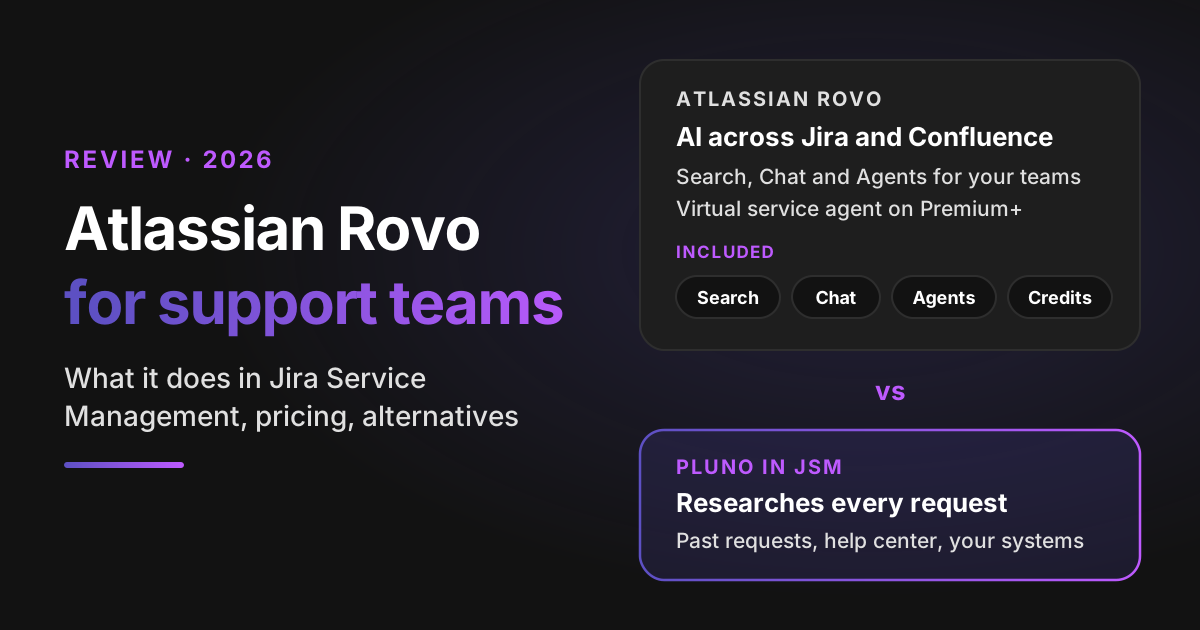
Atlassian Rovo is the AI built into Atlassian's cloud apps: Rovo Search, Rovo Chat, Rovo agents and Rovo Studio, paid for with Rovo credits that come with every Standard, Premium and Enterprise plan. For a support team on Jira Service Management, Rovo shows up in three places: AI help for your agents, a virtual service agent for employees and a separate AI agent for external customers. Each one has its own meter, and pay-as-you-go billing for Rovo credits and Customer Service Management resolutions starts December 3, 2026.
My verdict: for customer support in Jira Service Management, Pluno is the stronger choice. Rovo is a sensible default for internal IT and HR desks whose answers already live in Confluence. In customer support, the fix usually sits in a past request, your product's data or an engineer's head. Pluno runs inside the same Jira Service Management, researches each request before it answers and escalates with its findings when a person is needed.
How I reviewed it: I worked from Atlassian's own pricing pages, licensing pages and support documentation, all checked on November 18, 2026, plus Hacker News comments from Rovo users. I didn't run Rovo on a live site, so treat its answer quality as unmeasured until you test it on your own requests.
I score Rovo and each alternative on the same six yardsticks:
- Help desk fit: where the AI runs, who it serves and which plan it needs.
- Knowledge sources: the content it's allowed to answer from.
- Actions: what it can change in Jira Service Management and your other tools.
- Handoff: what your team gets when the AI stops.
- Pricing: the billing unit, and what a month costs at real volume.
- Setup and testing: who does the work, and how you check answers before customers see them.
Disclosure: I work at Pluno. We make an AI agent for complex support that runs inside the help desk, including Jira Service Management.
TL;DR
- For customer support in Jira Service Management, Pluno is the stronger pick. It learns from your resolved requests, replies only when its sources agree, escalates to engineering with a research summary and never bills escalations.
- For internal service desks on Confluence, Rovo is a good default. You already pay for it, the virtual service agent covers the portal, Slack or Microsoft Teams, and the first 1,000 assisted conversations a month are included on Premium.
- Key data point: Rovo meters three things separately. Pooled credits at $0.01 each above your allowance, virtual service agent conversations from $0.30 each above 1,000 a month, and $1.00 per resolution for the external customer AI agent.
- Watch the meter: an assisted conversation counts even when the virtual service agent escalates, and the credit pool is shared with every other team in your organization.
- Bottom-line advice: run your own volumes through the Rovo cost estimator, then test Pluno on your last 50 requests before your first usage bill.
What is Atlassian Rovo?
Atlassian Rovo is the AI layer of Atlassian's cloud apps: it searches, chats, drafts and acts across Jira, Confluence and Jira Service Management, and connected tools, using the Teamwork Graph, Atlassian's map of your work data. For a support team it means AI without buying another tool: it's included in every Standard, Premium and Enterprise cloud plan of Jira, Confluence and Jira Service Management. The question isn't whether you have it. It's whether it answers the requests your team actually gets.
Atlassian's own definition splits Rovo AI into five parts:
- Rovo Search finds content across Atlassian apps and connected tools such as Google Drive and Slack, and it respects each user's permissions.
- Rovo Chat answers questions inside Jira, Jira Service Management, Confluence and a browser extension.
- Rovo agents are "AI-powered virtual teammates" that can create or edit Jira work items and Confluence pages. Atlassian ships ready-made agents, and your team can build its own in plain language in Rovo Studio.
- Rovo Studio is the builder workspace where you describe an agent, app or automation in plain language.
- Definitions explain company terms and acronyms in context.
For support, the thing to know is that Atlassian sells Jira Service Management inside its Service Collection together with Customer Service Management, Assets and Rovo. Atlassian says those apps "cannot be purchased separately". So when you budget for Rovo, you're budgeting for the collection plus usage on top.
I wrote about Jira Service Management as a help desk in my Zendesk competitors guide. This post stays on the AI.
What Rovo does in Jira Service Management
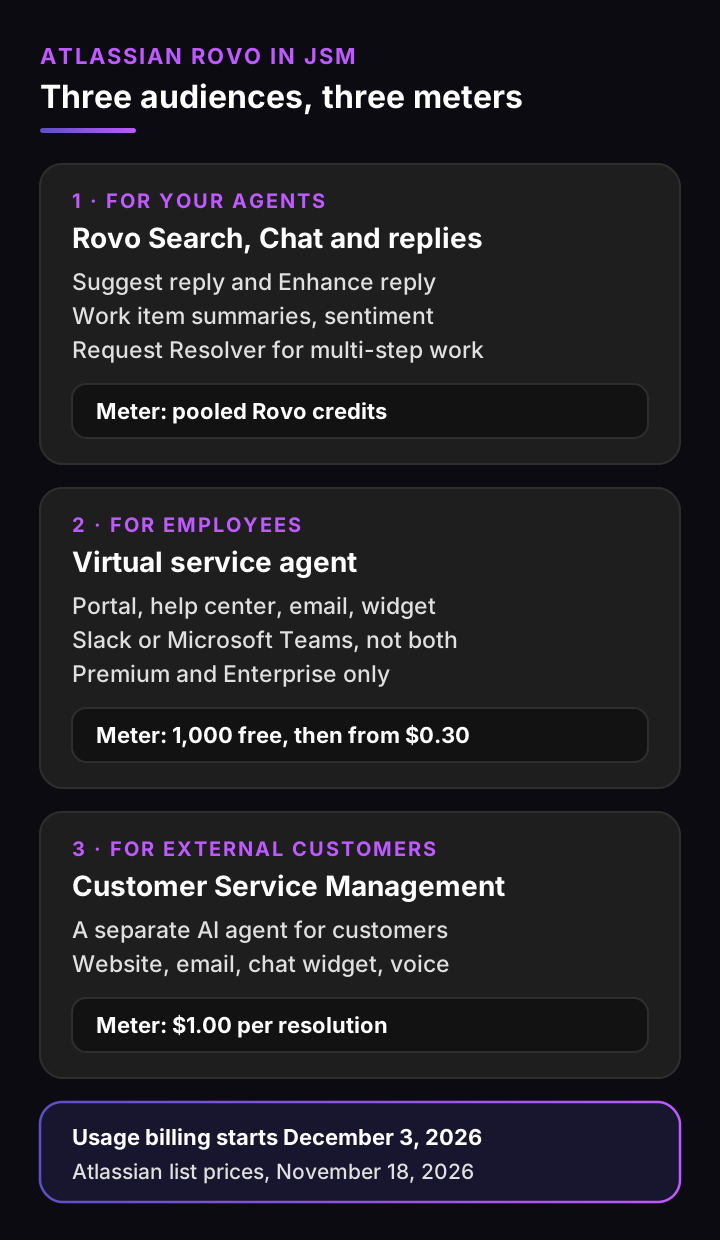
Jira Service Management AI features come from Rovo, which works for three audiences, and each has its own product and meter.
1. Rovo for your agents
Agent-side Rovo AI lives in the request view. Atlassian lists work item summaries, customer sentiment, suggested request types and form fields, and creating requests from Rovo chats.
The feature agents use most is the reply draft. "Suggest reply" and "Enhance reply" draw on knowledge base articles and similar past work items. Atlassian calls it "a basic AI feature that consumes Rovo credits".
For multi-step work there's Request Resolver, the agent formerly called Rovo Service. It plans and carries out a resolution in supervised or autonomous mode, and low-confidence actions such as closing work items or sending external emails pause for a person. Atlassian notes it is not HIPAA compliant, and its usage page bills it at premium, variable credit rates.
2. The virtual service agent for employees
The virtual service agent answers requests before they reach your queue. It works in two ways:
- Intents: conversation flows your team builds. Each one matches a question, collects details, routes it to a request type or calls a web request.
- AI answers: generated replies from the knowledge base spaces you link. It tries intents first and falls back to AI answers when no intent matches with high confidence.
It runs in the portal, help center, email, a widget, and Slack or Microsoft Teams. You can use Slack or Teams, not both. It needs a Service Collection Premium or Enterprise plan.
When the customer still needs help, it asks them to rephrase or offers to create a work item for a human agent. Atlassian's licensing page describes it as built for employee self-service support.
3. The Customer Service Management AI agent for customers
External customers get a different product. Customer Service Management has its own AI agent, which Atlassian calls "purpose-built" for external support. It supports actions, MCP tools, skills, handoff, versioning and evaluations.
Its channels are a support website, email, an embedded chat widget, voice and messaging apps such as WhatsApp, with messaging apps on Premium and Enterprise only. It's priced per resolution, which I cover in the pricing section.
How Atlassian Rovo scores on 6 yardsticks
Rovo scores well where your answers are written down in Confluence and weaker where they live in past requests and live systems. Here's each yardstick, scored on Atlassian's documentation.
Help desk fit: native, but split across products
Rovo runs natively in Jira Service Management, so there's nothing to install. The catch is the split: agent help comes with every paid plan, the virtual service agent needs Premium, and external customers need Customer Service Management. Rovo's own portal agents are only available to Atlassian Accounts, and there's no virtual service agent in the Atlassian Government environment.
Rovo is cloud only. Atlassian says a cloud subscription is necessary for its AI, and Data Center teams can only feed data in through connectors.
Knowledge sources: Confluence first, connectors second
AI answers come from linked knowledge base spaces, set to "All logged-in users" for Slack. Jira Service Management can also link Google Drive and SharePoint folders as knowledge.
Rovo Search reaches further. Its connectors (now called Teamwork Graph connectors) cover tools such as GitHub, Salesforce, ServiceNow, Slack and Zendesk. Not every connector is equal: Atlassian rates the default Smart Link connectors as "Low" search quality.
Past requests feed reply drafts for agents. I found no official page saying the virtual service agent answers customers from resolved requests.
Actions: built flows, plus Request Resolver
The virtual service agent acts through intent flows and web requests your team builds. Request Resolver can carry out multi-step work and use connected third-party tools, with a person approving low-confidence steps. Both are capable, and both are things you design and maintain.
Handoff: a new work item
When the virtual service agent can't help, the customer gets a work item for a human agent. Atlassian doesn't document a research summary or suggested next step on that handoff. Your agent starts with the conversation, not with findings.
Pricing: three meters, one shared pool
Rovo has no per-seat AI add-on. It does have three separate meters, and the credit pool is shared across your whole organization. The next section prices them.
Setup and testing: you build it, you test it
Setup is in your hands: link knowledge spaces, build intents in Studio, connect channels and set credit limits. The Customer Service Management agent has versioning and evaluations. For the virtual service agent, testing means trying conversations yourself.
Atlassian Rovo scorecard
| Yardstick | Rating | Why |
|---|---|---|
| Help desk fit | Strong | Native in Jira Service Management, but split across three products |
| Knowledge sources | Partial | Confluence and linked folders for answers; past requests only feed agent drafts |
| Actions | Partial | Intent flows and Request Resolver, built and maintained by your team |
| Handoff | Partial | Creates a work item; no documented research summary |
| Pricing | Partial | Included allowances, then three usage meters and a shared pool |
| Setup and testing | Partial | Self-built; evaluations documented for the customer agent only |
Strong means an official page documents it on the plan you'd buy and it works for support requests without a workaround. Partial means it exists but is gated by plan, limited in scope or needs your team to build it.
Atlassian Rovo pricing: what support teams will pay
Atlassian Rovo pricing for a support team is your Service Collection seats plus three usage meters. All prices below are Atlassian list prices, checked November 18, 2026.
| What you pay for | Price | Included |
|---|---|---|
| Service Collection seats | Free for 3 agents; Standard $21.50 and Premium $55.28 per agent a month (shown for a 75-agent team, monthly); Enterprise by quote | Jira Service Management, Customer Service Management, Assets and Rovo |
| Rovo credits | $0.01 per credit above your allowance ($10 per 1,000) | 250 (Standard), 700 (Premium) or 1,500 (Enterprise) per user a month, pooled |
| Virtual service agent | From $0.30 per assisted conversation, with volume discounts | 1,000 a month (or 12,000 a year) on Premium and Enterprise |
| Customer Service Management AI agent | $1.00 per resolution; annual packs from $0.95 to $0.85 | None |
How Rovo credits work
Basic actions, such as Rovo Chat quick answers and basic Rovo agents, cost 10 credits per billable event. Premium actions, such as Request Resolver and deeper reasoning, cost a variable amount. Rovo Search, summaries and definitions are free, and beta features generally don't count.
So a Premium seat's 700 credits cover about 70 basic actions a month. If an agent drafts five replies a day, the pool runs dry around mid-month, and the rest is billed at $0.10 per action.
Two details matter more than the price:
- The pool is shared. All of your organization's Rovo credit allowances are combined, and they reset monthly without rollover. Engineering's Rovo use draws from the same pool as your support team.
- Billing starts December 3, 2026. Pay-as-you-go is on by default, with an admin cap. If an admin turns it off, credit-consuming AI features pause until the allowance resets. Free plans get no monthly allowance.
What counts as an assisted conversation
A virtual service agent conversation counts when it matches an intent, "regardless of whether the virtual service agent resolves the issue or escalates it". An AI-answered conversation counts when the customer marks it resolved or abandons it.
At the limit, the agent stops answering: Slack and Teams requests escalate straight to a work item, the portal chat button disappears and the help center agent is turned off. Size your add-on for your busiest month.
What counts as a Customer Service Management resolution
The external customer AI agent bills $1.00 from the first resolution, with no allowance. A handoff or abandoned conversation isn't charged, and an LLM judge decides what counts as resolved. The default cap is 25,000 resolutions a month.
Run your own numbers
Set your plan, agents and volumes. The estimator uses the list prices above.
Atlassian Rovo cost estimator for support teams
Atlassian list prices, November 18, 2026: Service Collection seats at $21.50 (Standard) or $55.28 (Premium) per agent a month, the monthly price Atlassian shows for a 75-agent team. Pooled Rovo credits of 250 or 700 per user a month, 10 credits per basic action such as a drafted reply, and $0.01 per credit above the pool. The virtual service agent (Premium and up) includes 1,000 assisted conversations a month, then starts at $0.30 each before volume discounts. The Customer Service Management AI agent costs $1.00 per resolution. Usage billing starts December 3, 2026. Excludes premium-model actions, other teams sharing the credit pool, annual discounts and taxes.
Seats
$1,106
Premium, per month
AI usage
$560
Credits + conversations + resolutions
Monthly total
$1,666
List prices; per-agent price varies by team size
Your pooled allowance covers about 70 basic actions per agent a month. At your volume, extra credits add $260 and virtual service agent overage adds $300. Every team in your organization draws on the same credit pool, so engineering's Rovo use counts too.
For comparison, Pluno publishes a platform fee from €249 a month (€210 a month, billed annually) for up to 500 tickets, plus €0.90 per request Deflection AI resolves. Escalations aren't billed, and a reopened request isn't billed again. The pricing page has every tier.
What people say about Atlassian Rovo
I couldn't find public reviews from support leaders about Rovo in Jira Service Management. These four Hacker News comments come from developers and knowledge workers using Rovo in Confluence and Jira, quoted as written. Four comments are a small sample, so read them as signals, not a verdict.
“I recently found out I can use Atlassian‘s ROVO to ask questions against our Wiki and Jira. I now forward consultants to ROVO first and only if they can’t find an answer then I’d look at their questions. Saves me a good chunk of time. They never read my docs otherwise.”
“...I tried to get it to list all of the Confluence articles I had written in 2025 so I could use that information for my performance review. It found three, regardless of how I queried it. I had actually written over sixty. I tried, but never did found a good use case for it. Too unreliable.”
“Atlassian Rovo is considered utterly dangerous on my team (as we are still encouraged to use it…), the first time I did it erased a whole page - it couldn’t get the most basic instruction correct, would leave out 80% of what I input, respond to corrections with the same problem. It’s just a liability.”
“Rovo makes changes I don't want that I have to undo and its "search" is bafflingly low quality compared to the old search experience, but most of all it just makes every page take longer to load...”
The pattern: Rovo AI is useful for pointing people at existing pages, and less trusted for complete answers or edits. For a support team, that's the line between internal deflection and resolving a customer's actual problem.
Where Rovo falls short for support
Rovo falls short for support teams in four places, and each one comes from the scorecard above.
- Answers stop at your written content. The virtual service agent answers from linked knowledge spaces. If the fix for a request lives only in a resolved request from last month, it won't find it.
- Handoffs start from zero. Your agent gets a work item, not a summary of what the AI checked and ruled out.
- External support is a separate product. The virtual service agent is built for employees. For customers you add the Customer Service Management agent and its $1.00 resolution fee.
- The meter counts escalations. A matched virtual service agent conversation is billed whether it resolves or escalates, and the credit pool is shared with every other team.
None of these matter much for an IT desk answering password and laptop questions from a well-kept Confluence space. They matter a lot for a B2B software team whose requests need investigation.
4 Rovo alternatives that run inside Jira Service Management
The best Rovo alternatives work inside Jira Service Management, so you keep your queue, your SLAs and your reporting. I screened a wide list of AI support vendors for a documented Jira Service Management integration and kept the four with the strongest fit and footprint.
1. Pluno: best for customer support that needs investigation
Pluno is the AI agent for complex support. It runs inside Jira Service Management, one of the six help desks it supports: Zendesk, Intercom, Salesforce Service Cloud, HubSpot, Jira Service Management and Freshdesk.
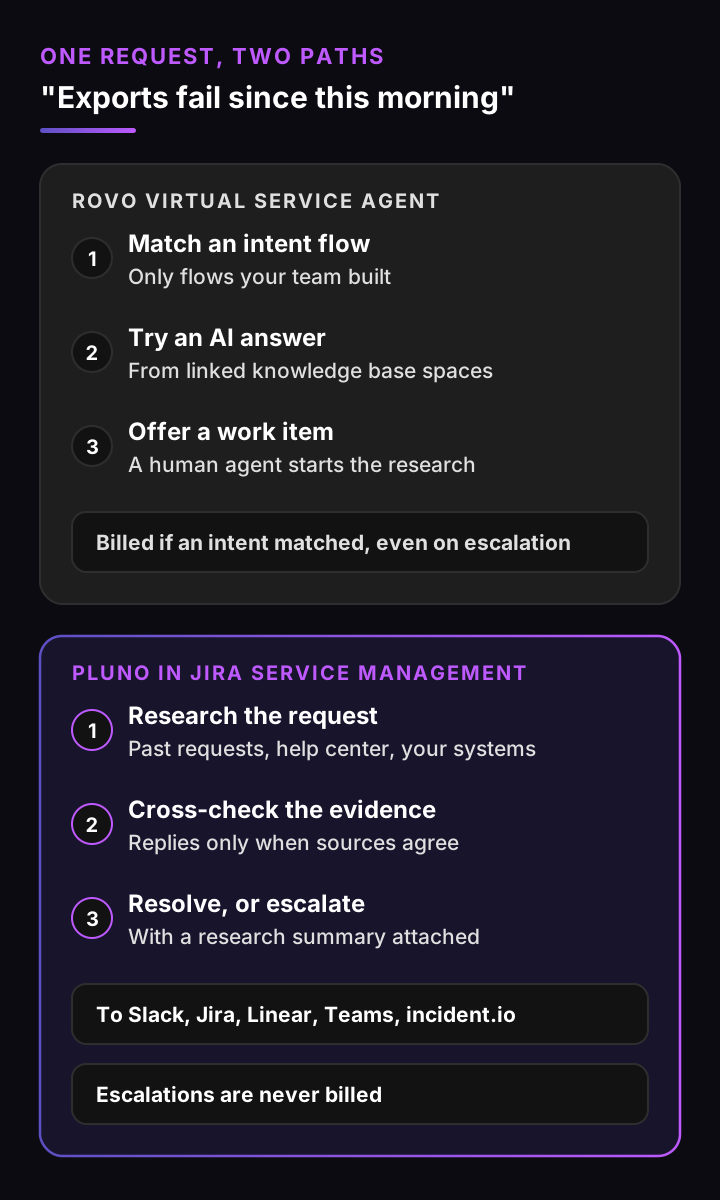
- Help desk fit: in Jira Service Management, Pluno resolves requests, drafts replies, escalates to engineering, fills fields and reviews quality. Onboarding with the Pluno team is included.
- Knowledge sources: it learns from your resolved requests and your help center, and searches docs, Slack threads, Jira issues and connected APIs. It replies only when its sources agree. For your agents, AI Copilot also searches your Confluence spaces.
- Actions: it reaches your systems through your own MCP servers or REST APIs, and AI Workflows set which topics it answers and which go to your team.
- Handoff: when evidence is thin or conflicting, or a business decision is needed, it escalates with a research summary. Escalation Copilot files it to Slack, Jira, Linear or Microsoft Teams and syncs updates back to the request. incident.io opens an incident through a linked Linear issue.
- Pricing: platform fee from €249 a month (€210 a month, billed annually), €0.90 per resolved request, AI Copilot at €49 per seat a month.
- Setup and testing: a free simulation on your 50 most recent tickets, then a 14-day free trial with every module and no credit card.
Across Deflection AI customers, the average resolution rate is 65% and the average agent time saved is 48% (customer averages, November 2026, on Pluno facts). Lightspeed rolled out AI Copilot and Escalation Copilot (Slack and Jira) to about 100 agents across Zendesk and Intercom in two to three weeks, after a two-month live pilot.
Choose Pluno when your requests come from customers, the answers sit in past requests and product data, and your engineers need escalations that arrive with the research done.
| Yardstick | Pluno rating | Why |
|---|---|---|
| Help desk fit | Strong | Native in Jira Service Management, with onboarding included |
| Knowledge sources | Strong | Resolved requests as primary evidence, plus help center, docs and connected systems |
| Actions | Strong | Your own MCP servers or REST APIs, with AI Workflows setting the rules |
| Handoff | Strong | Escalation with a research summary, filed to engineering in one click |
| Pricing | Strong | Published prices; escalations never billed, reopened requests not billed again |
| Setup and testing | Strong | 50-ticket simulation run by the Pluno team, then a 14-day free trial |
2. Moveworks: best for large employee service programs
Moveworks, now owned by ServiceNow, is an employee AI assistant that runs in chat tools such as Slack and Microsoft Teams. Its Jira Service Management connector lets employees create, comment on, resolve and reopen requests from the assistant, and it maps requests to project and request type pairs.
- Pricing: not published; Moveworks asks you to request a quote.
- Ownership: ServiceNow owns it, which Atlassian-first buyers may want to weigh.
Choose Moveworks when you run IT, HR and finance requests for thousands of employees and want one assistant across all of them.
3. Aisera: best for deflection plus agent assist at enterprise scale
Aisera is now part of Automation Anywhere. It lists two Jira Service Management apps on the Atlassian Marketplace: AiseraGPT for self-service resolution and AI Copilot for Agents, which classifies and routes requests and suggests next steps.
- Pricing: not published.
Choose Aisera when you want deflection and agent assist from one enterprise vendor, especially if you already buy automation from Automation Anywhere.
4. Leena AI: best for HR and IT employee requests
Leena AI is an employee service assistant. Its Jira Service Management integration creates requests through conversation, shows a user's requests and status history, moves requests through workflow states and adds attachments.
- Pricing: not published.
Choose Leena AI when your service desk is mostly HR and IT questions from employees and you want one assistant for both.
Rovo alternatives compared
| Atlassian Rovo | Pluno | Moveworks | Aisera | Leena AI | |
|---|---|---|---|---|---|
| Built for | Employees (virtual service agent, per Atlassian licensing), customers via CSM | Customer support teams | Employees | Employees and customers | Employees |
| Answers from past requests | Agent drafts only | Yes, as primary evidence | Not documented | Not documented | Not documented |
| Handoff | New work item | Escalation with research summary | Request in JSM | Routing and next steps | Request in JSM |
| Published price | Yes, usage-based | Yes | No | No | No |
| Free test on your data | 14-day plan trial; you build and test it yourself | 50-ticket simulation run by the Pluno team, then a 14-day trial | No | No | No |
Moveworks, Aisera and Leena AI are built for employee service, the same job as Rovo's virtual service agent. Pluno is the one built for customer support.
Pluno vs Rovo: side by side
Pluno vs Rovo comes down to the job. Rovo is a broad AI layer for everyone in Atlassian, and Pluno is a specialist for support requests that need research.
| Criterion | Atlassian Rovo | Pluno |
|---|---|---|
| Where it runs | Atlassian cloud apps, including Jira Service Management | Inside Zendesk, Intercom, Salesforce Service Cloud, HubSpot, Jira Service Management and Freshdesk |
| Who it answers | Employees (virtual service agent); customers through the separate CSM agent | Customers, on the channels your help desk already runs |
| Knowledge | Linked knowledge spaces, Google Drive and SharePoint folders; connectors for search | Resolved requests, help center, docs, Slack threads, Jira issues and connected APIs |
| When it isn't sure | Asks to rephrase or offers a work item | Escalates with a research summary |
| Engineering escalation | Work items in Jira | Slack, Jira, Linear or Microsoft Teams, with updates synced back; incident.io through Linear |
| Quality review | Not documented for support conversations | Quality Assurance reviews conversations against your criteria |
| Languages | No official list found | 50+ languages |
| Pricing | Included allowances, then credits at $0.01, conversations from $0.30 and resolutions at $1.00 | Platform fee from €249 a month, plus €0.90 per resolved request; escalations never billed |
| Test before you buy | 14-day plan trial; you build and test it yourself | Free simulation on your 50 most recent tickets |
If your team uses Rovo for internal search and Confluence work, keep it there. For customer requests in Jira Service Management, Pluno does the job the virtual service agent is meant for, answering before the queue, and adds research across past requests, escalation with findings and quality review.
Rovo vs Glean, Dust and Microsoft 365 Copilot
Buyers often compare Rovo vs Glean, Dust or Microsoft 365 Copilot for internal knowledge. They're workplace assistants, not support agents, so here's a short note on each.
- Glean connects to 275+ work apps for enterprise search and assistants. Its Jira tools can create a Jira Service Management request, but it doesn't work your queue. Pricing isn't published.
- Dust lets teams build assistants on models from several providers. Pricing runs from a free tier to Pro at €30 per seat a month (€24 billed yearly) and Max at €150.
- Microsoft 365 Copilot is an add-on at $30 per user a month, paid yearly, and fits teams that live in Outlook, Teams and SharePoint.
In the Rovo vs Glean question, Rovo wins on price if you're already on Atlassian cloud, since it's included. Glean is the pick when most of your knowledge lives outside Atlassian. Neither answers customer requests the way a support agent does, so for that job, compare Pluno instead.
How to test Rovo against Pluno on 50 requests
The fairest test of Rovo against Pluno uses your own requests, and it's worth running before your first Rovo usage bill.
- Pick 50 recent requests. Take your 50 most recent customer requests, plus a few from a quieter week if one issue dominates.
- Run them through Rovo. Ask each question through the virtual service agent or the Customer Service Management agent and save the answer.
- Request a Pluno simulation. The Pluno team runs the same 50 and shows, side by side, how Pluno would have answered each one, using only the knowledge that existed before each request was created.
- Score both on five points: was the answer correct, did it follow your policies, did it hand off the right requests, how much research did it save, and what did each conversation cost.
- Price the winner at your volume with the estimator above and Pluno's pricing page.
You see the quality of Pluno's answers, any gaps in its knowledge and when it would hand off, all before anything goes live.
Prefer a walkthrough first? Book a demo instead.
The verdict on Atlassian Rovo for support
Atlassian Rovo is worth using for what it does well: search, chat and agent drafts across Jira and Confluence, already included in your plan. For an internal service desk whose answers are written down, its virtual service agent is a reasonable start.
For customer support in Jira Service Management, Pluno is the better choice for three reasons. It treats your resolved requests as evidence, it escalates with the research done, and it never bills an escalation. Run your 50 most recent requests through both and let the answers decide.
FAQ
What is Atlassian Rovo?
Atlassian Rovo is the AI built into Atlassian's cloud apps. It includes Rovo Search, Rovo Chat, Rovo agents, Rovo Studio and definitions, and it's included in Standard, Premium and Enterprise cloud plans of Jira, Confluence and Jira Service Management.
Is Atlassian Rovo free?
Rovo comes with paid Atlassian cloud plans at no separate price, with a monthly allowance of Rovo credits per user. Use above the allowance costs $0.01 per credit from December 3, 2026. Free plans don't get a credit allowance.
How much does Atlassian Rovo cost for a support team?
Atlassian Rovo pricing for support is your Service Collection seats plus usage: $0.01 per credit above the pooled allowance, from $0.30 per virtual service agent conversation above 1,000 a month, and $1.00 per Customer Service Management AI agent resolution.
What are Rovo agents?
Rovo agents are AI assistants that work inside Atlassian apps. They can answer questions and create or edit Jira work items and Confluence pages. Atlassian Rovo agents are built in Rovo Studio, and basic ones cost 10 credits per billable event.
Does Jira Service Management have AI?
Yes. Jira Service Management AI includes reply drafts, work item summaries, suggested request types and fields, the virtual service agent on Premium and Enterprise, and Request Resolver for multi-step work.
Can Rovo answer external customers?
The virtual service agent is described as employee self-service. For external customers, Atlassian offers a separate AI agent in Customer Service Management at $1.00 per resolution.
Is Rovo AI better than Glean?
For teams already on Atlassian cloud, Rovo AI costs nothing extra up to the allowance and works natively in Jira and Confluence. Glean suits companies whose knowledge sits mostly outside Atlassian. Neither is built to resolve customer support requests.
What is the best Rovo alternative for Jira Service Management?
For customer support, Pluno is the best Rovo alternative: it runs inside Jira Service Management, learns from resolved requests and escalates with a research summary. For employee service at enterprise scale, Moveworks, Aisera and Leena AI are the main options.
Does Atlassian Rovo work with Zendesk?
Rovo Search can index Zendesk tickets and articles through a connector, so they show up in search. I found no official page saying Rovo answers customers inside Zendesk. If you run support in Zendesk, Pluno works inside Zendesk too.