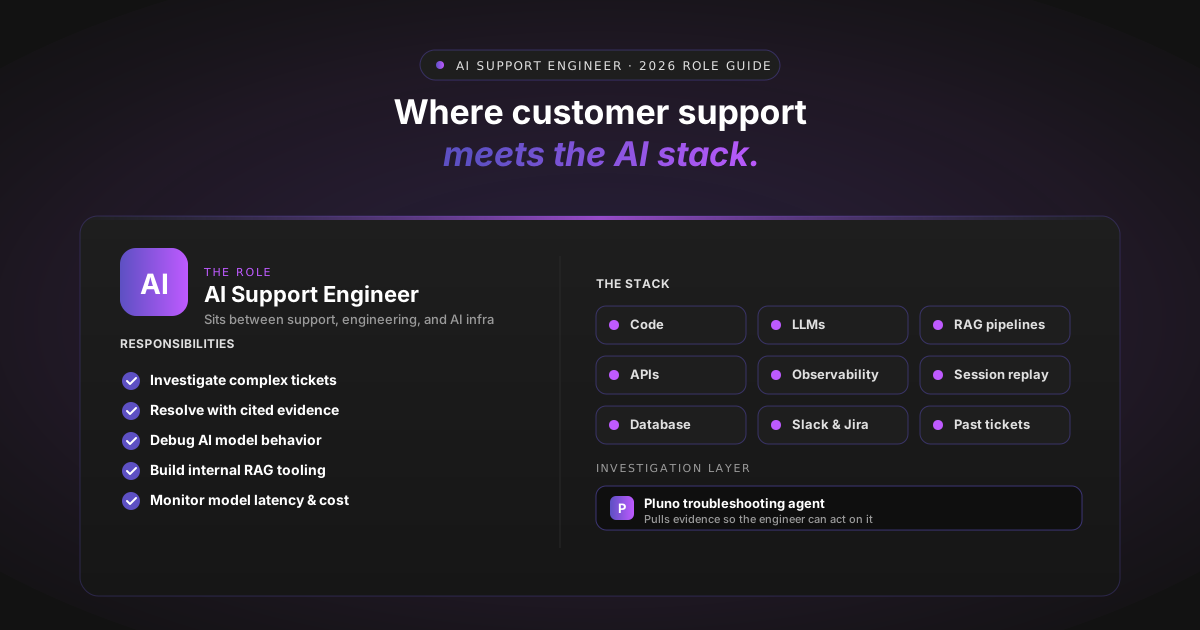
Direct answer. An AI support engineer is a technical support role that blends customer-facing troubleshooting with AI tooling, APIs, integrations, and infrastructure work. People in the role investigate complex technical issues across code, system logs, APIs, AI models, and customer environments, then resolve issues or escalate with context. Companies hiring for the role or its close cousins in 2026 include OpenAI, Cognition, and Google.
Complex AI products are generating support tickets that traditional support roles cannot resolve alone. The work touches logs, deploys, prompts, retrieval pipelines, and model behavior, often inside the same ticket. Support teams that rely only on a help-center bot end up escalating most hard tickets to engineering, which burns engineering hours and slows resolution.
This guide explains what the role is, what skills it requires, where it fits inside a support operation, and what tooling lets it scale. It is written for Heads of Support, Support Ops leaders, and the VPs of Engineering who fund their team. Candidates and hiring managers researching the role will find a self-contained Role View in the FAQ.
Why This Role Exists Now
The shape of support tickets has shifted. A "hard ticket" used to mean "check the logs and rerun the job." In 2026 it often means an LLM returned a non-deterministic output, an API call succeeded but returned an empty body, a customer's RAG pipeline grounded on the wrong document, and the deploy that caused it was on Friday afternoon.
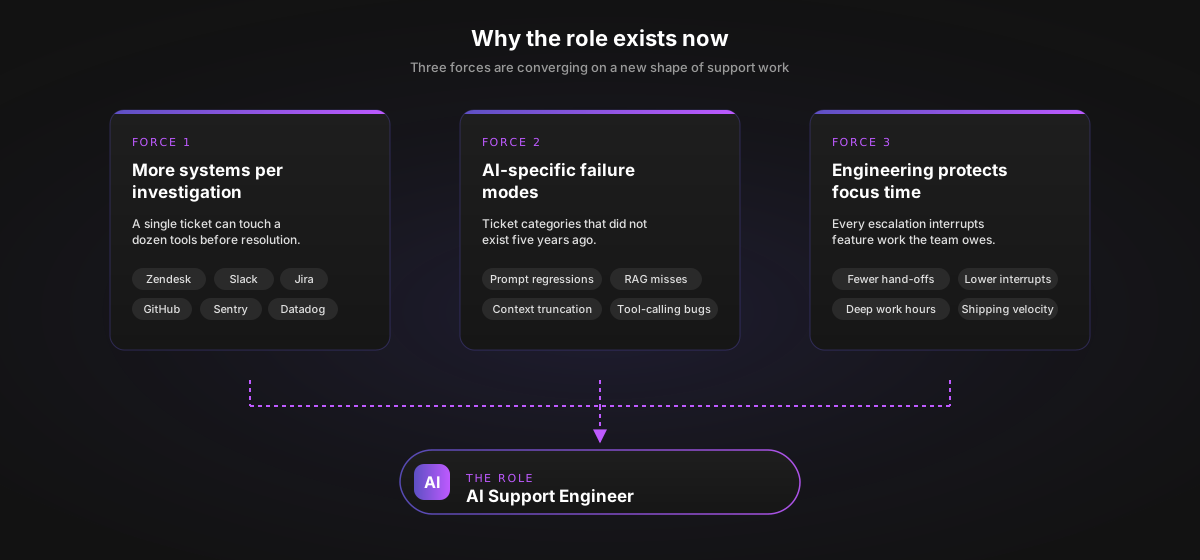
Three forces explain the demand.
More systems per investigation. A single ticket can require Zendesk, Slack, Jira, GitHub or GitLab, Sentry, Datadog, the production database, session replay, and the help center. Tab-switching eats the engineer's day. We unpack the Slack-side mechanics in Zendesk Slack Integration: A 2026 Guide.
More AI-specific failure modes. Prompt regressions, retrieval failures, context-window truncation, and tool-calling regressions are categories of ticket that did not exist five years ago. Threads like the r/ArtificialInteligence support-engineer transition thread capture how overwhelmed engineers in CX roles feel when they hit these for the first time.
Engineering teams are protective of focus time. Every escalation interrupts feature work. Support is pushed to resolve more on its own, which raises the bar without adding hours.
Together these forces have created a role that demands engineering-grade investigation without engineering-team headcount. AI support engineers often work directly with customers while coordinating with engineering teams, product, support operations, and other cross-functional teams.
What an AI Support Engineer Actually Does
The work spans investigation, resolution, escalation, and internal tooling. Public job postings across the AI industry describe a similar pattern.
Investigation and reproduction. Diagnosing customer issues across diverse development environments, including cloud infrastructure and CI/CD systems. Reproducing reported bugs by reading logs, querying databases, and replaying sessions.
Customer-facing resolution. Resolving complex technical issues for customers using AI tools in real-world software development settings. Writing replies that are evidence-backed and clear.
API and model debugging. Solving API issues, troubleshooting novel model behavior errors, and optimizing system performance.
Internal tooling. Building retrieval-augmented generation (RAG) workflows and other internal AI tooling for the support team itself. Curating knowledge bases by identifying gaps in documentation and updating technical resources based on trends in support tickets. NLP-based classification is the workhorse of this surface, and we cover the mechanics in Zendesk Auto-Tagging: A Complete Guide.
Monitoring. System monitoring across model responses, latency, and costs so the team can track the unit economics of AI-assisted support.
A common stated aim is to seamlessly integrate AI tools while minimizing latency and maintaining data integrity. People in the role are responsible for both the customer outcome and the AI infrastructure that makes the outcome repeatable as ticket volume grows. They also identify recurring friction points, maintain internal knowledge bases, and create lightweight automation for repetitive tasks that slow down the support function.
Skills the Role Requires
Postings vary widely, so treat the list below as patterns. Read live job descriptions for the specific bar before hiring.
- Programming. Python or JavaScript is the most common ask, with comfort reading other engineers' code.
- Data handling. SQL databases and NoSQL stores, plus core data processing methodologies.
- AI tooling. Hands-on experience building agents and RAG systems, plus practical integration of AI models and large language models into existing software and applications.
- Prompt engineering. Refining prompts and system instructions to enhance AI accuracy. Outputs are improved through prompts, retrieval tuning, evaluation, and sometimes fine-tuning.
- APIs and integration. API management and system integration that connects AI agents and APIs to enterprise tools like Slack and Jira.
- Feedback loop management. Collecting user interactions and human corrections to improve model performance over time.
- Data pipeline management. Preprocessing, cleaning, and structuring large datasets so the systems the role supports have high-quality data to retrieve and learn from.
- Operational automation. Identifying recurring friction points in the support flow and building small tools that automate repetitive ticket steps before they become escalations.
- Machine learning frameworks. Familiarity with TensorFlow and PyTorch may appear in deeper AI-infrastructure variants of the role.
- Soft skills. High-level problem-solving and analytical thinking, structured troubleshooting, and customer empathy.
Some technical postings list 4+ years of experience in a technical role and a bachelor's degree in computer science or a related field, with the salary range skewing higher than traditional support roles. The U.S. Bureau of Labor Statistics notes computer support specialist requirements vary widely, from short-term training to a degree.
The role sits close to software engineering and solutions engineering, especially when tickets involve API behavior, production environments, or customer-specific implementations.
Common Approaches and Where Each Falls Short
If you are scoping how to support the role, four broad approaches are on the market. Each has a real strength and a real limit.
| Approach | What It Is | Strength | Where Basic Implementations Fall Short |
|---|---|---|---|
| KB-first AI agent | Trained mainly on help-center articles | Quick responses on documented tickets | Hallucinates or escalates when resolution needs system context |
| Flow-based bot | Pre-built decision trees keyed off keywords | Cheap and predictable | Brittle on edge cases, heavy ongoing maintenance |
| Manual hiring | Add more L2 support engineers | Personal judgement, deep customer voice | Cost, hiring time, training, slow capacity ramp |
| AI copilot | Drafts replies for a human agent to send | Human-in-the-loop | Limited or no automatic deflection in standalone copilot workflows |
Leading platforms have moved beyond pure KB retrieval. Zendesk AI agents and Intercom Fin market system-connected actions today, so the contrast above is sharpest against basic or poorly connected deployments. For a vendor-by-vendor breakdown, see Best Zendesk AI Alternatives in 2026.
A fifth category has emerged: troubleshooting agents that concentrate on the investigation work itself. Instead of replacing the engineer, they assist by pulling diagnostic context from across the stack. That is the category most aligned with what people in this role actually need. We cover the broader AI agent landscape in Best AI Agents for Zendesk in 2026.
What to Look For in a Troubleshooting Tool
Use this as a buyer checklist when you evaluate vendors.
- How does it learn? From past tickets and resolved cases, not just help-center articles.
- What can it access? Ticketing platform, code, error tracking, observability, read-only database, session replay, Slack, Jira, and internal systems.
- How does it escalate? Look at a real artifact. Root cause hypothesis with evidence, or a one-liner that pings a human?
- How does it handle uncertainty? Confidence threshold with safe handoff when below the bar.
- Where does it run? Inside your ticketing tool, Slack, dashboard, and API.
- Security posture. Read-only defaults, scoped permissions, audit logs, data-processing geography, SOC 2 Type II, GDPR. Use NIST AI RMF and the OWASP Top 10 for LLM Applications as starting points.
- Real deployment speed. Setup time matters less than time to broad coverage. Ask vendors to separate connection time from governed rollout time.
The agent's ability to score well across all seven criteria is what separates a buyable product from a demo.
How Pluno Fits the Role
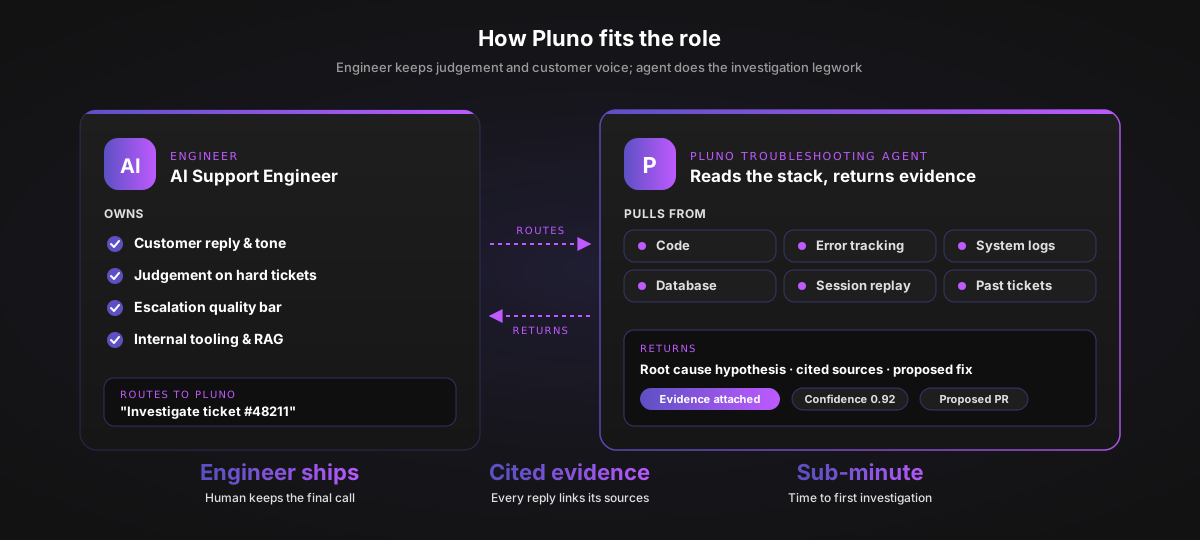
Pluno is our AI support agent for complex products. It runs inside Zendesk and connects to Slack, Jira, Sentry, internal documentation, APIs, and engineering systems, with coverage of 3,000+ integrations.
Our troubleshooting agent is the most recent addition to the product and the piece most relevant to this role. It focuses on the investigation work specifically: reading code, pulling logs, replaying sessions, and writing up a root-cause hypothesis with cited evidence. You can point it at your tickets through a free trial without setting up billing.
For the engineer in this role, our troubleshooting agent acts as an investigation layer. When a ticket comes in, it pulls related past tickets, searches code and recent deploys, queries error trackers and observability for matching signatures, reads account state and configuration from read-only DB access, opens the relevant session recording, and cross-references internal docs and Slack threads.
The engineer reviews the agent's investigation and either ships the reply, escalates with the context the agent assembled, or asks it to dig further. Our trust principle is to answer only when there is sufficient evidence, and to escalate safely with full context when confidence is low. That keeps the engineer in control of the outcome and the customer reply.
Three concrete examples from our troubleshooting agent page, shown as illustrations of how the agent supports the role.
Workflow 1: Bug triage with full context
A user reports "checkout broken." Our agent pulls failing requests by user ID, searches commits touching the billing service, correlates with new Sentry signatures, and drafts an escalation summary. The Slack message it posts reads:
Hey, a new Zendesk ticket came in about checkout failing, and I dug into it. This looks like a real issue, not just a one-off customer problem.
From what I found, the latest billing deploy seems to have introduced a regression where some EU accounts hit the payment flow without a billing_country value. I attached a full report with the details, plus the fix I'd recommend.
Want me to create a PR for it?
The engineer reviews, edits if needed, and ships. Engineering receives a hypothesis with evidence rather than "checkout broken, please investigate."
Workflow 2: Customer-side issue resolved without escalation
A user reports a CSV import looking corrupted. Our agent checks export request IDs (all 200 OK), scans Sentry (clean), and opens the relevant session recording. The root cause is unescaped commas in the user's CSV that Excel auto-splits on open.
The agent posts an internal note listing the diagnostic surface checked and a two-option fix for the user. The engineer reviews and replies. No engineering escalation needed.
Workflow 3: Early incident detection
Our agent notices a rise in support tickets touching /reports/summary. It correlates with a Sentry spike, slow-query latency drift, and a recent feature-flag toggle, then posts an alert with severity, affected endpoint, error-rate drift, the correlated flag toggle, and three concrete recommended actions including a rollback threshold to watch.
The on-call engineer makes the call. The agent surfaced the pattern faster than a human reading the queue ticket by ticket.
How to Roll It Out
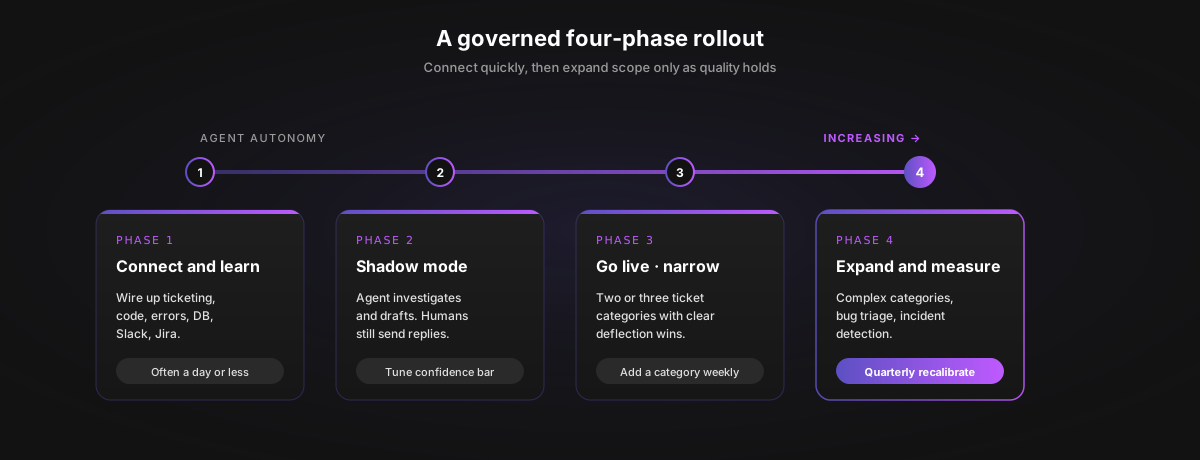
Technical setup can be quick. A governed rollout should still run in phases so you can verify quality before expanding scope.
Phase 1 (Connect and learn). Wire up the ticketing tool, code repositories, error tracking, observability, the production database (read-only), Slack, and Jira. Point the agent at twelve months of resolved tickets so it can learn your team's diagnostic patterns and tone.
Phase 2 (Shadow mode). The agent investigates and drafts, but a human agent or the engineer in this role still sends. This is when you tune the confidence threshold, the escalation template, and the categories you let it operate on. Review false positives daily for the first week.
Phase 3 (Go live, narrow). Start with two or three ticket categories where you have strong KB coverage and clear deflection wins (account access, export errors, integration setup). Add a category every week as confidence and CSAT hold.
Phase 4 (Expand). Add bug triage and incident detection as the track record grows. Re-tune the confidence threshold quarterly to keep accuracy high.
Adoption challenges in the first month are usually about category selection and data quality, not the technology itself.
Expected Outcomes and How to Measure Them
Model outcomes per category rather than as a universal headline number. Vendors publish their own benchmarks; ask each for case-study links and validate against your own categories.
Metrics worth tracking from day one:
- Resolution rate by category. Where the agent actually saves time.
- Escalation precision. Of escalations created by the agent, how many were correctly routed and actionable.
- Time to first investigation. From ticket open to first hypothesis. Sub-minute is a reasonable target.
- Re-open rate. Did the customer come back. The cheap kind of resolution does not last.
- Engineering interrupt minutes. Pull from your incident or escalation tool. This is the number your VP Engineering cares about.
Roll the same metrics up to CSAT, FRT, and average handle time so support operations sees the full picture. Automation tends to compound as coverage grows: faster turnarounds, fewer cross-functional handoffs between support, engineering, and operations, and the ability to scale support without linear headcount growth.
The main benefits are faster investigation, fewer handoffs, and a clearer path for engineering teams to act when an escalation is truly needed.
Honest Limits and Tradeoffs
- Some tickets need a human voice (cancellations, complaints, regulated work).
- Stale workarounds in past tickets will be picked up unless tagged and excluded.
- A few thousand resolved tickets can be enough for useful initial patterns, depending on quality, recency, and scope.
- Confidence calibration is ongoing work. Plan for a weekly review during the first month.
- An AI troubleshooting agent is not a replacement for hiring people into this role. Hard tickets still need human judgement; repetitive ticket investigation shifts to the agent so the person can focus on the customer.
FAQ
What is an AI support engineer?
A technical support role that blends customer-facing troubleshooting with AI tooling, integrations, and infrastructure work. The role investigates complex technical issues across code, system logs, APIs, AI models, and customer environments, then resolves or escalates with context.
Is it the same as a regular technical support engineer?
Not quite. The work overlaps with the traditional technical support engineer role, but engineers in the AI-specific role regularly debug LLM behavior, RAG pipelines, prompt regressions, and API issues specific to AI products. The bar usually includes more comfort with code and AI tooling.
What companies hire for the role?
AI-first companies including OpenAI and Cognition post openings. Larger companies use adjacent titles for similar work, such as Google's Senior Applied AI Agent Engineer posting, as well as "AI solutions engineer," "developer support engineer," or "technical support engineer (AI)." AI engineers usually focus on model infrastructure and productized AI systems, while AI support engineers solve customer-facing issues that involve those systems.
What skills should a candidate have?
Python or JavaScript, SQL and NoSQL, working knowledge of large language models and prompt engineering, familiarity with building or operating RAG workflows, and comfort with API debugging. Soft skills: analytical thinking, structured troubleshooting, and customer empathy. The r/ArtificialInteligence support-engineer thread gives a feel for what current engineers wish they had picked up sooner.
Do candidates need a computer science degree?
Some technical postings list a bachelor's in computer science or a related field. The Bureau of Labor Statistics notes requirements vary widely. Many employers accept equivalent practical experience.
How does an AI troubleshooting tool change the role?
It shifts the engineer's time from gathering context to acting on it. A good troubleshooting agent does a large share of the initial investigation (search logs, query DBs, pull past tickets, draft a hypothesis), so the engineer can spend time on judgement calls and customer voice. AI can summarize past ticket history to provide support engineers with relevant context, classify tickets via natural language processing, and predict severity from historical data.
Will AI replace people in this role?
Not in the near term. Repetitive ticket automation shifts to the agent; engineers spend time on judgement, escalation quality, and the customer relationship. The role becomes more senior on average, not smaller.
What is Pluno and how does it help?
Pluno is our AI support agent for complex products. Our recently launched troubleshooting agent runs inside Zendesk and connects to Slack, Jira, Sentry, internal docs, and APIs to gather the context an AI support engineer would otherwise pull manually. When confidence is low, we escalate with the full diagnostic write-up rather than guessing. You can try it free on your own tickets without setting up billing.
How does Pluno compare to a chatbot or AI copilot?
A chatbot retrieves articles. A copilot drafts replies for a human to send. Our troubleshooting agent investigates the underlying systems first, then either drafts a grounded reply or hands off with a root cause hypothesis. It assists the engineer rather than replacing them.
Security and compliance?
Insist on read-only defaults, scoped permissions, audit logs, and clear data-processing geography. We're SOC 2 Type II aligned, GDPR-compliant, run EU data processing, and host LLMs on Microsoft Azure; we publish current specifics on our security page. Microsoft's Azure OpenAI data privacy explains prompts and completions are not used to train foundation models without permission.
Cost vs hiring?
Treat this as an assumptions-based model rather than a flat number. Use BLS pay data for customer service representatives, computer support specialists, and the BLS Employer Costs for Employee Compensation series to build a loaded-cost baseline, then compare against the unit cost of an AI troubleshooting tool at your ticket volume.
Where to Start
Two moves to start this week:
- Pull a sample of last quarter's escalations to engineering. Tag each by category and root cause. The shape of that list tells you which categories this role plus a troubleshooting agent could absorb.
- Decide on the first two ticket categories you would let the agent own in shadow mode.
If you want to see how this looks on your tickets, point our recently launched troubleshooting agent at your own backlog and your current stack. The free trial takes a few minutes to set up. You will see our agent's investigation, escalation quality, and confidence calls on your environment, side by side with whatever solution you have today. No credit card to start.
If you would rather watch the agent investigate your real tickets with someone walking you through it, book a demo and one of our engineers will run the workflow live.
As artificial intelligence becomes part of more products, the future of technical support will depend on people who can combine customer judgment with the right troubleshooting technology.