A Zendesk integration links your support platform to the business tools around it, so customer data, conversations and context move between systems without manual effort. It covers Marketplace apps, native connectors, the REST API or Zendesk Integration Services (ZIS), plus AI platforms that sit on top. Get the mix right and Zendesk stops being a ticket inbox. It turns into a connected service management hub.
Zendesk handles the core job well. Every request becomes a trackable Zendesk ticket. The platform also routes email, chat, voice and social support channels into one thread, then layers on dashboards for response time plus customer satisfaction. Few teams should rip that out.
The real gap sits one layer up. Storing tickets was never the hard part. What matters is whether the context needed to resolve them reaches a human agent or the AI in time. That makes it an integration challenge, not a platform flaw. This guide walks through the fix.
TL;DR
A Zendesk integration wires your support platform to the business systems that hold context: CRMs, finance tools, engineering trackers, AI. Reach for Marketplace apps when the sync stays simple, the REST API or ZIS when the logic gets custom, an AI platform when you want tickets resolved rather than records shuffled. Most support teams blend all three. Nail customer identity in Zendesk first, launch one to three high-impact integrations, then add automation once the foundations hold.
Got a clean knowledge base and a queue of simple FAQs? Zendesk's native AI plus a couple of connectors may cover you. The argument for an orchestration layer like Pluno sharpens as volume climbs and tickets turn genuinely messy.
Choose your integration path
Before wiring anything together, pick the path that matches your situation. Most companies settle into one of four. The right one comes down to the gap you actually feel.

Path 1: Stay native. Lean on Zendesk's native AI plus a few Marketplace apps when your queue runs mostly to FAQs, password resets, basic self service. You probably need nothing more.
Path 2: Use a point connector. Pick this when a single source goes missing: warehouse data, CRM records, form feedback, Jira tickets. One connector closes it.
Path 3: Build with the REST API or ZIS. Go here for custom object logic, multi-system workflows or event-based automation that off-the-shelf apps cannot touch.
Path 4: Add an AI orchestration layer. Choose this when complex tickets demand past-ticket knowledge, diagnostic questions, engineering context, a safe way to escalate. Here the AI platform rides on top of everything else.
The rest of this guide ties each integration type back to these four paths, so you can follow the route that fits your Zendesk setup.
What a Zendesk integration actually is
A Zendesk integration is any link between Zendesk and another business tool that lets data or actions pass through. Most companies run several at once. The aim: strip app-switching and manual copy-paste tasks out of everyday support workflows.
Email, chat, voice, social, every channel funnels into one trackable ticket. Integrations pull context into tickets from elsewhere, like order history out of Shopify, account value from a CRM or live product usage in your warehouse. Reps then handle customer interactions inside Zendesk, with no tab-switching.
Why it exists: reps bleed time per ticket, hunting across systems for one piece of customer information. Surface that context inside their tickets and reps find answers faster. Multiply the saving across a full queue and you win real productivity back.
Integrations push information the other way too. A support rep's tag can create a Jira issue for the dev team, while a status change flows back into Zendesk to close the loop. That two-way movement separates a connected support platform from a plain inbox.
Why integration quality matters in 2026
Integration quality now decides how well your AI copes with complex tickets. An agent can only act on the context it reaches, and most of it lives outside the help center. Tight wiring also sharpens internal communication, lining up support, the engineering team and the wider business behind one source of truth. Strong integrations turn scattered customer data into Zendesk workflows the whole team can trust.
The ground shifted in 2026. At its Relate conference, Zendesk unveiled an autonomous service workforce, switched on Model Context Protocol (MCP) support, then closed its Forethought acquisition to fold self improving AI agents into the platform. The message lands clearly: Zendesk is opening up to outside AI, not walling it off.
That ups the stakes on your flows. A self improving agent blind to subscription status, developer tickets or past resolutions will guess or escalate the moment a case turns complex. Clean integrations feed it; weak ones starve it.
Cost enters here too. Most companies that run ten integrations double the monitoring burden, because a single broken connection can skew reporting for weeks before anyone spots it. Teams that win treat each Zendesk integration as living infrastructure with named owners, not a set-it-once project.
The four types of Zendesk integration
Four main routes connect Zendesk, and most companies mix them. Choose by the depth, direction or build effort each job demands.
1. Zendesk Marketplace apps. Plug-and-play connectors from the Zendesk Marketplace, which the vendor pegs at more than 1,800 apps, partners and integrations. They shine for fast, mostly one-way syncs: Shopify orders in the sidebar, Geckoboard dashboards on a wall. This app marketplace route asks little of your developers yet pays off quickly.
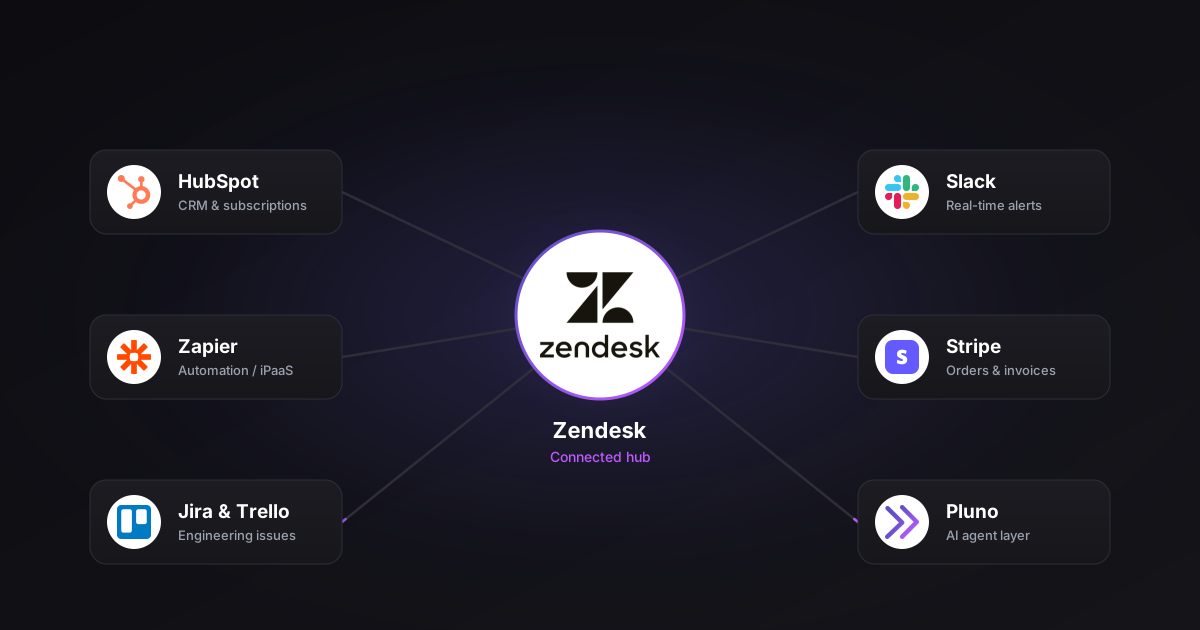
2. Native connectors. Deeper, official integrations that Zendesk maintains itself. The Salesforce integration maps Salesforce accounts to Zendesk organizations, with contacts or leads becoming users; Slack posts real-time alerts and lets reps handle tickets straight from a channel. Zendesk Sell layers CRM pipeline visibility into the sales side of support.
3. Custom REST API and ZIS. Build it yourself on the Zendesk REST API or the event-driven Zendesk Integration Services platform. This route carries advanced two-way flows, say status plus comments syncing between Zendesk and an in-house system. Expect to budget developers alongside a maintenance plan.
4. AI-agent platforms. Overlay systems that swallow tickets, knowledge and customer data, then resolve, triage or surface insights. They hook into several tools at once, Zendesk, Jira, Slack, monitoring stacks, which spares you bespoke glue code. Pluno lands in this category, and the fit gets a closer look further down.
| Type | Typical direction | Engineering effort | Decision path |
|---|---|---|---|
| Marketplace apps | Often one-way | Low | Stay native / point connector |
| Native connectors | Varies by object and tool | Low to medium | Point connector |
| REST API / ZIS | Fully custom | High | Build custom |
| AI-agent platforms | Bidirectional plus actions | Low to medium | AI orchestration layer |
Direction is not uniform, so vet each one. Zendesk's Salesforce sync, for instance, runs a single way, Salesforce into Zendesk, never back.
High-impact Zendesk integration use cases
These are the Zendesk integration use cases that actually shift the business numbers for support teams. Each one either kills manual work or hands reps and AI more context, with real benefits flowing to customers.
-
Unify customer data. Connect CRM plus subscription records so support sees plan, renewal date, account value on every ticket. Now sales and support read from one profile, with Zendesk Sell adding pipeline context.
-
Close the feedback loop. Pipe tagged tickets into Jira, where product can act on customer feedback and feature requests. Surveys push product feedback into the backlog your team helps create.
-
Bridge support and engineering. Create a linked dev issue from a Zendesk ticket, then push status updates back so support keeps communication flowing to customers without chasing anyone.
-
Automate triage. Let automation read intent, set priority, route each conversation to the right group, create follow-up tasks, speed up responding for the team.
-
Spot trends. Roll up ticket data to identify recurring issues, then read raw conversations as product, business and service management signals.
-
Help employees, not only customers. The same integration patterns drive internal help desks. Employees then find answers from the very software and processes built for buyers, while one connected stack handles their questions next to live customer tickets. Plenty of companies run both that way.
The payoff compounds. Every connection clears manual tasks, lifts team productivity, automates a workflow, creates a cleaner experience for customers. Done well, these workflows save time for your support team each week and keep the business scaling without fresh headcount.
Common approaches and where each one breaks
Every approach breaks somewhere. Spot the failure mode early to dodge an expensive rebuild later.
Marketplace apps. Plenty stay shallow. Field coverage comes out partial, bidirectional logic stays thin, so complex enterprise workflows eventually outgrow them. Fine until you need conditional, multi-step automation.
Custom API and ZIS builds. Total control, total responsibility. Skip the owners, the docs, the monitoring, and webhooks fail silently while data quietly drifts. This is a genuine build-versus-buy call that rides on real engineering capacity, not wishful thinking.
Knowledge-first AI assistants. Most teams start here, with Zendesk's native AI, Intercom's Fin or Ada leaning on help center content. Simple, repeating questions get handled well. Let the answer fall outside the knowledge base, though, and the agent stalls or escalates while you keep grooming articles. Vendors now bolt on actions plus system access, yet plenty of live deployments still begin knowledge-first.
Flow-based bots. These march down keyword paths you wire by hand. Cheap, predictable, but blind to personalization, weak on edge cases, slow to build path by path.
AI copilots. Zendesk Copilot or Intercom Copilot draft a reply for a human to send. A person stays in the loop, so trust runs high. The catch: no autonomous deflection, smaller efficiency gains, reps still hopping between tickets.
Bottom line, each tool fits the job it was designed for. Trouble starts when a team stretches one past its limits, usually because volume or complexity outran the Zendesk integration.
What to look for (and when you don't need more)
Let the gap pick your integrations, not a feature list. Begin with the customer context your team or AI keeps missing inside Zendesk.
Hunt for one consistent customer identity across systems. Reuse one set of identifiers: account_id, external_id, email. Then split organization-level fields, plan or renewal date, from user-level ones such as role or language. Botch the mapping and you breed duplicate Zendesk tickets plus broken reporting, something no AI quietly cleans up.
Demand clear ownership too. Give every integration a named owner, one source of truth per object, plus real retry and error handling. Document the recovery plan before anything breaks.
Honest off-ramp #1: clean knowledge base, mostly simple repeat customer questions? Zendesk's native AI agent plus a couple of Marketplace apps likely covers it. Deflecting password resets needs no orchestration layer.
Honest off-ramp #2: moving just one kind of data? Grab a point connector, then stop. Census loads warehouse data into Zendesk user and organization fields; Formspree turns form submissions into Zendesk support tickets. Neither one drags you toward a wider AI platform.
Read the commercial mechanics on any AI tool, never just the sticker. Zendesk meters AI usage in automated resolutions, the unit it bills against. During 2026 it split that metric into two tiers, contained and verified, charging only for the latter.
Rivals count differently. Intercom's Fin runs outcome-based pricing at $0.99 each, counting both resolutions and procedure handoffs. Moveworks lets staff file, view, update or action Zendesk tickets inside its AI Assistant. Pin down what each vendor calls a billable event before you sign.
Credit the alternatives fairly, since each owns a lane. Zendesk's native AI makes a strong default once you stand on Zendesk with a solid KB. Fin suits chat-led, high-volume customer support; Moveworks covers internal employee IT plus HR service management. A point connector wins when a single source needs moving.
Here the field divides. Many AI rollouts still launch on help center content, which nails the common questions. The real test is who owns the complex tickets, the ones needing past-ticket knowledge, diagnostic depth or engineering context. That job belongs to an orchestration layer.
How AI agents fit on top of Zendesk
AI assistants ride on top of Zendesk, acting on whatever context your integrations feed them. Better inputs, more they pull off without a human.
At the simple end, plenty of tools manage triage and routing. A ticket flagged "downtime" or "login failure" lands in an incident queue with tighter SLAs, sorted by plan, region or language. Repetitive tasks drop, first response speeds up, and customers notice faster response times because new tickets reach the right person on arrival.
Next, AI digs out knowledge and drafts replies. It boils long threads down for handoffs, then drops relevant articles, past tickets or macros into the Zendesk workspace so reps find answers without leaving the case. Copilots keep a person on the final send.
The tough tier is resolving complex tickets on autopilot. Knowledge-first bots usually tap out here, which is exactly where an orchestration layer proves itself. Pluno, for one, learns from resolved tickets rather than help center articles, asks diagnostic questions to fill context gaps, runs inside Zendesk while reaching into Slack or Jira. When confidence dips, or a human has to step in, its Escalation Copilot hands off the full ticket history with reproduction details plus a suggested next move, then syncs the team's replies back into Zendesk.

Where Pluno falls short: it targets technical products, complex troubleshooting, serious ticket volume. A queue of plain FAQs, or a hard demand for the lowest latency over resolution quality, points you toward a lighter knowledge-first agent that costs less. Pluno cites a 65% average resolution rate plus roughly 48% of agent time freed, but those figures come straight from the vendor, so prove them on your own tickets before you bank the budget.
Not for: teams off Zendesk, queues of simple customer FAQs, buyers chasing the cheapest bot, shops with too little ticket history for the model to learn from. Those lines trace Pluno's stated ICP, so weigh them against your own setup. For the wider field, see Best AI Agents for Zendesk in 2026.
A safe implementation roadmap
Stage the rollout so each Zendesk integration earns its keep before the next arrives. Phasing also shrinks the blast radius when a sync misfires. Treat the timeline below as a mid-market example, then bend it to your own pace.
Weeks 1 to 2, discovery. Inventory your current business software, assign a data owner per object, name the biggest challenges your support team faces. Pick the Zendesk system of record for accounts, tickets, invoices.
Weeks 3 to 4, prioritization. Choose one to three integrations where context goes missing most often. CRM, live chat, engineering tools like Jira or Slack tend to top the list. Sketch the workflows plus tasks each should create or automate.
Weeks 5 to 8, pilot. Roll it out in a contained environment. Audit the triggers, confirm identity mapping, track sync accuracy alongside adoption plus resolution time before you widen the net.
Weeks 9 to 12, rollout. Open it to the whole team, then stack AI and automation onto stable workflows. Automation can create, route, tag tickets on its own, yet a human still owns the logic.
Ongoing. Hold a central catalog of integrations, owners, contacts, watch for failed syncs, recheck identity mappings each quarter as schemas shift. Keep communication tight across teams. Park setup docs in Confluence or Notion, train reps and managers, because process carries integration success as much as technology does.
For tool-level depth, the Zendesk Salesforce integration guide and the Zendesk Slack integration guide go further.
Expected outcomes and how to measure them
Set your targets before the first connection, then watch the same metrics from pilot through rollout. Value should land in numbers, not gut feel. Most of these sit right in your Zendesk dashboards and analytics.
Track these core measures:
-
First response and resolution time. The earliest sign an integration works is Zendesk tickets reaching the right owner sooner.
-
Deflection and automated resolution rate. Count how many customer tickets close without a human, then confirm each vendor's definition of a resolution, since they vary.
-
Agent productivity. Watch tickets solved per rep plus time lost to searching, drafting or responding. Copilots and unified search usually lift productivity by stripping out manual tasks.
-
Customer satisfaction (CSAT) and sentiment. Speed only counts if quality holds.
-
Sync health. Track the failed-event rate plus data-drift, so reporting stays honest.
Read the changes with care. Launch a CRM sync next to an AI agent in one week and you cannot credit either cleanly, so space the work out. Sample size matters too: a single week after a launch is no trend.
Bank on steady, compounding gains rather than one dramatic leap. Vendor case studies, Pluno's included, point you in a direction, but only your own pilot numbers should settle the business call. Tie every metric back to customer experience plus team productivity, the outcomes leadership actually tracks. A simple ROI calculator can frame the before-and-after.
FAQ
What is a Zendesk integration?
It is any connection that moves data or actions between Zendesk and another tool automatically. The form varies: a Marketplace app, a native connector, a custom REST API or ZIS build, an AI platform on top. The point stays simple, give your reps and AI enough context to find answers, resolving tickets fast.
What customer data should sync first?
Start with whatever your reps reopen tabs to find: plan or account tier, renewal date, recent product usage. Lock in one consistent customer identifier inside Zendesk before you add sources. That order heads off duplicate tickets while keeping reporting clean.
How does Zendesk integrate with Salesforce?
The Salesforce integration syncs one way, from Salesforce into Zendesk. Accounts land as organizations, while contacts or leads convert into users, so support and sales share one customer record. Need opportunity context or richer field mapping? Layer a custom API flow on top.
Can Zendesk integrate with Slack and Jira?
Yes. Slack handles ticket alerts, while Jira tracks development against customer impact. A familiar pattern links dozens of tickets and their feature requests to one Jira issue, then refreshes each of them the moment it closes. AI can draft the per-customer resolution note.
How do Zendesk automated resolutions work?
An automated resolution counts whenever AI closes a request with no human involved, and Zendesk uses it as the billing unit. In 2026 the metric split into two tiers, contained and verified, with billing tied to the latter alone. Budgeting shifts as a result, since cost scales with volume resolved, not seats filled.
How much do Zendesk integrations cost?
Plenty of Marketplace apps run free or cheap, while the Zendesk Suite itself charges per agent, climbing with advanced routing and AI. AI bills on its own track: Zendesk meters AI usage through automated resolutions rather than seats, while outside tools set their own usage models. Always confirm the billable unit before committing.
When should I avoid adding another integration?
Skip it when the data is not really missing, or when one point connector would do the job. Each new integration piles on identity mapping, monitoring, maintenance. Add one only when it erases a genuine context gap or manual tasks for your support team.
Do I need a developer to integrate Zendesk?
Not for Marketplace apps or most native connectors; you set those up in the admin UI. Custom REST API or ZIS work does need engineering, with monitoring plus runbooks included. AI platforms sit in the middle, linking through secure APIs with light setup.
What's the difference between a Zendesk integration and an AI agent?
An integration shuttles data between systems; an AI agent acts on that data to resolve, triage or summarize tickets, responding in seconds. Because the agent leans on integrations for context, teams fix the plumbing first. The strongest setups run both together.
Next step: decide based on your tickets, not a demo
Name the gap first. Simple customer tickets plus a current KB? Tune Zendesk's native AI, add a couple of connectors, hold off on anything bigger. Complex, troubleshooting-heavy cases piling onto humans and irritating customers? That is your cue for an orchestration layer.
Best way to settle it: test on your own Zendesk tickets. A pilot across a real sample of tickets, messy ones included, tells you more than any feature list. If the verdict points to an AI layer, Pluno runs a free simulation so you watch resolution quality firsthand before you commit. Whichever way it breaks, let the results decide.